Collis SMARTWAVEBOX Inductive Proximity Card Reader User Manual SmartWave user manual CE FCC 1 0

Collis B.V. Inductive Proximity Card Reader SmartWave user manual CE FCC 1 0

Contents

User manual part 2

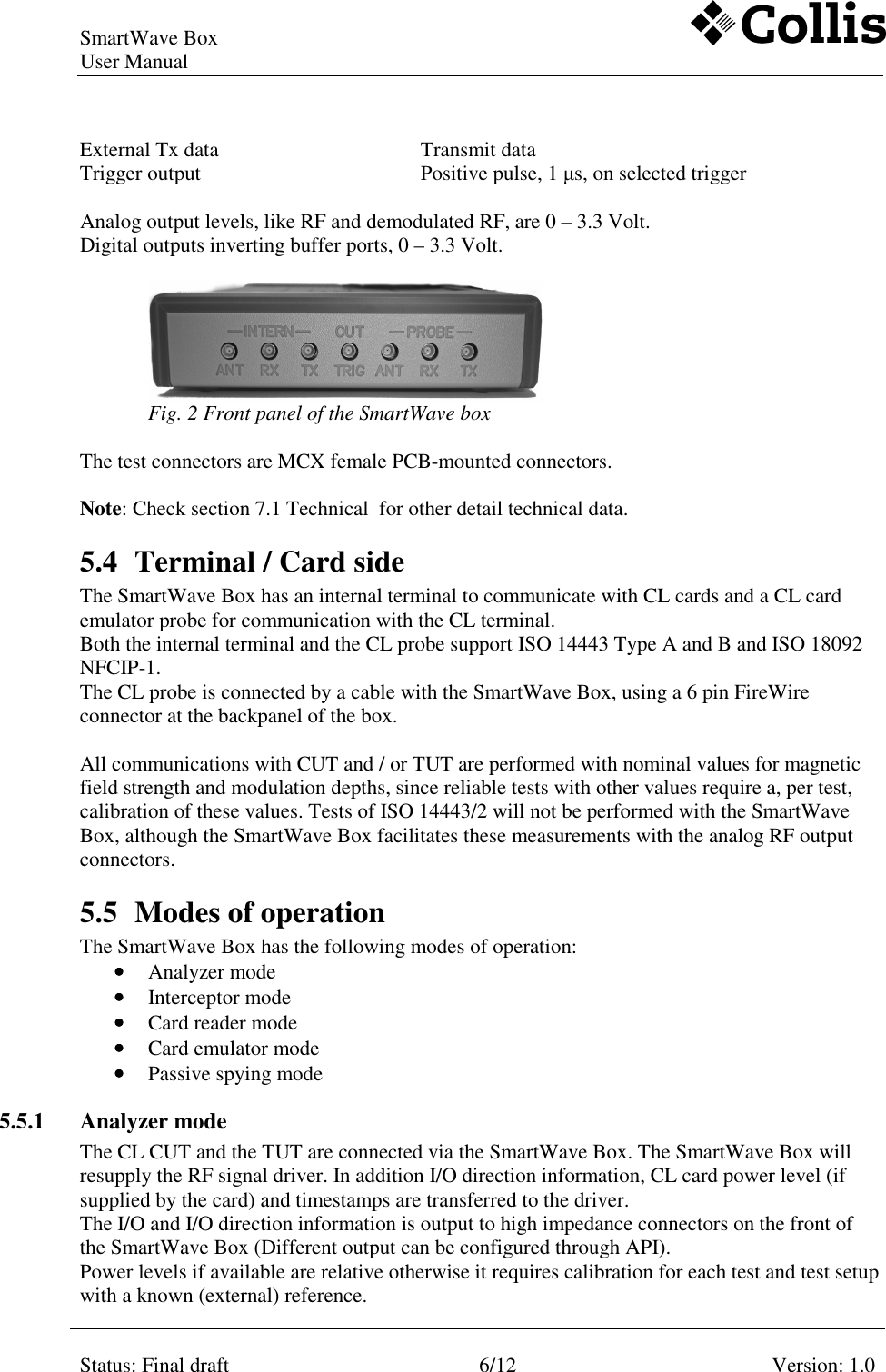
SmartWave Box   User Manual     Status: Final draft  6/12  Version: 1.0    External Tx data      Transmit data Trigger output        Positive pulse, 1 µs, on selected trigger  Analog output levels, like RF and demodulated RF, are 0 – 3.3 Volt. Digital outputs inverting buffer ports, 0 – 3.3 Volt.     Fig. 2 Front panel of the SmartWave box  The test connectors are MCX female PCB-mounted connectors.   Note: Check section 7.1 Technical  for other detail technical data. 5.4 Terminal / Card side The SmartWave Box has an internal terminal to communicate with CL cards and a CL card emulator probe for communication with the CL terminal.  Both the internal terminal and the CL probe support ISO 14443 Type A and B and ISO 18092 NFCIP-1.  The CL probe is connected by a cable with the SmartWave Box, using a 6 pin FireWire connector at the backpanel of the box.   All communications with CUT and / or TUT are performed with nominal values for magnetic field strength and modulation depths, since reliable tests with other values require a, per test, calibration of these values. Tests of ISO 14443/2 will not be performed with the SmartWave Box, although the SmartWave Box facilitates these measurements with the analog RF output connectors. 5.5 Modes of operation The SmartWave Box has the following modes of operation: •••• Analyzer mode •••• Interceptor mode •••• Card reader mode •••• Card emulator mode •••• Passive spying mode 5.5.1 Analyzer mode  The CL CUT and the TUT are connected via the SmartWave Box. The SmartWave Box will resupply the RF signal driver. In addition I/O direction information, CL card power level (if supplied by the card) and timestamps are transferred to the driver. The I/O and I/O direction information is output to high impedance connectors on the front of the SmartWave Box (Different output can be configured through API).  Power levels if available are relative otherwise it requires calibration for each test and test setup with a known (external) reference.
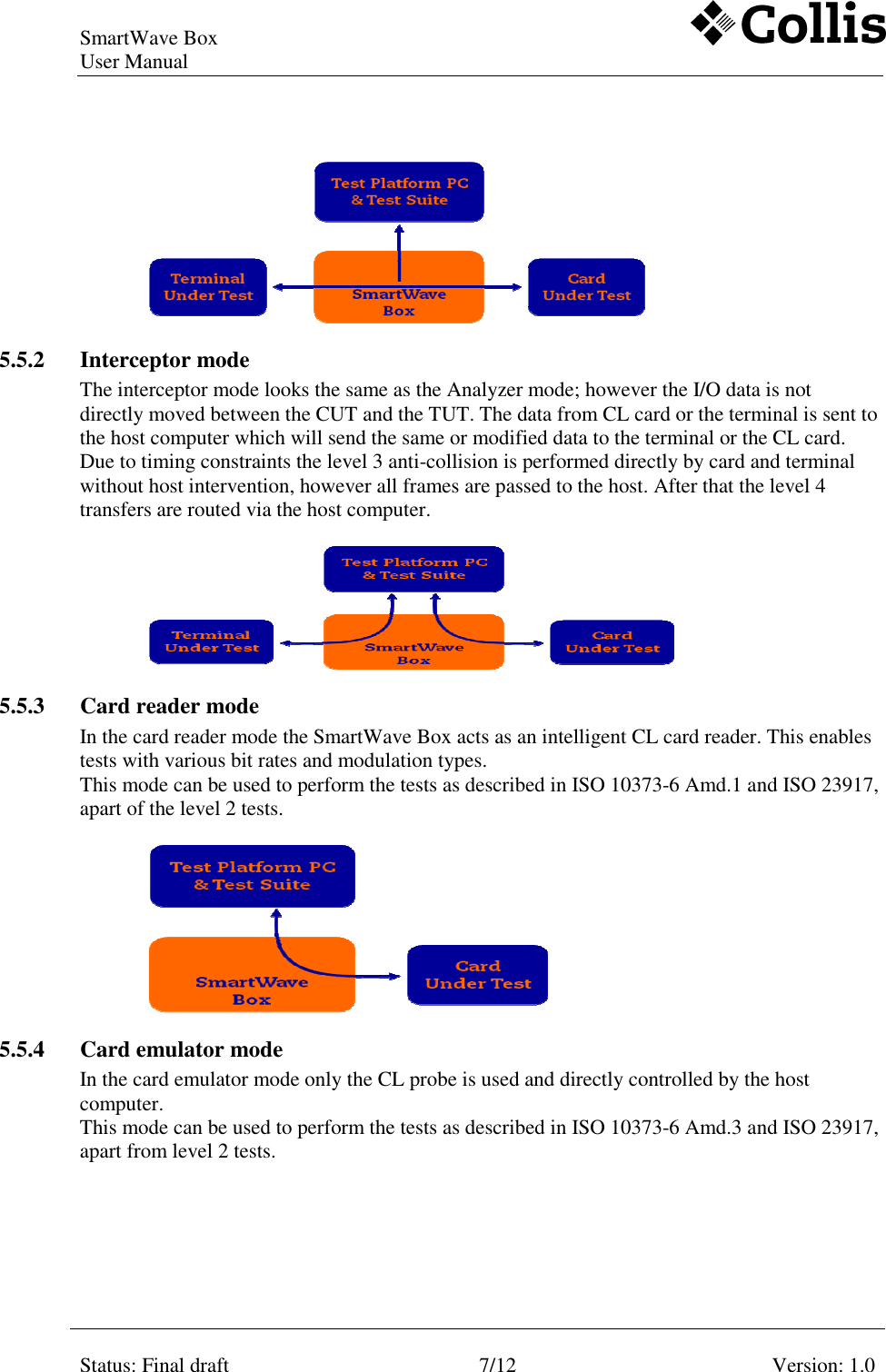
SmartWave Box   User Manual     Status: Final draft  7/12  Version: 1.0      5.5.2 Interceptor mode The interceptor mode looks the same as the Analyzer mode; however the I/O data is not directly moved between the CUT and the TUT. The data from CL card or the terminal is sent to the host computer which will send the same or modified data to the terminal or the CL card. Due to timing constraints the level 3 anti-collision is performed directly by card and terminal without host intervention, however all frames are passed to the host. After that the level 4 transfers are routed via the host computer.      5.5.3 Card reader mode In the card reader mode the SmartWave Box acts as an intelligent CL card reader. This enables tests with various bit rates and modulation types. This mode can be used to perform the tests as described in ISO 10373-6 Amd.1 and ISO 23917, apart of the level 2 tests.   5.5.4 Card emulator mode In the card emulator mode only the CL probe is used and directly controlled by the host computer. This mode can be used to perform the tests as described in ISO 10373-6 Amd.3 and ISO 23917, apart from level 2 tests.
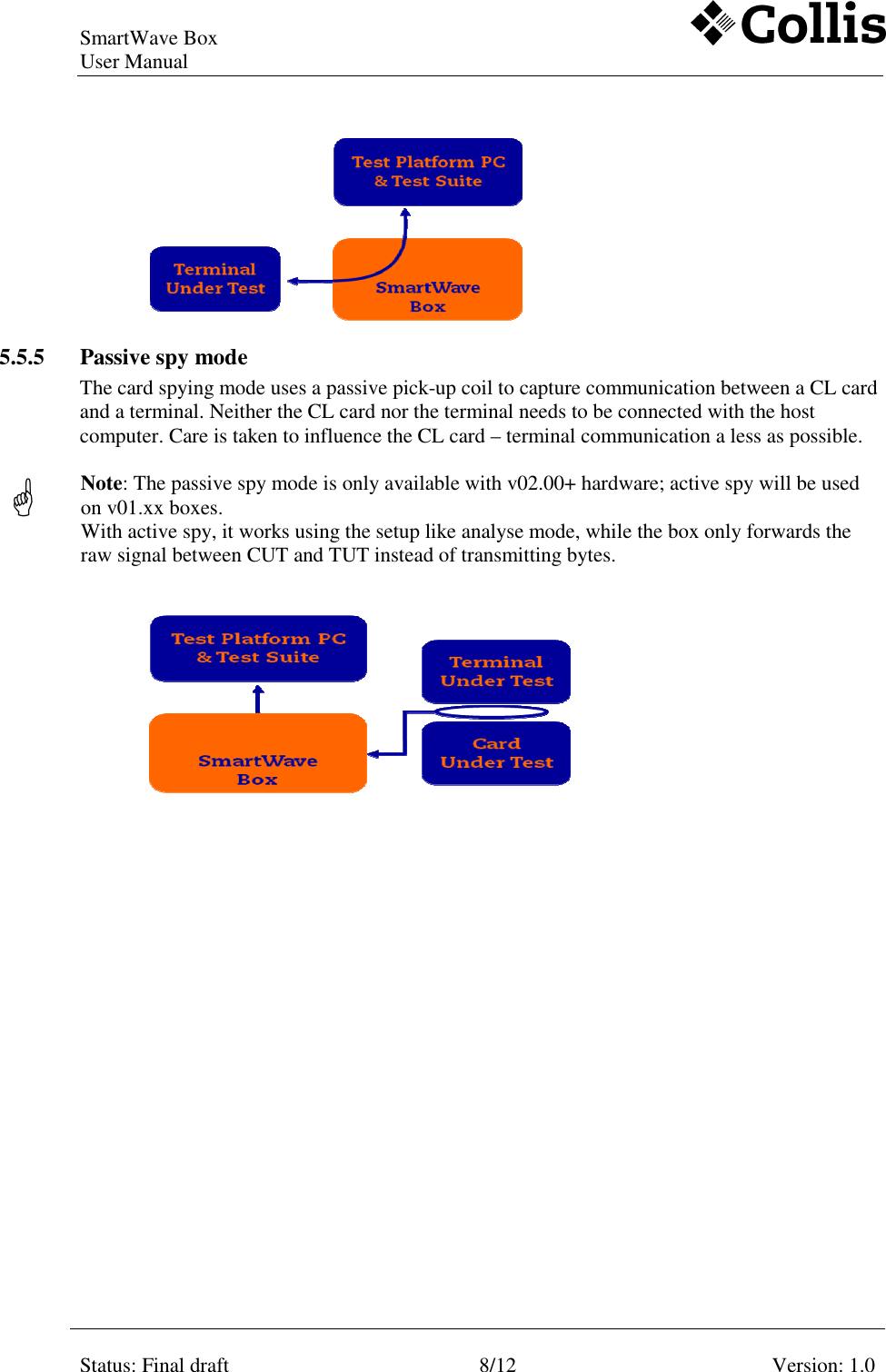
SmartWave Box   User Manual     Status: Final draft  8/12  Version: 1.0     5.5.5 Passive spy mode The card spying mode uses a passive pick-up coil to capture communication between a CL card and a terminal. Neither the CL card nor the terminal needs to be connected with the host computer. Care is taken to influence the CL card – terminal communication a less as possible.   Note: The passive spy mode is only available with v02.00+ hardware; active spy will be used on v01.xx boxes. With active spy, it works using the setup like analyse mode, while the box only forwards the raw signal between CUT and TUT instead of transmitting bytes.
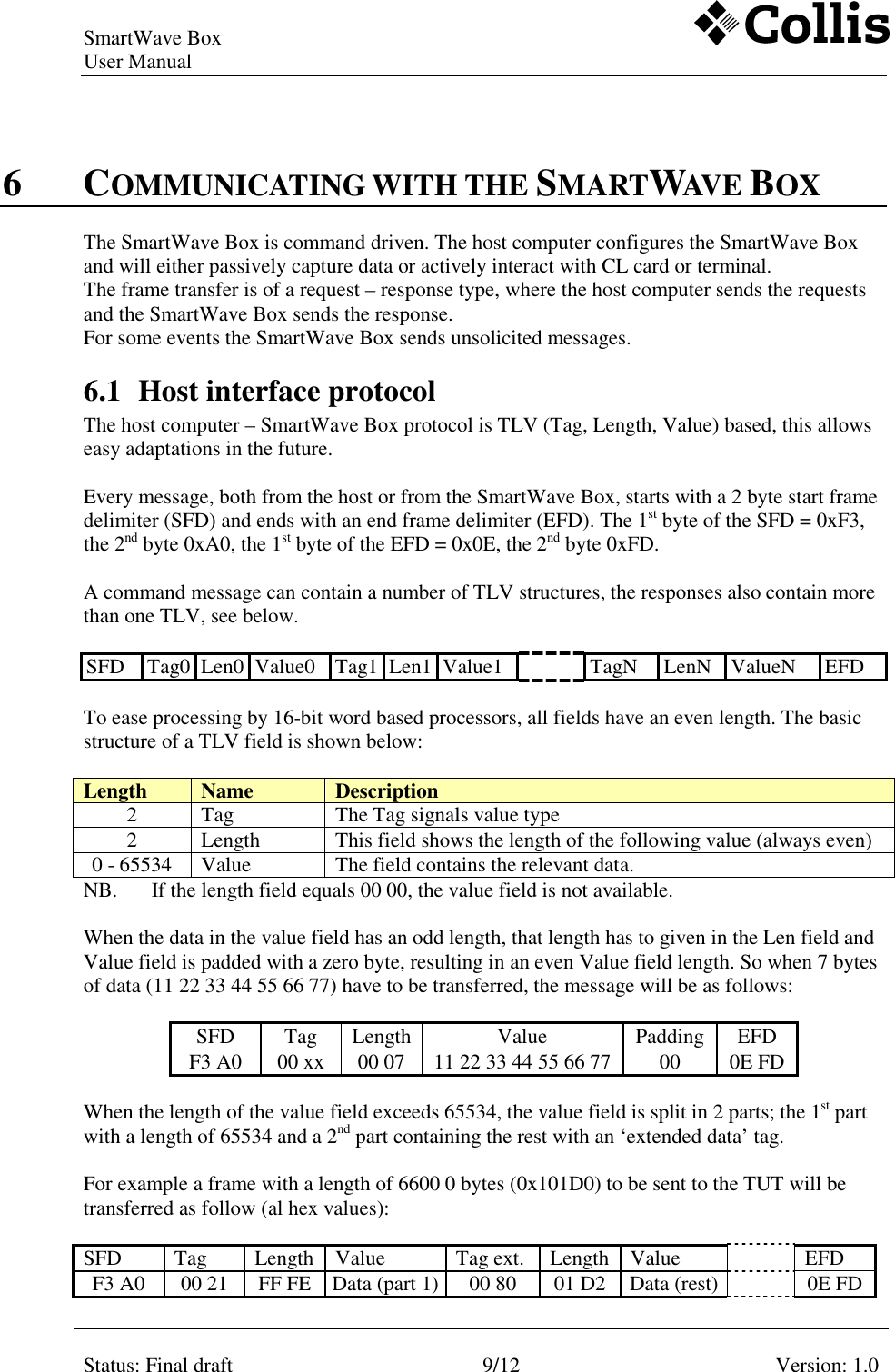
SmartWave Box   User Manual     Status: Final draft  9/12  Version: 1.0    6 COMMUNICATING WITH THE SMARTWAVE BOX The SmartWave Box is command driven. The host computer configures the SmartWave Box and will either passively capture data or actively interact with CL card or terminal. The frame transfer is of a request – response type, where the host computer sends the requests and the SmartWave Box sends the response. For some events the SmartWave Box sends unsolicited messages. 6.1 Host interface protocol The host computer – SmartWave Box protocol is TLV (Tag, Length, Value) based, this allows easy adaptations in the future.   Every message, both from the host or from the SmartWave Box, starts with a 2 byte start frame delimiter (SFD) and ends with an end frame delimiter (EFD). The 1st byte of the SFD = 0xF3, the 2nd byte 0xA0, the 1st byte of the EFD = 0x0E, the 2nd byte 0xFD.  A command message can contain a number of TLV structures, the responses also contain more than one TLV, see below.  SFD  Tag0 Len0 Value0  Tag1 Len1 Value1    TagN  LenN  ValueN  EFD   To ease processing by 16-bit word based processors, all fields have an even length. The basic structure of a TLV field is shown below:  Length  Name  Description 2  Tag  The Tag signals value type 2  Length  This field shows the length of the following value (always even) 0 - 65534  Value  The field contains the relevant data. NB.  If the length field equals 00 00, the value field is not available.  When the data in the value field has an odd length, that length has to given in the Len field and Value field is padded with a zero byte, resulting in an even Value field length. So when 7 bytes of data (11 22 33 44 55 66 77) have to be transferred, the message will be as follows:  SFD  Tag  Length Value  Padding  EFD F3 A0  00 xx  00 07  11 22 33 44 55 66 77  00  0E FD  When the length of the value field exceeds 65534, the value field is split in 2 parts; the 1st part with a length of 65534 and a 2nd part containing the rest with an ‘extended data’ tag.   For example a frame with a length of 6600 0 bytes (0x101D0) to be sent to the TUT will be transferred as follow (al hex values):  SFD  Tag  Length  Value  Tag ext.  Length  Value    EFD F3 A0  00 21  FF FE  Data (part 1) 00 80  01 D2  Data (rest)   0E FD
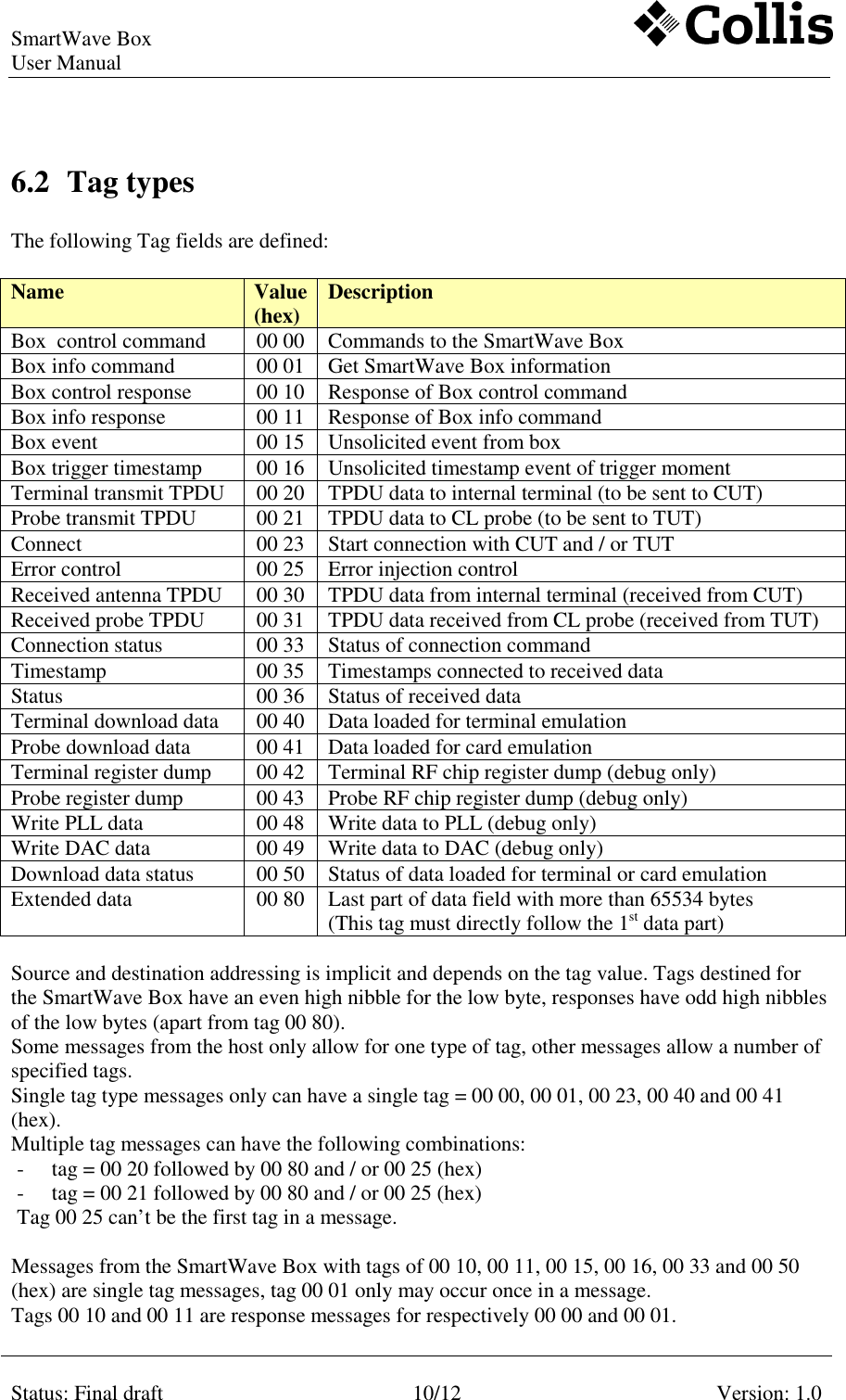
SmartWave Box   User Manual     Status: Final draft  10/12  Version: 1.0    6.2 Tag types  The following Tag fields are defined:  Name  Value (hex)  Description Box  control command  00 00  Commands to the SmartWave Box Box info command  00 01  Get SmartWave Box information Box control response  00 10  Response of Box control command Box info response  00 11  Response of Box info command Box event  00 15  Unsolicited event from box Box trigger timestamp  00 16  Unsolicited timestamp event of trigger moment Terminal transmit TPDU  00 20  TPDU data to internal terminal (to be sent to CUT) Probe transmit TPDU  00 21  TPDU data to CL probe (to be sent to TUT) Connect   00 23  Start connection with CUT and / or TUT Error control  00 25  Error injection control Received antenna TPDU  00 30  TPDU data from internal terminal (received from CUT) Received probe TPDU  00 31  TPDU data received from CL probe (received from TUT)  Connection status  00 33  Status of connection command Timestamp  00 35  Timestamps connected to received data Status  00 36  Status of received data Terminal download data  00 40  Data loaded for terminal emulation  Probe download data  00 41  Data loaded for card emulation  Terminal register dump  00 42  Terminal RF chip register dump (debug only) Probe register dump  00 43  Probe RF chip register dump (debug only) Write PLL data  00 48  Write data to PLL (debug only) Write DAC data  00 49  Write data to DAC (debug only) Download data status  00 50  Status of data loaded for terminal or card emulation  Extended data  00 80  Last part of data field with more than 65534 bytes (This tag must directly follow the 1st data part)  Source and destination addressing is implicit and depends on the tag value. Tags destined for the SmartWave Box have an even high nibble for the low byte, responses have odd high nibbles of the low bytes (apart from tag 00 80).  Some messages from the host only allow for one type of tag, other messages allow a number of specified tags. Single tag type messages only can have a single tag = 00 00, 00 01, 00 23, 00 40 and 00 41  (hex). Multiple tag messages can have the following combinations:  - tag = 00 20 followed by 00 80 and / or 00 25 (hex) - tag = 00 21 followed by 00 80 and / or 00 25 (hex) Tag 00 25 can’t be the first tag in a message.  Messages from the SmartWave Box with tags of 00 10, 00 11, 00 15, 00 16, 00 33 and 00 50  (hex) are single tag messages, tag 00 01 only may occur once in a message.  Tags 00 10 and 00 11 are response messages for respectively 00 00 and 00 01.
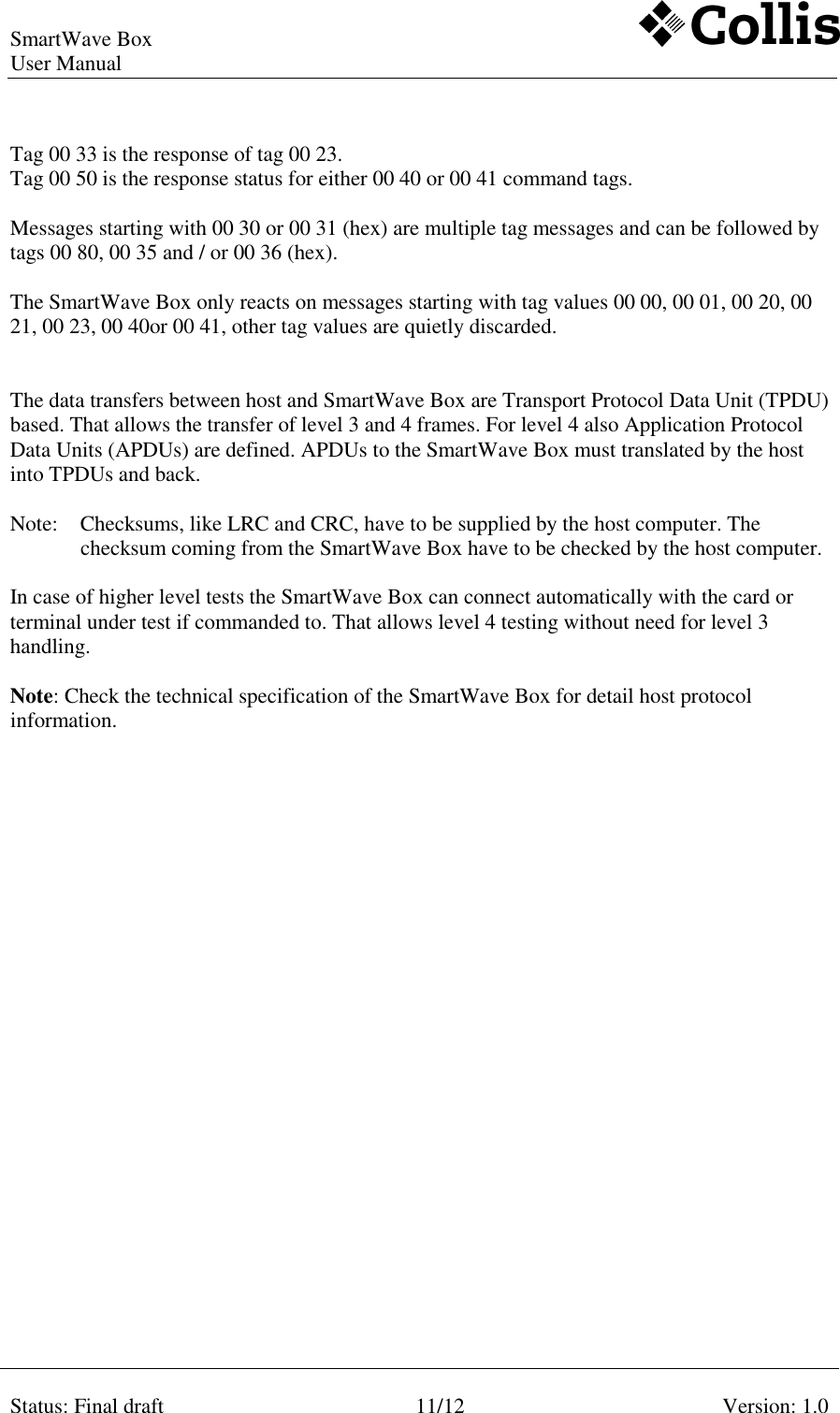
SmartWave Box   User Manual     Status: Final draft  11/12  Version: 1.0    Tag 00 33 is the response of tag 00 23.  Tag 00 50 is the response status for either 00 40 or 00 41 command tags.  Messages starting with 00 30 or 00 31 (hex) are multiple tag messages and can be followed by tags 00 80, 00 35 and / or 00 36 (hex).  The SmartWave Box only reacts on messages starting with tag values 00 00, 00 01, 00 20, 00 21, 00 23, 00 40or 00 41, other tag values are quietly discarded.   The data transfers between host and SmartWave Box are Transport Protocol Data Unit (TPDU) based. That allows the transfer of level 3 and 4 frames. For level 4 also Application Protocol Data Units (APDUs) are defined. APDUs to the SmartWave Box must translated by the host into TPDUs and back.  Note:  Checksums, like LRC and CRC, have to be supplied by the host computer. The checksum coming from the SmartWave Box have to be checked by the host computer.   In case of higher level tests the SmartWave Box can connect automatically with the card or terminal under test if commanded to. That allows level 4 testing without need for level 3 handling.  Note: Check the technical specification of the SmartWave Box for detail host protocol information.
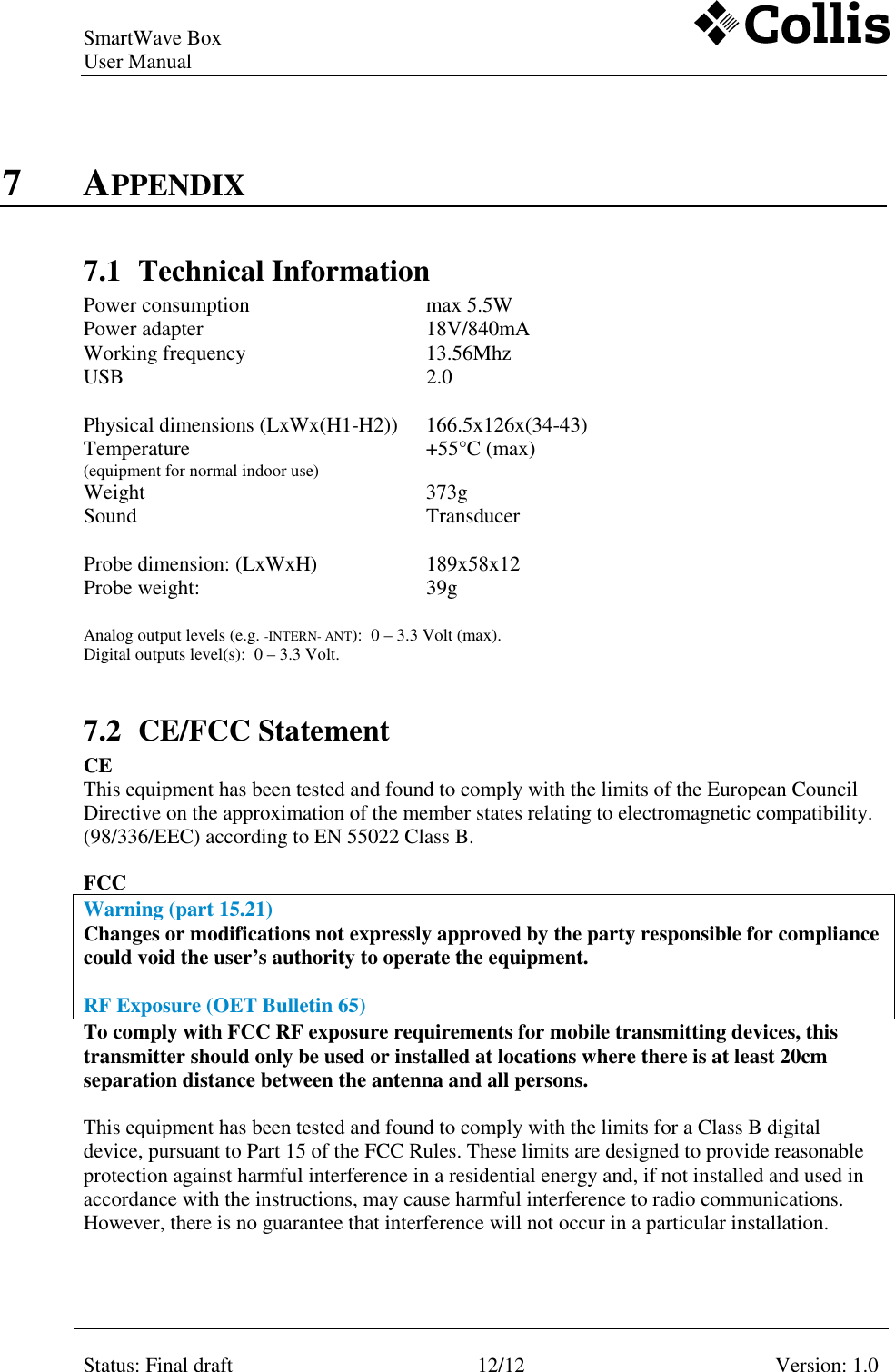
SmartWave Box   User Manual     Status: Final draft  12/12  Version: 1.0    7 APPENDIX 7.1 Technical Information Power consumption  max 5.5W   Power adapter  18V/840mA   Working frequency  13.56Mhz   USB  2.0        Physical dimensions (LxWx(H1-H2))  166.5x126x(34-43)   Temperature  (equipment for normal indoor use) +55°C (max)   Weight   373g   Sound   Transducer        Probe dimension: (LxWxH)  189x58x12   Probe weight:  39g    Analog output levels (e.g. -INTERN- ANT):  0 – 3.3 Volt (max). Digital outputs level(s):  0 – 3.3 Volt.    7.2 CE/FCC Statement  CE This equipment has been tested and found to comply with the limits of the European Council Directive on the approximation of the member states relating to electromagnetic compatibility. (98/336/EEC) according to EN 55022 Class B.   FCC  Warning (part 15.21) Changes or modifications not expressly approved by the party responsible for compliance could void the user’s authority to operate the equipment.  RF Exposure (OET Bulletin 65) To comply with FCC RF exposure requirements for mobile transmitting devices, this transmitter should only be used or installed at locations where there is at least 20cm separation distance between the antenna and all persons.  This equipment has been tested and found to comply with the limits for a Class B digital device, pursuant to Part 15 of the FCC Rules. These limits are designed to provide reasonable protection against harmful interference in a residential energy and, if not installed and used in accordance with the instructions, may cause harmful interference to radio communications. However, there is no guarantee that interference will not occur in a particular installation.
SmartWave Box   User Manual     Status: Final draft  13/12  Version: 1.0    8 SUPPORT For troubleshooting, support or more information contact Collis BV  E-mail    : service@collis.nl Telephone  : + 31 71 581 3636
SmartWave Box   User Manual     Status: Final draft  14/12  Version: 1.0    REFERENCES Ref.  Title  Status  Version  Date [1]   ISO 7816/3   Smart Card standard,  electrical signals and transmission protocols    2  1997 [2]   ISO 7816/4  Smart Card standard,  interindustry commands for interchange    1  1995 [3]  ISO 14443/2  CL card standard – proximity cards,  RF interface power and signal interface (+ Amendment 1)   1   2001  2005 [4]  ISO 14443/3  CL card standard – proximity cards, initialization and anticollision. (+ Amendments 1 and 3)   1  2001  2005/2006 [5]  ISO 14443/4  CL card standard – proximity cards, transmission protocol (+ Amendment 1)   1  2001  2006 [6]  ISO 18092  Near Field Communication cards,     interface and protocol    1  2004 [7]  ISO 10273-6  Identification cards, test methods proximity cards    1  2001 [8]  ISO 10273-6 Amendment 1 Protocol test methods for proximity cards  Final draft     [9]  ISO 10273-6 Amendment 3 Protocol test methods for proximity coupling devices  Final draft     [10]  ISO 10273-6 Amendment 5 Bit rates of fc/64, fc/32 and fc/16  Final draft     [11]  ISO 23917  NFCIP-1 protocol test methods    1  2005 [12]  SmartWave Box requirement specification document  Final  1.1  29-06-2006 [13]  SmartWave Box Technical Specification

Navigation menu