Elhrom EL-SKYPORT Wireless flash triggering system User Manual USB Rx
Elinchrom SA Wireless flash triggering system USB Rx
Elhrom >
Contents
USB Rx
Instructions for use
Istruzioni per l’uso
Инструкция по эксплуатации
Instrucciones para el uso
USB R
X

English 1 - 8
Français 9 - 16
Deutsch 17 - 24
Italiano 25 - 32
Русский 33 - 40
Español 41 - 48
Gurantee 49 - 50
English
EL-Skyport
USB RX
19354
Contents :
Features 2
Computer Remote control features 2
Minimum requirements
Windows / Mac 3
Driver Installation
Windows / Mac OSX 4
Frequency Channel 5
EL-Skyport Features 5
EL-Skyport Modules 5
Elinchrom Remote Software 6
Troubleshoodting 7
CE Statements 7
FCC Compliance and
Advisory Statement 8
Disposal and recycling 8
Installation Guide
Windows XP 9
Windows 98 11
Windows 2000 13
Mac OS X 15
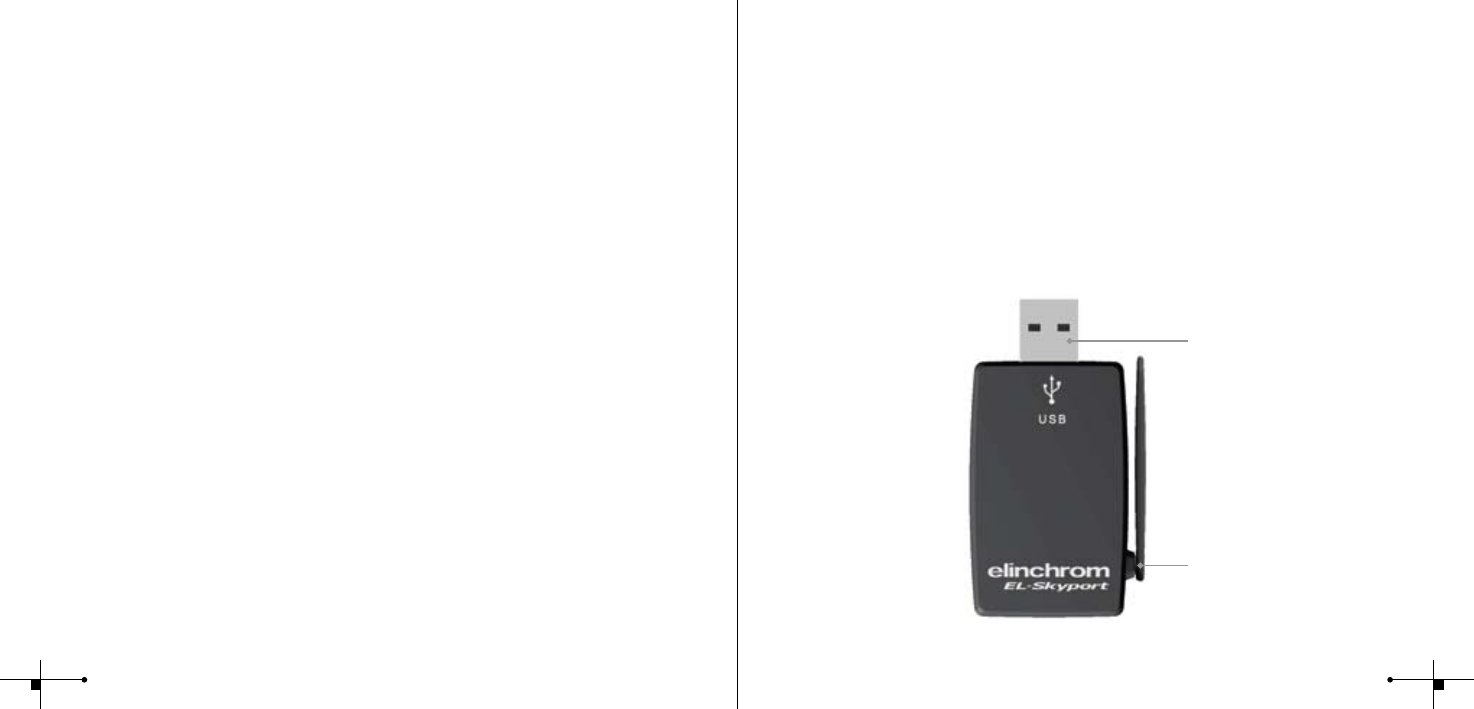
Fig. 1
Note:
Shutter speed and distance range is inuenced by reections (from ceilings, walls, oor, furniture and
other equipment) and interference from other 2.4 GHz electronic equipment. For best performance the
Transmitter and Receiver antenna should have direct sight, without any walls or objects in between.
Minimum requirements
Windows PC MAC
• PC 400 MHz • MAC G3 400 MHz
• Free USB 1.1 Port • Free USB 1.1 Port
• Windows 98SE, ME, 2000, XP, Server 2003 • MAC OSX 10.2.6
EL-Skyport
USB RX
19354
Operating instructions :
2.4 GHz digital wireless
Computer USB RX
Features
EL-Skyport ash trigger is designed with the latest 2.4 GHz Digital Wireless Technology.
• Wireless Remote Control via Mac / PC
• For all ELINCHROM RX ash units
• Up to 1/1000s shutter speed
• 4 selectable trigger groups
• 8 frequency channels
• 40 Bit security encryption
• Up to 50 m range indoors
• Up to 120 m range outdoors
Computer Remote control features
• Wireless Remote Control of all RX features and extra options with EL-Skyport
Software (i.e. Delay ash, ash Stand-by, special modelling lamp features and more..)
• Realtime feedback of RX units with EL-Skyport software. WYSIWYG: What you see is
what you get!
• Plug and Play auto detection with EL-Skyport Software (no manual unit addressing
necessary).
You will appreciate the convenience of this professional, and powerful wireless device.
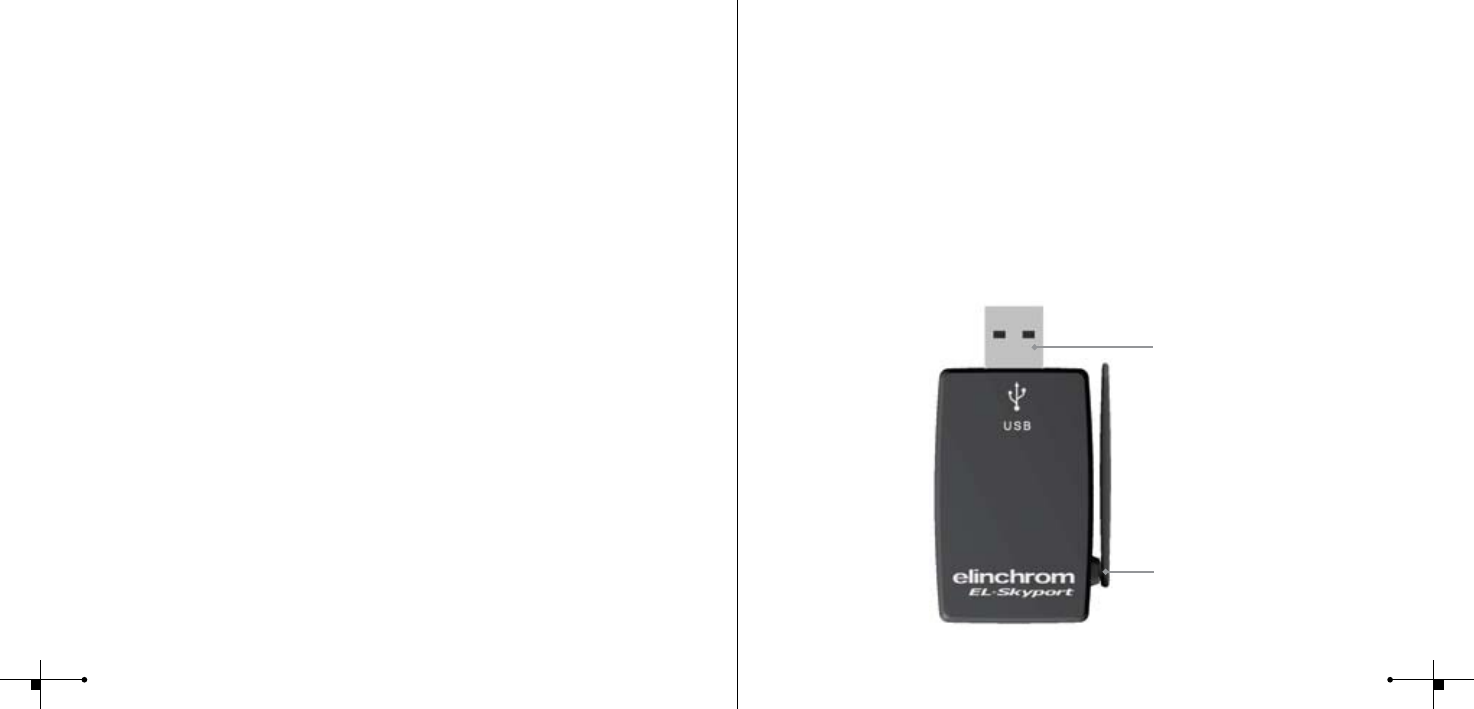
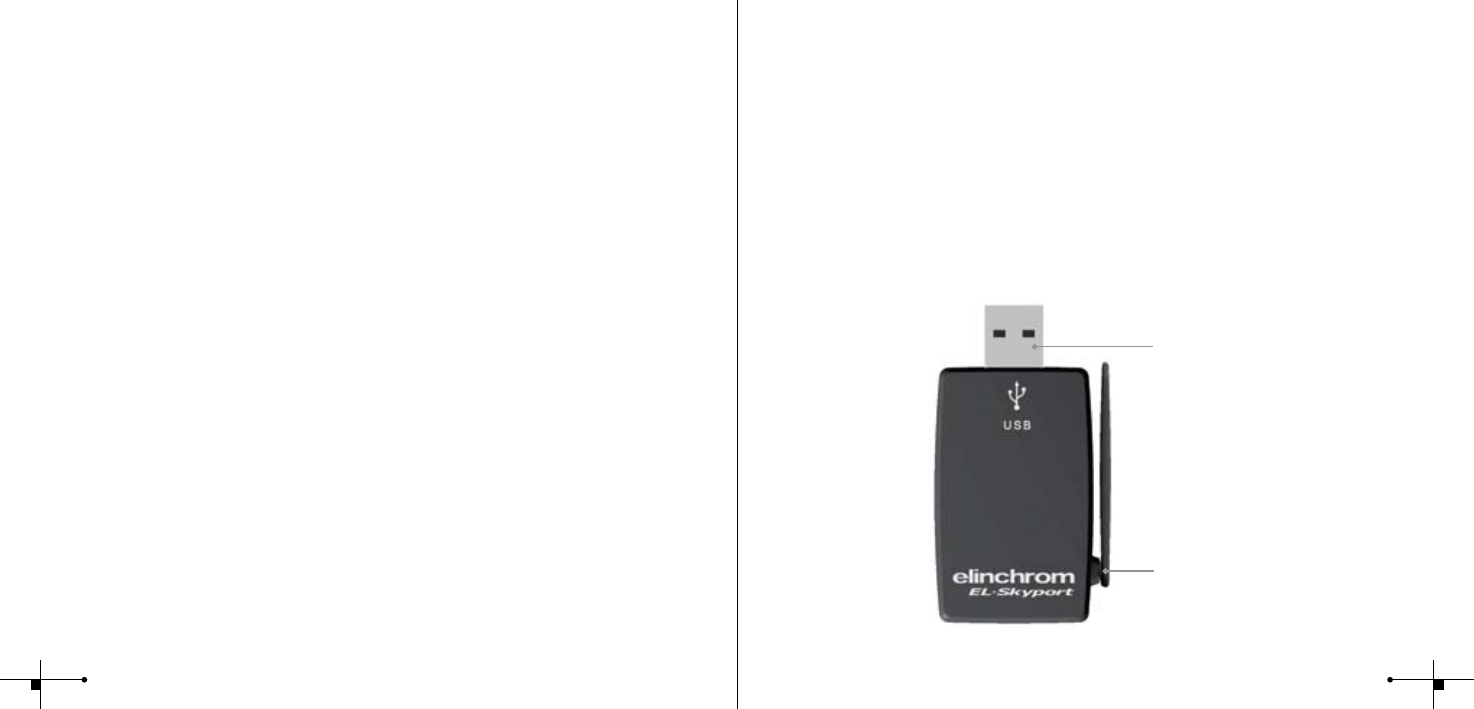
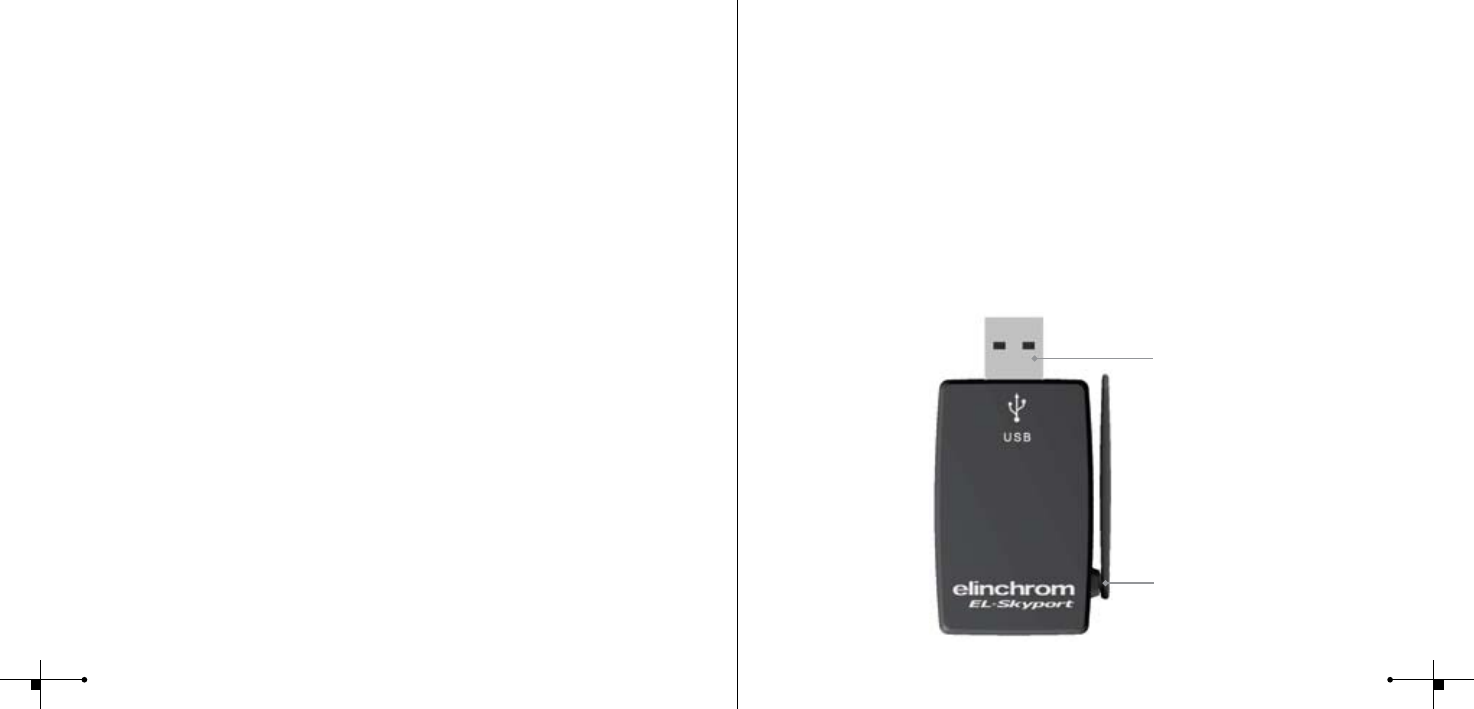
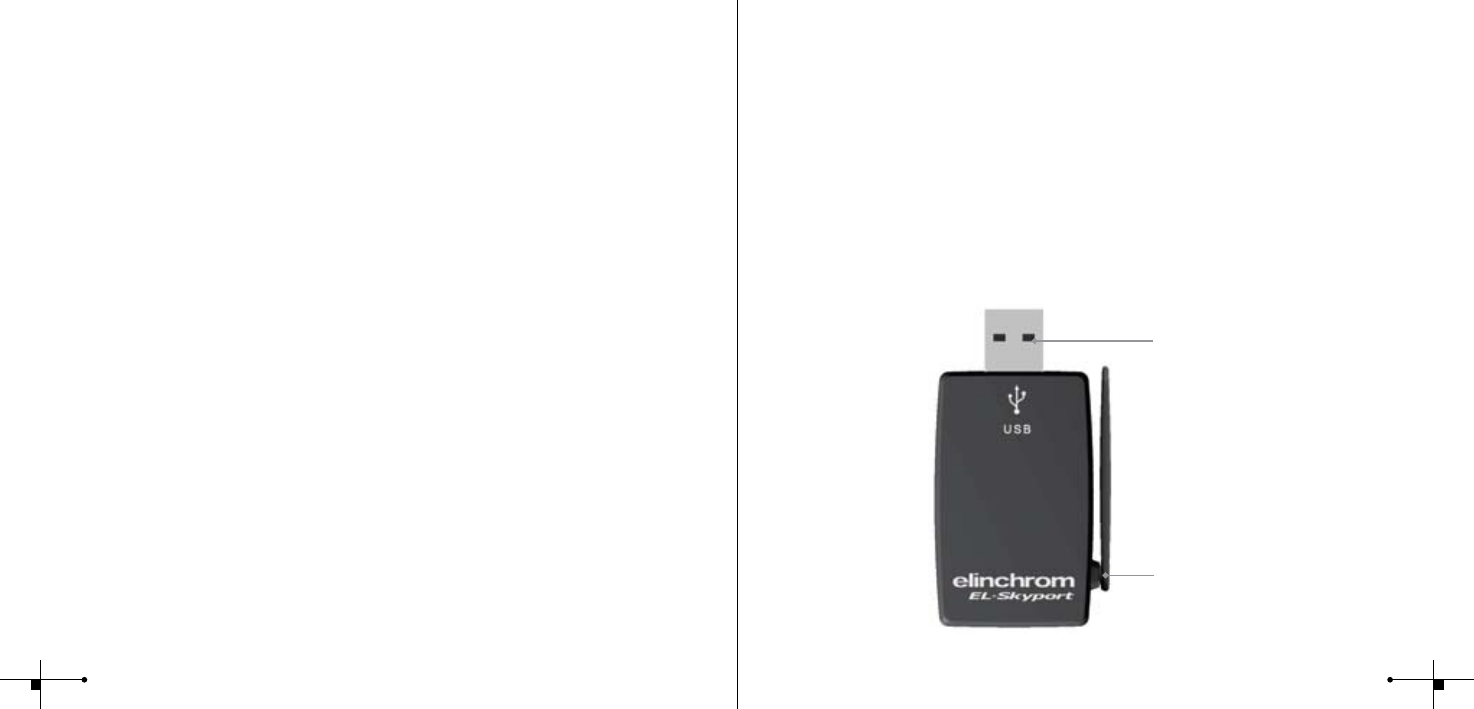
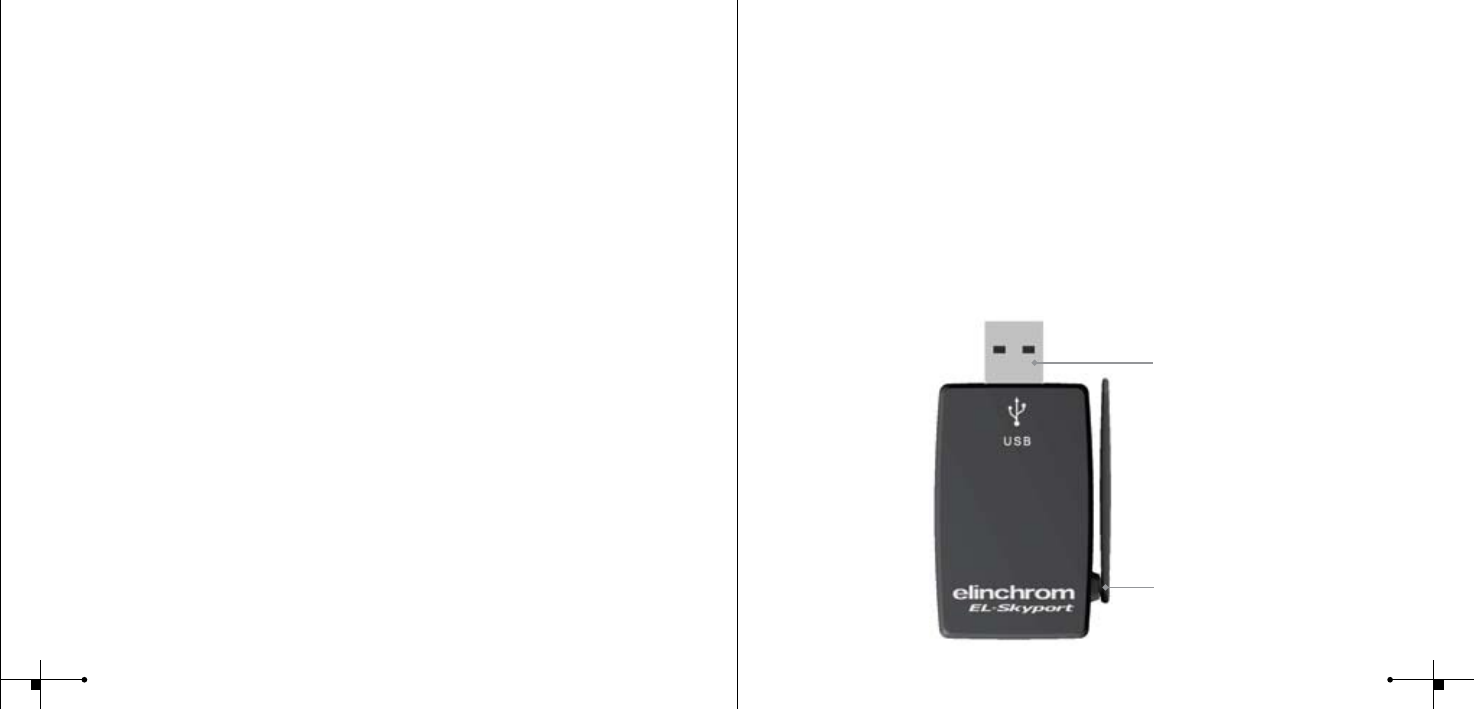
Flexible swivel
Antenna 360 ̊
Standard
USB A connector
23
Driver Installation
Windows
1. Plug in the USB RX transceiver into a free USB port of your computer
2. Wait until Windows launches the “Add New Hardware” wizard window
3. Follow the instructions of the Windows Driver Installation program
4. Use the correct drivers for your operating system
• XP, 2000, Server 2003: use folder Windows\XP_2000_Server2003
• Win98 and ME: use folder Windows\Win98_ME
• XP x64: use folder Windows\XP x64
5. Check Installation help les on the CD-ROM for more detailed help for your Operating system!
6. Start EL-Skyport or ERS software
Mac OSX
1. Insert the EL-Skyport driver CD in your CD drive and open Finder. Navigate to your CDROM
and open the correct subfolder of your Operating system.
• OS X 10.2.6 Jaguar up to OSX 10.3 Panther: use folder: <CDROM>/MacOSX/MacOSX
• OS X 10.4 Tiger and Intel: use folder <CDROM>/MacOSX/MacOSX_Intel_Tiger_10_4
2. Start installation with a double click on the “FDTIUSBSerialDriver” installation package in the
selected directory. Follow the installation instructions from there.
3. After system restart, plug in the RX Computer USB transceiver into a free USB port of your
computer
4. Start EL-Skyport or ERS software
Note:
With ERS 1.0 Software do the following steps:
1. Install ERS software rst
2. then do Driver Installation above
Use only the latest driver from the CD-ROM!
Old drivers from ERS Software CD-ROM are not recommended for the EL-Skyport USB RX
transceiver!!
Frequency Channel
Note:
The USB RX frequency channel is set by the EL-Skyport software only. With ERS 1.0 software only frequency
channel 1 on the Receivers are active!
The EL-Skyport software and the corresponding RX Transceivers or Universal Receivers must have the same
frequency channel setting !
EL-Skyport Features
All EL-RX units accept computer operation!. Use 19354, 19353 and the EL-Skyport PC / MAC
Software to access EXTRA features:
1. Automatic PnP (Plug and Play) detection. The software automatically adds connected
RX units to the units list. All EL-RX units and all EL-Skyport Universal Receivers are detected!
2. Flash Stand-By: Activation and deactivation of Flash trigger via EL-Skyport Software
3. Adjustable independent Flash Delay triggering for ash sequencing of between
5 milliseconds and 16 seconds.
4. Save and recall settings of RX units and Universal Receiver settings.
The EL-Skyport software offers additional features and information, for details please check
www.elinchrom.com
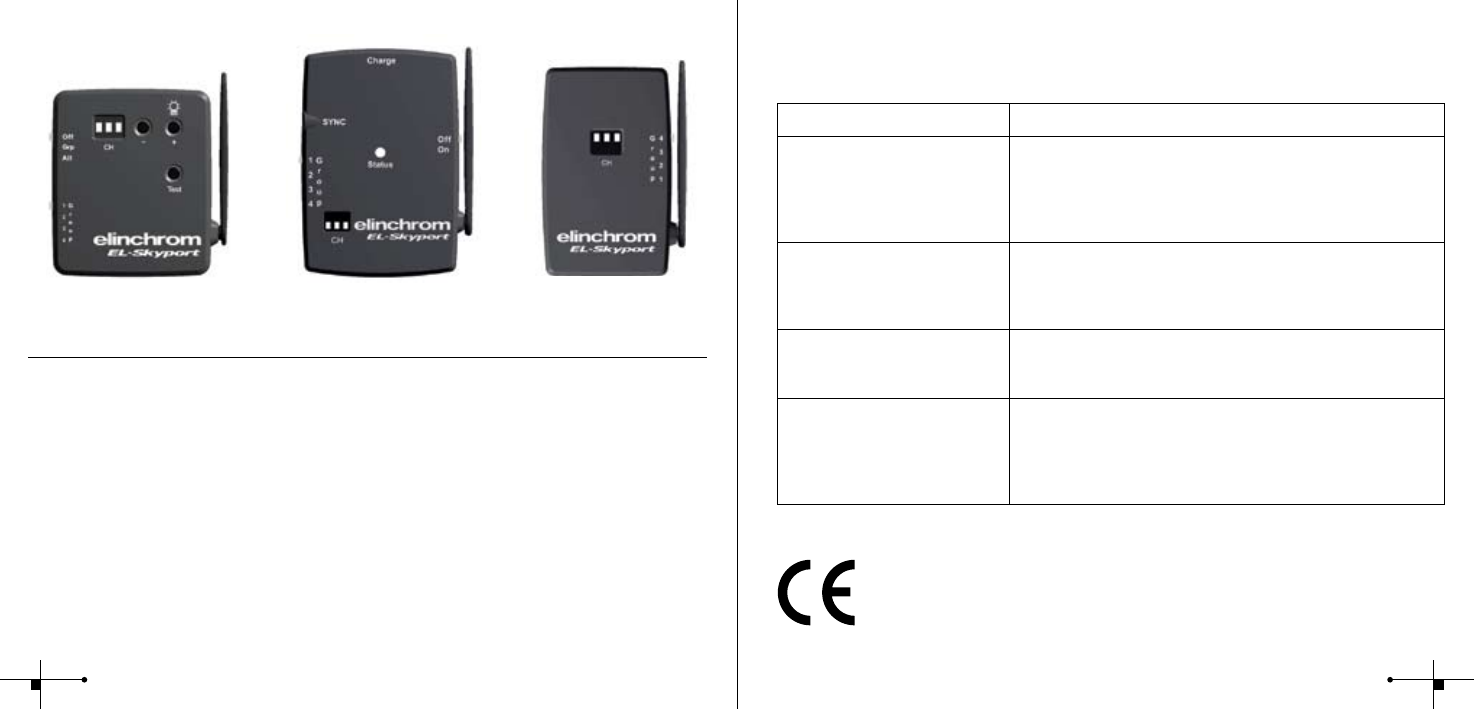
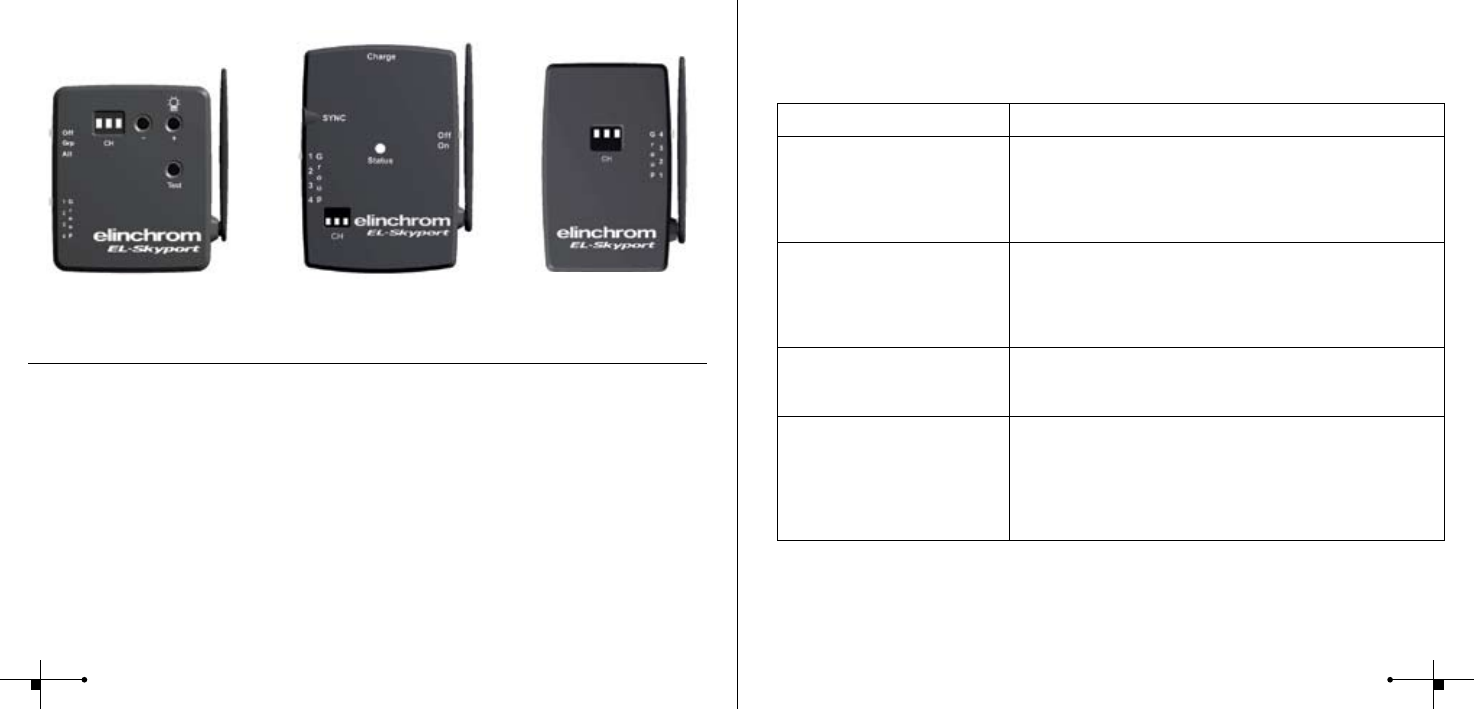
EL-Skyport Modules
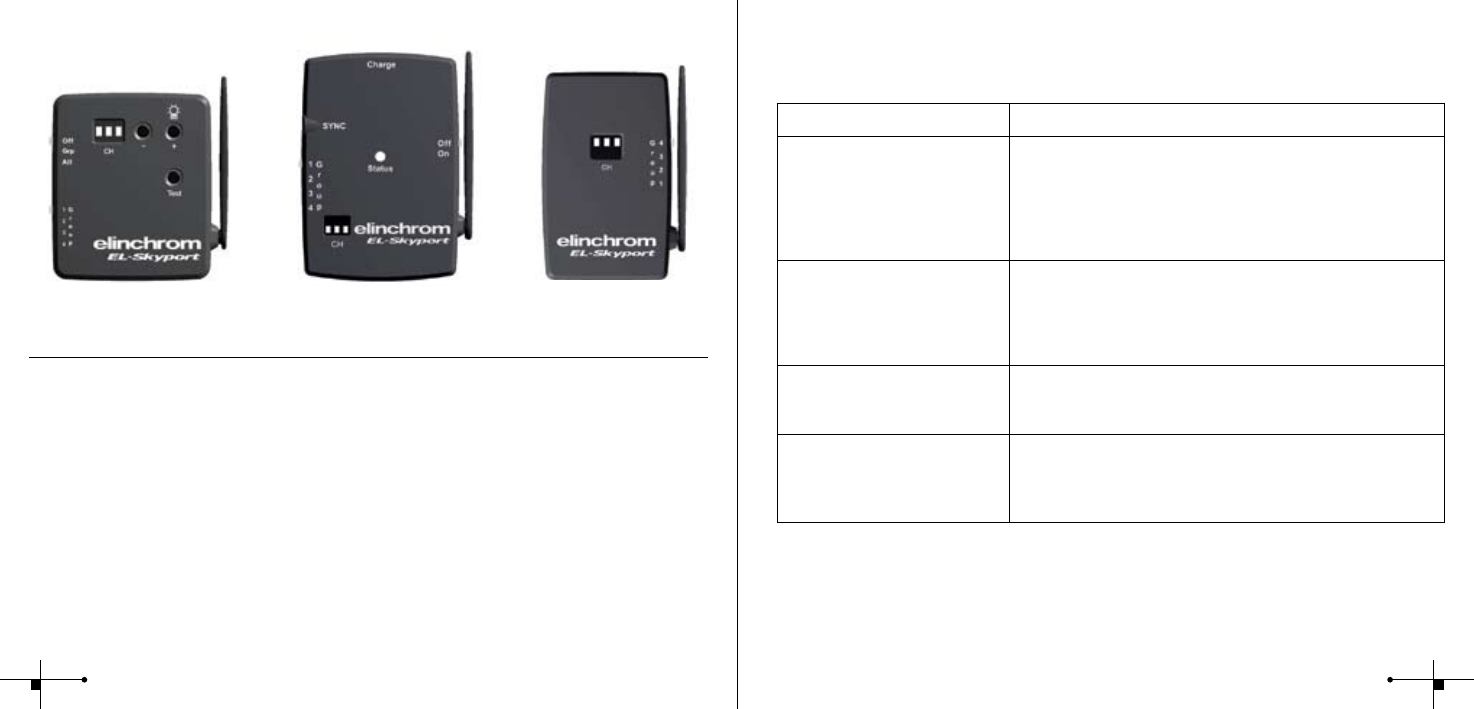
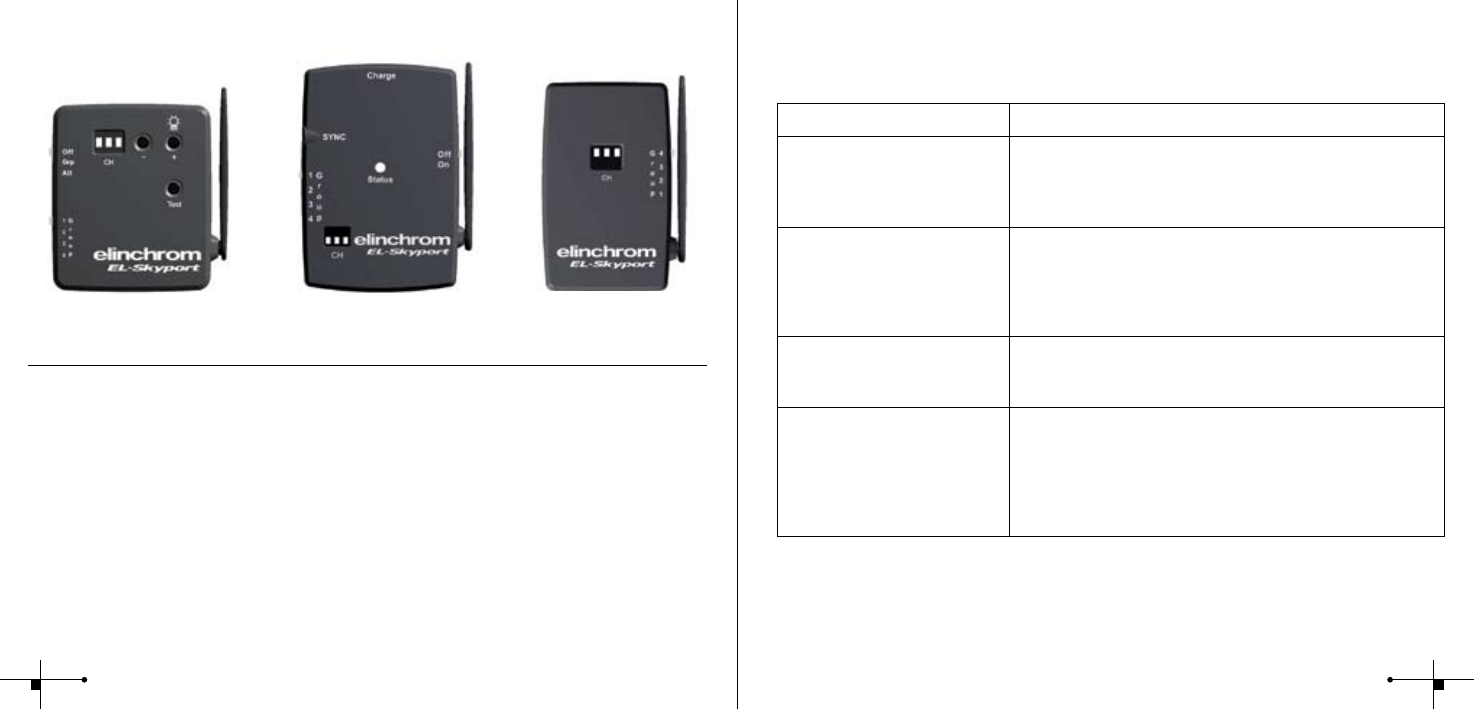
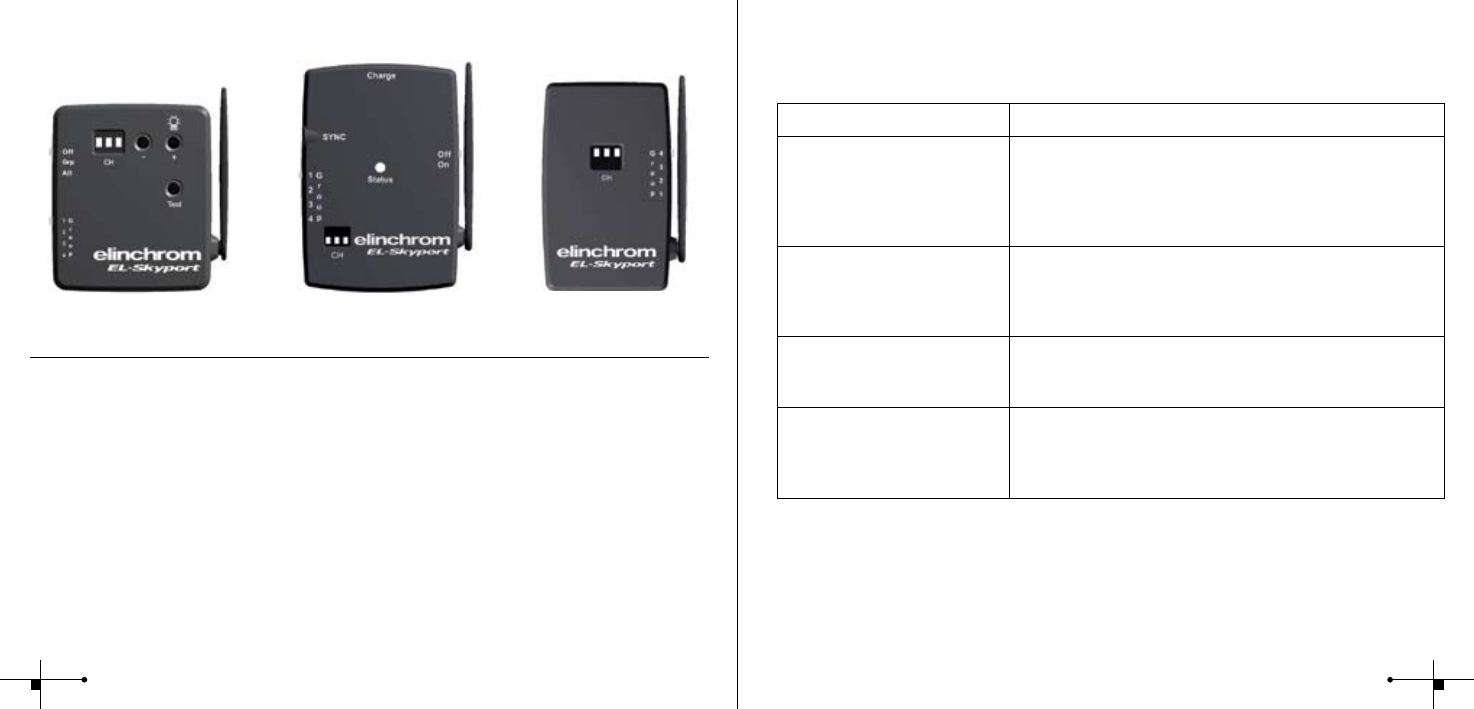
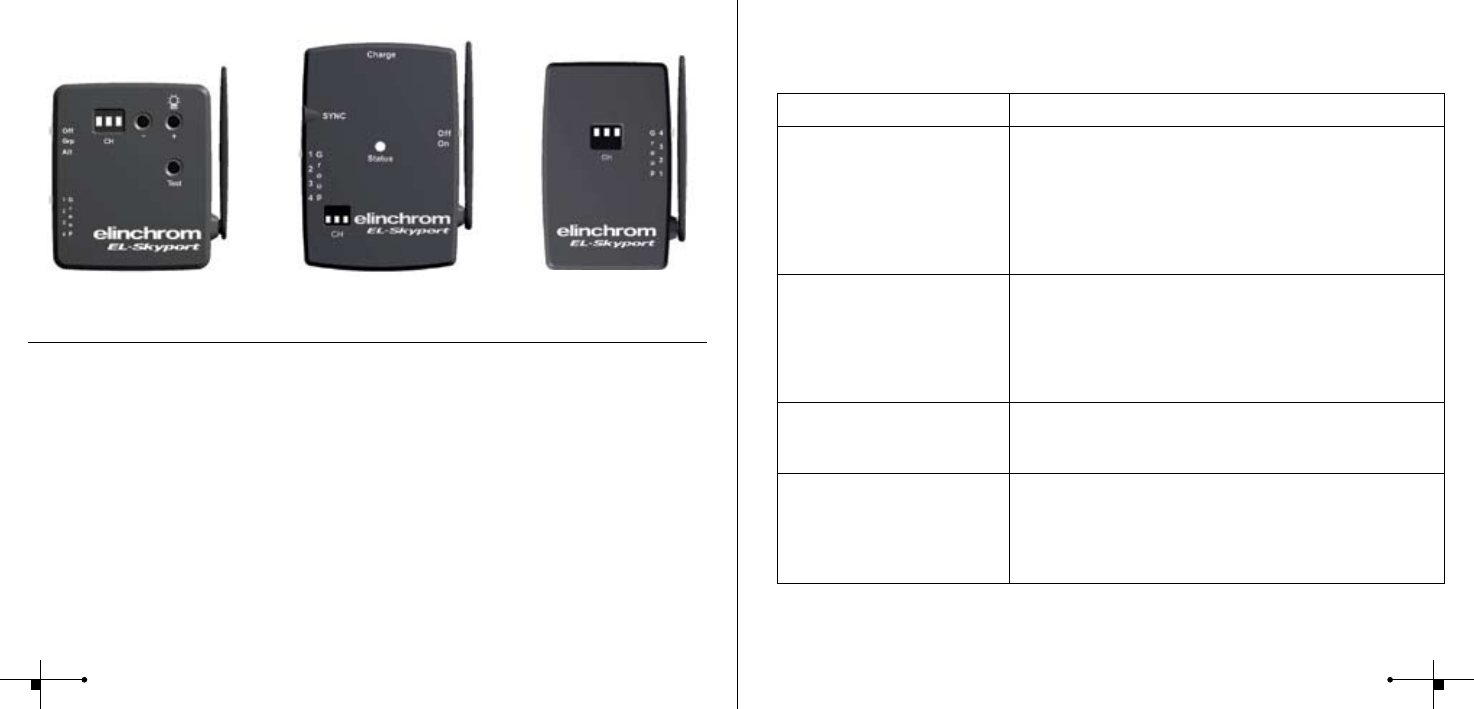
EL-Skyport Transmitter 19351
• Universal Transmitter for triggering all EL-Skyport Receivers via Camera Hot-shoe or
SYNC cable!
EL-Skyport Universal Receiver 19352
• The Universal Receiver for all Flash makes having a SYNC socket
EL-Skyport RX Transceiver 19353
• The Transceiver is only for Elinchrom RX units. This module operates all RX features
with the EL-Skyport / ERS- software and triggers the ash
45
Troubleshooting
Should an error occur, rst check the following points:
Having this problem? Check the following points:
Driver Installation not possible Ø Check if the RX Computer USB transceiver correctly ts into
the USB port
Ø Check the Installation help les on the CD-ROM for more
detailed help for your Operating system
Ø Use the correct Driver le for your operating system
RX-Unit is not found in ERS
software
Ø Check if Transceiver RX on the RX unit is switched to
Frequency channel 1 only!
Ø Switch on only one RX unit for test
Ø Use “Studio Wizard” for correct Unit addressing
Problems if more than one
RX-Unit is switched on with ERS
software
Ø Use the “Studio Wizard” for correct Unit addressing
Distance range is too small Ø Reposition the unit
Ø Increase the distance to walls and ceilings
Ø Position the antenna of Transmitter and Receiver
Ø Use an RX extension cable to reduce the distance between
modules
CE Statements
This device has been tested and found to comply with the requirements set
up in the council directive on the approximation of the law of member states
relating to EMC Directive 89/336/EEC, Low Voltage Directive 73/23/EEC and
R&TTE Directive 99/5/EC
Elinchrom Remote Software
ERS 1.0 Remote Software
EL-Skyport USB RX works with ERS 1.0 software with the following restrictions:
• Use only EL-Skyport USB RX drivers
• Only frequency channel 1 is possible
• Some EXTRA features of the EL-Skyport USB RX transceiver are not available
• Universal modules are not recognized by ERS 1.0 software
EL-Skyport Software
For best performance the current EL-Skyport software includes all the EXTRA features
mentioned previously under EL-Skyport Features
Universal
19352
Transmitter
19351
Transceiver RX
19353
67
FCC Compliance and Advisory Statement
This device complies with Part 15 of the FCC rules. Operation is subject of the following two
conditions: 1. this device may not cause harmful interference, and 2. this device must accept
any interference received, including interferences that may cause undesired operation.
The equipment has been certied to comply with the limits for a Class B computing device
pursuant to Part 15 of the FCC Rules. These limits are designed to provide reasonable pro-
tection against harmful interference in a residential installation. This equipment generates,
uses, and can radiate radio frequency energy and, if not installed or used in accordance with
the instructions, may cause harmful interference to radio communications. However, there
is no guarantee that interference will not occur in a particular installation. If this equipment
does cause harmful interference to radio or television reception, which can be determined
by switching the equipment off and on. The user can try to correct the interference by the
following measures:
1. Reorient or relocate the receiving antenna
2. Increase the separation between the equipment and receiver
3. Connect the equipment to an outlet on a circuit different from that to which the
receiver is connected.
4. Consult the dealer or an experience radio/TV technician for help Changes or modication
not expressly approved by the party responsible for compliance could avoid the user’s
authority to operate the equipment.
Disposal and recycling
This device has been manufactured to the highest possible degree from materials
which can be recycled or disposed of in a manner that is not environmentally
damaging. The device may be taken back after use to be recycled, provided that
it is returned in a condition that is the result of normal use. Any components not
reclaimed will be disposed of in an environmentally acceptable manner.
If you have any question on disposal, please contact your local ofce or your local
ELINCHROM agent (check our website for a list of all ELINCRHOM agents world wide).
8
EL-Skyport
USB RX
19354
Sommaire :
Caractéristiques 17
Caractéristiques du système de
gestion des ashes par ordinateur 17
Matériel nécessaire
Ordinateur Windows / Mac 18
Installation des pilotes
Pour Windows / Mac OS X 19
Fréquence du canal de communication 20
Caractéristiques du système EL-Skyport 20
Autres modules EL-Skyport 20
Télécommande par logiciel Elinchrom 21
Dépannage 22
Déclaration de conformité CE 23
Mise au rebut et recyclage 23
Guide d’installation pour Windows XP
pour Windows XP 24
pour Windows 98 26
pour Windows 2000 28
Mac OS X 30
EL-Skyport
USB RX
19354
Guide de l’utilisateur :
Dispositif de déclenchement sans l pour ordinateur, basé sur l’utilisation d’ondes
radio HF de la bande de fréquences 2,4GHz.
Caractéristiques
Ce déclencheur de ash et de communication “EL-Sky-Port”, exploite la plus récente
technologie en matière de radio numérique sans l (wireless).
• Télécommande sans l, compatible avec Mac et PC
• Vitesse d’obturation supérieure au 1/1000s
• Gère le déclenchement de 4 groupes de ashes
• 8 canaux de fréquence à choix
• Codage de sécurité sur 40 bits
• Portée supérieure à 50m à l’intérieur
• Portée supérieure à 120m à l’extérieur
Vous apprécierez, la simplicité et la facilité d’utilisation de ce système de communication
professionnel sans l
Caractéristiques du système de gestion des ashes par ordinateur
• Télécommande intégrale sans l. Toutes les fonctions et options sont disponibles
avec le logiciel “EL-Skyport” (déclenchement immédiat et retard programmable avant le
déclenchement du ash, repos (Stand-by), contrôle de la pilote, ainsi que d’autres
fonctionnalités)
• Actions en temps réel sur les ashes RX avec le logiciel et système “EL-Skyport”.
(WYSIWYG): ce que vous voyez à l’écran est réellement afché et appliqué sur le ash)
• Le système “EL-Skyport Software” détecte automa-tiquement le modèle de ash
(pas d’adressage manuel requis).
Vous apprécierez, la simplicité et la facilité d’utilisation de ce système professionnel de com-
munication sans l. Fig. 1
Remarque :
La portée de transmission et la vitesse de l’obturateur dépendront de la conguration et de la géographie
du lieu de travail. Les réexions sur le plafond, sur les murs ou des obstacles comme des meubles, des
étagères, ou d’autres système radio utilisant la même fréquence de communication, peut en limiter les
performances. Vous obtiendrez un fonctionnement optimal de ce matériel, en dirigeant et en orientant les
antennes en regard l’une de l’autre.
Matériel nécessaire
Ordinateur Windows Ordinateur MAC
• PC à 400 MHz • MAC G3 à 400 MHz
• Port USB 1.1, libre • Port USB 1.1, libre
• Windows 98SE, ME, 2000, XP, Server 2003 • MAC OSX 10.2.6
Antenne exible et
rotative sur 360°
Connecteur
USB A standard
10 11
Installation des pilotes
Pour Windows
1. Connectez le module 19354 (transceiver USB) dans un port USB disponible de votre ordinateur.
2. Attendez que l’installateur wizard de Windows afche, (Add New Hardware)
“Ajout de nouveau matériel”
3. Suivez les instructions du programme d’installation du pilote (driver) pour Windows
4. Utilisez le pilote approprié à votre système d’exploitation
• Pour : XP, 2000, Server 2003: utilisez le dossier Windows\XP_2000_Server2003
• Pour : Win98 and ME: utilisez le dossier Windows\Win98_ME
• Pour : XP x64: utilisez le dossier Windows\XP x64
5. Regardez sur le CD-ROM “EL-Sky-Port”, les chiers d’aide d’installation, correspondant
précisément à votre système d’exploitation.
6. Démarrez “EL-Skyport” ou le logiciel “ERS”.
Pour Mac OS X
1. Insérez le CD “EL-Skyport driver” (pilote) dans le lecteur, ouvrez alors le (nder), consultez le
contenu du CD et ouvrez le sous-dossier correspondant à votre système.
• OS X 10.2.6 Jaguar jusqu’à OSX 10.3 Panther:
utilisez le dossier: <CDROM>/MacOSX/MacOSX
• OS X 10.4 Tiger et Intel: utilisez le dossier <CDROM>/MacOSX/MacOSX_Intel_Tiger_10_4
2. Démarrez l’installation, avec un double clic sur le paquet d’installation “FDTIUSBSerialDriver”.
Suivez ensuite les instructions d’installation.
3. Après le redémarrage, insérez la clé USB RX, dans un port libre de votre ordinateur.
4. Lancez l’application “EL-Skyport” ou le logiciel “ERS”.
Remarque :
Avec le logiciel “ERS 1.0”, respectez cet ordre lors de l’installation:
1. installez premièrement le logiciel “ERS”.
2. installez alors le pilote (driver) du logiciel ci-dessus
Utilisez uniquement, la dernière version de pilote (driver), du CD “EL-Sky-Port”.
Les anciens pilotes du CD-ROM du logiciel “ERS”, ne sont pas recommandés pour l’installation
de la clé USB EL-Skyport RX (transceiver).
Fréquence du canal de communication
Remarque :
La fréquence du canal ne peut être attribuée que par le logiciel “USB RX–Skyport”. Avec la version 1.0 du
logiciel “ERS”, seul le canal 1 des récepteurs est utilisable. La fréquence du canal doit être la même
pour tous les composants de la chaîne de communication, logiciel “EL-Skyport”, émetteur/récepteur 19353,
ou du récepteur universel 19352. Tous doivent utiliser le même canal.
Caractéristiques du système EL-Skyport
Pour télécommander les ashes RX avec un ordinateur, Vous devez utiliser les modules
suivants : l’émetteur/récepteur(19353) et la clé USB RX (19354) Le système “EL-Skyport PC/
MAC” et son logiciel, permet l’accès aux fonctions spéciales suivantes:
1. Automatic PnP (plug and play) detection: le logiciel détecte tous les ashes actifs, il les
identies et active la communication.
2. Mode Stand-By: cette fonction du logiciel, autorise l’activation ou la désactivation du
déclenchement des ashes.
3. Flash Delay : retardement réglable du déclenchement
(entre 5 millisecondes et 16 secondes), individuel ou séquentiel des ashes.
4. Save and Recall: sauvegarde et conserve tous les réglages et informations de tous les
ashes et du récepteur universel.
Le logiciel “EL-Skyport” offre aussi d’autres fonctionnalités et des informations supplémentaires,
pour les découvrir. Visitez notre site Web : www.elinchrom.com
Autres modules EL-Skyport
EL-Skyport émetteur (19351)
• Émetteur universel pour le déclenchement de tous les récepteurs “EL-Skyport”,
directement depuis le socle ash de l’appareil photo ou avec un cordon de synchronisation.
EL-Skyport récepteur universel (19352)
• Récepteur universel de déclenchement, destiné aux ashes de toute marques
munis d’une prise de synchronisation.
EL-Skyport émetteur/récepteur RX (19353)
• Module de déclenchement et de communication, il est destiné uniquement aux ashes RX.
Ce module, supporte toutes les fonctionnalités avancées du système de communication “EL-
Skyport” avec un ordinateur PC ou Mac.
12 13
Télécommande par logiciel Elinchrom
Logiciel “ERS 1.0”
Le module EL-Skyport USB RX et le logiciel ERS 1.0, fonctionnent ensemble avec les restric-
tions suivantes: Utilisez seulement les pilotes EL-Skyport USB RX.
• Seul le canal 1 de fréquence est utilisable.
• Some EXTRA features of the EL-Skyport USB RX transceiver are not available
• Les modules récepteurs universels (19352) ne sont pas reconnus par le logiciel ERS 1.0.
Logiciel “EL-Skyport”
Encore plus de performance avec ce logiciel, il donne accès aux fonctionnalités étendues,
décrites précédemment sous la rubrique caractéristiques.
Universal
19352
Transmitter
19351
Transceiver RX
19353
Dépannage
En cas de problèmes, vériez les points suivants:
Problème? Vériez les points suivants:
Installation du pilote (driver)
impossible
Ø Vériez que le module USB 19354 est mis correctement dans
la prise USB du PC.
Ø Vériez sur le Cd-rom, les chiers d’aide en ligne
correspondant à votre système d’exploitation.
Ø Vériez que vous bien choisit, le chier d’installation
correspondant à votre système d’exploitation.
Un ash Elinchrom RX équipé
d’un émetteur-récepteur RX
(Transceiver RX 19353) n’est pas
reconnu par le logiciel
EL-SKYPORT.
Ø Vériez que le (transceiver) du ash est bien commuté sur
la fréquence du canal 1 (la seule qui est active).
Ø N’allumez qu’un ash RX pour faire un test.
Ø Utilisez “Studio Wizard” pour l’identication correcte les
ashes connectés.
Problème de détection des
ashes avec le logiciel “ERS,” si il
y a plus d’un ash allumé.
Ø Utilisez “Studio Wizard” pour identier et adresser
correctement les ashes connectés.
La distance est insufsante. Le
système ne fonctionne pas
correctement.
Ø Déplacez le ash.
Ø Éloignez le ash des murs ou du plafond
Ø Réorientez les antennes des modules
Ø Pour réduire la distance, utilisez un câble prolongateur RX,
14 15

Déclaration de conformité CE
Cet équipement a été testé et déclaré conforme aux directives européennes
ci-après : EMC Directive 89/336/EEC, basse tension Directive 73/23/EEC et
R&TTE Directive 99/5/EC.
Mise au rebut et recyclage
Ce symbole, apposé sur ce produit ou sur son emballage, indique que si un jour
ce produit devait être éliminé, il ne devrait pas être traité avec les déchets
ménagers. Il devrait être remis à un point de collecte approprié pour le
recyclage des équipements électroniques. En respectant ces conseils vous
aiderez à prévenir les conséquences potentiellement négatives pour l’environnement et la santé
humaine. Le recyclage des matériaux aidera à préserver les ressources naturelles. Pour toute
information supplémentaire vous pouvez contacter la déchetterie ou l’agent Elinchrom du pays.
La liste des agents, est disponible sur notre site: www.elinchrom.com
Deutsch
EL-Skyport
USB RX
19354
Inhaltsverzeichnis :
Funktionen 32
Computer Fernbedienung 32
Minimum Anforderungen
Windows / Mac 33
Treiberinstallation
Windows / Mac OSX 34
Frequenzkanäle 35
EL-Skyport Funktionen 35
EL-Skyport Module 35
Elinchrom Remote Software 36
Fehlerbehandlung 37
CE-Kennzeichnung 38
Entsorgung und Recycling 38
Installation Guide
Windows XP 39
Windows 98 41
Windows 2000 43
Mac OS X 45
16
EL-Skyport
USB RX
19354
Betriebsanleitung :
2.4 GHz digital wireless
Computer USB RX
Funktionen
EL-Skyport Flash Trigger und Remote ist mit der neuesten 2.4 GHz Digital Wireless
Technologie ausgestattet.
• Wireless Remote Control via Mac / PC
• Für alle ELINCHROM RX Blitzgeräte
• Verschlusszeit bis zu 1/1000 s
• 4 selektierbare Auslösegruppen
• 8 Frequenzkanäle
• 40 Bit Sicherheitsverschlüsselung
• Bis zu 50 m Reichweite im geschl. Raum
• Bis zu 120 m Reichweite im Freien
Computer Fernbedienung
• Wireless Remote Control. Alle RX Geräte- und Spezialfunktionen können mit der
EL-Skyport Software fernbedient werden, z. B. Delay Flash, Flash Stand-by, Spezial
Pilotlichtfunktionen und mehr…
• Echtzeitrückmeldung aller RX Geräteeinstellungen mit der EL-Skyport Software.
• Plug and Play Geräteerkennung mit der EL-Skyport Software (keine manuelle
Adressierung mehr notwendig).
Testen Sie die professionellen und leistungsstarken Funktionen von EL-Skyport System.
18
Bild. 1
Anmerkung:
Auslösezeit und Reichweite werden durch Reektionen (Decken, Wände, Einrichtung und Equipment) und
Interferenzen durch andere 2.4GHz Systeme beeinusst. Für optimale Funktion, sollten sich zwischen
Sender und Empfänger keine Objekte benden und eine direkte Sicht zwischen den Modulen erhöht die
Reichweite und Zuverlässigkeit.
Minimum Anforderungen
Windows PC MAC
• PC 400 MHz • MAC G3 400 MHz
• Freie USB 1.1 Buchse • Freie USB 1.1 Buchse
• Windows 98SE, ME, 2000, XP, Server 2003 • MAC OSX 10.2.6
Flexible
Antenne 360°
Standard USB A
Stecker
19
Treiberinstallation
Windows
1. Stecken sie das EL-Skyport USB RX Modul in eine freie USB Buchse Ihres Rechners
2. Der Installationsassistent erscheint.
3. Befolgen Sie den Anweisungen des Hardwareassistenten
4. Verwenden Sie den richtigen Treiber für Ihr Betriebssystem
• Windows XP, 2000, Server 2003: Ordner: Windows\XP_2000_Server2003
• Win98 and ME: Ordner: Windows\Win98_ME
• XP x64: Ordner: Windows\XP x64
5. Weitere zusätzliche Installationsinformationen nden Sie auf der Installation - CD-ROM!
6. Starten Sie EL-Skyport oder ERS Software
Mac OSX
1. Legen Sie dei EL-Skyport Treiber CD in Ihr CDROM Laufwerk und öffnen den Finder. Navigieren
Sie zu CDROM Laufwerk und öffnen den Ordner Ihres Betriebssystems:
• OS X 10.2.6 Jaguar up to OSX 10.3 Panther: Ordner: <CDROM>/MacOSX/MacOSX
• OS X 10.4 Tiger and Intel: Ordner <CDROM>/MacOSX/MacOSX_Intel_Tiger_10_4
2. Starten Sie die Installation mit einem Doppelmausklick auf “FDTIUSBSerialDriver” und
Bestätigen Sie die Installation.
3. Nach dem Neustart Ihres Computers stecken Sie das EL-Skyport USB RX Modul in eine freie
USB Buchse.
4. Starte Sie EL-Skyport or ERS Software
Note:
Vorgehensweise bei der ERS 1.0 Software Installation:
1. Zuerst die ERS Software installieren
2. danach müssen dieTreiber installiert werden
Benutzen Sie immer den neuesten Treiber auf CD-ROM!
Ältere Treiber können nicht von EL-Skyport USB RX Modulen verwendet werden !!
20
Frequenzkanäle
Anmerkung :
Die Frequenzkanaleinstellung der USB RX Module kann nur mit der EL-Skyport Software eingestellt werden.
ERS 1.0 Software kann nur den Frequenzkanal 1 verwenden.
Die EL-Skyport Software und alle RX Transceivers oder Universal Receivers müssen in der gleichen
Frequenzkanaleinstellung konguriert werden!
EL-Skyport Funktionen
Alle EL-RX Geräte können per Computer fernbedient werden. Benutzen Sie 19354 mit 19353
und die EL-Skyport PC/MAC Software um folgende EXTRA Funktionen zu erhalten:
1. PnP (Plug and Play) Geräteerkennung ermöglicht die automatische Erkennung von RX
Geräten ohne manuelle Adressierung
2. Blitz Stand-By Funktion: Aktivierung bzw. Deaktivierung der Blitzauslösung durch EL-
Skyport Software
3. Unabhängige Blitzverzögerung für Sequenzielle Blitzauslösung (zwischen 5 Millisekunden
und 16 Sekunden)
4. Speichern und Öffnen aller RX Geräte und Universal Receiver Einstellungen.
5. Blitzzähler
Die EL-Skyport Software ermöglicht zusätzliche Funktionen und Geräteinformationen. Mehr
unter www.elinchrom.com
EL-Skyport Module
EL-Skyport Transmitter 19351
• Transmitter zur drahtlosen Blitzauslösung aller EL-Skyport Receivers und Transceivers
durch die Kamera via Hot-shoe oder Sychronkabel!
EL-Skyport Universal Receiver 19352
• Universal Receiver ist ein universeller Empfänger für alle Blitzgeräte mit SYNCHRON Buchse.
EL-Skyport RX Transceiver 19353
• Dieser Transceiver ist nur für Elinchrom RX Geräte. Alle Einstellungen können mit der EL-
Skyport/ ERS- Software fernbedient werden. Zusätzlich kann mit dem Transmitter (Sender)
der Blitz ausgelöst werden.
21
Elinchrom Remote Software
ERS 1.0 Remote Software
EL-Skyport USB RX kann mit ERS 1.0 Software mit folgenden Einschränkungen verwendet werden:
• Verwenden Sie nur EL-Skyport USB RX Treiber
• Nur Frequenzkanal 1 möglich!
• Einige Spezialfunktionen sind nicht möglich
• Universal Receiver werden von der ERS 1.0 Software nicht erkannt!
EL-Skyport Software
Die optimale Performance erreichen Sie mit der neuesten EL-Skyport software mit allen Spezi-
alfunktionen (siehe EL-Skyport Funktionen)
Universal
19352
Transmitter
19351
Transceiver RX
19353
22
Fehlerbehandlung
Prüfen Sie beim Auftreten von Problem folgende Punkte:
Haben Sie dieses Problem? Bitte prüfen Sie genannte Punkte:
Treiberinstallation nicht möglich Ø Prüfen Sie ob das USB RX Modul korrekt eingesteckt ist
Ø Verwenden Sie die zusätzlichen Installationshilfedateien auf
der CD- ROM für Ihr Betriebssystem
Ø Benutzen Sie den korrekten Treiber Ihres Betriebssystems
RX-Gerät wurde mit der ERS
Software nicht gefunden
Ø Prüfen Sie die Frequenzkanaleinstellung. Mir ERS Software ist
nur Kanal 1 möglich
Ø Benutzen Sie nur ein RX Gerät zum Test
Ø Benutzen Sie den “Studio Wizard” für die richtige
Geräteadressierung
Probleme wenn mehrere RX-
Geräte mit de rERS Software
verwendet werden
Ø Benutzen Sie den “Studio Wizard” für die richtige
Geräteadressierung
Reichweite zu gering Ø Blitzlichtgerät anders positionieren
Ø Größerer Abstand zu Wänden und Decke
Ø Ausrichtung der Antenne von Transmitter und
Receiver/Transceiver ändern
Ø Benutzen Sie ein RX Verlängerungskabel um die Distanz
zu verringern
23

CE-Kennzeichnung
Dieses Gerät erfüllt in der ausgelieferten Ausführung die Anforderungen der EG
Richtlinie 89/336/EWG „Elektromagnetische Verträglichkeit“ und 73/23/EWG
“Niederspannungsrichtlinie” und die Richtlinie nach R&TTE 99/5/EC
Entsorgung und Recycling
Dieses Gerät wurde weitestgehend aus Materialien hergestellt, die umweltscho-
nend entsorgt und einem fachgerechten Recycling zugeführt werden können.
Nach seinem Gebrauch wird das Gerät zurückgenommen, um es einer Wiederver-
wertung bzw. wertstofichen Verwertung zuzuführen, soweit es in bestimmungs-
gemäßen Gebrauch entspricht. Nicht verwertbare Geräteteile werden sachgemäß
entsorgt. Bei Fragen zur Entsorgung wenden Sie sich bitte and Ihre Verkaufsstelle. Eine Liste
aller Verkaufsstellen in Ihrer Nähe nden Sie auf unserer Homepage www.elinchrom.com.
24
Italiano
EL-Skyport
USB RX
19354
Indice :
Caratteristiche 47
Caratteristiche di comando
remoto da computer 47
Requisiti minimi
PC ambiente Windows / Mac 48
Installazione del Driver
Ambiente Windows /
Ambiente Mac OS X 49
Canale di frequenza 50
Caratteristiche EL-Skyport 50
Moduli EL-Skyport Modules 50
Software remoto Elinchrom 51
Soluzione guasti 52
Dichiarazioni CE 53
Smaltimento e riciclo 53
Guida all’installazione
Windows XP 54
Windows 98 56
Windows 2000 58
Mac OS X 45
EL-Skyport
USB RX
19354
Istruzioni di Funzionamento :
USB RX per computer, tecnologia
digitale senza li a 2.4 GHz
Caratteristiche
L’innesco ash EL-Skyport è progettato con la più recente tecnologia digitale senza li a
2.4 GHz.
• Comando remoto senza li mediante Mac / PC
• Per tutti i ash ELINCHROM RX
• Fino ad un tempo di otturazione di 1/1000s
• 4 gruppi di innesco selezionabili
• 8 canali di frequenza
• Criptaggio di sicurezza da 40 Bit
• Campo di applicazione no a 50 m in interno
• Campo di applicazione no a 120 m in esterno
Caratteristiche di comando remoto da computer
• Comando remoto senza li di tutte le caratteristiche Rx e delle opzioni aggiuntive con
il software EL-Skyport (cioè ash ritardato, ash in attesa, caratteristiche speciali per
lampade di effetti ed altre ancora...)
• Riscontro in tempo reale dalle unità RX con il software EL-Skyport. “WYSIWYG”: ciò che
vedi è ciò che ottieni!
• Rilevamento automatico “Plug and Play” con il software EL-Skyport (non è neces
sario ricorrere al manuale).
Apprezzerete la praticità di questo apparecchio senza li professionale ed efcace.
Fig. 1
Nota:
La gamma di tempi di otturazione e di distanze è inuenzata dal riesso (da softti, pareti, pavimento,
mobili ed altre apparecchiature) e dall’interferenza di altre apparecchiature elettroniche da 2.4 GHz. Per
ottenere i risultati migliori le antenne di trasmettitore e ricevitore dovrebbero avere percezione diretta,
senza pareti od oggetti frapposti fra loro.
Requisiti minimi
PC ambiente Windows MAC
• PC da 400 MHz • MAC G3 da 400 MHz
• Porta USB 1.1 libera • Porta USB 1.1 libera
• versioni Windows 98SE, ME, • MAC versione OSX 10.2.6
2000, XP, Server 2003
Antenna essibile
ruotabile di360°
Connettore
Standard
USB A
26 27
Installazione del Driver
Ambiente Windows
1. Inserire l’USB RX del transceiver in una porta USB libera del computer
2. Attendere no a che Windows apre la nestra di dialogo di autocomposizione guidata “Aggiungi
nuovo Hardware”
3. Seguire le istruzioni del programma di installazione del driver di Windows
4. Utilizzare i driver corretti per il proprio sistema operativo
• per Windows XP, 2000, Server 2003: usare la cartella Windows\XP_2000_Server2003
• Win98 and ME: use folder Windows\Win98_ME
• per XP x64: usare la cartella Windows\XP x64
5. Controllare i le di aiuto all’installazione sul CD-ROM per un aiuto più in dettaglio specico per il
proprio sistema operativo!
6. Avviare il software EL-Skyport o ERS
Ambiente Mac OSX
1. Inserire il CD del driver nel lettore CD e aprire il “Finder”. Navigare nel CD ROM e aprire la sotto-
cartella corretta nel proprio sistema operativo.
• da OS X 10.2.6 Jaguar no a OSX 10.3 Panther:
usare la cartella: <CDROM>/MacOSX/MacOSX
• con OS X 10.4 Tiger e Intel:
usare la cartella <CDROM>/MacOSX/MacOSX_Intel_Tiger_10_4
2. Avviare l’installazione con un doppio click sul programma di installazione
“FDTIUSBSerialDriver” nella cartella selezionata. Seguire le istruzioni di installazione riportate lì.
3. Dopo aver riavviato il sistema, inserire l’USB RX del transceiver per computer in una porta USB
libera del proprio computer
4. Avviare il software EL-Skyport o ERS
Nota:
Con il software ERS 1.0 compiere le seguenti operazioni: steps:
1. Install ERS software rst
2. then do Driver Installation above
Usare solo il driver più recente sul CD-ROM!
I vecchi driver di software ERS Software contenuti nel CD-ROM non sono consigliati per
l’USB RX del transceiver EL-Skyport !!
Canale di frequenza
Nota:
Il canale di frequenza dell’USB RX è impostato unicamente dal software EL-Skyport. Con il software ERS
1.0 è attivo solo il canale di frequenza 1 sui ricevitori!
Il software EL-Skyport e i transceiver o i ricevitori universali RX devono avere le stesse impostazioni per il
canale di frequenza!
Caratteristiche EL-Skyport
Tutte i ash EL-RX possono essere fatti funzionare tramite computer! Usare gli apparecchi
19354, 19353 e il software EL-Skyport PC / MAC Software per aver accesso alle
caratteristiche EXTRA:
1. Rilevamento automatico PnP (Plug and Play).Il software aggiunge automaticamente
all’elenco unità le unità RX connesse. Sono rilevati tutte le unità EL-RX e tutti i ricevitori
universali EL-Skyport!
2. Modalità ash in attesa: attiva e disattiva l’innesco ash attraverso il software EL-Skyport
3. Innesco in ritardo del ash regolabile indipendente per creare delle sequenze comprese tra
5 millesimi di secondo e 16 secondi
4. Salva e richiama le impostazioni delle unità RX e del ricevitore universale.
Il software EL-Skyport offre molte caratteristiche ed in merito ci sono molte informazioni ulte-
riori. Per conoscerle più in dettaglio controllare il sito www.elinchrom.com
Moduli EL-Skyport Modules
Trasmettitore EL-Skyport 19351
• Trasmettitore universale per azionare tutti i ricevitori EL-Skyport attraverso il contatto
caldo o il cavo sincro dell’apparecchio fotograco!
Ricevitore universale EL-Skyport 19352
• Il ricevitore universale per tutti i modelli di ash dotati di una presa sincro
Transceiver EL-Skyport RX 19353
• Il transceiver funziona solo con unità Elinchrom RX. Questo modulo rende operative
tutte le caratteristiche RX ed innesca il ash con il software EL-Skyport/ ERS
28 29
Software Remoto Elinchrom
Software remoto ERS 1.0
L’USB EL-Skyport RX funziona con il software ERS 1.0 con le seguenti restrizioni:
• Usare solo driver per USB EL-Skyport RX
• E’ possible fruire soltanto di un canale di frequenza
• Non sono disponibili talune caratteristiche EXTRA dell’USB RX del transceiver EL-Skyport
• I moduli universali non sono riconosciuti dal software ERS 1.0
Software EL- Skyport
Per ottenere i risultati migliori l’attuale software EL-Skyport comprende tutte le caratteristiche
EXTRA ricordate in precedenza alla voce “Caratteristiche EL-Skyport”.
Universal
19352
Transmitter
19351
Transceiver RX
19353
Soluzione guasti
Should an error occur, rst check the following points:
C’è questo problema? Controllare i punti seguenti:
L’installazione del driver non è
possibile
Ø Controllare se l’USB RX del transceiver per computer entra
correttamente nella porta USB
Ø Controllare i le di aiuto all’installazione sul CD- ROM per un
aiuto più in dettaglio specico per il proprio sistema operativo
Ø Usare il le di driver corretto per il proprio sistema operativo
L’unità RX non viene rinvenuta
nel software ERS
Ø Controllare se in transceiver RX sull’unità RX è impostato solo
sul canale di frequenza 1 !
Ø Accendere per prova solo una unità RX
Ø Usare “Studio Wizard” per indirizzarsi all’unità corretta
Problemi quando viene accesa
più di una unità RX con il soft-
ware ERS
Ø Usare “Studio Wizard” per indirizzarsi all’unità corretta
La distanza è troppo ridotta Ø Riposizionare il ash
Ø Aumentare la distanza da pareti e softti
Ø Riposizionare le antenne di trasmettitore e ricevitore
Ø Usare una prolunga RX per ridurre la distanza tra i moduli
30 31

Dichiarazioni CE
Questa apparecchiatura è stata testata e rinvenuta conforme alle richieste
espresse nella direttiva conciliare sulla assimilazione nel diritto degli stati membri
della direttiva CEE n. 89/336 sulla compatibilità elettromagnetica,
della direttiva CEE n. 73/23 sul basso voltaggio e della direttiva CEE n. 99/5 sulle apparec-
chiature per terminali radio televisivi.
Smaltimento e riciclo
Questo apparecchio è stato prodotto in massimo grado con materiali che possono
essere riciclati o di cui si possa disporre in modo non dannoso per l’ambiente.
L’apparecchio può essere ritirato dopo l’uso per essere riciclato se viene restituito
in una condizione che sia il risultato del normale utilizzo.
Di tutti i componenti non recuperati si farà un uso accettabile per l’ambiente.
Per qualsiasi domanda sullo smaltimento si prega di contattare la sede locale o l’agente ELIN-
CHROM della propria località di residenza (controllare il nostro sito web per l’elenco di tutti gli
agenti ELINCRHOM nel mondo).
Русский
EL-Skyport
USB RX
19354
Возможности 62
Возможности удаленного
управления с компьютера 62
Минимальные требования
Windows PC / Mac 63
Установка драйвера
Windows / Mac OSX 64
Частотный канал 65
Возможности EL-Skyport 65
Модули EL-Skyport 65
ПО Elinchrom для
удаленного управления 66
Возможные неисправности 67
Заявление CE 68
Утилизация и переработка 68
Установка в
Windows XP 69
Windows 98 71
Windows 2000 73
Mac OS X 75
:
32
EL-Skyport
USB RX
19354
Инструкция по эксплуатации :
Цифровое беспроводное устройство RX с
возможностью подключения по USB и рабочей частотой 2.4 ГГц
Возможности
Светосинхронизатор EL-Skyport разработан по последней цифровой беспроводной
технологии 2,4 ГГц.
• Беспроводное управление при помощи Mac / PC
• Для всех вспышек ELINCHROM RX
• Выдержка до 1/1000 с
• 4 выбираемых группы переключателя
• 8 частотных каналов
• 40-битное кодирование
• Радиус действия в помещении до 50 м
• Радиус действия на откр. пространствах до 120 м
Возможности удаленного управления с компьютера
• Беспроводное удаленное управление всеми возможностями RX и
дополнительными возможностями ПО EL-Skyport (т.е. задержка срабатывания,
режим ожидания, возможности моделирующей лампы и др.)
• Взаимодействие блоков RX с ПО EL-Skyport в реальном времени. WYSIWYG: Режим
точного отображения ( What you see is what you get)!
• Автоматическое обнаружение (plug and play) программным обеспечением
EL-Skyport (нет необходимости в ручном обращении к блоку).
Вы обязательно оцените все удобства использования этого профессионального и
мощного беспроводного устройства.
34
Рис. 1
Примечание:
На выдержку и радиус действия оказывают влияние отражения (от потолков, стен, пола, мебели
и др.) и воздействия других устройств, работающих на частоте 2,4 ГГц Антенны передатчика и
приемника должны находиться в прямой видимости без препятствий в виде стен или каких-либо
объектов
Минимальные требования
Windows PC MAC
• ПК 400 МГц • MAC G3 400 МГц
• Свободный порт USB 1.1 • Свободный порт USB 1.1
• Windows 98SE, ME, 2000, XP, Server 2003 • MAC OSX 10.2.6
Стандартная
шарнирная
гибкая
Стандартный
разъем USB A
35
Установка драйвера Windows
Windows
1. Подсоедините трансивер USB RX к порту USB вашего компьютера
2. Дождитесь появления окна мастера Windows “Подключение нового оборудования”
3. Следуйте подсказкам программы установки драйвера
4. Используйте правильные драйвера для своей ОС
• Windows XP, 2000, Server 2003: папка Windows\XP_2000_Server2003
• Win98 и ME: папка Windows\Win98_ME
• XP x64: папка Windows\XP x64
5. На вашем CD находятся файлы справки для вашей операционной системы!
6. Запустите EL-Skyport или ERS
Mac O SX
1. Вставьте CD драйвера EL-Skyport в компьютер и откройте Поиск (Finder). На CD-роме
найдите и откройте нужную папку для своей ОС.
• OS X 10.2.6 Jaguar до to OSX 10.3 Panther: папка: <CDROM>/MacOSX/MacOSX
• OS X 10.4 Tiger и Intel: папка <CDROM>/MacOSX/MacOSX_Intel_Tiger_10_4
2. Запустите установку двойным щелчком по установочному пакету “FDTIUSBSerialDriver” в
выбранной директории, затем следуйте инструкциям.
3. После перезагрузки подключите трансивер RX USB к свободному порту USB на вашем
компьютере
4. Запустите EL-Skyport или ERS
Примечание :
Для программ ERS 1.0 необходимо сделать следующее :
1. Сначала установите ПО ERS
2. Затем поставьте драйвер, как описано выше
Используйте только последнюю версию драйвера с диска!
Не рекомендуется установка старых драйверов с диска ERS для трансивера EL-Skyport
USB RX!!!
36
Частотный канал
Примечание :
Частотный канал USB RX задается только ПО EL-Skyport. В ERS 1.0 активен только частотный канал
риемника 1!
ПО EL-Skyport и соответствующие трансиверы RX или приемники Universal должны иметь одинаковые
настройки частотных каналов!
Возможности EL-Skyport
Со всеми блоками EL-RX возможна работа с компьютера. Используйте 19354, 1953 и
ПО EL-Skyport PC / MAC для доступа к дополнительным возможностям:
1. Автоматическое обнаружение (Plug and Play). Программа автоматически
добавляет подключенные блоки RX к списку блоков. Распознаются все блоки EL-RX и
все универсальные приемники EL-Skyport!
2. Режим ожидания вспышки: Активация и отключение светосинхронизатора
осредством ПО EL-Skyport
3. Настраиваемое независимое срабатывание вспышки с задержкой для задания
последовательности между 5 миллисекундами и 16 секундами.
4. Настройки сохранения и вызова блоков RX и настроек универсальных приемников.
ПО EL-Skyport предлагает дополнительные возможности и информацию,
см. www.elinchrom.com
Модули EL-Skyport
Передатчик EL-Skyport 19351
• Универсальный передатчик для переключения всех приемников EL-Skyport через
разъем Hot-shoe («горячий башмак») камеры или кабель SYNC (синхронизации).
Универсальный приемник EL-Skyport 19352
• Универсальный приемник для всех моделей вспышек с разъемом SYNC
(синхронизации)
Трансивер EL-Skyport RX 19353
• Данный трансивер предназначен только для блоков Elinchrom RX. Модуль
поддерживает все возможности RX с EL-Skyport / ERS- и приводит в действие
вспышку
37
ПО Elinchrom для удаленного управления
ПО для удаленного управления ERS 1.0
EL-Skyport USB RX работает с ПО ERS 1.0 и имеет следующие ограничения:
• Использование только драйверов EL-Skyport USB RX
• Возможна работа только частотного канала 1
• Нет некоторых ДОПОЛНИТЕЛЬНЫХ возможностей трансивера EL-Skyport USB RX
• Универсальные модули не распознаются ERS 1.0
ПОEL- Skyport
Для повышения эффективности текущее ПО EL-Skyport включает в себя некоторые
упомянутые ДОПОЛНИТЕЛЬНЫЕ возможности.
Универсальный
приемник
19352
Трансивер RX
19353
Передатчик
19351
38
Возможные неисправности
При возникновении ошибки проверьте:
Проблема Проверьте следующее:
Установка драйверов
невозможна
Ø Надежно ли включен трансивер USB RX в порт компьютера
Ø Прочитайте файлы справки в установке для вашей
операционной системы
Ø Используйте правильный драйвер для вашей
операционной системы
RX-блок не обнаруживается
программой ERS
Ø Трансивер RX на блоке RX включен только на частотный
канал 1!
Ø Подключите для проверки только один блок RX
Ø Используйте мастер “Studio Wizard” для правильного
обращения к блоку
Problems if more than one
RX-Unit is switched on with ERS
software
Ø Use the “Studio Wizard” for correct Unit addressing
Радиус действия слишком мал Ø Измените положение блока
Ø Увеличьте расстояние до стен и потолков
Ø Расположите антенну передатчика и приемника другим
образом
Ø Используйте удлинительный кабель RX для снижения
расстояния между модулями
39
Заявление CE
Тестирование данного устройства показало его соответствие требованиям
директивы совета по унификации законодательства стран-членов
относительно директивы EMC 89/336/EEC, директивы по низкому
напряжению 73/23/EEC и директивы R&TTE 99/5/EC
Утилизация и переработка
Насколько это возможно, данное устройство было произведено из
материалов, подвергающихся утилизации и дальнейшей переработке
наименее вредным для окружающей среды способом. После использования
данное устройство можно вернуть для утилизации при условии его
нормальной эксплуатации. Все невосстанавливаемые компоненты будут
утилизированы с причинением наименьшего вреда окружающей среде.
При возникновении вопросов по утилизации свяжитесь с местным представительством
или агентом ELINCHROM (на нашем Интернет-сайте дан список всех агентов ELINCRHOM
по всему миру).
40
Español
EL-Skyport
USB RX
19354
Características 77
Características del control
remoto por ordenador 77
Requisitos mínimos
PC con Windows / Mac 78
Instalación del Driver
Ambiente Windows /
Ambiente Mac OS X 79
Canal de frecuencia 80
Características del EL-Skyport 80
Módulos del EL-Skyport 80
Software remoto de Elinchrom 81
Solución de problemas 82
Declaración de la CE 83
Eliminación y reciclado 83
Guía de Instalación
Windows XP 84
Windows 98 86
Windows 2000 88
Mac OS X 90
:
EL-Skyport
USB RX
19354
Instrucciones de funcionamiento :
Sistema inalámbrico digital a 2,4GHz
USB RX para PC o Mac
Características
El disparador de ash EL-Skyport ha sido diseñado con la última tecnología wireless
digital a 2,4GHz.
• Control remoto inalámbrico a través del PC / Mac
• Para todas las unidades de ash ELINCHROM RX
• Velocidad de obturador de hasta 1/1000s
• Cuatro grupos de disparadores seleccionables
• 8 canales de frecuencia
• Encriptación de seguridad de 40 bits
• Con un rango de alcance de hasta 50m en interiores
• Rango de alcance de hasta 120m en exteriores
Características del control remoto por ordenador
• Con el software EL-Skyport está disponible el control remoto inalámbrico de todas las
características RX y el de las opciones extra (es decir, el retardo del ash, el tiempo de
espera del ash, las características especiales de la lámpara de modelado y muchas más…)
• Realimentación en tiempo real desde las unidades RX con el software EL-Skyport.
WYSIWYG: What you see is what you get! (¡lo que ves es lo que tienes!)
• Auto-detección Plug and Play con el software EL-Skyport (no es necesario direc
cionar la unidad manualmente).
Apreciará la comodidad de este dispositivo inalámbrico potente y profesional.
Fig. 1
Nota:
Tanto la velocidad real del obturador como la distancia de alcance de la unidad de ash se ven inuencia-
das por las reexiones (techos, muros, suelos, muebles y otros equipamientos) y por la posible interfer-
encia de otro equipamiento electrónico inalámbrico cuya frecuencia de funcionamiento se encuentre en la
banda de los 2,4GHz.
Para un mejor rendimiento, las antenas del receptor y del transmisor deberían tener línea de visión
directa, sin ningún muro u objeto entre ellos.
Requisitos mínimos
PC con Windows MAC
• Un PC a 400MHz • MAC G3 a 400MHz
• Un puerto USB 1.1 libre • Un puerto USB 1.1 libre
• Sistema operativo Windows 98SE, ME, • Sistema operativo MAC OSX 10.2.6
2000, XP, Server 2003
Antena exible
con 360º de giro
Conector USB A
estándar
42 43
Instalación del Driver
Windows
1. Enchufe el transceptor USB RX en un puerto USB libre de su ordenador
2. Espere hasta que Windows lance la ventana del asistente de “Añadir nuevo hardware”
3. Siga las instrucciones del programa de instalación del driver (controlador) de Windows
4. Use los controladores correctos para su sistema operativo
• Windows XP, 2000, Server2003: use la carpeta Windows\XP_2000_Server2003
• Win98 y ME: use la carpeta Windows\Win98_ME
• XP x64: use la carpeta Windows\XP x64
5. Compruebe los cheros de ayuda de la instalación que se encuentran en el CD-ROM para
encontrar información adicional sobre los pasos de instalación para su sistema operativo
6. Inicie el software EL-Skyport / ERS
Mac OSX
1. Inserte el CD con el controlador del EL-Skyport en la unidad de CD de su Mac y abra la
sub-carpeta correcta de su sistema operativo.
• OS X 10.2.6 Jaguar hasta OS X 10.3 Panther, use la carpeta:
<CDROM>/MacOSX/MacOSX
• OS X 10.4 Tiger e Intel, use la carpeta: <CDROM>/MacOSX/MacOSX_Intel_Tiger_10_4
2. Inicie la instalación haciendo doble clic en el paquete de instalación “FDTIUSBSerialDriver”
situado en el directorio seleccionado. Siga las instrucciones de instalación desde aquí.
3. Una vez que se reinicie el sistema, enchufe el transceptor USB RX en un puerto USB libre de su
ordenador
4. Inicie el software EL-Skyport / ERS
Nota:
Con el software ERS 1.0 debe seguir los siguientes pasos:
1. Primero instale el software ERS
2. Entonces realice la instalación del driver tal y como se indica arriba
Use únicamente el controlador más reciente que se encuentra en el CD-ROM!
Las versiones antiguas de los drivers del software ERS no son recomendables para el
transceptor EL-Skyport USB RX!
Canal de frecuencia
Nota:
El canal de frecuencia del USB RX es congurado únicamente por el software EL-Skyport. ¡Con el software
ERS 1.0 únicamente el canal 1 de frecuencias está activo en los receptores!
El software EL-Skyport y los Transceptores RX o Receptores universales correspondientes deben tener
la misma conguración del canal de frecuencias!
Características del EL-Skyport
Todas las unidades EL-RX aceptan el manejo remoto a través de un ordenador. Use un 19354
con el 19353 y el software EL-Skyport para PC o Mac para acceder a las siguientes
características EXTRA:
1. Detección PnP (Plug and Play) automática. Este software añade automáticamente las
unidades RX conectadas a la lista de unidades
2. Modo de ash en espera: Activa y desactiva el disparador del ash mediante el software
EL-Skyport
3. Retardo del disparo del ash ajustable e independiente para disparo en secuencia
(de entre 5 milisegundos a 16 segundos)
4. Guardado y recuperación de todas las opciones de conguración de las unidades RX y
de los receptores universales.
El software EL-Skyport ofrece muchas características e información adicionales. Para saber más,
visite nuestra página Web: www.elinchrom.com
Módulos del EL-Skyport
Transmisor EL-Skyport 19351
• Transmisor universal para el disparo de todos los receptores EL-Skyport desde la cá
mara a través de la zapata de contacto del ash o mediante el cable SYNC!
Receptor universal EL-Skyport 19352
• El receptor universal para todos los fabricantes de unidades de ash que tengan un
enchufe tipo SYNC
Transceptor EL-Skyport 19353
• Este transceptor es únicamente adecuado para las unidades RX de Elinchrom. El
módulo puede manejar todas las características RX con el software EL-Skyport / ERS y
además dispara el ash
44 45
Software remoto de Elinchrom
Software remoto ERS 1.0
El USB RX EL-Skyport funciona con el software ERS 1.0 con las siguientes restricciones:
• Use únicamente los controladores USB RX EL-Skyport
• Únicamente es posible usar el canal de frecuencia 1
• Algunas de las características EXTRA del transceptor USB RX EL-Skyport no están dis
ponibles
• Los módulos universales no son reconocidos por el software ERS 1.0
Software EL-Skyport
Para obtener un mejor rendimiento, la actual versión del software EL-Skyport incluye todas
las características EXTRA mencionadas anteriormente bajo el epígrafe de “Características del
EL-Skyport”
Универсальный
приемник
19352
Трансивер RX
19353
Передатчик
19351
Solución de problemas
Si ocurriese un error, compruebe los siguientes puntos en primer lugar:
Está teniendo este problema? Compruebe los siguientes puntos:
No es posible instalar el
controlador
Ø Compruebe si el transceptor USB RX para ordenador está
enchufado correctamente en el
Ø Busque en los cheros de ayuda a la instalación que se
encuentran en el CD-ROM información más detallada sobre el
proceso de instalación para su sistema operativo
Ø Use el chero de controlador correcto para su sistema
operativo
El software ERS no encuentra la
unidad RX
Ø Compruebe si el Transceptor RX de la unidad RX está ajustado
en el canal de frecuencia 1
Ø Pulse “Buscar” en el software RL-Skyport para activar la
auto-detección PnP
Ø Compruebe la documentación del EL-Skyport si necesita más
información
Hay problemas con el software
RX cuando hay más de una
unidad RX activada
Ø Use el “Asistente de estudio” para corregir el direccionamiento
de las unidades
El rango de distancias es de-
masiado pequeño
Ø Reposicione la unidad de ash
Ø Incremente la distancia respecto a muros y techos
Ø Reposicione la antena del receptor y la del transmisor
Ø Use un cable de extensión RX para reducir la distancia entre
los módulos
46 47
Declaración de la CE
Este dispositivo ha sido testeado y se ha encontrado que cumple con los
requisitos establecidos en la directiva 89/336/EEC de “compatibilidad
electromagnética”, la 73/23/EEC “directiva para bajo voltaje” y la directiva 99/5/
EC de la R&TTE según establecen las directivas del consejo en
aproximación a las leyes de los estados miembros de la UE.
Eliminación y reciclado
Este dispositivo ha sido creado, hasta el límite de lo posible, usando materiales
que puedan ser reciclados o eliminados de modo que no sean dañinos para el
medio ambiente. El dispositivo puede ser devuelto después de su uso para ser
reciclado, suponiendo que se devuelva en una condición que sea resultado de un
uso normal. Cualquier componente que no sea reclamado será eliminado de un
modo medioambientalmente aceptable.
Si tiene cualquier duda sobre la eliminación del dispositivo, por favor, póngase en contacto con
su ocina o agente locales de ELINCHROM (compruebe en nuestro Sitio Web la lista de todos
los agentes de ELINCHROM a nivel mundial).
GUARANTEE
This ELINCHROM product will be repaired free of charge by the vending agent if during a period
of 24 months from date of purchase its working order is impaired through a manufacturing or
material defect. The faulty product should be immediately sent to the authorized dealer or ELINCA
agent. This guarantee is not valid for equipment which has been misued, dismantled, modied
or repaired by persons not belonging to the ELINCA distribution network. It does not cover ash
tubes, lamps and the normal ageing of capacitors. No responsibilities can be accepted for damage
resulting from unsatisfactoıy operation of the equipment, such as wasted lm or other expenses.
GARANTIE
Dieses ELINCHROM Produkt wird durch den Verkäufer des Gerätes kostenlos repariert, falls sich
innerhalb von 24 Monaten ab Verkaufsdatum durch Fabrikations oder Materialfehler verursachte
Mängel auftreten. Senden Sie das Gerät sofort an den zuständigen Händler oder ELINCA Vertreter.
Der Garantieanspruch entfällt, wenn das Gerät unsachgemäss behandelt oder durch unberechtigte
Personen demontiert, umgebaut oder repariert wurde. Ausgeschlossen von dieser Garantie sind
Blitzröhren, Lampen, das normale Altern von Kondensatoren sowie Schäden die durch ein defektes
Gerät entstehen könnten, z.B. Filmverlust, Reise-und andere Kosten
GARANTIE
Questo prodotto ELINCHROM sarà riparato gratuitamente da un agente della casa produttrice se
durante un periodo di 24 mesi dalla data dell’acquisto il suo funzionamento è danneggiato da un
difetto di fabbricazione o di materiale. Il prodotto difettoso dovrà essere inviato immediatamente a
un centro autorizzato o ad un rappresentante ELINCA. Questa garanzia non si applica ad apparec-
chiature usate in modo non conforme, che sono state smontate, su cui hanno operato o che sono
state riparate da personale non appartenente alla rete di distribuzione ELINCA. Parimenti essa
non copre lampadine per ash, lampade e il normale ammortamento dei condensatori. Non ci si
assume la responsabilità di danni derivanti da un funzionamento insoddisfacente dell’apparecchio
come pellicole rovinate o spese similari.
48

GARANTIE
Cet appareil ELINCHROM sera gratuitement remis en état par son vendeur en cas de mauvais
fonctionnement, imputable à un défaut de fabrication ou de composants, apparu dans un délai
de 24 mois à partir de la date d’achat. L’appareil doit être envoyé dès que possible à l’adresse du
vendeur ou de l’agent ELINCA autorisé. Cette garantie n’est plus valable pour les appareils soumis
à un traitement anormal, démontés, modiés ou réparés par des personnes n’appartenant pas au
réseau de distribution ELINCA. Sont exclus de cette garantie les tubes-éclairs, les lampes pilotes, le
vieillissement des con- densateurs ainsi que tout dommage pouvant résulter d’un fonctioımement
défectueux de l’appareil (perte de lm, man- que à gagner ou autres frais).
ГАРАНТИЯ
Торговый агент обязуется произвести ремонт данного изделия ELINCHROM в случае,
если в течение 24 месяцев с даты покупки причиной неисправности изделия явилось
наличие производственного или материального дефекта. Дефектное изделие должно быть
незамедлительно направлено официальному дилеру или агенту ELINCA. Настоящая гарантия
недействительна для оборудования, которое было использовано недолжным образом,
разобрано, модифицировано или ремонт которого был произведен лицами, не являющимися
представителями дистрибьюторской сети ELINCA. Гарантия не распространяется на
лампы-вспышки, лампы и случаи обычного износа конденсаторов. Компания не несет
ответственности за повреждения, вызванные ненадлежащей эксплуатацией оборудования,
такие как испорченная пленка или другие издержки.
GARANTIE
Este aparato ELINCHROM será reparado gratuitamente por el vendedor en caso de mal fun-
cionamento, imputable a un defecto de fabricación o de material, surgido durante 24 meses
siguiente a la fecha de compra. El aparato detectuoso deberá ser enviado rápidamente al
comerciante o al agente ELINCA. Esta garantía no es válida para los aparatos sometidos a un uso
anormal, desmontados, modicados a reparados por personas que no pertenecen a la red de
distribución ELINCA. Esta garantía no incluye los tubos de destello, los capacitores y el envejeci-
miento normal de las bombillas de luz de modelado, asi como también cualquier daño que pueda
resultar del funcionamiento defectuoso del aparato (pérdida de lm, gastos de desplazamiento,
perdida de ganancias, etc.). Av. de Longemalle 11, P. O. Box -458, CH-1020 Renens, Switzerland, Tel. : + 41 21 637 26 77
Fax: +41 21 637 26 81 E-mail: elinca@elinca.ch Website: www.elinchrom.com

P.O. Box 458
Avenue de Longemalle 11
CH-1020 Renens
Switzerland
Please return this registration card directly to :
Diese Registrierkarte bitte direkt zurücksenden an :
Veuillez retourner cette carte d’enregistrement directement à :
Vi preghiamo di far pervenire questa cartolina di iscrizione direttamente a :
Пожалуйста, верните данную регистрационную карточку непосредственно :
Por favor envie esta carta de registro directamente a :
Elinchrom model :
Elinchrom modèle :
Elinchrom Modell :
Modello di Elinchrom :
Elinchrom модель :
Modelo de Elinchrom : N ̊
Date of purchase :
Datum des Kaufs :
La date d’achat :
La data di acquisto :
Дата закупки :
La fecha de la compra :
Dealer :
Händler :
Négociant :
Il distributore :
Дилер :
El comerciante :
Your full name and address :
Ihr voller Name und redet an :
Votre nom plein et adresse :
Il suo nome pieno ed indirizza :
Ваше полное наименование и адрес :
Su nombre y apellidos y dirige :
Please „register“ your Elinchrom product online under
Bitte registrieren Sie ihr Elinchrom Produkt unter
Veuillez enregistrer votre produit Elinchrom on line sousz
Per favore registrare il suo prodotto Elinchrom in linea sul sito
Пожалуйста “регистрируйте” ваше Elinchrom изделие онлайн под
Por favor registra su producto Elinchrom por internet
www.elinchrom.com > Downloads > Product Registration
P.O. Box 458
Avenue de Longemalle 11
CH-1020 Renens
Switzerland
Stamp
IMPORTANT
Registration card
Carte d’enregistrement
Registrierkarte
Scheda di registrazione
Регистрационная карта
Tarjeta de registro