HUBSAN INTELLIGENT 507DRX X4 STAR FPV User Manual 2 of 2
SHENZHEN HUBSAN INTELLIGENT COMPANY LIMITED X4 STAR FPV 2 of 2
Contents
- 1. User Manual (1 of 2)
- 2. User Manual (2 of 2)
User Manual (2 of 2)

16
©2016 Hubsan
哈博森科技 版权所有
Home Point: It is recorded when armed the motors with no less than 6 GPS satellites.
CONDITIONS WHICH ACTIVATE THE FAILSAFE MODE
(1) Transmitter is powered off.
(2) The flight distance is beyond the range of the transmitter’s signal transmission.
(3) The transmitter’s signal was interrupted by some other strong electronic interference.
To ensure that the X4 can return safely to its home point when signal is lost, fly the
X4 in safe flight area.
If the quantity of GPS satellites drops below six for more than 20 seconds while the
X4 is returning home, the X4 will descend automatically.
The X4 can not avoid obstacles automatically while in failsafe mode.
When the power is low, please land the quadcopter in case of any damges
RTH only works when the quadcopter and tranmitter have more than 6 GPS satellites.
17©2016 Hubsan
哈博森科技 版权所有
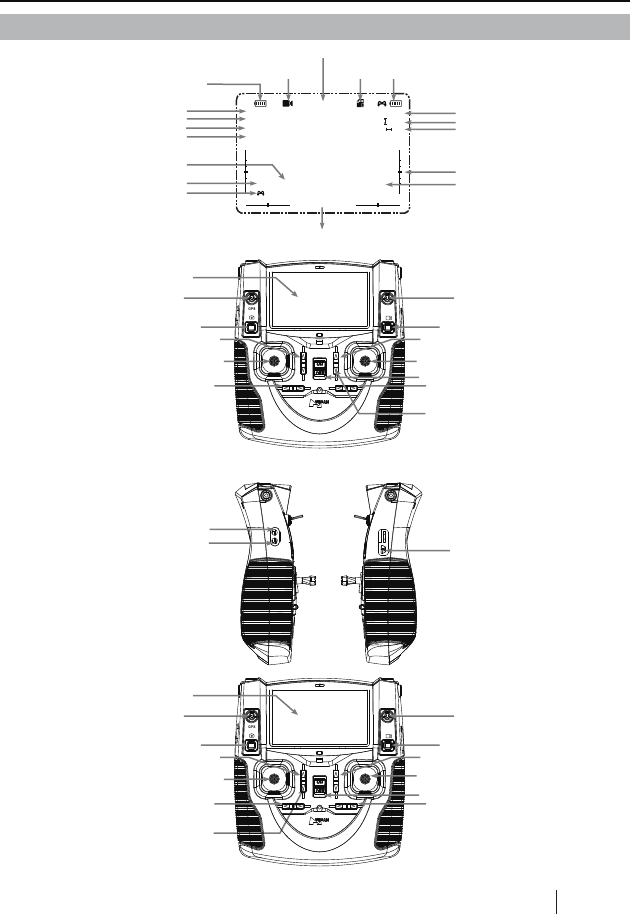
LCD
8 Photo
(MODE 1)
4 Elevator Trim
(2) Elevator/Rudder Stick
5 Rudder Trim
14 LED SW
14 LED SW
6 Throttle Trim
9 Video
(1) Throttle /Aileron Stick
7 Power SW
12 RTH SW
11 GPS SW
12 RTH SW
11 GPS SW
3 Aileron Trim
LCD
8 Photo
(MODE 2)
4 Elevator Trim
2 Elevator/Aileron Stick
5 Rudder Trim
6 Throttle Trim 9 Video
1 Throttle /Rudder Stick
7 Power SW
3 Aileron Trim
10 Video glasses socket
No function
13 USB Plug
HOME
Voltage
Quad copter’s
battery capacity
Recording time
SD Card Transmitter’s
battery capacity
Trimming
The display keep updating according to different functions
(eg:GPS Hold,Return Home,Follow me, Expert)
Latitude&Longitude
Record/Camera
status
Tilt Angle
Pitch Angle
Nose Orientation
GPS Signal
Quad copter’s GPS
Transmitter’s GPS
00:23:59
Altitude
GPS 6 N22.7914931 E:114.0479740
GPS 6 N:22.7914650 E:114.0479983
7.3V
HOME
7. TRANSMITTER
R 0
P 0
H 247
0.3m/s
1.5m
0m
Speed
Height
Distance
X4
X4

18©2016 Hubsan
哈博森科技 版权所有
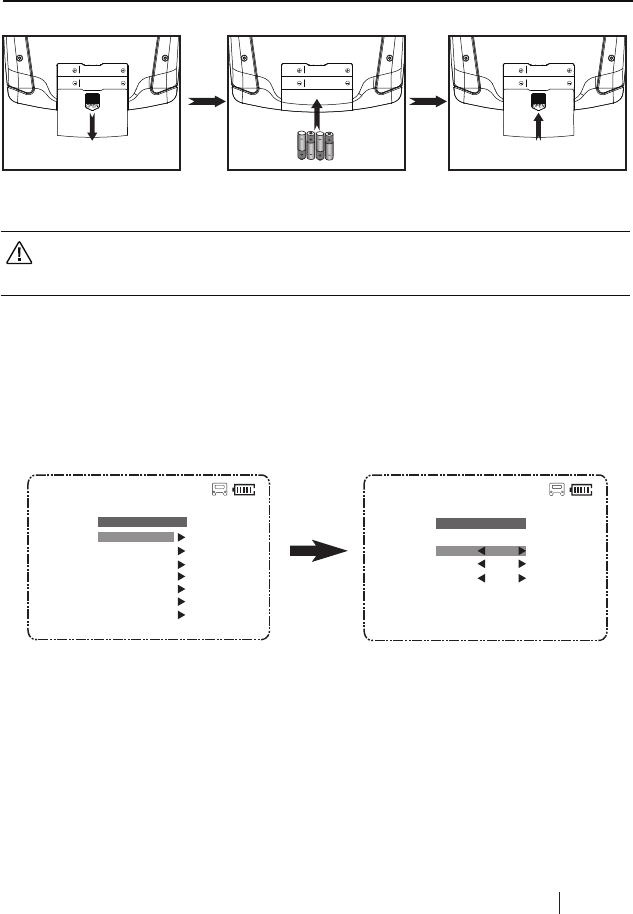
7.1 INPUT KEY FUNCTION
MODE 2
S/N Mode/ Control Function
MODE 1
(1)
Throttle/Aileron Stick
Push the stick forward or backward and the quadcopter will
ascend or decend; Push the stick left or right and the quadcopter
will fly left or right.
Push the stick forward or backward and the quadcopter will
ascend or decend; Push the stick left or right and the quadcopter
will rotate counter clockwise or clockwise.
MODE 1
(2)
Elevator/Rudder Stick
Push the stick forward or backward and the quadcopter will fly
forward or backward;Push the stick left or right and the quadcopter
will rotate counter clockwise or clockwise.
Push the stick forward or backward and the quadcopter will fly
forward or backward;Push the stick left or right and the quadcopter
will fly left or right.
3
Aileron Trim Aileron trim adjusts for left and right drift.
4
Elevator Trim Elevator trim adjusts for forward and backward drift.
5
Rudder Trim Rudder trim adjusts for drift of left and right rotation or yaw.
6
Throttle Trim Throttle trim is normally left at neutral.
7
Power Switch Push to turn on the transmitter. Push again to turn off.
MODE 2
2
Elevator /Aileron Stick
1
Throttle/ Rudder Stick
8
10
Photo
9
Video
Video glasses socket
Press the photo button to shoot photos.
Press video button to start recording and press again to stop.
Connect Hubsan video glasses (The video glass is not included)
13
USB plug For upgrading the software
14
LED SW To turn on/off LED motor indicators
11
GPS SW
Push the switch up, the bulit-in GPS will calculate the quad
copter’s position and height and help to keep the quad copter in a
stable hover (ONLY FOR OUTDOORS)
12
RTH SW Push the switch up, the quad copter will return to the home
point automatically ( ONLY FOR OUTDOORS)
19 ©2016 Hubsan
哈博森科技 版权所有
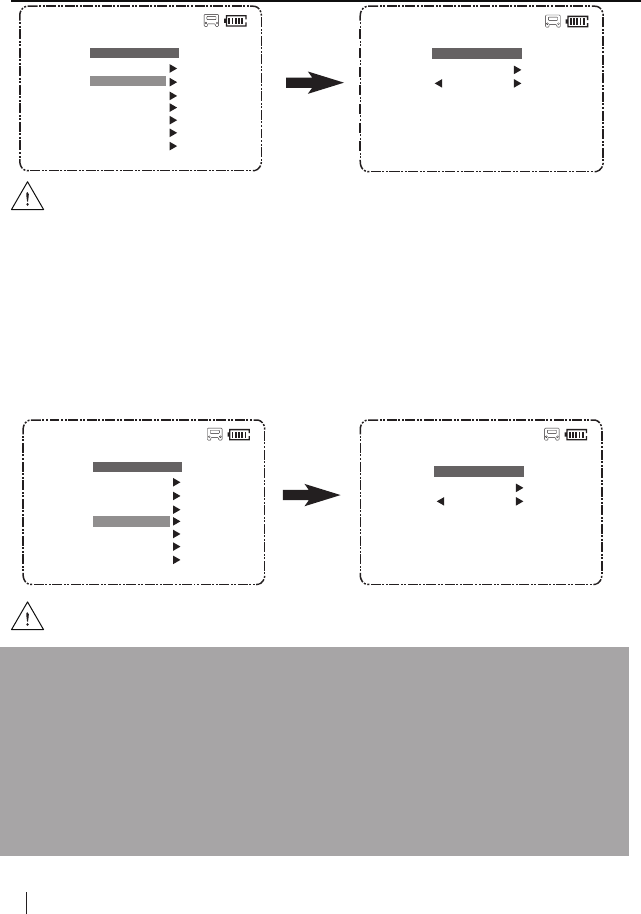
7.2 INSTALL THE TX BATTERY
7.3 REVERSING CHANNEL SETUP
If you would like to reverse any of the stick functions due to personal preference then follow
the instructions below. Be aware that it will change the controls back to front.
Pull the throttle stick to the lowest position and long press the Pitch stick simultaneously to
enter into MAIN MENU interface. Push the Elevator stick up/down to select “Set Reverse”.
Select “Exit” to exit.
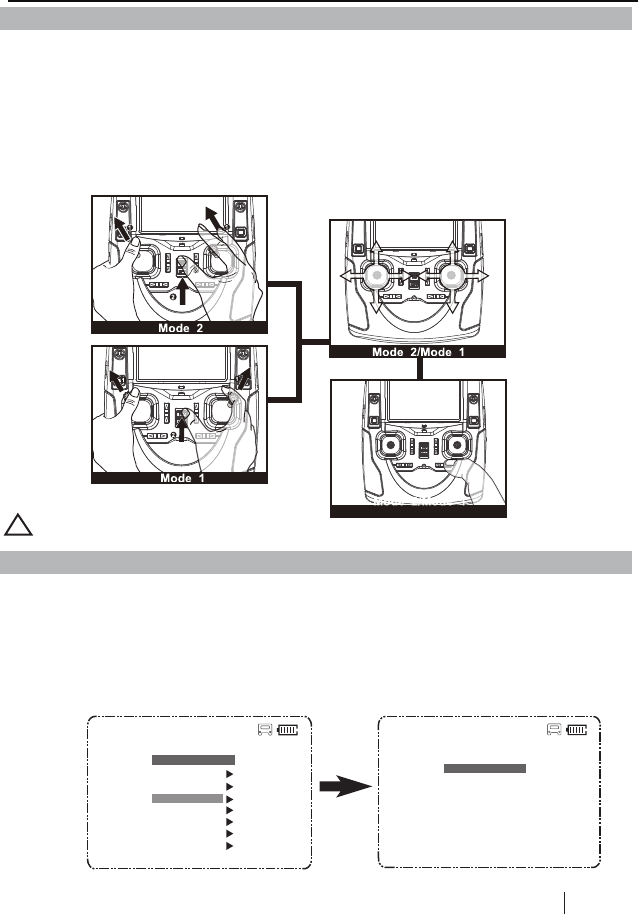
7.4 SENSITIVITY SETUP
If you would like to change the sensitivity of any of the stick functions then follow the
instructions below.
Pull the throttle stick to the lowest position and long press the Elevator stick to enter into the
MAIN MENU interface. Push the Elevator stick up/down to select “Set Sensitivity”, push the
stick right to enter into the “ set sensitivity” interface, select “Expert mode” or “ Normal
mode”.
Select” Exit” to exit.
0:08:49
SET REVERSE
NormalRudder
Aileron Normal
Normal
M2
Exit
Elevator
0:08:49
MAIN MENU
Set Reverse
Set Sensitivity
5.8G Frequency
Set Manual
Fly When no GPS
Show Version
Exit
M2
● Do not mix old and new batteries ● Do not mix different types of batteries
● Do not charge non-rechargeable battery.
Close the cover
Remove the cover Install 4 x AA batteries
according to the correct polarities
PUSH PUSH
20 ©2016 Hubsan
哈博森科技 版权所有
1. When the power on the transmitter runs low, the red LED will blink quickly and the LCD
screen will turn black, also the transmitter and X4 may disconnect. Please replace with new
batteries.
2. If the batteries in the transmitter runs low while flying the X4, you can still control the X4,
please land the X4 and then replace batteries.
3. The Transmitter can only use 2S Lipo batteries, 4XAA batteries or NI-MH AA batteries,
other batteries will damage the Transmitter.
Notice:
7.5 MANUAL MODE SETUP
If you would like to make acrobatic flights, such as throwing, please switch off the GPS
function and follow the instruction below to enter into the Manual mode
Pull the throttle stick to the lowest position and long press the Elevator stick to enter into the
MAIN MENU interface. Push the Elevator stick up/down to select “Set Manual”, push the
stick right to enter into the “ SET MANUAL” interface, select “ON” (without altitude function)
or “OFF” (with altitude function).Select” Exit” to exit.
Sensitivity default setting is in Expert Mode.
0:08:49
MAIN MENU
Set Reverse
Set Sensitivity
5.8G Frequency
Set Manual
Fly When no GPS
Show Version
Exit
M2
0:08:49
MAIN MENU
Set Reverse
Set Sensitivity
5.8G Frequency
Set Manual
Fly When no GPS
Show Version
Exit
M2
0:08:49
SET SENSITIVE
Elevator :
Aileron :
Rudder :
100
100
100
M2
Exit
Expert mode
Manual Mode default setting is OFF.
0:08:49 M2
SET MANUAL
Exit
OFF
21 ©2016 Hubsan
哈博森科技 版权所有
The transmitter will automatically find the best frequency to ensure a live video with good
quality of transmission. Please re-select the frequency from 5730MHZ to 5845MHZ to get a
better video transmission when necessary.
Pull the throttle stick to the lowest position and press the Elevator stick for 1.5 second to enter
into the MAIN MENU interface. Push the Elevator stick up/down to select “5.8G Frequency”,
push the stick to the right to enter into the “ 5.8G frequency” interface, select a matched
frequency.
Mode 2: Push both sticks to the upper left corner and power on the transmitter simultaneously
until “Calibrate Stick Mode 2” displays on LCD, rotate both sticks in circles for three times, then
release both sticks, press any trim for 1.5 seconds until the LED on the transmitter turns into
solid green which indicates a successful calibration.
Mode 1: Push the left stick to the upper left corner and the right stick to the upper right corner
and power on the transmitter simultaneously until “Calibrate Stick Mode 1” displays on LCD,
rotate both sticks in circles for three times, then release both sticks, press any trim for 1.5
seconds until the LED on the transmitter turns into solid green which indicates a successful
calibration.
!
5.8G FREQUENCY
0:08:49
Exit
5730MHZ
M2
0:08:49
MAIN MENU
Set Reverse
Set Sensitivity
5.8G Frequency
Set Manual
Fly When no GPS
Show Version
Exit
M2
8. TRANSMITTER CALIBRATION
9. FREQUENCY SELECTABLE 5.8GHZ
The transmitter mode can be shifted according to the above operation.
22 ©2016 Hubsan
哈博森科技 版权所有
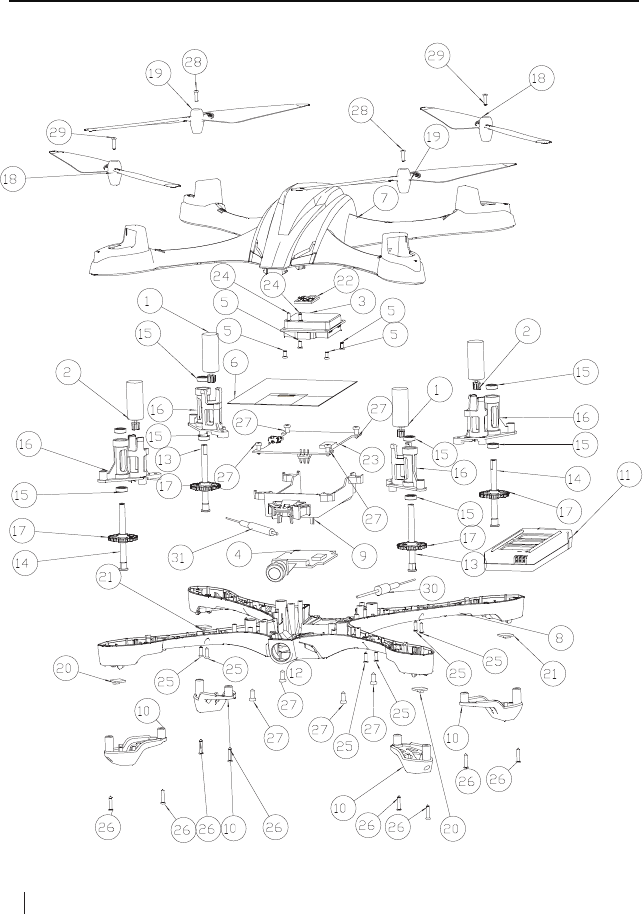
EXPLODED VIEW
23 ©2016 Hubsan
哈博森科技 版权所有
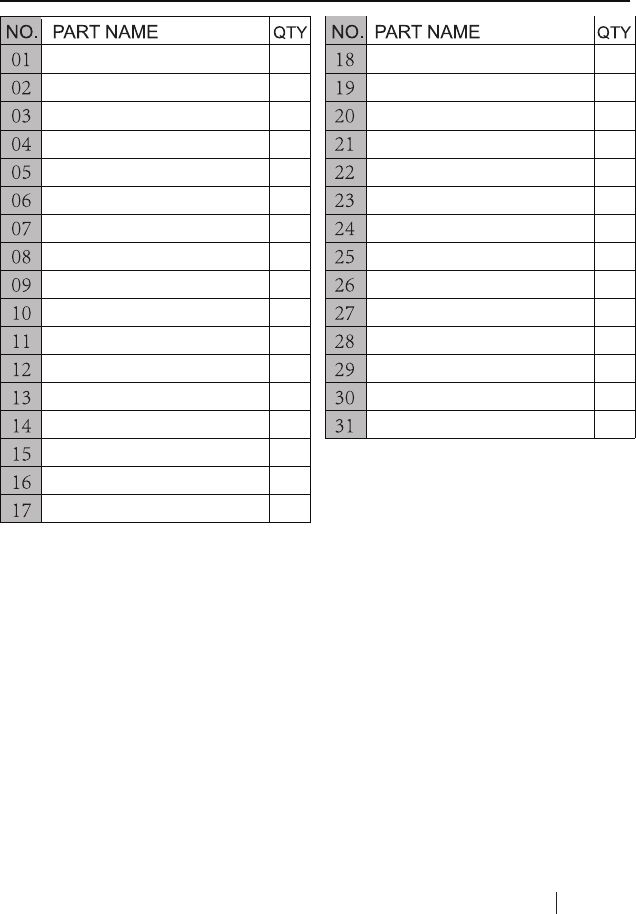
Motor B
Motor A
GPS Module
5.8 GHz Transmission Module
Screw(PB1.4*3)
Signal Isolation Membrane
Upper Body Shell
Lower Body Shell
Battery Compartment
Lampshade
Li-Po Battery
Camera Module
Motor Shaft B
Motor Shaft A
Shaft Sleeve
Motor Holder
Rotary Gear
Propeller A
Propeller B
Blue LED
Red LED
Compass Module
Main Control Board
Screw(PA1.4*4)
Screw(PA1.4*5)
Screw(PA1.4*6)
Screw(PA2.0*5)
Screw(PM1.4*5)
Screw(PM1.4*5)
5.8G Attenna
2.4G Attenna
2
2
1
1
4
1
1
1
1
4
1
1
2
2
8
4
4
2
2
2
2
1
1
2
8
8
8
2
2
1
1

24©2016 Hubsan
哈博森科技 版权所有
H507D TROUBLESHOOTING
1. Cannot bind!
① Check if the quadcopter and transmitter are powered on or not.
② Rebind the quadcopter and transmitter, please refer to the procedures instructed by point 5.3
in the manual.
2. Cannot arm the motors!
① Check if the compass calibration is completed or not.
② Make sure the Home switch on transmitter is off.
③ Calibrate the transmitter.
3. No GPS Signal!
Make sure it’s for outdoors flight, and the flight environment should be open without tall
buildings.
4. Altitude Hold do not work!
① Check if the barameter parameters on transmitter are OK or not;
② Clibrate the transmitter.
5. Positioning do not work!
① Check if the quadcopter is with more than 6 GPS satellites or not.
② Calibrate the transmitter.
6. Cannot take pictures or videos!
① Check if the Micro-SD card is inserted or not.
② Check if the Micro-SD card is formatted correctly or not (Format the Mirco-SD card before use, if
the Micro-SD card is with FAT32, the card should be Class 4 or Class 4+)
7. Cannot fly back to Home Point!
Be sure the GPS satellites are more than 6 before flying.
8. GPS signal lost!
Check if there is any interference to quad or not, for example: high-tension cables, radio tower.
9. The quad or video shakes while flying
① Check the propellers, replace propellers if there is any broken or deformed;
② Check the screws on quadcopter are fixed in place or not;
③ Check the motor shaft is broken or not.

FCC INFORMATION
This equipment has been tested and found to comply with the limits for a Class B digital
device, pursuant to Part 15 of the FCC Rules. These limits are designed to provide
reasonable protection against harmful interference in a residential installation. This
equipment generates, uses, and can radiate radio frequency energy and, if not installed
and used in accordance with the instructions, may cause harmful interference to radio
communications. However, there is no guarantee that interference will not occur in a
particular installation. If this equipment does cause harmful interference to radio or
television reception, which can be determined by turning the equipment off and on, the
user is encouraged to try to correct the interference by one or more of the following
measures:
• Reorient or relocate the receiving antenna.
• Increase the separation between the equipment and receiver.
• Connect the equipment into an outlet on a circuit different from that to which the receiver
is connected.
• Consult the local dealer or an experienced radio/TV technician for help.
Changes or modifications not expressly approved by the party responsible for
compliance could void the user’s authority to operate the equipment.
This device complies with Part 15 of the FCC Rules. Operation is subject to the following
two conditions: (1) this device may not cause harmful interference, and (2) this device
must accept any interference received, including interference that may cause undesired
operation.
CAUTION
RISK OF EXPLOSION IF BATTERY IS REPLACED
BY AN INCORRECT TYPE,
DISPOSE OF USED BATTERIES ACCORDING
TO THE INSTRUCTIONS
Environmentally friendly disposal
Old electrical appliances must not be disposed of together with the residual waste, but have to
be disposed of separately. The disposal at the communal collecting point via private persons is
for free.
The owner of old appliances is responsible to bring the appliances to thise collecting
points or to similar collection points. With this little personal effort, you contribute to
recycle valuable raw materials and the treatment of toxic substances.
25©2016 Hubsan
哈博森科技 版权所有

User manual is subject to change without prior notice due to
unforseen product upgrades.
WWW.HUBSAN.COM
VERSION 1.0 EN
H507A TROUBLESHOOTING
26©2016 Hubsan
哈博森科技 版权所有