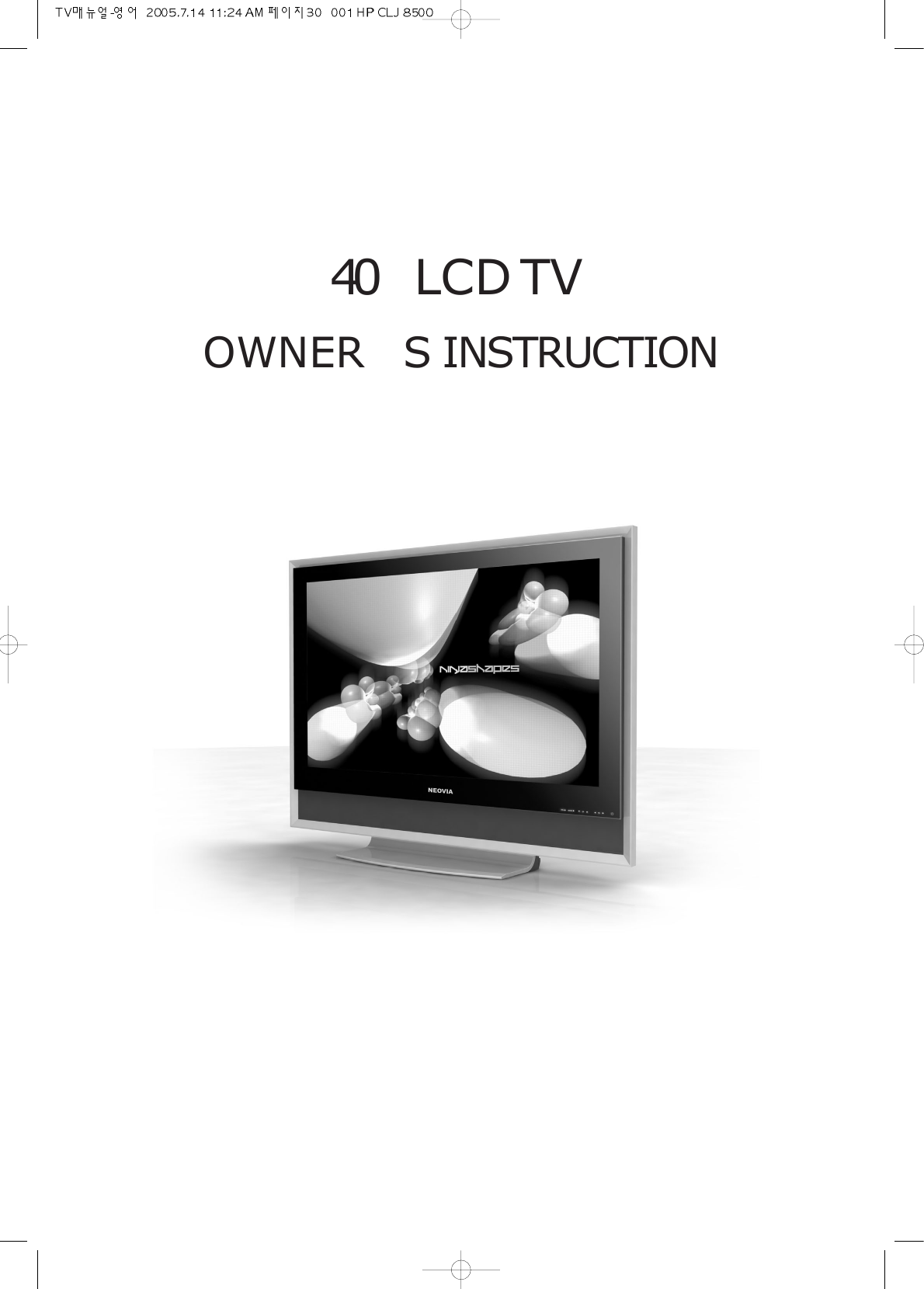
LPS Device NEO-4005LS LCD TV & MONITOR User Manual USERS MANUAL 3

LPS Device Co., Ltd. LCD TV & MONITOR USERS MANUAL 3

Contents

USERS MANUAL 3

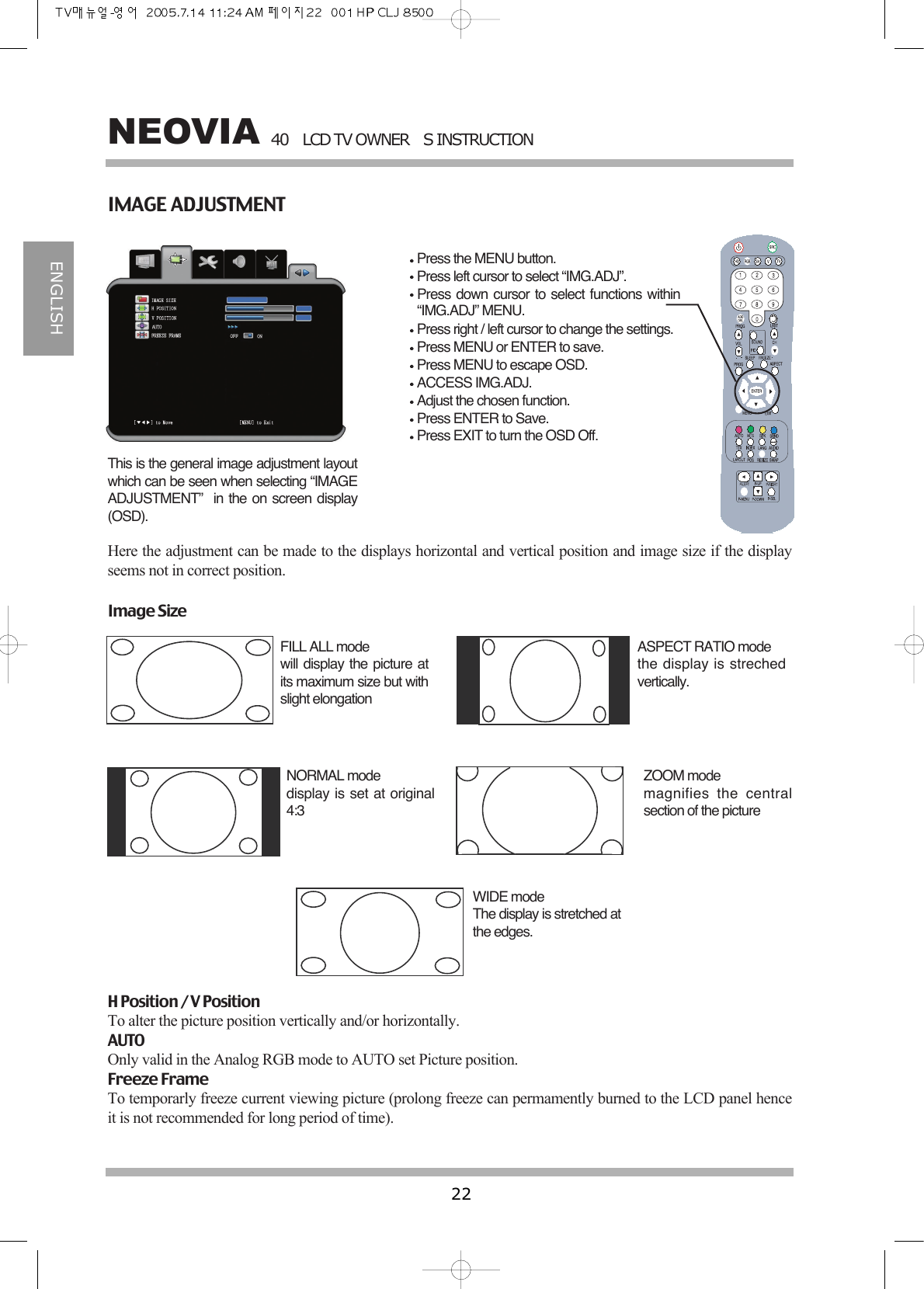
40LCD TV OWNERS INSTRUCTION22NEOVIAENGLISHIMAGE ADJUSTMENTPress the MENU button.Press left cursor to select “IMG.ADJ”.Press down cursor to select functions within“IMG.ADJ” MENU.Press right / left cursor to change the settings.Press MENU or ENTER to save.Press MENU to escape OSD.ACCESS IMG.ADJ.Adjust the chosen function.Press ENTER to Save.Press EXIT to turn the OSD Off.This is the general image adjustment layoutwhich can be seen when selecting “IMAGEADJUSTMENT”  in the on screen display(OSD).Here the adjustment can be made to the displays horizontal and vertical position and image size if the displayseems not in correct position.Image SizeFILL ALL modewill display the picture atits maximum size but withslight elongation ASPECT RATIO modethe display is strechedvertically.NORMAL modedisplay is set at original4:3 ZOOM modemagnifies the centralsection of the pictureWIDE modeThe display is stretched atthe edges.H Position / V PositionTo alter the picture position vertically and/or horizontally.AUTOOnly valid in the Analog RGB mode to AUTO set Picture position.Freeze FrameTo temporarly freeze current viewing picture (prolong freeze can permamently burned to the LCD panel henceit is not recommended for long period of time).
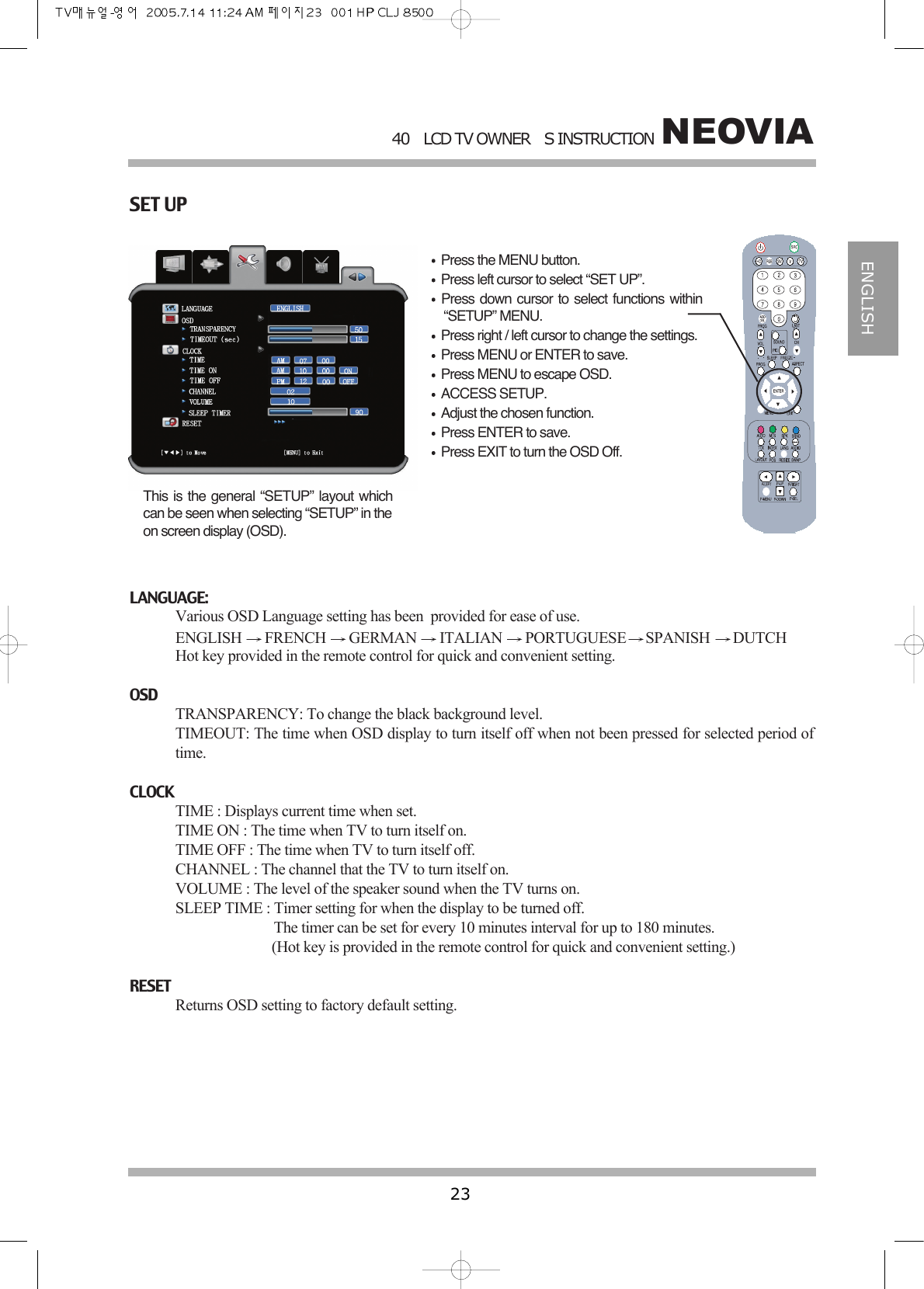
NEOVIA40LCD TV OWNERS INSTRUCTION23ENGLISHSET UPPress the MENU button.Press left cursor to select “SET UP”.Press down cursor to select functions within“SETUP” MENU.Press right / left cursor to change the settings.Press MENU or ENTER to save.Press MENU to escape OSD.ACCESS SETUP.Adjust the chosen function.Press ENTER to save.Press EXIT to turn the OSD Off.This is the general “SETUP” layout whichcan be seen when selecting “SETUP” in theon screen display (OSD).LANGUAGE:Various OSD Language setting has been  provided for ease of use.ENGLISH  FRENCH  GERMAN  ITALIAN  PORTUGUESE SPANISH  DUTCH Hot key provided in the remote control for quick and convenient setting.OSDTRANSPARENCY: To change the black background level.TIMEOUT: The time when OSD display to turn itself off when not been pressed for selected period oftime.CLOCKTIME : Displays current time when set.TIME ON : The time when TV to turn itself on.TIME OFF : The time when TV to turn itself off.CHANNEL : The channel that the TV to turn itself on.VOLUME : The level of the speaker sound when the TV turns on.SLEEP TIME : Timer setting for when the display to be turned off.The timer can be set for every 10 minutes interval for up to 180 minutes.(Hot key is provided in the remote control for quick and convenient setting.)RESETReturns OSD setting to factory default setting.
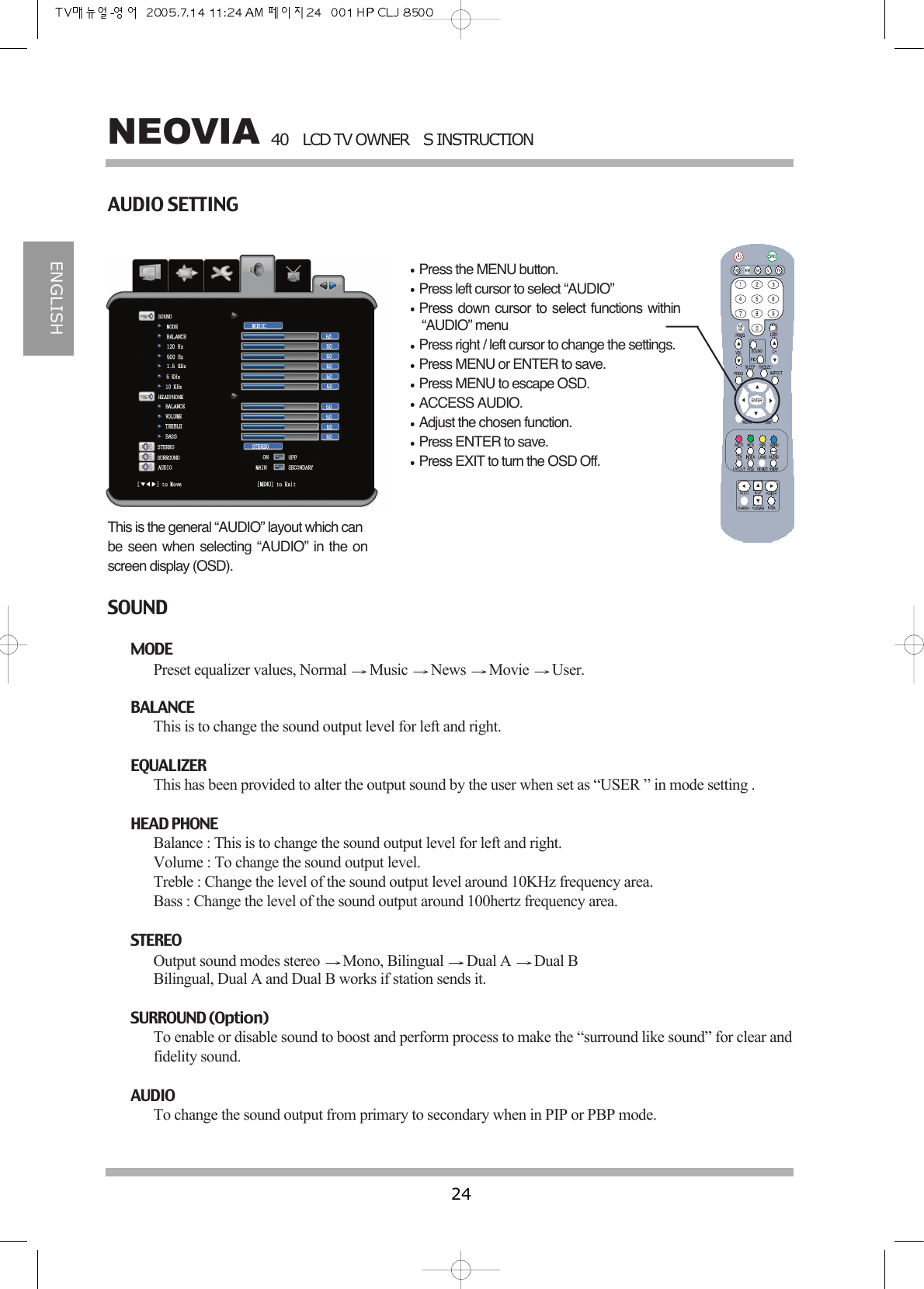
40LCD TV OWNERS INSTRUCTION24NEOVIAENGLISHAUDIO SETTINGPress the MENU button.Press left cursor to select “AUDIO”Press down cursor to select functions within“AUDIO” menuPress right / left cursor to change the settings.Press MENU or ENTER to save.Press MENU to escape OSD.ACCESS AUDIO.Adjust the chosen function.Press ENTER to save.Press EXIT to turn the OSD Off.This is the general “AUDIO” layout which canbe seen when selecting “AUDIO” in the onscreen display (OSD).SOUNDMODE Preset equalizer values, Normal  Music  News  Movie  User.BALANCEThis is to change the sound output level for left and right.EQUALIZERThis has been provided to alter the output sound by the user when set as “USER ” in mode setting .HEAD PHONEBalance : This is to change the sound output level for left and right.Volume : To change the sound output level.Treble : Change the level of the sound output level around 10KHz frequency area.Bass : Change the level of the sound output around 100hertz frequency area.STEREOOutput sound modes stereo  Mono, Bilingual  Dual A  Dual BBilingual, Dual A and Dual B works if station sends it.SURROUND (Option)To enable or disable sound to boost and perform process to make the “surround like sound” for clear andfidelity sound.AUDIOTo change the sound output from primary to secondary when in PIP or PBP mode.
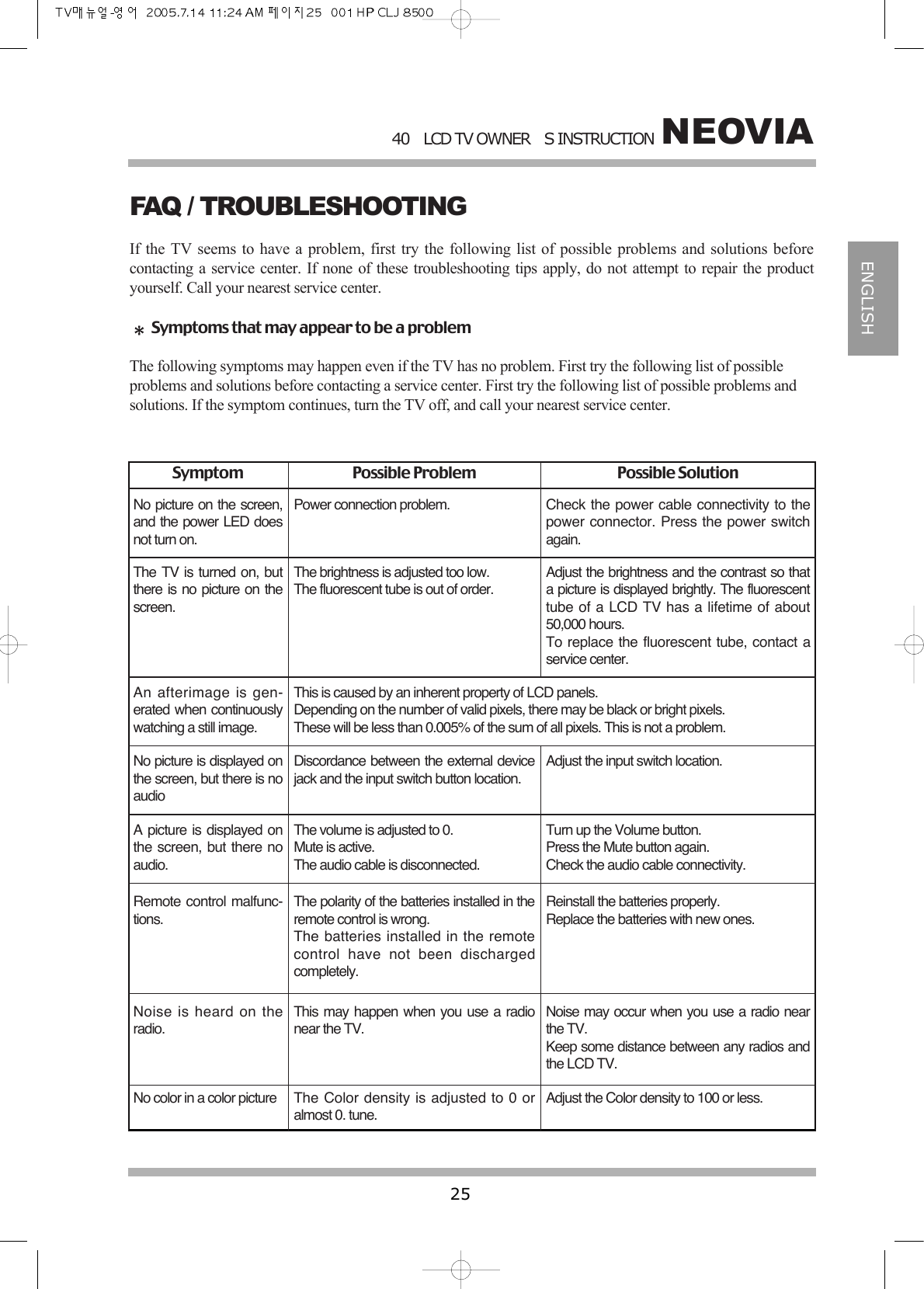
NEOVIA40LCD TV OWNERS INSTRUCTION25ENGLISHFAQ / TROUBLESHOOTINGIf the TV seems to have a problem, first try the following list of possible problems and solutions beforecontacting a service center. If none of these troubleshooting tips apply, do not attempt to repair the productyourself. Call your nearest service center.Symptoms that may appear to be a problemThe following symptoms may happen even if the TV has no problem. First try the following list of possibleproblems and solutions before contacting a service center. First try the following list of possible problems andsolutions. If the symptom continues, turn the TV off, and call your nearest service center.Symptom Possible Problem Possible SolutionNo picture on the screen,and the power LED doesnot turn on.The TV is turned on, butthere is no picture on thescreen.An afterimage is gen-erated when continuouslywatching a still image.Power connection problem.The brightness is adjusted too low.The fluorescent tube is out of order.This is caused by an inherent property of LCD panels.Depending on the number of valid pixels, there may be black or bright pixels.These will be less than 0.005% of the sum of all pixels. This is not a problem.No picture is displayed onthe screen, but there is noaudioA picture is displayed onthe screen, but there noaudio.Remote control malfunc-tions.Discordance between the external devicejack and the input switch button location.The volume is adjusted to 0.Mute is active.The audio cable is disconnected.The polarity of the batteries installed in theremote control is wrong.The batteries installed in the remotecontrol have not been dischargedcompletely.Adjust the input switch location.Turn up the Volume button.Press the Mute button again.Check the audio cable connectivity.Reinstall the batteries properly.Replace the batteries with new ones.Noise is heard on theradio.No color in a color pictureThis may happen when you use a radionear the TV.The Color density is adjusted to 0 oralmost 0. tune.Noise may occur when you use a radio nearthe TV.Keep some distance between any radios andthe LCD TV.Adjust the Color density to 100 or less.Check the power cable connectivity to thepower connector. Press the power switchagain.Adjust the brightness and the contrast so thata picture is displayed brightly. The fluorescenttube of a LCD TV has a lifetime of about50,000 hours.To replace the fluorescent tube, contact aservice center.
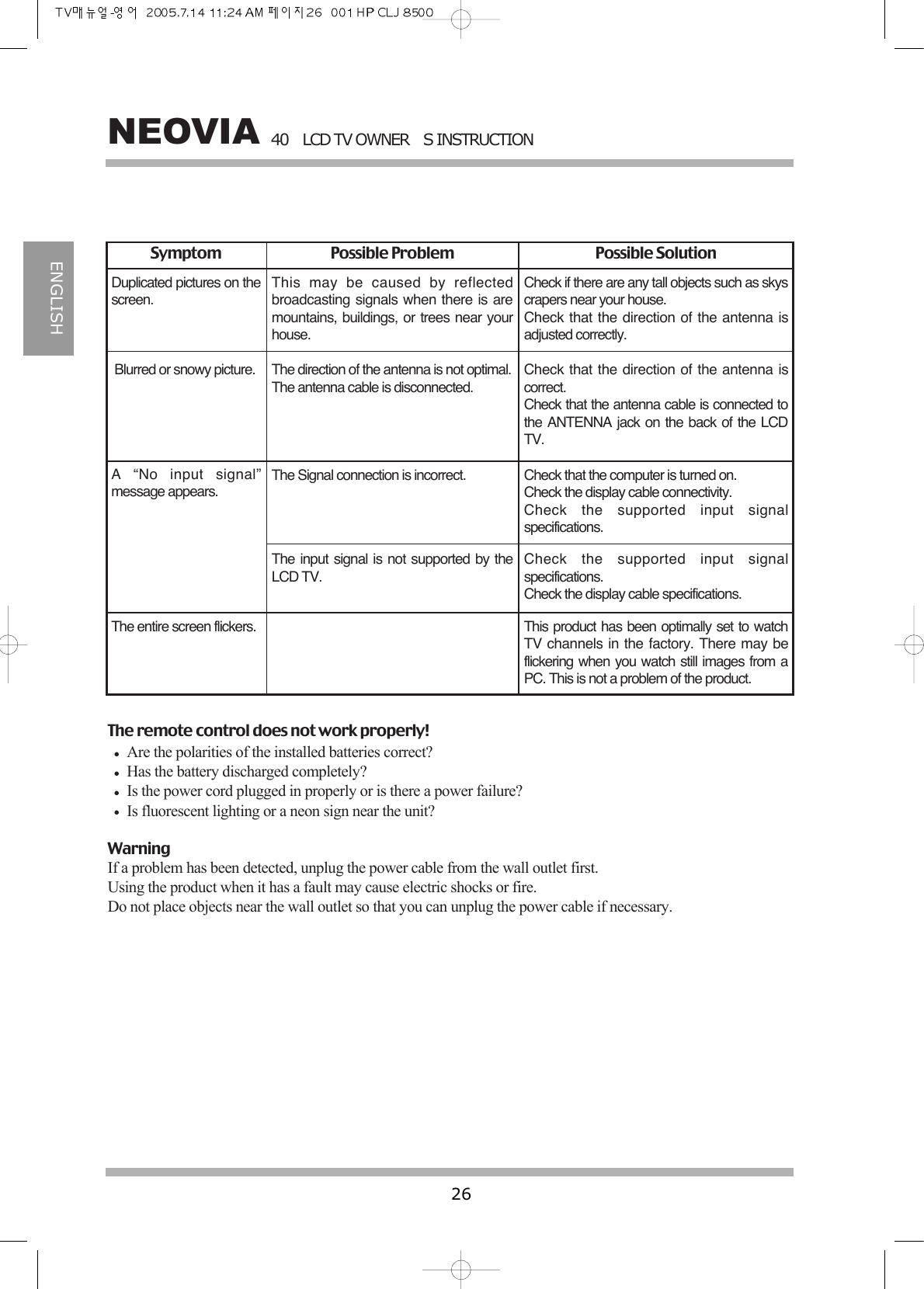
40LCD TV OWNERS INSTRUCTION26NEOVIAENGLISHDuplicated pictures on thescreen.This may be caused by reflectedbroadcasting signals when there is aremountains, buildings, or trees near yourhouse.Check if there are any tall objects such as skyscrapers near your house.Check that the direction of the antenna isadjusted correctly.Blurred or snowy picture. The direction of the antenna is not optimal.The antenna cable is disconnected.Check that the direction of the antenna iscorrect.Check that the antenna cable is connected tothe ANTENNA jack on the back of the LCDTV.A “No input signal”message appears.The Signal connection is incorrect. Check that the computer is turned on.Check the display cable connectivity.Check the supported input signalspecifications.The input signal is not supported by theLCD TV.Check the supported input signalspecifications.Check the display cable specifications.The entire screen flickers. This product has been optimally set to watchTV channels in the factory. There may beflickering when you watch still images from aPC. This is not a problem of the product.Symptom Possible Problem Possible SolutionThe remote control does not work properly!Are the polarities of the installed batteries correct?Has the battery discharged completely?Is the power cord plugged in properly or is there a power failure?Is fluorescent lighting or a neon sign near the unit?WarningIf a problem has been detected, unplug the power cable from the wall outlet first.Using the product when it has a fault may cause electric shocks or fire.Do not place objects near the wall outlet so that you can unplug the power cable if necessary.
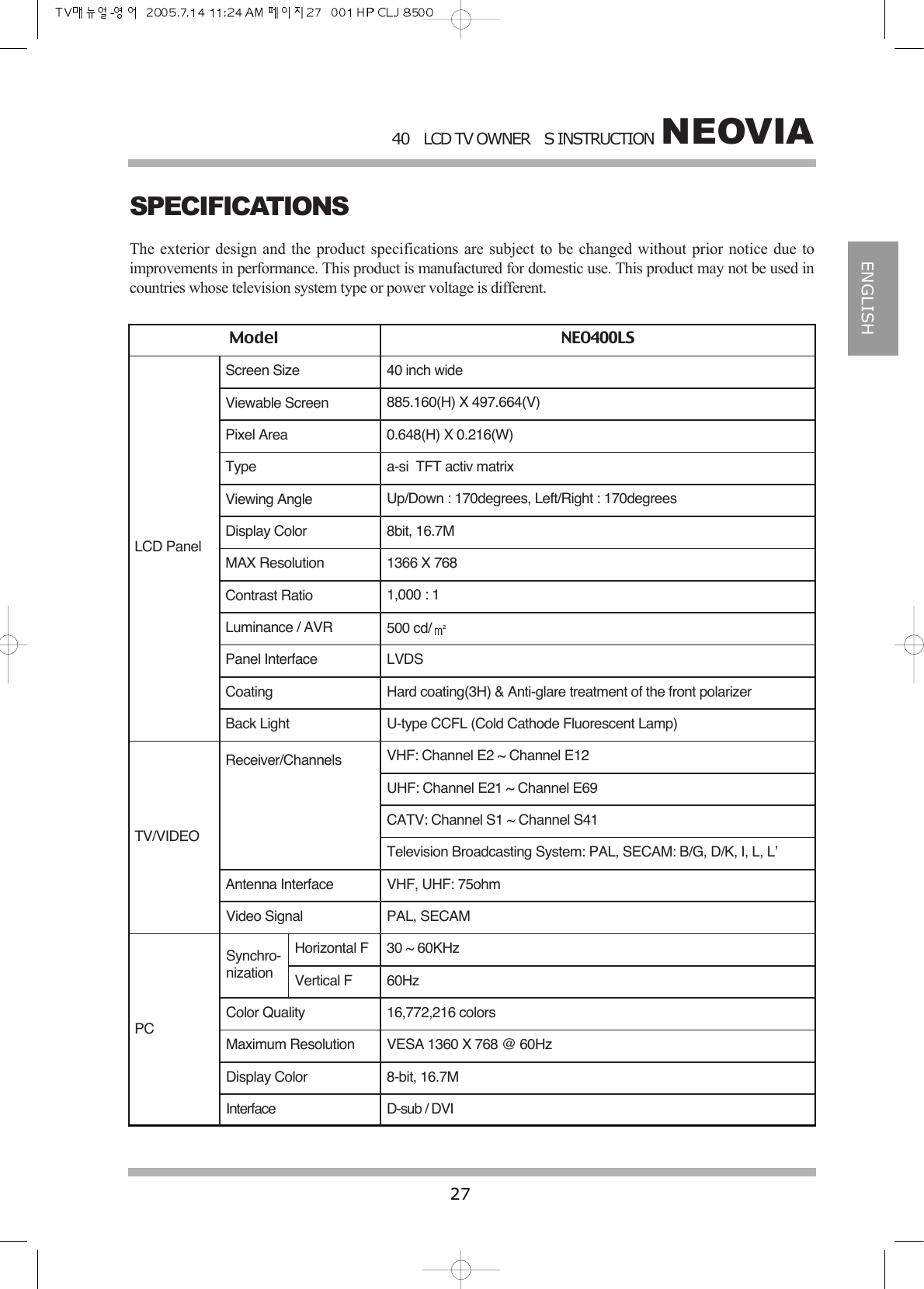
NEOVIA40LCD TV OWNERS INSTRUCTION27ENGLISHSPECIFICATIONSThe exterior design and the product specifications are subject to be changed without prior notice due toimprovements in performance. This product is manufactured for domestic use. This product may not be used incountries whose television system type or power voltage is different.Model NEO400LSLCD PanelTV/VIDEO PCScreen Size 40 inch wideViewable Screen 885.160(H) X 497.664(V)Pixel Area 0.648(H) X 0.216(W)Type a-si  TFT activ matrixViewing Angle Up/Down : 170degrees, Left/Right : 170degreesDisplay Color 8bit, 16.7MMAX Resolution 1366 X 768Contrast Ratio 1,000 : 1Luminance / AVR 500 cd/Panel Interface LVDSCoating Hard coating(3H) & Anti-glare treatment of the front polarizerBack Light U-type CCFL (Cold Cathode Fluorescent Lamp)Receiver/Channels VHF: Channel E2 ~ Channel E12UHF: Channel E21 ~ Channel E69CATV: Channel S1 ~ Channel S41Television Broadcasting System: PAL, SECAM: B/G, D/K, I, L, L’Antenna Interface VHF, UHF: 75ohmVideo Signal PAL, SECAMSynchro-nizationHorizontal FVertical F30 ~ 60KHz60HzColor Quality 16,772,216 colorsMaximum Resolution VESA 1360 X 768 @ 60HzDisplay Color 8-bit, 16.7MInterface D-sub / DVI
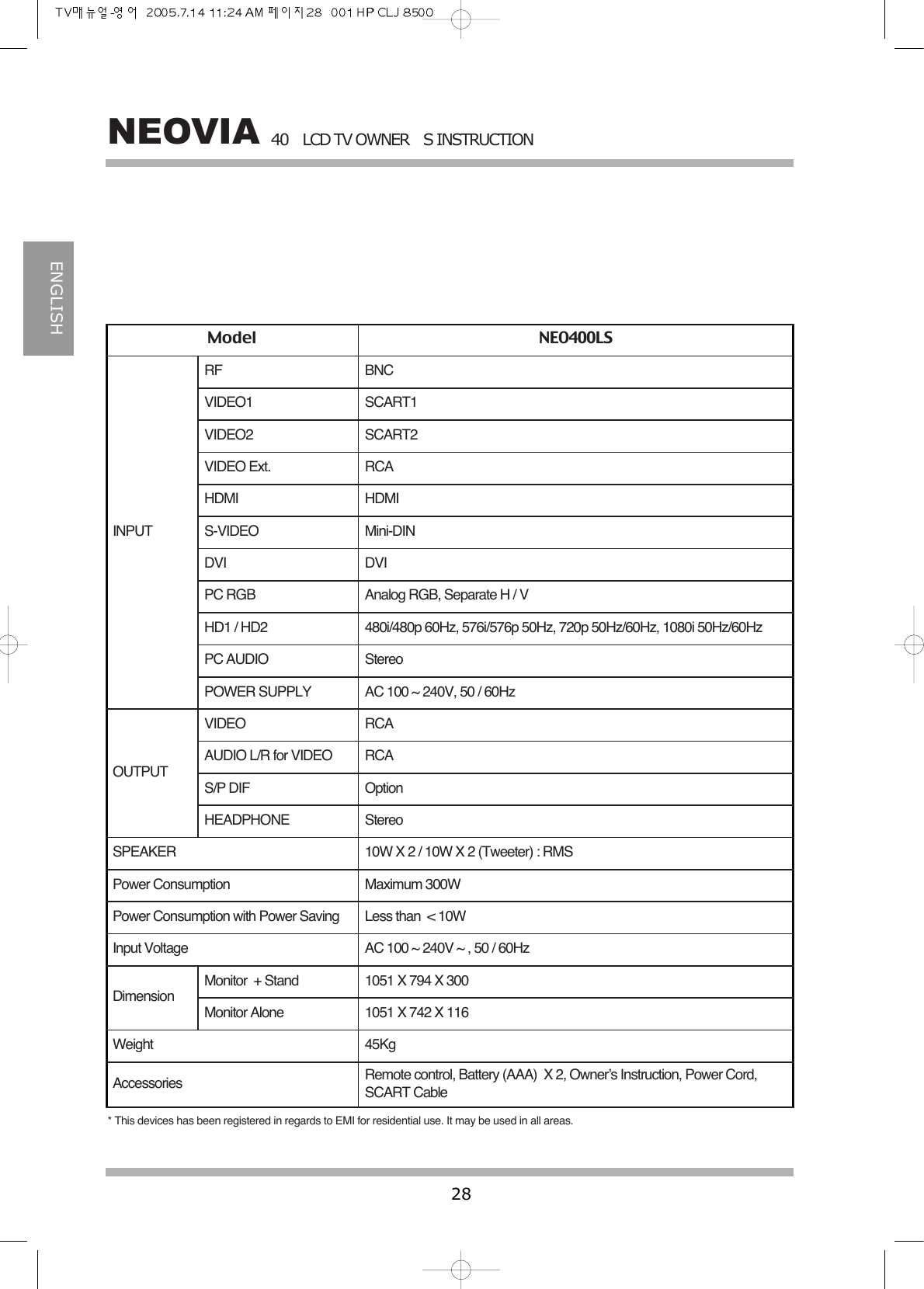
40LCD TV OWNERS INSTRUCTION28NEOVIAENGLISHModel NEO400LSINPUTOUTPUTDimensionRFVIDEO1VIDEO2VIDEO Ext.HDMI S-VIDEODVIPC RGBHD1 / HD2PC AUDIOPOWER SUPPLYVIDEOAUDIO L/R for VIDEOS/P DIFHEADPHONESPEAKERPower ConsumptionPower Consumption with Power SavingInput VoltageMonitor  + StandMonitor AloneWeightBNCSCART1SCART2RCAHDMIMini-DINDVIAnalog RGB, Separate H / V480i/480p 60Hz, 576i/576p 50Hz, 720p 50Hz/60Hz, 1080i 50Hz/60HzStereoAC 100 ~ 240V, 50 / 60HzRCARCAOptionStereo10W X 2 / 10W X 2 (Tweeter) : RMSMaximum 300WLess than  < 10WAC 100 ~ 240V ~ , 50 / 60Hz1051 X 794 X 3001051 X 742 X 11645KgAccessories Remote control, Battery (AAA) X 2, Owner’s Instruction, Power Cord,SCART Cable* This devices has been registered in regards to EMI for residential use. It may be used in all areas.
Pour toute question, n’hesitez pas a contracter la HOTLINE :In case of any question, do not hesitate to contact the HOTLINE:France / France : 0 892 02 17 56Italie / Italy : 0296 172 240Royaume-Uni / UK : 08 70 60 91 564Belgique / Belgium : 064 237 181Luxembourg / Luxemburg : 00 32 64 237 181Hollande / Netherland : 00 32 64 237 181Suisse / Switzerland : 0844 810 110Espagne / Spain : 902 100 424Portugal / Portugal : 229 408 962
40L C D  T VOWNERS INSTRUCTION

Navigation menu