Thomson Broadcast and Multimedia LBD-25200 Affinity L-Band Transmitter for Mobile Media Svs. User Manual Affinity LBD 200C N1 DRAFT1

Thomson Broadcast & Multimedia, Inc. Affinity L-Band Transmitter for Mobile Media Svs. Affinity LBD 200C N1 DRAFT1

200W User Manual part 3
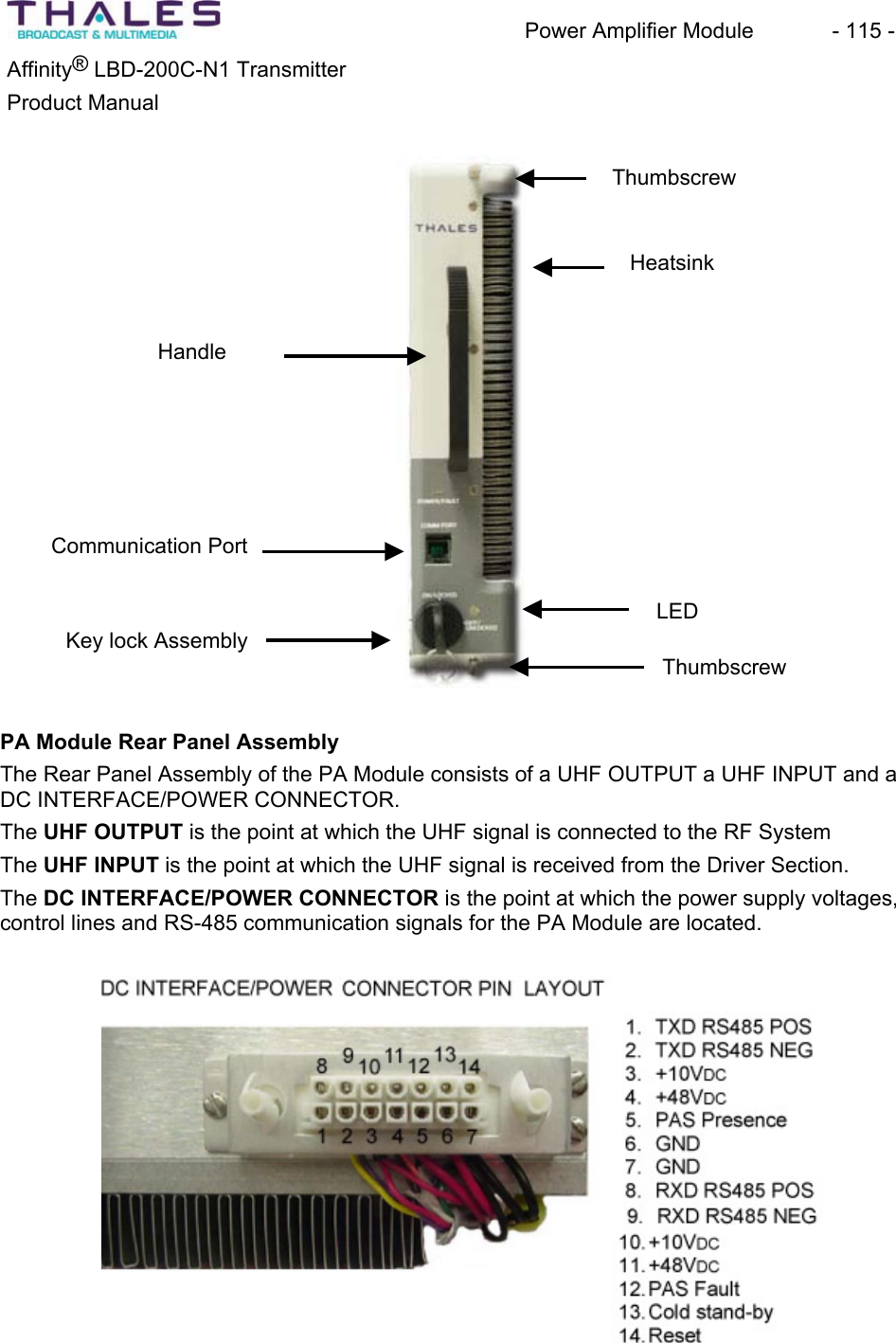
Power Amplifier Module  - 115 - ®Affinity  LBD-200C-N1 TransmitterProduct Manual ThumbscrewHeatsinkHandleKey lock AssemblyLEDThumbscrewCommunication Port PA Module Rear Panel AssemblyThe Rear Panel Assembly of the PA Module consists of a UHF OUTPUT a UHF INPUT and a DC INTERFACE/POWER CONNECTOR.The UHF OUTPUT is the point at which the UHF signal is connected to the RF SystemThe UHF INPUT is the point at which the UHF signal is received from the Driver Section. The DC INTERFACE/POWER CONNECTOR is the point at which the power supply voltages, control lines and RS-485 communication signals for the PA Module are located.
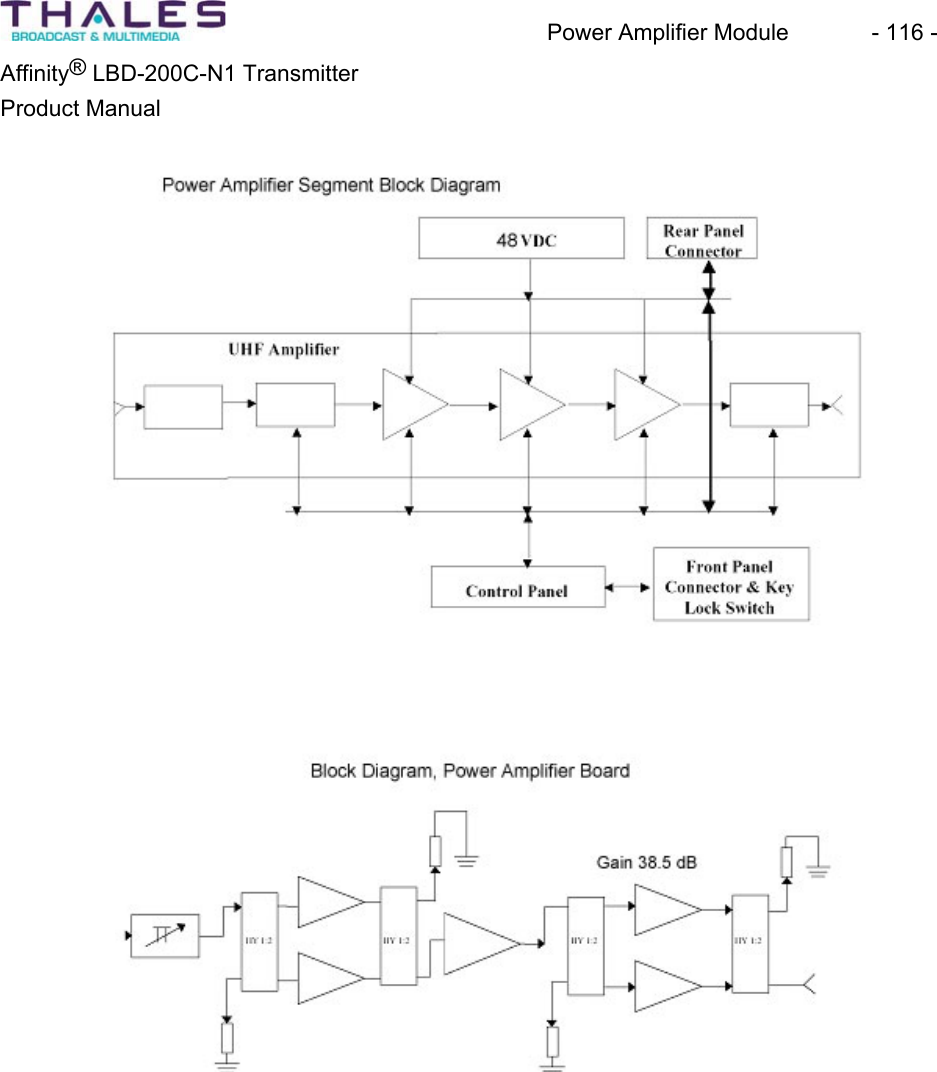
Power Amplifier Module  - 116 - Affinity® LBD-200C-N1 TransmitterProduct Manual
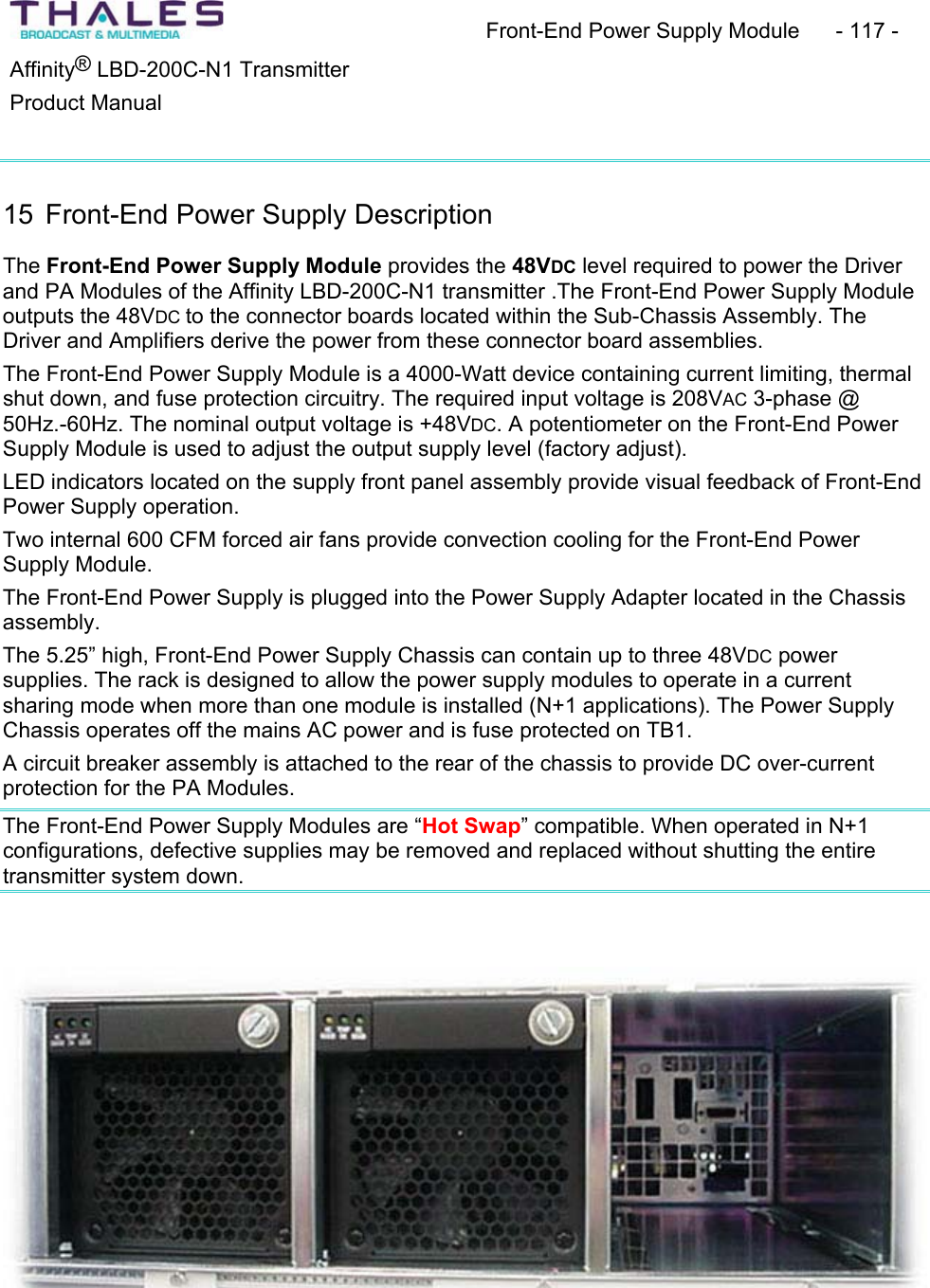
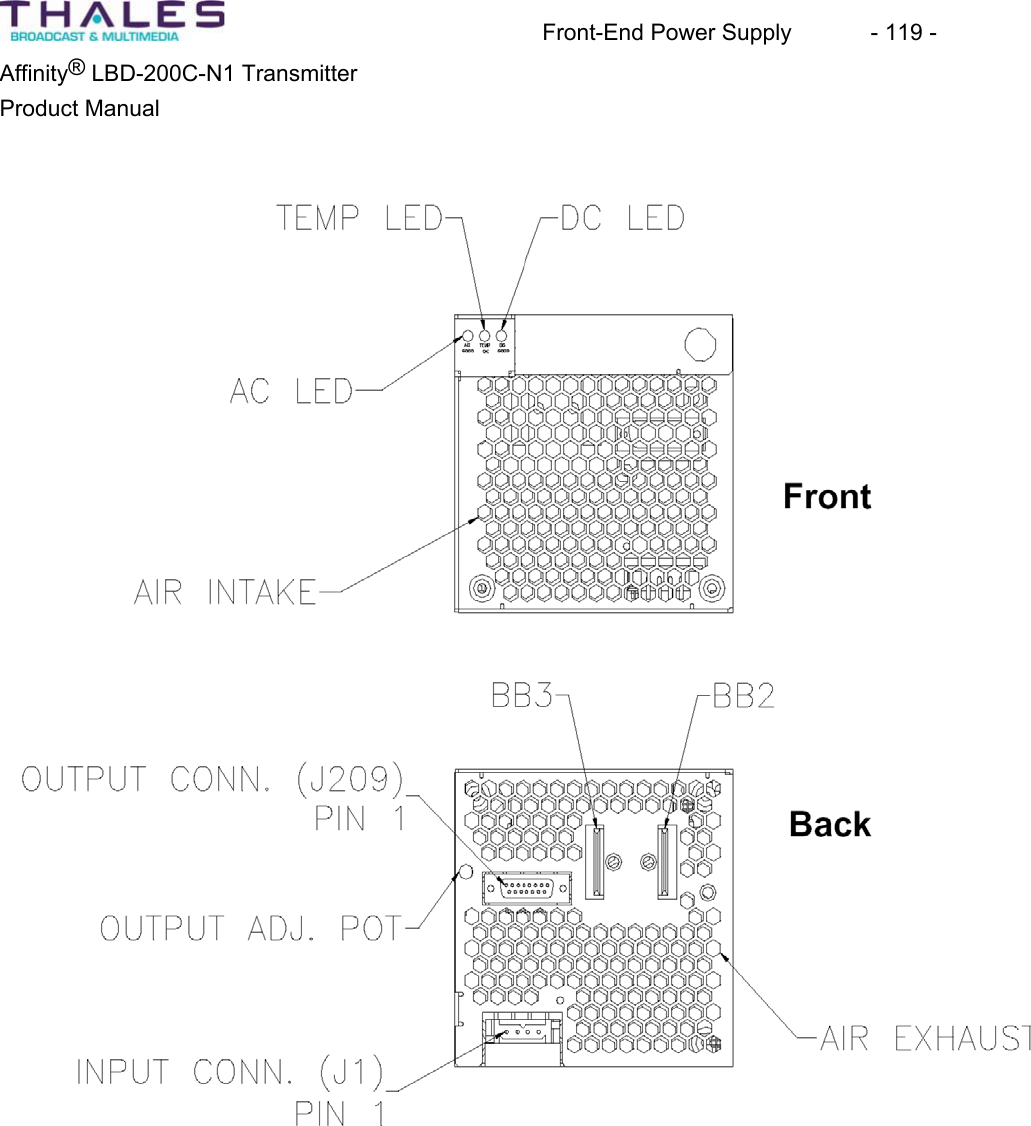
Front-End Power Supply Module  - 117 - ®Affinity  LBD-200C-N1 TransmitterProduct Manual 15 Front-End Power Supply DescriptionThe Front-End Power Supply Module provides the 48VDC level required to power the Driver and PA Modules of the Affinity LBD-200C-N1 transmitter .The Front-End Power Supply Module outputs the 48VDC to the connector boards located within the Sub-Chassis Assembly. The Driver and Amplifiers derive the power from these connector board assemblies.The Front-End Power Supply Module is a 4000-Watt device containing current limiting, thermal shut down, and fuse protection circuitry. The required input voltage is 208VAC 3-phase @ 50Hz.-60Hz. The nominal output voltage is +48VDC. A potentiometer on the Front-End Power Supply Module is used to adjust the output supply level (factory adjust). LED indicators located on the supply front panel assembly provide visual feedback of Front-End Power Supply operation. Two internal 600 CFM forced air fans provide convection cooling for the Front-End Power Supply Module.The Front-End Power Supply is plugged into the Power Supply Adapter located in the Chassisassembly.The 5.25” high, Front-End Power Supply Chassis can contain up to three 48VDC powersupplies. The rack is designed to allow the power supply modules to operate in a currentsharing mode when more than one module is installed (N+1 applications). The Power Supply Chassis operates off the mains AC power and is fuse protected on TB1. A circuit breaker assembly is attached to the rear of the chassis to provide DC over-current protection for the PA Modules.The Front-End Power Supply Modules are “Hot Swap” compatible. When operated in N+1 configurations, defective supplies may be removed and replaced without shutting the entire transmitter system down.
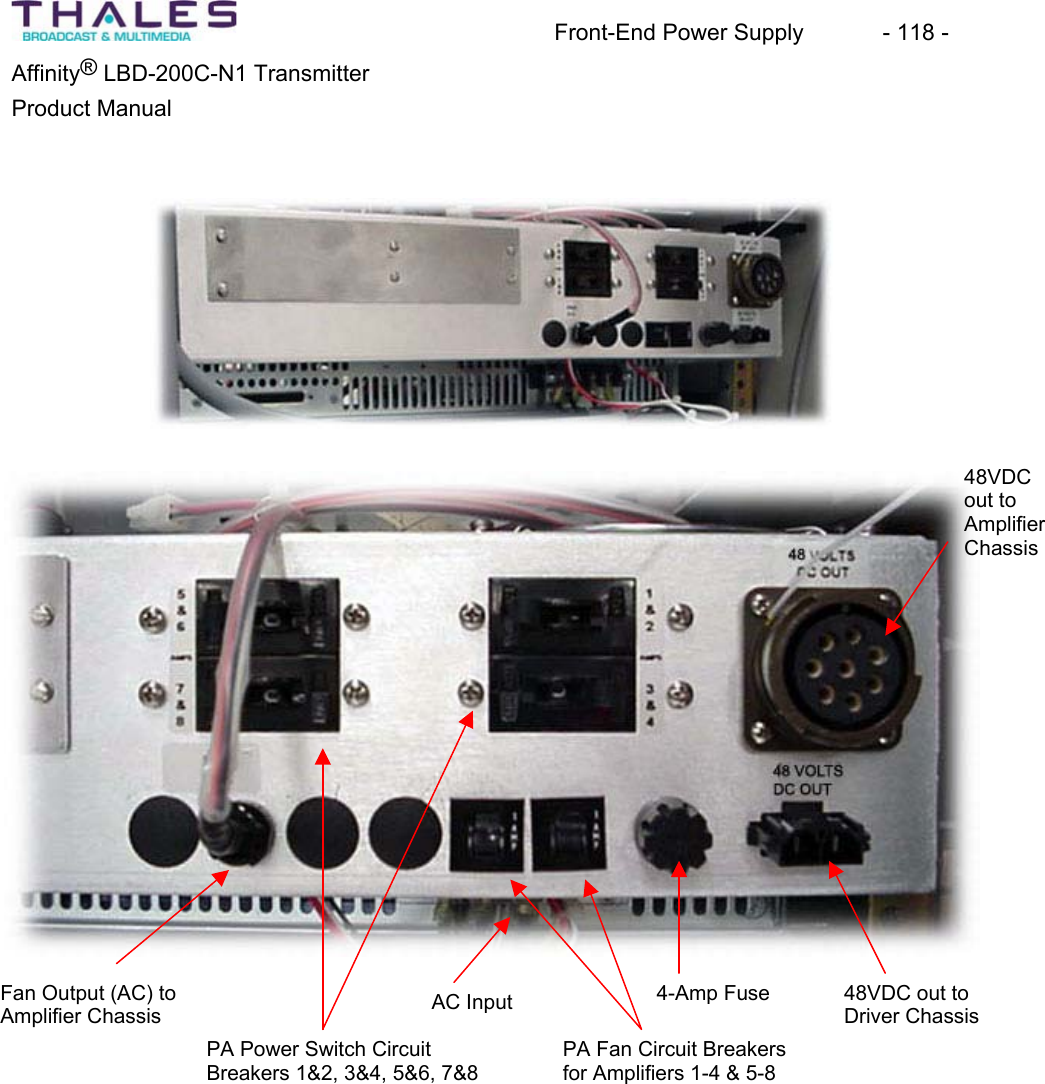
Front-End Power Supply  - 118 - Affinity® LBD-200C-N1 TransmitterProduct Manual 48VDCout to AmplifierChassisPA Power Switch CircuitBreakers 1&2, 3&4, 5&6, 7&848VDC out to Driver Chassis4-Amp FusePA Fan Circuit Breakersfor Amplifiers 1-4 & 5-8 AC InputFan Output (AC) to Amplifier Chassis
Front-End Power Supply  - 119 - Affinity® LBD-200C-N1 TransmitterProduct Manual
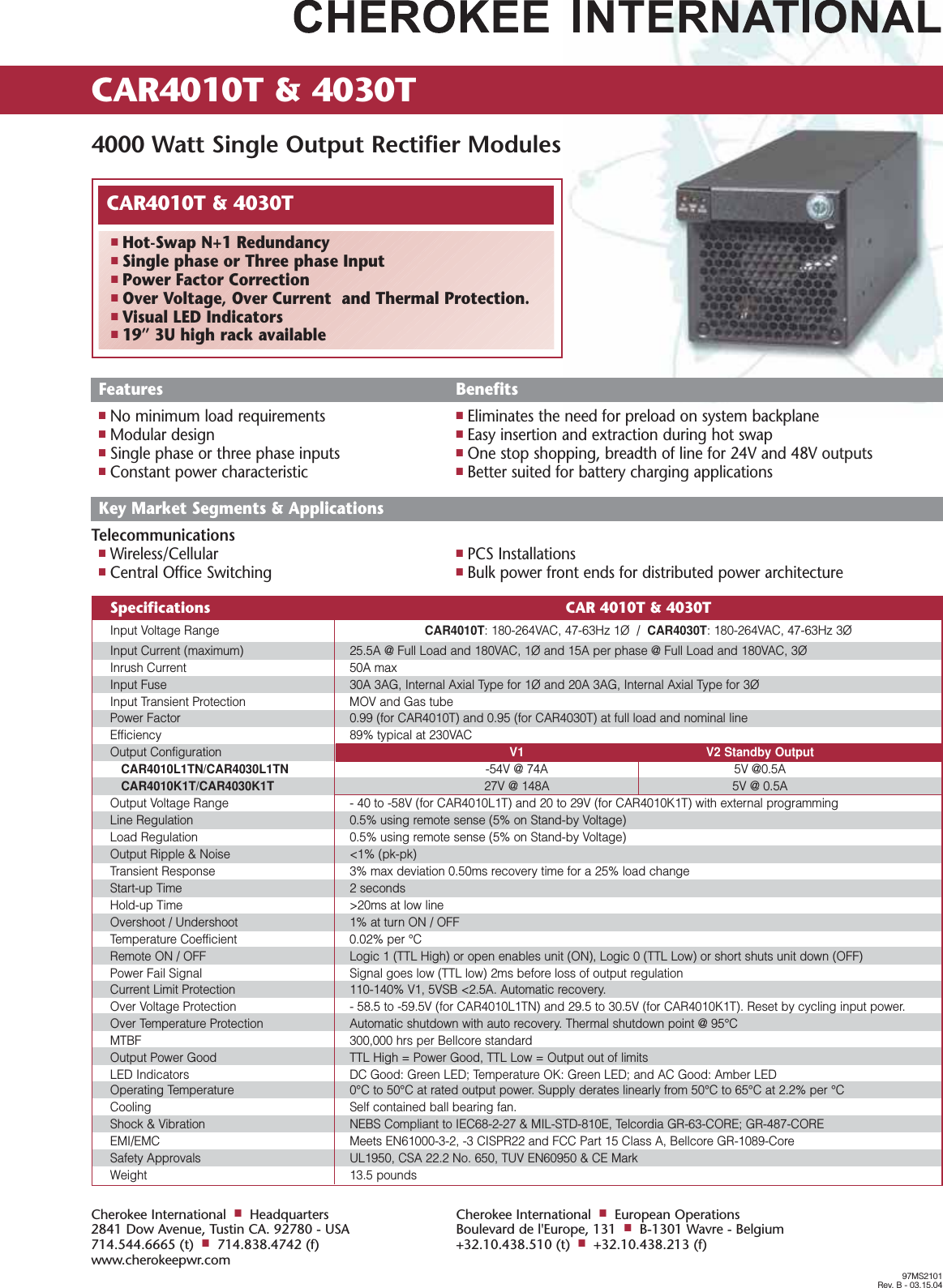
CAR4010T & 4030T 4000 Watt Single Output Rectifier Modules97MS2101Rev. B - 03.15.04Cherokee International■Headquarters2841 Dow Avenue, Tustin CA. 92780 - USA714.544.6665 (t)■714.838.4742 (f)www.cherokeepwr.comCherokee International■European OperationsBoulevard de l'Europe, 131■B-1301 Wavre - Belgium+32.10.438.510 (t)■+32.10.438.213 (f)CAR4010T & 4030T■Hot-Swap N+1 Redundancy■Single phase or Three phase Input■Power Factor Correction■Over Voltage, Over Current  and Thermal Protection.■Visual LED Indicators■19” 3U high rack availableSpecifications CAR 4010T & 4030TInput Voltage Range CAR4010T: 180-264VAC, 47-63Hz 1Ø  /  CAR4030T: 180-264VAC, 47-63Hz 3ØInput Current (maximum) 25.5A @ Full Load and 180VAC, 1Ø and 15A per phase @ Full Load and 180VAC, 3ØInrush Current 50A maxInput Fuse 30A 3AG, Internal Axial Type for 1Ø and 20A 3AG, Internal Axial Type for 3ØInput Transient Protection MOV and Gas tubePower Factor 0.99 (for CAR4010T) and 0.95 (for CAR4030T) at full load and nominal lineEfficiency 89% typical at 230VACOutput Configuration V1 V2 Standby OutputCAR4010L1TN/CAR4030L1TN -54V @ 74A 5V @0.5ACAR4010K1T/CAR4030K1T 27V @ 148A  5V @ 0.5AOutput Voltage Range  - 40 to -58V (for CAR4010L1T) and 20 to 29V (for CAR4010K1T) with external programmingLine Regulation 0.5% using remote sense (5% on Stand-by Voltage)Load Regulation 0.5% using remote sense (5% on Stand-by Voltage)Output Ripple & Noise <1% (pk-pk)Transient Response 3% max deviation 0.50ms recovery time for a 25% load changeStart-up Time 2 secondsHold-up Time >20ms at low lineOvershoot / Undershoot 1% at turn ON / OFFTemperature Coefficient 0.02% per °CRemote ON / OFF Logic 1 (TTL High) or open enables unit (ON), Logic 0 (TTL Low) or short shuts unit down (OFF)Power Fail Signal Signal goes low (TTL low) 2ms before loss of output regulationCurrent Limit Protection 110-140% V1, 5VSB <2.5A. Automatic recovery.Over Voltage Protection - 58.5 to -59.5V (for CAR4010L1TN) and 29.5 to 30.5V (for CAR4010K1T). Reset by cycling input power.Over Temperature Protection Automatic shutdown with auto recovery. Thermal shutdown point @ 95°CMTBF 300,000 hrs per Bellcore standardOutput Power Good  TTL High = Power Good, TTL Low = Output out of limitsLED Indicators DC Good: Green LED; Temperature OK: Green LED; and AC Good: Amber LEDOperating Temperature 0°C to 50°C at rated output power. Supply derates linearly from 50°C to 65°C at 2.2% per °CCooling Self contained ball bearing fan.Shock & Vibration  NEBS Compliant to IEC68-2-27 & MIL-STD-810E, Telcordia GR-63-CORE; GR-487-COREEMI/EMC Meets EN61000-3-2, -3 CISPR22 and FCC Part 15 Class A, Bellcore GR-1089-CoreSafety Approvals UL1950, CSA 22.2 No. 650, TUV EN60950 & CE MarkWeight 13.5 poundsFeatures Benefits■No minimum load requirements ■Eliminates the need for preload on system backplane■Modular design ■Easy insertion and extraction during hot swap■Single phase or three phase inputs  ■One stop shopping, breadth of line for 24V and 48V outputs■Constant power characteristic ■Better suited for battery charging applicationsKey Market Segments & ApplicationsTelecommunications■Wireless/Cellular ■PCS Installations■Central Office Switching ■Bulk power front ends for distributed power architecture
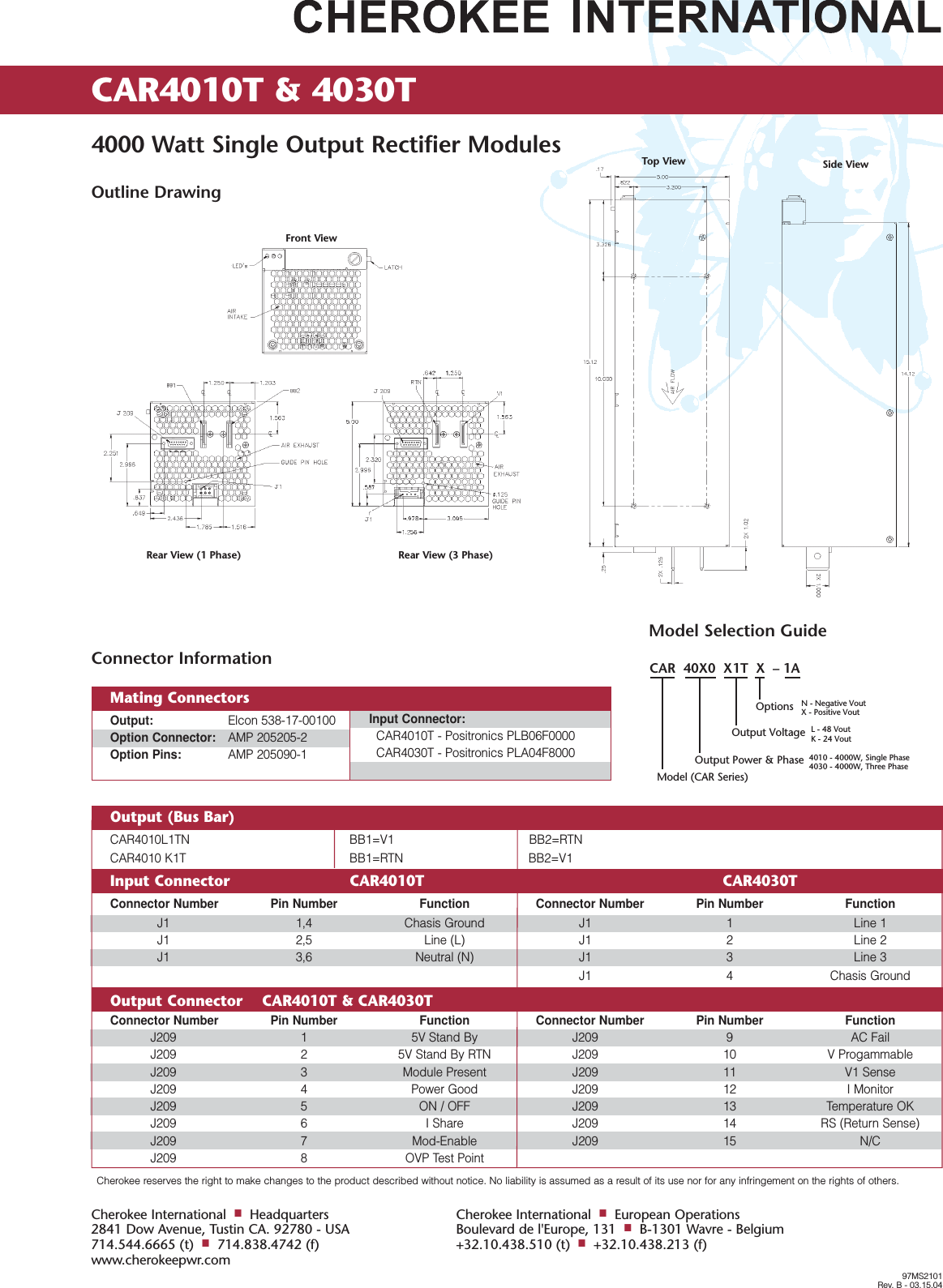
Cherokee reserves the right to make changes to the product described without notice. No liability is assumed as a result of its use nor for any infringement on the rights of others.CAR4010T & 4030T 4000 Watt Single Output Rectifier Modules97MS2101Rev. B - 03.15.04Cherokee International■Headquarters2841 Dow Avenue, Tustin CA. 92780 - USA714.544.6665 (t)■714.838.4742 (f)www.cherokeepwr.comCherokee International■European OperationsBoulevard de l'Europe, 131■B-1301 Wavre - Belgium+32.10.438.510 (t)■+32.10.438.213 (f)Outline DrawingOutput (Bus Bar)    CAR4010L1TN BB1=V1 BB2=RTNCAR4010 K1T  BB1=RTN BB2=V1Input Connector CAR4010T CAR4030TConnector Number Pin Number Function Connector Number Pin Number FunctionJ1 1,4 Chasis Ground J1 1 Line 1J1 2,5 Line (L) J1 2 Line 2J1 3,6 Neutral (N) J1 3 Line 3J1 4 Chasis GroundOutput Connector    CAR4010T & CAR4030TConnector Number Pin Number Function Connector Number Pin Number FunctionJ209 1 5V Stand By J209 9 AC FailJ209 2 5V Stand By RTN J209 10 V ProgammableJ209 3 Module Present J209 11 V1 SenseJ209 4 Power Good J209 12 I MonitorJ209 5 ON / OFF J209 13 Temperature OKJ209 6 I Share J209 14 RS (Return Sense)J209 7 Mod-Enable J209 15 N/CJ209 8 OVP Test PointModel Selection GuideCAR  40X0  X1T  X  – 1AOptions N - Negative VoutX - Positive VoutL - 48 VoutK - 24 Vout4010 - 4000W, Single Phase4030 - 4000W, Three PhaseOutput VoltageOutput Power & PhaseModel (CAR Series)Connector InformationOutput: Elcon 538-17-00100Option Connector: AMP 205205-2Option Pins: AMP 205090-1Input Connector:CAR4010T - Positronics PLB06F0000CAR4030T - Positronics PLA04F8000Mating ConnectorsFront ViewRear View (1 Phase) Rear View (3 Phase)Top View Side View
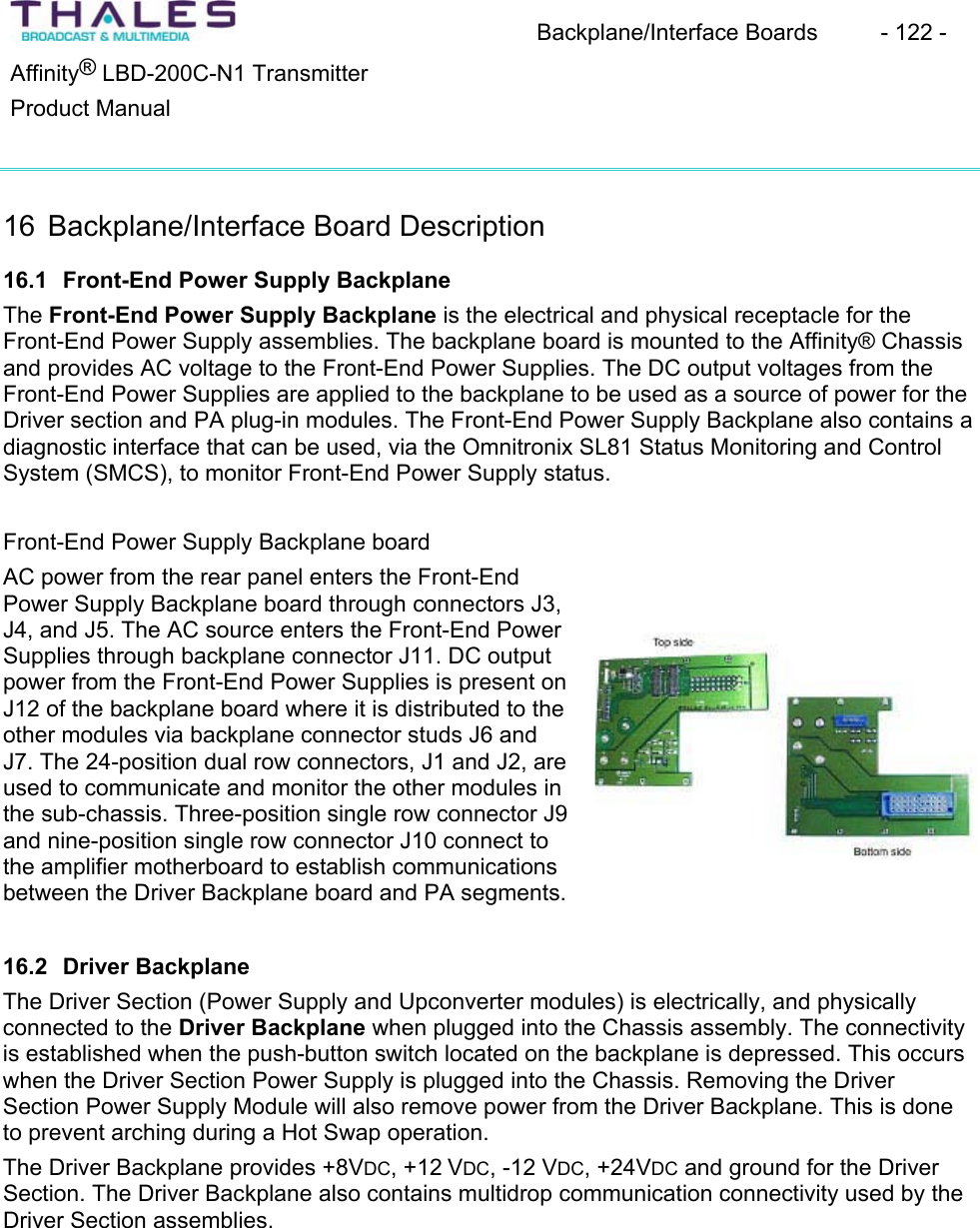
Backplane/Interface Boards  - 122 - ®Affinity  LBD-200C-N1 TransmitterProduct Manual 16 Backplane/Interface Board Description16.1 Front-End Power Supply BackplaneThe Front-End Power Supply Backplane is the electrical and physical receptacle for the Front-End Power Supply assemblies. The backplane board is mounted to the Affinity® Chassis and provides AC voltage to the Front-End Power Supplies. The DC output voltages from the Front-End Power Supplies are applied to the backplane to be used as a source of power for the Driver section and PA plug-in modules. The Front-End Power Supply Backplane also contains adiagnostic interface that can be used, via the Omnitronix SL81 Status Monitoring and ControlSystem (SMCS), to monitor Front-End Power Supply status.Front-End Power Supply Backplane boardAC power from the rear panel enters the Front-End Power Supply Backplane board through connectors J3, J4, and J5. The AC source enters the Front-End Power Supplies through backplane connector J11. DC output power from the Front-End Power Supplies is present on J12 of the backplane board where it is distributed to the other modules via backplane connector studs J6 andJ7. The 24-position dual row connectors, J1 and J2, are used to communicate and monitor the other modules in the sub-chassis. Three-position single row connector J9 and nine-position single row connector J10 connect to the amplifier motherboard to establish communications between the Driver Backplane board and PA segments. 16.2 Driver BackplaneThe Driver Section (Power Supply and Upconverter modules) is electrically, and physicallyconnected to the Driver Backplane when plugged into the Chassis assembly. The connectivityis established when the push-button switch located on the backplane is depressed. This occurswhen the Driver Section Power Supply is plugged into the Chassis. Removing the Driver Section Power Supply Module will also remove power from the Driver Backplane. This is done to prevent arching during a Hot Swap operation. The Driver Backplane provides +8VDC, +12 VDC, -12 VDC, +24VDC and ground for the Driver Section. The Driver Backplane also contains multidrop communication connectivity used by the Driver Section assemblies.
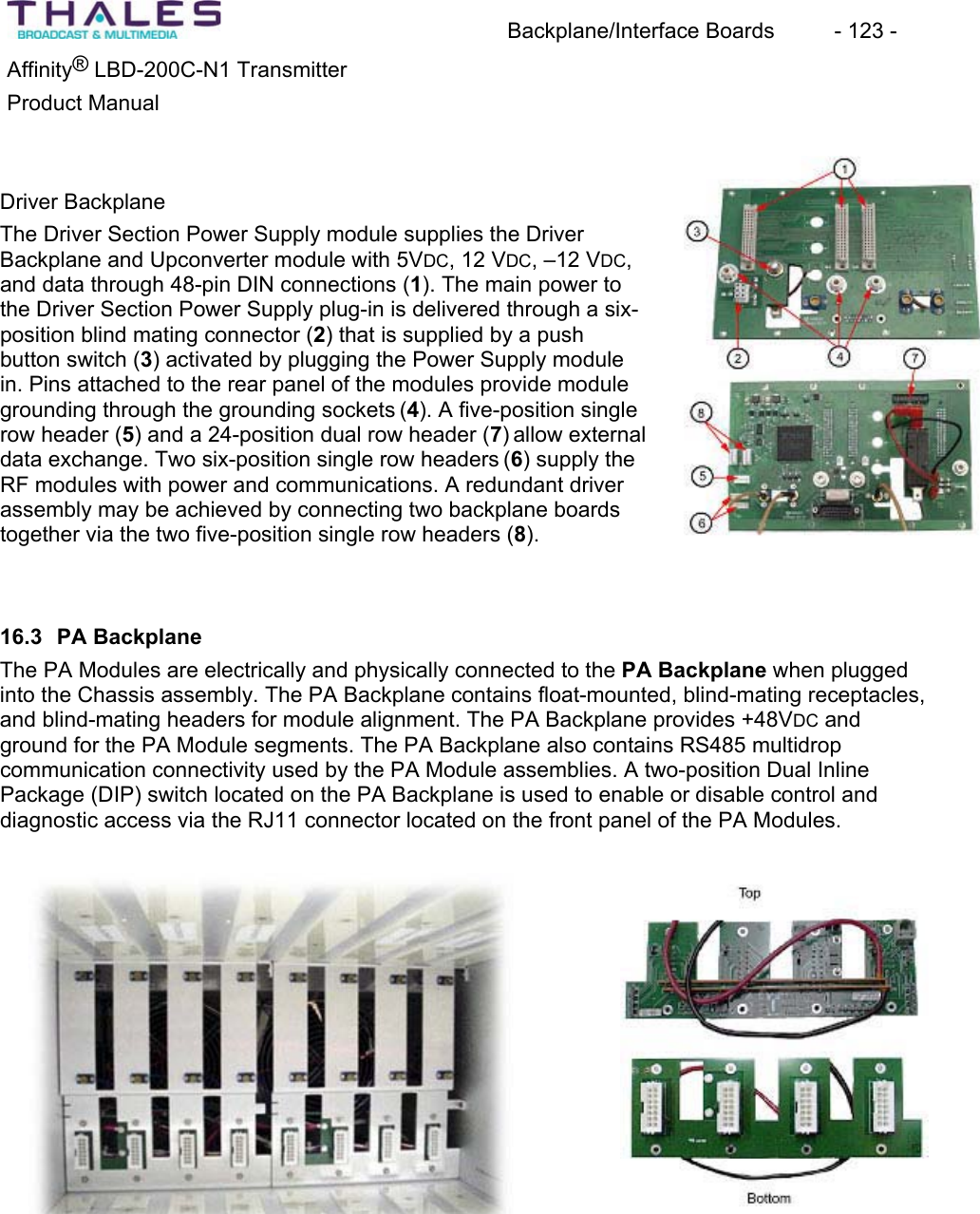
Backplane/Interface Boards  - 123 - ®Affinity  LBD-200C-N1 TransmitterProduct Manual Driver BackplaneThe Driver Section Power Supply module supplies the Driver Backplane and Upconverter module with 5VDC, 12 VDC, –12 VDC,and data through 48-pin DIN connections (1). The main power to the Driver Section Power Supply plug-in is delivered through a six-position blind mating connector (2) that is supplied by a push button switch (3) activated by plugging the Power Supply modulein. Pins attached to the rear panel of the modules provide modulegrounding through the grounding sockets (4). A five-position singlerow header (5) and a 24-position dual row header (7) allow external data exchange. Two six-position single row headers (6) supply the RF modules with power and communications. A redundant driver assembly may be achieved by connecting two backplane boardstogether via the two five-position single row headers (8).16.3 PA BackplaneThe PA Modules are electrically and physically connected to the PA Backplane when plugged into the Chassis assembly. The PA Backplane contains float-mounted, blind-mating receptacles,and blind-mating headers for module alignment. The PA Backplane provides +48VDC and ground for the PA Module segments. The PA Backplane also contains RS485 multidrop communication connectivity used by the PA Module assemblies. A two-position Dual InlinePackage (DIP) switch located on the PA Backplane is used to enable or disable control and diagnostic access via the RJ11 connector located on the front panel of the PA Modules.
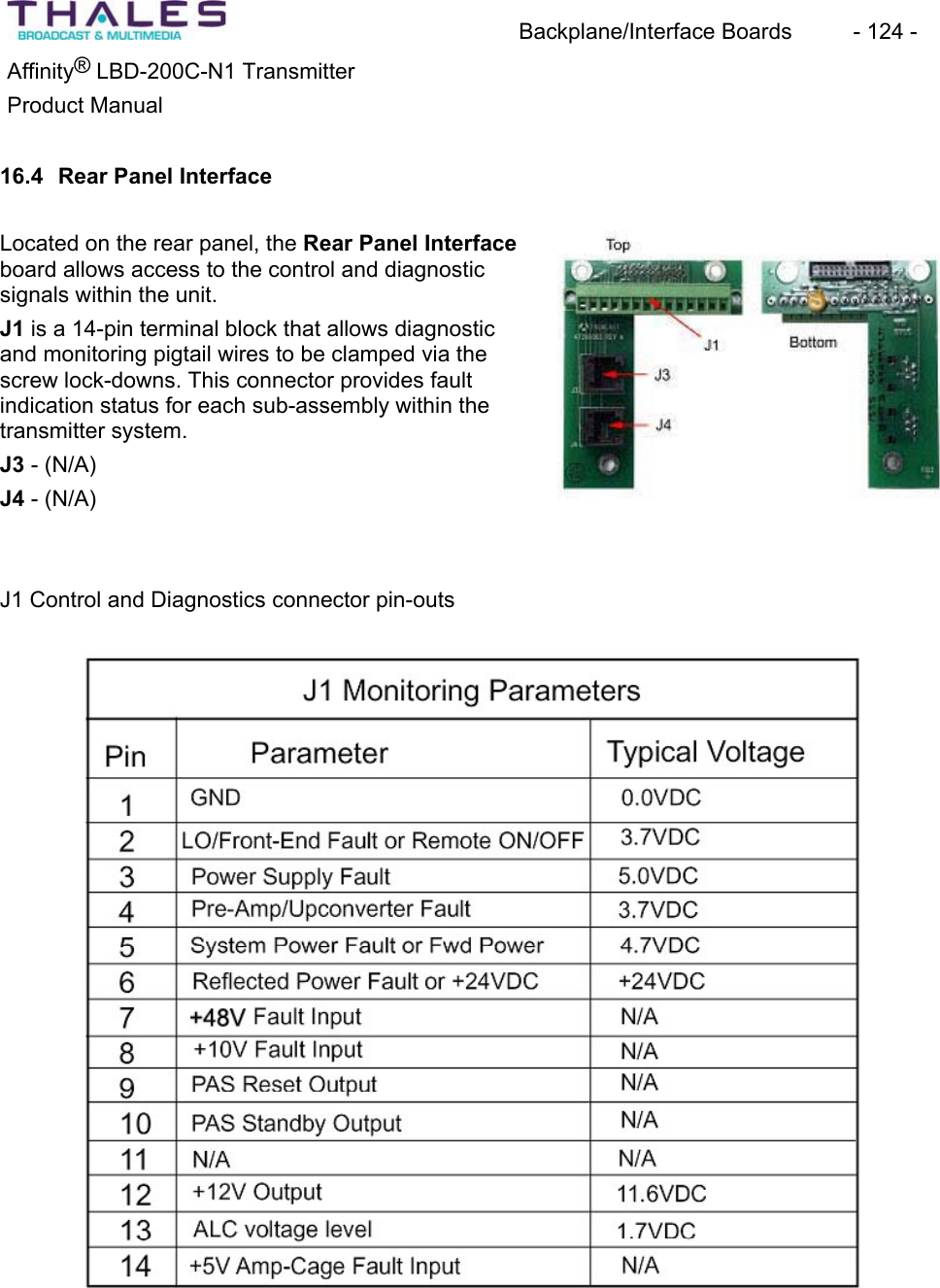
Backplane/Interface Boards  - 124 - ®Affinity  LBD-200C-N1 TransmitterProduct Manual 16.4 Rear Panel InterfaceLocated on the rear panel, the Rear Panel Interfaceboard allows access to the control and diagnostic signals within the unit.J1 is a 14-pin terminal block that allows diagnostic and monitoring pigtail wires to be clamped via thescrew lock-downs. This connector provides fault indication status for each sub-assembly within thetransmitter system. J3 - (N/A) J4 - (N/A) J1 Control and Diagnostics connector pin-outs
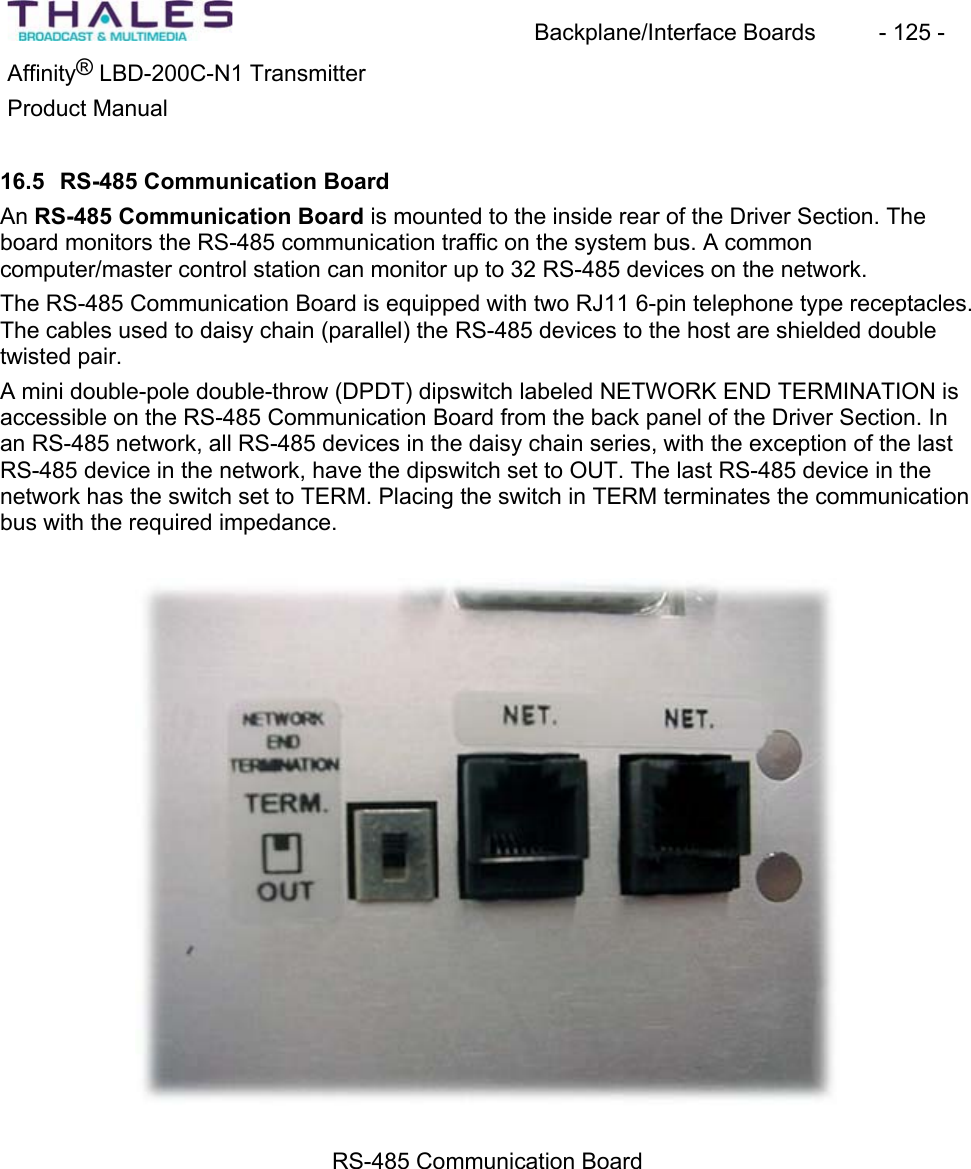
Backplane/Interface Boards  - 125 - ®Affinity  LBD-200C-N1 TransmitterProduct Manual16.5 RS-485 Communication Board An RS-485 Communication Board is mounted to the inside rear of the Driver Section. The board monitors the RS-485 communication traffic on the system bus. A commoncomputer/master control station can monitor up to 32 RS-485 devices on the network. The RS-485 Communication Board is equipped with two RJ11 6-pin telephone type receptacles.The cables used to daisy chain (parallel) the RS-485 devices to the host are shielded double twisted pair. A mini double-pole double-throw (DPDT) dipswitch labeled NETWORK END TERMINATION is accessible on the RS-485 Communication Board from the back panel of the Driver Section. In an RS-485 network, all RS-485 devices in the daisy chain series, with the exception of the last RS-485 device in the network, have the dipswitch set to OUT. The last RS-485 device in the network has the switch set to TERM. Placing the switch in TERM terminates the communicationbus with the required impedance.RS-485 Communication Board
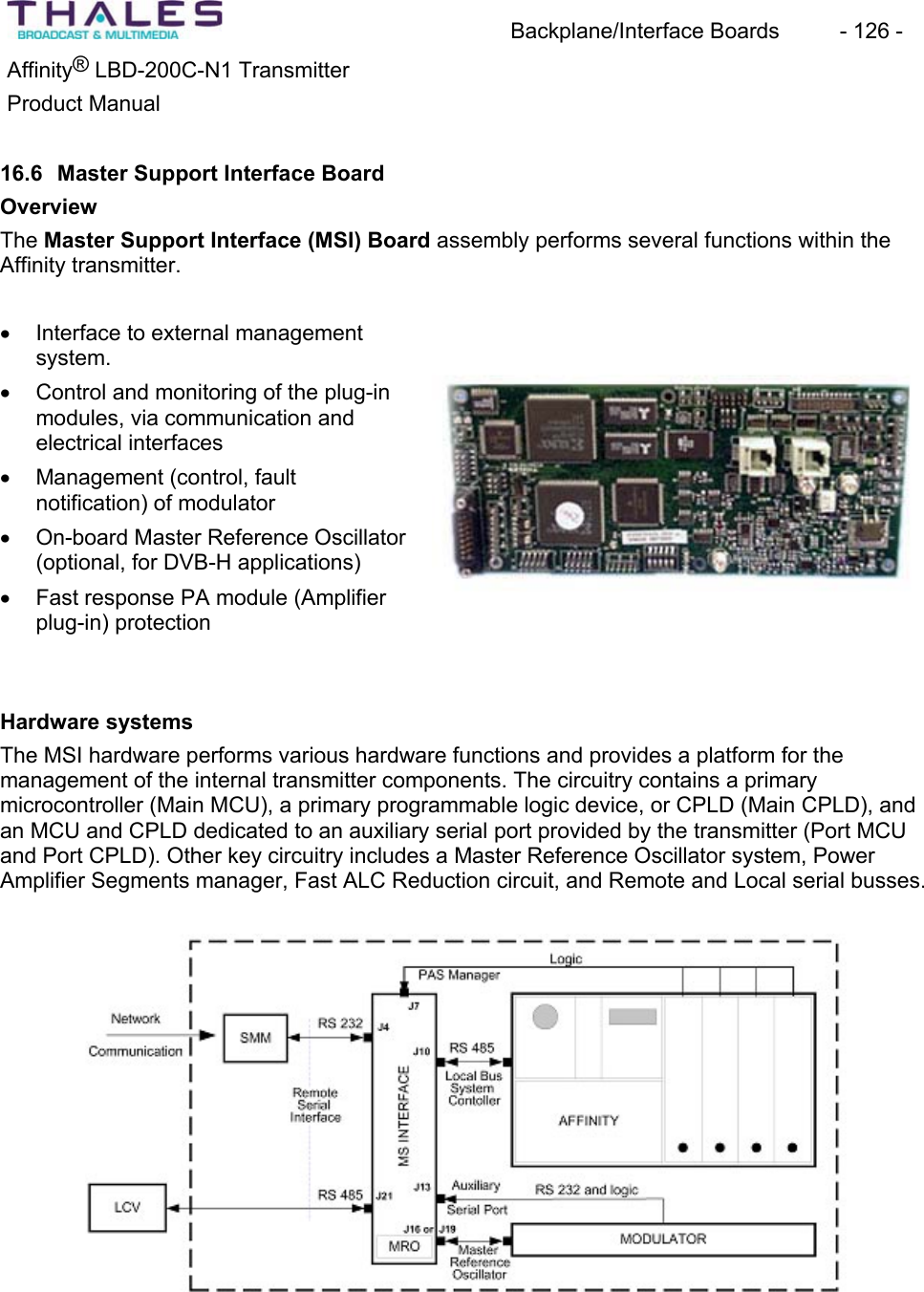
Backplane/Interface Boards  - 126 - ®Affinity  LBD-200C-N1 TransmitterProduct Manual16.6 Master Support Interface BoardOverviewThe Master Support Interface (MSI) Board assembly performs several functions within the Affinity transmitter.x Interface to external managementsystem.x Control and monitoring of the plug-in modules, via communication and electrical interfaces x Management (control, faultnotification) of modulatorx On-board Master Reference Oscillator(optional, for DVB-H applications)x Fast response PA module (Amplifierplug-in) protection Hardware systems The MSI hardware performs various hardware functions and provides a platform for the management of the internal transmitter components. The circuitry contains a primarymicrocontroller (Main MCU), a primary programmable logic device, or CPLD (Main CPLD), and an MCU and CPLD dedicated to an auxiliary serial port provided by the transmitter (Port MCUand Port CPLD). Other key circuitry includes a Master Reference Oscillator system, Power Amplifier Segments manager, Fast ALC Reduction circuit, and Remote and Local serial busses.
Backplane/Interface Boards  - 127 - Affinity® LBD-200C-N1 TransmitterProduct ManualRemote Serial Interface External high-level management systems connect to the Affinity® transmitter using thetransmitter Remote RS-485 interface. The electrical interface consists of: an RJ-11 jack locatedon the Affinity® rear panel, a wire harness located inside the Affinity® chassis, and the RS-485 transceiver circuit located on the MSI circuit board assembly. SNMP management is provided through the Omnitronix SNMP Device Server. Local Bus System ControllerThe MSI acts as a master on the Local RS-485 network located inside the Affinity® chassis. As the master on the network, the MSI sends query and command messages to the slave devices on the Local network, and receives responses from the slave devices. The Upconverter plug-in is a slave device.The Local bus support circuitry consists of:Auxiliary Serial Port An RS-232 transceiver, and dedicated MCU and CPLD circuits are provided on the MSI to support an auxiliary RS-232 serial port (aux port). The port system consists of the transceiverand controller circuits on MSI connector J13, and harnessing to the rear panel DB-9 maleconnector. The auxiliary serial port is typically used to interface a modulator to the Affinity® transmitter.Master Reference Oscillator The Master Reference Oscillator (MRO) system on the MSI receives a 10 MHz reference inputon MSI SMA connector J17. The MRO phase-locked loop (PLL), which contains an on-boardVCO, locks to the reference input. The VCO output signal is fed to two SM connectors, J16 and J19. These are used to feed the Affinity® Local Oscillator and the modulator (optional). A tracking mechanism is provided that follows the control voltage applied to the VCO. Should the 10 MHz reference input be removed, the tracking holds the VCO at the last stable position of the VCO. This helps maintain the transmitter on frequency, even after loss of reference input.PAS ManagerThe Power Amplifier Segments (PAS) are contained in the same chassis as the MSI. This group of amplifiers is called a “quad”.The PAS Manager of the MSI protects the amplifiers from damage that could occur followingfailure or removal. When an amplifier fails, the output power of the transmitter is reduced. The transmitter ALC will attempt to correct the reduction in power by increasing the drive level applied to the remaining amplifiers. Since this can result in overdriving the remaining amplifiersand potentially damaging the device(s), the PAS Manager reduces the ALC level to a factory-calibrated level. The transmitter power is reduced predictably (Fast ALC Reduction). The PAS status signals are monitored on connector J7 of the MSI. Failed PAS location numbers are stored in a CPLD register and read by the Main MCU for monitoring and fault notification.
Backplane/Interface Boards  - 128 - Affinity® LBD-200C-N1 TransmitterProduct ManualFirmware SystemsThe MSI contains four firmware programs: the Main MCU program, the Main CPLD program,the Port MCU program, and the Port CPLD program. Interaction of the various firmwareprograms is described below.Main MCU FirmwareThe Main MCU program (main firmware) is the most complex of the four programs. This program is responsible for supporting the Local and Remote serial interfaces, MRO, and PAS Manager, as well as passing commands to the Modulator, and receiving fault notifications fromthe Modulator.Remote Serial Bus Support The main firmware receives TNET protocol Remote serial commands and requests. Commandsmay be issued by using the Omnitronix SNMP Link SL81 management device. The commandsmay be used to change the values of calibration variables stored in MSI non-volatile memory.For a list of these variables, refer to the SNMP document.Commands may also be issued to change the settings and behavior of the Modulator. Refer to SNMP document for a list and description of the available Modulator commands. The mainfirmware is stored in flash memory. The firmware may be updated using a terminal emulator to issue updated commands to the transmitter, and to transfer the updated firmware file to the transmitter.Status of the Affinity® transmitter is collected by means of status queries sent to the MSIRemote serial port. The MSI responds to these requests with a response message in apredefined format, containing values of monitored variables. In transmitters having an internal SNMP Device Server, the Device Server repeatedly polls the status of the Affinity® transmitterwith status queries sent to the MSI.Local Serial Bus Support The MSI Main MCU, through firmware, implements a master device on the Affinity® internal Local serial bus. The master device issues requests and commands to the Upconverter on the bus, which is a slave device (i.e. this node cannot issue a request or command, but can only receive requests/commands and respond). Through frequent Local bus queries/responses, the MSI collects the status of the Upconverter. In addition, the MSI can send commands to the plug-in causing changes in operation such as: changing the operating channel, or setting the systemto STANDBY or ON AIR.Master Reference Oscillator Support The MSI main firmware monitors and controls the on-board Master Reference Oscillator (MRO).The main firmware monitors the MRO PLL VCO control voltage using an A/D converter. The MSI uses the measured voltage to determine a second control voltage to be applied to the PLL that follows the MRO PLL VOC control voltage. A D/A converter on the MSI generates the output. As the VCO control voltage changes slowly with time, the D/A voltage tracks the VCO voltage. If the 10 MHz reference input to the transmitter is removed, the tracking voltage is
Backplane/Interface Boards  - 129 - Affinity® LBD-200C-N1 TransmitterProduct Manualfrozen by the main firmware thus minimizing disturbance to the transmitter. When the input is reapplied, the tracking resumes.PAS Manager Support In the Power Amplifier Segment (PAS) quad system, the MSI monitors two signals, PAS_faultand PAS_presence, for each PAS. The monitoring is performed in the Main CPLD in a system called the PAS Manager. The failed PAS is detected by the MSI main firmware by reading the registers in the Main CPLD. The MSI main firmware uses a calibration variable QUAD_MASK to inform the MSI CPLD of the number of installed PAS modules. This is necessary to set the proper ALC reduction for the given number of PAS. Auxiliary Port ManagementThe MSI Auxiliary Serial Port (aux port) is used to monitor and control a device connected to the Affinity® transmitter, such as a modulator. The Port MCU handles port management; however, the commands and requests for status of the modulator originate in the top-level managementsystem and pass through the Main MCU as TNET serial messages. The Main MCU copies the command or status request from the TNET message and passes the request to the Port CPLD, which sends the appropriate control or monitoring message to the managed port device. Refer to SNMP document for a list and description of the variables managed in the auxiliaryequipment connected to the Auxiliary Port. Port MCU FirmwareThe Port MCU is dedicated solely to the management of a device connected to the AuxiliarySerial Port. Equipment such as a modulator may be connected to the aux port. In the factory, the firmware program appropriate to the end-user’s purchased equipment is loaded in the Port MCU.The Port MCU periodically reads fault alarms for various modulator systems from the modulatorand writes the conditions of the systems (pass/fail) to the Port CPLD. The alarm status is available to the Main MCU for fault notification to the top-level management system.At any time, the top-level management system can issue a command to the modulator. The command is received by the Main MCU and passed through the Port CPLD to the Port MCU.The Port MCU develops the corresponding message with arguments given in the original command, and sends messages to the modulator connected to the aux port.
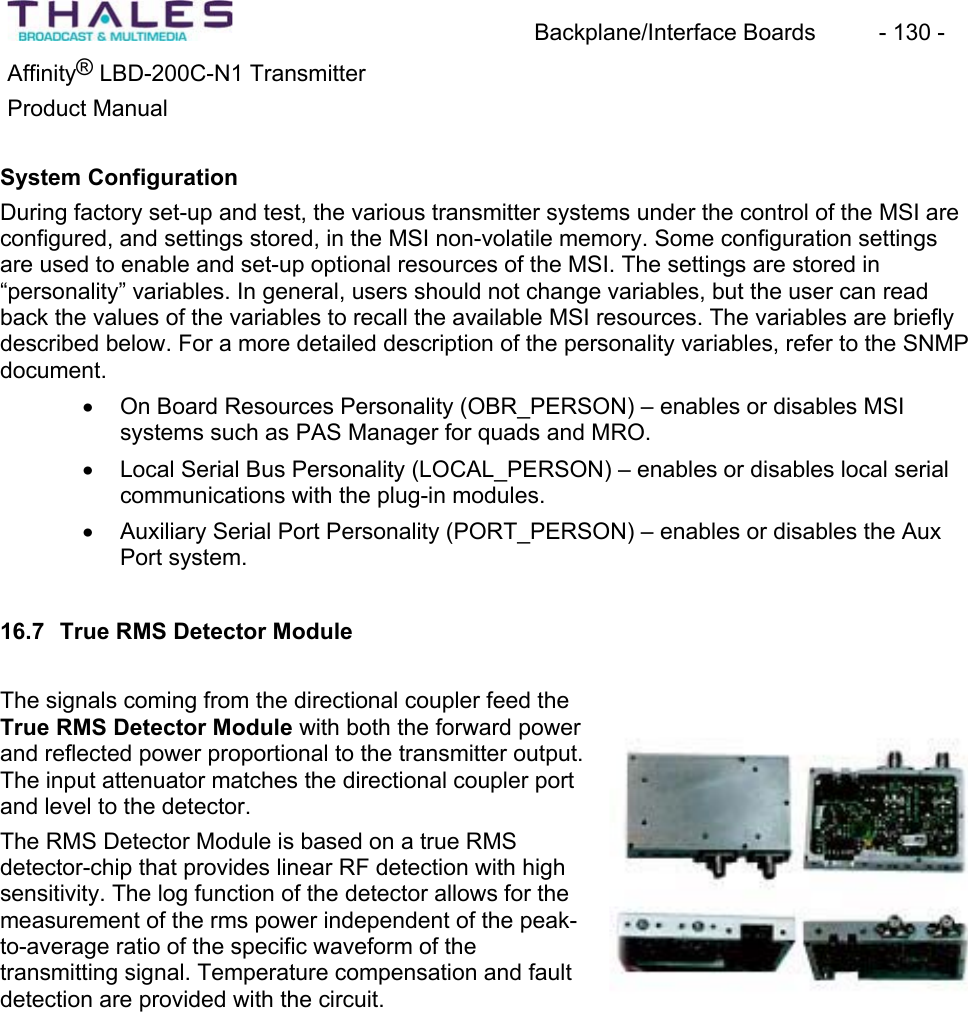
Backplane/Interface Boards  - 130 - Affinity® LBD-200C-N1 TransmitterProduct ManualSystem ConfigurationDuring factory set-up and test, the various transmitter systems under the control of the MSI are configured, and settings stored, in the MSI non-volatile memory. Some configuration settingsare used to enable and set-up optional resources of the MSI. The settings are stored in“personality” variables. In general, users should not change variables, but the user can read back the values of the variables to recall the available MSI resources. The variables are briefly described below. For a more detailed description of the personality variables, refer to the SNMPdocument.x On Board Resources Personality (OBR_PERSON) – enables or disables MSIsystems such as PAS Manager for quads and MRO. x Local Serial Bus Personality (LOCAL_PERSON) – enables or disables local serialcommunications with the plug-in modules.x Auxiliary Serial Port Personality (PORT_PERSON) – enables or disables the Aux Port system.16.7 True RMS Detector ModuleThe signals coming from the directional coupler feed the True RMS Detector Module with both the forward power and reflected power proportional to the transmitter output. The input attenuator matches the directional coupler port and level to the detector.The RMS Detector Module is based on a true RMSdetector-chip that provides linear RF detection with high sensitivity. The log function of the detector allows for the measurement of the rms power independent of the peak-to-average ratio of the specific waveform of the transmitting signal. Temperature compensation and fault detection are provided with the circuit.
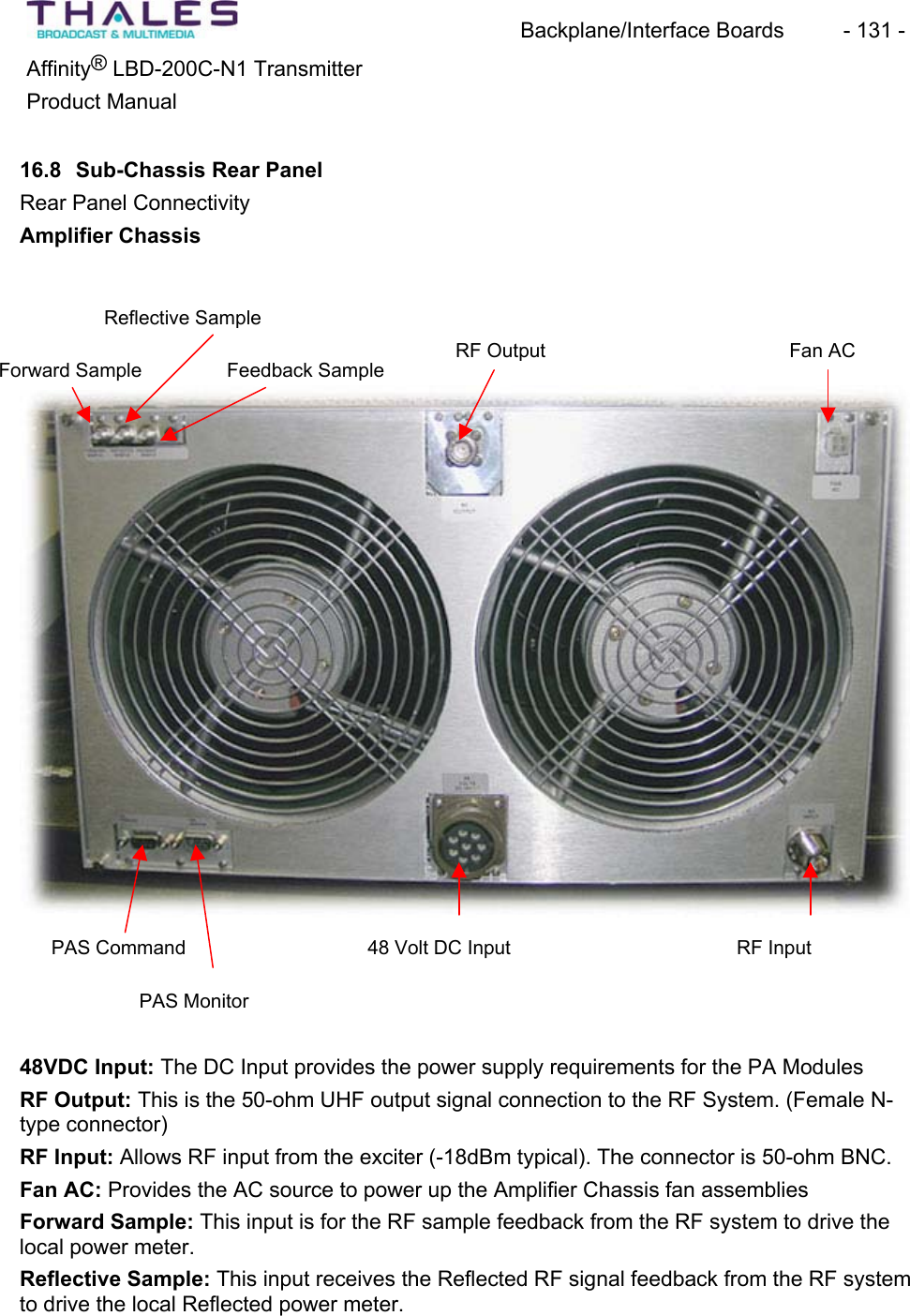
Backplane/Interface Boards  - 131 - ®Affinity  LBD-200C-N1 TransmitterProduct Manual16.8 Sub-Chassis Rear PanelRear Panel Connectivity Amplifier ChassisReflective SampleFan ACRF OutputForward Sample Feedback SamplePAS Monitor PAS Command  48 Volt DC Input RF Input 48VDC Input: The DC Input provides the power supply requirements for the PA ModulesRF Output: This is the 50-ohm UHF output signal connection to the RF System. (Female N-type connector) RF Input: Allows RF input from the exciter (-18dBm typical). The connector is 50-ohm BNC. Fan AC: Provides the AC source to power up the Amplifier Chassis fan assembliesForward Sample: This input is for the RF sample feedback from the RF system to drive the local power meter.Reflective Sample: This input receives the Reflected RF signal feedback from the RF systemto drive the local Reflected power meter.
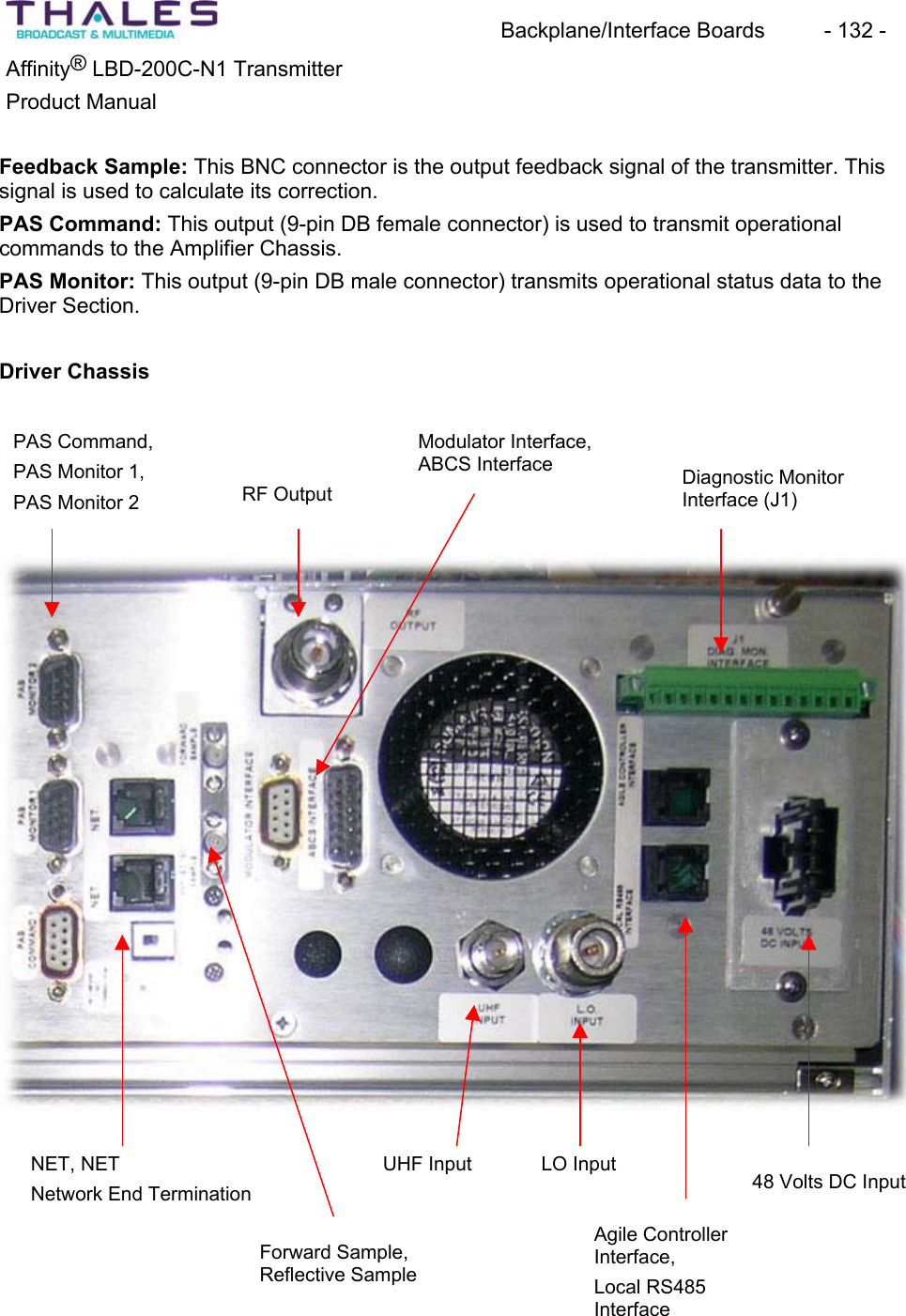
Backplane/Interface Boards  - 132 - ®Affinity  LBD-200C-N1 TransmitterProduct ManualFeedback Sample: This BNC connector is the output feedback signal of the transmitter. This signal is used to calculate its correction.PAS Command: This output (9-pin DB female connector) is used to transmit operational commands to the Amplifier Chassis. PAS Monitor: This output (9-pin DB male connector) transmits operational status data to the Driver Section. Driver ChassisPAS Command, PAS Monitor 1, PAS Monitor 2 Modulator Interface, ABCS InterfaceRF Output  Diagnostic MonitorInterface (J1) NET, NET Network End TerminationForward Sample,Reflective Sample UHF Input LO Input Agile ControllerInterface,Local RS485Interface48 Volts DC Input
Backplane/Interface Boards  - 133 - ®Affinity  LBD-200C-N1 TransmitterProduct Manual16.8.1 Exciter to UCA Cabling and System Interconnects This section explains cabling and interconnections for the LBD-200C-N1 transmitter. Refer to the Automatic Backup Control System (ABCS) & Site Management Module (SMM) descriptionswithin the BTS control chassis manual for additional interconnections of the agile transmitterand remote SNMP management systems.UCA Sub-Chassis Front Panel: Connect the LO output of the LO Plug-In module to the LO input of the UCA with the SMA male-to-male semi rigid jumper.Transmitter:Refer to the cabling diagram, which depicts a photo of the rear panel interconnections.
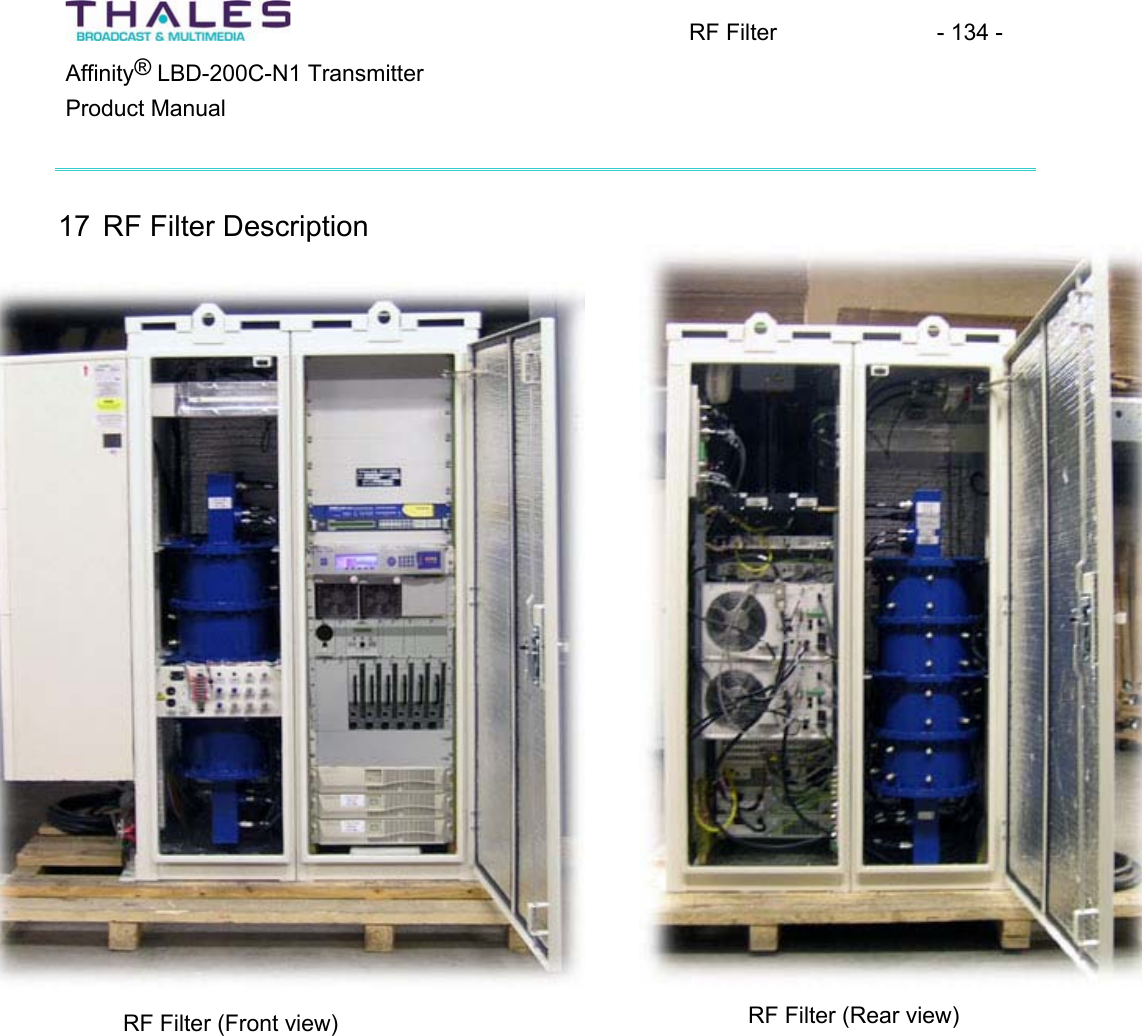
RF Filter  - 134 - ®Affinity  LBD-200C-N1 TransmitterProduct Manual17 RF Filter DescriptionRF Filter (Rear view) RF Filter (Front view)
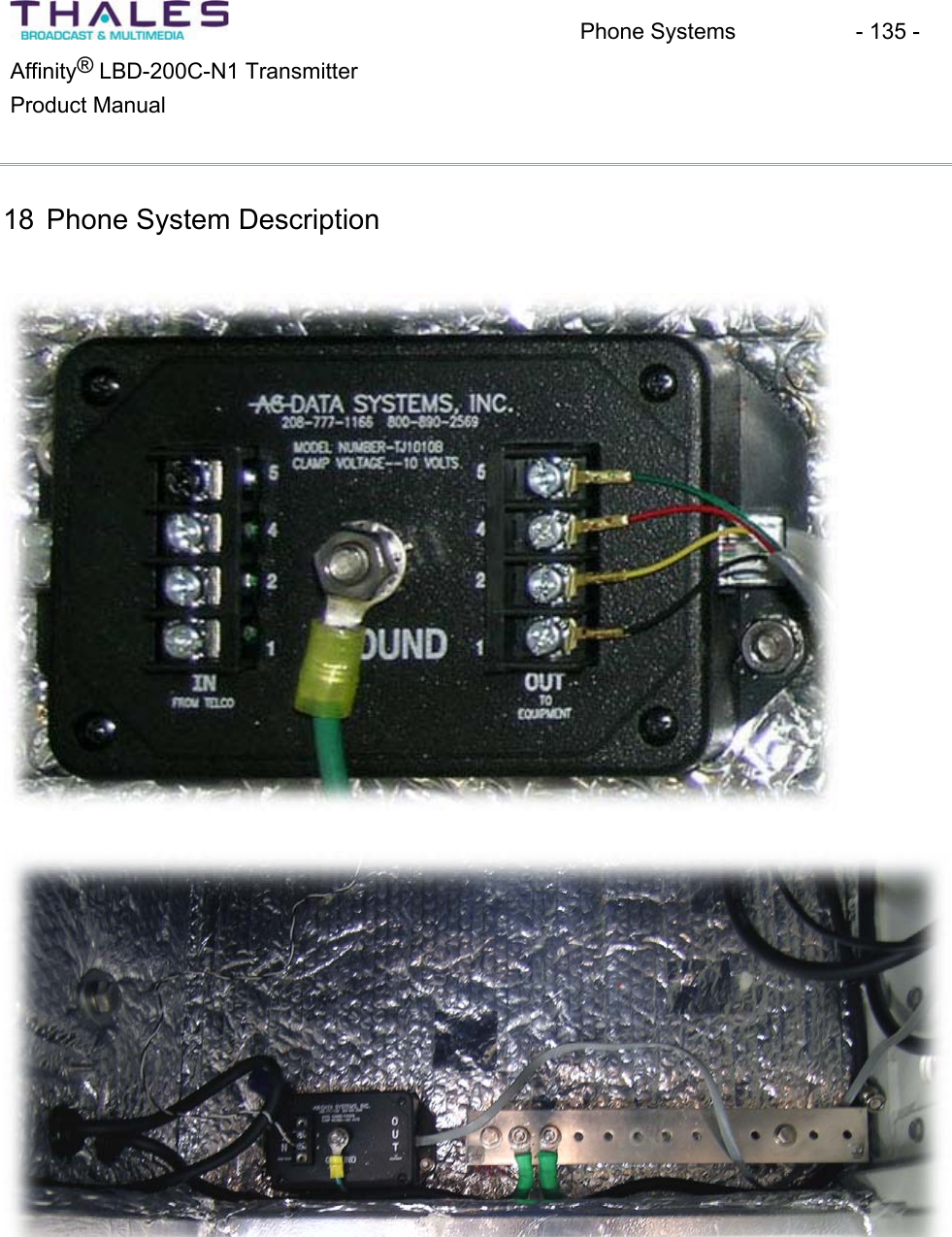
Phone Systems - 135 - ®Affinity  LBD-200C-N1 TransmitterProduct Manual18 Phone System Description
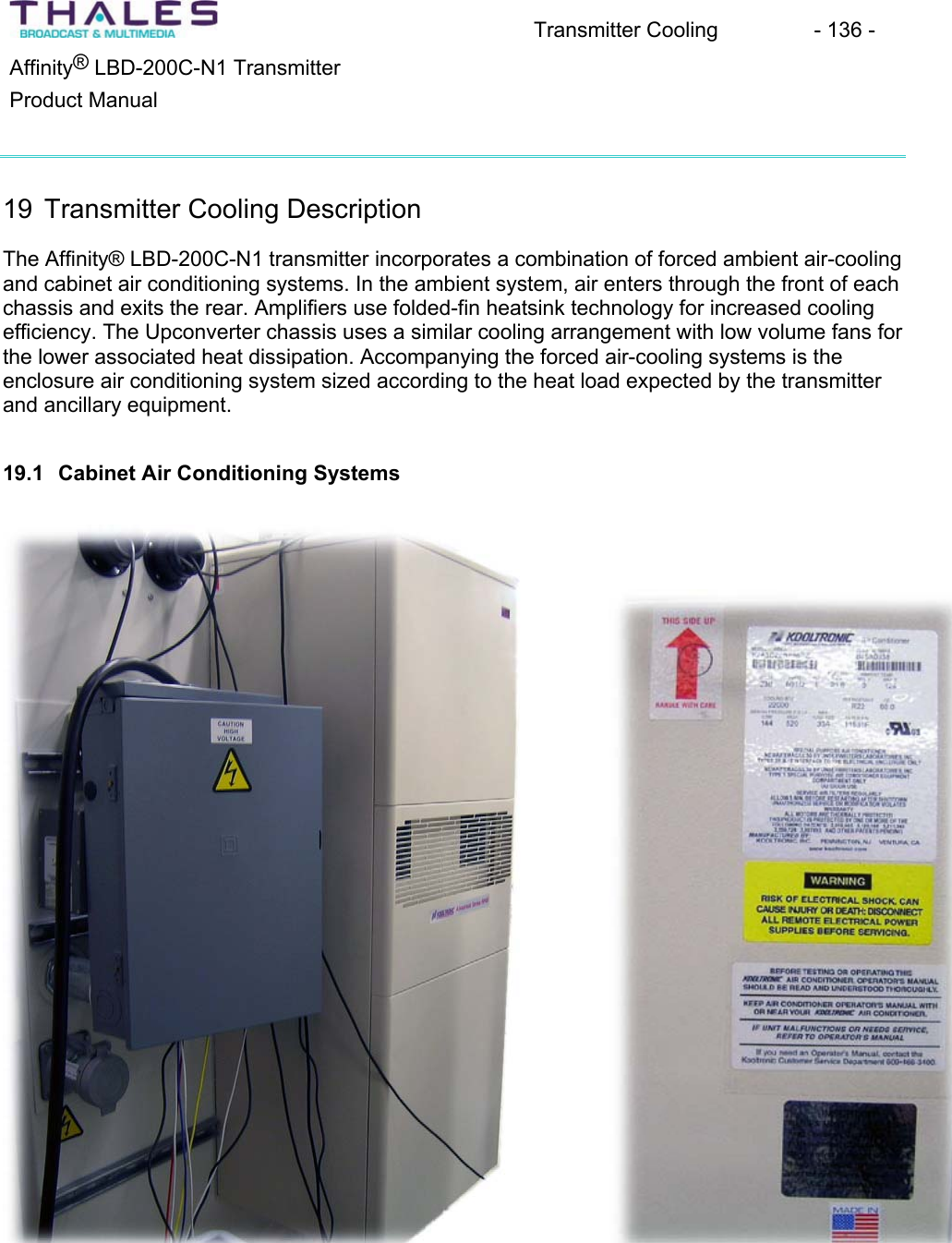
Transmitter Cooling  - 136 - ®Affinity  LBD-200C-N1 TransmitterProduct Manual19 Transmitter Cooling DescriptionThe Affinity® LBD-200C-N1 transmitter incorporates a combination of forced ambient air-cooling and cabinet air conditioning systems. In the ambient system, air enters through the front of each chassis and exits the rear. Amplifiers use folded-fin heatsink technology for increased cooling efficiency. The Upconverter chassis uses a similar cooling arrangement with low volume fans for the lower associated heat dissipation. Accompanying the forced air-cooling systems is the enclosure air conditioning system sized according to the heat load expected by the transmitterand ancillary equipment.19.1 Cabinet Air Conditioning Systems
K2A3C18RP55R R22 Recognized 18000 125 0 51.7 -17.8 230 60 21.6 5.3/8.8K2A3C20RP55R R22 Recognized 20000 125 0 51.7 -17.8 230 60 21.6 5.3/8.8K2A3C22RP55R R22 Recognized 22000 125 0 51.7 -17.8 230 60 21.6 5.3/8.8UL/CUL Ambient Temp. ***Listed or BTU/H °F °C Cooling HeatingModel Refrigerant Recognized Rating Max. Min. Max. Min. Volts Hz Amps AmpsTECHNICAL DATA* Rating shown is for operation at maximum ambient temperature.** Optional Single Enclosure Heater/Double Enclosure HeaterADVANTAGE RP55 SERIES AIR-COOLEDPANEL-MOUNTED AIR CONDITIONERSACCESSORIES AND OPTIONS*QCooling Effect DetectorQEnclosure HeaterQFilter Recoating AdhesiveQFilters for replacementQInternal corrosion protectionQPower Loss Delayed Compressor StartQSpecial paint finishes*See opposite side for more information.POPULAR MODELS ARESTOCKED AND READY TO SHIPHOW TO ORDERSpecify model number. NOTE: Accessoriesand Options may affect model number,contact KOOLTRONIC for information.For assistance in model selection, refer tothe Air Conditioner Sizing and SelectionGuide, contact KOOLTRONIC, or useone of our design aid software programs,available FREE.CALL 1-800-321-KOOL (5665)or FAX 609-466-1114APPROXIMATE WEIGHT298 lbs. [135.5 kg]STANDARD FEATURESTextured Baked Powder FinishBuilt-in Condensate EvaporatorLow ODP RefrigerantClosed-Loop CoolingCrankcase Compressor HeaterDigital Temperature DisplayEMI/RFI SuppressorHead Pressure Control SwitchHeavy-duty Steel EnclosureLow Ambient KitLow Temperature Control ThermostatM/TAB Mounting SystemNEMA3R Rating Maintained (UL50)Permanent FiltersSix Foot [1.8m] (minimum) SJT 3-wire CordUL/CUL RecognizedKooltronic, Inc., 30 Pennington-Hopewell Road, P.O. Box 240, Pennington, NJ 08534-0240Tel: (609) 466-3400       Fax: (609) 466-1114       Internet: www.kooltronic.com        E-Mail: sales@kooltronic.comMOUNTING PLAN 55.62[1412.7mm]21.99[558.6mm]17.34[440.4mm]56.20[1427.5mm]FILTERED CONDENSERAIR INLET (Ambient Air In)CONDENSER OUTLET(Warm Ambient Air Out)WARM AIR RETURNFROM ENCLOSURECOOL AIR OUTLETTO ENCLOSURE❶❸❷❹❶❷❹❸❹❸Dimensions, inches [metric], are for reference only and are subject to change.19.25[489.0mm]2.43[61.7mm]10.00[254.0mm]31.44[489.0mm]2.34[59.4mm]10.00[254.0mm]1.99[50.5mm]18.00[457.2mm]7.31[185.7mm]2.68[68.1mm]1.37[34.8mm](16) .281 [7.0mm]DIA. HOLES21.99[558.6mm]56.20[1427.5mm]UNIT MUST BE 4" MINIMUMABOVE FLOOR FOR FILTERACCESSrp55.qxd8/23/05K2A3C20RP55R
DESCRIPTIONAt last - air conditioners designed specifically for cooling electronic enclosures that can be used for both indoor and outdoor applications right out of thebox!No more bulky unattractive weather hoods... No more worries over what options to specify for outdoor applications.Expertly designed and crafted, the ADVANTAGE Series boasts a stylish appearance with rounded edges, no visible hardware and a textured bakedpowder finish to blend easily with contemporary enclosure designs.Servicability has been made easier by incorporating a “knock-down” sheetmetal design which provides quick access to internal components.Standard features include heavy duty galvanized steel construction with baked-on powder paint, environmentally friendly refrigerants, built-incondensate evaporator,  thermostatic low temperature control and EMI/RFI Suppressor. These air conditioners are available in capacities from1,000 to 22,000 BTU/H in seven heights, all utilizing the exclusive KOOLTRONIC M/TAB integral mounting system.KOOLTRONIC also designs and manufactures a variety of Air Conditioners to meet unique specifications. We invite your inquiries about ourmodification and custom-design capabilities.STANDARD FEATURESCLOSED-LOOP COOLING: The enclosure interior airflow system is isolated from the ambient airflow system. Ambient air can not invade the cool,dehumidified sensitive component compartment. BALL-BEARING MOTORS: All fan motors are UL/CSA Recognized and include automatic-reset thermal overload protection and double-sealed ordouble-shielded precision ball bearings. Special permanent lubricants in the tube axial fans perform over a broad temperature range: -20°F [-28.9°C] to250°F [121.1°C].RUGGED CONSTRUCTION: Precision-engineered heavy gauge steel construction of all cabinets and blowers insures Air Conditioners will stand upunder tough applications.TEXTURED BAKED POWDER FINISH: Durable, baked-on textured beige powder finish is standard. Other finishes are available.POWER: Available in 230 VAC, 50 Hz or 60 Hz. REFRIGERANT: Low Ozone Depleting Potential (ODP) R22 Refrigerant is used in all Advantage RP55 Series Air Conditioners and are being con-verted to CFC-free R134a Refrigerant as compressors become available. Consult KOOLTRONIC for status at time of requirement. PERMANENT FILTERS: Multi-layer grid of sturdy, corrugated aluminum in an aluminum frame. May be reused after washing off accumulations andspraying with A-16 Recoating Adhesive.CONDENSATE EVAPORATOR: Built-in Condensate Evaporator eliminates need for draining condensate under normal operating conditions. Maynot be adequate in extremely high humidity with open or leaky enclosure. Overflow condensate drain fitting and hose are included.LOW AMBIENT KIT: Maintains sufficient operating pressures when ambient temperatures drop below 50°F [10°C]. Includes a compressor heater andpressure actuated condenser blower cycling control.LOW TEMPERATURE CONTROL: Thermostatic Low Temperature Control prevents over-cooling and provides energy-efficient operation. EMI/RFI SUPPRESSOR: EMI/RFI Suppressor minimizes transient line spikes during on/off cycling.CRANKCASE COMPRESSOR HEATER: 240V heater attached to the compressor crankcase to maintain appropriate temperatures during coldoperating conditions.HEAD PRESSURE CONTROL SWITCH: A control device to minimize compressor cycling and prevent evaporator coil icing.POWER CORD: All models have six foot [1.8m] SJT-type 3-wire power cords with appropriate plugs.INSULATION: All cold components, lines and the evaporator compartment are insulated with high-performance insulation for maximum efficiency.GASKETING: All units are fully gasketed for tight, leakproof installation, in compliance with the NEMA 3R Enclosure Rating.QUALITY ASSURANCE: Refrigeration system components are kept sealed until charged with refrigerant; all brazed joints are thoroughly leak-tested;each unit is functionally tested before shipment. INSTALLATION: Detailed Installation and Operator's Manual, with drawings, mounting plan and spare parts list is included with each unit.UL/CUL RECOGNIZED: All Advantage RP55 models are UL/CUL Recognized. All Recognized models are available as Listed at added cost.ACCESSORIES AND OPTIONS**FACTORY-INSTALLED OPTIONS:COOLING EFFECT DETECTOR: A thermostat is mounted inside the cabinet and attached to a sensor in the warm air return. When the airtemperature increases to the set point, a signal is sent to a terminal block. User-installed wiring from the terminal block to local and/or remote warningdevices (light, bell, siren, etc.) can be for normally open or closed operation.Append letter "B" to Part No.ENCLOSURE HEATER: 240V fin strip heater, installed singly or ganged, used to maintain desired internal enclosure temperature, under cold oper-ating conditions.Single Heater, append letter "F" to Part No.Double Heater, append letter “G” to Part No.**Contact KOOLTRONIC for information.
ACCESSORIES AND OPTIONS** (continued)INTERNAL CORROSION PROTECTION: For corrosive or other hostile environments, special coating material is applied to copper lines, coilsand other parts subject to damage.Append letter "H" to Part No.POWER LOSS DELAYED COMPRESSOR START: Protects the compressor from possible damage due to harmful short cycling, by initiating an“off” period before resumption of normal operation.  Generally air conditioners require several minutes off for compressor protection after power inter-ruptions of any type. These power interruptions can include power failures, opening of interlocked access doors, and cases where a thermostat activatesthe compressor in less than a few minutes.  This option is particularly recommended for applications where frequent, brief power failures occur, inter-locked cabinet doors are utilized, or where the cabinet internal loads fluctuate across a wide range.Append letter "Y" to Part No.SHORT CYCLE PROTECTOR: Protects the compressor from possible damage due to harmful short cycling, by initiating an "off" period beforeresumption of normal operation.  Generally air conditioners require several minutes off for compressor protection after power interruptions of any type.These power interruptions can include power failures, opening of interlocked access doors, and cases where a thermostat activates the compressor inless than a few minutes.  This option is particularly recommended for applications where frequent, brief power failures occur, interlocked cabinet doorsare utilized, or where the cabinet internal loads fluctuate across a wide range.Append letter "Y" to Part No.SPECIAL PAINT FINISHES**PAINTED METAL GRILLE** Append letter “Z” to Part No.CUSTOMER-INSTALLED OPTIONS:FILTERS FOR REPLACEMENT: All KOOLTRONIC filters consist of a multi-layer grid of sturdy corrugated aluminum, securely held in a one-piecealuminum frame. Filters are required wherever air is drawn into an electronics enclosure or related cooling equipment to keep internal parts as clean as possible. A non-drying adhesive coating traps a high percentage of particulate matter. These washable, reusable filters are designed to last the life of the coolingunit. Replacements are available for those which become damaged or otherwise non-serviceable.Part No. 11631F (11.63 x 21.63 x 0.38 [295mm x 321mm x 10mm])FILTER RECOATING ADHESIVE: This compound is a superior product for recoating all permanent filters after washing. The adhesives penetratedirt layers to keep the filter surface tacky for longer effective performance between washings.  Part No. A-16 - one pint container.**Contact KOOLTRONIC for information. Kooltronic, Inc., 30 Pennington-Hopewell Road, P.O. Box 240, Pennington, NJ 08534-0240Tel: (609) 466-3400       Fax: (609) 466-1114       Internet: www.kooltronic.com        E-Mail: sales@kooltronic.com
Affinity® Control Systems  - 140 - ®Affinity  LBD-200C-N1 TransmitterProduct Manual20 Affinity Transmitter Control Systems The upconverter amplifier (UCA) control system (driven by multiple microprocessors) monitorsand controls all of the transmitter sub-assemblies, and provides transmitter status information to the operator.A user-friendly man/machine interface is provided by: x A front-panel control interface for menu driven commands (select, enter, escape, & exit buttons). x A front panel LCD screen located on the driver module providing transmitter status information (status of transmitter, output power, power supply, local oscillator, and upconverter).The transmitter safety system is hard wired, which allows for real-time processing, and is independent of the control system.20.1 Automatic Control Systems and MonitoringAutomatic control systems protect the transmitter against VSWR problems and excessive air input temperatures by affecting successive restarts---first at the nominal power---then at –3dB while maintaining the transmission quality at the level obtained at nominal power output. Approximately, a 30-second delay will occur between the restarts. The transmitter is automatically shut down if the fault persists.The transmitter is also protected by a safety system that causes amplifier module shutdown (due to excessive transmitter temperature, etc.). Monitoring of operational parameters, alarms,power output, VSWR, status of amplifiers, drivers and safety loops are available.20.2 Status Monitoring and Control System (SMCS) The Omnitronix SL81 Status Monitoring and Control System (SMCS) is provided for use with the Affinity® LBD-200C-N1 transmitters. The SMCS is a rack-mounted unit located within the transmitter cabinet. It provides a web interface and an SNMP agent for remote control. Remoteaccess to the SNMP agent is available through a GSM connection or via dial-up modem and a PSTN line. All events and faults are stored in a logbook with date and timestamps.20.2.1 SMCS Functions:ControlsThe SMCS has the ability to access the On (transmit), Off (standby), and Reset commands.Other operational commands, monitoring and safety controls, and diagnostic help system are available. The SNMP manager program can be used to browse the MIB of a connected device and select variable(s) to be modified.
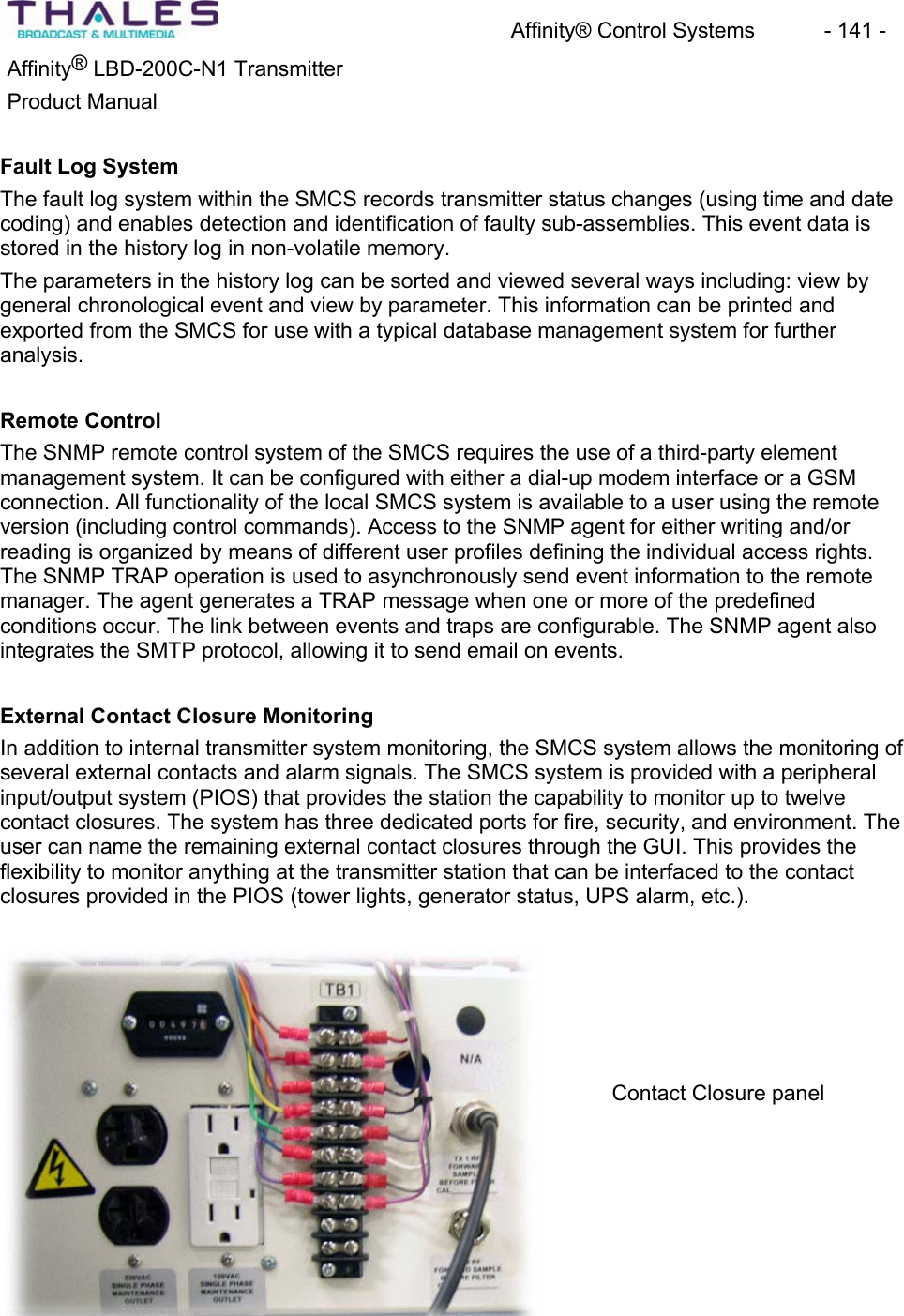
Affinity® Control Systems  - 141 - Affinity® LBD-200C-N1 TransmitterProduct ManualFault Log SystemThe fault log system within the SMCS records transmitter status changes (using time and date coding) and enables detection and identification of faulty sub-assemblies. This event data is stored in the history log in non-volatile memory.The parameters in the history log can be sorted and viewed several ways including: view by general chronological event and view by parameter. This information can be printed andexported from the SMCS for use with a typical database management system for furtheranalysis.Remote ControlThe SNMP remote control system of the SMCS requires the use of a third-party element management system. It can be configured with either a dial-up modem interface or a GSMconnection. All functionality of the local SMCS system is available to a user using the remoteversion (including control commands). Access to the SNMP agent for either writing and/or reading is organized by means of different user profiles defining the individual access rights. The SNMP TRAP operation is used to asynchronously send event information to the remotemanager. The agent generates a TRAP message when one or more of the predefinedconditions occur. The link between events and traps are configurable. The SNMP agent also integrates the SMTP protocol, allowing it to send email on events. External Contact Closure MonitoringIn addition to internal transmitter system monitoring, the SMCS system allows the monitoring of several external contacts and alarm signals. The SMCS system is provided with a peripheral input/output system (PIOS) that provides the station the capability to monitor up to twelvecontact closures. The system has three dedicated ports for fire, security, and environment. The user can name the remaining external contact closures through the GUI. This provides the flexibility to monitor anything at the transmitter station that can be interfaced to the contactclosures provided in the PIOS (tower lights, generator status, UPS alarm, etc.).Contact Closure panel
Affinity® Control Systems  - 142 - Affinity® LBD-200C-N1 TransmitterProduct ManualOmnitronix SNMP-Link SL81 Manual here
Quick Start Procedure  - 143 - Affinity® LBD-200C-N1 TransmitterProduct Manual21 The Affinity® Quick Start Procedure Each Thales transmitter is factory calibrated, and requires only a minimum start-up procedure to ensure proper operation. The appropriate steps for the installation of the Affinity® transmittersystem and its ancillary equipment must have been performed prior to initiating this procedure.Please consult the installation and cabling sections of this manual before powering up any equipment. Verifying that all cables and electrical connections are in place is crucial. Read this section entirely, along with the calibration section, prior to beginning the transmitter power initiation process.1. Start by ensuring that all of the amplifier modules are turned off via the front panel keyswitches.2. Apply AC power to the UPS system; follow the manufacture’s turn on guidelines.3. Apply AC power to the site management system; follow the manufacture’s turn on guidelines.4. Apply AC power to the satellite receiver; follow the manufacture’s turn on guidelines. Ensure a proper ASI feed is available to the Sirius DVB-H Exciter. 5. Switch on AC power to the Affinity® Upconverter amplifier chassis(s). Observe that the AC fan has begun to operate (fan noise will be heard).6. Turn on the 48V Front-End Power Supplies; all plug-in modules should indicate properDC output via their LED display. Also, observe that the driver sections including the multi-output Power Supply Plug-In and Upconverter have begun their initialization (asmall time lag is normal -- under 5 seconds typical).7. Switch on the Sirius DVB-H Exciter. Using the exciter front panel MMI, turn off adaptive pre-correction if enabled and place in flat response mode (first go to frozen mode then go to flat mode).8. If available, use a spectrum analyzer to verify the exciter output level -18dBm r 1dB. Adjust if required. Observe the exciter output, perform cancellation of LO or imagerejection via local MMI or SIRUIS setup GUI interface (this is a factory calibration and should not be required). 9. Connect exciter output to the Upconverter amplifier chassis (UCA) UHF input.10. Ensure 1GHz Local Oscillator connection via exciter and UCA. 11. Connect power meter to output coupler.12. Ensure that the transmitter output is connected to an appropriate sized 50-ohm station load. Note: the return loss of the load should be greater than 15 dB at minimum.13. Switch on all power amplifier (PA) front panel key switches while observing the power meter.14. Using a power meter, ensure proper power output. Also, if available, observe channel spectrum output shoulder performance; shoulder should not exceed -29dBc from flat top, RES BW 30kHz VBW 3kHz. Span 15MHz. marker at 1672.5MHz delta r2.64MHz.
Quick Start Procedure  - 144 - Affinity® LBD-200C-N1 TransmitterProduct Manual15. If required, raise or lower power (see calibration sections below for process). Note thatsome sites may require power to be re-adjusted to compensate for antenna feed line loss. This is normal, and is site specific. The Affinity® system, as calibrated by the factory, will not allow the transmitter rated power output to be exceeded by more than 1dB. This 1dB margin is intended to compensate for transmitter drift with ageing, and serves as the power limiter for transmitter safety and protection against overdrivedamage. Thales requires that the transmitter be operated at or below rated output, andthat the total effective radiated power at the antenna terminal(s) not exceed the FCC limit of 2kW for this wireless service under part 27 of the commission regulations.16. Recalibrate meter if required, see calibration process below.17. Enable adaptive non-linear pre-corrector via front panel MMI. First, place the pre-corrector in frozen mode, then enter adaptive mode. Observe shoulder performance viaspectrum analyzer and /or exciter front panel display; shoulder level greater than 34dBcis acceptable, 36 dB is typical. 18. Enable adaptive linear pre-corrector via front panel MMI. First, place the pre-corrector in frozen mode, then enter adaptive mode. Observe frequency response and group delaythrough appropriate measurement technique. 19. As a safety precaution, place the transmitter into standby; also remove the UHF input to the UCA. Now, connect the transmitter output to the antenna system. Note that the return loss of the antenna should be greater than 15 dB at minimum.20. Reconnect the UHF input and place transmitter into transmit mode.21. See that shoulder performance and linear response has not changed with connection to antenna system.22. Ensure digital transmission quality by the appropriate demodulation and signal analysistechniques.NOTE: If this is the initial turn on, Thales recommends that the full site proof be conducted in accordance with the provided field proof and handover documentation. All required data should be recorded within that specific documentation. Typically, a Thales field engineer will conductthis site turn-on process test during the site installation and proof. This eliminates the need for any specialized test equipment by the product end-user. Once the system is setup, the customer may maintain and view operating parameters via the onboard control and diagnostictools, which have been designed for ease-of-use, and to minimize the operator’s cost of maintenance.
Setup & Detailed Alignment Procedures - 145 - Affinity® LBD-200C-N1 TransmitterProduct Manual22 Setup and Detailed Alignment Procedures The normal start-up procedure for installation and operation of the Thales transmitter is found in the Affinity® Quick Start Procedure outlined in the previous section. In most cases, detailedmaintenance calibration may be achieved by running the “Affinity Control GUI” software tool, which is typically loaded on a laptop computer.NOTE: The user should be familiar with this software prior to attempting any calibrations. Refer to the Affinity Control User’s Guide document number # 47267151-108 for a detailed descriptionof software operation.Manual Alignment Process 22.1 Power Limiter & Manual Gain Calibration 1. Using the front panel key switches, place the PA modules to the OFF/UNLOCKED position.2. Using EMSET, Set ALC MODE SELECT = 0. 3. Connect a cable to the RF Sample Output located on the preamplifier front panel.4. Set POWER LIMITER value to zero. At this point, maximum output power should be +9dBm from the preamplifier direct output. Measured at front panel, sample would be -21dBm max.).5. Set ALC MODE SELECT = 1. 6. Set ALC AUTO REF to 4095.7. Using the front panel key switches, place the PA modules to the ON/LOCKED position. 8. Raise the POWER LIMITER value until power is 1db above the nominal power. 9. Set ALC MODE SELECT back to 0.10. Raise ALC MANUAL REF from parameter value of zero until nominal power is achieved. 11. Set HEALTH SNAPSHOT 65535 to clear any faults. 22.2 Forward Power Calibration1. Using EMSET, Refresh the monitored variables under normal debug mode 1. 2. Under monitored variables frame, read values displayed in the second row. The value in the cell titled LOW is multiplied by 256 and added to the value in the cell titled HIGH. The resulting value from this operation is now entered into the SYSTEM FORWARD POWER REFERENCE parameter.3. Use EMSET to set ALC AUTO REF until the transmitter output power is 6dB +/- 0.1dB lower than nominal output power. This -6dB setting is critical for the accuracy of the front panel display.
Setup & Detailed Alignment Procedures - 146 - Affinity® LBD-200C-N1 TransmitterProduct Manual4. Using NORM DEBUG MODE 1, read the values displayed in the second row. Multiplythe value in the cell titled LOW by 256 and add this to the value in the cell titled HIGH. Record the total value.5. Locate the correct setting partition, you should see two fields: one labeled address, andthe other labeled Data. Enter 65 into the address field. 6. Enter the recorded value from the step above into data and click send. At this point, thescale factor will be incorporated into the meter system.7. Confirm that 25% is displayed on the front panel meter under SYSTEM FORWARDPOWER.8. Now close EMSET 4.1, and reopen EMSET 5. Connect as before.9. Raise ALC AUTO REF until system reaches nominal power and 100% on the front panelmeter.10. This completes the forward power meter calibration. 11. Set HEALTH SNAPSHOT 65535 to clear any faults. 22.3 Automatic Level Control 1. Using EMSET, Place system back to auto ALC mode by setting ALC MODE SELECT = 1.2. Lower ALC AUTO REF until system reaches nominal power. 3. Perform linear and non-linear pre-correction of transmitter using the front panel menu via the Exciter (see below). After correction, the exciter output level should still be at -18dBm. If not, readjust output back to this nominal level.4. With the exciter now at -18dBm, If necessary, go back to refine ALC AUTO REFERENCE to nominal power after correction. 5. Set HEALTH SNAPSHOT 65535 to clear any faults. 22.4 Upconverter Power Meter Calibration1. Refresh the monitored variables under normal debug mode 1. 2. Under the monitored variables frame, read values displayed in the eighth row. The value in the cell titled LOW is first multiplied by 256 then added to the value in the cell titled HIGH. The resulting value from this operation is now entered into UPCONVERTER FORWARD POWER REFERENCE parameter. This completes the preamplifier metercalibration.3. Set HEALTH SNAPSHOT 65535 to clear any faults 22.5 Reverse Power Calibration1. Verify the level at the TRU-RMS Detector is +5dBm +/- 2dbm. If not, troubleshoot. (Thelevel is determined by a fixed coupling factor and fixed attenuation values based on transmitter output power rating; if the level is out of tolerance, something is wrong in the RF chain.)
Setup & Detailed Alignment Procedures - 147 - Affinity® LBD-200C-N1 TransmitterProduct Manual2. In order to calibrate the reflected meter, swap the forward sample and reflected samplecables on detector module.3. Set NORMAL DEBUG MODE = 1(For a complete explanation of debug modes see DOC#25-0021). The screen will auto refresh. Note, that the variable names no longerrepresent actual parameter. DOC# 25-0021 explains the function of each parameterunder the various debug modes. (Normal debug mode = 1 is used for meter calibration.)4. Under the monitored variables frame, read values displayed in the third row. The value in the cell titled LOW is first multiplied by 256 then added to the value in the cell titled HIGH. The resulting value from this operation is now entered into SYSTEM REFLECTED POWER REFERENCE parameter. This completes the reflect metercalibration.5. Return the cables to normal position.6. Set HEALTH SNAPSHOT 65535 to clear any faults. 22.6 Calibrate Fast Reflected Shut Down1. Sample the Transmitter output using an inline variable attenuator. Set the level to -5dBmand connect this signal to the reflected port of TRU RMS detector module.2. Raise level slowly until the preamplifier LCD display of reflected power reads 15%. 3. Lower the FAST REFLECTED THRESHOLD until the power is reduced by approx. 6dB(this power reduction is pre determined) A typical value of fast reflected threshold = 1000. This threshold must be precise. Use smaller calibrations steps when reaching near the value of 1000. 4. Once tripped, it will stay at reduced power. To verify or to recalibrate, lower the sampleand reset the module; use the reset button on the EMSET window for this purpose.5. Verify that you can raise the reflected power percentage to at least 10% without the transmitter tripping into the 6dB protection mode. Also, exceed the 15% mark to activate the protection system. Again, reset the module back into normal operation when this testis completed.6. Set system reflected power percent limit to = 25. 7. Return all cables to normal position.8. Set HEALTH SNAPSHOT 65535 to clear any faults. 22.7 Non-linear Precorrection1. Navigate to the menu for non-linear calibration on the exciter front panel; this is locatedunder the F5 button on the keypad located below the display window [Press F5 once]. The feedback sample should be connected prior to the channel filter (default location). 2. Observe that the feedback level is Normal; see feedback level indicator (typical level is –15dBm).3. Apply a one-shot or place the correction in adaptive mode; allow a few seconds for automatic correction. 4. Observe the shoulder level; ensure it is within tolerable limits (i.e. t34dB).
Setup & Detailed Alignment Procedures - 148 - Affinity® LBD-200C-N1 TransmitterProduct Manual22.8 Linear Precorrection1. Navigate to the menu for linear calibration on the front panel of the exciter; this is locatedunder the F5 button on the keypad located below the display window [Press F5 twice]. The feedback sample should be connected after the channel filter.2. Observe that the feedback level is Normal; see feedback level indicator.3. Apply a one-shot or place the correction in adaptive mode; allow a few seconds for automatic correction. 4. Observe the frequency response and group delay; ensure they are within tolerable limits.22.9 Raise & Lower Power1. Navigate to the menu for POWER & CONTROL on the exciter front panel; this is locatedunder the F3 button on the keypad located below the display window [Press F3 once].2. Change power by selecting the appropriate output power in a percentage value. An increase or decrease can be achieved, so long as the maximum rating of the transmitteris not exceeded. (Example: to reduce the transmitter to 90% output, select 90% in menucontrol.)3. Observe the power adjustment.NOTE: To succeed in performing this step requires prior transmitter meter calibration or original default factory calibration settings.
Maintenance and Servicing  - 149 - Affinity® LBD-200C-N1 TransmitterProduct Manual23 Maintenance and Servicing23.1 Maintenance ProceduresThis section contains important maintenance information and procedures for the Affinity®transmitter system. It is divided into sections that describe the daily, weekly, monthly, semi-annual, and annual maintenance plans. Use this information in conjunction with the informationand/or procedures supplied with vendor components. If information in this manual conflict with information supplied with vendor components, use the vendor-supplied information, or contact Thales Customer Service for subject matter clarification. 23.2 General PrinciplesThe following two recommended general practices will allow for quick and trouble-freetransmitter maintenance.First, it is imperative that operators and/or maintenance people become familiar with the Affinity® transmitter including operational and safety features. Read the informationsupplied with the transmitter. Become familiar with the location of major assemblies andcomponents that make up the Affinity® transmitter system.xx The second practice is to keep proper and accurate operating and maintenance records.A good record keeping system should include current as well as historical maintenanceand operational data. Using the records as reference, along with adhering to the standard maintenance guidelines, will enable operators to identify and resolve issues before the issues adversely affect system operation. An example of information that should be contained within a good maintenance record book include:PROBLEM: Thoroughly describe the problem or failure and record symptom descriptions relevant to the problem.SOLUTION: Record what was done to resolve the problem. Include any conclusions as to why the problem occurred. Add notes as necessary to prevent the problem from reoccurring. Update applicable procedures and support documentation if warranted. PARTS REPLACED: Identify all parts that were replaced. Include the part number and assembly reference designation. Use, and if required, update support documentation such as assembly prints, schematic diagrams, and part-lists as necessary.DATE: Record the date, time, and personnel performing the maintenance or repair.
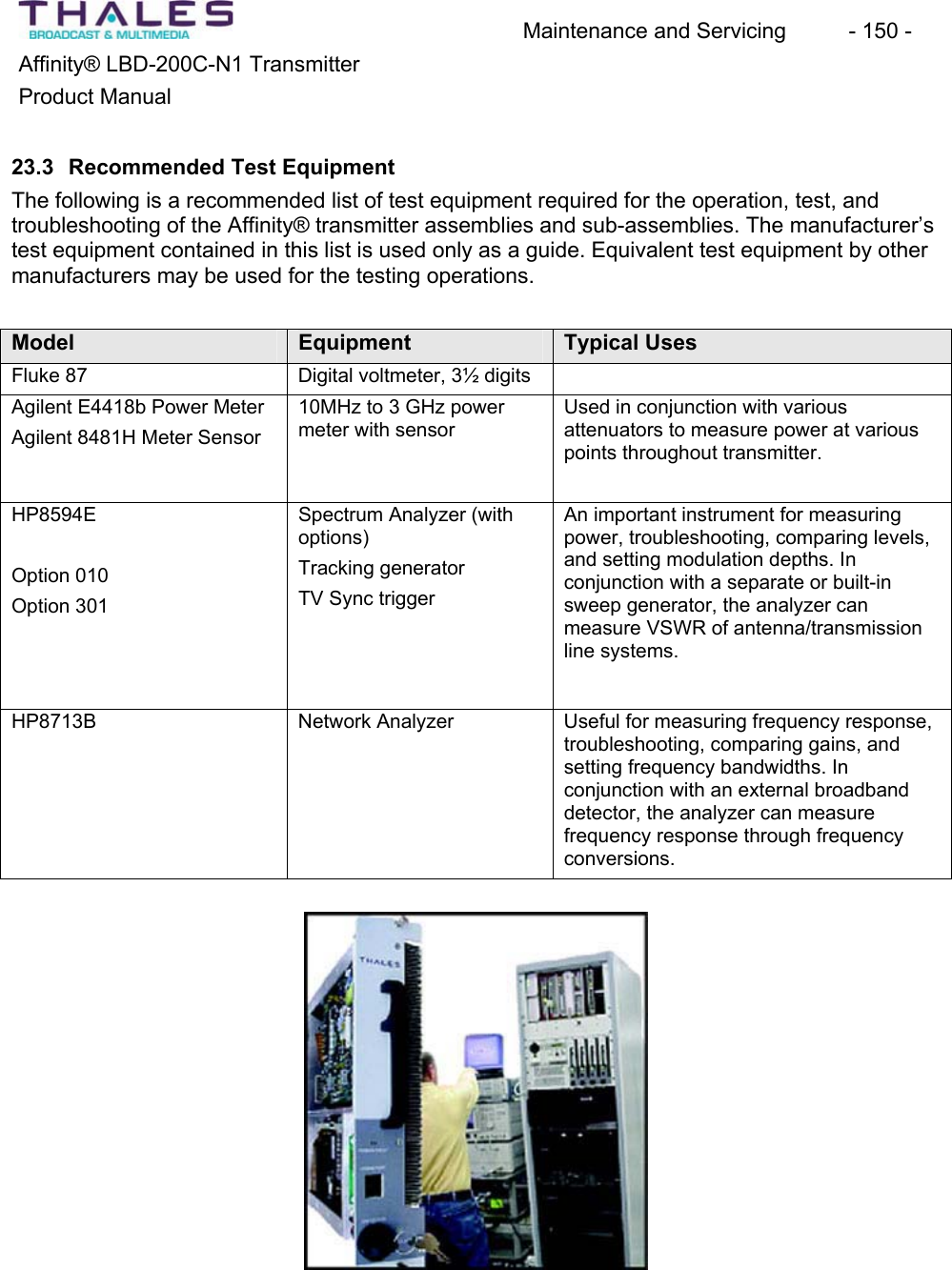
Maintenance and Servicing  - 150 - Affinity® LBD-200C-N1 TransmitterProduct Manual23.3 Recommended Test Equipment The following is a recommended list of test equipment required for the operation, test, and troubleshooting of the Affinity® transmitter assemblies and sub-assemblies. The manufacturer’stest equipment contained in this list is used only as a guide. Equivalent test equipment by other manufacturers may be used for the testing operations.Model Equipment Typical UsesFluke 87 Digital voltmeter, 3½ digits Agilent E4418b Power MeterAgilent 8481H Meter Sensor10MHz to 3 GHz powermeter with sensorUsed in conjunction with variousattenuators to measure power at variouspoints throughout transmitter.HP8594EOption 010Option 301Spectrum Analyzer (withoptions)Tracking generatorTV Sync trigger An important instrument for measuringpower, troubleshooting, comparing levels,and setting modulation depths. In conjunction with a separate or built-in sweep generator, the analyzer canmeasure VSWR of antenna/transmissionline systems.HP8713B Network Analyzer Useful for measuring frequency response,troubleshooting, comparing gains, and setting frequency bandwidths. In conjunction with an external broadbanddetector, the analyzer can measurefrequency response through frequencyconversions.
Maintenance and Servicing  - 151 - Affinity® LBD-200C-N1 TransmitterProduct Manual23.4 Schedules MaintenanceUse this maintenance schedule as a guide for the Affinity® transmitter. Maintenance proceduresmay be performed more often if environmental conditions are not typical. Variables such as dirt, heat and power-line variations, which may degrade the transmitter operation, should bemonitored and accounted for during any maintenance schedule. Keep the transmitter and the surrounding area clean. The transmitter can fail if operated in an overheated and/or dirty environment. Parts with accumulated dirt will not be as efficient and may prematurely fail. Dirty fan assemblies reduce the amount of cooling airflow to the transmitter causing components to overheat. It is important to note that all scheduled maintenance activity should be flexible enough to accommodate any operational variance. 23.4.1 Monthly MaintenancePerform the following checks on a monthly basis:Operating TemperaturesDuring transmitter operation, and using a temperature probe, test the transmission linecomponents, waveguide, and other exposed components for abnormal temperature fluctuations.Unusual hot spots on these components typically indicate a problem.Visual InspectionVisually examine the entire transmitter system. Look for loose connections, damagedcomponents, (discolored, charred, melted, broken leads) and dirty areas. Tighten all looseconnections; replace all damaged components, and clean dirty areas. Investigate and record the cause for any of these issues. Cooling SystemVerify that all system cooling air displacement fans and air-conditioning units are in workingorder. Ensure all fans are clean and unobstructed.CleaningIt is important to keep the Affinity® transmitter and related support equipment clean. For example, a dirty air filter reduces cooling airflow and can cause a thermal runaway probleminside the transmitter cabinets. Dirt makes a low-resistance path across insulators and wiring. WARNINGPerform these procedures and checks only when the voltage is removed from the transmitter.Use a vacuum cleaner, small brushes, or clean lint-free cloths with denatured alcohol or mild-detergent cleaning solutions. Do not use compressed air. Compressed air blows dirt around
Maintenance and Servicing  - 152 - Affinity® LBD-200C-N1 TransmitterProduct Manualrather than removing it. Use a small brush to dislodge dirt while using the vacuum to remove it. Where practical, use cloth to wipe dirty surfaces. Clean the fans that pull air through the transmitter. The amount of air that the fan can move is reduced if the impellers are dirty. Clean the motors; dirt may accumulate on the windings and bearings that can increase the operatingtemperature and decrease the life of the motor.23.4.2 Semi Annual Maintenance Perform these checks on a semi-annual schedule:Plug-In Module Cleaning Procedure This cleaning procedure is applicable to all the Affinity® plug-in modules.NOTE: When plug-in modules are removed during the cleaning process there will be aninterruption in service. Returning the module to the sub-chassis will restore service. This note does not apply to the Power Amplifier Segments (PAS). The amplifier segments may be removed one-at-a-time for cleaning with the power attached. Removing an amplifier during this cleaning procedure will cause a reduction in transmitter power until the amplifier is again securedx Remove the plug-in module by loosening the thumbscrew and sliding the moduleout of the sub-chassis.x Remove the side “snap-on” covers if required. x Gently vacuum or dust inside the plug-in. x Clean the outside covers and front panel using a damp (NOT WET) non-abrasive cloth, and a mixture of mild detergent and water. x Ensure that the plug-in module is COMPLETELY dry before plugging it back into thesub-assembly.x Tighten the thumbscrewsPower and Grounding Audit The first step to avoiding power quality problems is to check the AC distribution and groundingsystem for missing, improper, or poor connections. It is important to check the completegrounding system from the source to the load. Checking the grounding system ensures that the voltage drops are within acceptable limits and the ground connections are proper. Wiring and Grounding ProblemsWhen a neutral-to-ground connection is made at the load side of the equipment, the feeder neutral current will divide and return on both feeder metal raceway and feeder neutral conductor. When an AC current travels on the metal enclosure of the equipment, an electromagnetic field is produced, which is not desirable. Grounding and wiring problems can arise from inconsistencies in equipment installations, such as:x Different parts of the industrial set-up were built during various time schedules.
Maintenance and Servicing  - 153 - Affinity® LBD-200C-N1 TransmitterProduct Manualx Electronic equipment with control ground and power ground makes the issue of the system grounding more complex.x In new installations, connections may be left off or may not be properly tightened. x Loads cycling on-and-off produce heating and cooling that eventually result in poor joints with high impedancex Periodic additions or modifications to the distribution system can result in missing,improper, and poor quality connections.x Multiple control or power grounds belonging to different facilities and connected to the same ground will cause loop currents.x With the introduction of many converter and solid-state power supplies, the steady state neutral current becomes significant, which is not desirable and has to be monitored and corrected.Acceptance Criteria A grounding audit must be performed to ensure that acceptance criteria are maintained. Voltage limits, and neutral and ground bonding must be evaluated. Voltage limits: Line-to-groundvoltage, and line-to-neutral voltages, must be within 5% of the nominal voltage as per ANSI Standard 84.1. Any voltage deviation above or below the defined limit may affect equipmentperformance. Voltage drop-in feeders that serve sensitive electronic equipment shall be no more than 2% under the actual load conditions as per IEEE Standard 1100. This is not a requirement, but this practice may help to achieve better equipment performance.Neutral and ground bonding: A voltage measurement between the neutral and ground will indicate voltage in the milli-volt range under normal operating conditions. A reading of zero volts indicates the presence of a nearby neutral-ground bond. This condition is acceptable.x Excessive current on equipment ground can indicate the presence of a load-side ground connection. This condition requires careful visual inspection. x Open or ungrounded equipment has to be identified by visual inspection. Thiscondition must be remedied.Corrective MeasuresThe following are some of the typical items that require corrective measures followed by the results of field measurements.x Missing equipment ground connection. This ground connection must be installed. x Missing interconnection from the industrial ground to the utility ground has to be connected.x Reversed connection between the neutral and the ground must be corrected. x Multiple control grounds from the adjacent facilities connected to the same ground to provide isolated grounding for the facility.x Rectify loose ground connections. Loose connection in the ground connectionsproduces high impedance connection and has contact resistance.
Maintenance and Servicing  - 154 - Affinity® LBD-200C-N1 TransmitterProduct Manualx It is recommended that all grounding bonds be inspected and tested annually to ensure proper and low impedance connections. 23.4.3 Annual MaintenanceAnnual maintenance should consist of verifying that the transmitter is operating in accordance with licensing authority Rules and Regulations. Use the factory tested transmitter data that was initially provided with the transmitter, or any performance data taken after the transmitter was installed. Use this information as a guide for completing the necessary tests, and as acomparison to data recorded during the tests. Thales offers services to conduct these tests. For more information, contact Thales Customer Service Department.23.5 Troubleshooting The Affinity® transmitter is equipped with comprehensive diagnostic circuitry that monitors the status of each plug-in module and amplifier segment. The Affinity® front panel contains an LED display that is used in conjunction with the installed Control and Monitoring system to diagnose failure modes.A 14-pin diagnostic interface connector, labeled J1 located on the back of the transmitter, is used to assist in troubleshooting. Critical power supply, plug-in module, and motherboardvoltage test-points can be accessed from this location. Should a failure occur, the combinationof diagnostic status LEDs, the Control and Monitoring system, and the diagnostic interface voltage levels will help identify the failure. NOTE: Repair of internal modules is not recommended or advised. Contact Thales CustomerService department should a failure occur to any of the plug-in modules or amplifier segments.Power Supply plug-in modulePowerA lit green LED indicates normal operation. Absence of a lit green LED indicates a missingsignal or parameter resulting in an automatic controlled shutdown.Problem:No power present from the Front-End Power SupplyPossible Cause  SolutionFuse F1 blown in plug-in module Replace fuse with the same rating No DC input from Front-End Power Supply Check OEM Power supply for proper operationFailure in plug-in module Contact Thales Customer Service Department
Maintenance and Servicing  - 155 - Affinity® LBD-200C-N1 TransmitterProduct ManualProblem:No output power on the Driver DC Power Supply Possible Cause  SolutionShort circuit or current overload  Test the 48-pin connector on the backplaneassembly for any short circuits.Short circuit or current overload  Find the plug-in module that is causing theoverload by swapping with a known good plug-inmodule.Failure in plug-in module Contact Thales Customer Service DepartmentUpconverter plug-in moduleThe Upconverter plug-in module is equipped with a Liquid Crystal Display (LCD) assembly that provides a PASS/FAIL status for each plug-in module, as well as a series of measurements and user adjustments.To view the status of each plug-in module, perform the following: x Press the Select key on the Pre-Amplifier keypad assembly. When “STATUS” is displayed press the ENTER key. x Select the plug-in module to be tested.x The LCD will display a PASS or FAIL for the plug-in module being tested x If a FAIL is displayed, contact the Thales Customer Service Department for a replacement.NOTE: There are no user-level troubleshooting steps for the plug-in modulesIf the Reflected Power measurement is high, check the following: x Output cables between amplifier chassis(s) and output RF filter x Output RF filter x High Power Combiner and reject load, if applicableConnections to the antennaIf these checks have been verified and problems still exist, contact Thales Customer Service. If the Forward Power measurement is low, check the following: x Check the LEDs on the Power Amplifier Segment. The LEDs should be lit Green. x Check the status of each plug-in module via the keypad on the Pre-Amplifier plug-in front panel. x If no Power Amplifier Segment or plug-in module indicates a FAIL condition, use the keypad and LCD to display the IN-SIGNAL condition. x If the IN-SIGNAL status indicates a NO IN-SIGNAL condition, check the signalsource.
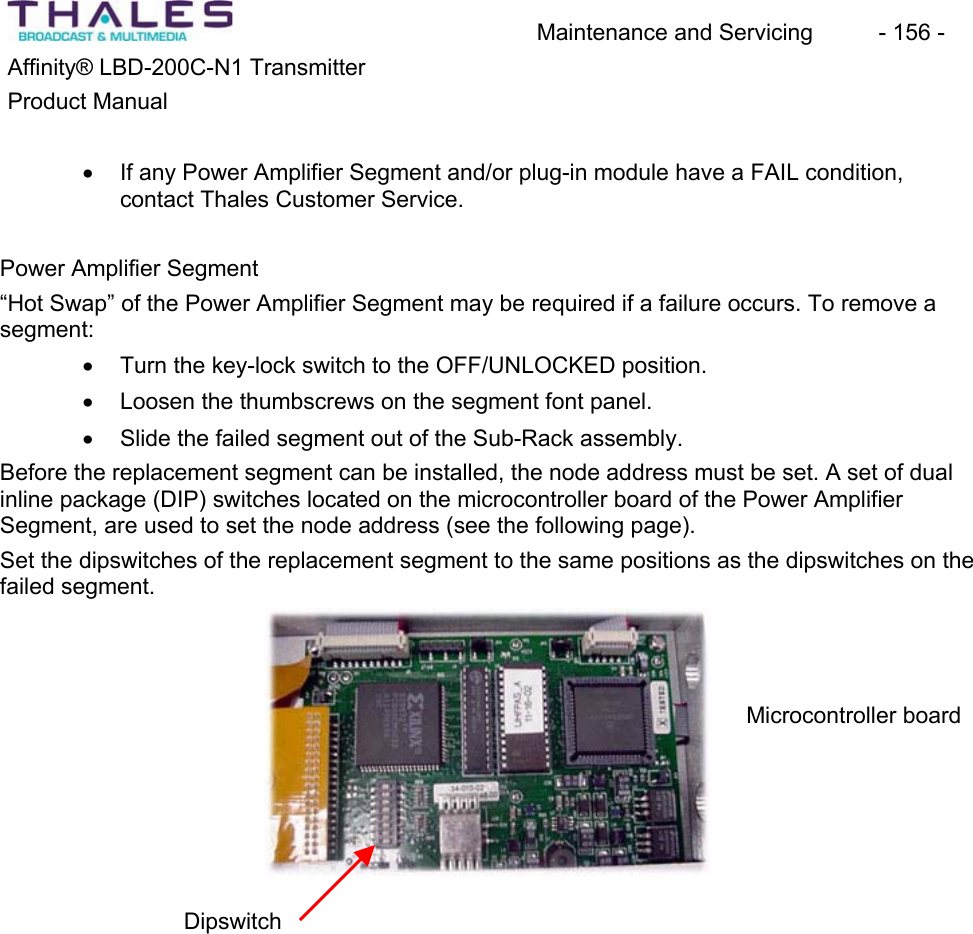
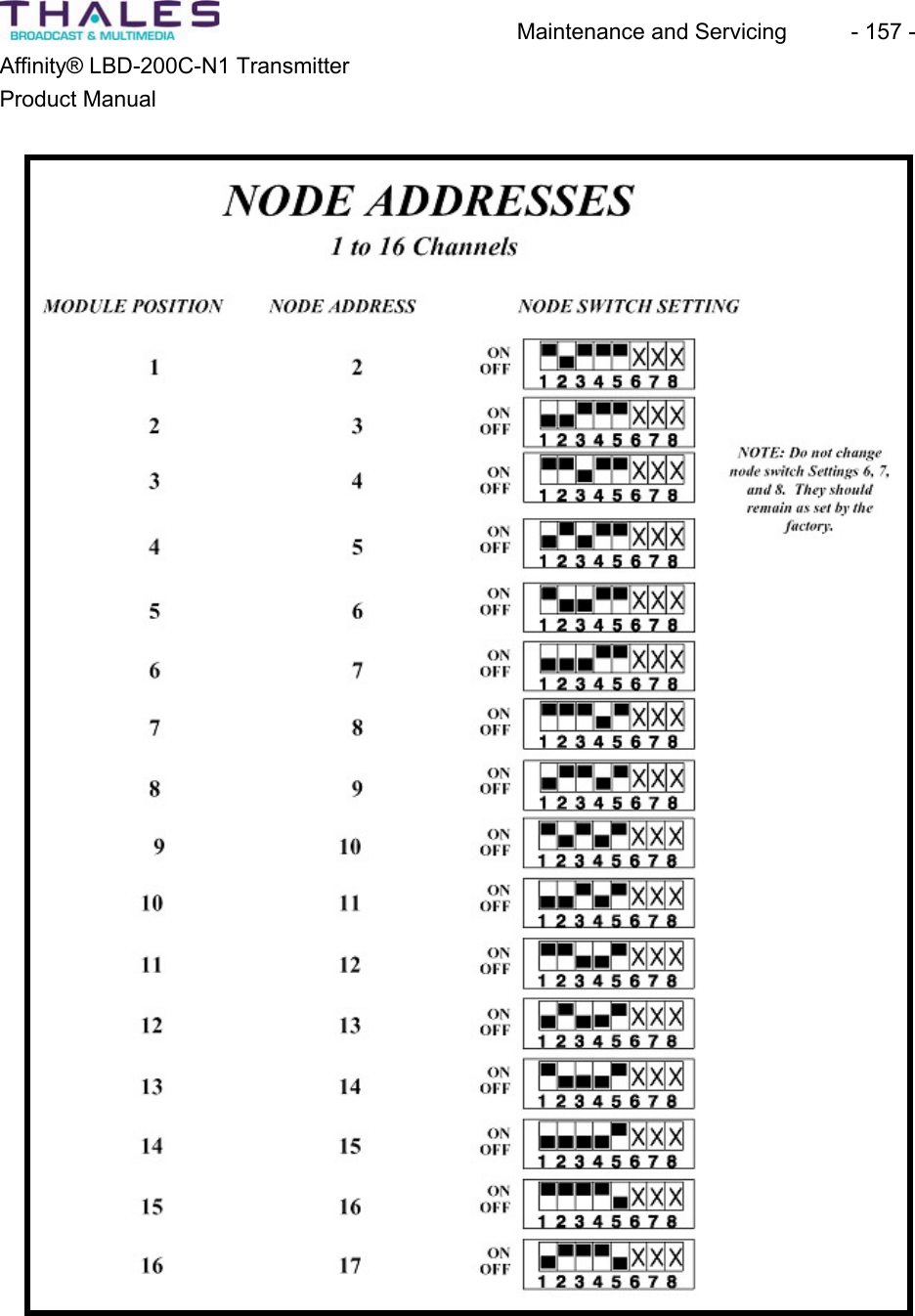
Maintenance and Servicing  - 156 - Affinity® LBD-200C-N1 TransmitterProduct Manualx If any Power Amplifier Segment and/or plug-in module have a FAIL condition, contact Thales Customer Service. Power Amplifier Segment“Hot Swap” of the Power Amplifier Segment may be required if a failure occurs. To remove a segment:x Turn the key-lock switch to the OFF/UNLOCKED position. x Loosen the thumbscrews on the segment font panel. x Slide the failed segment out of the Sub-Rack assembly.Before the replacement segment can be installed, the node address must be set. A set of dual inline package (DIP) switches located on the microcontroller board of the Power AmplifierSegment, are used to set the node address (see the following page). Set the dipswitches of the replacement segment to the same positions as the dipswitches on the failed segment.Microcontroller board Dipswitch
Maintenance and Servicing  - 157 - Affinity® LBD-200C-N1 TransmitterProduct Manual
Maintenance and Servicing  - 158 - Affinity® LBD-200C-N1 TransmitterProduct ManualTroubleshooting WorksheetThe troubleshooting worksheet identifies each interface pin. Fill in the Measured Voltage columnwith the values derived from J1.Sample Worksheet with Typical Voltage Values Fill in your company information in the space provided on the following page and either mail,email, or phone in the measured voltage results of the troubleshooting worksheet to the Thales Customer Service Department:Thales Broadcast & Multimedia, Inc. Customer Service Department104 Feeding Hills Road Southwick, MA 010771-800-345-9295csfeedback@us.thales-bm.com
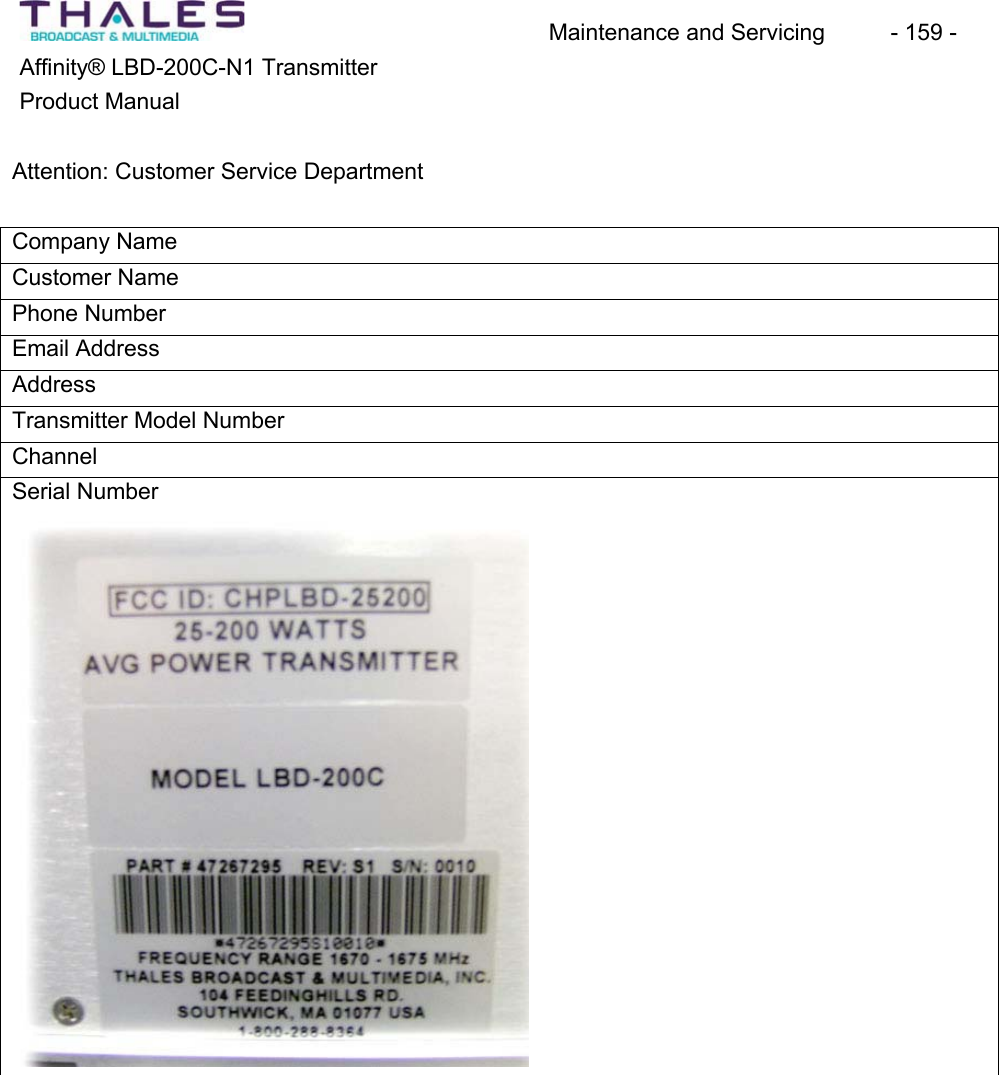
Maintenance and Servicing  - 159 - Affinity® LBD-200C-N1 TransmitterProduct ManualAttention: Customer Service DepartmentCompany NameCustomer NamePhone Number Email AddressAddressTransmitter Model Number ChannelSerial Number
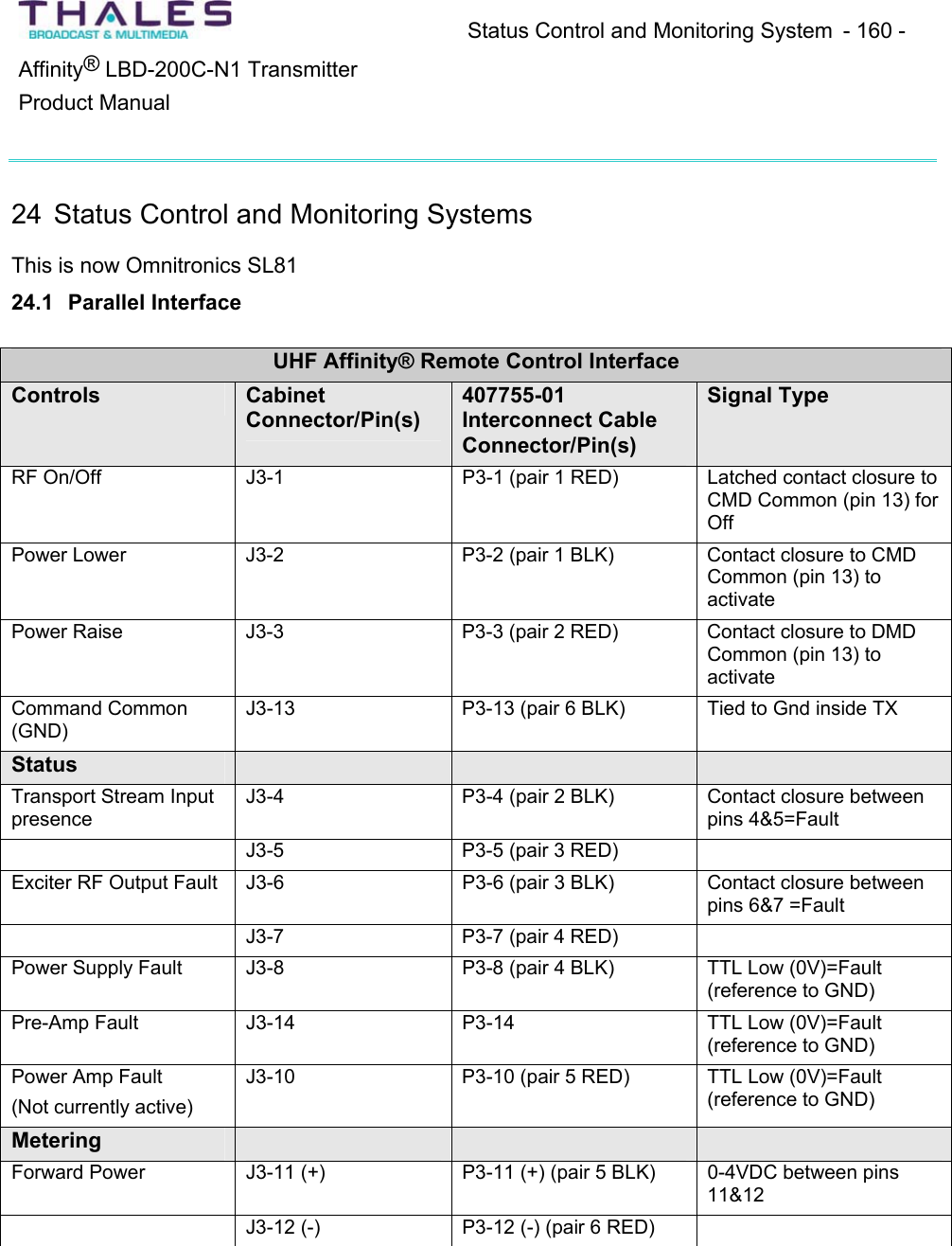
Status Control and Monitoring System  - 160 - ®Affinity  LBD-200C-N1 TransmitterProduct Manual24 Status Control and Monitoring Systems This is now Omnitronics SL8124.1 Parallel InterfaceUHF Affinity® Remote Control Interface Controls CabinetConnector/Pin(s)407755-01Interconnect Cable Connector/Pin(s)Signal TypeRF On/Off  J3-1 P3-1 (pair 1 RED) Latched contact closure toCMD Common (pin 13) for OffPower Lower J3-2 P3-2 (pair 1 BLK) Contact closure to CMDCommon (pin 13) to activatePower Raise J3-3 P3-3 (pair 2 RED) Contact closure to DMDCommon (pin 13) to activateCommand Common (GND)J3-13 P3-13 (pair 6 BLK)  Tied to Gnd inside TX StatusTransport Stream Input presenceJ3-4 P3-4 (pair 2 BLK) Contact closure between pins 4&5=FaultJ3-5 P3-5 (pair 3 RED)Exciter RF Output Fault  J3-6 P3-6 (pair 3 BLK) Contact closure between pins 6&7 =FaultJ3-7 P3-7 (pair 4 RED)Power Supply Fault  J3-8 P3-8 (pair 4 BLK) TTL Low (0V)=Fault(reference to GND)Pre-Amp Fault J3-14 P3-14 TTL Low (0V)=Fault(reference to GND)Power Amp Fault(Not currently active)J3-10 P3-10 (pair 5 RED)  TTL Low (0V)=Fault(reference to GND)MeteringForward Power  J3-11 (+)  P3-11 (+) (pair 5 BLK)  0-4VDC between pins11&12J3-12 (-)  P3-12 (-) (pair 6 RED)
Block Diagrams and Schematics - 161 - ®Affinity  LBD-200C-N1 TransmitterProduct Manual25 Block Diagrams and Schematics
  Block Diagrams and Schematics  - 162 - Affinity® LBD-200C-N1 Transmitter Product Manual   THIS DOCUMENT AND THE INFORMATION IN IT IS THE PROPERTY OF THALES BROADCAST & MULTIMEDIA (THALES)  THIS DOCUMENTAND INFORMATION SHALL NOT BE REPRODUCED  OR DICLOSED TO ANY PERSON OR ENTITY WITHOUT PRIOR WRITTEN CONSENT FROM THALES. CE COCUMENT ET LES INFORMTIONS QU’IL CONTIENT SONT LA PROPIETE DE THALES BROADCAST & MULTIMEDIA ILS NE PEUVENT ETRE REPRODUITS NI COMMUNIQUES A DES TIERS SANS L’AUTHORISATION PREALABLE ECRITE DE THALESHANDWRITTEN CHANGE FORBIDDENTHALES BROADCAST & MULTIMEDIA© 2005TITLE:A ‘ ‘ ‘ ENGINEERING RELEASE06/21/05D.WikeREV CHANGE ORDER ISSUED DATE DESCRIPTIONDATEAUTHORIZEDUNLESS OTHERWISE SPECIFIED:DIMENSIONS ARE IN INCHES. DIMENSIONS IN BRACKETS [X.XX] ARE IN MILLIMETERS.ISSUED: 05/11/05CHECKED: ‘ENG: 06/20/05ENG: ‘PROJECT: ‘MFG: ‘EDC: 06/21/05THALES BROADCAST & MULTIMEDIASOUTHWICK, MASSACHUSETTS 01077MATERIAL SEE PARTS LISTTREATMENT ‘FINISH ‘REVBDOCUME NT NUM BE R47267199 050 B 1 OF 1DTC CODE SIZE PAGEPROJECT NO. CAD F ILE SCAL ENONE47267199-050B.pptRD-DAB-20-TRANSINTERCONNECT DIAGRAM, 50-200W, L-BANDTRANSMITTER CHASSISD.WIKEG.DelCampo‘‘‘‘D.Tougas47266066Rear Panel interfaceJ1J547266769MSI PCBJ21J20J4&J22J13J8 J10J14J933-304-02RS485 PCB47267377envelope detectorJ7- Rear Panel 9 Pin D-subto modulator commandJ4- Rear Panel 15 Pin D-subABCS interface134567750396-0147266064Driver BackplaneJ15J5&J7J14J29J1847266165Power Supply BackplaneJ2J16 - LoadJ17- NeutralJ15 - GNDJ1J4 - LoadJ5- NeutralJ3 - GND47267294AMP Backplane boardJ9J13J8J7BUSS BUSSJ10J7AC ENTRYMODULE750490-01J6 & J13 - (+V)J7 & 14- (-V)J9J6 J8J1747267088SNMP DEVICESERVEROPTION KIT14119813102Note:Ensure jumpers JK1-4 are configured properly J2 = Agile Cntrlr Int.J3 = Local RS485CABLE KEY1. 47266293.00-3702. 754449-013. 47266393.00-0524. 47266392.00-1405. 47266278.00-1806. 47266887.00-2207. 16-086-2908. 47266294.00-2209. 47266278.00-05010. 47266294.00-05211. 750497-0112. 47266389 ASSY13. 47266295.00-10014. 47266287.00-19215. 16-021-20016. 4726638517. 47267220.00-24018. 47267370.00-30019. 47267406.00-0701915ADNOTE:Rear door is grounded using 47266385 ground strap; Item 16BLACKREDORANGELoad = BLACKNeutral = WHITEGround = GREEN* Use normally closed contactsJ12+48VDC+48VDC+48VDC +48VDC+10VDCACACJ2J2 = 14 Pin Diagnostics Interface (J1 on Rear Panel)RJ45 Conn LAN Network Interface (J5 on Rear Panel)Two RJ11 Conn RS485 Remote Network Interface J2J317124726709012-5V converterJ54726638948-10V converterJ517J14124726638948-10V converterJ5-10VDCWired as positive groundWired as negative groundORANGE18J6- Rear Panel 9 Pin D-subto modulator interfaceJ8- 48VDC inputJ9- 48VDC inputB ‘ ‘ ‘ D.Wike 07/05/05 Add items 18 & 19
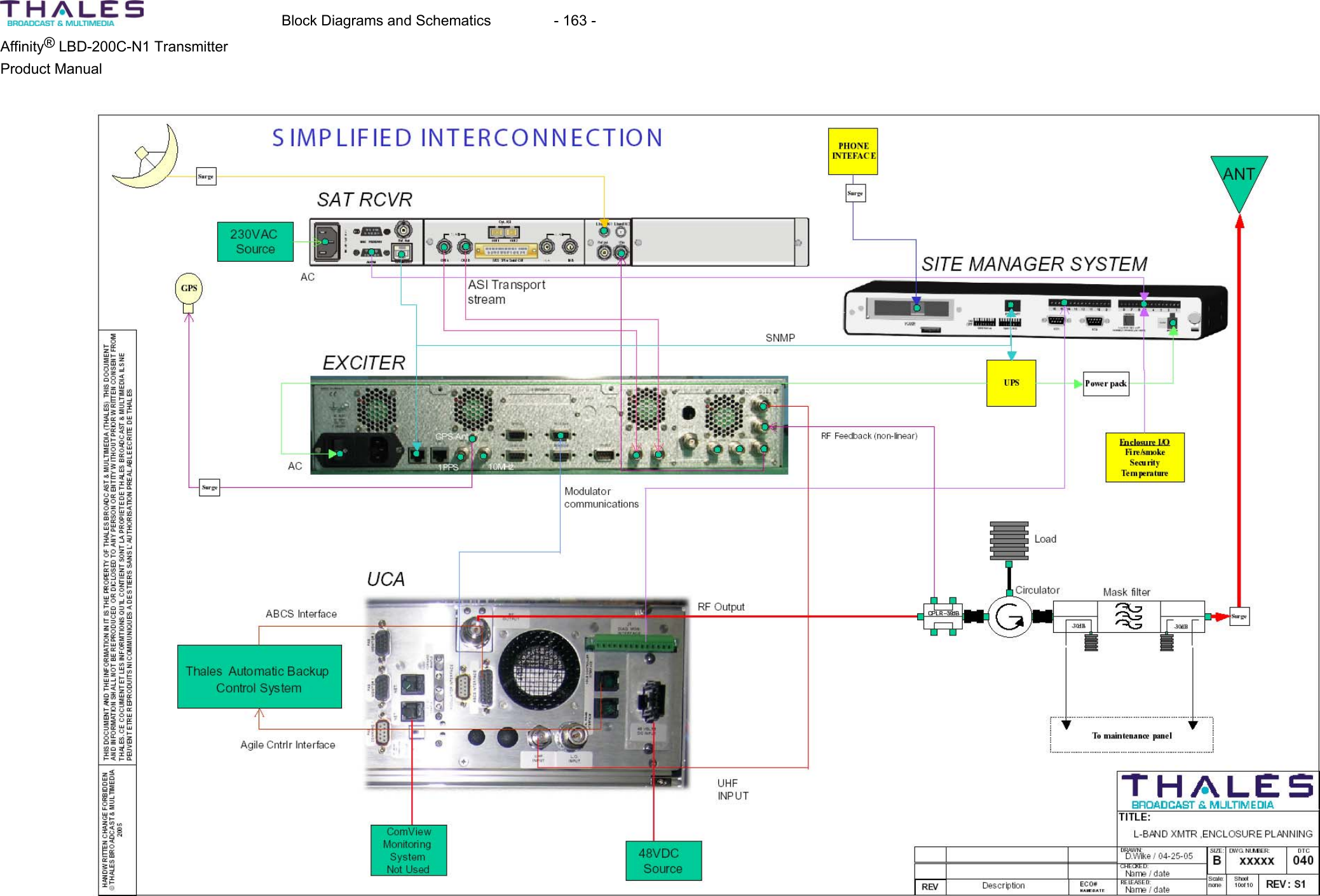
  Block Diagrams and Schematics  - 163 - Affinity® LBD-200C-N1 Transmitter Product Manual
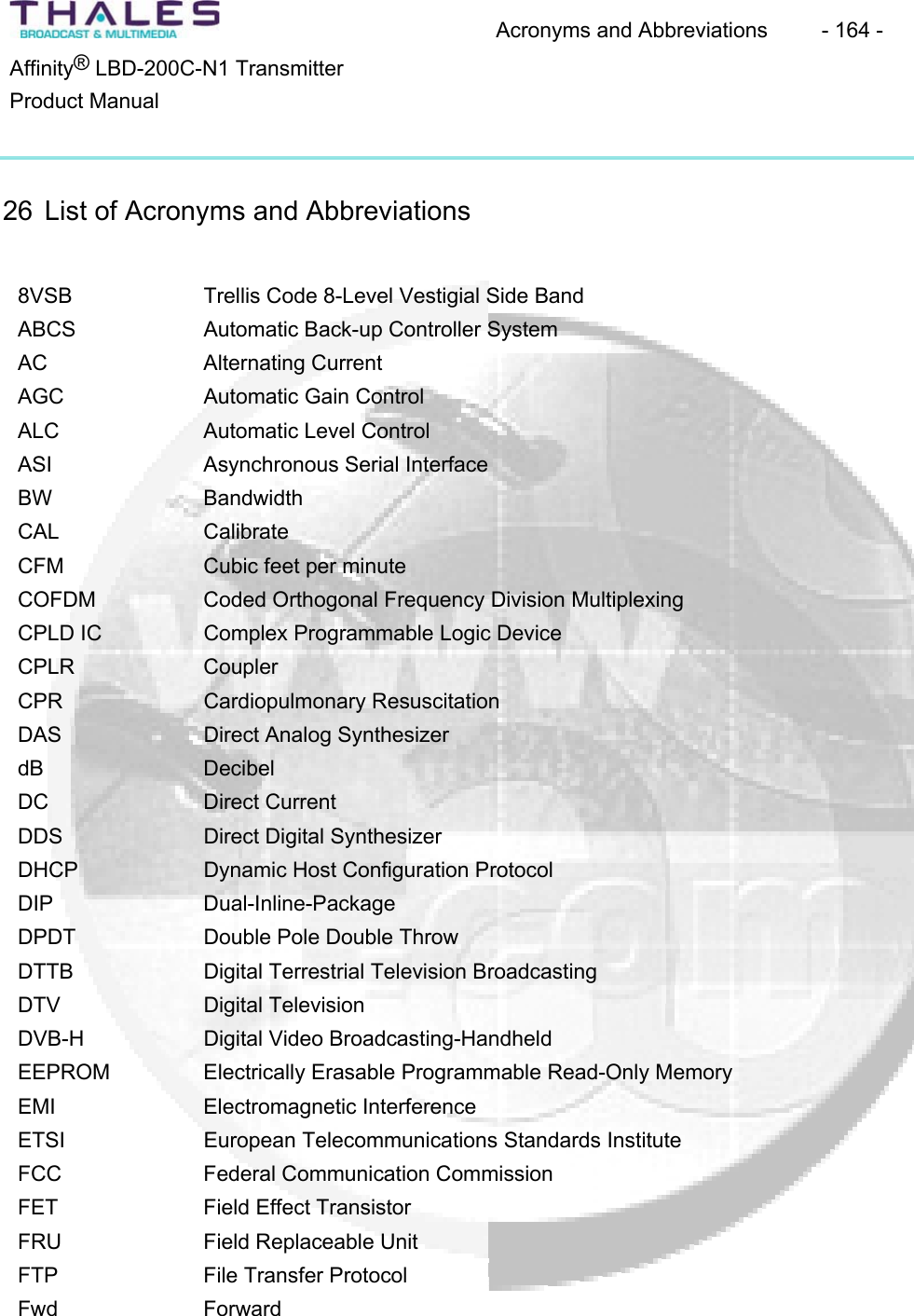
Acronyms and Abbreviations  - 164 - ®Affinity  LBD-200C-N1 TransmitterProduct Manual26 List of Acronyms and Abbreviations 8VSB Trellis Code 8-Level Vestigial Side BandABCS Automatic Back-up Controller System AC Alternating CurrentAGC Automatic Gain Control ALC Automatic Level Control ASI Asynchronous Serial Interface BW BandwidthCAL CalibrateCFM Cubic feet per minuteCOFDM Coded Orthogonal Frequency Division MultiplexingCPLD IC  Complex Programmable Logic Device CPLR CouplerCPR Cardiopulmonary ResuscitationDAS Direct Analog Synthesizer dB DecibelDC Direct CurrentDDS Direct Digital SynthesizerDHCP Dynamic Host Configuration Protocol DIP Dual-Inline-PackageDPDT Double Pole Double Throw DTTB Digital Terrestrial Television BroadcastingDTV Digital TelevisionDVB-H Digital Video Broadcasting-Handheld EEPROM Electrically Erasable Programmable Read-Only MemoryEMI Electromagnetic InterferenceETSI European Telecommunications Standards InstituteFCC Federal Communication CommissionFET Field Effect TransistorFRU Field Replaceable Unit FTP File Transfer Protocol Fwd Forward
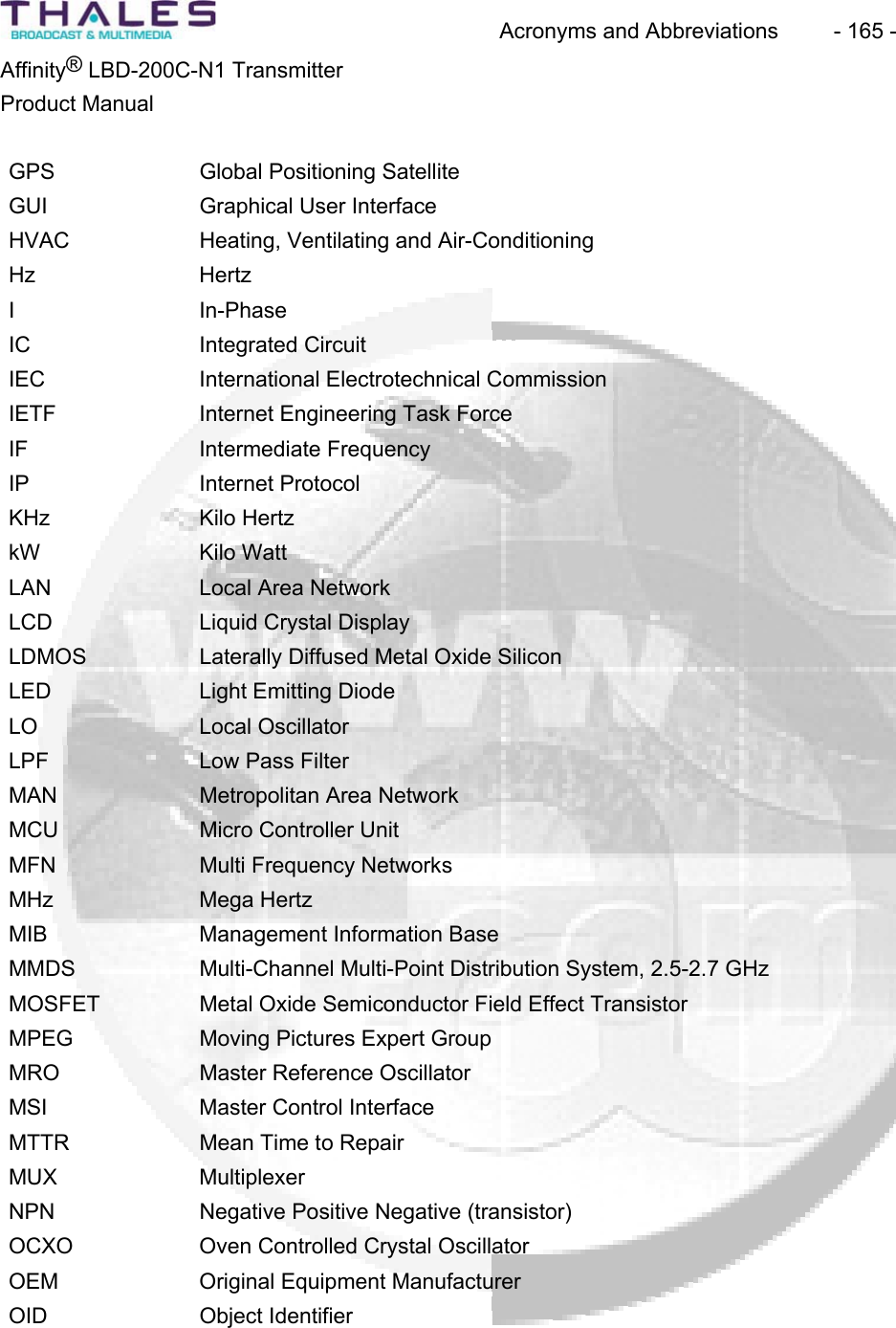
Acronyms and Abbreviations  - 165 - ®Affinity  LBD-200C-N1 TransmitterProduct ManualGPS Global Positioning Satellite GUI Graphical User InterfaceHVAC Heating, Ventilating and Air-Conditioning Hz HertzI In-PhaseIC Integrated CircuitIEC International Electrotechnical CommissionIETF Internet Engineering Task Force IF Intermediate FrequencyIP Internet ProtocolKHz Kilo HertzkW Kilo WattLAN Local Area NetworkLCD Liquid Crystal Display LDMOS Laterally Diffused Metal Oxide Silicon LED Light Emitting Diode LO Local OscillatorLPF Low Pass Filter MAN Metropolitan Area NetworkMCU Micro Controller UnitMFN Multi Frequency NetworksMHz Mega HertzMIB Management Information Base MMDS Multi-Channel Multi-Point Distribution System, 2.5-2.7 GHz MOSFET Metal Oxide Semiconductor Field Effect Transistor MPEG Moving Pictures Expert Group MRO Master Reference Oscillator MSI Master Control InterfaceMTTR Mean Time to Repair MUX MultiplexerNPN Negative Positive Negative (transistor)OCXO Oven Controlled Crystal OscillatorOEM Original Equipment ManufacturerOID Object Identifier
Acronyms and Abbreviations  - 166 - ®Affinity  LBD-200C-N1 TransmitterProduct ManualOS Operating SystemPA Power AmplifierPAS Power Amplifier Segment PC Personal ComputerPCB Printed Circuit Board PIN Positive Intrinsic Negative PIOS Peripheral Input/Output SystemPLL Phase Lock LoopPLO Phase Locked OscillatorPNP Positive Negative Positive (transistor)PSTN Public Switched Telephone Network Pwr PowerQ QuadratureQAM Quadrature Amplitude Modulation RAM Random Access MemoryRF Radio FrequencyRMS Root Mean SquareRU Rack UnitRX ReceiveSFN Single Frequency Networks SMA Sub-Miniature-ASMCS Status Monitor and Control SystemSMM Site Management ModuleSNMP Simple Network Management ProtocolSPI Serial Peripheral InterfaceSSB Single Side BandSYS SystemTB Terminal Barrier Strip TCP/IP Transmission Control Protocol/Internet Protocol Temp TemperatureTFTP Trivial File Transfer Protocol TTL Transistor-Transistor-LogicTx TransmitterTX Transmit
Acronyms and Abbreviations  - 167 - ®Affinity  LBD-200C-N1 TransmitterProduct ManualUBS Unique Broadband Systems, Inc. UCA Upconverter AmplifierUHF Ultra High Frequency VAC Voltage Alternating Current VCO Voltage Controlled Oscillator VDC Voltage Direct Current VHF Very High FrequencyVSWR Voltage Standing Wave Ratio V-Tune Voltage ControlWWattWAN Wide Area Network WLL Wireless Local Loop, 3.4-3.6 GHz
Warranty - 168 - ®Affinity  LBD-200C-N1 TransmitterProduct Manual27 Warranty Thales Broadcast & Multimedia Inc. warrants each product of its manufacture to be free fromany defect in material and workmanship for a period of one year after delivery to, and return by, the original purchaser. No returns, however, will be accepted unless accompanied by a written factory return authorization. The limit of liability under this warranty shall be to repair or replace any product, or part thereof, which proves to be defective after inspection by Thales Broadcast & Multimedia, Inc. With the exception of lamps, fuses or any equipment manufactured by others, which are subject to only such loss adjustments as Thales Broadcast & Multimedia, Inc. may obtain from the suppliers thereof.This warranty shall not apply to any Thales Broadcast & Multimedia, Inc. product, which has been modified physically or electrically damaged, or to modules which seals have been broken, or any product, which has been subjected to conditions exceeding the applicable specificationsor ratings or improper service techniques. Thales Broadcast & Multimedia, Inc. reserves the right to make design changes to any Thales Broadcast & Multimedia, Inc. product without incurring any obligation to make the samechanges to previously purchased units.This warranty is the full extent of the obligation and liability assumed by Thales Broadcast & Multimedia, Inc. with respect to any and all Thales Broadcast & Multimedia, Inc. products.Thales Broadcast & Multimedia, Inc. neither makes, nor authorizes any person to make, any other guarantee or warranty concerning Thales Broadcast & Multimedia, Inc. products.
Parts Lists  - 169 - ®Affinity  LBD-200C-N1 TransmitterProduct Manual28 Parts Lists
Appendix - 170 - Affinity® LBD-200C-N1 TransmitterProduct Manual29 Appendix 29.1 Section A- Hazardous Materials List29.2 Section B- Site Drawings29.3 Section C- List of Modules and Site ID, with Barcode Number 29.4 Section D- Site Acceptance Document 29.5 Section E- Log File
Thales Broadcast & Multimedia, Inc. 104 Feeding Hills Road Southwick MA 01077-USATel: (413) 998-11001-800-345-9295www.thales-bm.comMade and printed in the U.S.A.

Navigation menu