Wireless Seismic 00106 Wireless remote seismic disturbance sensor User Manual DeploymentGuide

Wireless Seismic, Inc. Wireless remote seismic disturbance sensor DeploymentGuide

Contents

User Manual Part 2

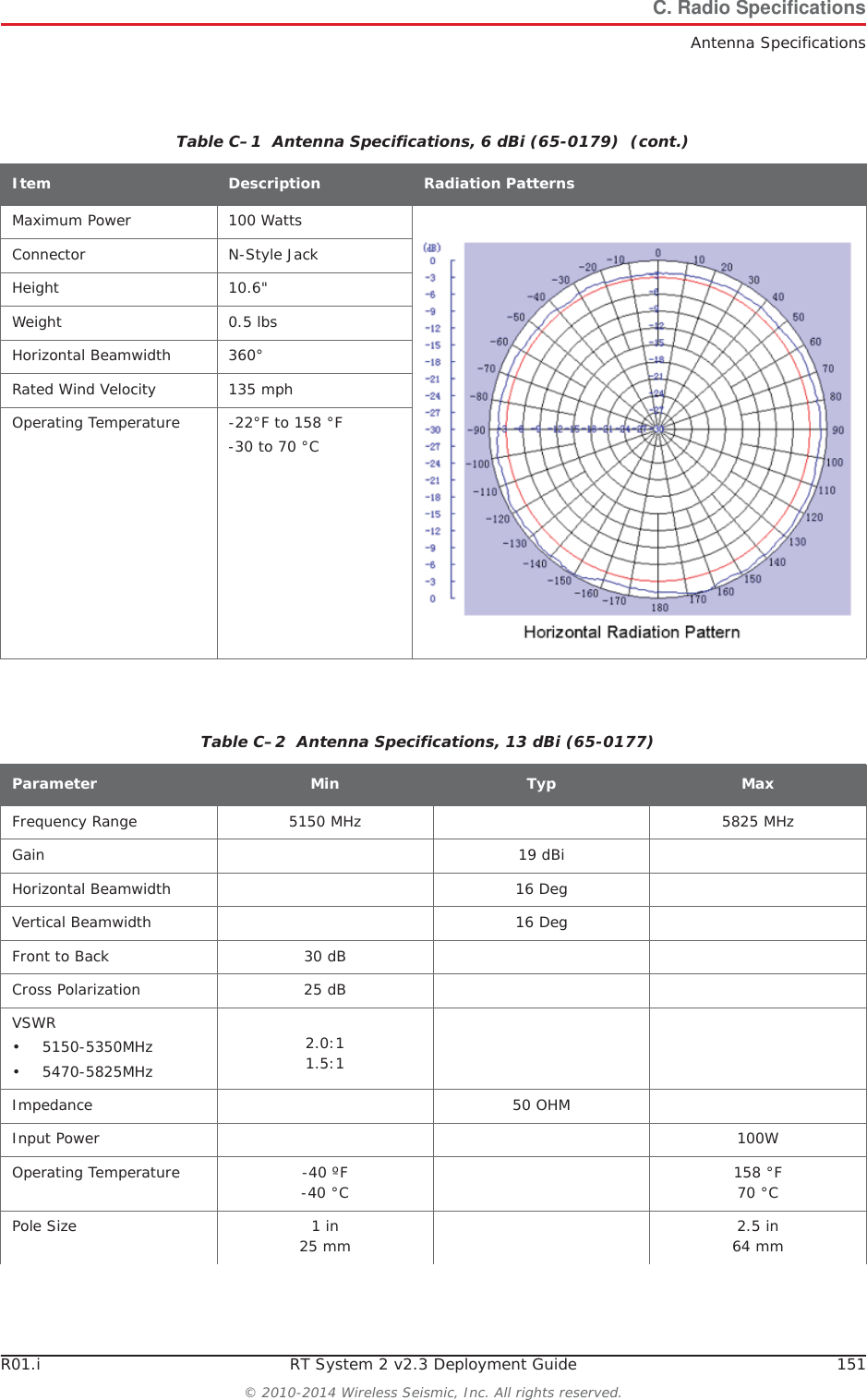
R01.i RT System 2 v2.3 Deployment Guide 151© 2010-2014 Wireless Seismic, Inc. All rights reserved.C. Radio SpecificationsAntenna SpecificationsMaximum Power 100 WattsConnector N-Style JackHeight 10.6"Weight 0.5 lbsHorizontal Beamwidth 360°Rated Wind Velocity 135 mphOperating Temperature -22°F to 158 °F-30 to 70 °CTable C–1  Antenna Specifications, 6 dBi (65-0179)  (cont.)Item Description Radiation PatternsTable C–2  Antenna Specifications, 13 dBi (65-0177) Parameter Min Typ MaxFrequency Range 5150 MHz 5825 MHzGain 19 dBiHorizontal Beamwidth 16 DegVertical Beamwidth 16 DegFront to Back 30 dBCross Polarization 25 dBVSWR• 5150-5350MHz• 5470-5825MHz2.0:11.5:1Impedance 50 OHMInput Power 100WOperating Temperature -40 ºF-40 °C 158 °F70 °CPole Size 1 in 25 mm 2.5 in 64 mm
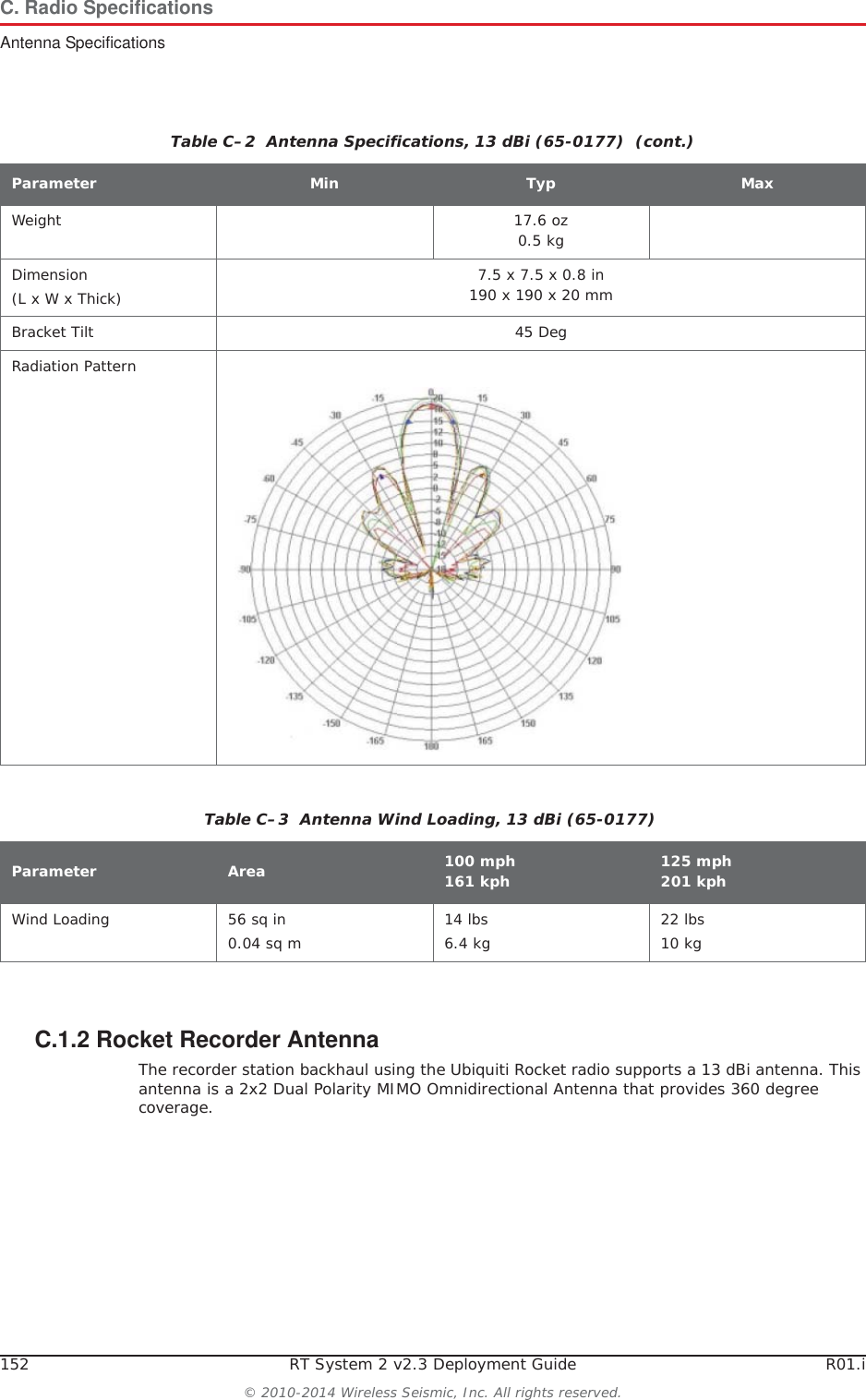
152 RT System 2 v2.3 Deployment Guide R01.i© 2010-2014 Wireless Seismic, Inc. All rights reserved.C. Radio SpecificationsAntenna SpecificationsC.1.2 Rocket Recorder AntennaThe recorder station backhaul using the Ubiquiti Rocket radio supports a 13 dBi antenna. This antenna is a 2x2 Dual Polarity MIMO Omnidirectional Antenna that provides 360 degree coverage.Weight 17.6 oz0.5 kgDimension(L x W x Thick) 7.5 x 7.5 x 0.8 in190 x 190 x 20 mmBracket Tilt 45 DegRadiation PatternTable C–2  Antenna Specifications, 13 dBi (65-0177)  (cont.)Parameter Min Typ MaxTable C–3  Antenna Wind Loading, 13 dBi (65-0177)Parameter Area 100 mph161 kph 125 mph201 kphWind Loading 56 sq in0.04 sq m 14 lbs6.4 kg 22 lbs10 kg
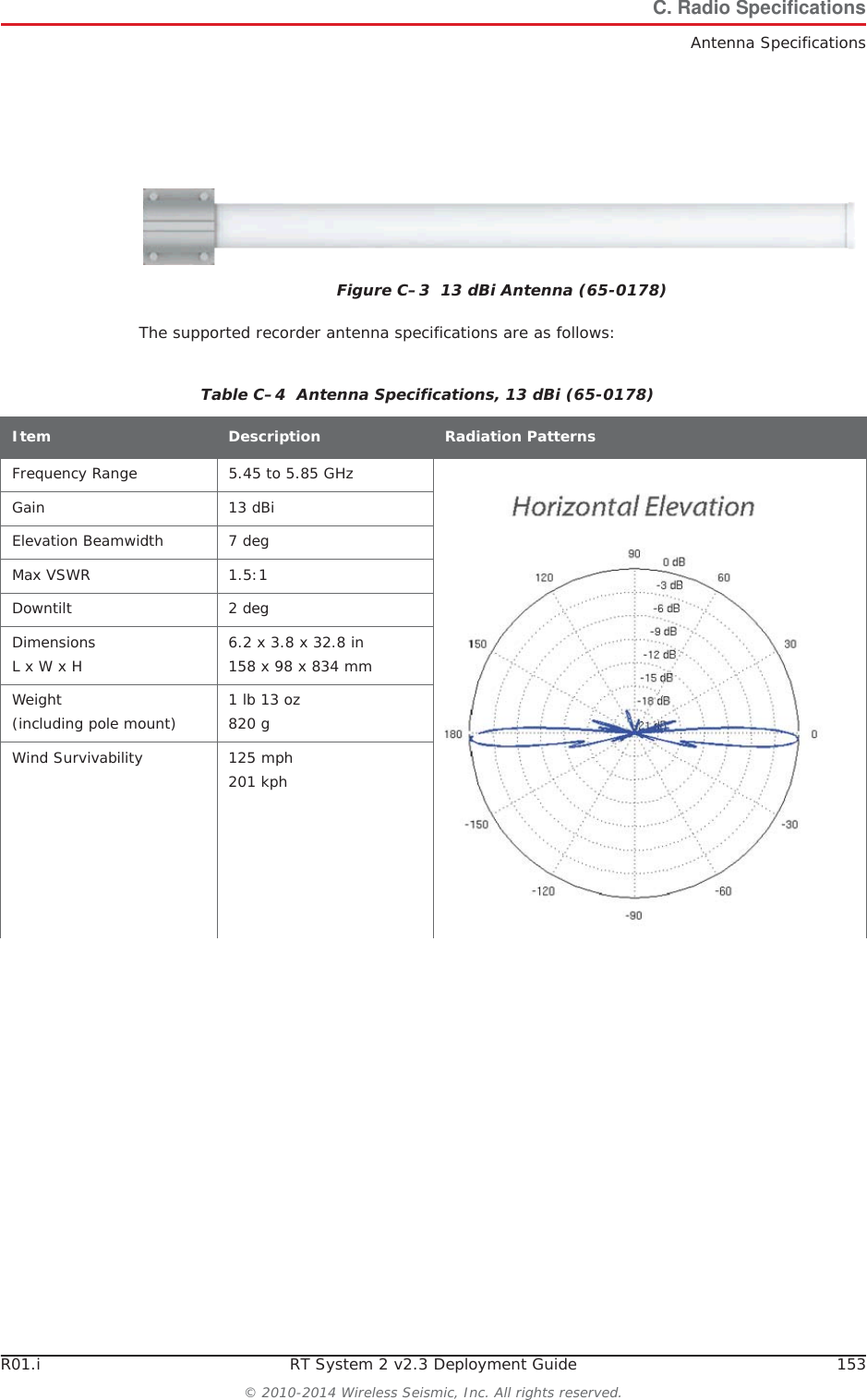
R01.i RT System 2 v2.3 Deployment Guide 153© 2010-2014 Wireless Seismic, Inc. All rights reserved.C. Radio SpecificationsAntenna SpecificationsThe supported recorder antenna specifications are as follows:Figure C–3  13 dBi Antenna (65-0178)Table C–4  Antenna Specifications, 13 dBi (65-0178) Item Description Radiation PatternsFrequency Range 5.45 to 5.85 GHzGain 13 dBiElevation Beamwidth 7 degMax VSWR 1.5:1Downtilt 2 degDimensionsL x W x H 6.2 x 3.8 x 32.8 in158 x 98 x 834 mmWeight(including pole mount) 1 lb 13 oz820 gWind Survivability 125 mph201 kph
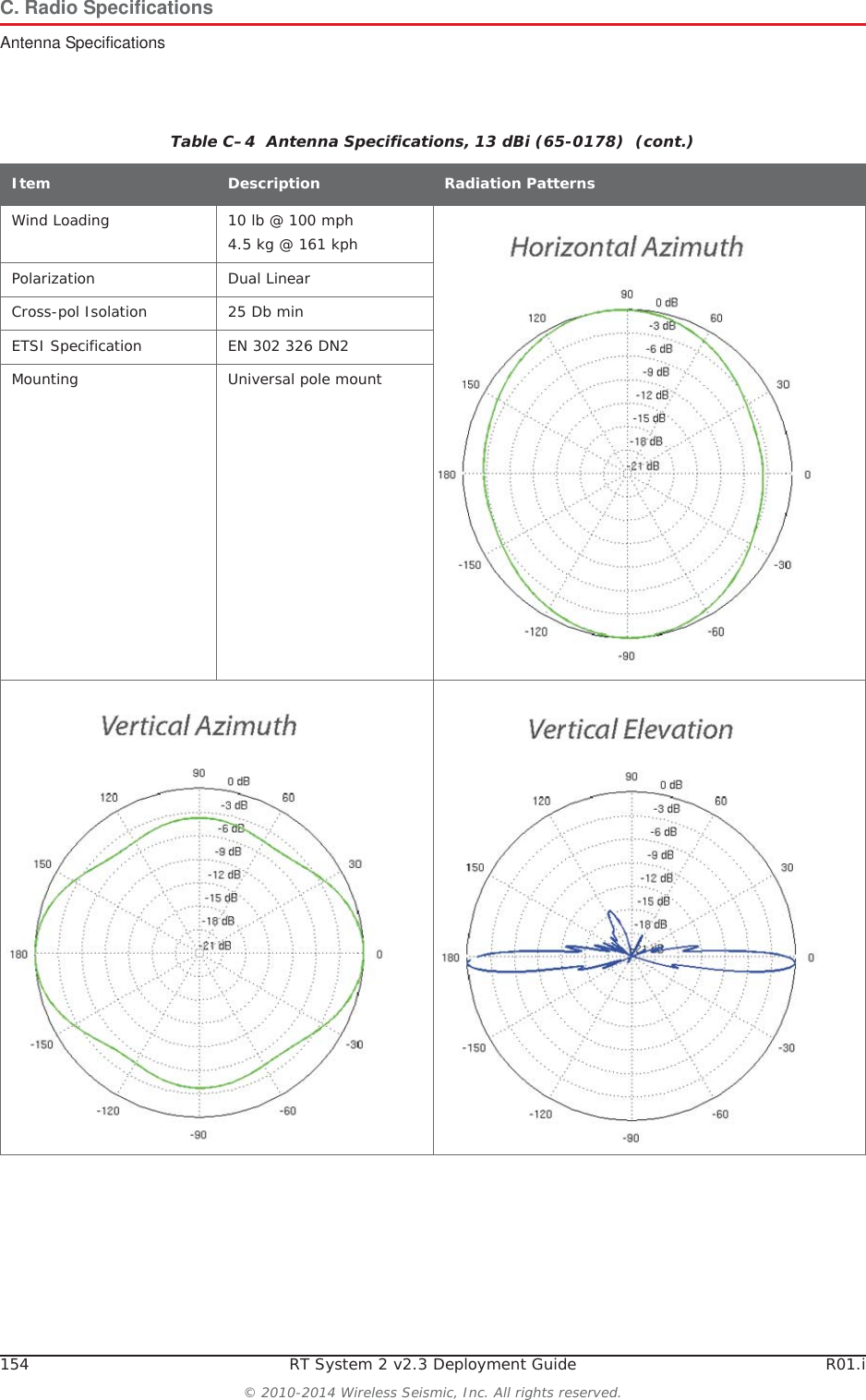
154 RT System 2 v2.3 Deployment Guide R01.i© 2010-2014 Wireless Seismic, Inc. All rights reserved.C. Radio SpecificationsAntenna SpecificationsWind Loading 10 lb @ 100 mph4.5 kg @ 161 kphPolarization Dual LinearCross-pol Isolation 25 Db minETSI Specification EN 302 326 DN2Mounting Universal pole mountTable C–4  Antenna Specifications, 13 dBi (65-0178)  (cont.)Item Description Radiation Patterns
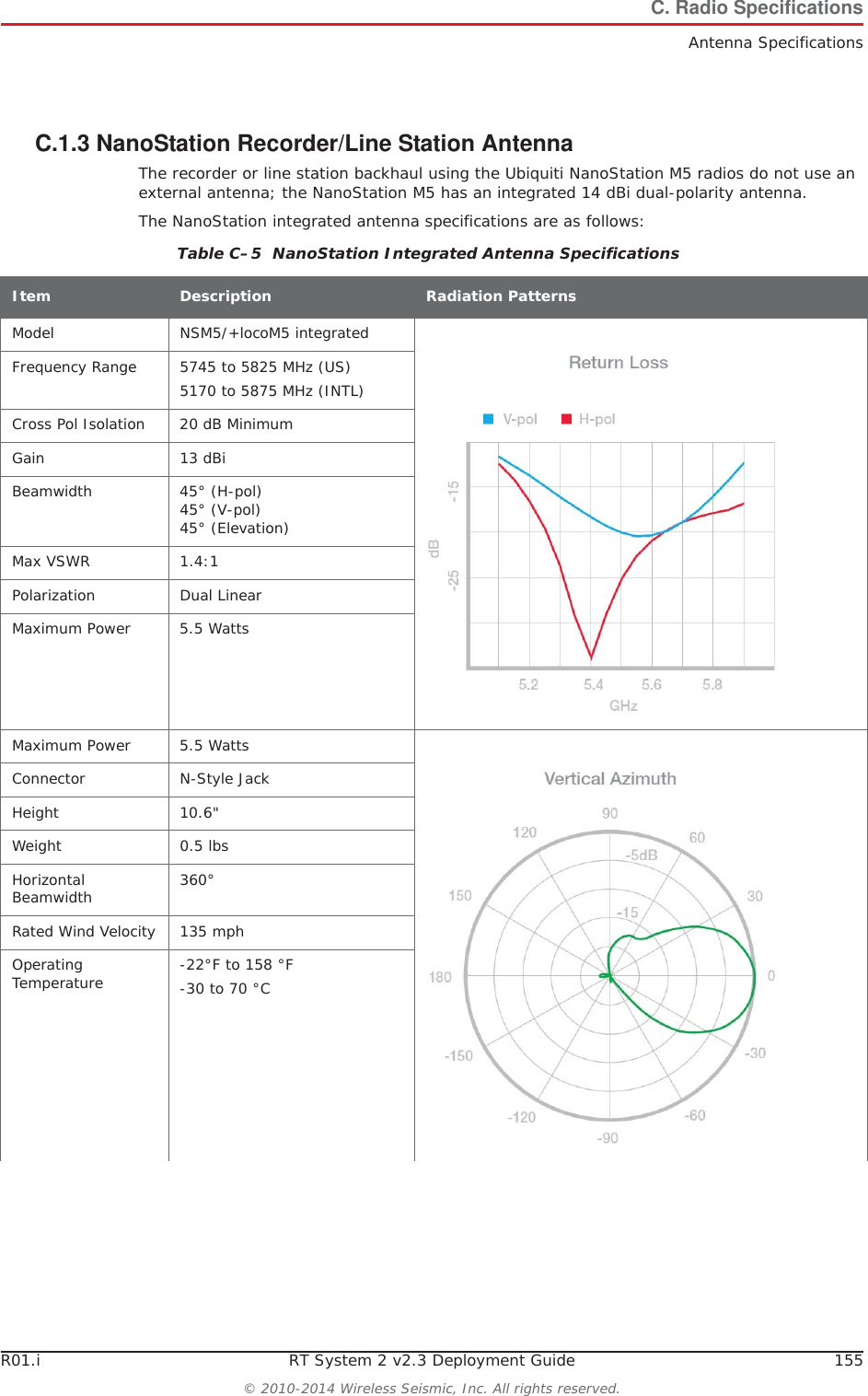
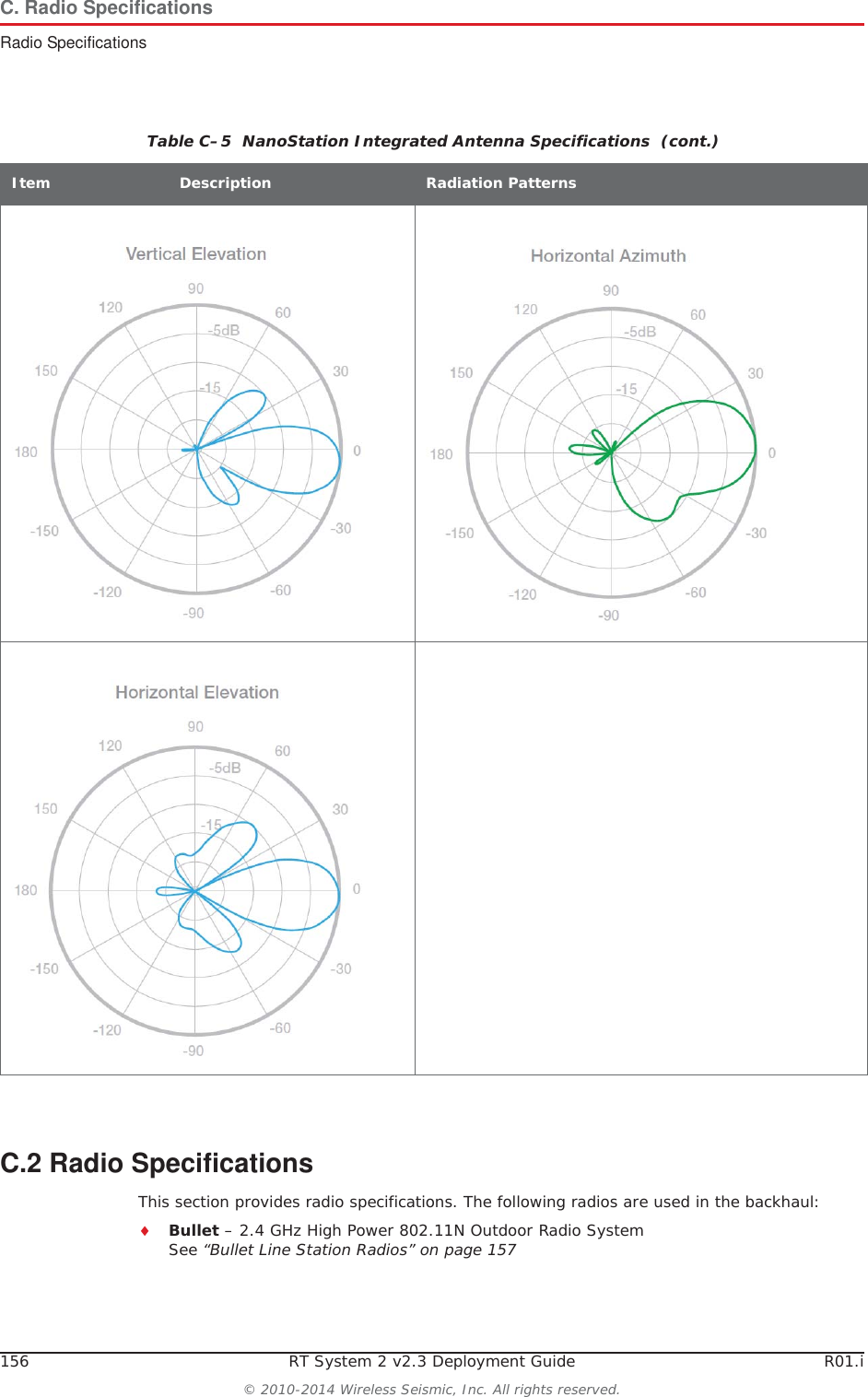
R01.i RT System 2 v2.3 Deployment Guide 155© 2010-2014 Wireless Seismic, Inc. All rights reserved.C. Radio SpecificationsAntenna SpecificationsC.1.3 NanoStation Recorder/Line Station AntennaThe recorder or line station backhaul using the Ubiquiti NanoStation M5 radios do not use an external antenna; the NanoStation M5 has an integrated 14 dBi dual-polarity antenna. The NanoStation integrated antenna specifications are as follows:Table C–5  NanoStation Integrated Antenna Specifications Item Description Radiation PatternsModel NSM5/+locoM5 integratedFrequency Range 5745 to 5825 MHz (US)5170 to 5875 MHz (INTL)Cross Pol Isolation 20 dB MinimumGain 13 dBiBeamwidth 45° (H-pol) 45° (V-pol) 45° (Elevation)Max VSWR 1.4:1Polarization Dual LinearMaximum Power 5.5 WattsMaximum Power 5.5 WattsConnector N-Style JackHeight 10.6"Weight 0.5 lbsHorizontal Beamwidth 360°Rated Wind Velocity 135 mphOperating Temperature -22°F to 158 °F-30 to 70 °C
156 RT System 2 v2.3 Deployment Guide R01.i© 2010-2014 Wireless Seismic, Inc. All rights reserved.C. Radio SpecificationsRadio SpecificationsC.2 Radio SpecificationsThis section provides radio specifications. The following radios are used in the backhaul:iBullet – 2.4 GHz High Power 802.11N Outdoor Radio SystemSee “Bullet Line Station Radios” on page 157Table C–5  NanoStation Integrated Antenna Specifications  (cont.)Item Description Radiation Patterns
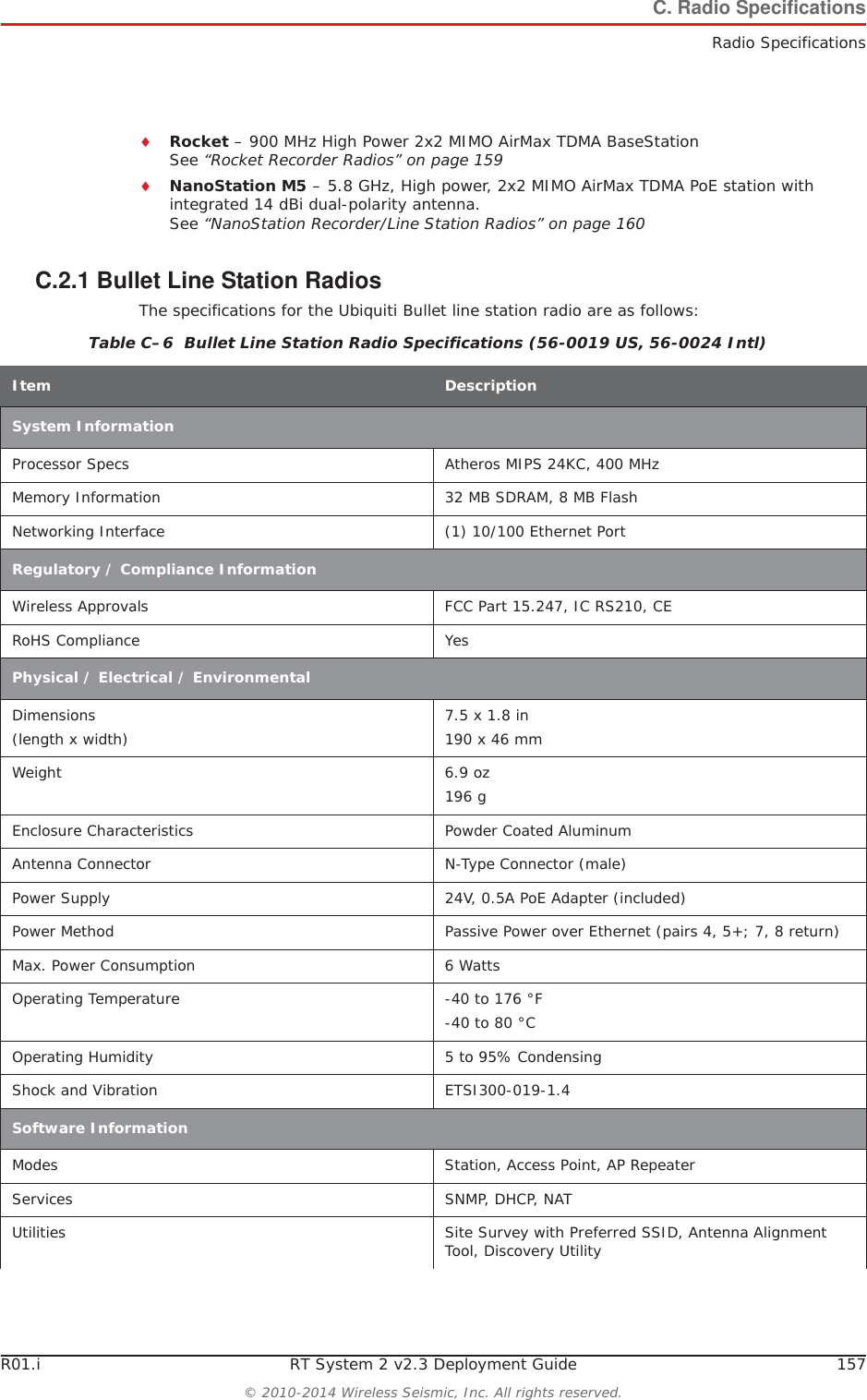
R01.i RT System 2 v2.3 Deployment Guide 157© 2010-2014 Wireless Seismic, Inc. All rights reserved.C. Radio SpecificationsRadio SpecificationsiRocket – 900 MHz High Power 2x2 MIMO AirMax TDMA BaseStation See “Rocket Recorder Radios” on page 159iNanoStation M5 – 5.8 GHz, High power, 2x2 MIMO AirMax TDMA PoE station with integrated 14 dBi dual-polarity antenna.See “NanoStation Recorder/Line Station Radios” on page 160C.2.1 Bullet Line Station RadiosThe specifications for the Ubiquiti Bullet line station radio are as follows:Table C–6  Bullet Line Station Radio Specifications (56-0019 US, 56-0024 Intl) Item DescriptionSystem InformationProcessor Specs Atheros MIPS 24KC, 400 MHzMemory Information 32 MB SDRAM, 8 MB FlashNetworking Interface (1) 10/100 Ethernet PortRegulatory / Compliance InformationWireless Approvals FCC Part 15.247, IC RS210, CERoHS Compliance YesPhysical / Electrical / EnvironmentalDimensions(length x width) 7.5 x 1.8 in190 x 46 mmWeight 6.9 oz196 gEnclosure Characteristics Powder Coated AluminumAntenna Connector N-Type Connector (male)Power Supply 24V, 0.5A PoE Adapter (included)Power Method Passive Power over Ethernet (pairs 4, 5+; 7, 8 return)Max. Power Consumption 6 WattsOperating Temperature -40 to 176 °F-40 to 80 °COperating Humidity 5 to 95% CondensingShock and Vibration ETSI300-019-1.4Software InformationModes Station, Access Point, AP RepeaterServices SNMP, DHCP, NATUtilities Site Survey with Preferred SSID, Antenna Alignment Tool, Discovery Utility
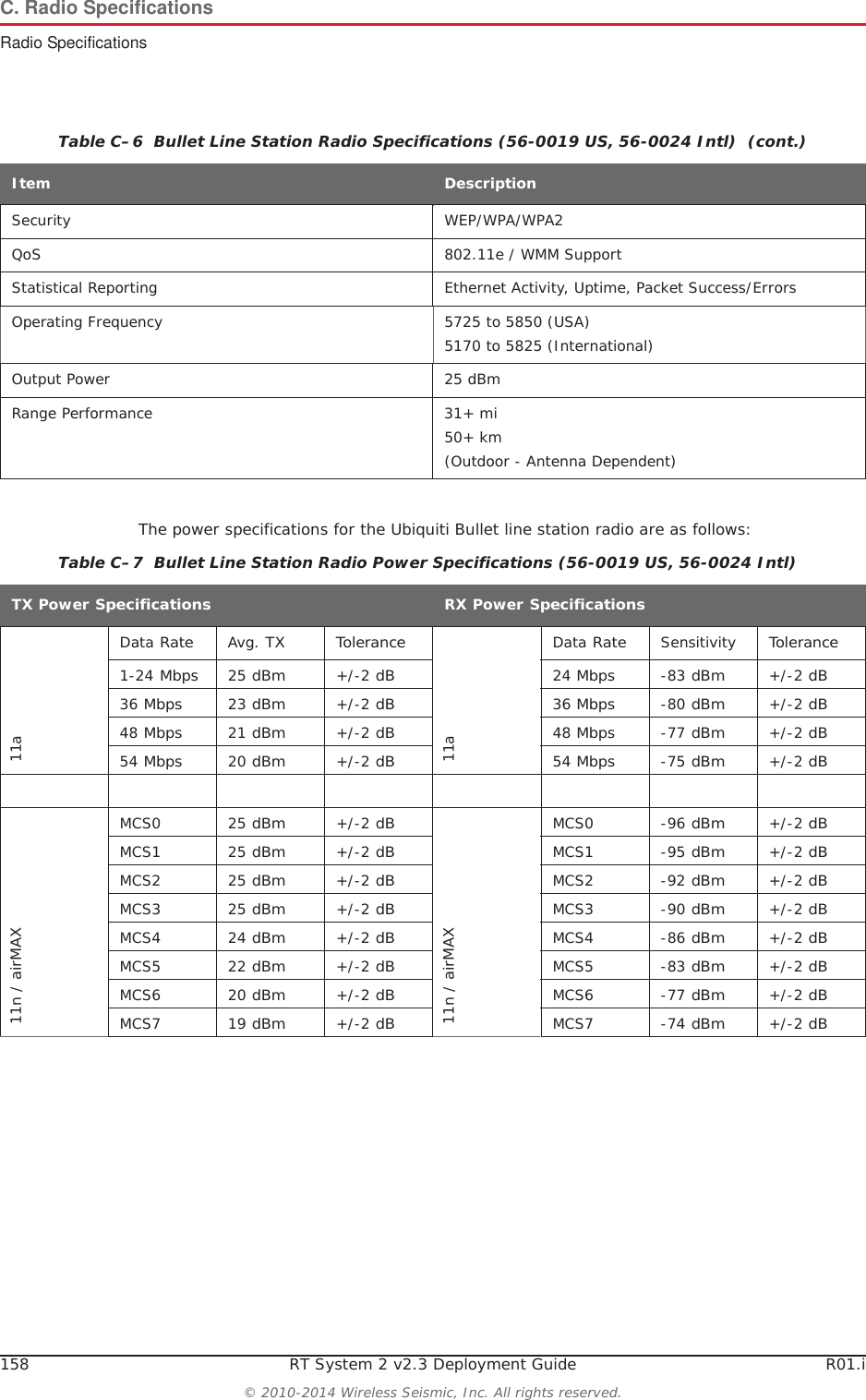
158 RT System 2 v2.3 Deployment Guide R01.i© 2010-2014 Wireless Seismic, Inc. All rights reserved.C. Radio SpecificationsRadio SpecificationsThe power specifications for the Ubiquiti Bullet line station radio are as follows:Security WEP/WPA/WPA2QoS 802.11e / WMM SupportStatistical Reporting Ethernet Activity, Uptime, Packet Success/ErrorsOperating Frequency 5725 to 5850 (USA)5170 to 5825 (International)Output Power 25 dBmRange Performance 31+ mi50+ km (Outdoor - Antenna Dependent)Table C–6  Bullet Line Station Radio Specifications (56-0019 US, 56-0024 Intl)  (cont.)Item DescriptionTable C–7  Bullet Line Station Radio Power Specifications (56-0019 US, 56-0024 Intl) TX Power SpecificationsRX Power Specifications11aData RateAvg. TX Tolerance11aData RateSensitivityTolerance1-24 Mbps25 dBm+/-2 dB24 Mbps-83 dBm+/-2 dB36 Mbps23 dBm+/-2 dB36 Mbps-80 dBm+/-2 dB48 Mbps21 dBm+/-2 dB48 Mbps-77 dBm+/-2 dB54 Mbps20 dBm+/-2 dB54 Mbps-75 dBm+/-2 dB11n / airMAXMCS0 25 dBm+/-2 dB11n / airMAXMCS0 -96 dBm+/-2 dBMCS1 25 dBm+/-2 dBMCS1 -95 dBm+/-2 dBMCS2 25 dBm+/-2 dBMCS2 -92 dBm+/-2 dBMCS3 25 dBm+/-2 dBMCS3 -90 dBm+/-2 dBMCS4 24 dBm+/-2 dBMCS4 -86 dBm+/-2 dBMCS5 22 dBm+/-2 dBMCS5 -83 dBm+/-2 dBMCS6 20 dBm+/-2 dBMCS6 -77 dBm+/-2 dBMCS7 19 dBm+/-2 dBMCS7 -74 dBm+/-2 dB
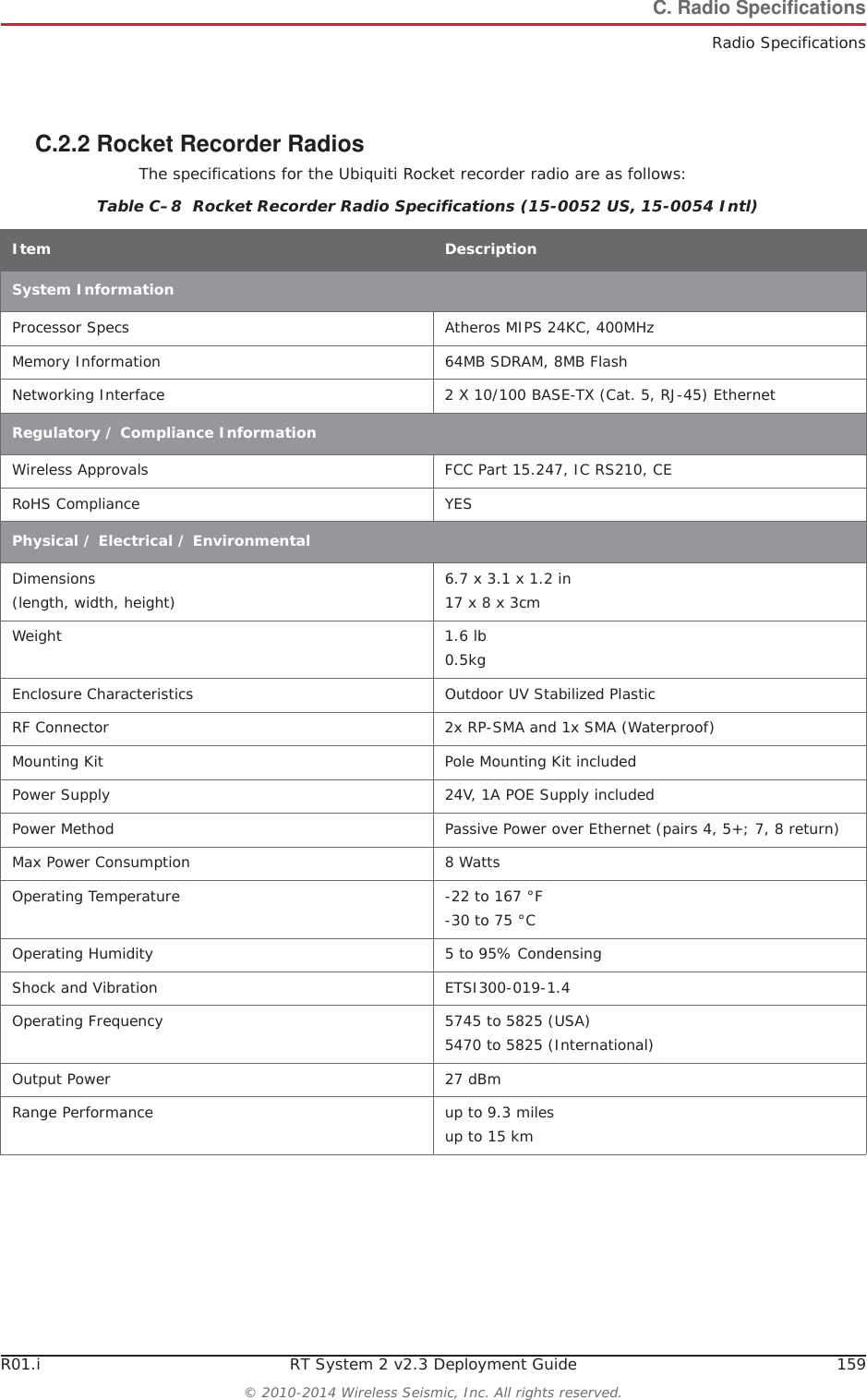
R01.i RT System 2 v2.3 Deployment Guide 159© 2010-2014 Wireless Seismic, Inc. All rights reserved.C. Radio SpecificationsRadio SpecificationsC.2.2 Rocket Recorder RadiosThe specifications for the Ubiquiti Rocket recorder radio are as follows:Table C–8  Rocket Recorder Radio Specifications (15-0052 US, 15-0054 Intl) Item DescriptionSystem InformationProcessor Specs Atheros MIPS 24KC, 400MHzMemory Information 64MB SDRAM, 8MB FlashNetworking Interface 2 X 10/100 BASE-TX (Cat. 5, RJ-45) EthernetRegulatory / Compliance InformationWireless Approvals FCC Part 15.247, IC RS210, CERoHS Compliance YESPhysical / Electrical / EnvironmentalDimensions(length, width, height) 6.7 x 3.1 x 1.2 in17 x 8 x 3cm Weight 1.6 lb0.5kgEnclosure Characteristics Outdoor UV Stabilized PlasticRF Connector 2x RP-SMA and 1x SMA (Waterproof)Mounting Kit Pole Mounting Kit includedPower Supply 24V, 1A POE Supply includedPower Method Passive Power over Ethernet (pairs 4, 5+; 7, 8 return)Max Power Consumption 8 WattsOperating Temperature -22 to 167 °F-30 to 75 °COperating Humidity 5 to 95% CondensingShock and Vibration ETSI300-019-1.4Operating Frequency 5745 to 5825 (USA)5470 to 5825 (International)Output Power 27 dBmRange Performance up to 9.3 milesup to 15 km
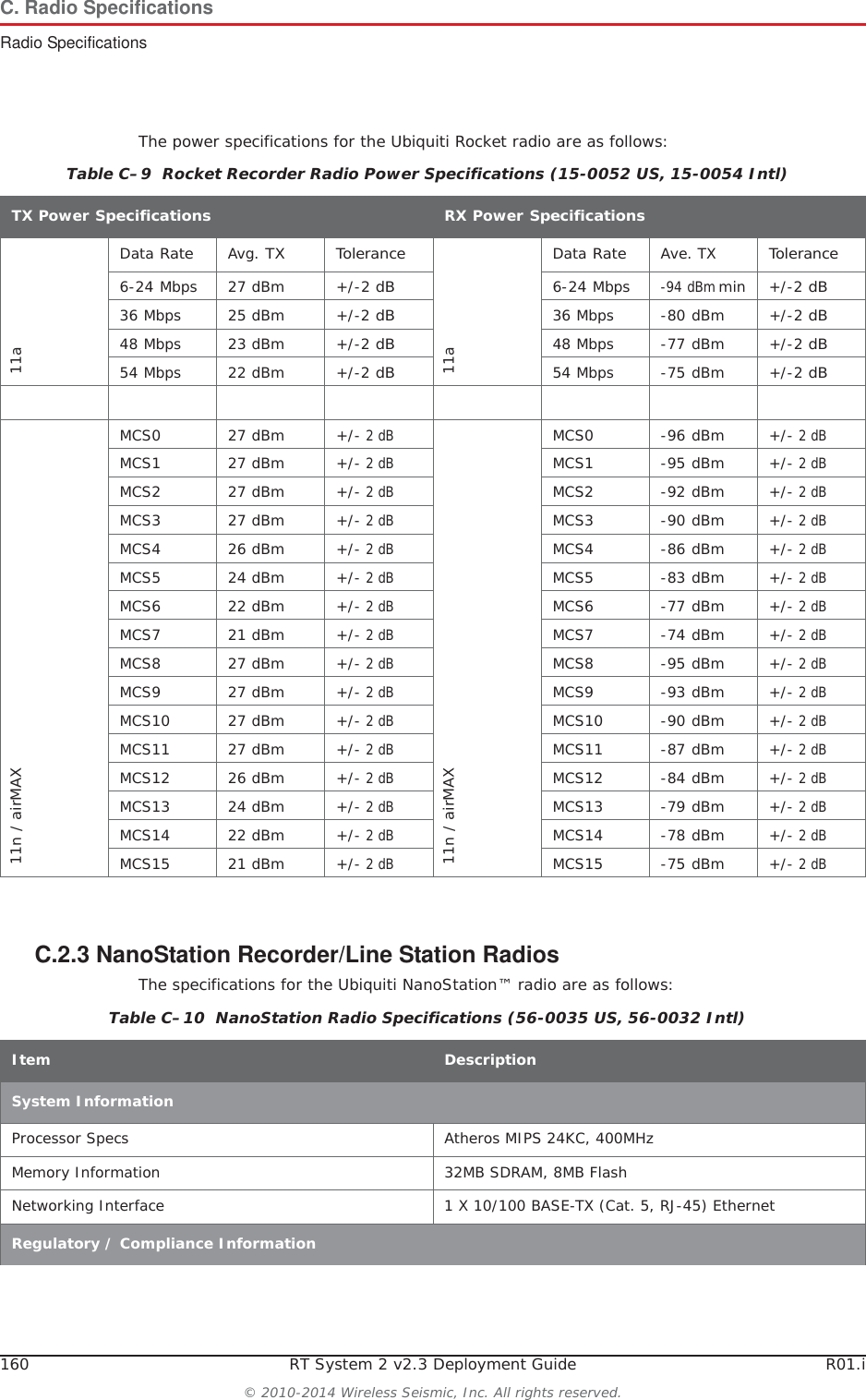
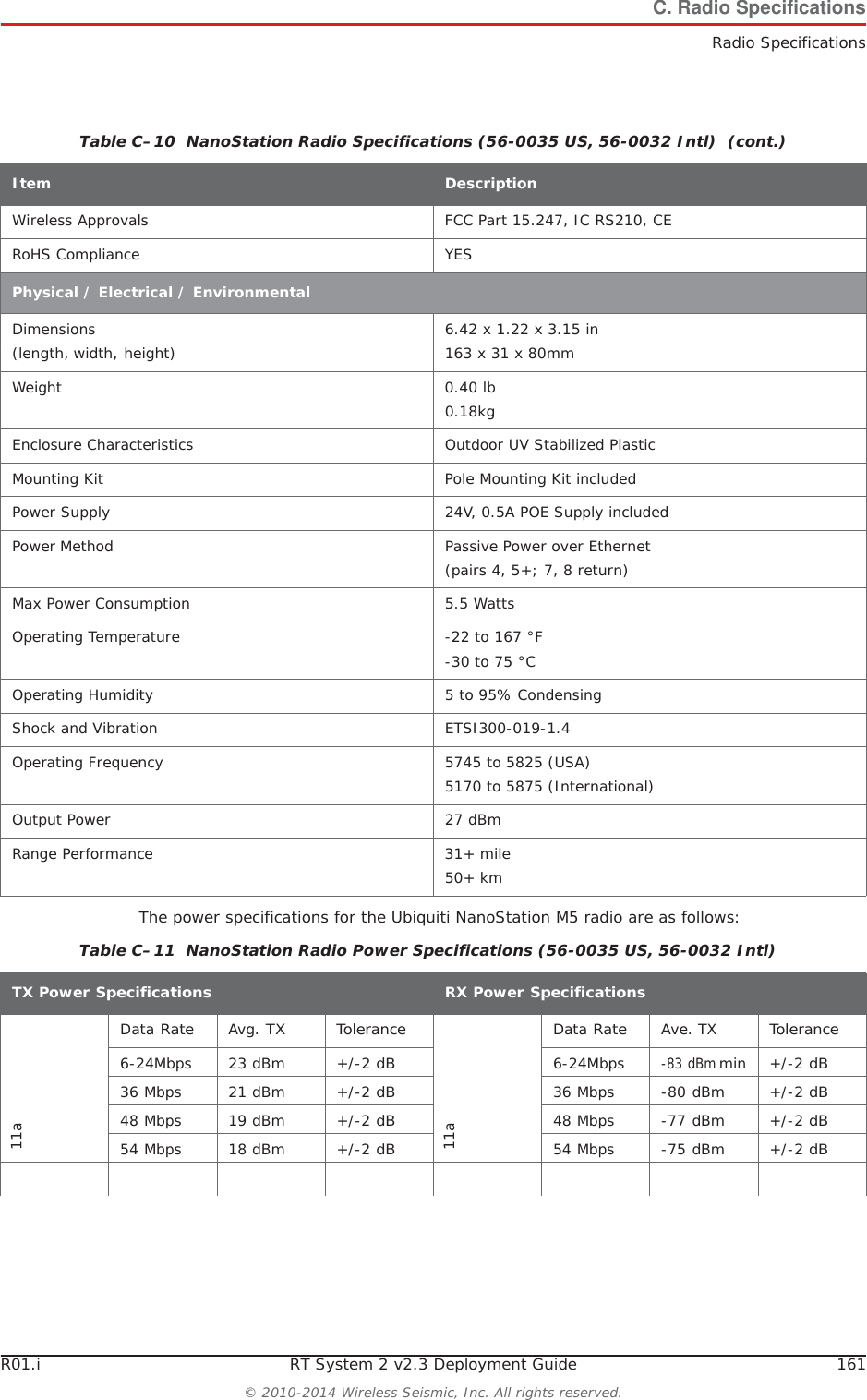
160 RT System 2 v2.3 Deployment Guide R01.i© 2010-2014 Wireless Seismic, Inc. All rights reserved.C. Radio SpecificationsRadio SpecificationsThe power specifications for the Ubiquiti Rocket radio are as follows:C.2.3 NanoStation Recorder/Line Station RadiosThe specifications for the Ubiquiti NanoStation™ radio are as follows:Table C–9  Rocket Recorder Radio Power Specifications (15-0052 US, 15-0054 Intl) TX Power SpecificationsRX Power Specifications11aData RateAvg. TX Tolerance11aData RateAve. TXTolerance6-24 Mbps 27 dBm +/-2 dB6-24 Mbps-94 dBm min +/-2 dB36 Mbps 25 dBm +/-2 dB36 Mbps -80 dBm +/-2 dB48 Mbps 23 dBm +/-2 dB48 Mbps -77 dBm +/-2 dB54 Mbps 22 dBm +/-2 dB54 Mbps -75 dBm +/-2 dB11n / airMAXMCS0 27 dBm +/- 2 dB11n / airMAXMCS0 -96 dBm +/- 2 dBMCS1 27 dBm +/- 2 dBMCS1 -95 dBm +/- 2 dBMCS2 27 dBm +/- 2 dBMCS2 -92 dBm +/- 2 dBMCS3 27 dBm +/- 2 dBMCS3 -90 dBm +/- 2 dBMCS4 26 dBm +/- 2 dBMCS4 -86 dBm +/- 2 dBMCS5 24 dBm +/- 2 dBMCS5 -83 dBm +/- 2 dBMCS6 22 dBm +/- 2 dBMCS6 -77 dBm +/- 2 dBMCS7 21 dBm +/- 2 dBMCS7 -74 dBm +/- 2 dBMCS8 27 dBm +/- 2 dBMCS8 -95 dBm +/- 2 dBMCS9 27 dBm +/- 2 dBMCS9 -93 dBm +/- 2 dBMCS10 27 dBm +/- 2 dBMCS10 -90 dBm +/- 2 dBMCS11 27 dBm +/- 2 dBMCS11 -87 dBm +/- 2 dBMCS12 26 dBm +/- 2 dBMCS12 -84 dBm +/- 2 dBMCS13 24 dBm +/- 2 dBMCS13 -79 dBm +/- 2 dBMCS14 22 dBm +/- 2 dBMCS14 -78 dBm +/- 2 dBMCS15 21 dBm +/- 2 dBMCS15 -75 dBm +/- 2 dBTable C–10  NanoStation Radio Specifications (56-0035 US, 56-0032 Intl) Item DescriptionSystem InformationProcessor Specs Atheros MIPS 24KC, 400MHzMemory Information 32MB SDRAM, 8MB FlashNetworking Interface 1 X 10/100 BASE-TX (Cat. 5, RJ-45) EthernetRegulatory / Compliance Information
R01.i RT System 2 v2.3 Deployment Guide 161© 2010-2014 Wireless Seismic, Inc. All rights reserved.C. Radio SpecificationsRadio SpecificationsThe power specifications for the Ubiquiti NanoStation M5 radio are as follows:Wireless Approvals FCC Part 15.247, IC RS210, CERoHS Compliance YESPhysical / Electrical / EnvironmentalDimensions(length, width, height) 6.42 x 1.22 x 3.15 in163 x 31 x 80mm Weight 0.40 lb0.18kgEnclosure Characteristics Outdoor UV Stabilized PlasticMounting Kit Pole Mounting Kit includedPower Supply 24V, 0.5A POE Supply includedPower Method Passive Power over Ethernet (pairs 4, 5+; 7, 8 return)Max Power Consumption 5.5 WattsOperating Temperature -22 to 167 °F-30 to 75 °COperating Humidity 5 to 95% CondensingShock and Vibration ETSI300-019-1.4Operating Frequency 5745 to 5825 (USA)5170 to 5875 (International)Output Power 27 dBmRange Performance 31+ mile50+ km Table C–10  NanoStation Radio Specifications (56-0035 US, 56-0032 Intl)  (cont.)Item DescriptionTable C–11  NanoStation Radio Power Specifications (56-0035 US, 56-0032 Intl) TX Power SpecificationsRX Power Specifications11aData RateAvg. TX Tolerance11aDataRateAve. TXTolerance6-24Mbps 23 dBm +/-2 dB6-24Mbps-83 dBm min +/-2 dB36 Mbps 21 dBm +/-2 dB36 Mbps -80 dBm +/-2 dB48 Mbps 19 dBm +/-2 dB48 Mbps -77 dBm +/-2 dB54 Mbps 18 dBm +/-2 dB54 Mbps -75 dBm +/-2 dB
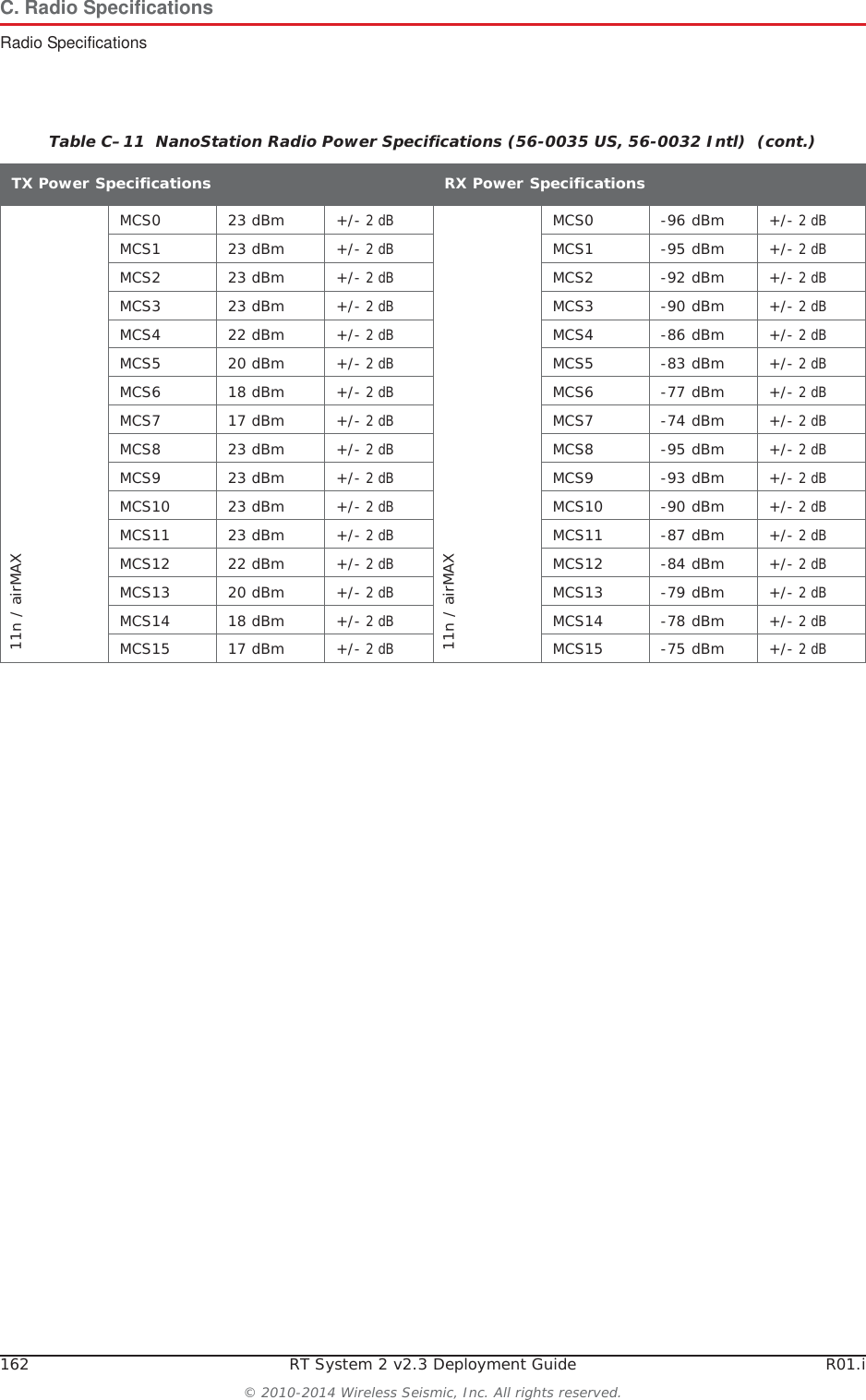
162 RT System 2 v2.3 Deployment Guide R01.i© 2010-2014 Wireless Seismic, Inc. All rights reserved.C. Radio SpecificationsRadio Specifications11n / airMAXMCS0 23 dBm +/- 2 dB11n / airMAXMCS0 -96 dBm +/- 2 dBMCS1 23 dBm +/- 2 dBMCS1 -95 dBm +/- 2 dBMCS2 23 dBm +/- 2 dBMCS2 -92 dBm +/- 2 dBMCS3 23 dBm +/- 2 dBMCS3 -90 dBm +/- 2 dBMCS4 22 dBm +/- 2 dBMCS4 -86 dBm +/- 2 dBMCS5 20 dBm +/- 2 dBMCS5 -83 dBm +/- 2 dBMCS6 18 dBm +/- 2 dBMCS6 -77 dBm +/- 2 dBMCS7 17 dBm +/- 2 dBMCS7 -74 dBm +/- 2 dBMCS8 23 dBm +/- 2 dBMCS8 -95 dBm +/- 2 dBMCS9 23 dBm +/- 2 dBMCS9 -93 dBm +/- 2 dBMCS10 23 dBm +/- 2 dBMCS10 -90 dBm +/- 2 dBMCS11 23 dBm +/- 2 dBMCS11 -87 dBm +/- 2 dBMCS12 22 dBm +/- 2 dBMCS12 -84 dBm +/- 2 dBMCS13 20 dBm +/- 2 dBMCS13 -79 dBm +/- 2 dBMCS14 18 dBm +/- 2 dBMCS14 -78 dBm +/- 2 dBMCS15 17 dBm +/- 2 dBMCS15 -75 dBm +/- 2 dBTable C–11  NanoStation Radio Power Specifications (56-0035 US, 56-0032 Intl)  (cont.)TX Power SpecificationsRX Power Specifications
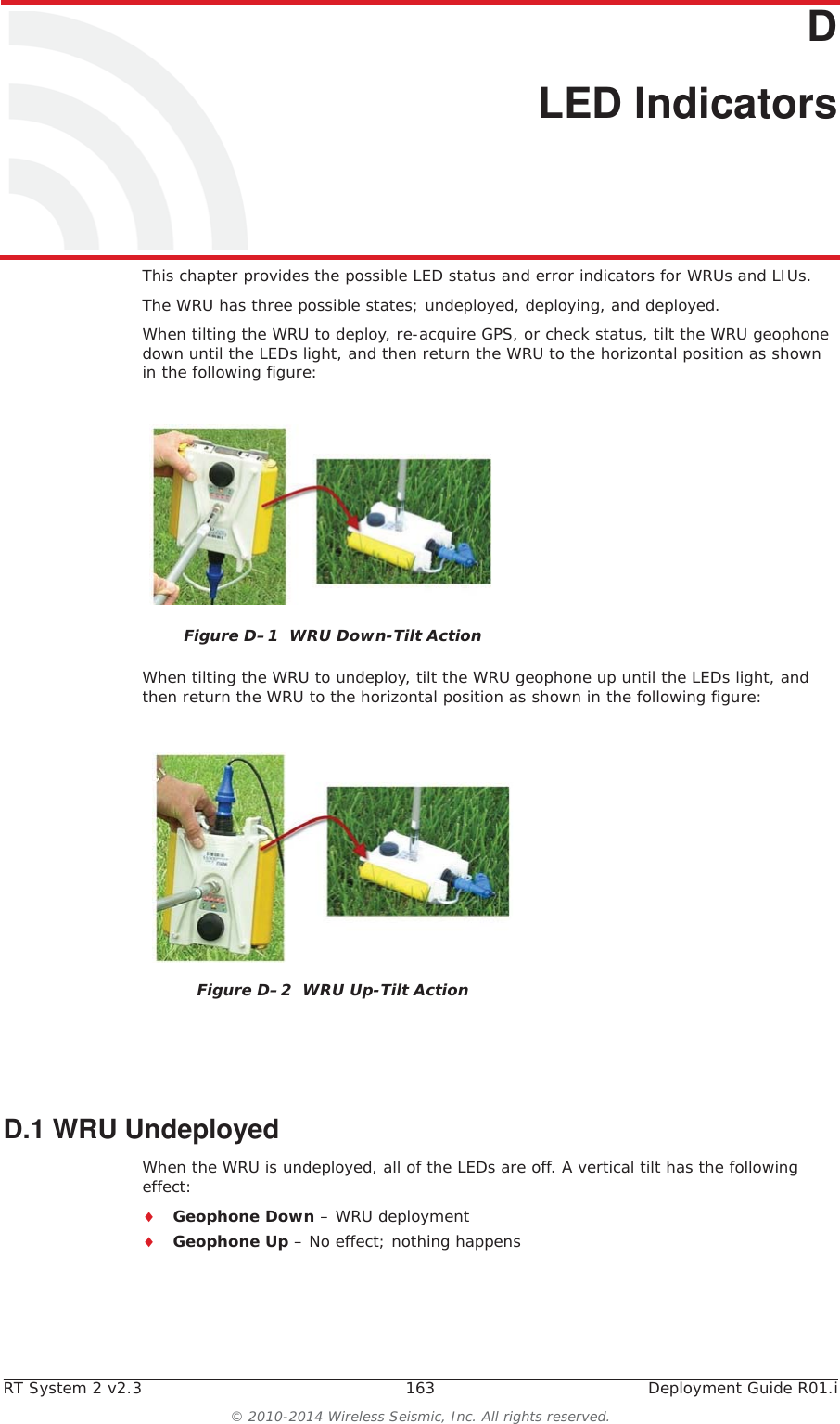
RT System 2 v2.3 163  Deployment Guide R01.i© 2010-2014 Wireless Seismic, Inc. All rights reserved.DD. LED IndicatorsThis chapter provides the possible LED status and error indicators for WRUs and LIUs.The WRU has three possible states; undeployed, deploying, and deployed. When tilting the WRU to deploy, re-acquire GPS, or check status, tilt the WRU geophone down until the LEDs light, and then return the WRU to the horizontal position as shown in the following figure:When tilting the WRU to undeploy, tilt the WRU geophone up until the LEDs light, and then return the WRU to the horizontal position as shown in the following figure:D.1 WRU Undeployed When the WRU is undeployed, all of the LEDs are off. A vertical tilt has the following effect:iGeophone Down – WRU deploymentiGeophone Up – No effect; nothing happensFigure D–1  WRU Down-Tilt ActionFigure D–2  WRU Up-Tilt Action
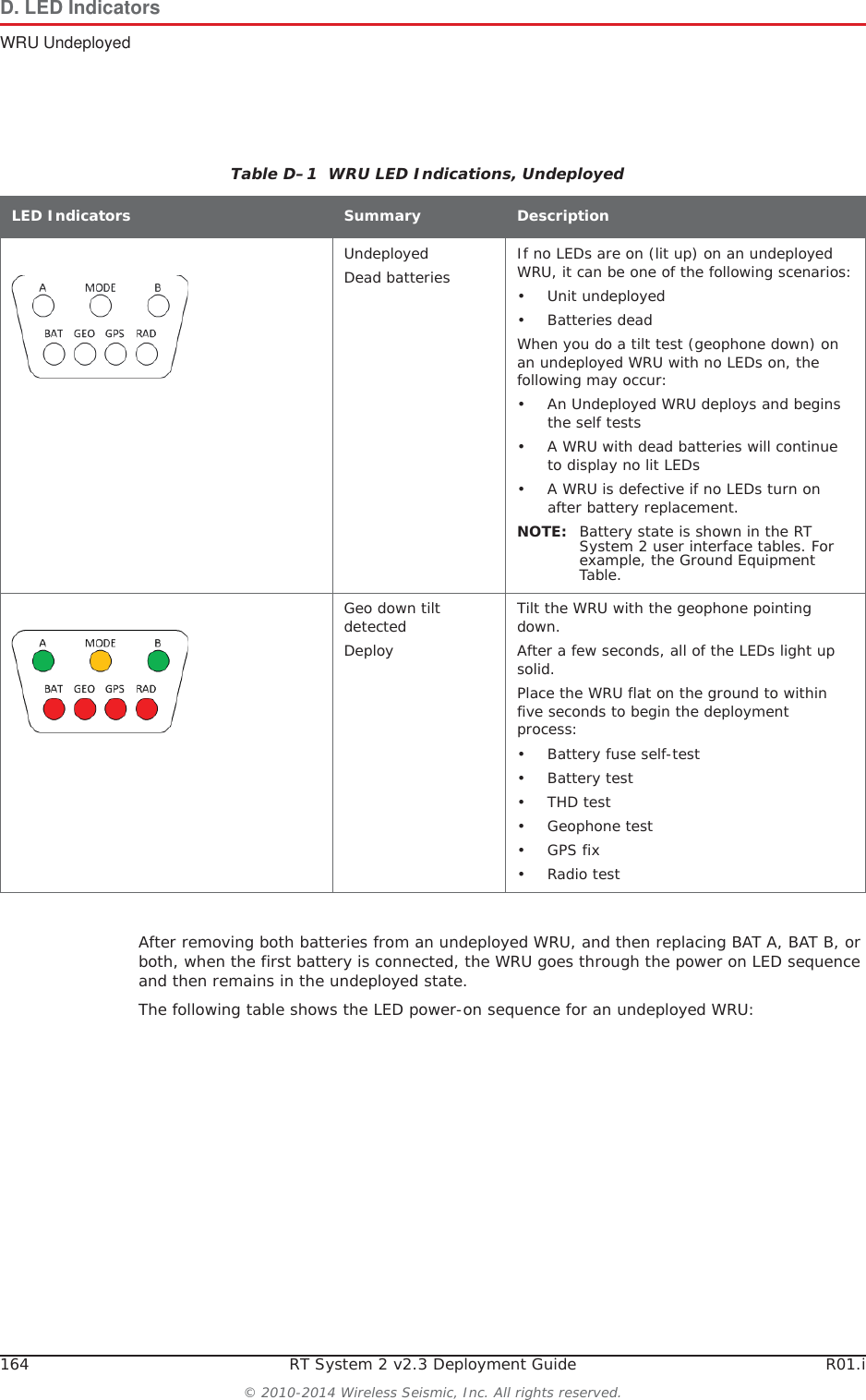
164 RT System 2 v2.3 Deployment Guide R01.i© 2010-2014 Wireless Seismic, Inc. All rights reserved.D. LED IndicatorsWRU UndeployedAfter removing both batteries from an undeployed WRU, and then replacing BAT A, BAT B, or both, when the first battery is connected, the WRU goes through the power on LED sequence and then remains in the undeployed state. The following table shows the LED power-on sequence for an undeployed WRU:Table D–1  WRU LED Indications, Undeployed LED Indicators Summary DescriptionUndeployedDead batteries If no LEDs are on (lit up) on an undeployed WRU, it can be one of the following scenarios:• Unit undeployed• Batteries deadWhen you do a tilt test (geophone down) on an undeployed WRU with no LEDs on, the following may occur:• An Undeployed WRU deploys and begins the self tests• A WRU with dead batteries will continue to display no lit LEDs• A WRU is defective if no LEDs turn on after battery replacement.NOTE: Battery state is shown in the RT System 2 user interface tables. For example, the Ground Equipment Table.Geo down tilt detectedDeployTilt the WRU with the geophone pointing down.After a few seconds, all of the LEDs light up solid. Place the WRU flat on the ground to within five seconds to begin the deployment process:• Battery fuse self-test• Battery test •THD test• Geophone test• GPS fix•Radio test
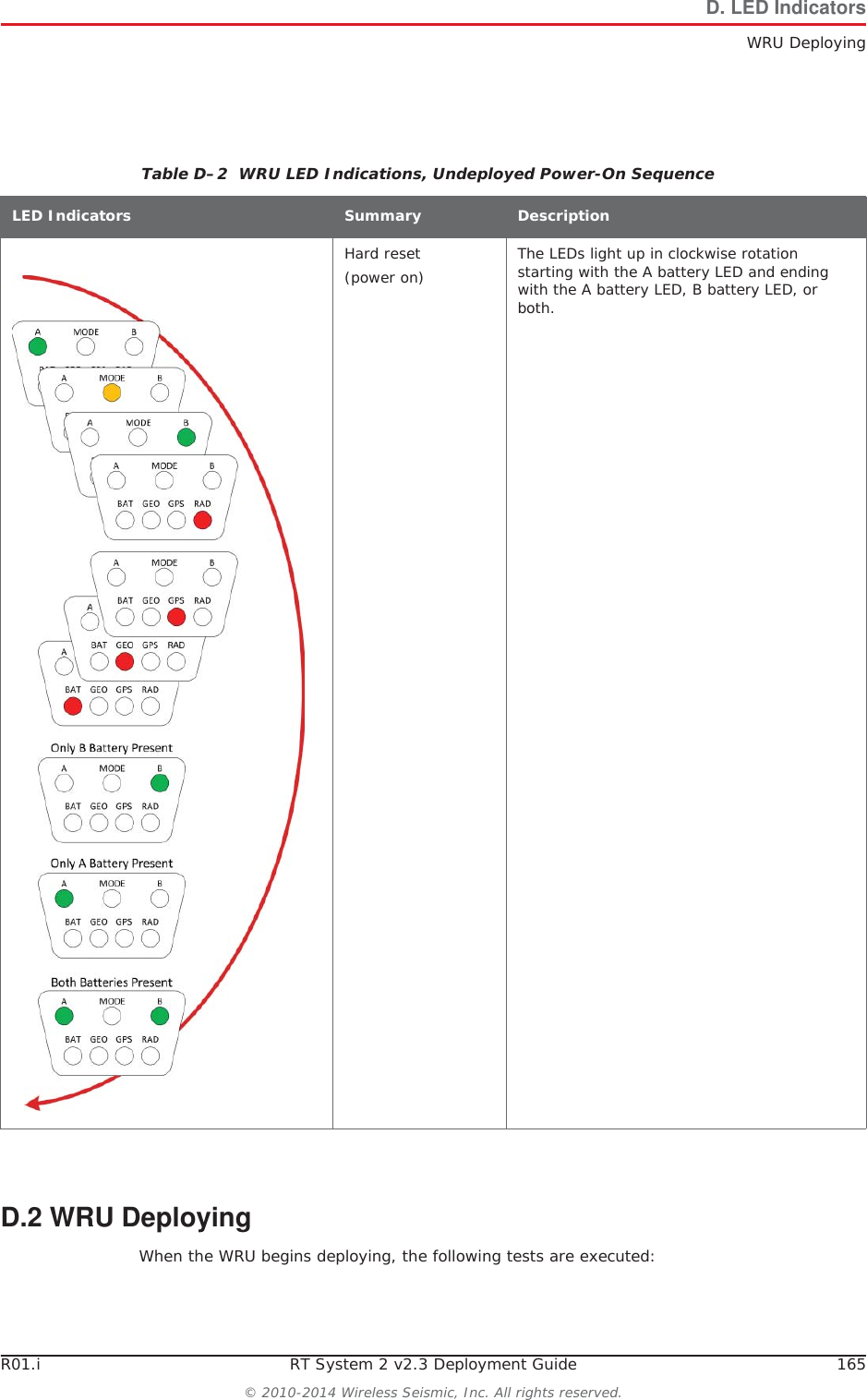
R01.i RT System 2 v2.3 Deployment Guide 165© 2010-2014 Wireless Seismic, Inc. All rights reserved.D. LED IndicatorsWRU DeployingD.2 WRU DeployingWhen the WRU begins deploying, the following tests are executed:Table D–2  WRU LED Indications, Undeployed Power-On Sequence LED Indicators Summary DescriptionHard reset (power on) The LEDs light up in clockwise rotation starting with the A battery LED and ending with the A battery LED, B battery LED, or both.
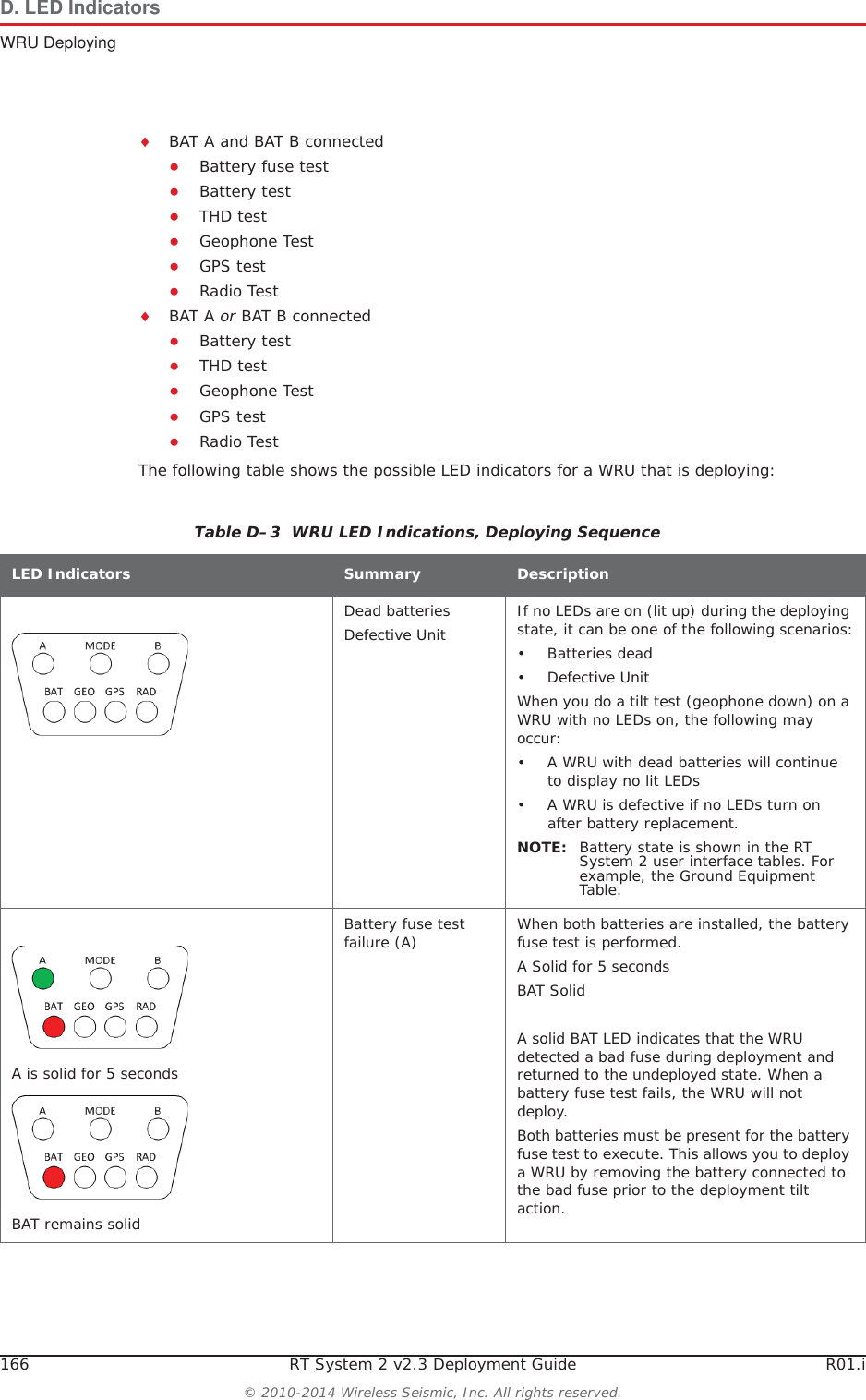
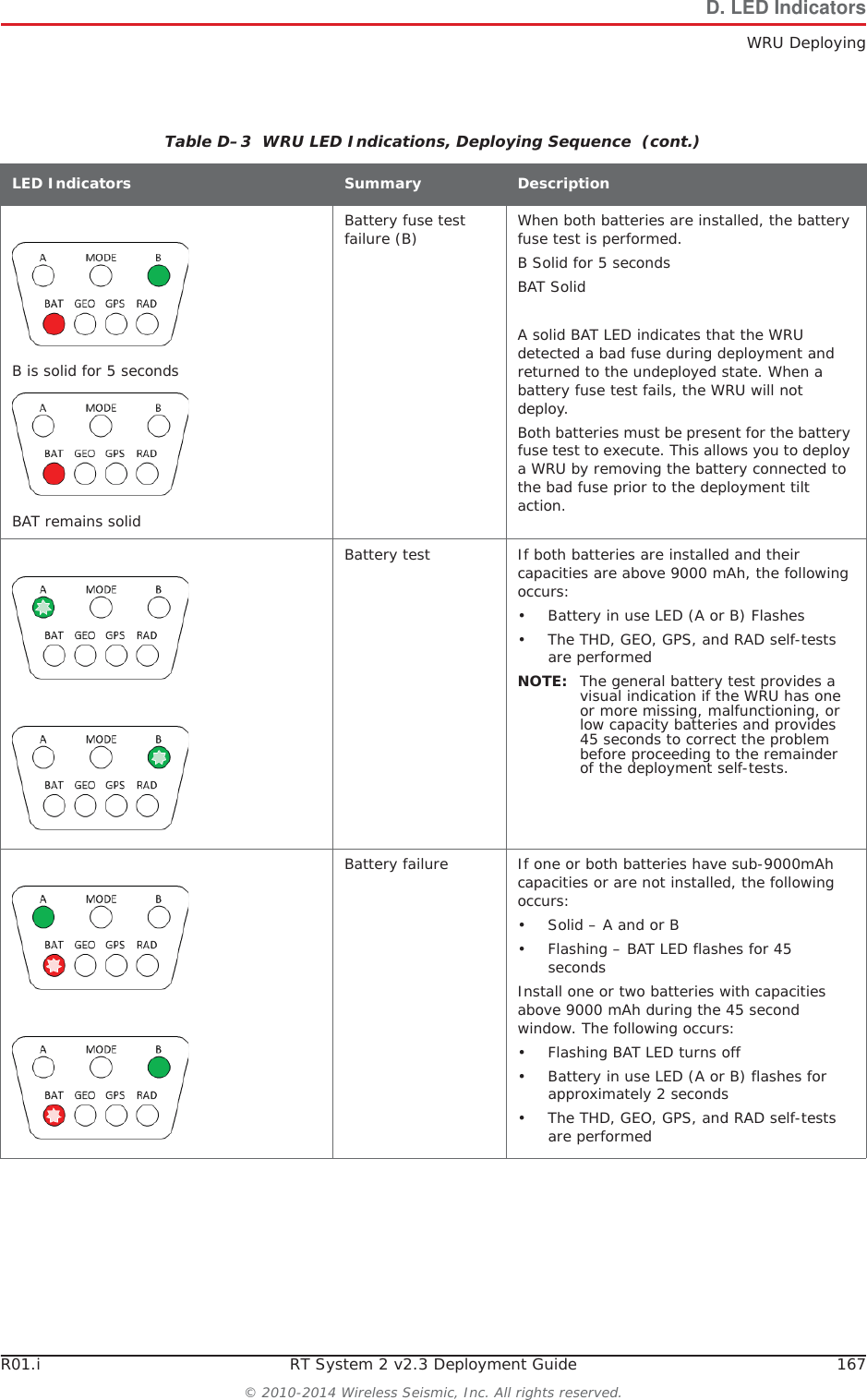
166 RT System 2 v2.3 Deployment Guide R01.i© 2010-2014 Wireless Seismic, Inc. All rights reserved.D. LED IndicatorsWRU DeployingiBAT A and BAT B connectedƔBattery fuse testƔBattery testƔTHD testƔGeophone TestƔGPS testƔRadio TestiBAT A or BAT B connectedƔBattery testƔTHD testƔGeophone TestƔGPS testƔRadio TestThe following table shows the possible LED indicators for a WRU that is deploying:Table D–3  WRU LED Indications, Deploying Sequence LED Indicators Summary DescriptionDead batteriesDefective Unit If no LEDs are on (lit up) during the deploying state, it can be one of the following scenarios:• Batteries dead•Defective UnitWhen you do a tilt test (geophone down) on a WRU with no LEDs on, the following may occur:• A WRU with dead batteries will continue to display no lit LEDs• A WRU is defective if no LEDs turn on after battery replacement.NOTE: Battery state is shown in the RT System 2 user interface tables. For example, the Ground Equipment Table.A is solid for 5 secondsBAT remains solidBattery fuse test failure (A) When both batteries are installed, the battery fuse test is performed. A Solid for 5 secondsBAT SolidA solid BAT LED indicates that the WRU detected a bad fuse during deployment and returned to the undeployed state. When a battery fuse test fails, the WRU will not deploy. Both batteries must be present for the battery fuse test to execute. This allows you to deploy a WRU by removing the battery connected to the bad fuse prior to the deployment tilt action.
R01.i RT System 2 v2.3 Deployment Guide 167© 2010-2014 Wireless Seismic, Inc. All rights reserved.D. LED IndicatorsWRU DeployingB is solid for 5 secondsBAT remains solidBattery fuse test failure (B) When both batteries are installed, the battery fuse test is performed. B Solid for 5 secondsBAT SolidA solid BAT LED indicates that the WRU detected a bad fuse during deployment and returned to the undeployed state. When a battery fuse test fails, the WRU will not deploy. Both batteries must be present for the battery fuse test to execute. This allows you to deploy a WRU by removing the battery connected to the bad fuse prior to the deployment tilt action.Battery test If both batteries are installed and their capacities are above 9000 mAh, the following occurs:• Battery in use LED (A or B) Flashes• The THD, GEO, GPS, and RAD self-tests are performedNOTE: The general battery test provides a visual indication if the WRU has one or more missing, malfunctioning, or low capacity batteries and provides 45 seconds to correct the problem before proceeding to the remainder of the deployment self-tests.Battery failure If one or both batteries have sub-9000mAh capacities or are not installed, the following occurs:•Solid – A and or B• Flashing – BAT LED flashes for 45 secondsInstall one or two batteries with capacities above 9000 mAh during the 45 second window. The following occurs:• Flashing BAT LED turns off• Battery in use LED (A or B) flashes for approximately 2 seconds• The THD, GEO, GPS, and RAD self-tests are performedTable D–3  WRU LED Indications, Deploying Sequence  (cont.)LED Indicators Summary Description
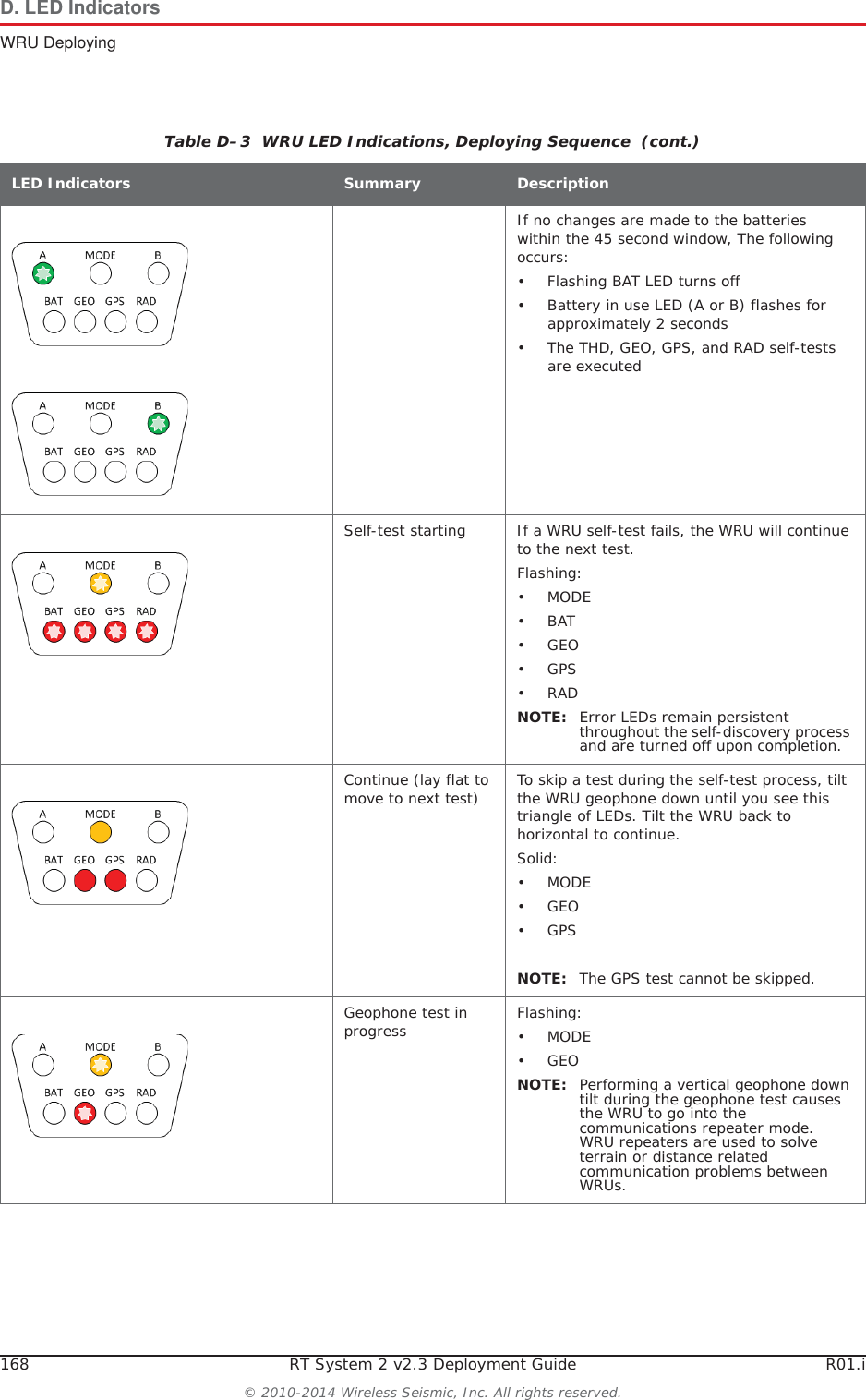
168 RT System 2 v2.3 Deployment Guide R01.i© 2010-2014 Wireless Seismic, Inc. All rights reserved.D. LED IndicatorsWRU DeployingIf no changes are made to the batteries within the 45 second window, The following occurs:• Flashing BAT LED turns off• Battery in use LED (A or B) flashes for approximately 2 seconds• The THD, GEO, GPS, and RAD self-tests are executedSelf-test starting If a WRU self-test fails, the WRU will continue to the next test. Flashing:•MODE•BAT•GEO•GPS•RADNOTE: Error LEDs remain persistent throughout the self-discovery process and are turned off upon completion. Continue (lay flat to move to next test) To skip a test during the self-test process, tilt the WRU geophone down until you see this triangle of LEDs. Tilt the WRU back to horizontal to continue.Solid:•MODE•GEO•GPSNOTE: The GPS test cannot be skipped.Geophone test in progress Flashing:•MODE•GEONOTE: Performing a vertical geophone down tilt during the geophone test causes the WRU to go into the communications repeater mode. WRU repeaters are used to solve terrain or distance related communication problems between WRUs. Table D–3  WRU LED Indications, Deploying Sequence  (cont.)LED Indicators Summary Description
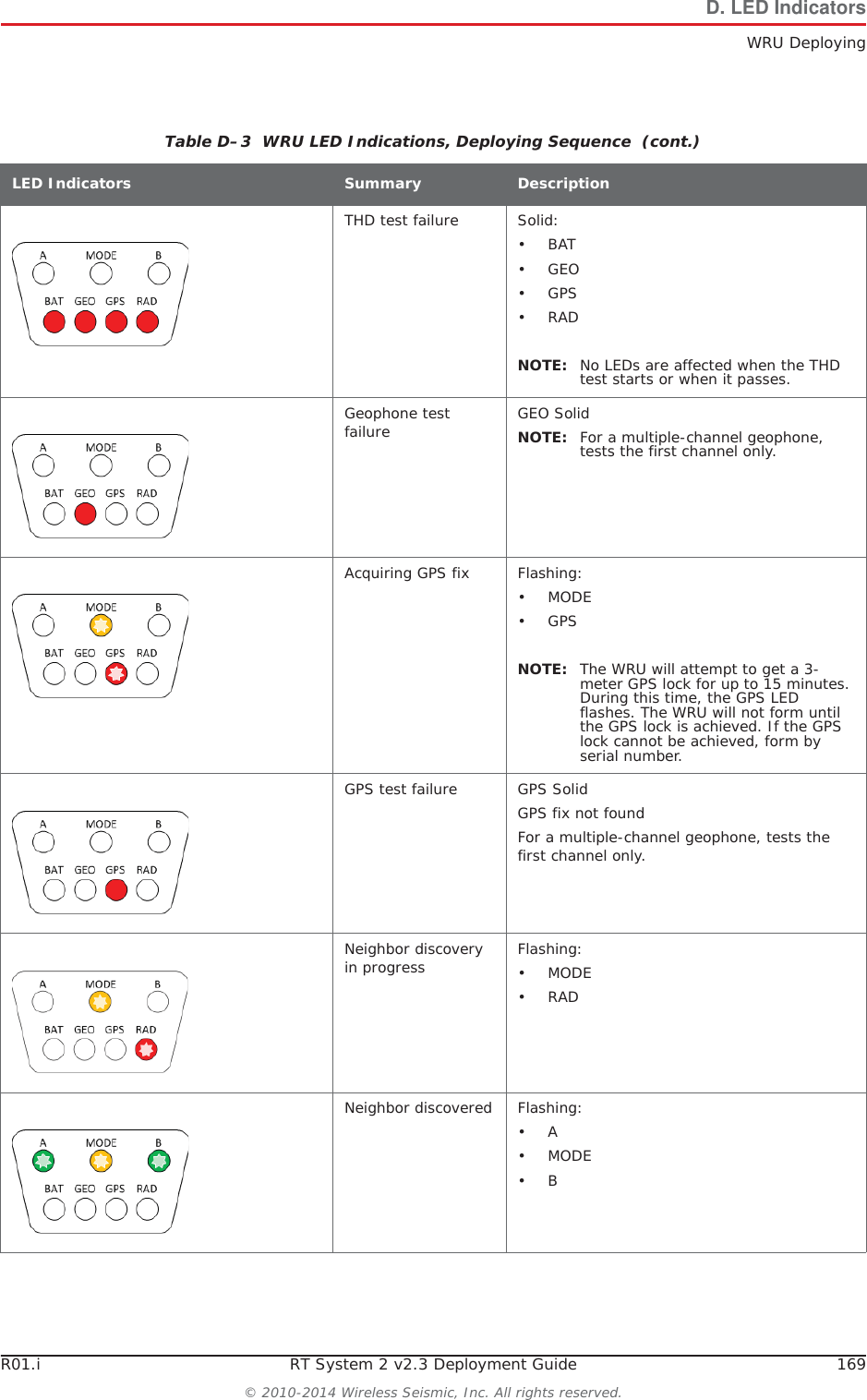
R01.i RT System 2 v2.3 Deployment Guide 169© 2010-2014 Wireless Seismic, Inc. All rights reserved.D. LED IndicatorsWRU DeployingTHD test failure Solid:•BAT•GEO•GPS•RADNOTE: No LEDs are affected when the THD test starts or when it passes. Geophone test failure GEO SolidNOTE: For a multiple-channel geophone, tests the first channel only.Acquiring GPS fix Flashing:•MODE•GPSNOTE: The WRU will attempt to get a 3-meter GPS lock for up to 15 minutes. During this time, the GPS LED flashes. The WRU will not form until the GPS lock is achieved. If the GPS lock cannot be achieved, form by serial number. GPS test failure GPS SolidGPS fix not foundFor a multiple-channel geophone, tests the first channel only.Neighbor discovery in progress Flashing:•MODE•RADNeighbor discovered Flashing:•A•MODE•BTable D–3  WRU LED Indications, Deploying Sequence  (cont.)LED Indicators Summary Description
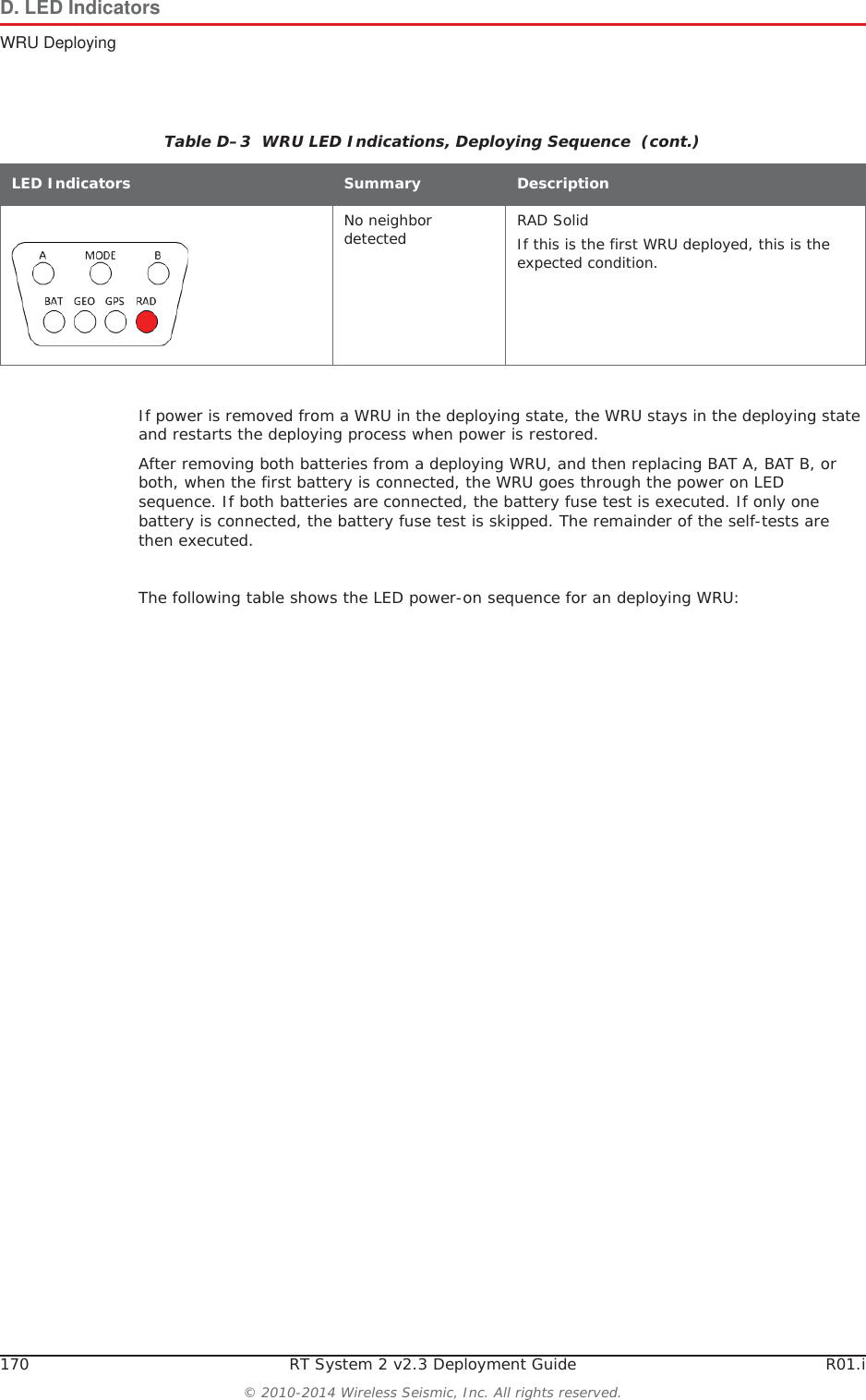
170 RT System 2 v2.3 Deployment Guide R01.i© 2010-2014 Wireless Seismic, Inc. All rights reserved.D. LED IndicatorsWRU DeployingIf power is removed from a WRU in the deploying state, the WRU stays in the deploying state and restarts the deploying process when power is restored.After removing both batteries from a deploying WRU, and then replacing BAT A, BAT B, or both, when the first battery is connected, the WRU goes through the power on LED sequence. If both batteries are connected, the battery fuse test is executed. If only one battery is connected, the battery fuse test is skipped. The remainder of the self-tests are then executed. The following table shows the LED power-on sequence for an deploying WRU:No neighbor detected RAD SolidIf this is the first WRU deployed, this is the expected condition. Table D–3  WRU LED Indications, Deploying Sequence  (cont.)LED Indicators Summary Description
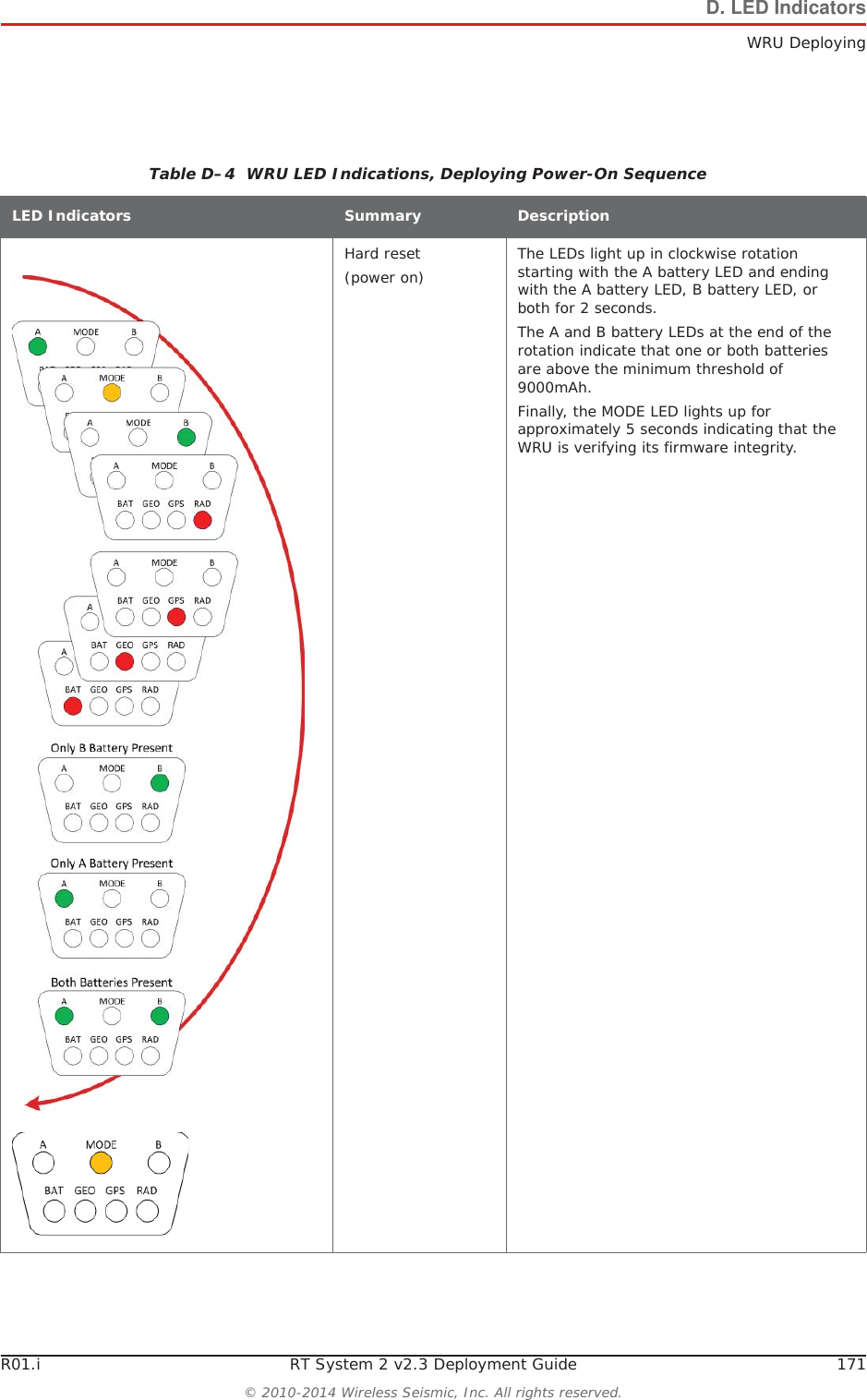
R01.i RT System 2 v2.3 Deployment Guide 171© 2010-2014 Wireless Seismic, Inc. All rights reserved.D. LED IndicatorsWRU DeployingTable D–4  WRU LED Indications, Deploying Power-On Sequence LED Indicators Summary DescriptionHard reset (power on) The LEDs light up in clockwise rotation starting with the A battery LED and ending with the A battery LED, B battery LED, or both for 2 seconds. The A and B battery LEDs at the end of the rotation indicate that one or both batteries are above the minimum threshold of 9000mAh. Finally, the MODE LED lights up for approximately 5 seconds indicating that the WRU is verifying its firmware integrity.
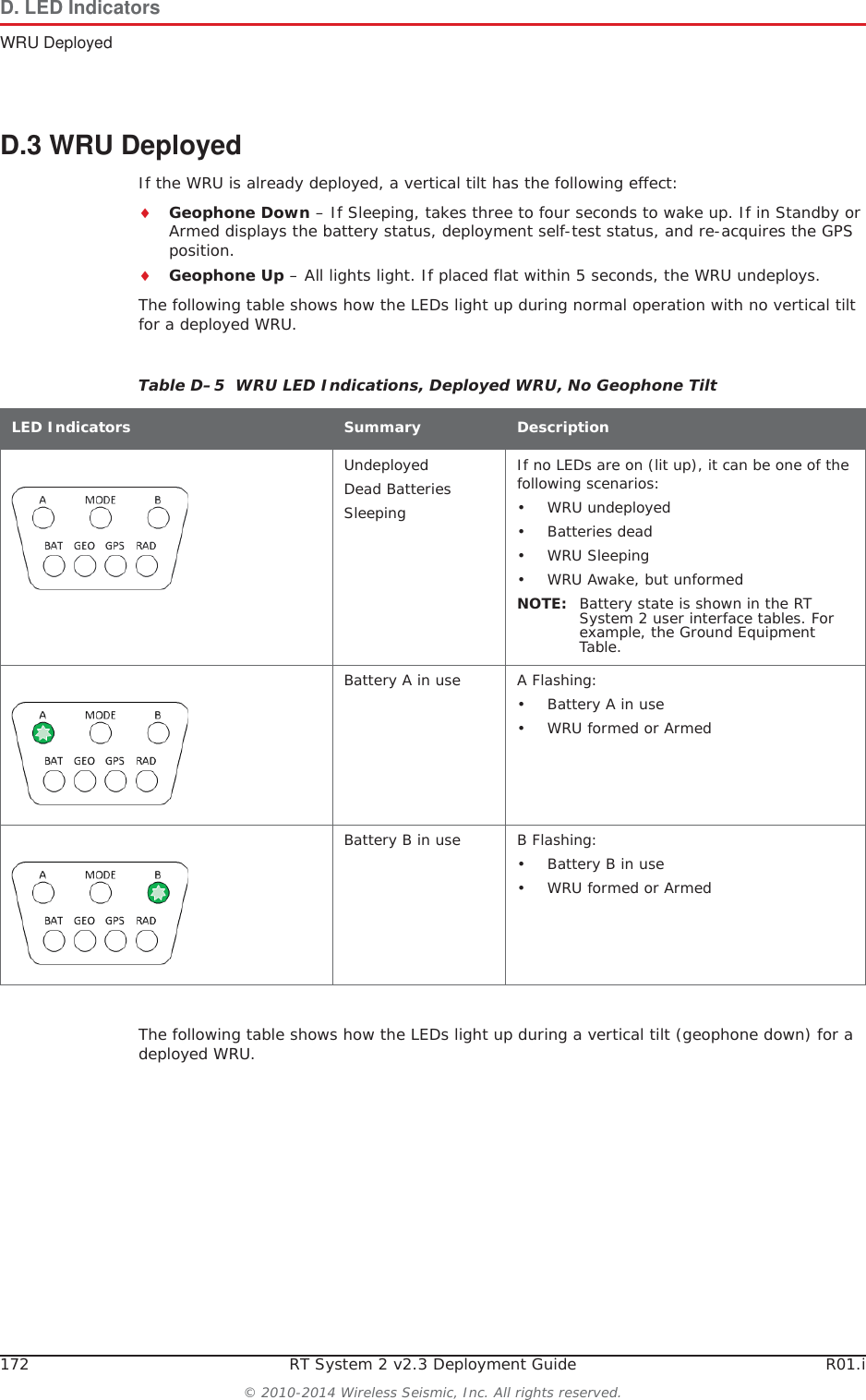
172 RT System 2 v2.3 Deployment Guide R01.i© 2010-2014 Wireless Seismic, Inc. All rights reserved.D. LED IndicatorsWRU DeployedD.3 WRU DeployedIf the WRU is already deployed, a vertical tilt has the following effect:iGeophone Down – If Sleeping, takes three to four seconds to wake up. If in Standby or Armed displays the battery status, deployment self-test status, and re-acquires the GPS position.iGeophone Up – All lights light. If placed flat within 5 seconds, the WRU undeploys. The following table shows how the LEDs light up during normal operation with no vertical tilt for a deployed WRU.The following table shows how the LEDs light up during a vertical tilt (geophone down) for a deployed WRU.Table D–5  WRU LED Indications, Deployed WRU, No Geophone Tilt LED Indicators Summary DescriptionUndeployedDead BatteriesSleepingIf no LEDs are on (lit up), it can be one of the following scenarios:• WRU undeployed• Batteries dead•WRU Sleeping• WRU Awake, but unformedNOTE: Battery state is shown in the RT System 2 user interface tables. For example, the Ground Equipment Table.Battery A in use A Flashing:• Battery A in use• WRU formed or Armed Battery B in use B Flashing:• Battery B in use• WRU formed or Armed
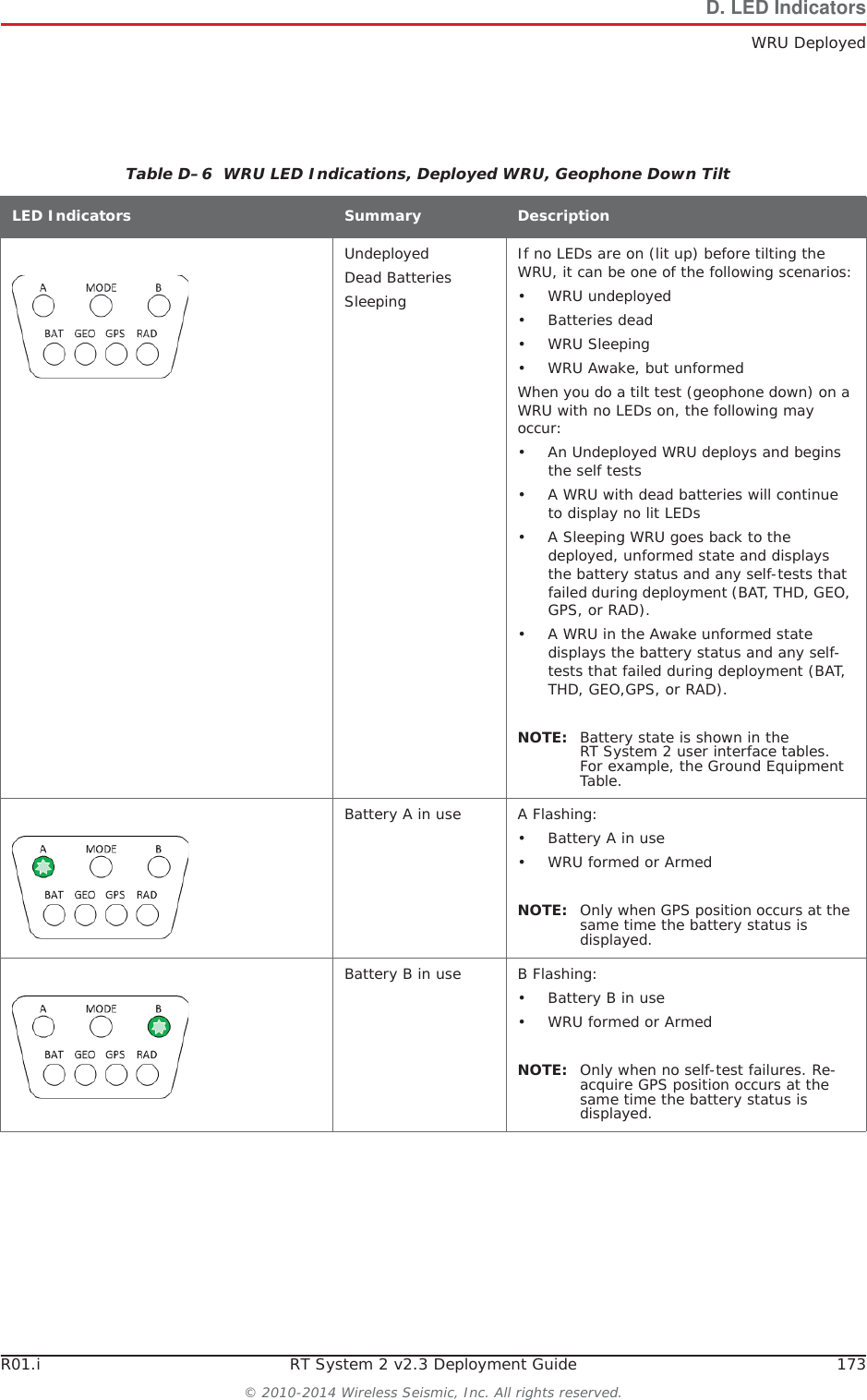
R01.i RT System 2 v2.3 Deployment Guide 173© 2010-2014 Wireless Seismic, Inc. All rights reserved.D. LED IndicatorsWRU DeployedTable D–6  WRU LED Indications, Deployed WRU, Geophone Down Tilt LED Indicators Summary DescriptionUndeployedDead BatteriesSleepingIf no LEDs are on (lit up) before tilting the WRU, it can be one of the following scenarios:• WRU undeployed• Batteries dead•WRU Sleeping• WRU Awake, but unformedWhen you do a tilt test (geophone down) on a WRU with no LEDs on, the following may occur:• An Undeployed WRU deploys and begins the self tests• A WRU with dead batteries will continue to display no lit LEDs• A Sleeping WRU goes back to the deployed, unformed state and displays the battery status and any self-tests that failed during deployment (BAT, THD, GEO, GPS, or RAD).• A WRU in the Awake unformed state displays the battery status and any self-tests that failed during deployment (BAT, THD, GEO,GPS, or RAD).NOTE: Battery state is shown in the RT System 2 user interface tables. For example, the Ground Equipment Table.Battery A in use A Flashing:• Battery A in use• WRU formed or Armed NOTE: Only when GPS position occurs at the same time the battery status is displayed.Battery B in use B Flashing:• Battery B in use• WRU formed or Armed NOTE: Only when no self-test failures. Re-acquire GPS position occurs at the same time the battery status is displayed.
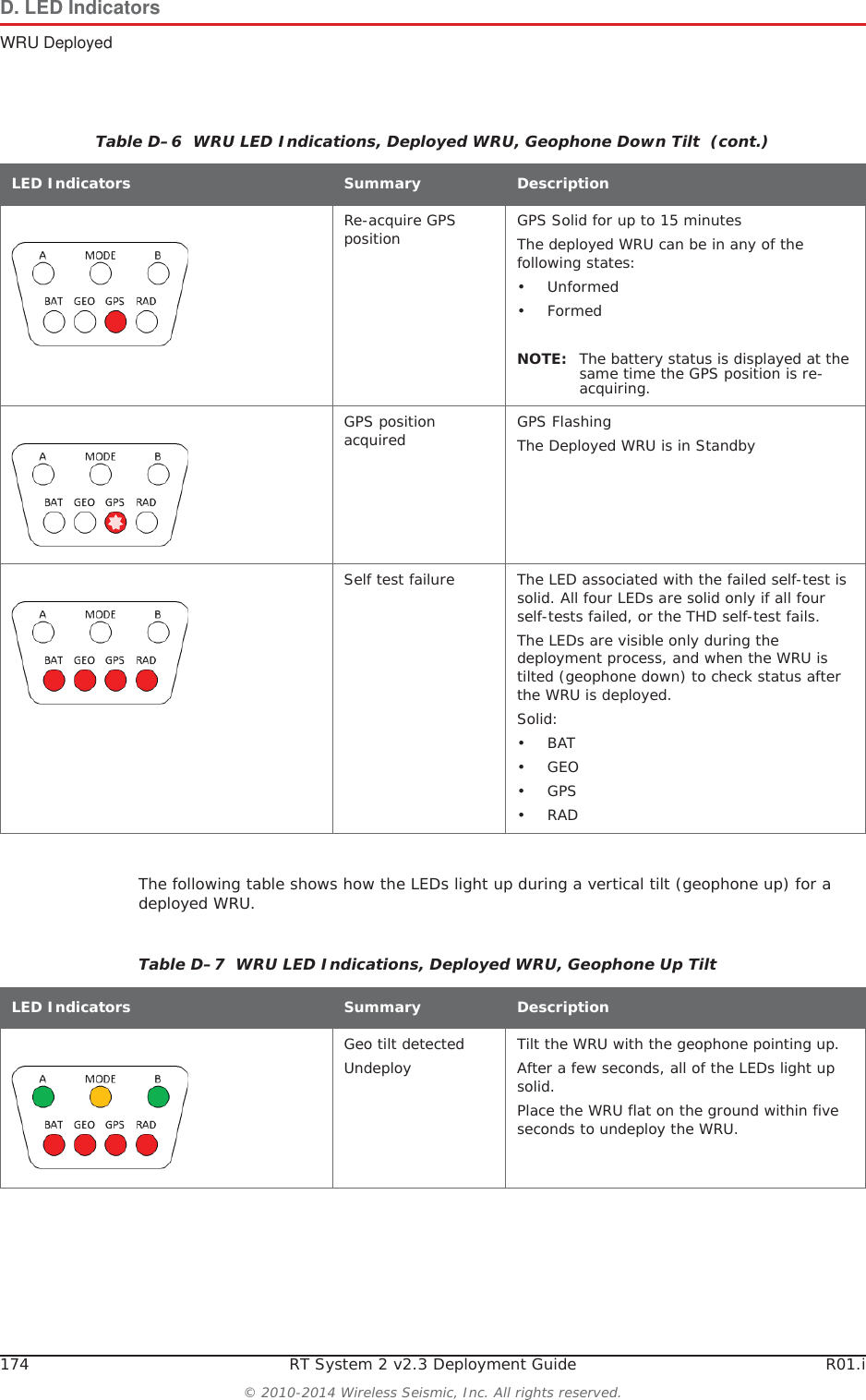
174 RT System 2 v2.3 Deployment Guide R01.i© 2010-2014 Wireless Seismic, Inc. All rights reserved.D. LED IndicatorsWRU DeployedThe following table shows how the LEDs light up during a vertical tilt (geophone up) for a deployed WRU.Re-acquire GPS position GPS Solid for up to 15 minutesThe deployed WRU can be in any of the following states:•Unformed•FormedNOTE: The battery status is displayed at the same time the GPS position is re-acquiring.GPS position acquired GPS FlashingThe Deployed WRU is in StandbySelf test failure The LED associated with the failed self-test is solid. All four LEDs are solid only if all four self-tests failed, or the THD self-test fails. The LEDs are visible only during the deployment process, and when the WRU is tilted (geophone down) to check status after the WRU is deployed.Solid:•BAT•GEO•GPS•RADTable D–6  WRU LED Indications, Deployed WRU, Geophone Down Tilt  (cont.)LED Indicators Summary DescriptionTable D–7  WRU LED Indications, Deployed WRU, Geophone Up Tilt LED Indicators Summary DescriptionGeo tilt detectedUndeploy Tilt the WRU with the geophone pointing up. After a few seconds, all of the LEDs light up solid. Place the WRU flat on the ground within five seconds to undeploy the WRU.
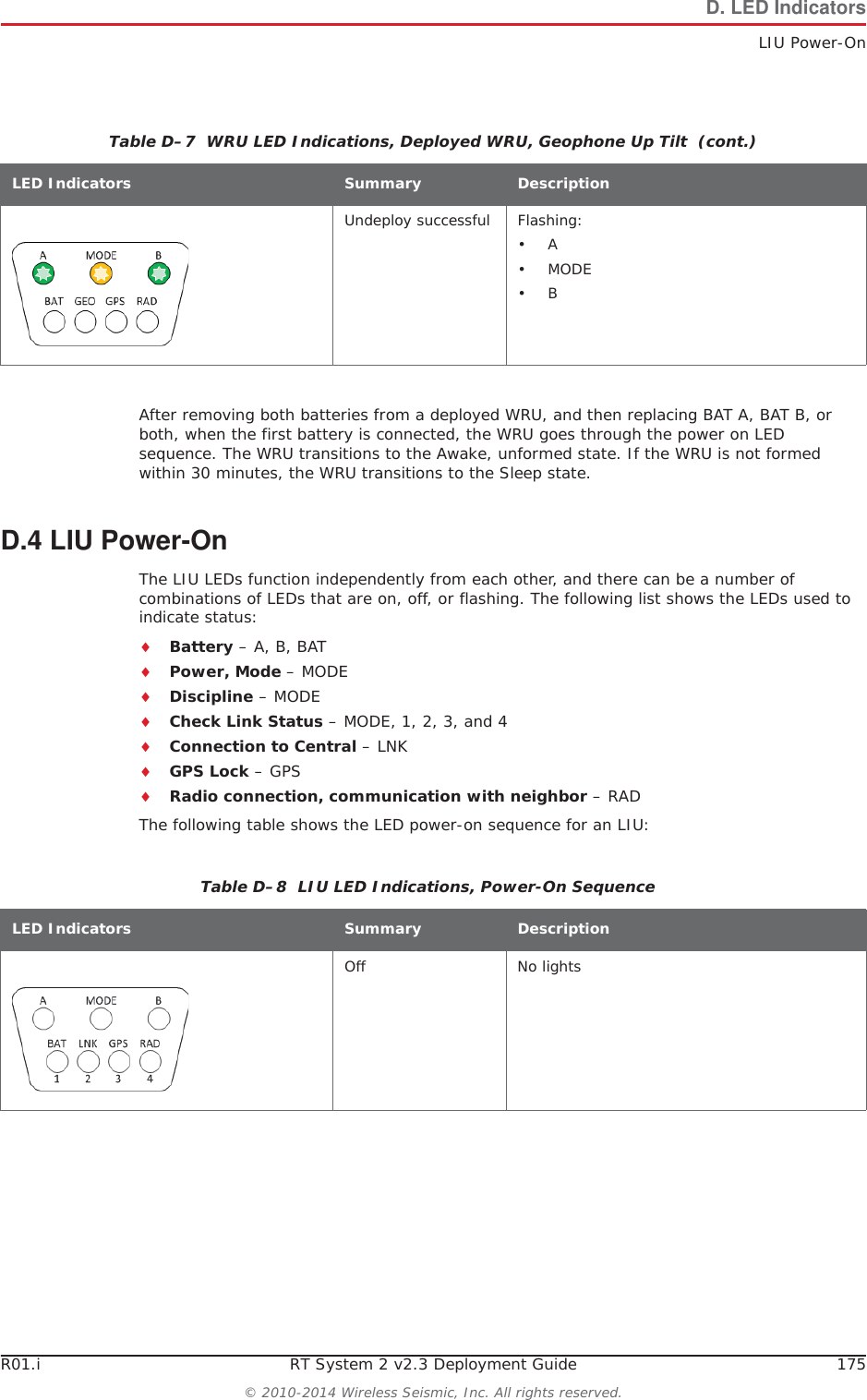
R01.i RT System 2 v2.3 Deployment Guide 175© 2010-2014 Wireless Seismic, Inc. All rights reserved.D. LED IndicatorsLIU Power-OnAfter removing both batteries from a deployed WRU, and then replacing BAT A, BAT B, or both, when the first battery is connected, the WRU goes through the power on LED sequence. The WRU transitions to the Awake, unformed state. If the WRU is not formed within 30 minutes, the WRU transitions to the Sleep state.D.4 LIU Power-OnThe LIU LEDs function independently from each other, and there can be a number of combinations of LEDs that are on, off, or flashing. The following list shows the LEDs used to indicate status:iBattery – A, B, BATiPower, Mode – MODEiDiscipline – MODEiCheck Link Status – MODE, 1, 2, 3, and 4iConnection to Central – LNKiGPS Lock – GPSiRadio connection, communication with neighbor – RADThe following table shows the LED power-on sequence for an LIU:Undeploy successful Flashing:•A•MODE•BTable D–7  WRU LED Indications, Deployed WRU, Geophone Up Tilt  (cont.)LED Indicators Summary DescriptionTable D–8  LIU LED Indications, Power-On Sequence LED Indicators Summary DescriptionOff No lights
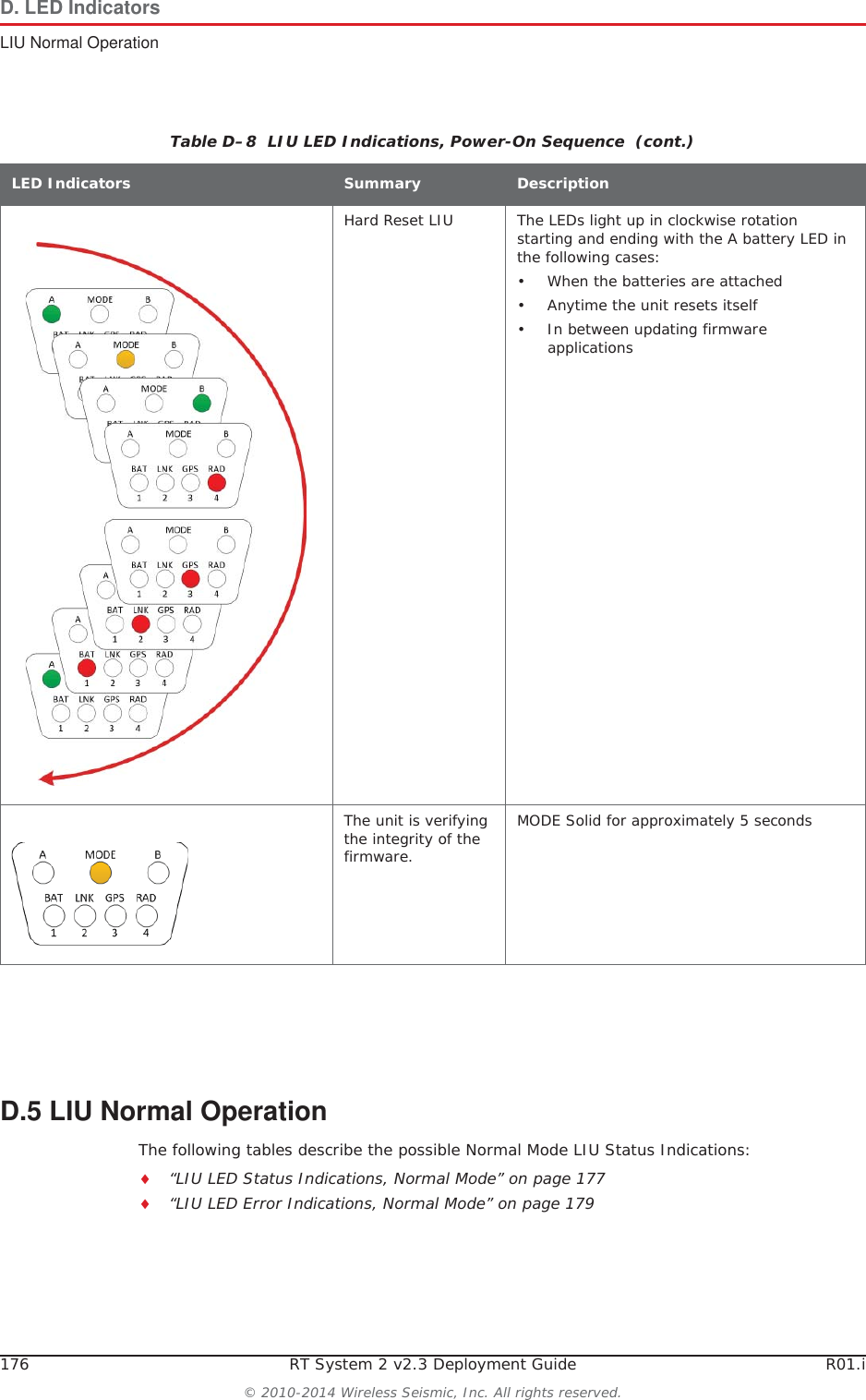
176 RT System 2 v2.3 Deployment Guide R01.i© 2010-2014 Wireless Seismic, Inc. All rights reserved.D. LED IndicatorsLIU Normal OperationD.5 LIU Normal OperationThe following tables describe the possible Normal Mode LIU Status Indications:i“LIU LED Status Indications, Normal Mode” on page 177i“LIU LED Error Indications, Normal Mode” on page 179Hard Reset LIU The LEDs light up in clockwise rotation starting and ending with the A battery LED in the following cases:• When the batteries are attached• Anytime the unit resets itself• In between updating firmware applicationsThe unit is verifying the integrity of the firmware.MODE Solid for approximately 5 secondsTable D–8  LIU LED Indications, Power-On Sequence  (cont.)LED Indicators Summary Description
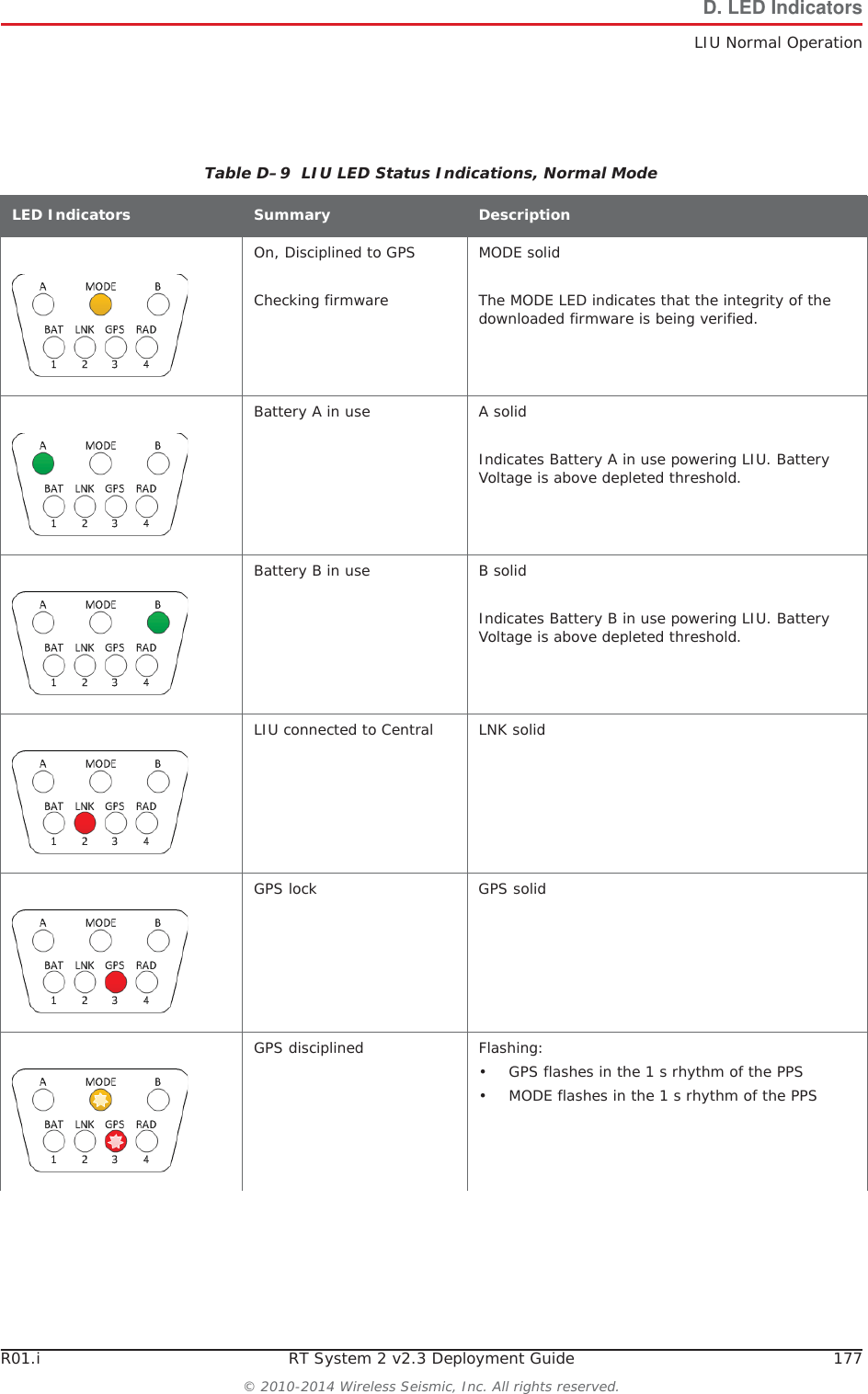
R01.i RT System 2 v2.3 Deployment Guide 177© 2010-2014 Wireless Seismic, Inc. All rights reserved.D. LED IndicatorsLIU Normal OperationTable D–9  LIU LED Status Indications, Normal ModeLED Indicators Summary DescriptionOn, Disciplined to GPSChecking firmwareMODE solidThe MODE LED indicates that the integrity of the downloaded firmware is being verified.Battery A in use A solidIndicates Battery A in use powering LIU. Battery Voltage is above depleted threshold. Battery B in use B solidIndicates Battery B in use powering LIU. Battery Voltage is above depleted threshold. LIU connected to Central LNK solidGPS lock GPS solidGPS disciplined Flashing:• GPS flashes in the 1 s rhythm of the PPS• MODE flashes in the 1 s rhythm of the PPS
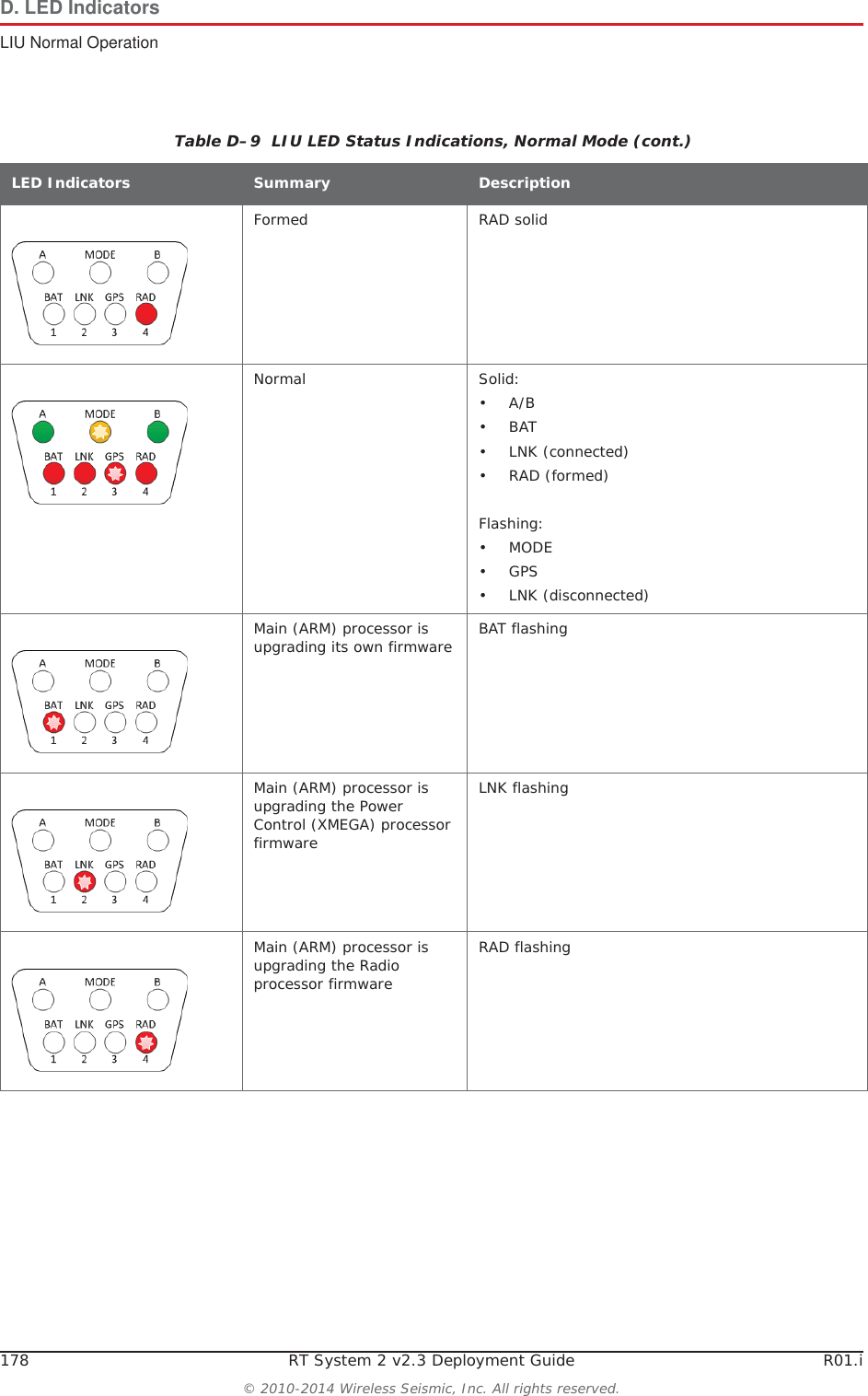
178 RT System 2 v2.3 Deployment Guide R01.i© 2010-2014 Wireless Seismic, Inc. All rights reserved.D. LED IndicatorsLIU Normal OperationFormed RAD solidNormal Solid:•A/B •BAT • LNK (connected)•RAD (formed)Flashing:•MODE •GPS • LNK (disconnected)Main (ARM) processor is upgrading its own firmware BAT flashingMain (ARM) processor is upgrading the Power Control (XMEGA) processor firmwareLNK flashingMain (ARM) processor is upgrading the Radio processor firmwareRAD flashingTable D–9  LIU LED Status Indications, Normal Mode (cont.)LED Indicators Summary Description
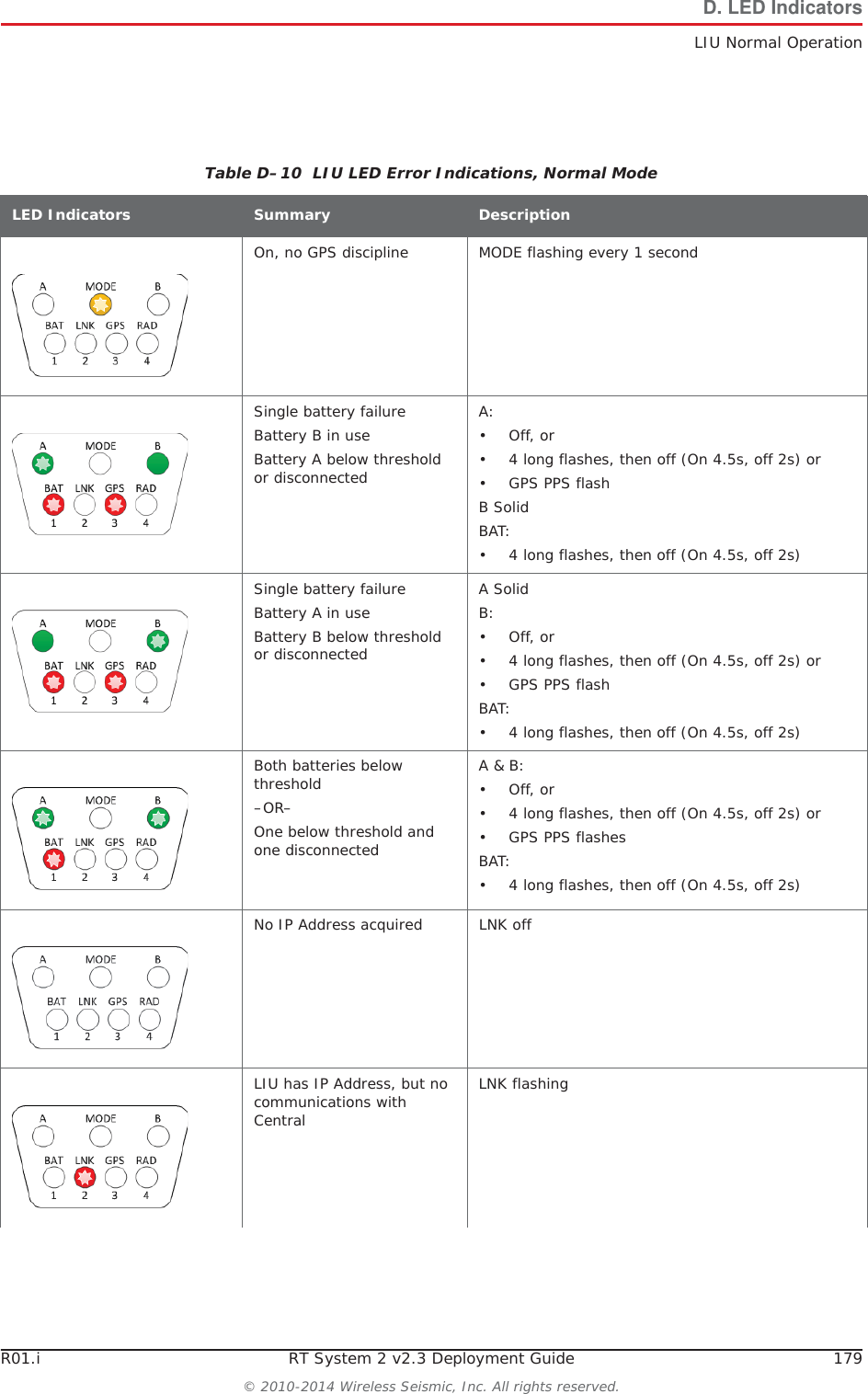
R01.i RT System 2 v2.3 Deployment Guide 179© 2010-2014 Wireless Seismic, Inc. All rights reserved.D. LED IndicatorsLIU Normal OperationTable D–10  LIU LED Error Indications, Normal ModeLED Indicators Summary DescriptionOn, no GPS discipline MODE flashing every 1 secondSingle battery failureBattery B in useBattery A below threshold or disconnectedA:•Off, or• 4 long flashes, then off (On 4.5s, off 2s) or• GPS PPS flashB SolidBAT:• 4 long flashes, then off (On 4.5s, off 2s)Single battery failureBattery A in useBattery B below threshold or disconnectedA SolidB:•Off, or• 4 long flashes, then off (On 4.5s, off 2s) or• GPS PPS flashBAT:• 4 long flashes, then off (On 4.5s, off 2s)Both batteries below threshold–OR–One below threshold and one disconnectedA & B:•Off, or• 4 long flashes, then off (On 4.5s, off 2s) or• GPS PPS flashesBAT:• 4 long flashes, then off (On 4.5s, off 2s)No IP Address acquired LNK offLIU has IP Address, but no communications with CentralLNK flashing
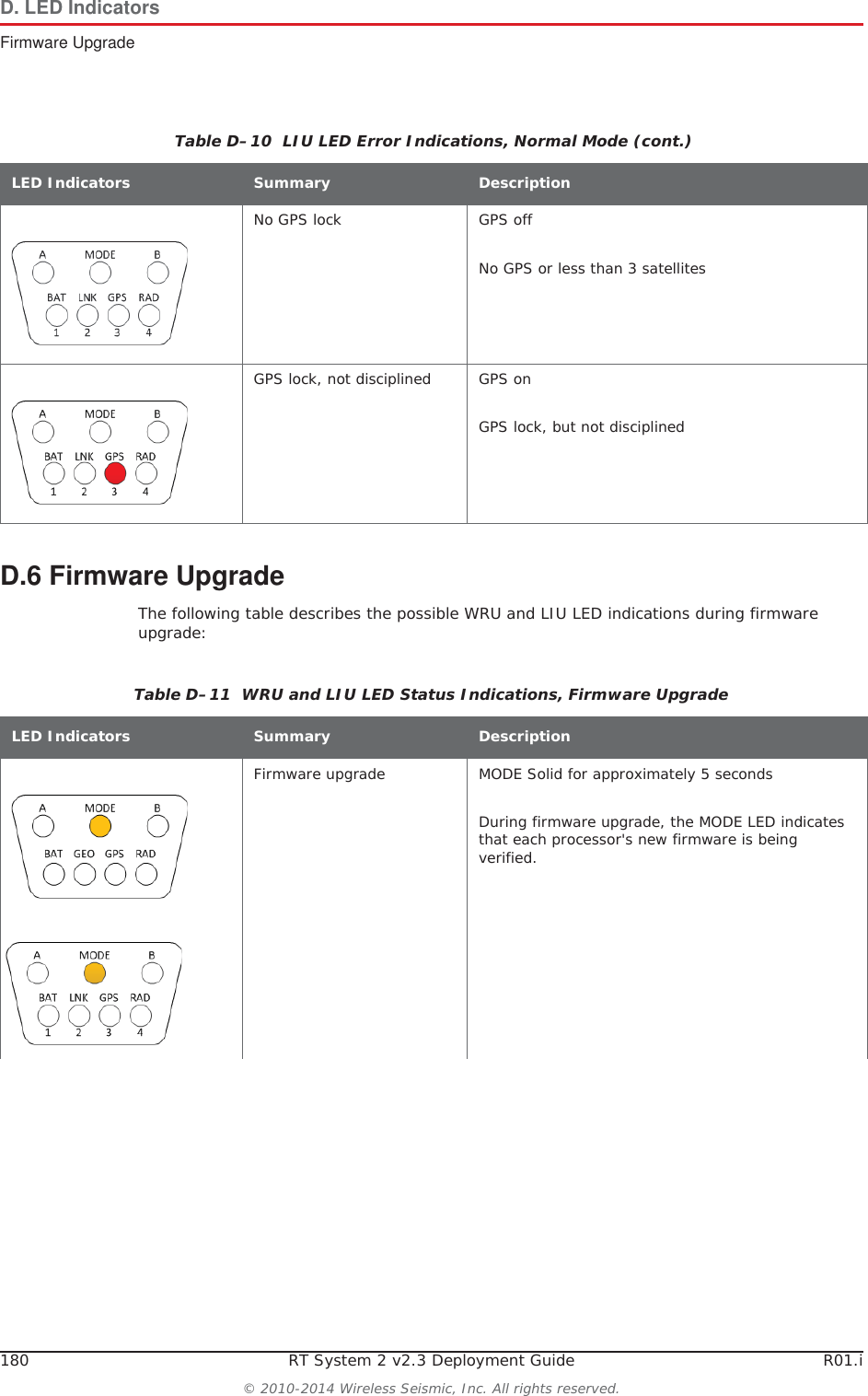
180 RT System 2 v2.3 Deployment Guide R01.i© 2010-2014 Wireless Seismic, Inc. All rights reserved.D. LED IndicatorsFirmware UpgradeD.6 Firmware UpgradeThe following table describes the possible WRU and LIU LED indications during firmware upgrade:No GPS lock GPS offNo GPS or less than 3 satellitesGPS lock, not disciplined GPS onGPS lock, but not disciplinedTable D–10  LIU LED Error Indications, Normal Mode (cont.)LED Indicators Summary DescriptionTable D–11  WRU and LIU LED Status Indications, Firmware UpgradeLED Indicators Summary DescriptionFirmware upgrade MODE Solid for approximately 5 secondsDuring firmware upgrade, the MODE LED indicates that each processor's new firmware is being verified.
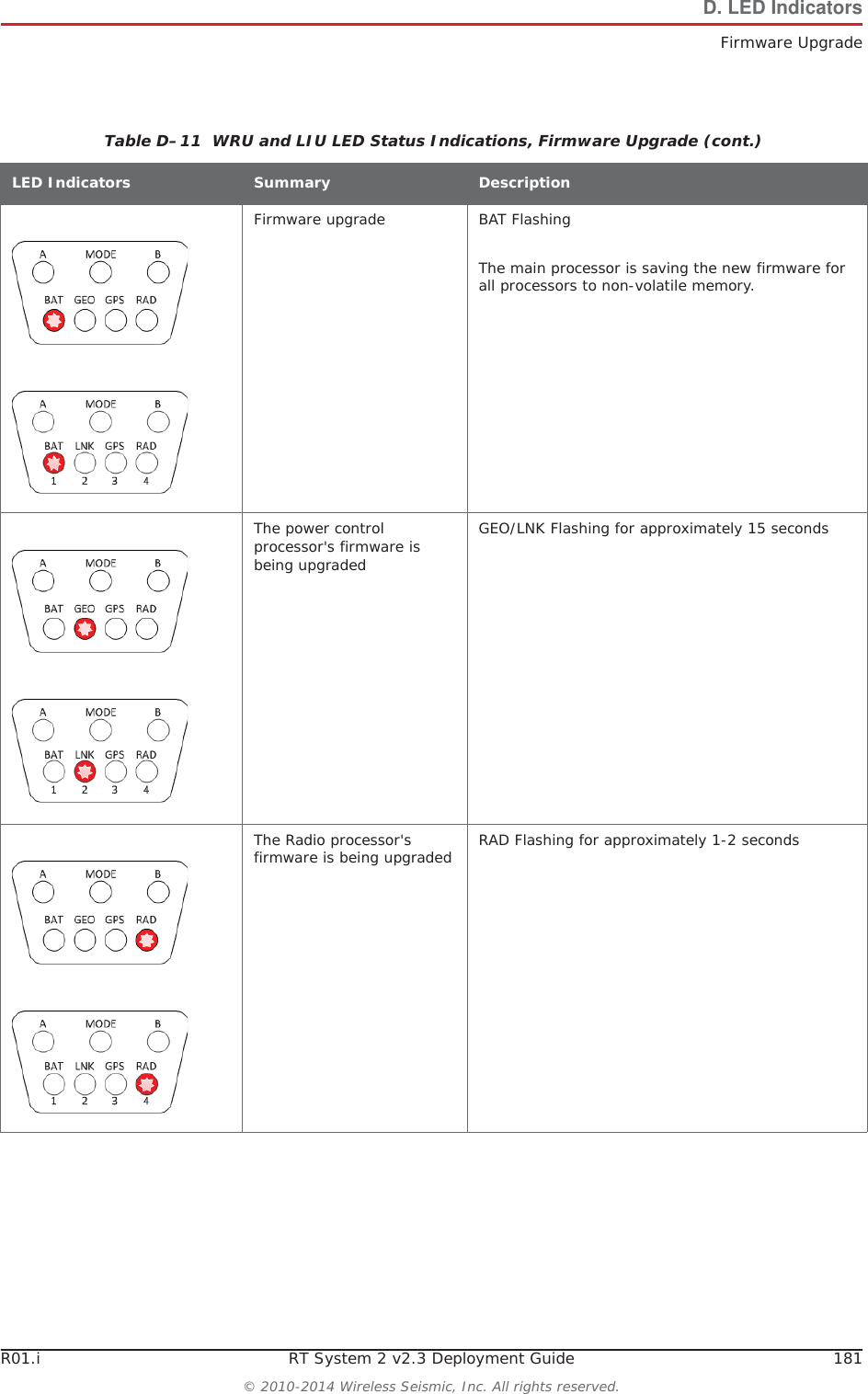
R01.i RT System 2 v2.3 Deployment Guide 181© 2010-2014 Wireless Seismic, Inc. All rights reserved.D. LED IndicatorsFirmware UpgradeFirmware upgrade BAT FlashingThe main processor is saving the new firmware for all processors to non-volatile memory.The power control processor's firmware is being upgradedGEO/LNK Flashing for approximately 15 secondsThe Radio processor's firmware is being upgraded RAD Flashing for approximately 1-2 secondsTable D–11  WRU and LIU LED Status Indications, Firmware Upgrade (cont.)LED Indicators Summary Description
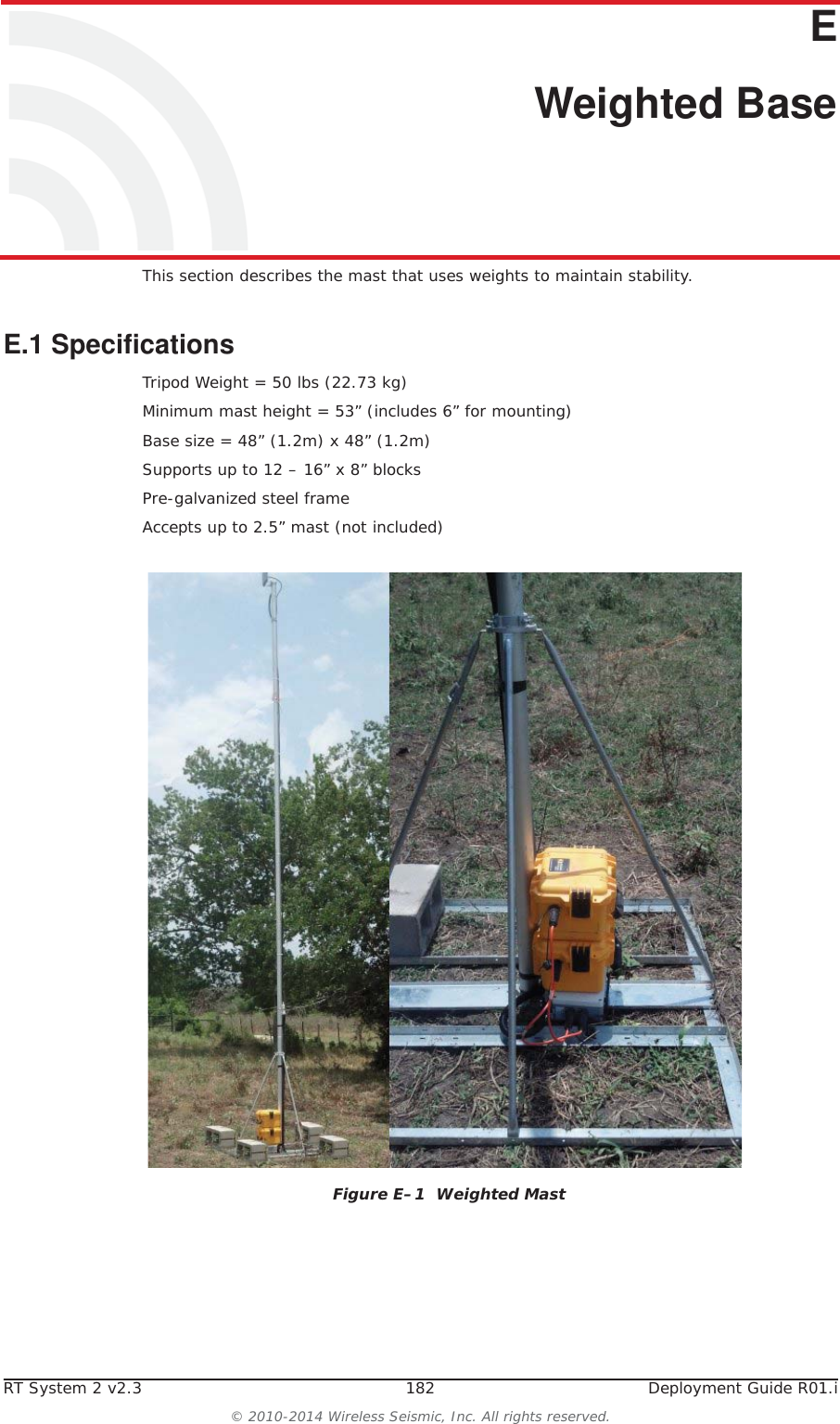
RT System 2 v2.3 182  Deployment Guide R01.i© 2010-2014 Wireless Seismic, Inc. All rights reserved.EE. Weighted BaseThis section describes the mast that uses weights to maintain stability.E.1 SpecificationsTripod Weight = 50 lbs (22.73 kg)Minimum mast height = 53” (includes 6” for mounting)Base size = 48” (1.2m) x 48” (1.2m)Supports up to 12 – 16” x 8” blocksPre-galvanized steel frameAccepts up to 2.5” mast (not included)Figure E–1  Weighted Mast
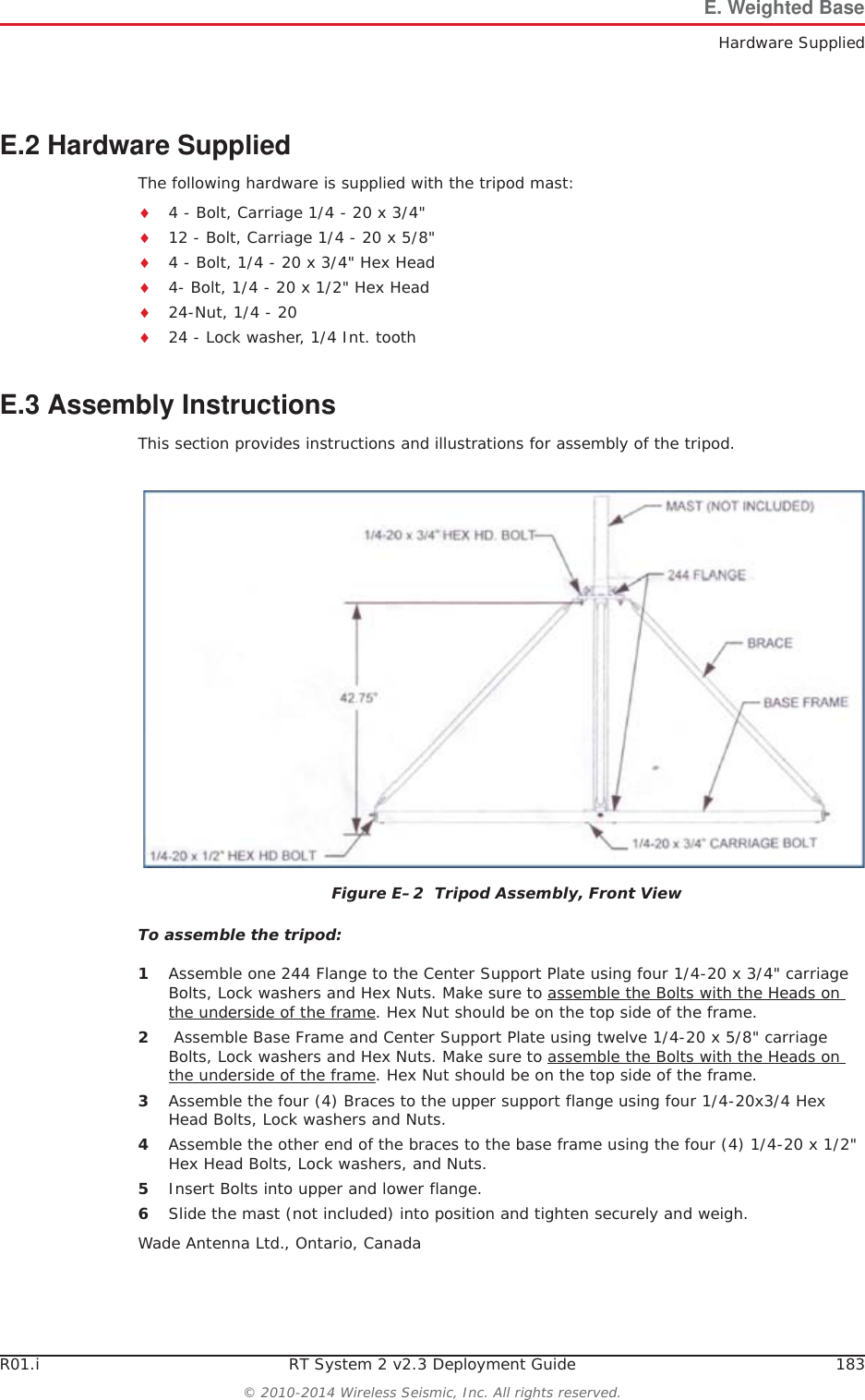
R01.i RT System 2 v2.3 Deployment Guide 183© 2010-2014 Wireless Seismic, Inc. All rights reserved.E. Weighted BaseHardware SuppliedE.2 Hardware SuppliedThe following hardware is supplied with the tripod mast:i4 - Bolt, Carriage 1/4 - 20 x 3/4"i12 - Bolt, Carriage 1/4 - 20 x 5/8"i4 - Bolt, 1/4 - 20 x 3/4" Hex Headi4- Bolt, 1/4 - 20 x 1/2" Hex Headi24-Nut, 1/4 - 20i24 - Lock washer, 1/4 Int. toothE.3 Assembly InstructionsThis section provides instructions and illustrations for assembly of the tripod.To assemble the tripod:1Assemble one 244 Flange to the Center Support Plate using four 1/4-20 x 3/4" carriage Bolts, Lock washers and Hex Nuts. Make sure to assemble the Bolts with the Heads on the underside of the frame. Hex Nut should be on the top side of the frame. 2 Assemble Base Frame and Center Support Plate using twelve 1/4-20 x 5/8" carriage Bolts, Lock washers and Hex Nuts. Make sure to assemble the Bolts with the Heads on the underside of the frame. Hex Nut should be on the top side of the frame.3Assemble the four (4) Braces to the upper support flange using four 1/4-20x3/4 Hex Head Bolts, Lock washers and Nuts.4Assemble the other end of the braces to the base frame using the four (4) 1/4-20 x 1/2" Hex Head Bolts, Lock washers, and Nuts.5Insert Bolts into upper and lower flange.6Slide the mast (not included) into position and tighten securely and weigh.Wade Antenna Ltd., Ontario, CanadaFigure E–2  Tripod Assembly, Front View
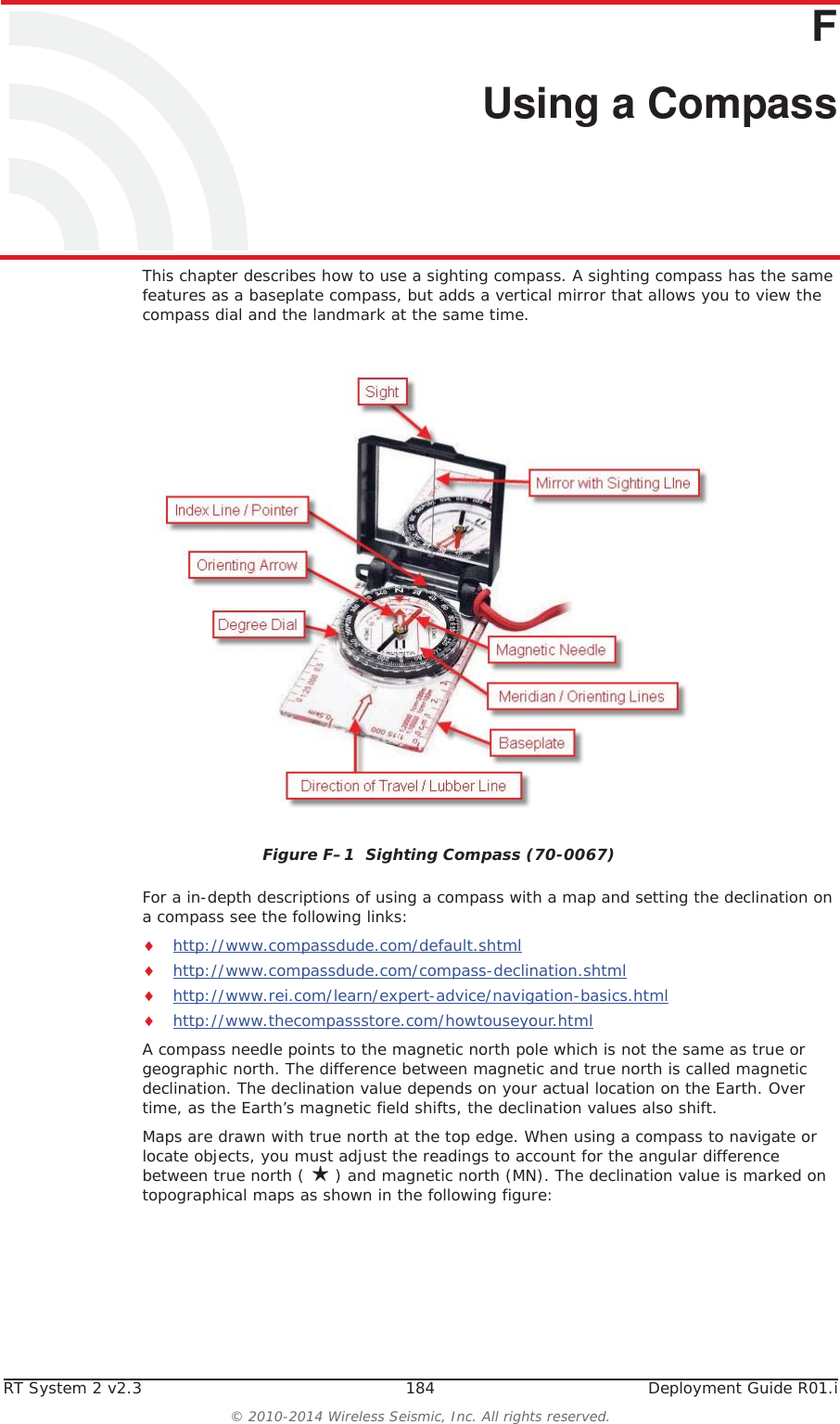
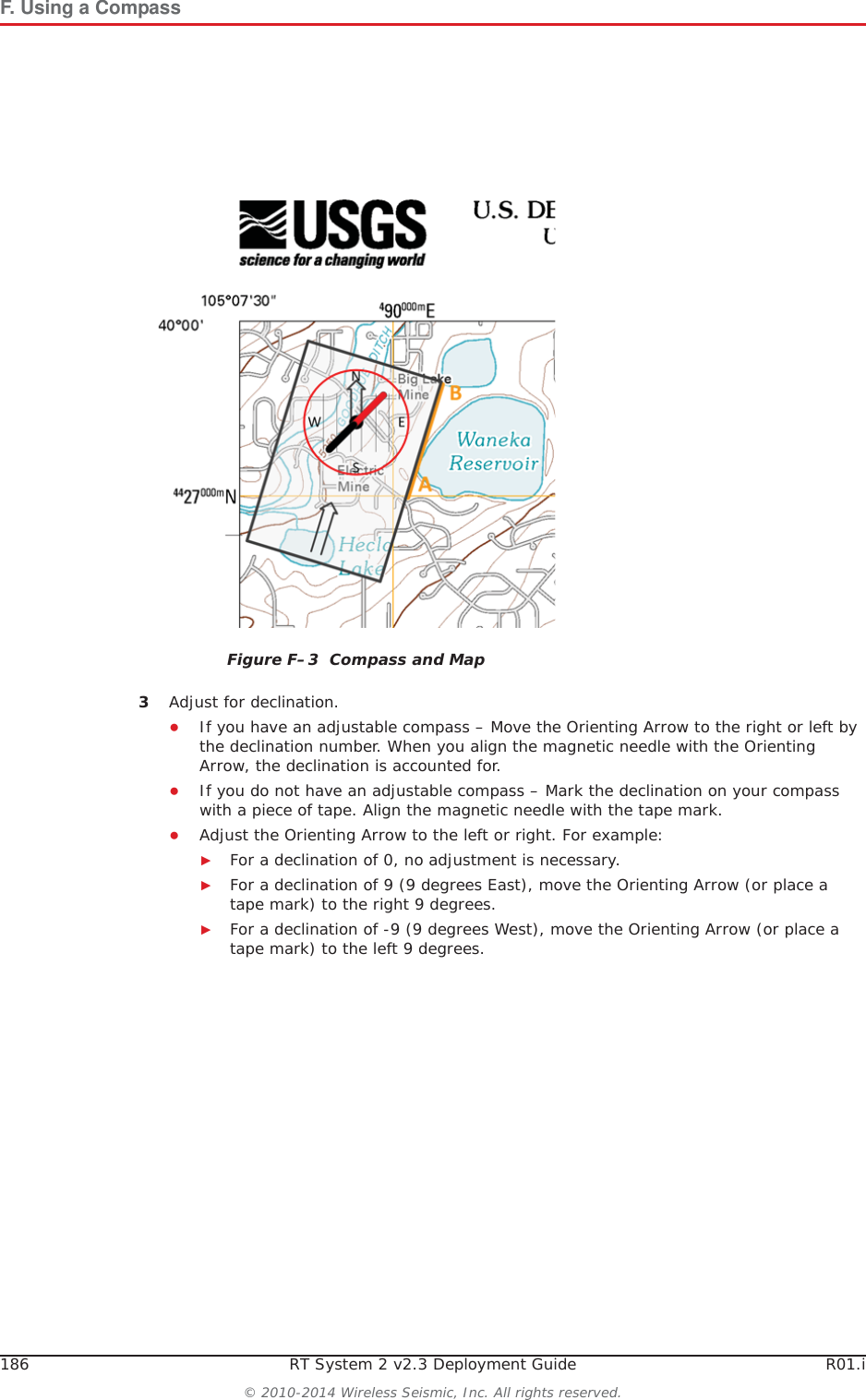
RT System 2 v2.3 184  Deployment Guide R01.i© 2010-2014 Wireless Seismic, Inc. All rights reserved.FF. Using a CompassThis chapter describes how to use a sighting compass. A sighting compass has the same features as a baseplate compass, but adds a vertical mirror that allows you to view the compass dial and the landmark at the same time. For a in-depth descriptions of using a compass with a map and setting the declination on a compass see the following links:ihttp://www.compassdude.com/default.shtmlihttp://www.compassdude.com/compass-declination.shtmlihttp://www.rei.com/learn/expert-advice/navigation-basics.htmlihttp://www.thecompassstore.com/howtouseyour.htmlA compass needle points to the magnetic north pole which is not the same as true or geographic north. The difference between magnetic and true north is called magnetic declination. The declination value depends on your actual location on the Earth. Over time, as the Earth’s magnetic field shifts, the declination values also shift. Maps are drawn with true north at the top edge. When using a compass to navigate or locate objects, you must adjust the readings to account for the angular difference between true north ( ღ) and magnetic north (MN). The declination value is marked on topographical maps as shown in the following figure:Figure F–1  Sighting Compass (70-0067)
R01.i RT System 2 v2.3 Deployment Guide 185© 2010-2014 Wireless Seismic, Inc. All rights reserved.F. Using a CompassHowever, because of the dynamic nature of the Earth’s magnetic field, old maps are inaccurate. To obtain the most recent declination values, enter your map location at the following link:http://www.ngdc.noaa.gov/geomag-web/#declinationTo locate an object using a map and a compass:1Place the long edge of the compass baseplate on the map, connecting the desired start and end points. For example, the start point could be where you are standing [A], and the end point [B] is where you want to locate the backhaul mast. The Direction of Travel arrow should point towards the end point (mast location). 2While holding the compass on the map, turn the Degree Dial until the Meridian / Orienting Lines are parallel with the Meridian lines on the map. This is the same as turning the Degree Dial until the Orienting Arrow points to north on the map. Figure F–2  Declination Indication on MapNOTE Placing magnetic objects near a compass can cause an incorrect reading (deviation). Examples include:• Objects that contain steel and iron such as pocket knives, belt buckles, vehicles, railroad tracks, and ore deposits in the Earth• Objects that use magnets such as stereo speakers• Electrical current in cables and overhead lines
186 RT System 2 v2.3 Deployment Guide R01.i© 2010-2014 Wireless Seismic, Inc. All rights reserved.F. Using a Compass3Adjust for declination. ƔIf you have an adjustable compass – Move the Orienting Arrow to the right or left by the declination number. When you align the magnetic needle with the Orienting Arrow, the declination is accounted for. ƔIf you do not have an adjustable compass – Mark the declination on your compass with a piece of tape. Align the magnetic needle with the tape mark. ƔAdjust the Orienting Arrow to the left or right. For example:ŹFor a declination of 0, no adjustment is necessary. ŹFor a declination of 9 (9 degrees East), move the Orienting Arrow (or place a tape mark) to the right 9 degrees.ŹFor a declination of -9 (9 degrees West), move the Orienting Arrow (or place a tape mark) to the left 9 degrees.Figure F–3  Compass and Map
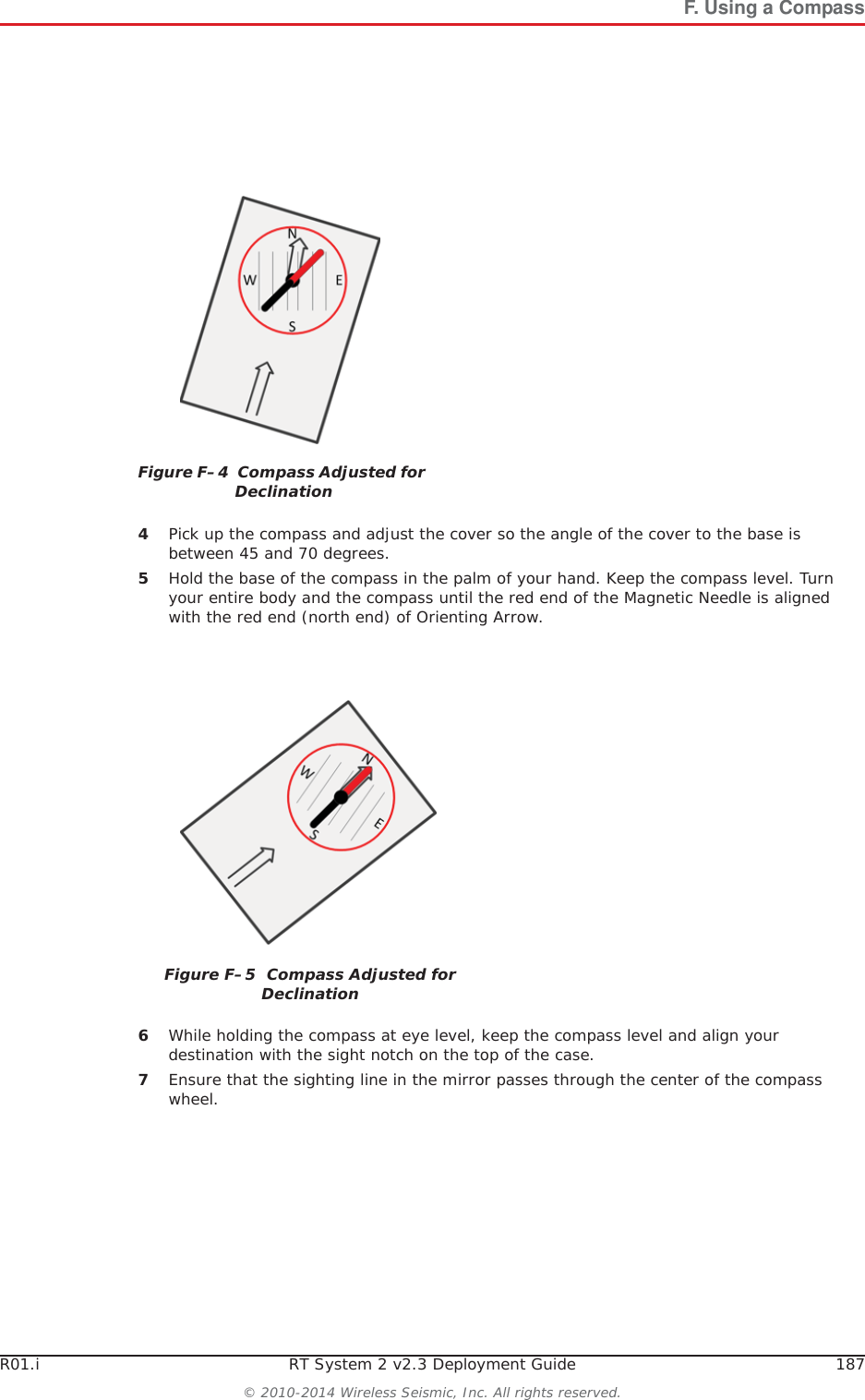
R01.i RT System 2 v2.3 Deployment Guide 187© 2010-2014 Wireless Seismic, Inc. All rights reserved.F. Using a Compass4Pick up the compass and adjust the cover so the angle of the cover to the base is between 45 and 70 degrees. 5Hold the base of the compass in the palm of your hand. Keep the compass level. Turn your entire body and the compass until the red end of the Magnetic Needle is aligned with the red end (north end) of Orienting Arrow. 6While holding the compass at eye level, keep the compass level and align your destination with the sight notch on the top of the case.7Ensure that the sighting line in the mirror passes through the center of the compass wheel.Figure F–4  Compass Adjusted for DeclinationFigure F–5  Compass Adjusted for Declination
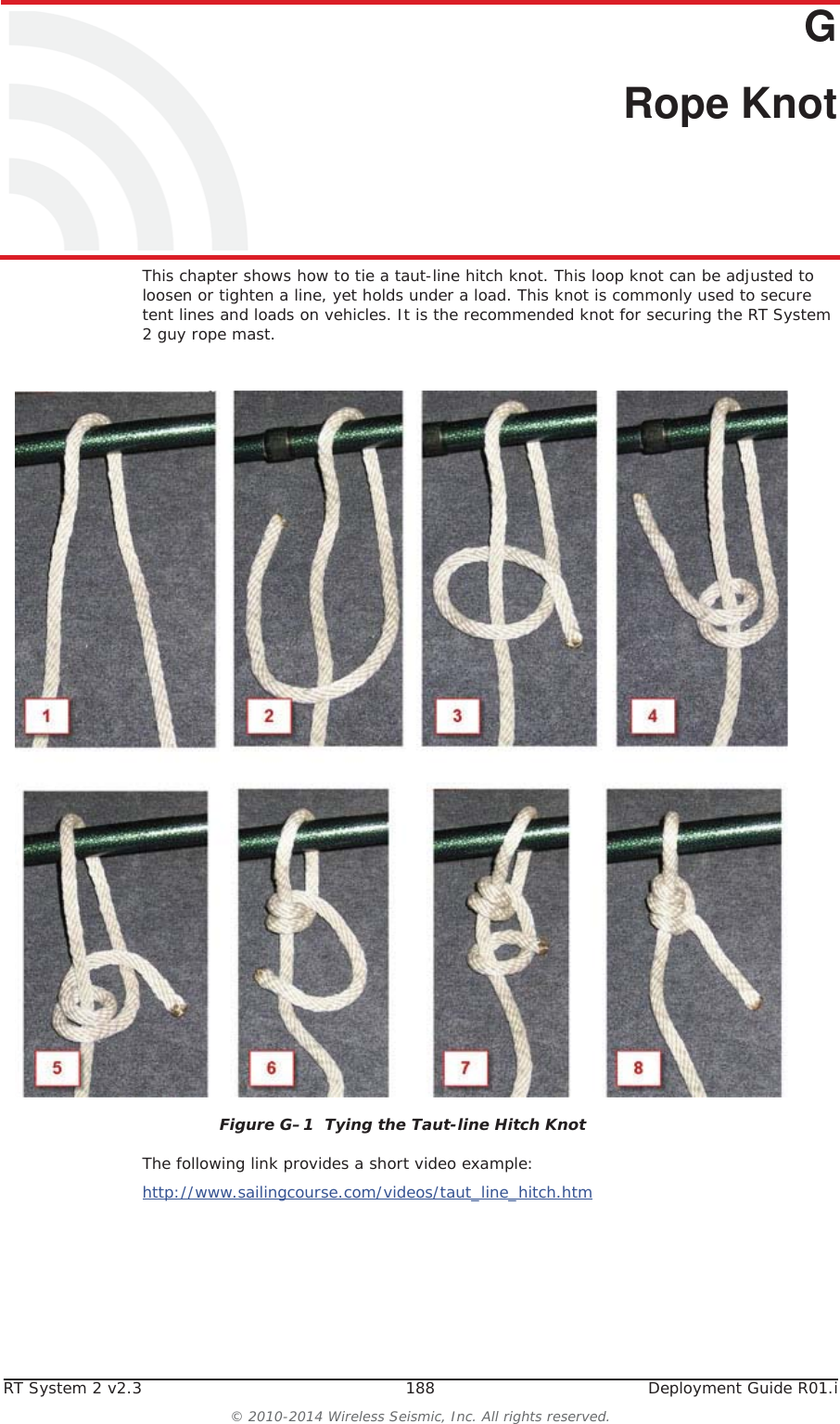
RT System 2 v2.3 188  Deployment Guide R01.i© 2010-2014 Wireless Seismic, Inc. All rights reserved.GG. Rope KnotThis chapter shows how to tie a taut-line hitch knot. This loop knot can be adjusted to loosen or tighten a line, yet holds under a load. This knot is commonly used to secure tent lines and loads on vehicles. It is the recommended knot for securing the RT System 2 guy rope mast.The following link provides a short video example:http://www.sailingcourse.com/videos/taut_line_hitch.htmFigure G–1  Tying the Taut-line Hitch Knot
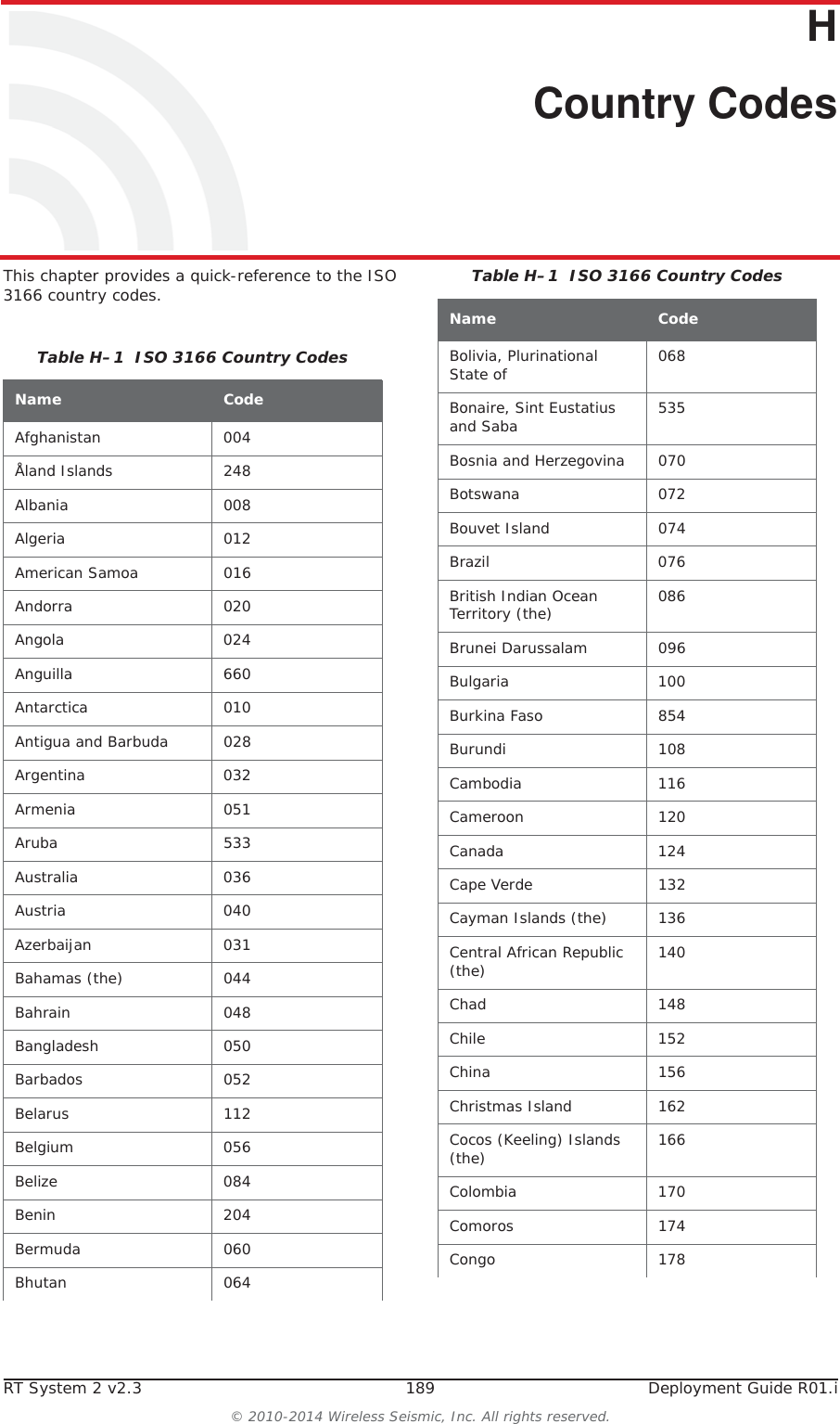
RT System 2 v2.3 189  Deployment Guide R01.i© 2010-2014 Wireless Seismic, Inc. All rights reserved.HH. Country CodesThis chapter provides a quick-reference to the ISO 3166 country codes.Table H–1  ISO 3166 Country CodesName CodeAfghanistan 004Åland Islands 248Albania 008Algeria 012American Samoa 016Andorra 020Angola 024Anguilla 660Antarctica 010Antigua and Barbuda 028Argentina 032Armenia 051Aruba 533Australia 036Austria 040Azerbaijan 031Bahamas (the) 044Bahrain 048Bangladesh 050Barbados 052Belarus 112Belgium 056Belize 084Benin 204Bermuda 060Bhutan 064Bolivia, Plurinational State of 068Bonaire, Sint Eustatius and Saba 535Bosnia and Herzegovina 070Botswana 072Bouvet Island 074Brazil 076British Indian Ocean Territory (the) 086Brunei Darussalam 096Bulgaria 100Burkina Faso 854Burundi 108Cambodia 116Cameroon 120Canada 124Cape Verde 132Cayman Islands (the) 136Central African Republic (the) 140Chad 148Chile 152China 156Christmas Island 162Cocos (Keeling) Islands (the) 166Colombia 170Comoros 174Congo 178Table H–1  ISO 3166 Country CodesName Code
H. Country Codes190 RT System 2 v2.3 Deployment Guide R01.i© 2010-2014 Wireless Seismic, Inc. All rights reserved.Congo (the Democratic Republic of the) 180Cook Islands (the) 184Costa Rica 188Côte d'Ivoire 384Croatia 191Cuba 192Curaçao 531Cyprus 196Czech Republic (the) 203Denmark 208Djibouti 262Dominica 212Dominican Republic (the) 214Ecuador 218Egypt 818El Salvador 222Equatorial Guinea 226Eritrea 232Estonia 233Ethiopia 231Falkland Islands (the) [Malvinas] 238Faroe Islands (the) 234Fiji 242Finland 246France 250French Guiana 254French Polynesia 258French Southern Territories (the) 260Gabon 266Gambia (The) 270Table H–1  ISO 3166 Country CodesName CodeGeorgia 268Germany 276Ghana 288Gibraltar 292Greece 300Greenland 304Grenada 308Guadeloupe 312Guam 316Guatemala 320Guernsey 831Guinea 324Guinea-Bissau 624Guyana 328Haiti 332Heard Island and McDonald Islands 334Holy See (the) [Vatican City State] 336Honduras 340Hong Kong 344Hungary 348Iceland 352India 356Indonesia 360Iran (the Islamic Republic of) 364Iraq 368Ireland 372Isle of Man 833Israel 376Italy 380Jamaica 388Table H–1  ISO 3166 Country CodesName Code
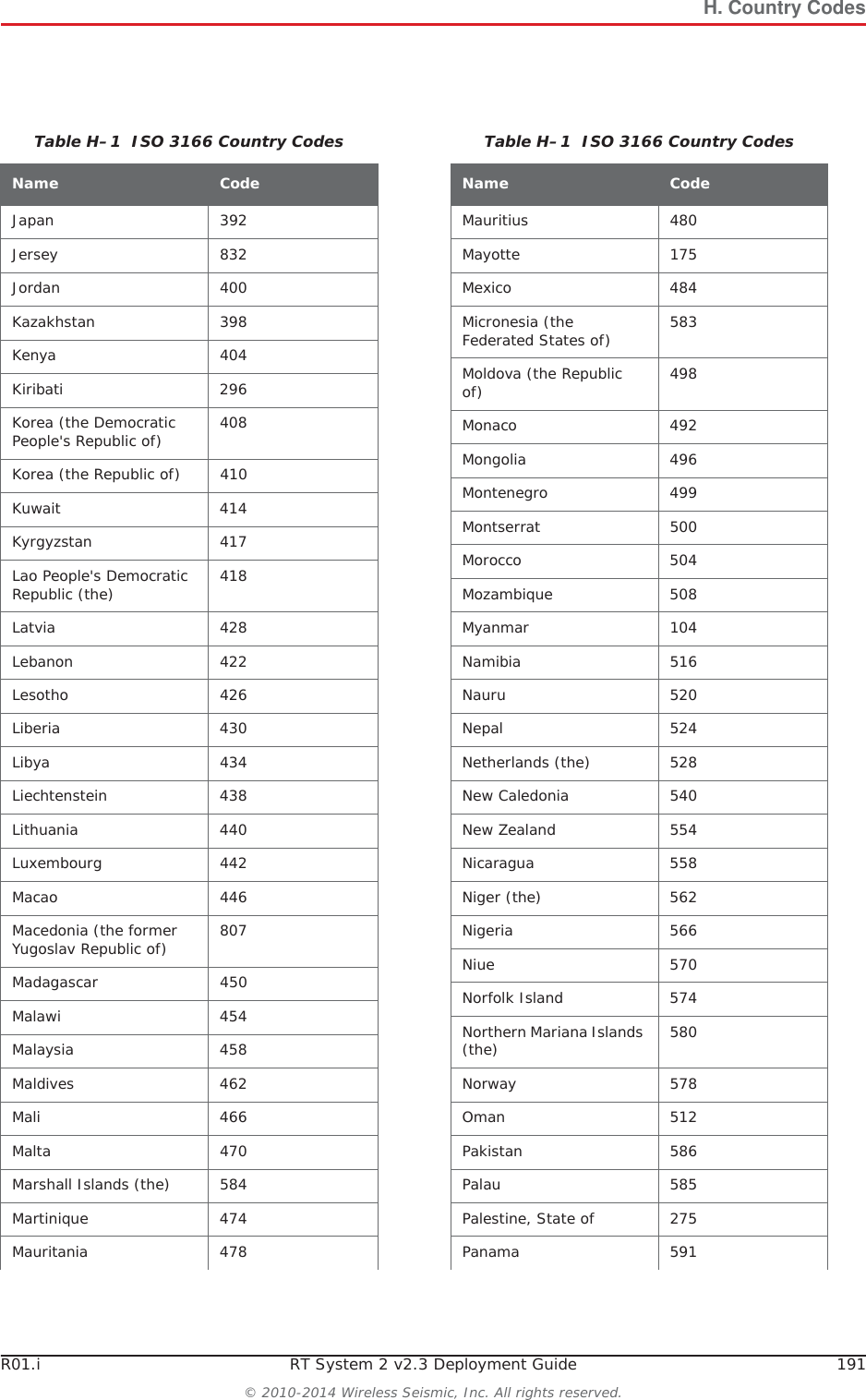
H. Country CodesR01.i RT System 2 v2.3 Deployment Guide 191© 2010-2014 Wireless Seismic, Inc. All rights reserved.Japan 392Jersey 832Jordan 400Kazakhstan 398Kenya 404Kiribati 296Korea (the Democratic People's Republic of) 408Korea (the Republic of) 410Kuwait 414Kyrgyzstan 417Lao People's Democratic Republic (the) 418Latvia 428Lebanon 422Lesotho 426Liberia 430Libya 434Liechtenstein 438Lithuania 440Luxembourg 442Macao 446Macedonia (the former Yugoslav Republic of) 807Madagascar 450Malawi 454Malaysia 458Maldives 462Mali 466Malta 470Marshall Islands (the) 584Martinique 474Mauritania 478Table H–1  ISO 3166 Country CodesName CodeMauritius 480Mayotte 175Mexico 484Micronesia (the Federated States of) 583Moldova (the Republic of) 498Monaco 492Mongolia 496Montenegro 499Montserrat 500Morocco 504Mozambique 508Myanmar 104Namibia 516Nauru 520Nepal 524Netherlands (the) 528New Caledonia 540New Zealand 554Nicaragua 558Niger (the) 562Nigeria 566Niue 570Norfolk Island 574Northern Mariana Islands (the) 580Norway 578Oman 512Pakistan 586Palau 585Palestine, State of 275Panama 591Table H–1  ISO 3166 Country CodesName Code
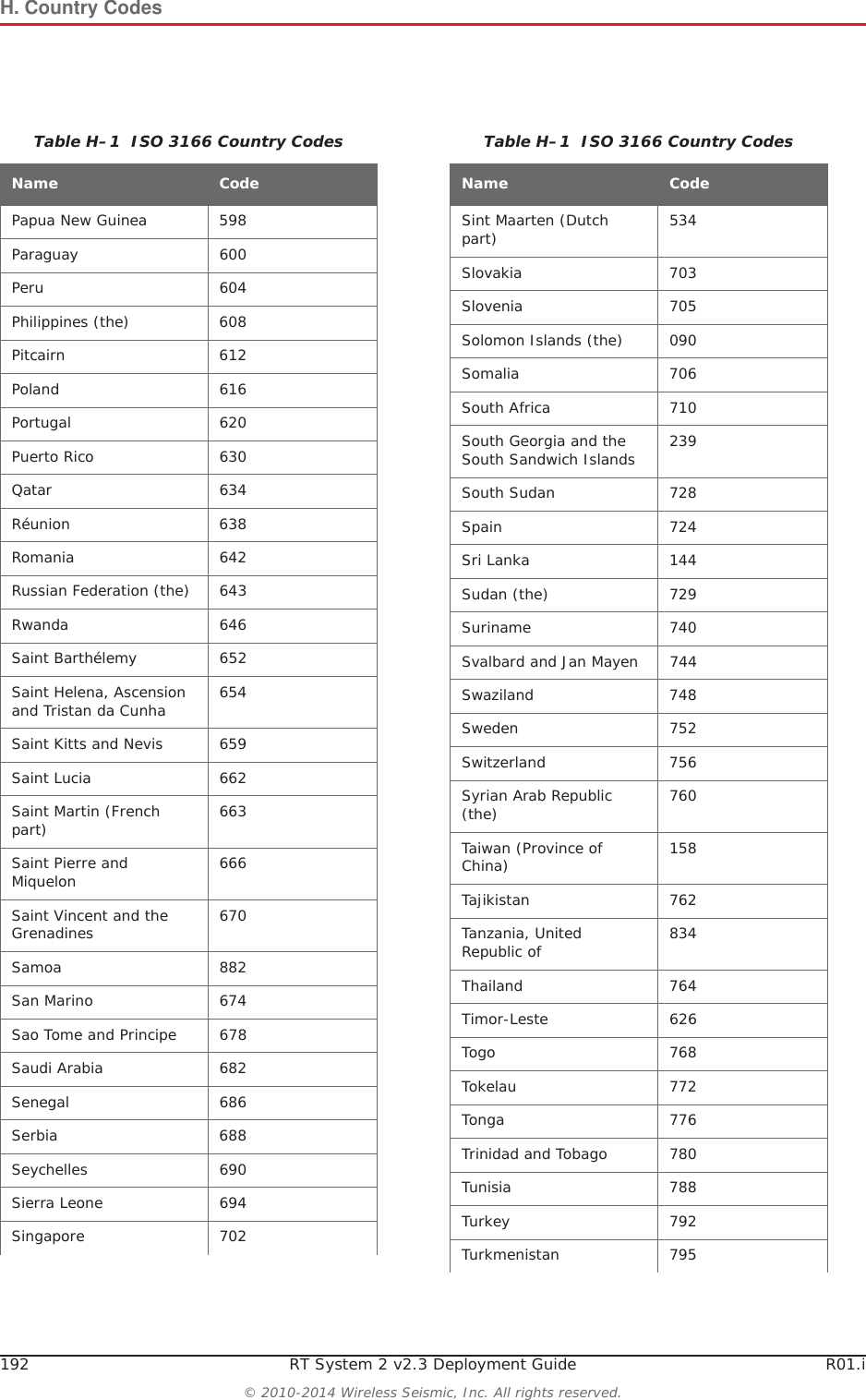
H. Country Codes192 RT System 2 v2.3 Deployment Guide R01.i© 2010-2014 Wireless Seismic, Inc. All rights reserved.Papua New Guinea 598Paraguay 600Peru 604Philippines (the) 608Pitcairn 612Poland 616Portugal 620Puerto Rico 630Qatar 634Réunion 638Romania 642Russian Federation (the) 643Rwanda 646Saint Barthélemy 652Saint Helena, Ascension and Tristan da Cunha 654Saint Kitts and Nevis 659Saint Lucia 662Saint Martin (French part) 663Saint Pierre and Miquelon 666Saint Vincent and the Grenadines 670Samoa 882San Marino 674Sao Tome and Principe 678Saudi Arabia 682Senegal 686Serbia 688Seychelles 690Sierra Leone 694Singapore 702Table H–1  ISO 3166 Country CodesName CodeSint Maarten (Dutch part) 534Slovakia 703Slovenia 705Solomon Islands (the) 090Somalia 706South Africa 710South Georgia and the South Sandwich Islands 239South Sudan  728Spain 724Sri Lanka 144Sudan (the) 729Suriname 740Svalbard and Jan Mayen 744Swaziland 748Sweden 752Switzerland 756Syrian Arab Republic (the) 760Taiwan (Province of China) 158Tajikistan 762Tanzania, United Republic of 834Thailand 764Timor-Leste 626Togo 768Tokelau 772Tonga 776Trinidad and Tobago 780Tunisia 788Turkey 792Turkmenistan 795Table H–1  ISO 3166 Country CodesName Code
H. Country CodesR01.i RT System 2 v2.3 Deployment Guide 193© 2010-2014 Wireless Seismic, Inc. All rights reserved.Turks and Caicos Islands (the) 796Tuvalu 798Uganda 800Ukraine 804United Arab Emirates (the) 784United Kingdom (the) 826United States (the) 840United States Minor Outlying Islands (the) 581Uruguay 858Uzbekistan 860Vanuatu 548Venezuela, Bolivarian Republic of  862Viet Nam 704Virgin Islands (British) 092Virgin Islands (U.S.) 850Wallis and Futuna 876Western Sahara* 732Yemen 887Zambia 894Zimbabwe 716Table H–1  ISO 3166 Country CodesName Code
RT System 2 v2.3 194  Deployment Guide R01.i© 2010-2014 Wireless Seismic, Inc. All rights reserved.II. FrançaisCe chapitre fournit des informations sur le suivant :i“Batteries” sur la page 194i“l'information juridique” sur la page 200I.1 BatteriesCe chapitre fournit des informations sur les batteries utilisées dans le système RT System 2 de Wireless Seismic, Inc. I.1.1 Batteries au lithium-ionCette section fournit des informations sur les caractéristiques, l'utilisation et la manipulation des batteries au lithium-ion. Reportez-vous aux sections suivantes pour en savoir plus:Ɣ“Spécifications” on page 194Ɣ“Directives en matière de manipulation et de sécurité” on page 195Ɣ“Transport” on page 196Ɣ“Entreposage” on page 198I.1.1.1 SpécificationsLe RT System 2 utilise une ou deux batteries au lithium-ion intelligentes et personnalisées, dotées d'un circuit de charge autonome qui protège les batteries contre les surcharges, décharges, courts-circuits ou changements extrêmes de température.Le tableau suivant indique les spécifications des batteries:Tableau I–1  Spécifications des batteries au lithium-ion Élément Description ValeurTension Nominale 3,7 V c.c.Arrêt 2,8 V c.c.Charge complète (90 %) 4,1 V c.c.Tension de charge excessive 4,28 V c.c.Tension de décharge excessive 2,80 V c.c.Courant Courant de charge maximum 2 AConsommation, mode actif 4,2 mA maximumConsommation, mode veille 66 PA maximumCharge complète (90 %) mAh Environ 12 000 mAh à la tension nominale
R01.i RT System 2 v2.3 Deployment Guide 195© 2010-2014 Wireless Seismic, Inc. All rights reserved.I. FrançaisBatteriesI.1.1.2 Directives en matière de manipulation et de sécuritéRespecter les directives suivantes en matière de manipulation et de sécurité :iSi un bloc-batterie présente une fuite de liquides, ne pas toucher les liquides. Jeter le bloc-batterie en cas de fuite. En cas de contact oculaire avec du liquide, ne pas se frotter les yeux. Rincer immédiatement les yeux avec de l'eau pendant au moins 15 minutes, en soulevant les paupières supérieures et inférieures jusqu'à ce qu'il n'y ait plus de trace de liquide. Consulter un médecin. iNe pas démonter, écraser ou percer une batterieiNe pas court-circuiter les contacts externes d'une batterieiNe pas jeter une batterie dans le feu ou l'eauiNe pas exposer une batterie à des températures supérieures à 60 °C (140 °F)iMaintenir la batterie à l'écart des enfantsiÉviter d'exposer la batterie à des vibrations ou chocs excessifsiNe pas utiliser une batterie endommagéeiLes blocs-batteries au lithium-ion DOIVENT être entièrement déchargés avant leur éliminationCharge complète (90 %) mWh Environ 44 400 mWh à la tension nominaleCapacité 48,8 wattheuresConnecteur 5 brochesDEL Une DEL qui indique l'état de charge lors de la connexion à la station de charge, de la manière suivante :•Vert : chargé•Rouge : en train de charger• Orange : phase transitionnelle entre l'état de chargement et l'état chargé, ou dépassement des limites de la température de chargeÉtiquette Une étiquette indiquant le numéro de série sous forme de code à barresTempérature Fonctionnement De -40°C à +85°CChargement De -5°Cà+45°CEntreposage à température ambiente • De -20°C à +45°C durant une période maximum d'un mois• De -20°C à +35°C durant 6 mois maximum ; passé ce délai, les blocs-batteries doivent être rechargés à plus de 50 % de leur capacitéTableau I–1  Spécifications des batteries au lithium-ion  (cont.)Élément Description Valeur
196 RT System 2 v2.3 Deployment Guide R01.i© 2010-2014 Wireless Seismic, Inc. All rights reserved.I. FrançaisBatteriesiBien qu'il puisse exister des restrictions locales ou nationales, les batteries au lithium-ion sont considérées comme des « déchets universels non dangereux » par le gouvernement fédéral. Il existe des restrictions qui s'appliquent à ceux qui gèrent de grandes quantités de déchets universels ; celles-ci définissent l'étiquetage, le confinement, etc. Dans la mesure du possible, les batteries doivent être déchargées avant de les jeter. Les conducteurs/contacts de batterie doivent être fixés de manière à éviter un court-circuit accidentel. Chaque bloc-batterie doit être placé dans un sac en plastique.iLe recyclage est encouragé lorsqu'il est réalisable. Les batteries contiennent des matériaux recyclables et sont acceptées par plusieurs entreprises de recyclage de batteries. Reportez-vous à l'un des éléments suivants pour obtenir plus d'informations sur le recyclage et l'élimination :Ɣhttp://www.swe.comƔhttp://www.rbrc.orgƔhttp://www.call2recycle.orgƔ1-800-8-BATTERY Ɣ1-877-2-RECYCLEI.1.1.3 TransportAux États-Unis, les expéditions de grandes quantités de batterie au lithium-ion (plus de 24 piles ou 12 batteries par colis) sont réglementées comme des matières dangereuses (classe 9) par le gouvernement fédéral et sont soumises aux règlements décrits ci-après :iCode of Federal Regulations, Title 49 Transportation. http://ecfr.gpoaccess.gov/cgi/t/text/text-idx?sid=92868a82add6feba6afa796572133179&c=ecfr&tpl=/ecfrbrowse/Title49/49tab_02.tpliInternational Air Transport Association (IATA)http://www.iata.org/whatwedo/cargo/dangerous_goods/pages/lithium_batteries.aspxLes batteries ne peuvent être expédiées par voie terrestre que si toutes les conditions suivantes sont satisfaites : iLa boîte utilisée satisfait le test de chute de 1,2 m (boîte classée « UN ») de boîte d'emballageiLes bornes de bloc-batterie sont protégées pour éviter un court-circuitiLe poids brut ne dépasse pas 30 kg (66 livres) iL'emballage extérieur porte l'étiquette requise en vigueur. La figure suivante en montre un exemple.
R01.i RT System 2 v2.3 Deployment Guide 197© 2010-2014 Wireless Seismic, Inc. All rights reserved.I. FrançaisBatteriesLes batteries ne peuvent être expédiées par voie aérienne que si toutes les conditions suivantes sont satisfaites :iLa boîte utilisée satisfait le test de chute de 1,2 m (boîte classée « UN ») de boîte d'emballageiLes bornes de bloc-batterie sont protégées pour éviter un court-circuitiLe poids brut de chaque colis ne dépasse pas 10 kg (22 livres) iL'emballage extérieur porte l'étiquette requise en vigueur. La figure précédente en montre un exemple (“Example Battery Shipping Label” on page 197).Exemple I–1  Example Battery Shipping LabelREMARQUELes informations contenues dans le présent document ont pour but de fournir une connaissance générale des règlements s'appliquant aux batteries. Elles ne sont pas exhaustives, et les conditions mentionnées dans ce document peuvent avoir changées. Rien dans le présent chapitre ou dans le Guide de déploiement ne constitue un avis juridique ou est destiné à répondre aux problèmes juridiques, de conformité, ou réglementaires spécifiques qui peuvent survenir dans des circonstances particulières. Le présent chapitre et le Guide de déploiement ne sont pas destinés à remplacer les règlements officiels en vigueur concernant l'emballage et l'expédition de matières dangereuses ou un conseil juridique indépendant sur   c es questions. Vous êtes seul responsable du respect de toutes les lois, règlements et autres exigences. Veuillez vous reporter à une copie officielle de la version en vigueur de ces documents pour obtenir les dernières informations.
198 RT System 2 v2.3 Deployment Guide R01.i© 2010-2014 Wireless Seismic, Inc. All rights reserved.I. FrançaisBatteriesI.1.1.4 EntreposageUn entreposage et un entretien adéquats des batteries au lithium-ion est indispensable pour optimiser leur durée de vie utile et éviter une défaillance catastrophique. Respecter les précautions suivantes en matière d'entreposage :iRetirer les batteries de l'unité distante sans fil avant l'entreposageiTempérature d'entreposage recommandée des batteries au lithium-ion :ƔDe -20°C à +45°C durant une période maximum d'un moisƔDe -20°C à +35°C durant 6 mois maximum ; passé ce délai, les blocs-batteries doivent être rechargés à plus de 50 % de leur capacité ƔL'entreposage à basses températures ralentit la décharge naturelle et la perte de capacité au fil du temps. Entreposer les batteries à 25°C ou moins si possibleiNiveaux de charge d'entreposage recommandés :ƔCharger (ou décharger) les batteries à un niveau de charge de 30 % à 50 % avant de les entreposer. Des niveaux de charge inférieurs ou supérieurs peuvent réduire la durée de vie des batteries.ƔNe jamais entreposer des batteries entièrement déchargées, sauf en cas d'élimination.ƔUn chargement périodique est nécessaire pour maintenir une charge de 30 % à 50 % en cas d'entreposage de longue duréeiEntreposer les batteries dans un endroit bien aéréiNe pas laisser les batteries inutilisées pendant de longues durées, qu'elles soient dans le produit ou placées en entreposage. Si une batterie n'a pas été utilisée pendant 6 mois, vérifier l'état de charge et charger ou éliminer la batterie, le cas échéant.iVérifier régulièrement l'état de charge de la batterieiEnvisager le remplacement de la batterie par une nouvelle en cas de constat d'une des conditions suivantes :ƔL'autonomie de la batterie descend en dessous d'environ 80 % de son autonomie initialeƔLe temps de charge de la batterie augmente sensiblementI.1.2 Chargement des batteries au lithium-ionCette section décrit les précautions de chargement et présente le chargeur de batterie. I.1.2.1 Précautions de chargementRespecter les précautions de chargement suivantes :iAvant de la charger, inspecter la batterie pour détecter les signes éventuels de dommages sur le boîtier ou les connecteurs susceptibles de créer un court-circuit.iLa batterie peut être chargée dans la plage de température de 0°Cà+45°C. En cas de chargement de la batterie en dehors de cette plage, la batterie peut devenir très chaude ou se rompre.iÊtre absolument sûr de l'utilisation d'une source de 5 V lors du chargement de la batterie.iPrendre soin de charger les batteries sur une surface ininflammable. iNe pas charger les batteries à proximité d'objets ou de liquides inflammables.iConserver un extincteur à poudre chimique de classe C à proximité.iNe pas continuer de recharger la batterie si elle ne se recharge pas dans le temps de chargement spécifié.iNE JAMAIS laisser une batterie au lithium-ion sans surveillance lorsqu'elle est en train de charger.
R01.i RT System 2 v2.3 Deployment Guide 199© 2010-2014 Wireless Seismic, Inc. All rights reserved.I. FrançaisBatteriesI.1.2.2 Chargeur de batterieLe chargeur de batterie au lithium-ion est conçu pour fonctionner à partir d'une ligne de service simple 120 V c.a., 10 A.Le bloc d'alimentation servant à charger le bloc-batterie fournit une tension régulée de 5 V c.c.Exemple I–2  Chargeur de batterieExemple I–3  Étiquette avec numéro de série et voyant DEL
200 RT System 2 v2.3 Deployment Guide R01.i© 2010-2014 Wireless Seismic, Inc. All rights reserved.I. Françaisl'information juridiqueI.2 l'information juridiqueI.2.1 Conformité avec les règles et règlements de la FCCLa Federal Communications Commission (FCC) règlemente l'utilisation d'antennes dans l'article suivant : Code of Federal Regulations – Title 47, Part 15 – Radio Frequency Devices, Subpart C – Intentional Radiators, Section 15.203 Antenna Requirement. Lorsqu'il est utilisé comme prévu, le RT System 2 respecte les conditions de l'article 15.203 de la FCC et d'Industrie Canada CNR-Gen 7.1.2 de la manière suivante :iLes antennes du RT System 2 doivent être installées et manipulées par des professionnels spécifiquement désignés pour cela.iLes changements ou modifications non expressément approuvés par Wireless Seismic, Inc. peuvent annuler l'autorisation de l'utilisateur d'utiliser l'équipement.  iLe système RT 2 doit être utilisé uniquement avec les antennes fournies (Tableau I–2)attachées à l’unité distante sans fil ou WRU (tous les modèles) ou à l’unité d’interface de ligne ou LIU (tous les modèles) avec un connecteur (fileté ou HPQN) mâle de type N.PRUDENCELe risque d'explosion si la batterie est remplacée par un type incorrect. Débarrassez-vous utilisé batteries selon les instructions.REMARQUECet équipement a été testé et jugé conforme aux limites fixées pour un appareil numérique de classe A, conformément à la partie 15 des règles de la FCC. Ces limites sont conçues pour fournir une protection raisonnable contre les interférences nuisibles lorsque l'équipement est utilisé dans un environnement commercial. Cet équipement génère, utilise et peut émettre l'énergie des fréquences radio et, s'il n'est pas installé et utilisé conformément au mode d'emploi, peut causer des interférences nuisibles avec les communications radio. Le fonctionnement de cet équipement dans une zone résidentielle est susceptible de provoquer des interférences nuisibles, auquel cas l'utilisateur devra corriger les interférences à ses propres frais.REMARQUEEn vertu des règlementations d’Industrie Canada, cet émetteur radio peut être utilisé uniquement à l’aide d’une antenne de type et de gain maximum (ou inférieur) approuvés pour l’émetteur par Industrie Canada.  Pour réduire les interférences radio éventuelles avec d’autres utilisateurs, le type et le gain de l’antenne doivent être choisis de sorte que la puissance isotrope rayonnée équivalente (p.i.r.e.) ne dépasse pas la valeur nécessaire pour établir une communication réussie.
R01.i RT System 2 v2.3 Deployment Guide 201© 2010-2014 Wireless Seismic, Inc. All rights reserved.I. Françaisl'information juridiqueL'autorisation d'équipement de FCC a été accordée comme suit :iLe 5Mbps unité d'interface de ligne a reçu l'autorisation d'équipement.iLe 5Mbps unité lointaine sans fil a reçu l'autorisation d'équipement.I.2.2 Industrie Canada ConformitéL’unité distante sans fil (WRU) fournie avec ce guide a obtenu l’approbation d’Industrie Canada (IC) ainsi que la certification en vertu de l’édition 8 de la norme RSS-210 et de l’édition 4 de la norme RSS-102.Cet appareil numérique de la classe A est conforme à la norme NMB-003 du Canada.L’unté d’interface de ligne (LIU) fournie avec ce guide a obtenu l’approbation d’Industrie Canada (IC) ainsi que la certification en vertu de l’édition 8 de la norme RSS-210 et de l’édition 4 de la norme RSS-102.Cet appareil numérique de la classe A est conforme à la norme NMB-003 du Canada.Cet appareil est conforme avec I'industrie Canada licence exemptes des normes. Son fonctionnement est soumis aux deux conditions suivantes :iCe dispositif ne peut causer des interférences, etiCe dispositif doit accepter toute interférence, y compris les interférences qui peuvent causer un mauvais fonctionnement du dispositif.REMARQUECet émetteur radio a été approuvé par Industrie Canada pour fonctionner avec les types d’antenne énumérés ci-dessous. Le gain maximum permis et l’impédance d’antenne requise pour chaque antenne sont indiqués.  Les types d’antenne non inclus dans cette liste, ayant un gain supérieur au gain maximum indiqué pour le type en question, sont strictement interdits pour ce dispositif.Tableau I–2  Spécifications des antennes Modèle Fréquence (MHz) Gain Maximal Bande passante verticale Poids Dimensions (longueur x diamètre)WSI 65-0204/65-0264(antenna standard) 2400 5,5 dBi (50 ohms) 25° 0.4 lbs0.2 kg 32 x 0,6 po810.5 x 15 mmWSI 65-0091(extenseur standard) 2400 0 dBi s.o. 0.6 lbs0.3 kg 30 x 0,7 po762 x 18,5 mmPRUDENCEAfin de se conformer aux normes de la matière d'exposition aux  radiofréquences (RF), les unités RT System 2 doivent être installées de manière à garder en permanence une distance minimale de 20 cm entre la ou les antennes et le corps de toute personne en mode de fonctionnement normal.
202 RT System 2 v2.3 Deployment Guide R01.i© 2010-2014 Wireless Seismic, Inc. All rights reserved.I. Françaisl'information juridiqueI.2.3 Acquiescement de CEL’unité distante sans fil (WRU) et l’unité d’interface de ligne (LIU) fournies avec ce guide sont conformes aux directives applicables de l’UE pour la marque de Conformité européenne (CE). La marque suivante est apposée sur chaque unité.Exemple I–4  Marque de CE
RT System 2 v2.3 203  Deployment Guide R01.i© 2010-2014 Wireless Seismic, Inc. All rights reserved.IndexNumerics12 V DC 3919 dBi directional antenna 1495.8 GHz band 3856-0032 INTL 7156-0035 US 716 dBi antenna 14965-0091 1890-0026 1090-0028 1090-0032 1090-0039 10Aaccess point radio 67Acquiring GPS fix 169anchor plate 23antennaattach 18bracket 56connecting 18extender 18extenders 11specifications 39, 44, 145antennas 39, 144radio 44anti-tipping 23armored cable 59assemblethe backhaul 50the ground equipment 16auto-power-leveling 39BB 169, 175backhaul 26, 31components 31masts 49power requirements 39Backpack Kit 31base 49, 51tips 50batteriesattach 16batterycharge time 12charger 142charger location 12charging 142failure 179fuse test failure 166handling and safety guidelines 139latch 16remove 136shipments 140specifications 138storage 141Battery A in use 172, 173Battery B in use 172, 173battery failure 179browser pop-ups 121Bucket Brigade 26CcableArmored Ethernet 45clamp 55Ethernet 45LIU to Battery 45LIU to NanoStation radio 45LIU-to-PC 45RF Extender 45Shielded Ethernet 45cables 59, 63central 31clamps 63color-coded 67compass 184contact 10Continue 168country codes for radios 71CSS 27custom number of recorder radios 119Ddata flow 28declination 184deployat actual location 14deviation 185disassemble the WRU 136discharge 138discover and configure the radios 71, 106Dummy Batteries 11Eelbow connector 59Elevation Profile 77, 113errorGeophone failure 169indicators 163No GPS fix 169No neighbor detected 170Self test failure 174Error LEDs 168Ethernet cablenon-powered 80powered 80extreme temperature charging 138FFCC 144Section 15.203 144Fiber Backhaul Kit 32, 45fiber cables 68fiber optic cable 38figureTripod Assembly – Front View 183final speed test 119firmwareupgrade 181Formed 178four-line, dual-backhaul line 29frequencyInternational 71United States of America 71fuse test failure 166
IndexGR01.i RT System 2 v2.3 Deployment Guide 204© 2010-2014 Wireless Seismic, Inc. All rights reserved.Ggeographic north 184geophone 17Geophone test in progress 168Global Mapper 77Google Earth 77, 113GPS acquire position 21antenna 59disciplined 177error 169LED flashing 21lock 21, 177lock, not disciplined 180no discipline 179no lock 180green-to-green 59ground 63equipment 11wire 59, 63ground equipmentassemble 16guy lines 60, 61ring 54, 55, 56Hhelp 10hopping 26hose clamp 52IIndustrial, Scientific, and Medical radio band 27Industry Canada RSS-Gen 7.1.2 144install and troubleshoot the radios 78ISM 27ISO 3166-1 71LLED dead batteries 164, 166, 172, 173reset pattern 176sleeping 164, 166, 172, 173status 163undeployed 164, 166, 172, 173line radio 39, 52kit 32line station 31LIU 38A, flashing 179A, solid 177, 178all off 175B, flashing 179B, solid 177, 178BAT, flashing 178, 179BAT, solid 178Disciplined to GPS 177GPS, flashing 177, 178, 179GPS, off 180GPS, solid 177, 180hard reset 176LEDs 175LNK, flashing 178, 179LNK, off 179LNK, solid 177, 178MODE, flashing 177, 178, 179MODE, solid 177power on LED rotation 176RAD, flashing 178RAD, solid 178LIU connected to Central 177LIU Kit 31locate an object using a map and a compass 185loop knot 188Mmagneticnorth 184objects near a compass 185mast 49, 51, 61, 62, 182assemble 54collar 60kit 31masts 49modifications 144NNeighbordiscovered 169discovery in progress 169no communications with Central 179GPS discipline 179GPS lock 180IP Address 179node 26Oobstructions 50one recorder, multiple line station radios 117overcharge 138Ppendant link 72pendant radio connection 96pendant radio link connections 95PoE 27injector 27switch 27Point-to-Multipoint 26Point-to-Point 26pole pairs 67power off WRU 135Power over Ethernet 27power-leveling 39private network 72, 107RradioAccess Point (A) 67configuration 70configuration files 71, 106configure 117country codes 71create an Elevation Profile 77credentials 74default IP Address 73error message 71frequencies 105install and troubleshoot 115label 67link to recording truck 72location plan 76multiple line station 117one recorder 117pairs 67prepare 70, 104recorder 119redundant recorder 118replacing 90set power level 97
IndexS205 RT System 2 v2.3 Deployment Guide R01.i© 2010-2014 Wireless Seismic, Inc. All rights reserved.shielding 85speed test 80Station (S) 67upload configuration file 75upload new firmware 90version 70versions 105recorder 31radio 43Recorder Radio Kit 33, 34recording truck 31recording truck connectionfiber cable 92optimal angle pendant to line 94radio link (pendant) 93redundant recorder radio 118relay 26remote 31remove battery 136repeater 19rolling the backhaul 86run the speed test 82, 120Sself test 168fails 22failure 21in progress 168set the PN radio power level 97short circuit 138single-backhaul line 28skip a self-test 22a test 168slope 50specificationsantenna 39, 44, 145stakes 52, 61star configuration 26, 30static IP address 72station radio 67statusAcquiring GPS fix 169Battery A in use 172, 173Battery B in use 172, 173Continue 168Geophone test in progress 168Neighbor discovered 169Neighbor discovery in progress 169self test in progress 168Undeployed 164, 172, 173String-of-Pearls 26supportedantennas 39, 44, 145Surge Protector 34, 44, 59, 60ground wire 63TTHD test failure 169tie a taut-line hitch knot 188tipping, preventing 23tripod assembly 183true north 184UUbiquiti Discovery Tool 71, 106download 73undeploy the WRU 135undeployed 136, 164, 172, 173unzip7-Zip 91, 129Windows 7 91, 129upload new firmware 128upload new radio firmware 90users 10Wwhite-to-white 59wind 51WRUA, flashing 169, 172, 173, 175A, solid 166B, flashing 169, 172, 173, 175B, solid 167BAT, flashing 168, 181BAT, solid 166, 167, 174GEO, flashing 168, 181GEO, solid 168, 169, 174GPS, flashing 168, 169GPS, solid 168, 169, 174hard reset 165, 171MODE, flashing 168, 169, 175MODE, solid 168, 180no LEDs 164, 166, 172, 173power off 135power on 19power on LED rotation 165, 171RAD, flashing 168, 169, 181RAD, solid 170, 174tests 21

Navigation menu