Zida Technologies MB-A845 Tomato User Manual 90 A845S1 00 00 indd

Zida Technologies Ltd. Tomato 90 A845S1 00 00 indd

users manual 1

USER’S     MANUALMore compatible, more functional and more competitive. Excellent quality and faster response.Supporting Socket mPGA478 Intel Pentium 4® FC-PGA2 Processors, UDMA33/66/100, PC133 SDRAM Quality, Performance Mainboards
No part of this manual, including the products and software described in it, may be reproduced, transmitted, transcribed, stored in a retrieval system, or translated into any language  in  any form  or  by  any  means,  except  documentation  kept  by  the  purchaser  for  backup  purposes, without the express written permission of MANUFACTURER.MANUFACTURER  PROVIDES  THIS  MANUAL  “AS  IS”  WITHOUT  WARRANTY  OF  ANY KIND,  EITHER  EXPRESS  OR  IMPLIED,  INCLUDING  BUT  NOT  LIMITED  TO  THE IMPLIED  WARRANTIES  OR  CONDITIONS  OF  MERCHANTABILITY  OR  FITNESS  FOR  A PARTICULAR PURPOSE.IN NO EVENT SHALL MANUFACTURER, ITS DIRECTORS, OFFICERS, EMPLOYEES OR AGENTS BE LIABLE FOR ANY INDIRECT, SPECIAL, INCIDENTAL, OR CONSEQUENTIAL DAMAGES  (INCLUDING  DAMAGES  FOR  LOSS  OF  PROFITS,  LOSS  OF  BUSINESS, LOSS  OF  USE  OR  DATA,  INTERRUPTION  OF  BUSINESS  AND  THE  LIKE),  EVEN  IF MANUFACTURER  HAS  BEEN  ADVISED  OF  THE  POSSIBILITY  OF  SUCH  DAMAGES ARISING FROM ANY DEFECT OR ERROR IN THlS MANUAL OR PRODUCT.Products  and  corporate  names  appearing  in  this  manual  may  or  may  not  be  registered trademarks or copyrights of their respective companies, and are used only for identification or explanation and to the owners benefit, without intent to infringe.AMD, Duron, Thunderbird are registered trademark of AMD Corporation.VIA is a registered trademark of VIA Technologies, Incorporated.IBM,  IBM  PC,  IBM  PC/AT,  PC-DOS,  OS/2  and  OS/2  WARP  are  registered  trademarks of International Business Machines Corporation.MS-DOS,  Windows,  Windows  NT,  Windows  95, Windows 98, Windows  2000,  Windows  ME and Windows XP are registered trademarks of Microsoft Corporation.Norton AntiVirus Corporate Edition  is a product of Symantec Corporation.AMI BIOS is a product of American Megatrends, Inc.AWARD BIOS is a product of Phoenix Technologies Ltd.Third-party  brands  and  names  mentioned  in  this  User’s  Manual  are  the  property  of  their respective owners.The product name and revision number are both printed on the board itself. Manual revisions are  released  for  each  board  design  represented  by  the  digit  before  and  after  the  period of  the  manual  revision  number.  Manual  updates  are  represented  by  the  third  digit  in  the manual revision number.SPECIFlCATlONS AND INFORMATION CONTAINED IN THIS MANUAL ARE FURNISHED FOR  INFORMATION  USE  ONLY,  AND  ARE  SUBJECT  TO  CHANGE  AT  ANY  TIME WITHOUT  NOTICE,  AND  SHOULD  NOT  BE  CONSTRUED  AS  A  COMMITMENT  BY MANUFACTURER. MANUFACTURER ASSUMES NO RESPONSIBILITY OR LIABILITY FOR ANY  ERRORS  OR  INACCURACIES  THAT  MAY  APPEAR  IN  THIS  MANUAL,  INCLUDING THE PRODUCTS AND SOFTWARE DESCRIBED IN IT.Copyright © 2001 Manufacturer All Rights Reserved.Manual Revision:  1.00              Release Date:   August 2001Part No: 90-A845X1-00-00Page 2  Mainboard User's Manual
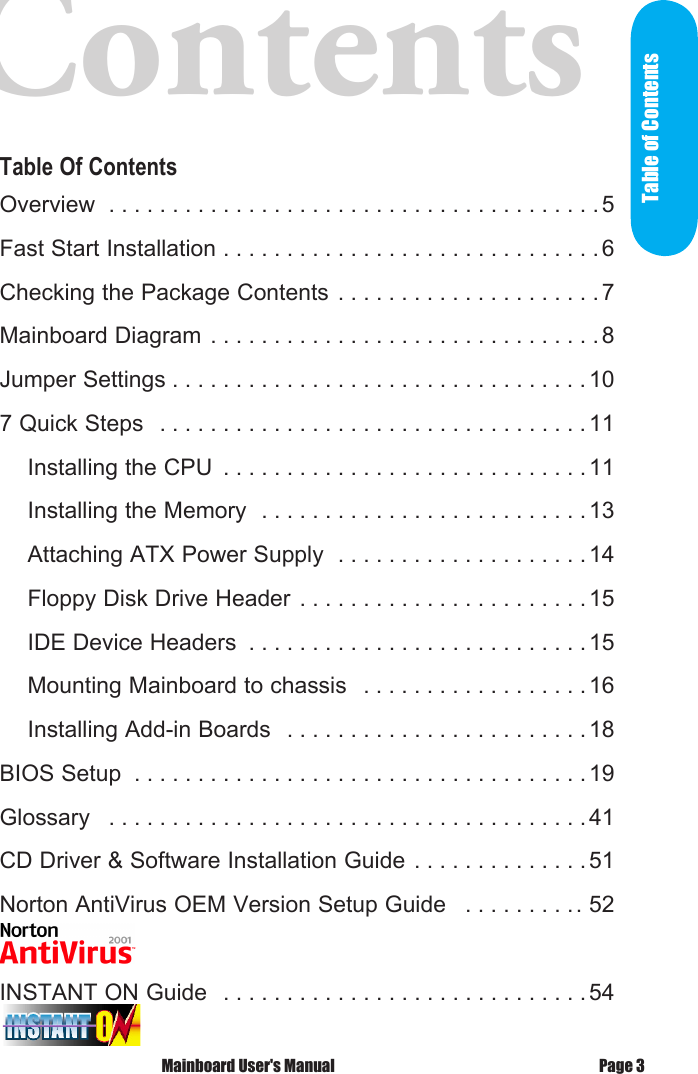
Contents      Table Of ContentsOverview  . . . . . . . . . . . . . . . . . . . . . . . . . . . . . . . . . . . . . . . 5Fast Start Installation . . . . . . . . . . . . . . . . . . . . . . . . . . . . . .6Checking the Package Contents . . . . . . . . . . . . . . . . . . . . . 7Mainboard Diagram . . . . . . . . . . . . . . . . . . . . . . . . . . . . . . . 8Jumper Settings . . . . . . . . . . . . . . . . . . . . . . . . . . . . . . . . . 107 Quick Steps  . . . . . . . . . . . . . . . . . . . . . . . . . . . . . . . . . . 11    Installing the CPU  . . . . . . . . . . . . . . . . . . . . . . . . . . . . . 11    Installing the Memory  . . . . . . . . . . . . . . . . . . . . . . . . . . 13    Attaching ATX Power Supply  . . . . . . . . . . . . . . . . . . . . 14    Floppy Disk Drive Header  . . . . . . . . . . . . . . . . . . . . . . . 15    IDE Device Headers  . . . . . . . . . . . . . . . . . . . . . . . . . . .15    Mounting Mainboard to chassis  . . . . . . . . . . . . . . . . . . 16    Installing Add-in Boards  . . . . . . . . . . . . . . . . . . . . . . . . 18BIOS Setup  . . . . . . . . . . . . . . . . . . . . . . . . . . . . . . . . . . . . 19Glossary  . . . . . . . . . . . . . . . . . . . . . . . . . . . . . . . . . . . . . . 41CD Driver & Software Installation Guide . . . . . . . . . . . . . .51Norton AntiVirus OEM Version Setup Guide  . . . . . . . . .. 52INSTANT ON Guide  . . . . . . . . . . . . . . . . . . . . . . . . . . . . . 54 Mainboard User's Manual Page 3Table of Contents
OverviewThank  You  for  purchasing  our  High  Performance  Mainboard. Our  advanced  technology  mainboard  is  designed  for  Socket mPGA478 Pentium 4  CPU at  processing speed  of 1.4GHz or above and is upgradeable for future processors. The  Intel  Mainboard  utilizes  i845  and  ICH2  chipset.    The ICH2 I/O Controller provides an Integrated Bus Mastering IDE controller  with  two  high  performance  IDE  interfaces  for  up to  four  UDMA  IDE  devices  (hard  drives,  or  CD-ROM's)  and two  USB  1.1  compliant  controllers  support  a  total  of  4  USB ports.    The  LPC  (Low-pin  count)  I/O  controller  integrates  a floppy drive interface, two enhanced 16C550 compatible serial ports, one parallel port and one consumer infrared compatible interface.Three  DIMM  slots  support  up  to  3GB  Memory  Capacity.  WAKEUP-LINK Header supports Wake-On-LAN feature. Integrated  AC97  2.1  Compliant  Codec  with  3D  Stereo enhancement.    Award  2M  bits  Firmware  Hub  compliant  with PC99, ACPI//DMI power management. Optional Ethernet 10/100MB onboard LAN interface.ATX 305mm x 210mm. Mainboard User's Manual Page 5Overview
Page 6  Mainboard User's ManualFast StartInstallationThis  section  will  aid  you  in  quickly  setting  up  the  Mainboard. Be  sure  to  take  caution  to  avoid  personal  injury  or  damage to  wiring  due  to  sharp  pins  on  connectors,  printed  circuit assemblies, rough edges and corners and hot components. Your Location Requirements Are:•  A sturdy, level surface for placement•  Space allowance around mainboard•  A  stable  environment  with  no  abrupt  temperature  or  humidity changes•  No exposure to chemicals or direct sunlight•  Line voltage and frequency not varying more than + or -10% from the  value  stated  on  the  package  or  nameplate  (located  on  the back, opposite the power plug)
Checking The Package ContentsRemove  the  items  from  the  box  and  make  sure  you  have the  following  items  before  beginning.    If  any  of  the  items below are missing, please contact the representative for part replacement.ATX Box Standard Package1)  Mainboard2)  Driver CD with Norton AntiVirus 2001 OEM Version3)  User Manual4)  IDE Hard Drive Ribbon Cable5)  Floppy Drive Ribbon CableInstallation Mainboard User's Manual Page 7
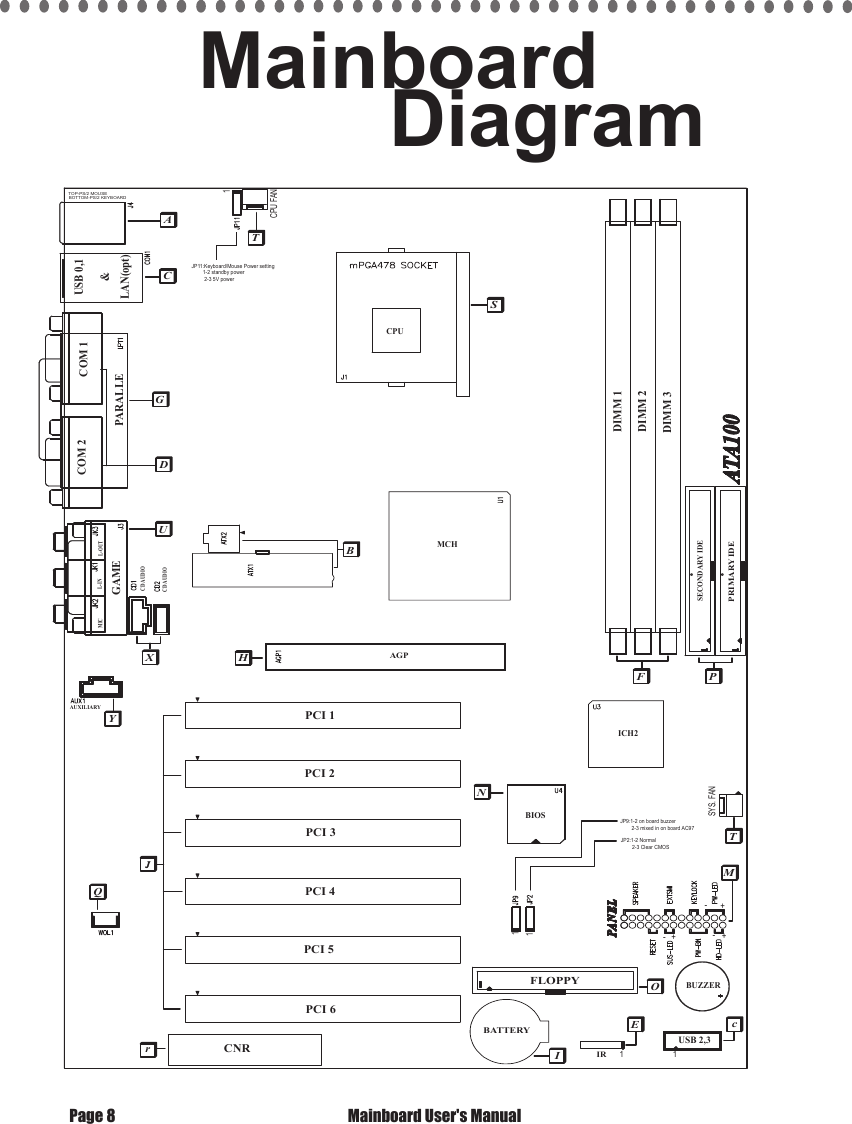
PCI 2PCI 3PCI 1PCI 4PCI 5PCI 6CNRCD AUDIOCD AUDIOGAME PARALLECOM 2 COM 1USB 0,1LAN(opt)&TOP-PS/2 MOUSEBOTTOM-PS/2 KEYBOARDCPU FANDIMM 1DIMM 2DIMM 3PRIMARY IDESECONDARY IDEBIOSFLOPPYUSB 2,3IRBATTERYAUXILIARYSYS. FANACGUXYQEOIcMTNPFBHST11111AGPrICH2MCHL-OUTL-INMICCPUJP2:1-2 Normal        2-3 Clear CMOSJP9:1-2 on board buzzer        2-3 mixed in on board AC97JP11:Keyboard/Mouse Power setting        1-2 standby power         2-3 5V powerBUZZERD+-+-+-Page 8  Mainboard User's ManualMainboard         Diagram
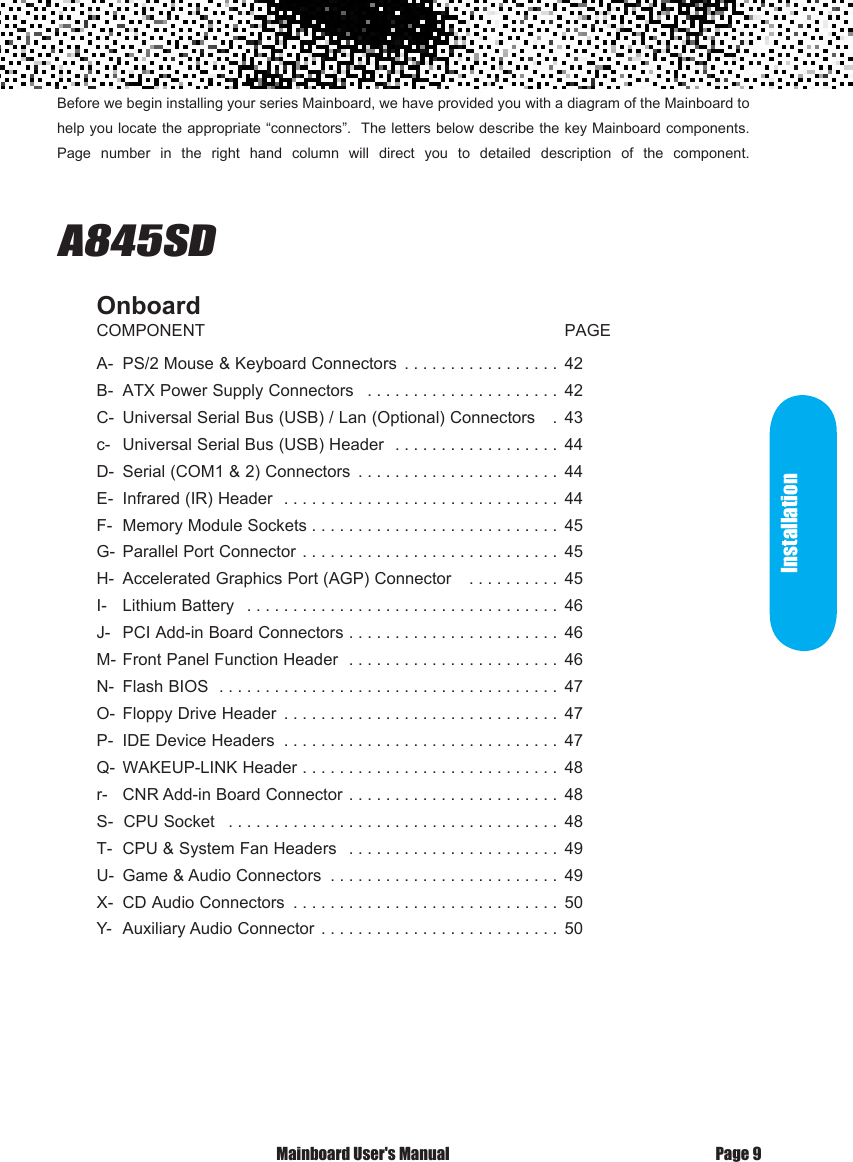
Before we begin installing your series Mainboard, we have provided you with a diagram of the Mainboard to help you locate the appropriate “connectors”.  The letters below describe the key Mainboard components. Page  number  in  the  right  hand  column  will  direct  you  to  detailed  description  of  the  component.                              A845SD   OnboardCOMPONENT                                                                              PAGEA-  PS/2 Mouse & Keyboard Connectors  . . . . . . . . . . . . . . . . . 42B-  ATX Power Supply Connectors  . . . . . . . . . . . . . . . . . . . . . 42C-  Universal Serial Bus (USB) / Lan (Optional) Connectors   . 43c-   Universal Serial Bus (USB) Header  . . . . . . . . . . . . . . . . . . 44D-  Serial (COM1 & 2) Connectors  . . . . . . . . . . . . . . . . . . . . . . 44E-  Infrared (IR) Header  . . . . . . . . . . . . . . . . . . . . . . . . . . . . . . 44F-  Memory Module Sockets . . . . . . . . . . . . . . . . . . . . . . . . . . . 45G-  Parallel Port Connector . . . . . . . . . . . . . . . . . . . . . . . . . . . . 45H-  Accelerated Graphics Port (AGP) Connector   . . . . . . . . . . 45I-   Lithium Battery  . . . . . . . . . . . . . . . . . . . . . . . . . . . . . . . . . . 46J-   PCI Add-in Board Connectors . . . . . . . . . . . . . . . . . . . . . . . 46M- Front Panel Function Header  . . . . . . . . . . . . . . . . . . . . . . . 46N-  Flash BIOS  . . . . . . . . . . . . . . . . . . . . . . . . . . . . . . . . . . . . . 47O-  Floppy Drive Header  . . . . . . . . . . . . . . . . . . . . . . . . . . . . . . 47P-  IDE Device Headers  . . . . . . . . . . . . . . . . . . . . . . . . . . . . . . 47Q-  WAKEUP-LINK Header . . . . . . . . . . . . . . . . . . . . . . . . . . . . 48r-   CNR Add-in Board Connector . . . . . . . . . . . . . . . . . . . . . . . 48S-  CPU Socket  . . . . . . . . . . . . . . . . . . . . . . . . . . . . . . . . . . . . 48T-  CPU & System Fan Headers  . . . . . . . . . . . . . . . . . . . . . . . 49U-  Game & Audio Connectors  . . . . . . . . . . . . . . . . . . . . . . . . . 49X-  CD Audio Connectors  . . . . . . . . . . . . . . . . . . . . . . . . . . . . . 50Y-  Auxiliary Audio Connector . . . . . . . . . . . . . . . . . . . . . . . . . . 50 Mainboard User's Manual Page 9Installation
Page 10  Mainboard User's ManualJumper SettingsClear CMOS                Set the Jumper   JP2 : CMOS Setting    [1-2] Normal    [2-3] Clear CMOS   JP9 : PC Sound Selection    [1-2] Onboard buzzer or direct to speaker    [2-3] Mixed in onboard AC97 codec  JP11: Keyboard / Mouse Power Setting    [1-2] : Standby Power    [2-3] : 5V Power
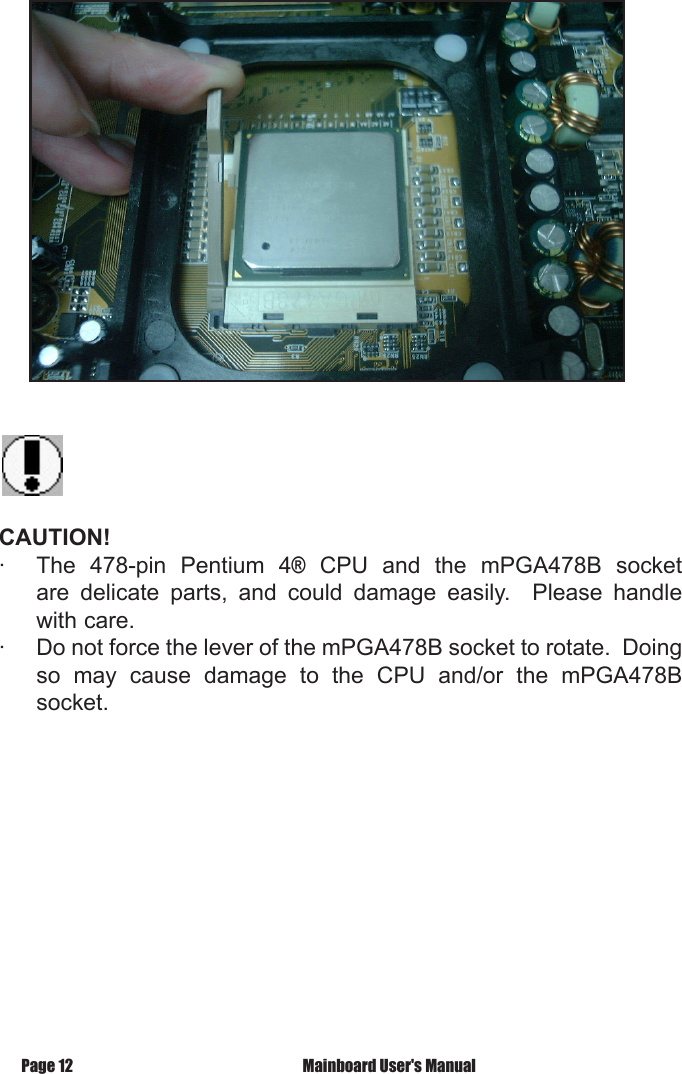
 7 Quick      StepsPlease follow these steps in order to assure that your series of Mainboard installation  is  successful.    Please  refer  to  the  back  chapters  for  further information regarding boot-up and configurations.  An anti-static wrist band is  recommended  when  handling  electronic  components,  make  sure  your work area is static free before you begin this section.Page 11 Mainboard User's ManualThe  Mainboard  provides  a  478-pin  socket  (S  in  Mainboard Diagram), namely  socket mPGA478B, for an easy CPU installa-tion.    Simply disengage the  lever  from  the  locking  latch,  lift  it to its  vertical  position.    Match  the  triangle  markings  on  both  the CPU and the mPGA478B socket.  Carefully drop the CPU into the socket such that all the CPU pins entered the holes in the socket.  Apply  slight  pressure  if  necessary.    Make  sure  the  CPU  is  level with the surface of the socket.  Maintain a slight pressure on the CPU  and  rotate  the  lever  back  to  its  horizontal  (or  locking) position, and snap the lever back to the locking latch.The  CPU  should  have  a  heat  sink  attached  to  prevent  from overheating.    User  should  purchase  those  with  fans  attached.  The  recommended  heat  sinks  fan  for  the  478-pin  processors are  those  with  three-pin  connector  (with  three  wire)  that  can  be connected  to  the  fan  header  on  the  Mainboard.    It  provides  the +12 Volts D.C. power that is necessary for CPU cooling fan, and a wire for fan speed detection.Installing the CPU 7 Quick Steps
CAUTION! ·  The  478-pin  Pentium  4®  CPU  and  the  mPGA478B  socket are  delicate  parts,  and  could  damage  easily.    Please  handle with care.·  Do not force the lever of the mPGA478B socket to rotate.  Doing so  may  cause  damage  to  the  CPU  and/or  the  mPGA478B socket. Mainboard User's ManualPage 12
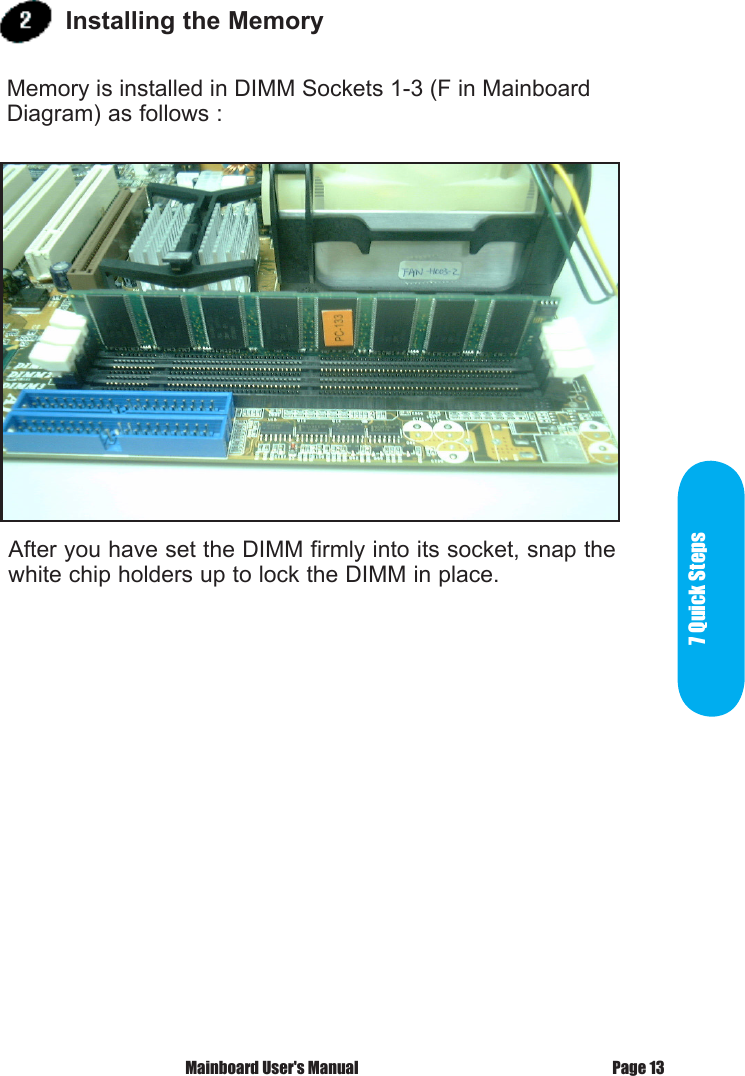
7 Quick StepsPage 13 Mainboard User's ManualAfter you have set the DIMM firmly into its socket, snap the white chip holders up to lock the DIMM in place. Installing the Memory Memory is installed in DIMM Sockets 1-3 (F in Mainboard Diagram) as follows :
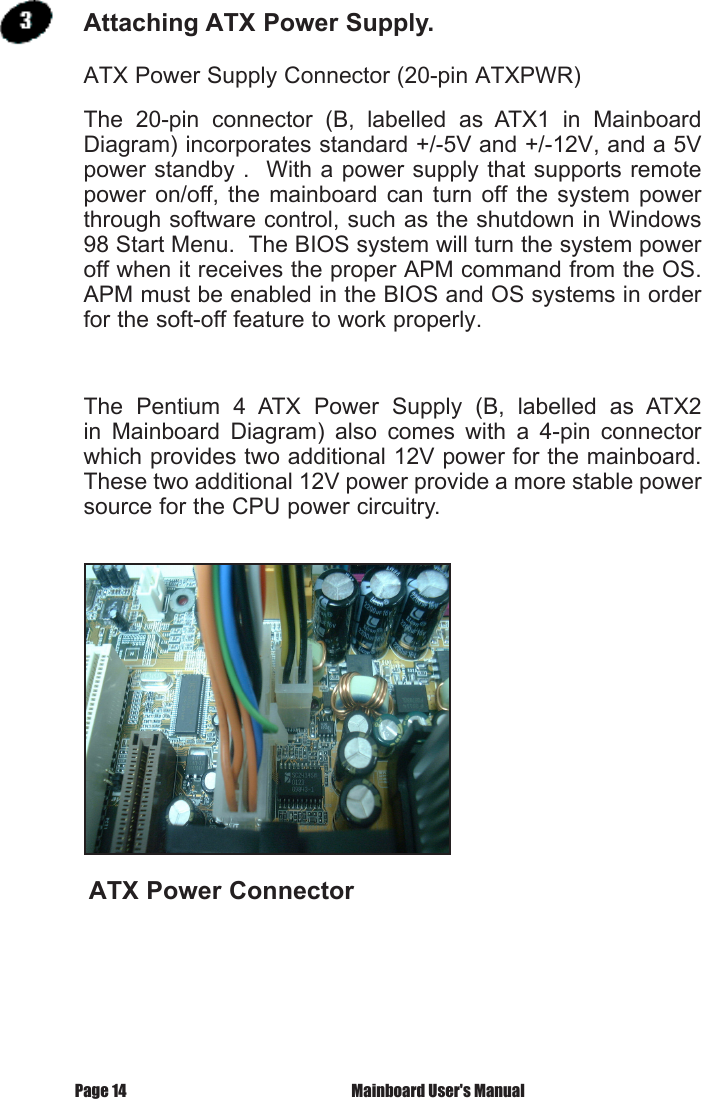
 Mainboard User's ManualPage 14ATX Power Supply Connector (20-pin ATXPWR)The  20-pin  connector  (B,  labelled  as  ATX1  in  Mainboard Diagram) incorporates standard +/-5V and +/-12V, and a 5V power standby .  With a power supply that supports remote power  on/off,  the  mainboard can turn off  the  system  power through software control, such as the shutdown in Windows 98 Start Menu.  The BIOS system will turn the system power off when it receives the proper APM command from the OS.  APM must be enabled in the BIOS and OS systems in order for the soft-off feature to work properly.The  Pentium  4  ATX  Power  Supply  (B,  labelled  as  ATX2 in  Mainboard  Diagram)  also  comes  with  a  4-pin  connector which provides two additional 12V power for the mainboard.  These two additional 12V power provide a more stable power source for the CPU power circuitry.ATX Power ConnectorAttaching ATX Power Supply.

Navigation menu