ShenZhen Foscam Intelligent Technology FI9900P Outdoor HD IP Camera User Manual Part Four

ShenZhen Foscam Intelligent Technology Co., Ltd. Outdoor HD IP Camera Part Four

User Manual Part Four
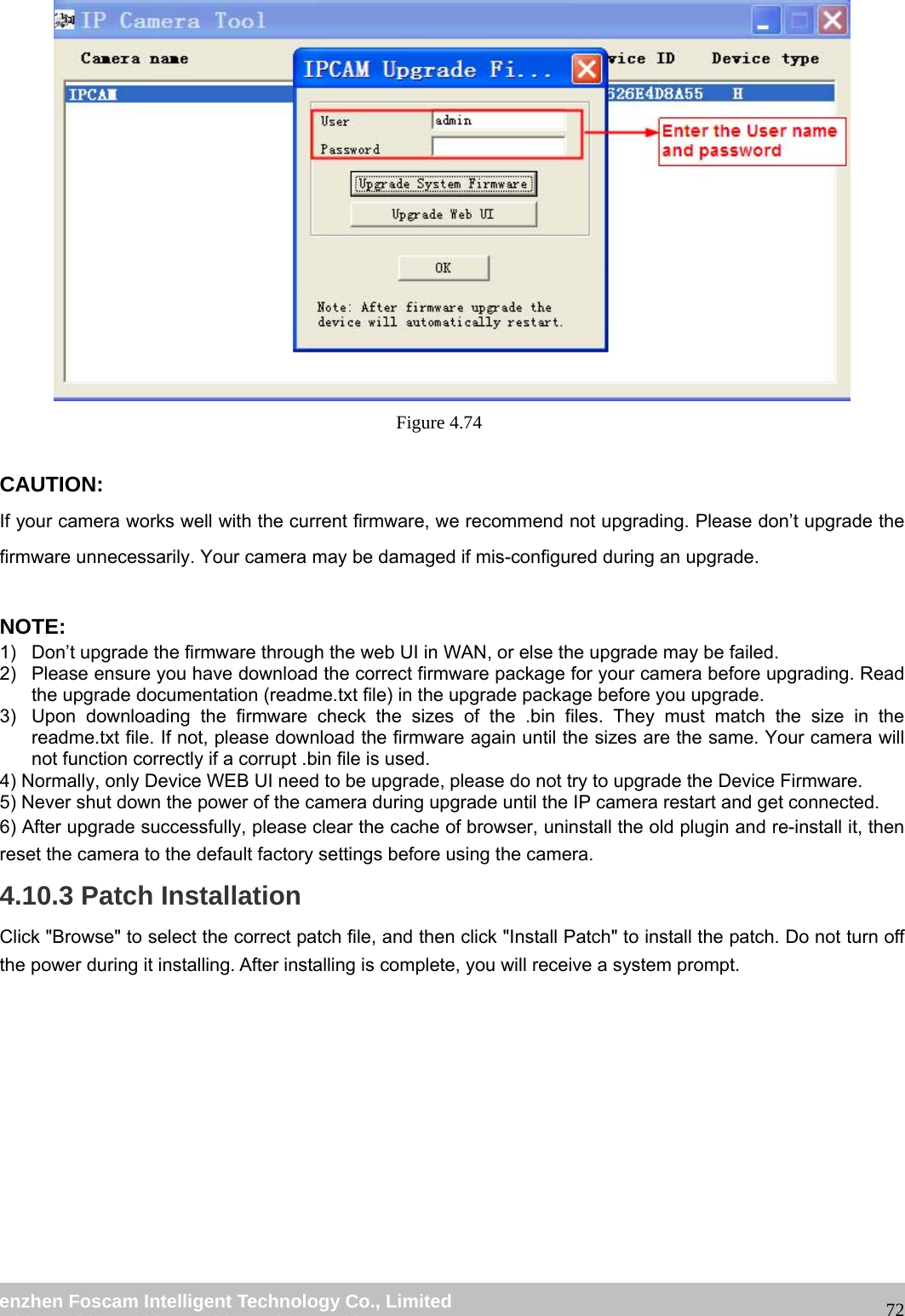
                                                        wwwwww..ffoossccaamm..ccoomm  SShheennzzhheenn  FFoossccaamm  IInntteelllliiggeenntt  TTeecchhnnoollooggyy  CCoo..,,  LLiimmiitteedd  TTeell::  8866  775555  22667744  55666688  FFaaxx::  8866  775555  22667744  55116688                                                                                                                   72 Figure 4.74   CAUTION: If your camera works well with the current firmware, we recommend not upgrading. Please don’t upgrade the firmware unnecessarily. Your camera may be damaged if mis-configured during an upgrade.    NOTE:  1)  Don’t upgrade the firmware through the web UI in WAN, or else the upgrade may be failed. 2)  Please ensure you have download the correct firmware package for your camera before upgrading. Read the upgrade documentation (readme.txt file) in the upgrade package before you upgrade. 3)  Upon downloading the firmware check the sizes of the .bin files. They must match the size in the readme.txt file. If not, please download the firmware again until the sizes are the same. Your camera will not function correctly if a corrupt .bin file is used. 4) Normally, only Device WEB UI need to be upgrade, please do not try to upgrade the Device Firmware. 5) Never shut down the power of the camera during upgrade until the IP camera restart and get connected. 6) After upgrade successfully, please clear the cache of browser, uninstall the old plugin and re-install it, then reset the camera to the default factory settings before using the camera. 4.10.3 Patch Installation Click "Browse" to select the correct patch file, and then click "Install Patch" to install the patch. Do not turn off the power during it installing. After installing is complete, you will receive a system prompt.
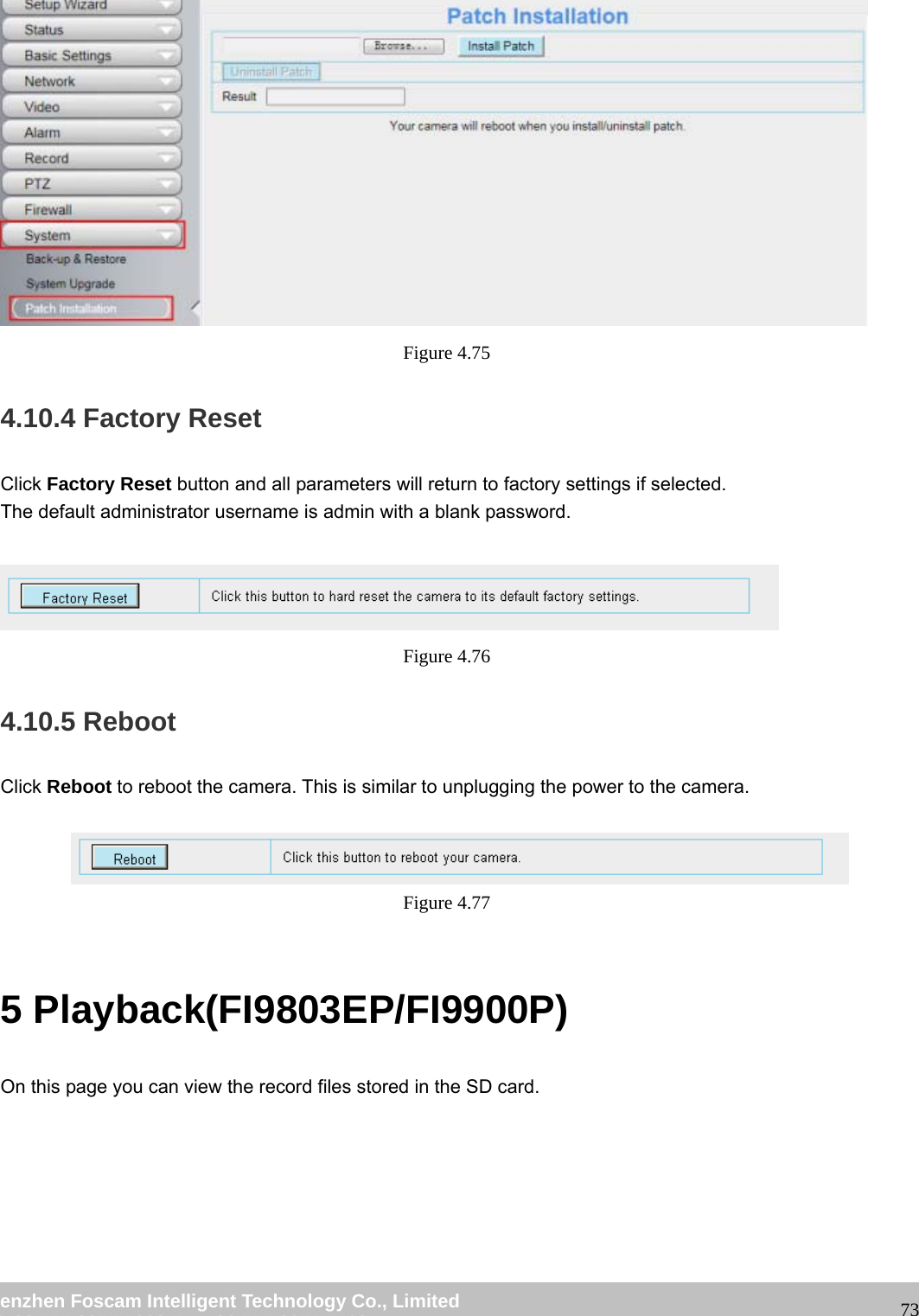
                                                        wwwwww..ffoossccaamm..ccoomm  SShheennzzhheenn  FFoossccaamm  IInntteelllliiggeenntt  TTeecchhnnoollooggyy  CCoo..,,  LLiimmiitteedd  TTeell::  8866  775555  22667744  55666688  FFaaxx::  8866  775555  22667744  55116688                                                                                                                   73 Figure 4.75  4.10.4 Factory Reset Click Factory Reset button and all parameters will return to factory settings if selected. The default administrator username is admin with a blank password.   Figure 4.76  4.10.5 Reboot Click Reboot to reboot the camera. This is similar to unplugging the power to the camera.   Figure 4.77   5 Playback(FI9803EP/FI9900P) On this page you can view the record files stored in the SD card.
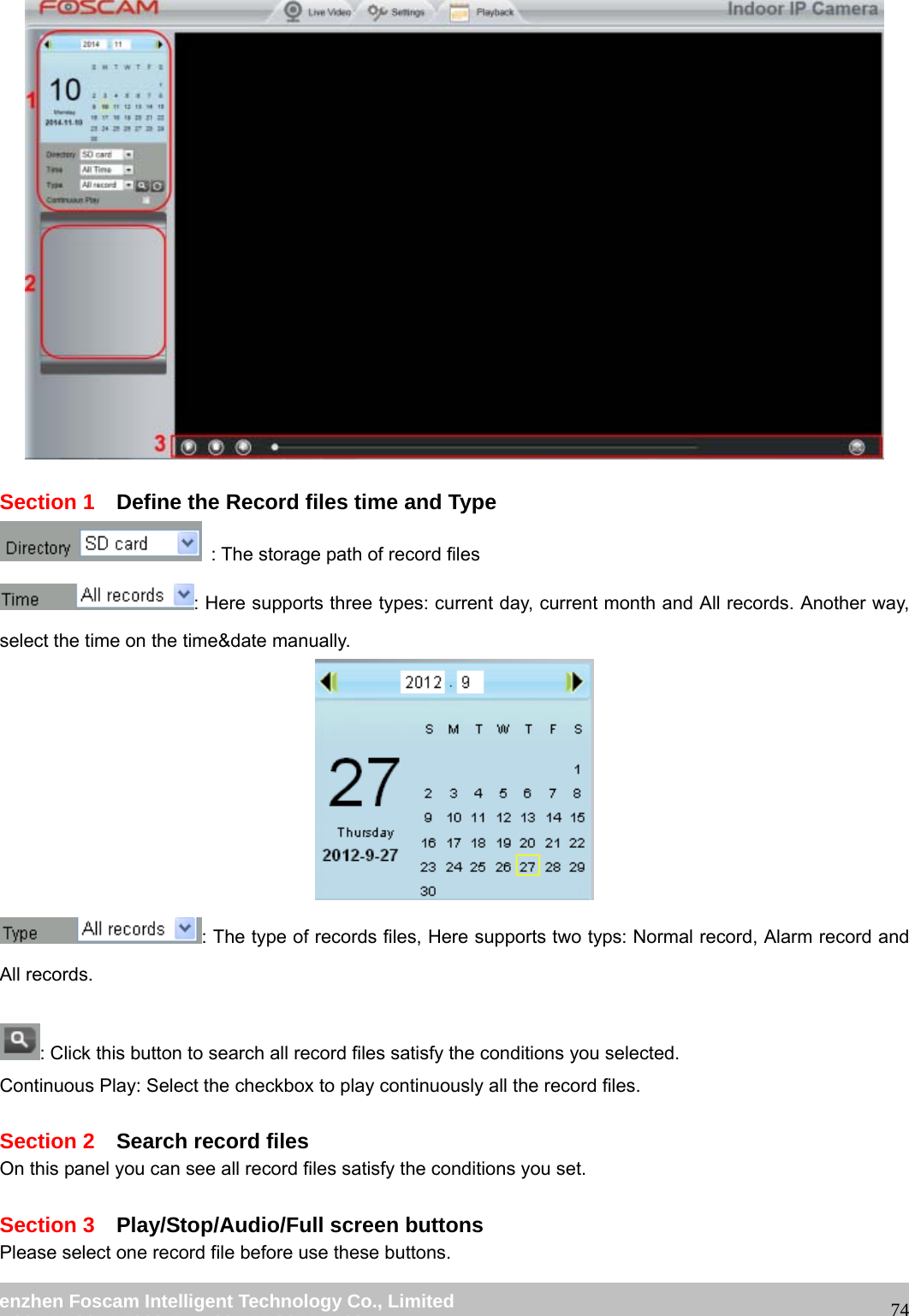
                                                        wwwwww..ffoossccaamm..ccoomm  SShheennzzhheenn  FFoossccaamm  IInntteelllliiggeenntt  TTeecchhnnoollooggyy  CCoo..,,  LLiimmiitteedd  TTeell::  8866  775555  22667744  55666688  FFaaxx::  8866  775555  22667744  55116688                                                                                                                   74  Section 1    Define the Record files time and Type   : The storage path of record files : Here supports three types: current day, current month and All records. Another way, select the time on the time&date manually.  : The type of records files, Here supports two typs: Normal record, Alarm record and All records.  : Click this button to search all record files satisfy the conditions you selected. Continuous Play: Select the checkbox to play continuously all the record files.  Section 2  Search record files On this panel you can see all record files satisfy the conditions you set.  Section 3  Play/Stop/Audio/Full screen buttons Please select one record file before use these buttons.
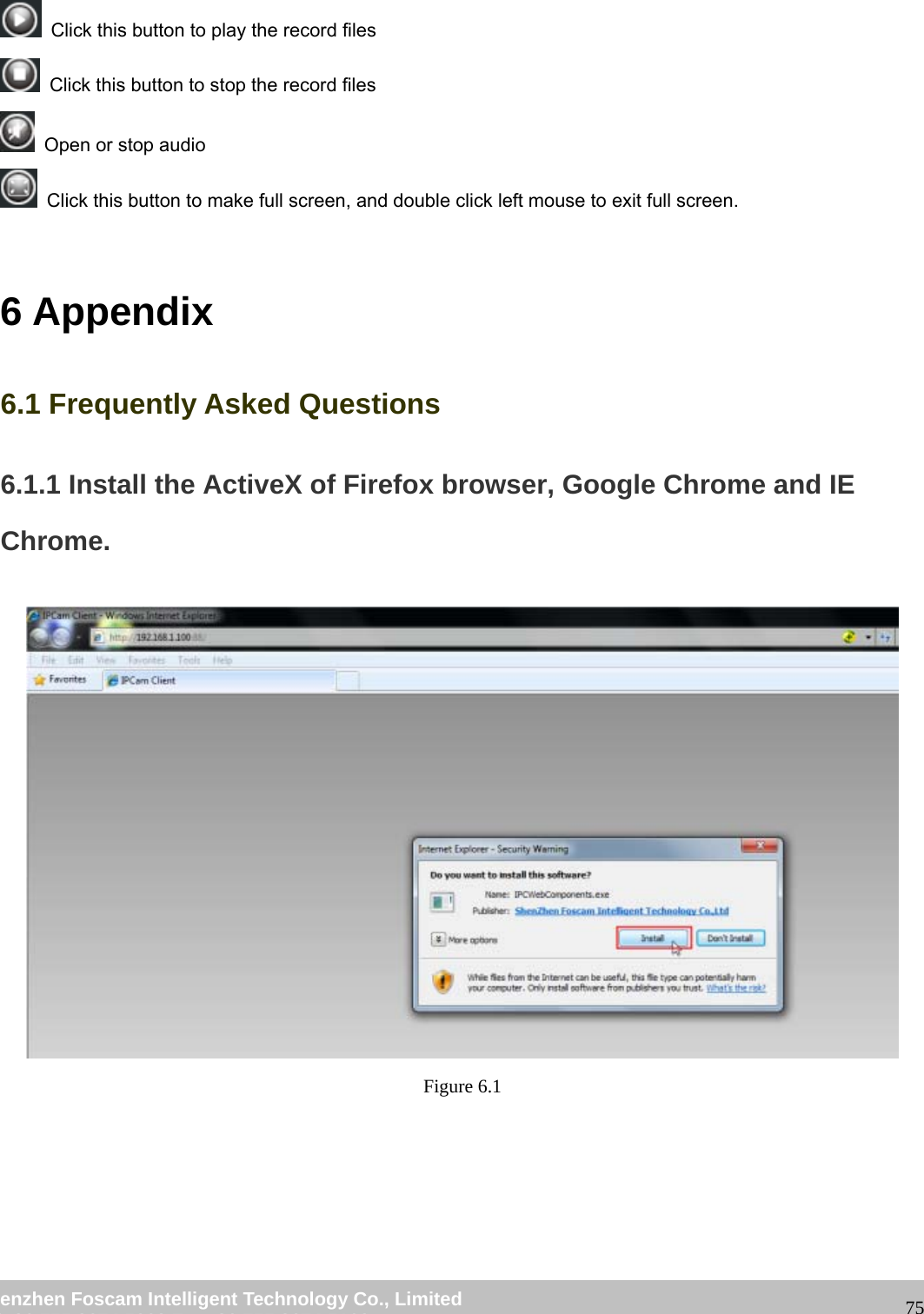
                                                        wwwwww..ffoossccaamm..ccoomm  SShheennzzhheenn  FFoossccaamm  IInntteelllliiggeenntt  TTeecchhnnoollooggyy  CCoo..,,  LLiimmiitteedd  TTeell::  8866  775555  22667744  55666688  FFaaxx::  8866  775555  22667744  55116688                                                                                                                   75   Click this button to play the record files   Click this button to stop the record files   Open or stop audio   Click this button to make full screen, and double click left mouse to exit full screen.  6 Appendix 6.1 Frequently Asked Questions 6.1.1 Install the ActiveX of Firefox browser, Google Chrome and IE Chrome.  Figure 6.1
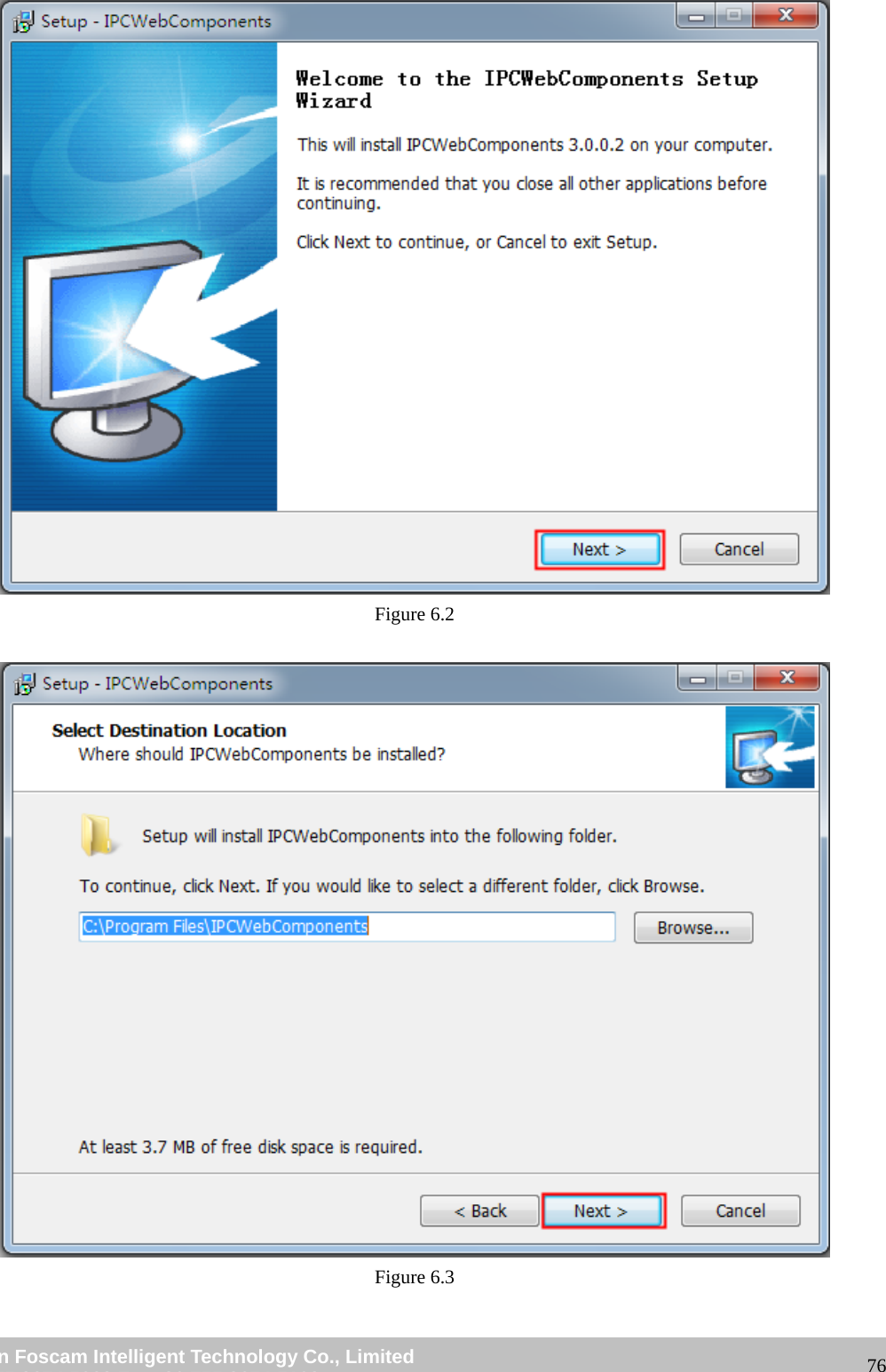
                                                        wwwwww..ffoossccaamm..ccoomm  SShheennzzhheenn  FFoossccaamm  IInntteelllliiggeenntt  TTeecchhnnoollooggyy  CCoo..,,  LLiimmiitteedd  TTeell::  8866  775555  22667744  55666688  FFaaxx::  8866  775555  22667744  55116688                                                                                                                   76 Figure 6.2   Figure 6.3
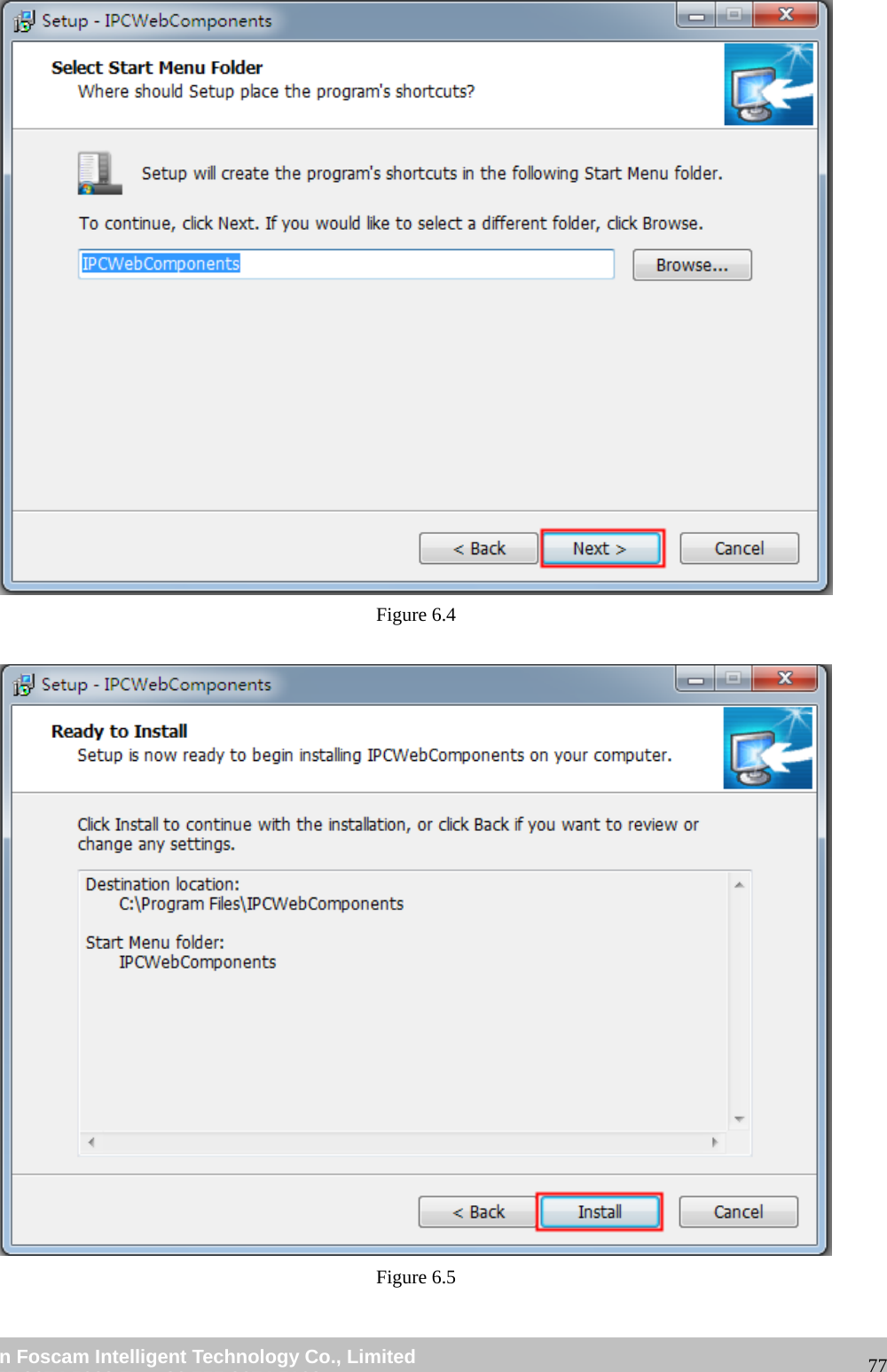
                                                        wwwwww..ffoossccaamm..ccoomm  SShheennzzhheenn  FFoossccaamm  IInntteelllliiggeenntt  TTeecchhnnoollooggyy  CCoo..,,  LLiimmiitteedd  TTeell::  8866  775555  22667744  55666688  FFaaxx::  8866  775555  22667744  55116688                                                                                                                   77 Figure 6.4   Figure 6.5
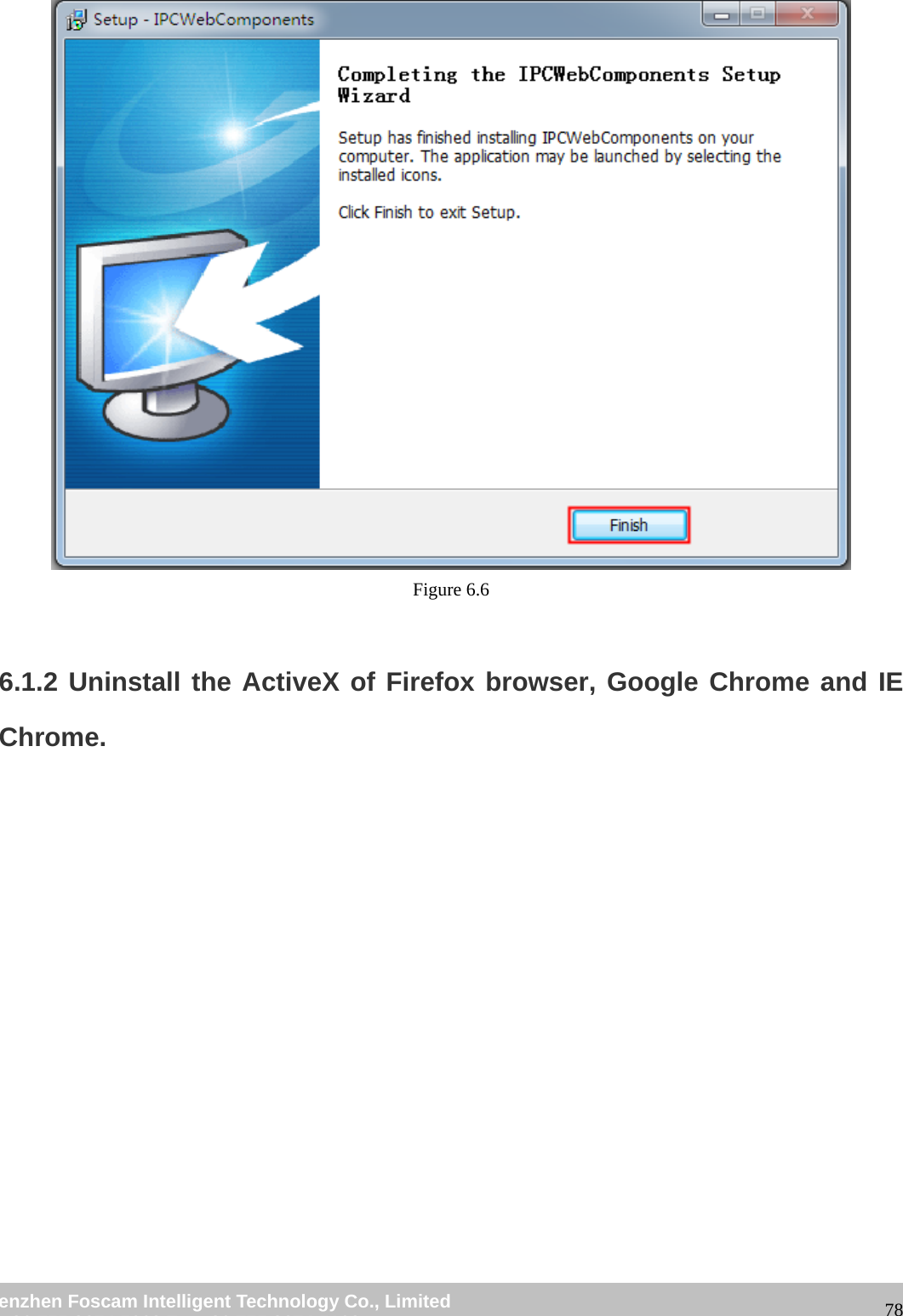
                                                        wwwwww..ffoossccaamm..ccoomm  SShheennzzhheenn  FFoossccaamm  IInntteelllliiggeenntt  TTeecchhnnoollooggyy  CCoo..,,  LLiimmiitteedd  TTeell::  8866  775555  22667744  55666688  FFaaxx::  8866  775555  22667744  55116688                                                                                                                   78 Figure 6.6  6.1.2 Uninstall the ActiveX of Firefox browser, Google Chrome and IE Chrome.
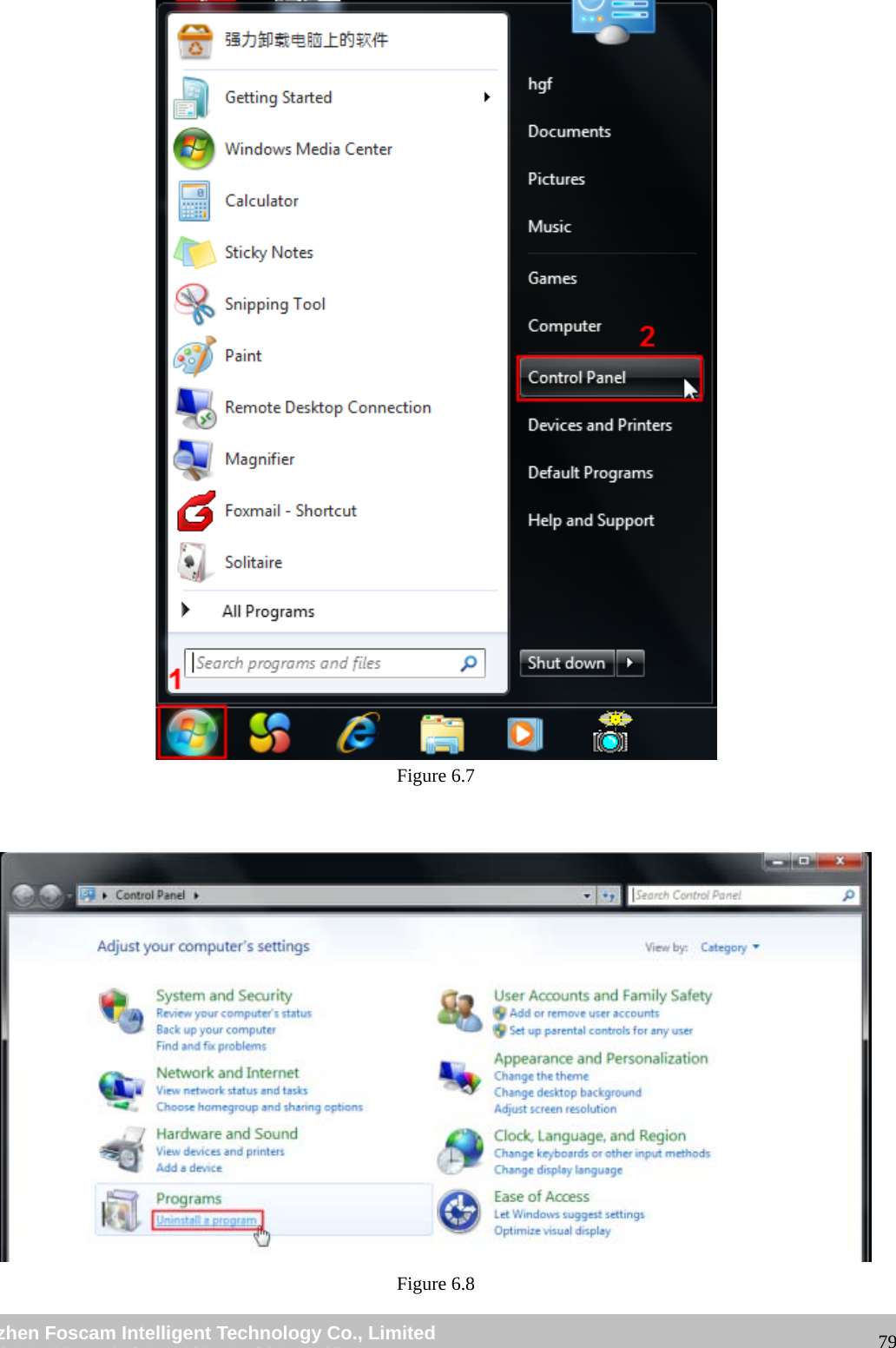
                                                        wwwwww..ffoossccaamm..ccoomm  SShheennzzhheenn  FFoossccaamm  IInntteelllliiggeenntt  TTeecchhnnoollooggyy  CCoo..,,  LLiimmiitteedd  TTeell::  8866  775555  22667744  55666688  FFaaxx::  8866  775555  22667744  55116688                                                                                                                   79 Figure 6.7    Figure 6.8
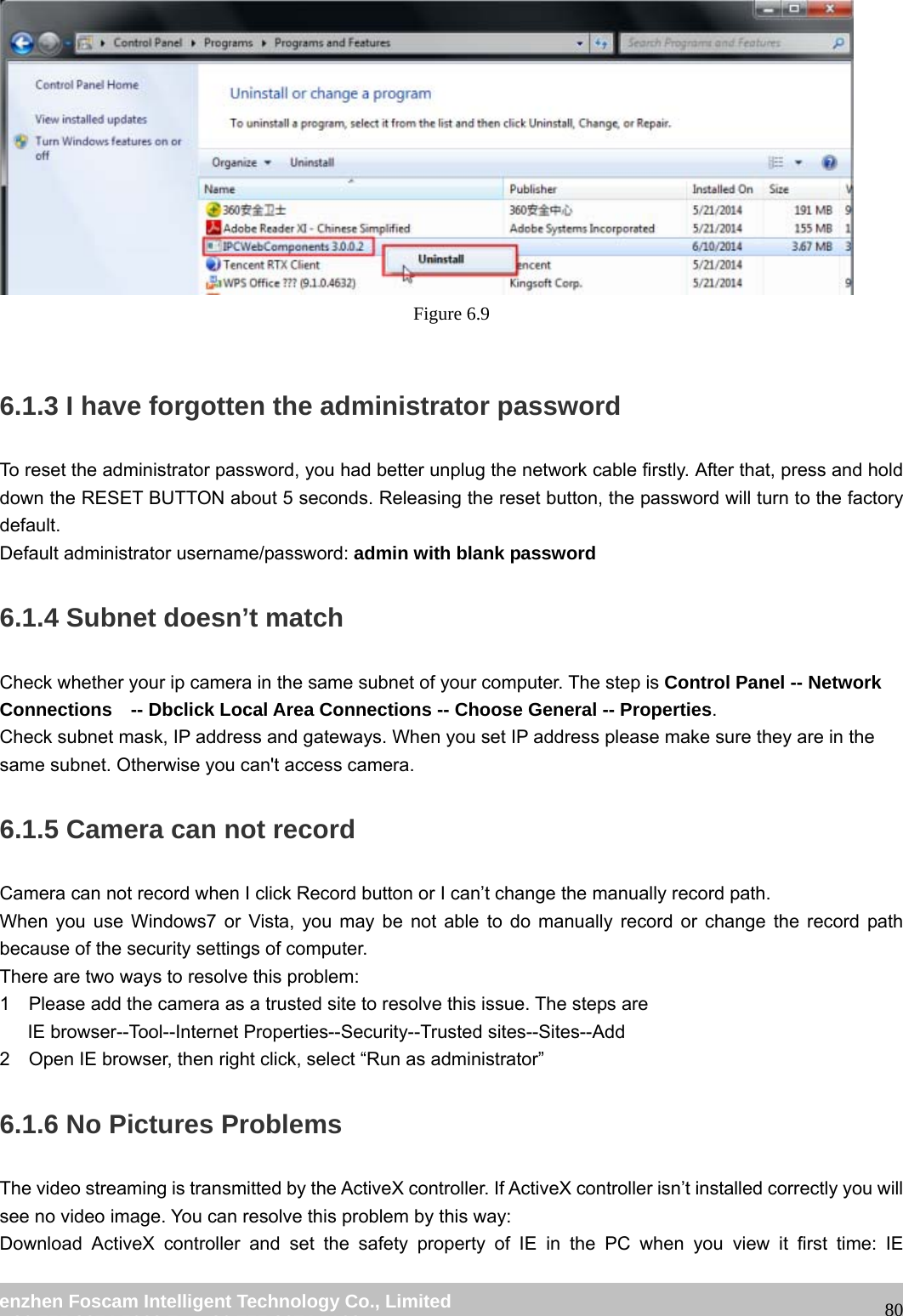
                                                        wwwwww..ffoossccaamm..ccoomm  SShheennzzhheenn  FFoossccaamm  IInntteelllliiggeenntt  TTeecchhnnoollooggyy  CCoo..,,  LLiimmiitteedd  TTeell::  8866  775555  22667744  55666688  FFaaxx::  8866  775555  22667744  55116688                                                                                                                   80 Figure 6.9  6.1.3 I have forgotten the administrator password To reset the administrator password, you had better unplug the network cable firstly. After that, press and hold down the RESET BUTTON about 5 seconds. Releasing the reset button, the password will turn to the factory default.  Default administrator username/password: admin with blank password 6.1.4 Subnet doesn’t match Check whether your ip camera in the same subnet of your computer. The step is Control Panel -- Network Connections    -- Dbclick Local Area Connections -- Choose General -- Properties. Check subnet mask, IP address and gateways. When you set IP address please make sure they are in the same subnet. Otherwise you can't access camera.   6.1.5 Camera can not record   Camera can not record when I click Record button or I can’t change the manually record path. When you use Windows7 or Vista, you may be not able to do manually record or change the record path because of the security settings of computer.   There are two ways to resolve this problem: 1    Please add the camera as a trusted site to resolve this issue. The steps are    IE browser--Tool--Internet Properties--Security--Trusted sites--Sites--Add 2    Open IE browser, then right click, select “Run as administrator” 6.1.6 No Pictures Problems The video streaming is transmitted by the ActiveX controller. If ActiveX controller isn’t installed correctly you will see no video image. You can resolve this problem by this way: Download ActiveX controller and set the safety property of IE in the PC when you view it first time: IE
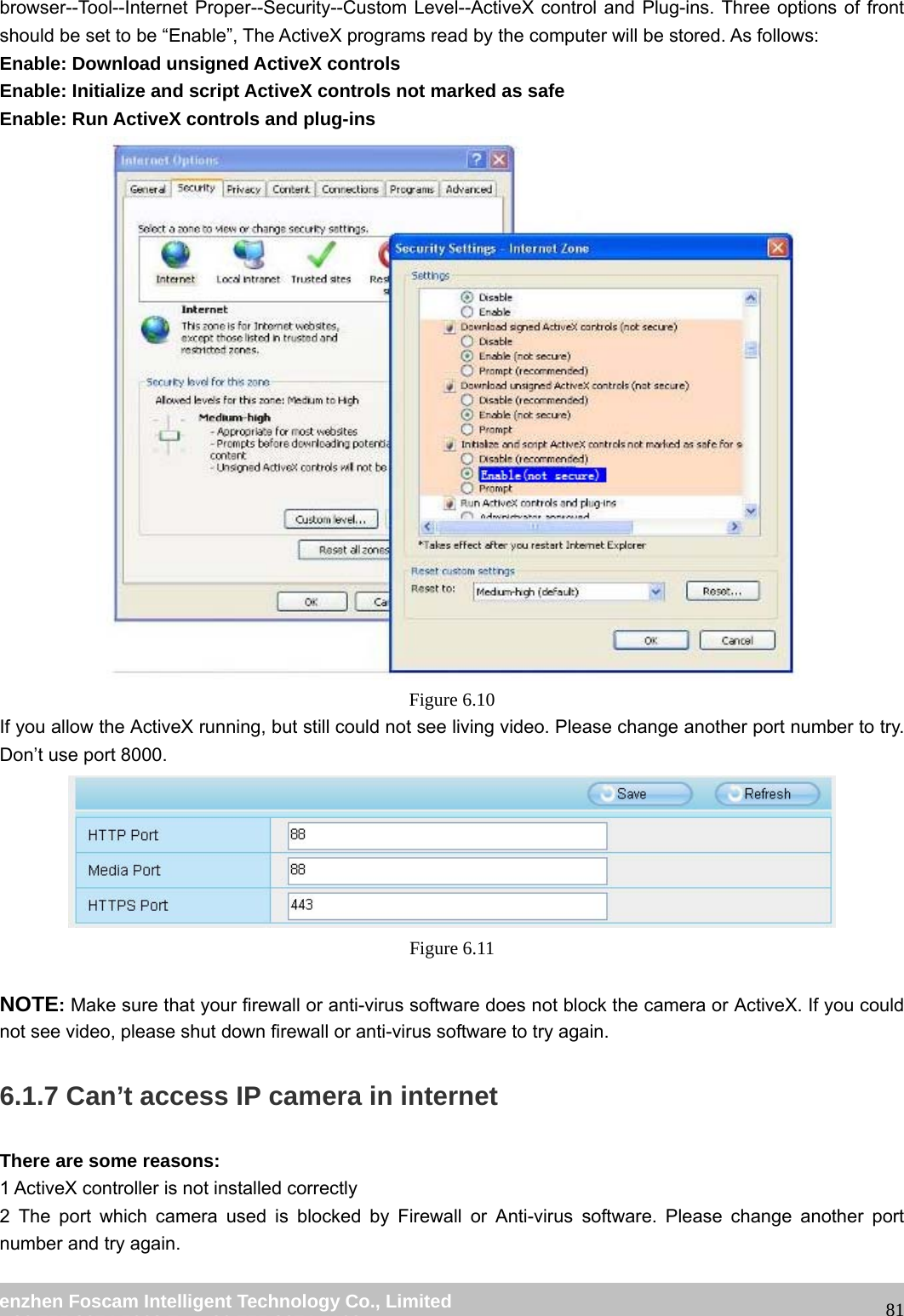
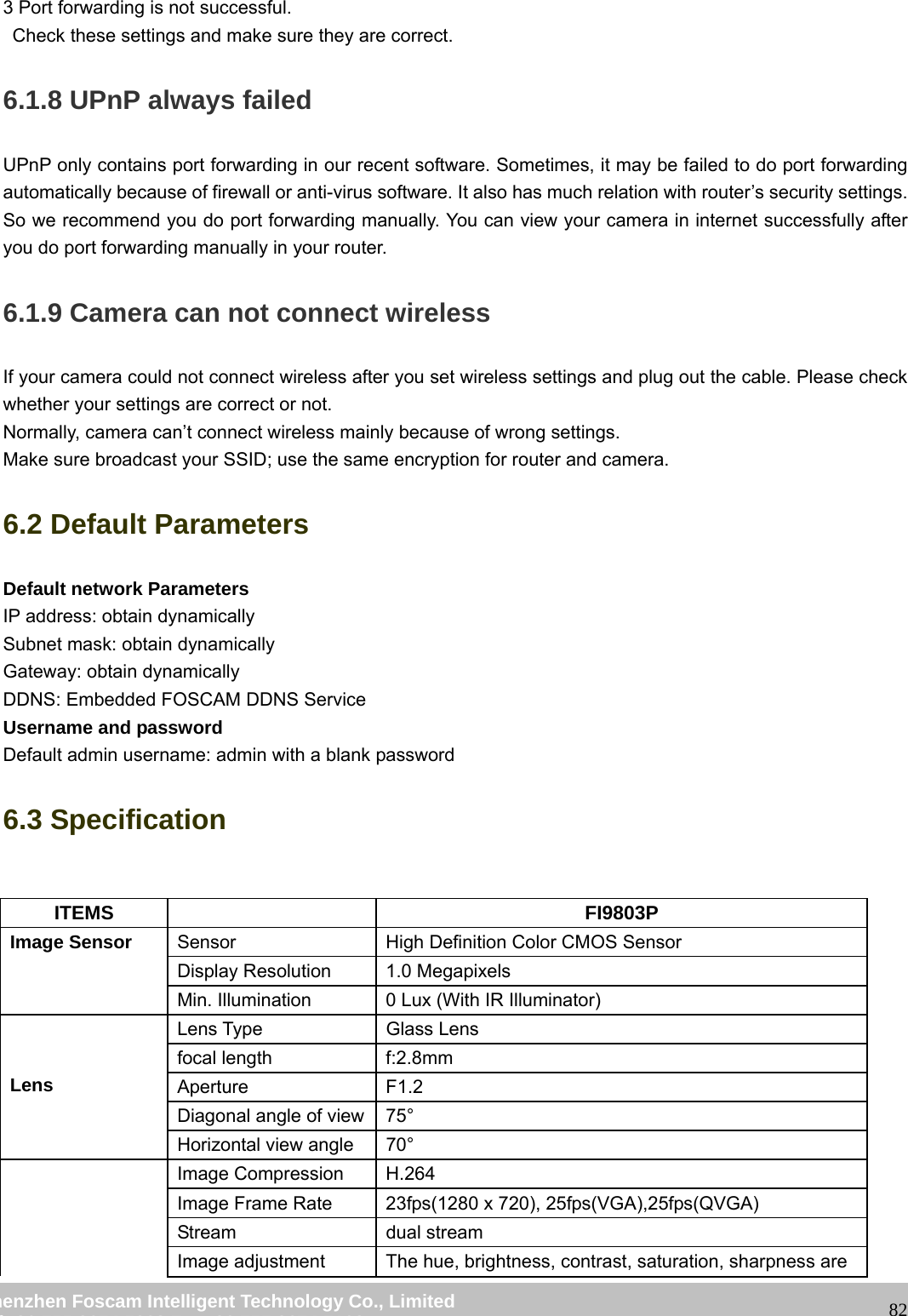
                                                        wwwwww..ffoossccaamm..ccoomm  SShheennzzhheenn  FFoossccaamm  IInntteelllliiggeenntt  TTeecchhnnoollooggyy  CCoo..,,  LLiimmiitteedd  TTeell::  8866  775555  22667744  55666688  FFaaxx::  8866  775555  22667744  55116688                                                                                                                   81browser--Tool--Internet Proper--Security--Custom Level--ActiveX control and Plug-ins. Three options of front should be set to be “Enable”, The ActiveX programs read by the computer will be stored. As follows: Enable: Download unsigned ActiveX controls Enable: Initialize and script ActiveX controls not marked as safe Enable: Run ActiveX controls and plug-ins  Figure 6.10 If you allow the ActiveX running, but still could not see living video. Please change another port number to try. Don’t use port 8000.  Figure 6.11  NOTE: Make sure that your firewall or anti-virus software does not block the camera or ActiveX. If you could not see video, please shut down firewall or anti-virus software to try again. 6.1.7 Can’t access IP camera in internet There are some reasons: 1 ActiveX controller is not installed correctly   2 The port which camera used is blocked by Firewall or Anti-virus software. Please change another port number and try again.
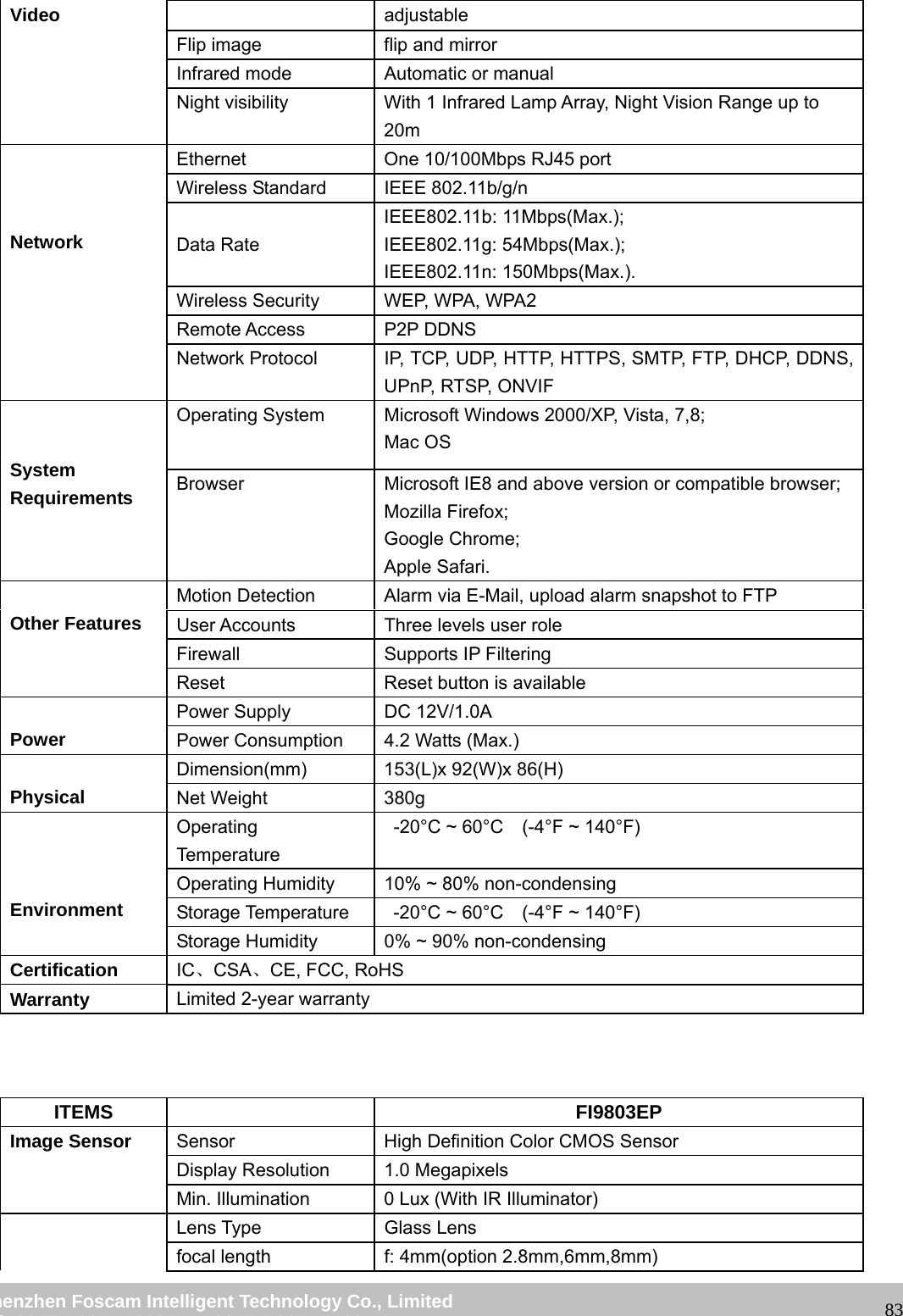
                                                        wwwwww..ffoossccaamm..ccoomm  SShheennzzhheenn  FFoossccaamm  IInntteelllliiggeenntt  TTeecchhnnoollooggyy  CCoo..,,  LLiimmiitteedd  TTeell::  8866  775555  22667744  55666688  FFaaxx::  8866  775555  22667744  55116688                                                                                                                   823 Port forwarding is not successful.   Check these settings and make sure they are correct. 6.1.8 UPnP always failed UPnP only contains port forwarding in our recent software. Sometimes, it may be failed to do port forwarding automatically because of firewall or anti-virus software. It also has much relation with router’s security settings. So we recommend you do port forwarding manually. You can view your camera in internet successfully after you do port forwarding manually in your router. 6.1.9 Camera can not connect wireless If your camera could not connect wireless after you set wireless settings and plug out the cable. Please check whether your settings are correct or not.   Normally, camera can’t connect wireless mainly because of wrong settings. Make sure broadcast your SSID; use the same encryption for router and camera.   6.2 Default Parameters Default network Parameters IP address: obtain dynamically Subnet mask: obtain dynamically   Gateway: obtain dynamically DDNS: Embedded FOSCAM DDNS Service Username and password Default admin username: admin with a blank password 6.3 Specification  ITEMS   FI9803P Image Sensor  Sensor  High Definition Color CMOS Sensor Display Resolution  1.0 Megapixels Min. Illumination  0 Lux (With IR Illuminator)   Lens Lens Type  Glass Lens focal length  f:2.8mm Aperture F1.2 Diagonal angle of view 75° Horizontal view angle  70°     Image Compression  H.264 Image Frame Rate  23fps(1280 x 720), 25fps(VGA),25fps(QVGA) Stream dual stream Image adjustment  The hue, brightness, contrast, saturation, sharpness are
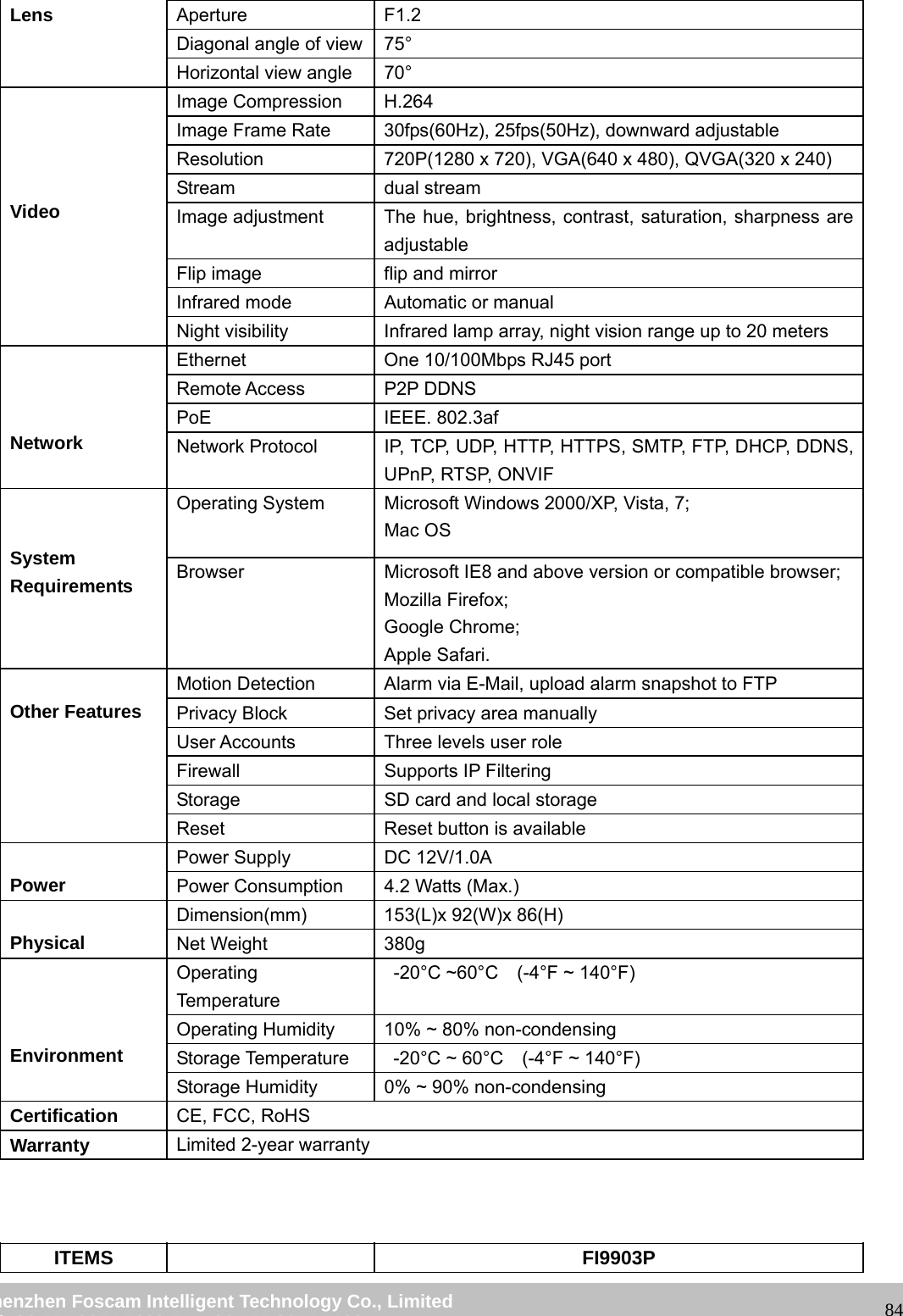
                                                        wwwwww..ffoossccaamm..ccoomm  SShheennzzhheenn  FFoossccaamm  IInntteelllliiggeenntt  TTeecchhnnoollooggyy  CCoo..,,  LLiimmiitteedd  TTeell::  8866  775555  22667744  55666688  FFaaxx::  8866  775555  22667744  55116688                                                                                                                   83Video  adjustable Flip image  flip and mirror Infrared mode  Automatic or manual Night visibility  With 1 Infrared Lamp Array, Night Vision Range up to 20m    Network Ethernet  One 10/100Mbps RJ45 port Wireless Standard  IEEE 802.11b/g/n      Data Rate IEEE802.11b: 11Mbps(Max.); IEEE802.11g: 54Mbps(Max.); IEEE802.11n: 150Mbps(Max.). Wireless Security  WEP, WPA, WPA2 Remote Access  P2P DDNS Network Protocol  IP, TCP, UDP, HTTP, HTTPS, SMTP, FTP, DHCP, DDNS, UPnP, RTSP, ONVIF   System Requirements Operating System  Microsoft Windows 2000/XP, Vista, 7,8; Mac OS Browser  Microsoft IE8 and above version or compatible browser; Mozilla Firefox; Google Chrome; Apple Safari.  Other Features Motion Detection  Alarm via E-Mail, upload alarm snapshot to FTP User Accounts  Three levels user role Firewall Supports IP Filtering Reset  Reset button is available  Power Power Supply  DC 12V/1.0A Power Consumption  4.2 Watts (Max.)  Physical Dimension(mm)  153(L)x 92(W)x 86(H)   Net Weight  380g    Environment Operating Temperature   -20°C ~ 60°C    (-4°F ~ 140°F) Operating Humidity  10% ~ 80% non-condensing Storage Temperature    -20°C ~ 60°C    (-4°F ~ 140°F) Storage Humidity  0% ~ 90% non-condensing Certification  IC、CSA、CE, FCC, RoHS Warranty  Limited 2-year warranty    ITEMS   FI9803EP Image Sensor  Sensor  High Definition Color CMOS Sensor Display Resolution  1.0 Megapixels Min. Illumination  0 Lux (With IR Illuminator)   Lens Type  Glass Lens focal length  f: 4mm(option 2.8mm,6mm,8mm)
                                                        wwwwww..ffoossccaamm..ccoomm  SShheennzzhheenn  FFoossccaamm  IInntteelllliiggeenntt  TTeecchhnnoollooggyy  CCoo..,,  LLiimmiitteedd  TTeell::  8866  775555  22667744  55666688  FFaaxx::  8866  775555  22667744  55116688                                                                                                                   84Lens  Aperture F1.2 Diagonal angle of view 75° Horizontal view angle  70°     Video Image Compression  H.264 Image Frame Rate  30fps(60Hz), 25fps(50Hz), downward adjustable Resolution  720P(1280 x 720), VGA(640 x 480), QVGA(320 x 240) Stream dual stream Image adjustment  The hue, brightness, contrast, saturation, sharpness are adjustable Flip image  flip and mirror Infrared mode  Automatic or manual Night visibility  Infrared lamp array, night vision range up to 20 meters    Network Ethernet  One 10/100Mbps RJ45 port Remote Access  P2P DDNS PoE IEEE. 802.3af Network Protocol  IP, TCP, UDP, HTTP, HTTPS, SMTP, FTP, DHCP, DDNS, UPnP, RTSP, ONVIF   System Requirements Operating System  Microsoft Windows 2000/XP, Vista, 7; Mac OS Browser  Microsoft IE8 and above version or compatible browser; Mozilla Firefox; Google Chrome; Apple Safari.  Other Features Motion Detection  Alarm via E-Mail, upload alarm snapshot to FTP Privacy Block  Set privacy area manually User Accounts  Three levels user role Firewall Supports IP Filtering Storage  SD card and local storage Reset  Reset button is available  Power Power Supply  DC 12V/1.0A Power Consumption  4.2 Watts (Max.)  Physical Dimension(mm)  153(L)x 92(W)x 86(H)   Net Weight  380g    Environment Operating Temperature  -20°C ~60°C  (-4°F ~ 140°F) Operating Humidity  10% ~ 80% non-condensing Storage Temperature    -20°C ~ 60°C    (-4°F ~ 140°F) Storage Humidity  0% ~ 90% non-condensing Certification  CE, FCC, RoHS Warranty  Limited 2-year warranty    ITEMS   FI9903P
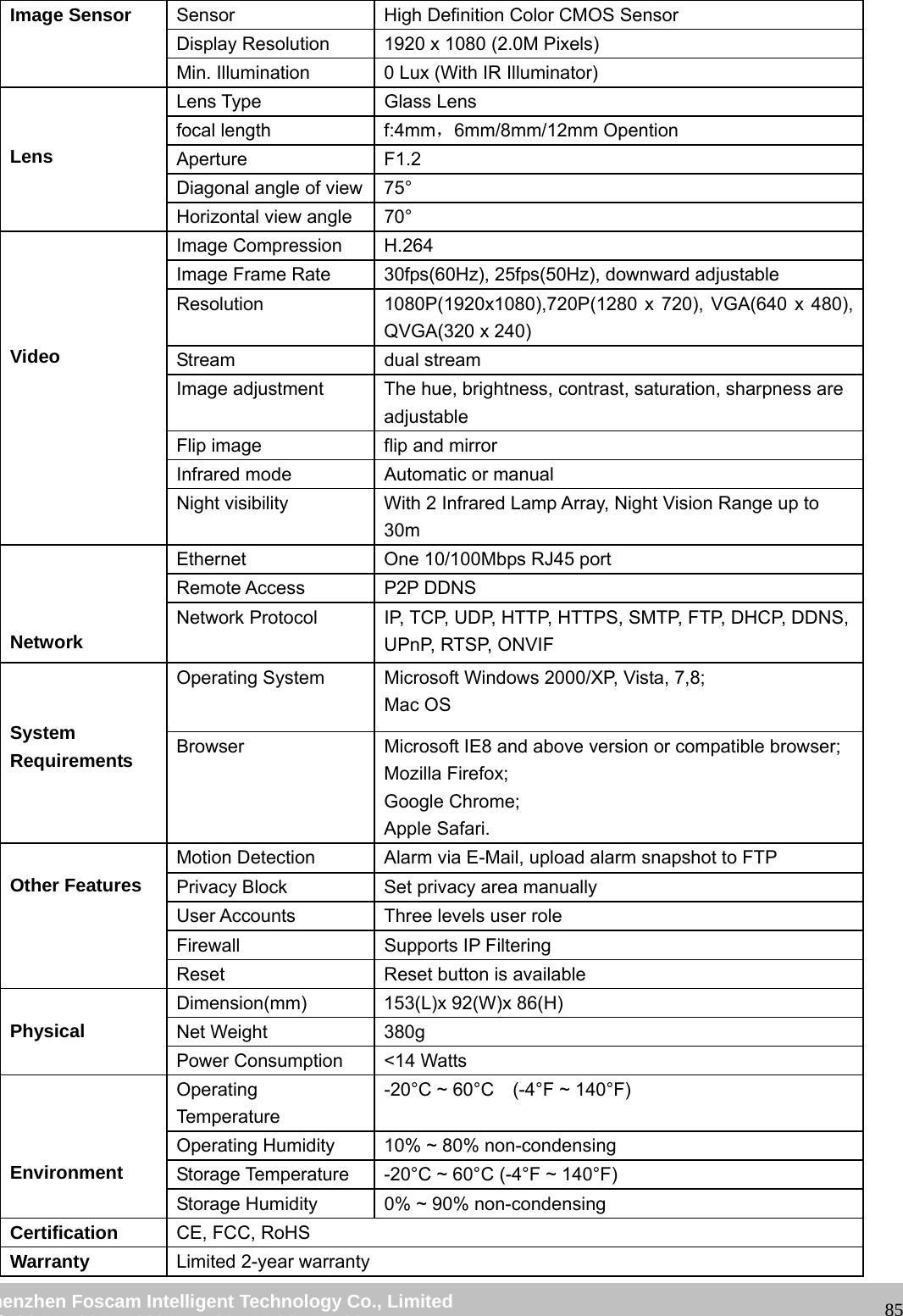
                                                        wwwwww..ffoossccaamm..ccoomm  SShheennzzhheenn  FFoossccaamm  IInntteelllliiggeenntt  TTeecchhnnoollooggyy  CCoo..,,  LLiimmiitteedd  TTeell::  8866  775555  22667744  55666688  FFaaxx::  8866  775555  22667744  55116688                                                                                                                   85Image Sensor  Sensor  High Definition Color CMOS Sensor Display Resolution  1920 x 1080 (2.0M Pixels) Min. Illumination  0 Lux (With IR Illuminator)   Lens Lens Type  Glass Lens focal length  f:4mm,6mm/8mm/12mm Opention Aperture F1.2 Diagonal angle of view 75° Horizontal view angle  70°     Video Image Compression  H.264 Image Frame Rate  30fps(60Hz), 25fps(50Hz), downward adjustable Resolution  1080P(1920x1080),720P(1280 x 720), VGA(640 x 480), QVGA(320 x 240) Stream dual stream Image adjustment  The hue, brightness, contrast, saturation, sharpness are adjustable Flip image  flip and mirror Infrared mode  Automatic or manual Night visibility  With 2 Infrared Lamp Array, Night Vision Range up to 30m    Network Ethernet  One 10/100Mbps RJ45 port Remote Access  P2P DDNS Network Protocol  IP, TCP, UDP, HTTP, HTTPS, SMTP, FTP, DHCP, DDNS, UPnP, RTSP, ONVIF   System Requirements Operating System  Microsoft Windows 2000/XP, Vista, 7,8; Mac OS Browser  Microsoft IE8 and above version or compatible browser; Mozilla Firefox; Google Chrome; Apple Safari.  Other Features Motion Detection  Alarm via E-Mail, upload alarm snapshot to FTP Privacy Block  Set privacy area manually User Accounts  Three levels user role Firewall Supports IP Filtering Reset  Reset button is available  Physical Dimension(mm)  153(L)x 92(W)x 86(H)   Net Weight  380g Power Consumption  <14 Watts    Environment Operating Temperature -20°C ~ 60°C    (-4°F ~ 140°F) Operating Humidity  10% ~ 80% non-condensing Storage Temperature  -20°C ~ 60°C (-4°F ~ 140°F) Storage Humidity  0% ~ 90% non-condensing Certification  CE, FCC, RoHS Warranty  Limited 2-year warranty
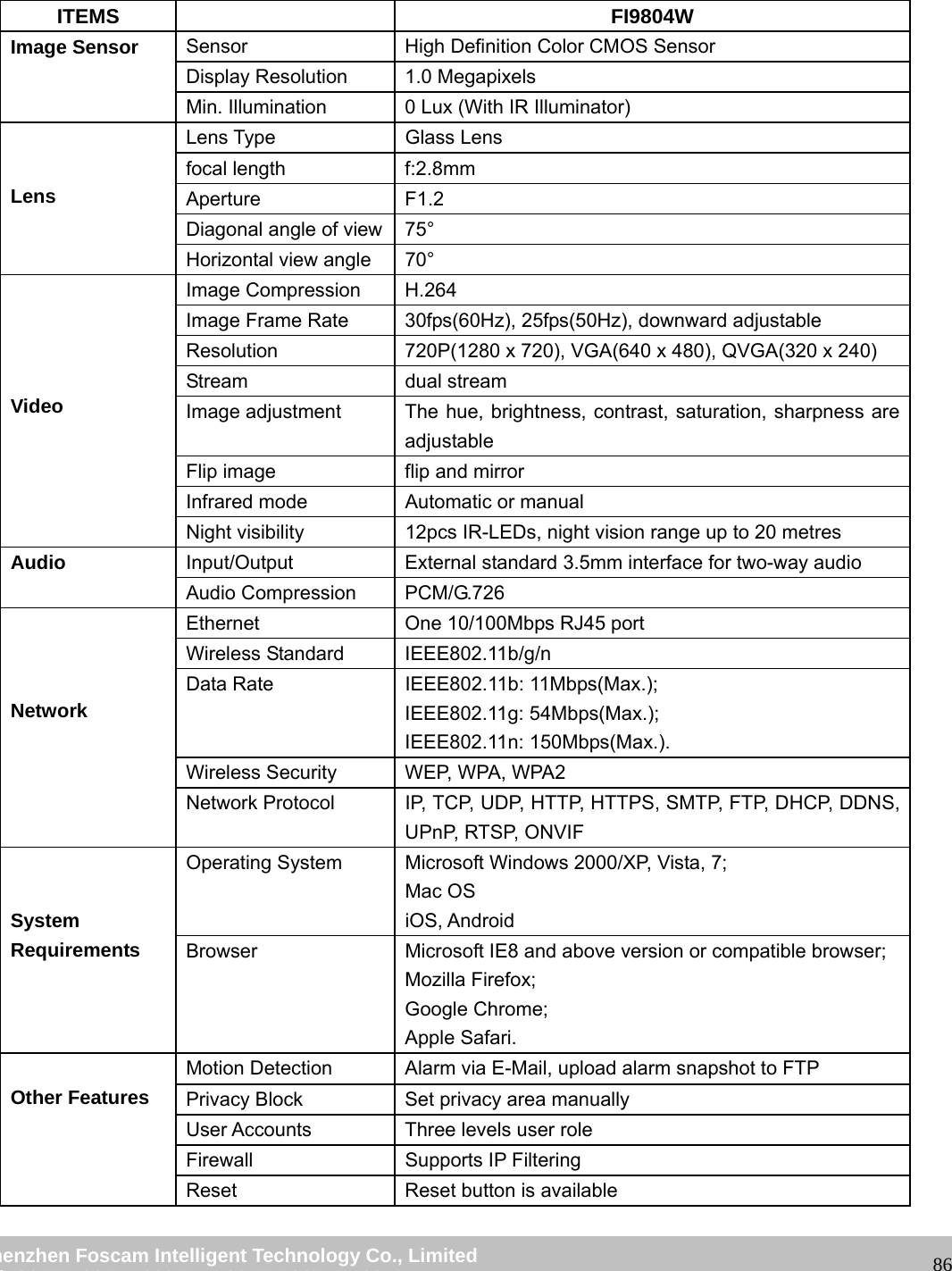
                                                        wwwwww..ffoossccaamm..ccoomm  SShheennzzhheenn  FFoossccaamm  IInntteelllliiggeenntt  TTeecchhnnoollooggyy  CCoo..,,  LLiimmiitteedd  TTeell::  8866  775555  22667744  55666688  FFaaxx::  8866  775555  22667744  55116688                                                                                                                   86    ITEMS   FI9804W Image Sensor  Sensor  High Definition Color CMOS Sensor Display Resolution  1.0 Megapixels Min. Illumination  0 Lux (With IR Illuminator)   Lens Lens Type  Glass Lens focal length  f:2.8mm Aperture F1.2 Diagonal angle of view 75° Horizontal view angle  70°     Video Image Compression  H.264 Image Frame Rate  30fps(60Hz), 25fps(50Hz), downward adjustable Resolution  720P(1280 x 720), VGA(640 x 480), QVGA(320 x 240) Stream dual stream Image adjustment  The hue, brightness, contrast, saturation, sharpness are adjustable Flip image  flip and mirror Infrared mode  Automatic or manual Night visibility  12pcs IR-LEDs, night vision range up to 20 metres Audio  Input/Output  External standard 3.5mm interface for two-way audio Audio Compression  PCM/G.726    Network Ethernet  One 10/100Mbps RJ45 port Wireless Standard  IEEE802.11b/g/n Data Rate  IEEE802.11b: 11Mbps(Max.); IEEE802.11g: 54Mbps(Max.); IEEE802.11n: 150Mbps(Max.). Wireless Security  WEP, WPA, WPA2 Network Protocol  IP, TCP, UDP, HTTP, HTTPS, SMTP, FTP, DHCP, DDNS, UPnP, RTSP, ONVIF   System Requirements Operating System  Microsoft Windows 2000/XP, Vista, 7; Mac OS iOS, Android Browser  Microsoft IE8 and above version or compatible browser; Mozilla Firefox; Google Chrome; Apple Safari.  Other Features Motion Detection  Alarm via E-Mail, upload alarm snapshot to FTP Privacy Block  Set privacy area manually User Accounts  Three levels user role Firewall Supports IP Filtering Reset  Reset button is available
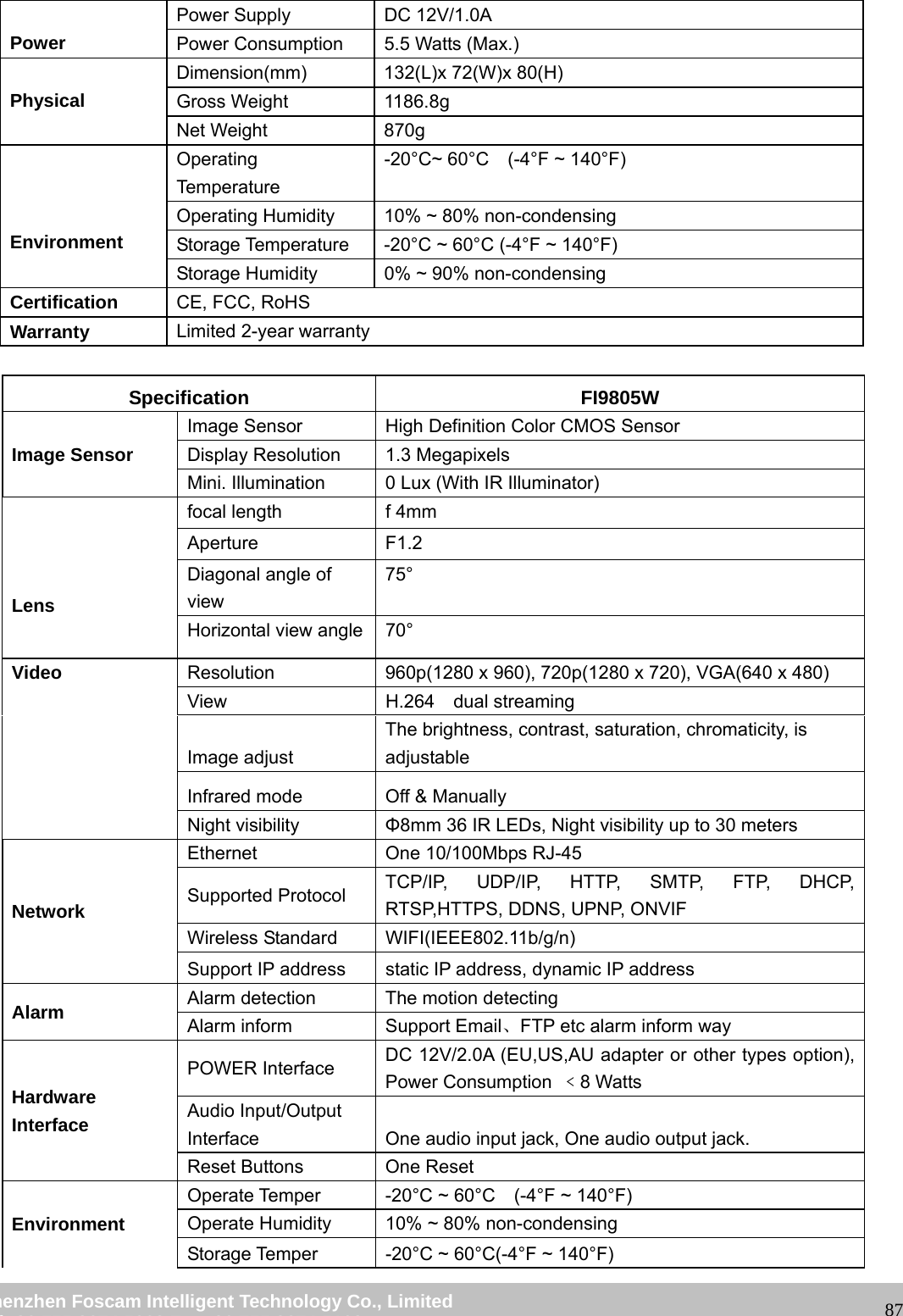
                                                        wwwwww..ffoossccaamm..ccoomm  SShheennzzhheenn  FFoossccaamm  IInntteelllliiggeenntt  TTeecchhnnoollooggyy  CCoo..,,  LLiimmiitteedd  TTeell::  8866  775555  22667744  55666688  FFaaxx::  8866  775555  22667744  55116688                                                                                                                   87 Power Power Supply  DC 12V/1.0A Power Consumption  5.5 Watts (Max.)  Physical Dimension(mm)  132(L)x 72(W)x 80(H)   Gross Weight  1186.8g Net Weight  870g    Environment Operating Temperature -20°C~ 60°C    (-4°F ~ 140°F) Operating Humidity  10% ~ 80% non-condensing Storage Temperature  -20°C ~ 60°C (-4°F ~ 140°F) Storage Humidity  0% ~ 90% non-condensing Certification  CE, FCC, RoHS Warranty  Limited 2-year warranty  Specification FI9805W Image Sensor Image Sensor  High Definition Color CMOS Sensor Display Resolution  1.3 Megapixels Mini. Illumination  0 Lux (With IR Illuminator)   Lens focal length  f 4mm   Aperture F1.2 Diagonal angle of view 75° Horizontal view angle 70° Video  Resolution  960p(1280 x 960), 720p(1280 x 720), VGA(640 x 480) View  H.264  dual streaming Image adjust The brightness, contrast, saturation, chromaticity, is adjustable Infrared mode  Off & Manually Night visibility  Φ8mm 36 IR LEDs, Night visibility up to 30 meters Network Ethernet  One 10/100Mbps RJ-45 Supported Protocol  TCP/IP, UDP/IP, HTTP, SMTP, FTP, DHCP, RTSP,HTTPS, DDNS, UPNP, ONVIF Wireless Standard  WIFI(IEEE802.11b/g/n) Support IP address  static IP address, dynamic IP address Alarm  Alarm detection  The motion detecting Alarm inform  Support Email、FTP etc alarm inform way Hardware Interface POWER Interface  DC 12V/2.0A (EU,US,AU adapter or other types option), Power Consumption  ﹤8 Watts   Audio Input/Output Interface  One audio input jack, One audio output jack. Reset Buttons  One Reset Environment Operate Temper  -20°C ~ 60°C    (-4°F ~ 140°F) Operate Humidity  10% ~ 80% non-condensing Storage Temper  -20°C ~ 60°C(-4°F ~ 140°F)
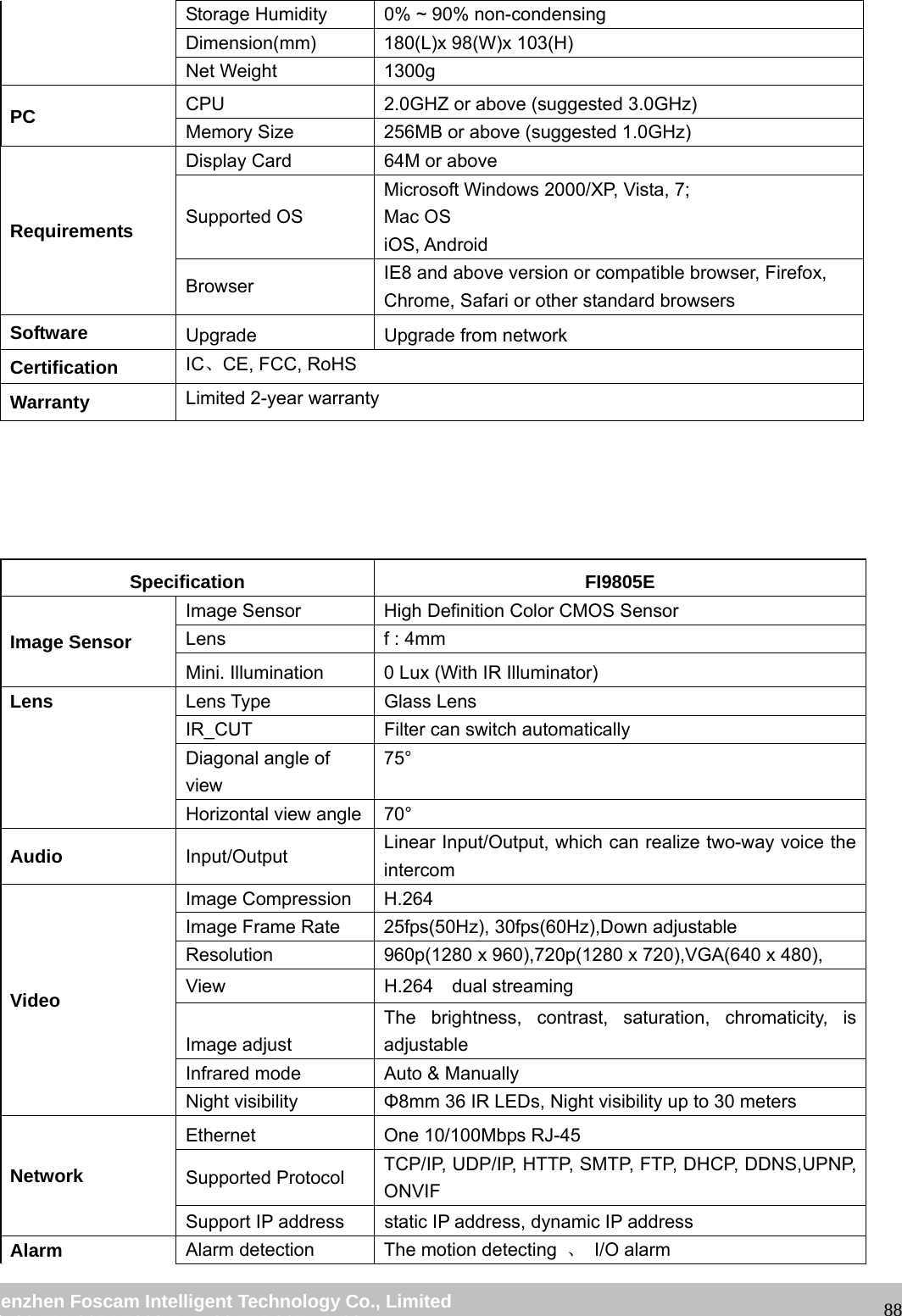
                                                        wwwwww..ffoossccaamm..ccoomm  SShheennzzhheenn  FFoossccaamm  IInntteelllliiggeenntt  TTeecchhnnoollooggyy  CCoo..,,  LLiimmiitteedd  TTeell::  8866  775555  22667744  55666688  FFaaxx::  8866  775555  22667744  55116688                                                                                                                   88Storage Humidity  0% ~ 90% non-condensing Dimension(mm)  180(L)x 98(W)x 103(H) Net Weight  1300g PC   CPU  2.0GHZ or above (suggested 3.0GHz) Memory Size  256MB or above (suggested 1.0GHz) Requirements Display Card  64M or above Supported OS Microsoft Windows 2000/XP, Vista, 7; Mac OS iOS, Android Browser  IE8 and above version or compatible browser, Firefox, Chrome, Safari or other standard browsers Software  Upgrade  Upgrade from network Certification  IC、CE, FCC, RoHS Warranty  Limited 2-year warranty      Specification FI9805E Image Sensor Image Sensor  High Definition Color CMOS Sensor Lens    f : 4mm Mini. Illumination  0 Lux (With IR Illuminator) Lens  Lens Type  Glass Lens IR_CUT  Filter can switch automatically Diagonal angle of view 75° Horizontal view angle 70° Audio  Input/Output  Linear Input/Output, which can realize two-way voice the intercom Video Image Compression  H.264 Image Frame Rate  25fps(50Hz), 30fps(60Hz),Down adjustable Resolution  960p(1280 x 960),720p(1280 x 720),VGA(640 x 480),   View  H.264  dual streaming Image adjust The brightness, contrast, saturation, chromaticity, is adjustable Infrared mode  Auto & Manually Night visibility  Φ8mm 36 IR LEDs, Night visibility up to 30 meters Network Ethernet  One 10/100Mbps RJ-45 Supported Protocol  TCP/IP, UDP/IP, HTTP, SMTP, FTP, DHCP, DDNS,UPNP, ONVIF Support IP address  static IP address, dynamic IP address Alarm  Alarm detection  The motion detecting  、 I/O alarm
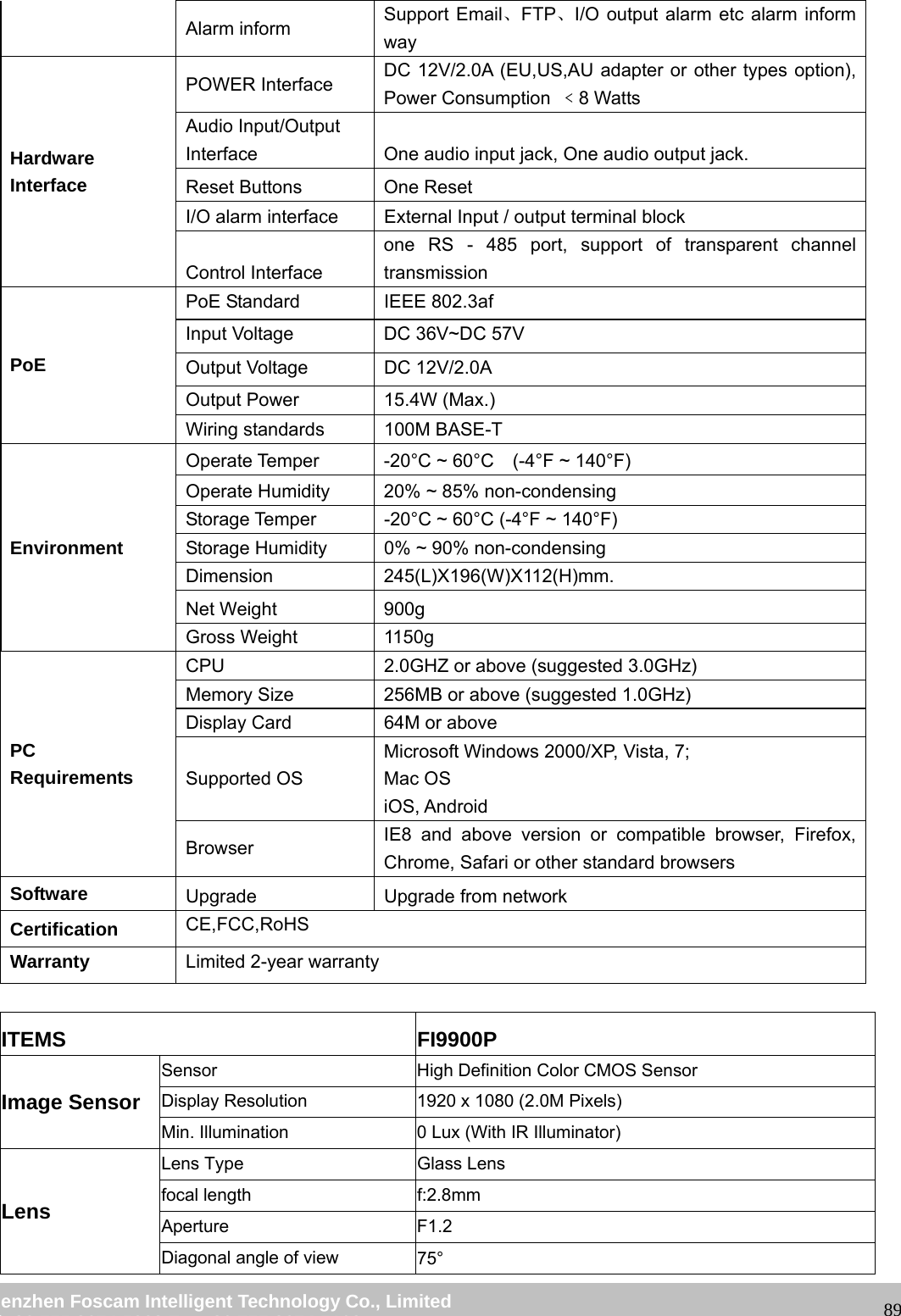
                                                        wwwwww..ffoossccaamm..ccoomm  SShheennzzhheenn  FFoossccaamm  IInntteelllliiggeenntt  TTeecchhnnoollooggyy  CCoo..,,  LLiimmiitteedd  TTeell::  8866  775555  22667744  55666688  FFaaxx::  8866  775555  22667744  55116688                                                                                                                   89Alarm inform  Support Email、FTP、I/O output alarm etc alarm inform way Hardware Interface POWER Interface  DC 12V/2.0A (EU,US,AU adapter or other types option), Power Consumption  ﹤8 Watts   Audio Input/Output Interface  One audio input jack, One audio output jack. Reset Buttons  One Reset I/O alarm interface  External Input / output terminal block Control Interface one RS - 485 port, support of transparent channel transmission PoE PoE Standard  IEEE 802.3af Input Voltage  DC 36V~DC 57V Output Voltage  DC 12V/2.0A Output Power  15.4W (Max.) Wiring standards  100M BASE-T Environment Operate Temper  -20°C ~ 60°C    (-4°F ~ 140°F) Operate Humidity  20% ~ 85% non-condensing Storage Temper  -20°C ~ 60°C (-4°F ~ 140°F) Storage Humidity  0% ~ 90% non-condensing Dimension 245(L)X196(W)X112(H)mm. Net Weight  900g Gross Weight  1150g PC  Requirements CPU  2.0GHZ or above (suggested 3.0GHz) Memory Size  256MB or above (suggested 1.0GHz) Display Card  64M or above Supported OS Microsoft Windows 2000/XP, Vista, 7; Mac OS iOS, Android Browser  IE8 and above version or compatible browser, Firefox, Chrome, Safari or other standard browsers Software  Upgrade  Upgrade from network Certification  CE,FCC,RoHS Warranty  Limited 2-year warranty  ITEMS FI9900P Image Sensor Sensor  High Definition Color CMOS Sensor Display Resolution  1920 x 1080 (2.0M Pixels) Min. Illumination  0 Lux (With IR Illuminator) Lens Lens Type  Glass Lens focal length  f:2.8mm Aperture F1.2 Diagonal angle of view  75°
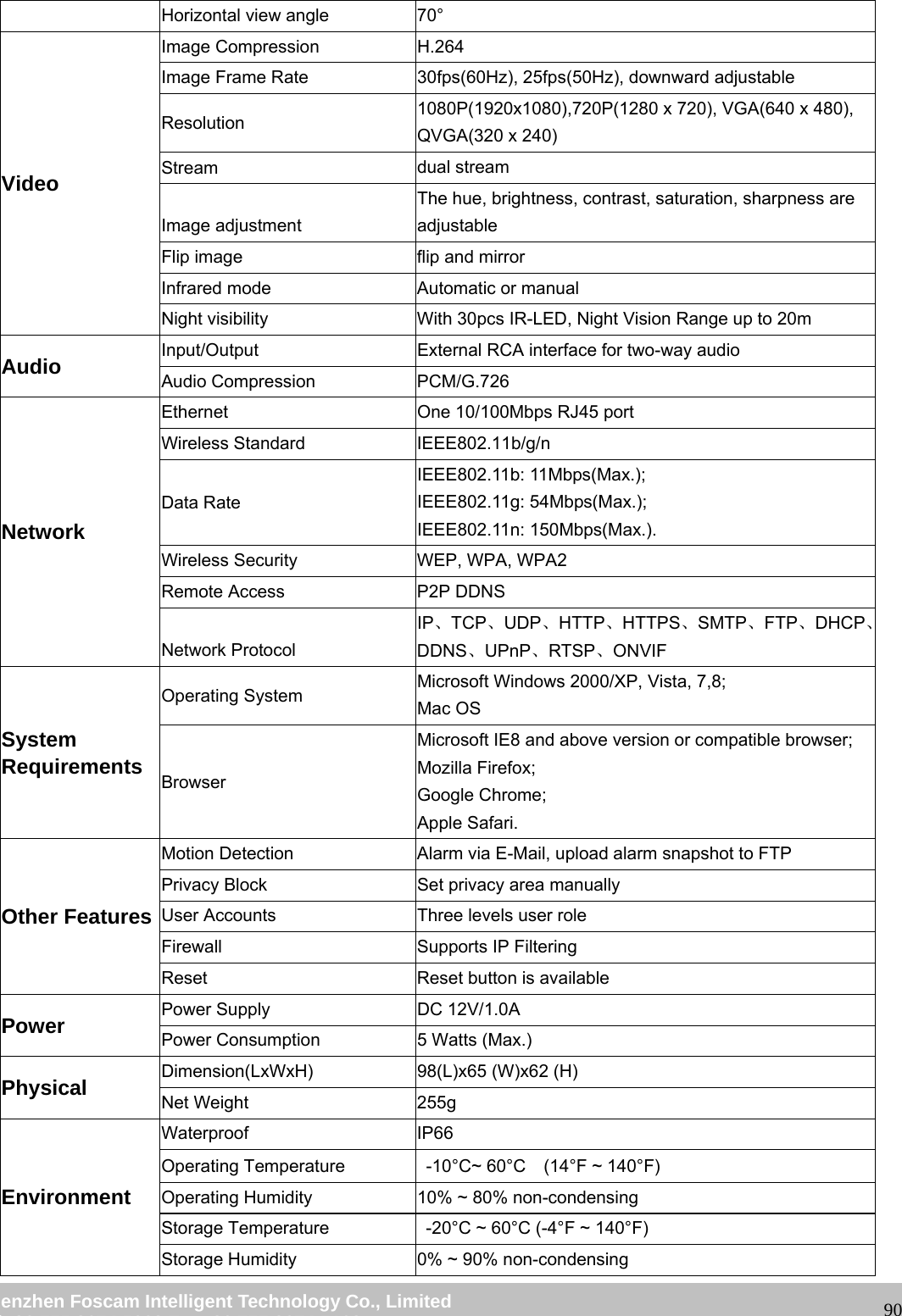
                                                        wwwwww..ffoossccaamm..ccoomm  SShheennzzhheenn  FFoossccaamm  IInntteelllliiggeenntt  TTeecchhnnoollooggyy  CCoo..,,  LLiimmiitteedd  TTeell::  8866  775555  22667744  55666688  FFaaxx::  8866  775555  22667744  55116688                                                                                                                   90Horizontal view angle  70° Video Image Compression  H.264 Image Frame Rate  30fps(60Hz), 25fps(50Hz), downward adjustable Resolution  1080P(1920x1080),720P(1280 x 720), VGA(640 x 480), QVGA(320 x 240) Stream  dual stream Image adjustment The hue, brightness, contrast, saturation, sharpness are adjustable Flip image  flip and mirror Infrared mode  Automatic or manual Night visibility  With 30pcs IR-LED, Night Vision Range up to 20m Audio  Input/Output  External RCA interface for two-way audio Audio Compression  PCM/G.726 Network Ethernet  One 10/100Mbps RJ45 port Wireless Standard  IEEE802.11b/g/n Data Rate IEEE802.11b: 11Mbps(Max.); IEEE802.11g: 54Mbps(Max.); IEEE802.11n: 150Mbps(Max.). Wireless Security  WEP, WPA, WPA2 Remote Access  P2P DDNS Network Protocol IP、TCP、UDP、HTTP、HTTPS、SMTP、FTP、DHCP、DDNS、UPnP、RTSP、ONVIF System Requirements Operating System  Microsoft Windows 2000/XP, Vista, 7,8; Mac OS Browser Microsoft IE8 and above version or compatible browser; Mozilla Firefox; Google Chrome; Apple Safari. Other Features Motion Detection  Alarm via E-Mail, upload alarm snapshot to FTP Privacy Block  Set privacy area manually User Accounts  Three levels user role Firewall  Supports IP Filtering Reset  Reset button is available Power  Power Supply  DC 12V/1.0A Power Consumption  5 Watts (Max.) Physical  Dimension(LxWxH)  98(L)x65 (W)x62 (H)   Net Weight  255g Environment Waterproof IP66 Operating Temperature    -10°C~ 60°C    (14°F ~ 140°F) Operating Humidity  10% ~ 80% non-condensing Storage Temperature    -20°C ~ 60°C (-4°F ~ 140°F) Storage Humidity  0% ~ 90% non-condensing
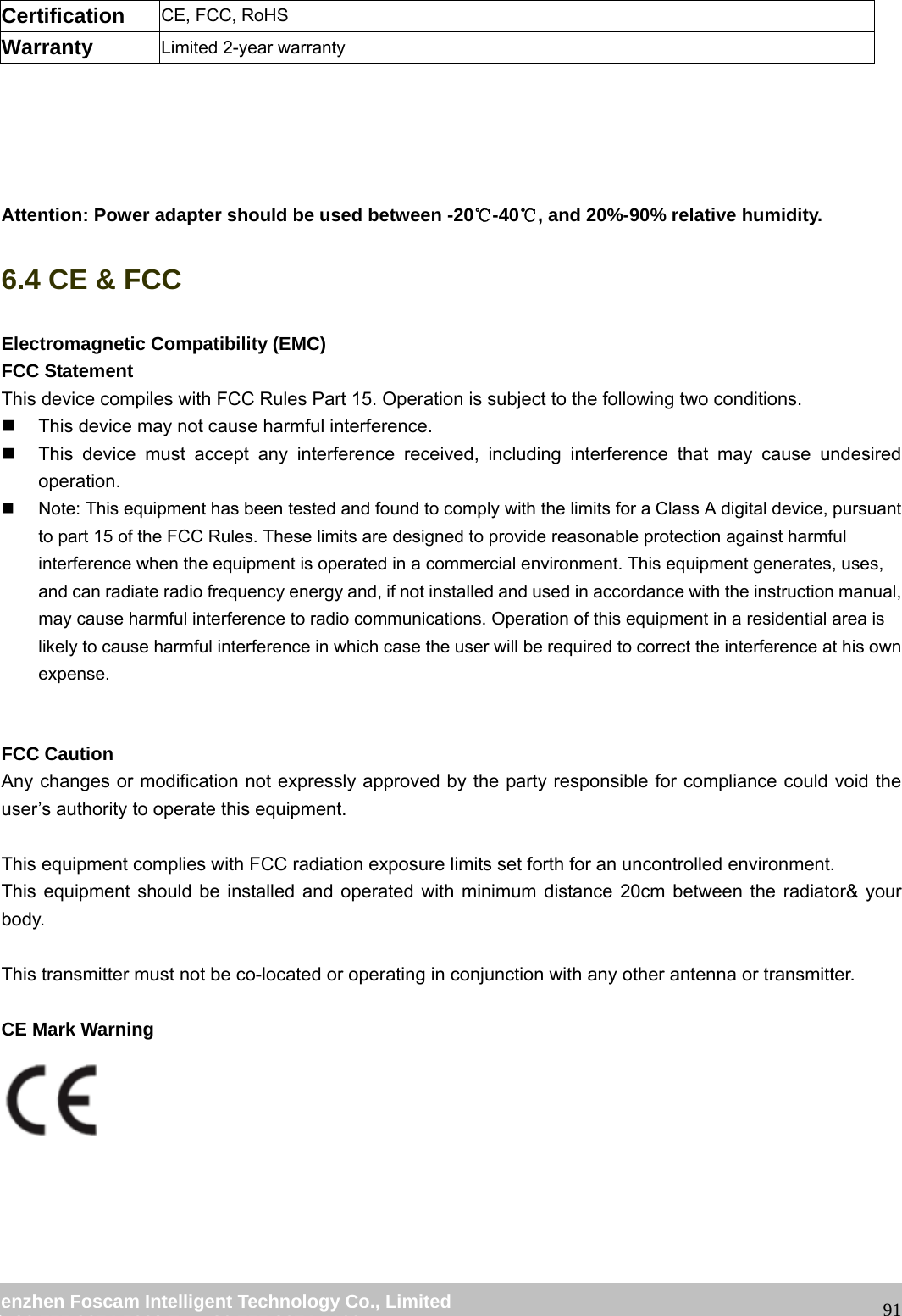
                                                        wwwwww..ffoossccaamm..ccoomm  SShheennzzhheenn  FFoossccaamm  IInntteelllliiggeenntt  TTeecchhnnoollooggyy  CCoo..,,  LLiimmiitteedd  TTeell::  8866  775555  22667744  55666688  FFaaxx::  8866  775555  22667744  55116688                                                                                                                   91Certification  CE, FCC, RoHS Warranty  Limited 2-year warranty      Attention: Power adapter should be used between -20℃-40 , and 20%℃-90% relative humidity. 6.4 CE & FCC   Electromagnetic Compatibility (EMC) FCC Statement This device compiles with FCC Rules Part 15. Operation is subject to the following two conditions.   This device may not cause harmful interference.   This device must accept any interference received, including interference that may cause undesired operation.   Note: This equipment has been tested and found to comply with the limits for a Class A digital device, pursuant to part 15 of the FCC Rules. These limits are designed to provide reasonable protection against harmful interference when the equipment is operated in a commercial environment. This equipment generates, uses, and can radiate radio frequency energy and, if not installed and used in accordance with the instruction manual, may cause harmful interference to radio communications. Operation of this equipment in a residential area is likely to cause harmful interference in which case the user will be required to correct the interference at his own expense.  FCC Caution   Any changes or modification not expressly approved by the party responsible for compliance could void the user’s authority to operate this equipment.  This equipment complies with FCC radiation exposure limits set forth for an uncontrolled environment. This equipment should be installed and operated with minimum distance 20cm between the radiator& your body.  This transmitter must not be co-located or operating in conjunction with any other antenna or transmitter.  CE Mark Warning
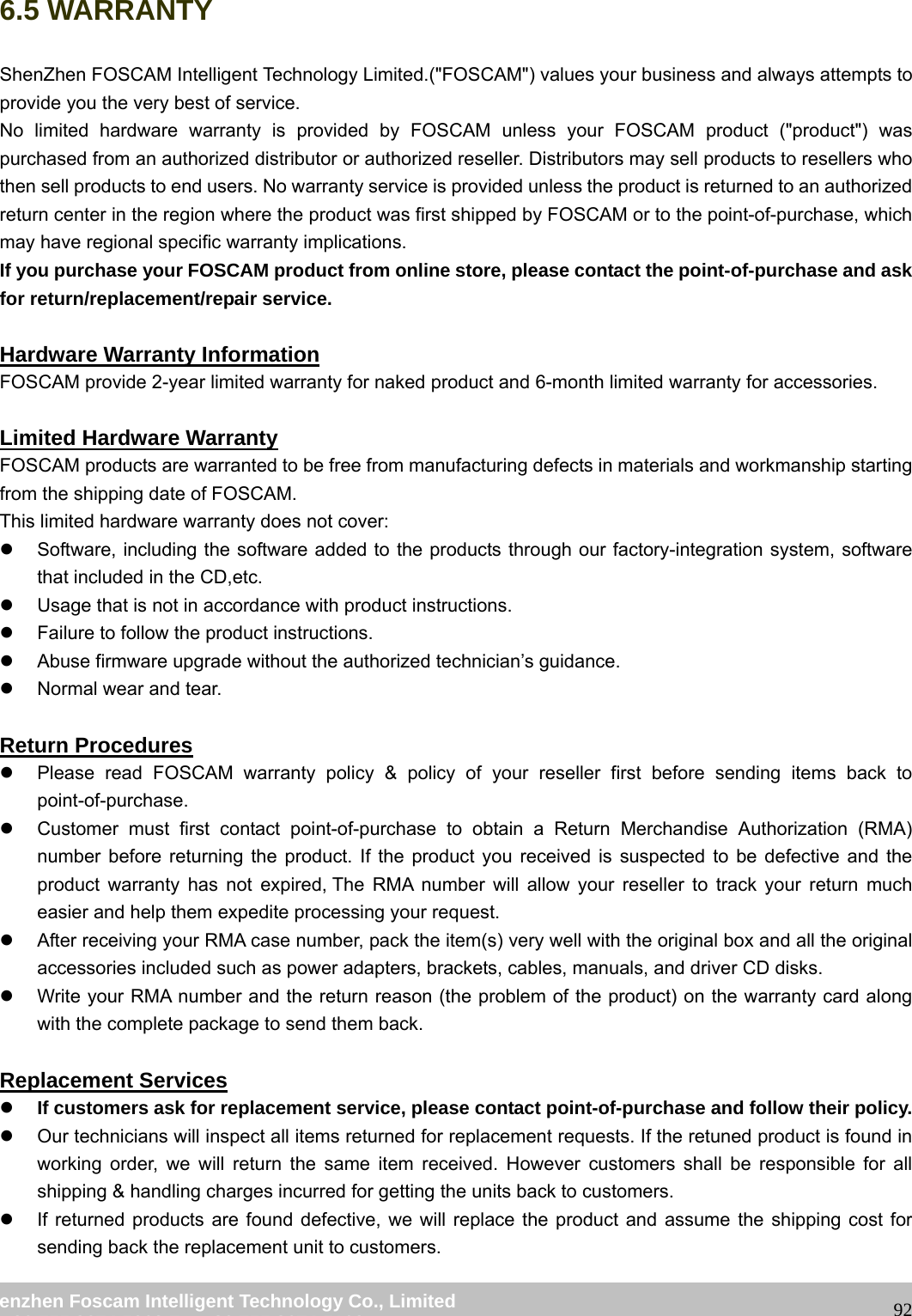
                                                        wwwwww..ffoossccaamm..ccoomm  SShheennzzhheenn  FFoossccaamm  IInntteelllliiggeenntt  TTeecchhnnoollooggyy  CCoo..,,  LLiimmiitteedd  TTeell::  8866  775555  22667744  55666688  FFaaxx::  8866  775555  22667744  55116688                                                                                                                   926.5 WARRANTY ShenZhen FOSCAM Intelligent Technology Limited.("FOSCAM") values your business and always attempts to provide you the very best of service. No limited hardware warranty is provided by FOSCAM unless your FOSCAM product ("product") was purchased from an authorized distributor or authorized reseller. Distributors may sell products to resellers who then sell products to end users. No warranty service is provided unless the product is returned to an authorized return center in the region where the product was first shipped by FOSCAM or to the point-of-purchase, which may have regional specific warranty implications. If you purchase your FOSCAM product from online store, please contact the point-of-purchase and ask for return/replacement/repair service.  Hardware Warranty Information FOSCAM provide 2-year limited warranty for naked product and 6-month limited warranty for accessories.  Limited Hardware Warranty FOSCAM products are warranted to be free from manufacturing defects in materials and workmanship starting from the shipping date of FOSCAM. This limited hardware warranty does not cover: z  Software, including the software added to the products through our factory-integration system, software that included in the CD,etc. z  Usage that is not in accordance with product instructions. z  Failure to follow the product instructions. z  Abuse firmware upgrade without the authorized technician’s guidance. z  Normal wear and tear.  Return Procedures z  Please read FOSCAM warranty policy & policy of your reseller first before sending items back to point-of-purchase.  z  Customer must first contact point-of-purchase to obtain a Return Merchandise Authorization (RMA) number before returning the product. If the product you received is suspected to be defective and the product warranty has not expired, The RMA number will allow your reseller to track your return much easier and help them expedite processing your request.  z  After receiving your RMA case number, pack the item(s) very well with the original box and all the original accessories included such as power adapters, brackets, cables, manuals, and driver CD disks. z  Write your RMA number and the return reason (the problem of the product) on the warranty card along with the complete package to send them back.  Replacement Services z If customers ask for replacement service, please contact point-of-purchase and follow their policy. z  Our technicians will inspect all items returned for replacement requests. If the retuned product is found in working order, we will return the same item received. However customers shall be responsible for all shipping & handling charges incurred for getting the units back to customers. z  If returned products are found defective, we will replace the product and assume the shipping cost for sending back the replacement unit to customers.
                                                        wwwwww..ffoossccaamm..ccoomm  SShheennzzhheenn  FFoossccaamm  IInntteelllliiggeenntt  TTeecchhnnoollooggyy  CCoo..,,  LLiimmiitteedd  TTeell::  8866  775555  22667744  55666688  FFaaxx::  8866  775555  22667744  55116688                                                                                                                   93z  If for any reason, we are unable to provide a replacement of the original returned item(s). You will have a choice for a “Substitute” item at the same equal value. z  We do not provide exchange and replacement due to normal hardware upgrade according the market after 14 days after the product is delivered.   z  Our technicians will test the product before send out the replacement, any other demand for more than two times replacement for the same product during replacement limit will be rejected. z Replaced products are warranted from the balance of the former warranty period.    Warranty Forfeiture z  Warranty is void if purchase from unauthorized distributor or reseller. z Warranty is void if trade-mark, serial tags, product stickers have been removed, altered or tampered with. z  Warranty is void for mishandling, improper use, or defacing the product.   z Abuse firmware upgrade without the authorized technician’s guidance. z  Warranty is void for physical damage, altered, either internally or externally, improper or inadequate packaging when returned for RMA purposes. z  Warranty is void if damage has resulted from accident, dismantle, abuse, or service or modification by someone other than the appointed vendor, souse, fission or the spare part has been over the period of warranty.  z  Warranty is void if product is damaged due to improper working environment or operation. (For example, improper temperature, humidity, unusual physical or electrical stress or interference, failure or fluctuation of electrical power, static electricity, using wrong power adapter, etc.) z  Warranty is void if damaged by the use of parts not manufactured or sold by FOSCAM. z  Damage caused by improper installation of third-party products. z  Warranty is void if damaged for irresistible cause, such as earthquake, fire, lightning, flood, etc. z Product beyond limited warranty.  Shipping Fee z  If products are defective or damaged under normal use or operation in the replacement limit, distributors or resellers are responsible for the shipping cost the product back to customers, customers should assume the shipping cost send the product to the point-of-purchase. z  During replacement limit, if customers ask for replacement due to the product does not fit for customer’s personal expectation, customers should responsible for both shipping fee. z  Customers shall be responsible for both shipping fee if their product beyond the replacement limit but still in warranty limit.    Repair Service Out Of Warranty z  FOSCAM provide extra repair service for product that out of warranty, it is chargeable. The total fee contains device cost and service fee. Device cost (including accessories) is the standard uniform price provide by FOSCAM. z  Different region may have different service fee, please contact the point-of-purchase to confirm that before you ask for this service. z  Our technicians will quote the total price after detect the product, If customers refused to repair after the quotation, customers need pay for the test fee, $3.5/hour. If agree with the quotation, test will be free. z  Repaired product out of warranty will obtains 3-month warranty from the date of the product back to customers.
                                                        wwwwww..ffoossccaamm..ccoomm  SShheennzzhheenn  FFoossccaamm  IInntteelllliiggeenntt  TTeecchhnnoollooggyy  CCoo..,,  LLiimmiitteedd  TTeell::  8866  775555  22667744  55666688  FFaaxx::  8866  775555  22667744  55116688                                                                                                                   94 Limitation of Liability z  FOSCAM is not responsible for other extra warranty or commitment promised by resellers, if your reseller promised some extra commitment or warranty; please ask for written documents to protect your rights and interests. z  FOSCAM does not offer refunds under any circumstances. Please contact the point-of-purchase and follow their refund/return policy. z  FOSCAM shall not be liable under any circumstances for any consequential, incidental, special or exemplary damages arising out of or in any connection with this agreement or the products, including but not limited to lost profits, or any claim based on indemnity or contribution, or the failure of any limited or exclusive remedy to achieve its essential purpose or otherwise. Purchaser's exclusive remedy, as against FOSCAM, shall be the repair or replacement of defective parts. If FOSCAM lists a product on its website specification in error or that is no longer available for any reason, FOSCAM reserves the right to explain it without incurring any liability. All rights reserved. FOSCAM and the FOSCAM logo are trademarks of ShenZhen FOSCAM Intelligent Technology Limited., registered in the U.S. and other countries.    7 Obtaining Technical Support While we hope your experience with the IPCAM network camera is enjoyable and easy to use, you may experience some issues or have questions that this User’s Guide has not answered.   If you have problem with FOSCAM IP camera, please first contact FOSCAM reseller for solving the problems. If our reseller cannot provide service, please contact our service department: tech@foscam.com .

Navigation menu