Thomson Broadcast and Multimedia ULT-1K10K2 UHF Digital transmitter, for use with MediaFlo User Manual PREIMPAP

Thomson Broadcast & Multimedia, Inc. UHF Digital transmitter, for use with MediaFlo PREIMPAP

User Manual part 5

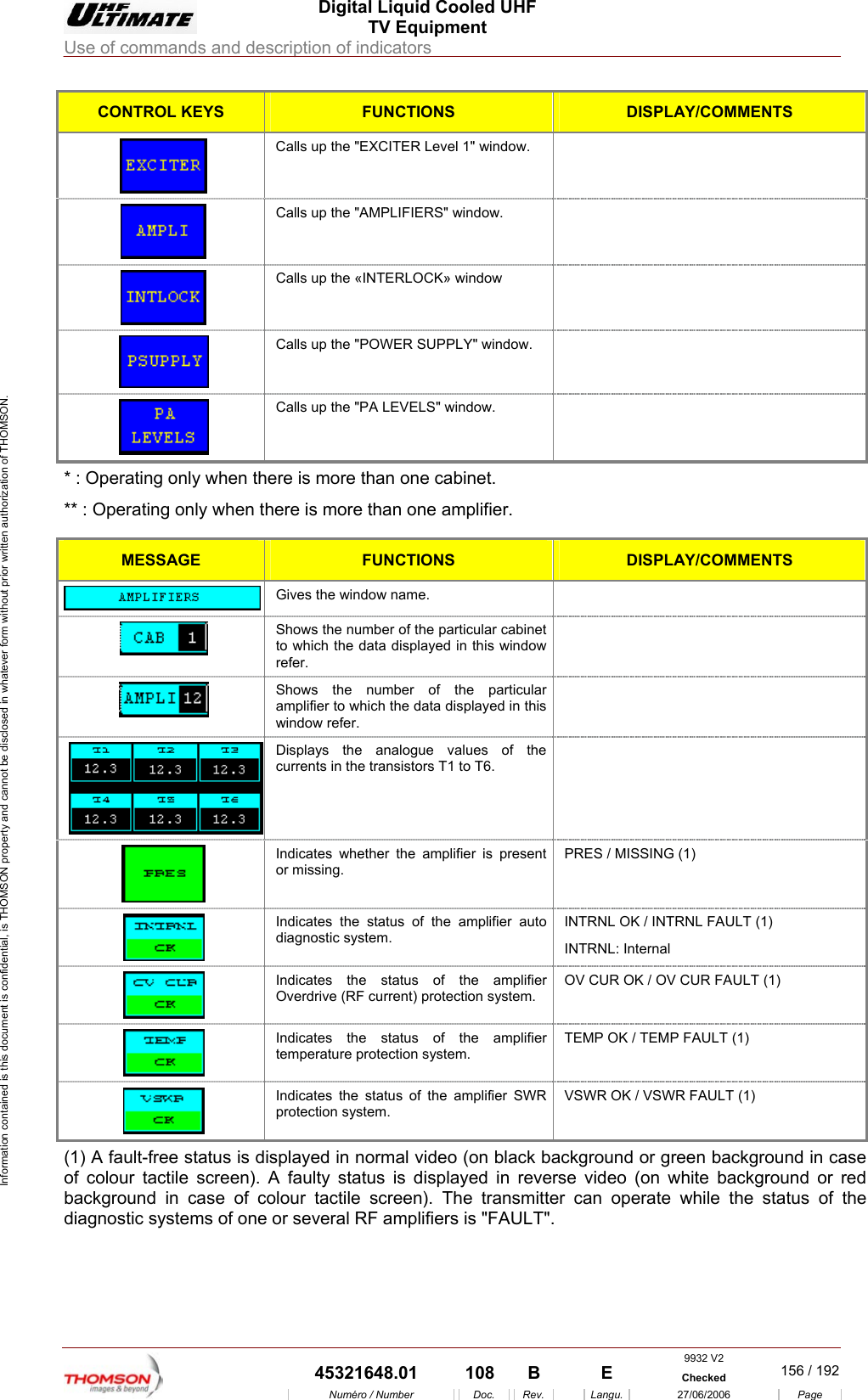
 Digital Liquid Cooled UHF TV Equipment Use of commands and description of indicators  Information contained is this document is confidential, is THOMSON property and cannot be disclosed in whatever form without prior written authorization of THOMSON. CONTROL KEYS FUNCTIONS DISPLAY/COMMENTS  Calls up the "EXCITER Level 1" window.    Calls up the "AMPLIFIERS" window.    Calls up the «INTERLOCK» window     Calls up the "POWER SUPPLY" window.    Calls up the "PA LEVELS" window.   * : Operating only when there is more than one cabinet. ** : Operating only when there is more than one amplifier.  MESSAGE FUNCTIONS DISPLAY/COMMENTS  Gives the window name.    Shows the number of the particular cabinet to which the data displayed in this window refer.   Shows the number of the particular amplifier to which the data displayed in this window refer.   Displays the analogue values of the currents in the transistors T1 to T6.   Indicates whether the amplifier is present or missing. PRES / MISSING (1)  Indicates the status of the amplifier auto diagnostic system. INTRNL OK / INTRNL FAULT (1) INTRNL: Internal  Indicates the status of the amplifier Overdrive (RF current) protection system. OV CUR OK / OV CUR FAULT (1)  Indicates the status of the amplifier temperature protection system. TEMP OK / TEMP FAULT (1)  Indicates the status of the amplifier SWR protection system. VSWR OK / VSWR FAULT (1) (1) A fault-free status is displayed in normal video (on black background or green background in case of colour tactile screen). A faulty status is displayed in reverse video (on white background or red background in case of colour tactile screen). The transmitter can operate while the status of the diagnostic systems of one or several RF amplifiers is "FAULT".    9932 V2  45321648.01  108  B    E  Checked  156 / 192Numéro / Number Doc. Rev. Langu. 27/06/2006 Page
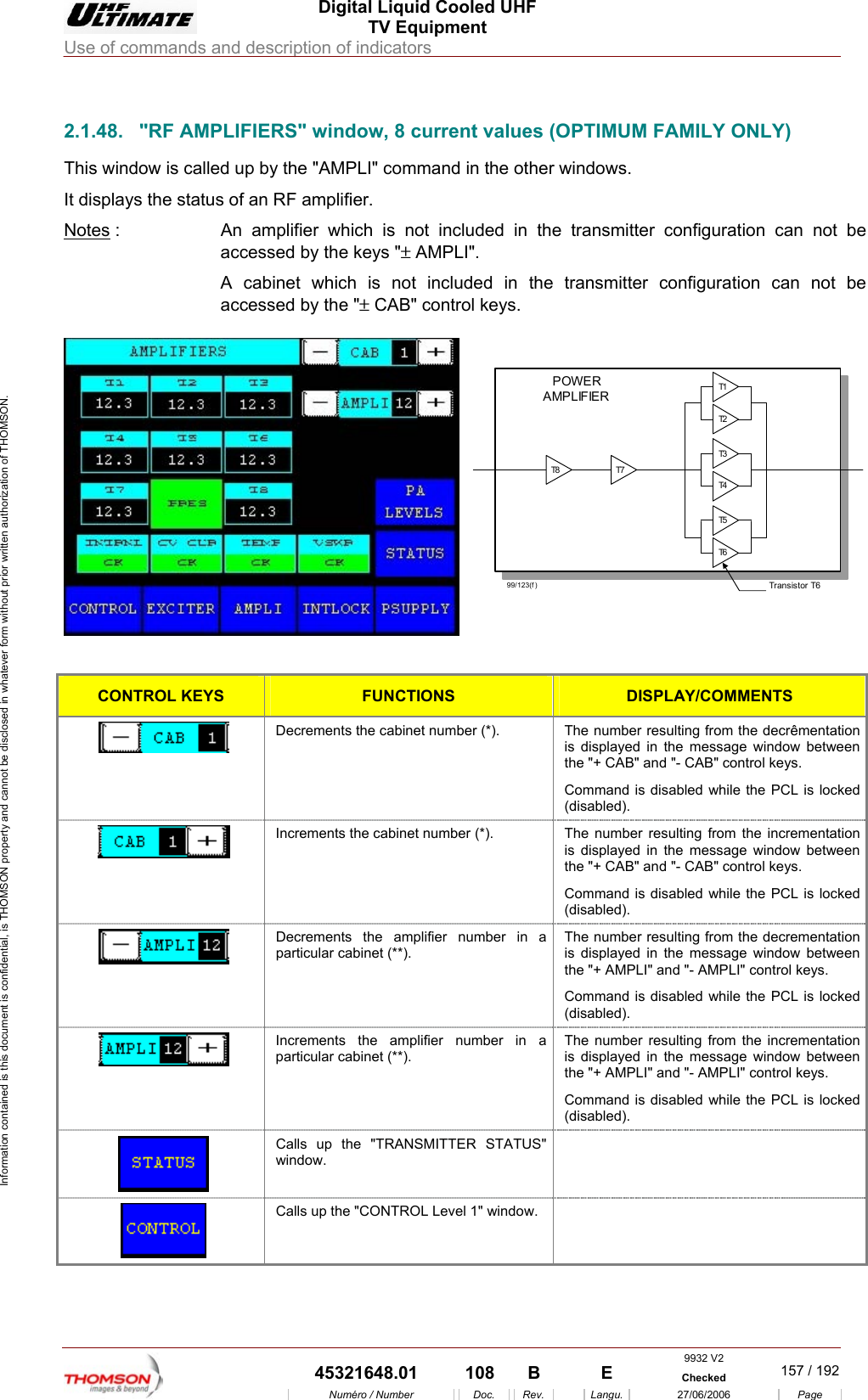
 Digital Liquid Cooled UHF TV Equipment Use of commands and description of indicators  Information contained is this document is confidential, is THOMSON property and cannot be disclosed in whatever form without prior written authorization of THOMSON.                        MILY ONLY) 2.1.48.  "RF AMPLIFIERS" window, 8 current values (OPTIMUM FAThis window is called up by the "AMPLI" command in the other windows. It displays the status of an RF amplifier.  Notes :  An amplifier which is not included in the transmitter configuration can not be accessed by the keys "± AMPLI".  A cabinet which is  transmitter configuration can not be accessed by the "± CAB" control keys.   not included in the T8 T7T1T2T3T4T5T6Transistor T699/123(f )POWERAMPLIFIER  CONTROL KEYS FUNCTIONS DISPLAY/COMMENTS  Decrements the cabinet number (*).  The number resulting from the decrêmentation is displayed in the message window between the "+ CAB" and "- CAB" control keys. Command is disabled while the PCL is locked (disabled).  Increments the cabinet number (*).  The number resulting from the incrementation is displayed in the message window between the "+ CAB" and "- CAB" control keys. Command is disabled while the PCL is locked (disabled).   Decrements tparticular cabinThe number resulting from the decrementation is displayed in the message window between the "+ AMPLI" and "- AMPLI" control keys. Command i  locked (disabled). he amplifier number in a et (**). s disabled while the PCL isIncrements the amplifier number in a particularThe cabinet (**). umber resulting from the incrementation is displayed in the message window between  AMPLI" and "- AMPLI" control keys. mmand is disabled while the PCL is locked (disabled).  nthe Co"+  Calls up the "TRANSMITTER STATUS" window.   Calls up the "CONTROL Level 1" window.   9932 V2  45321648.01  108  B    E  Checked  157 / 192Numéro / Number Doc. Rev. Langu. 27/06/2006 Page
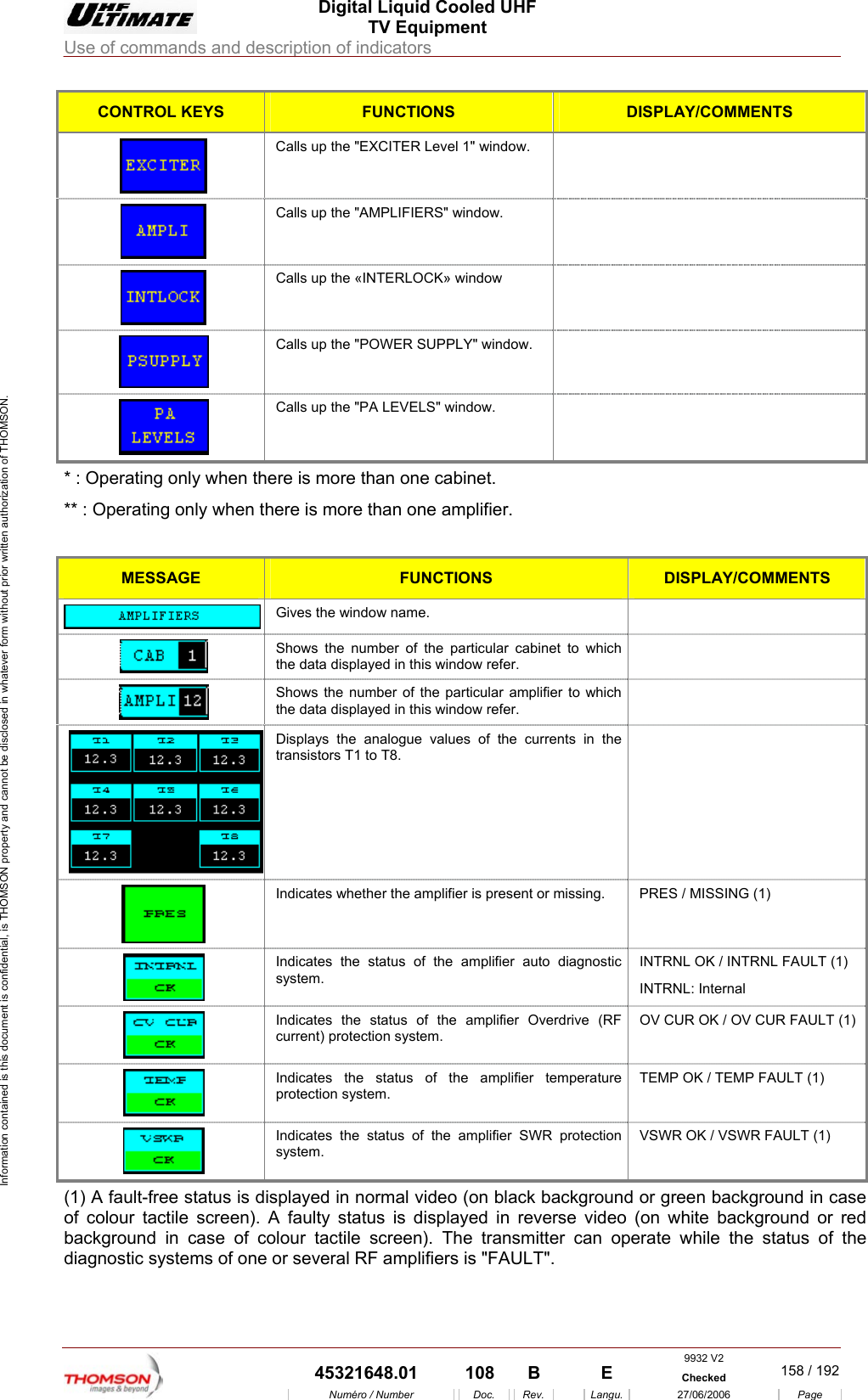
 Digital Liquid Cooled UHF TV Equipment Use of commands and description of indicators  Information contained is this document is confidential, is THOMSON property and cannot be disclosed in whatever form without prior written authorization of THOMSON. CONTROL KEYS FUNCTIONS DISPLAY/COMMENTS Calls up the "EXCITER Level 1" window.     Calls up the "AMPLIFIERS" window.   Calls up the «INTERLOCK» window      Calls up the "POWER SUPPLY" window.    Calls up the "PA LEVELS" window.   * : Operating only when the** : Operating only when th plifier.  re is more than one cabinet. ere is more than one amMESSAGE FUNCTIONS DISPLAY/COMMENTS  Gives the window name.   Shows the number of the particular cabinet to wthe data displayed in this window refer. hich    Shows the number of the particular amplifier to wthe data displayed in this window refer. hich     Displays the analogue values of the currents in the transistors T1 to T8.  Indicates wheth er the amplifier is present or missing.  PRES / MISSING (1) Indicates the status of the amplifiersystem.   auto diagnostic  INTRNL OK / INTRNL FAULT (1) INTRNL: Internal  Indicates the status of the amplifier Overdrive (RF current) protection system. OV CUR OK / OV CUR FAULT (1)  Indicates the status of the amplifier temperature protection system. TEMP OK / TEMP FAULT (1)  Indicates the status of the amplifier SWR protection system. VSWR OK / VSWR FAULT (1) (1) A fault-free status is displayed in normal video (on black background or green background in case of colour tactile screen). A faulty status is displayed in reverse video (on white background or red background in case of colour tactile screen). The transmitter can operate while the status of the diagnostic systems of one or several RF amplifiers is "FAULT".    9932 V2  45321648.01  108  B    E  Checked  158 / 192Numéro / Number Doc. Rev. Langu. 27/06/2006 Page
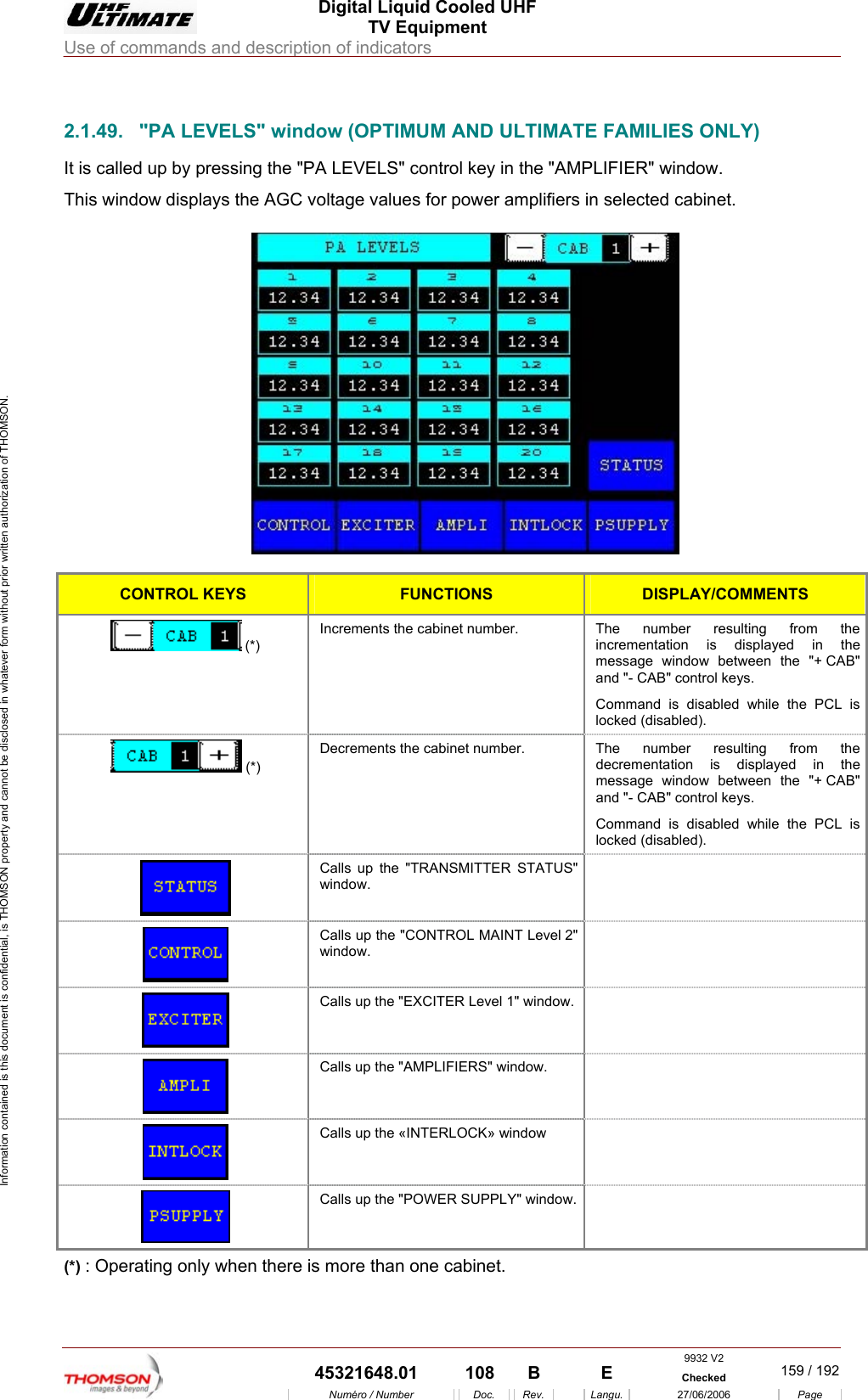
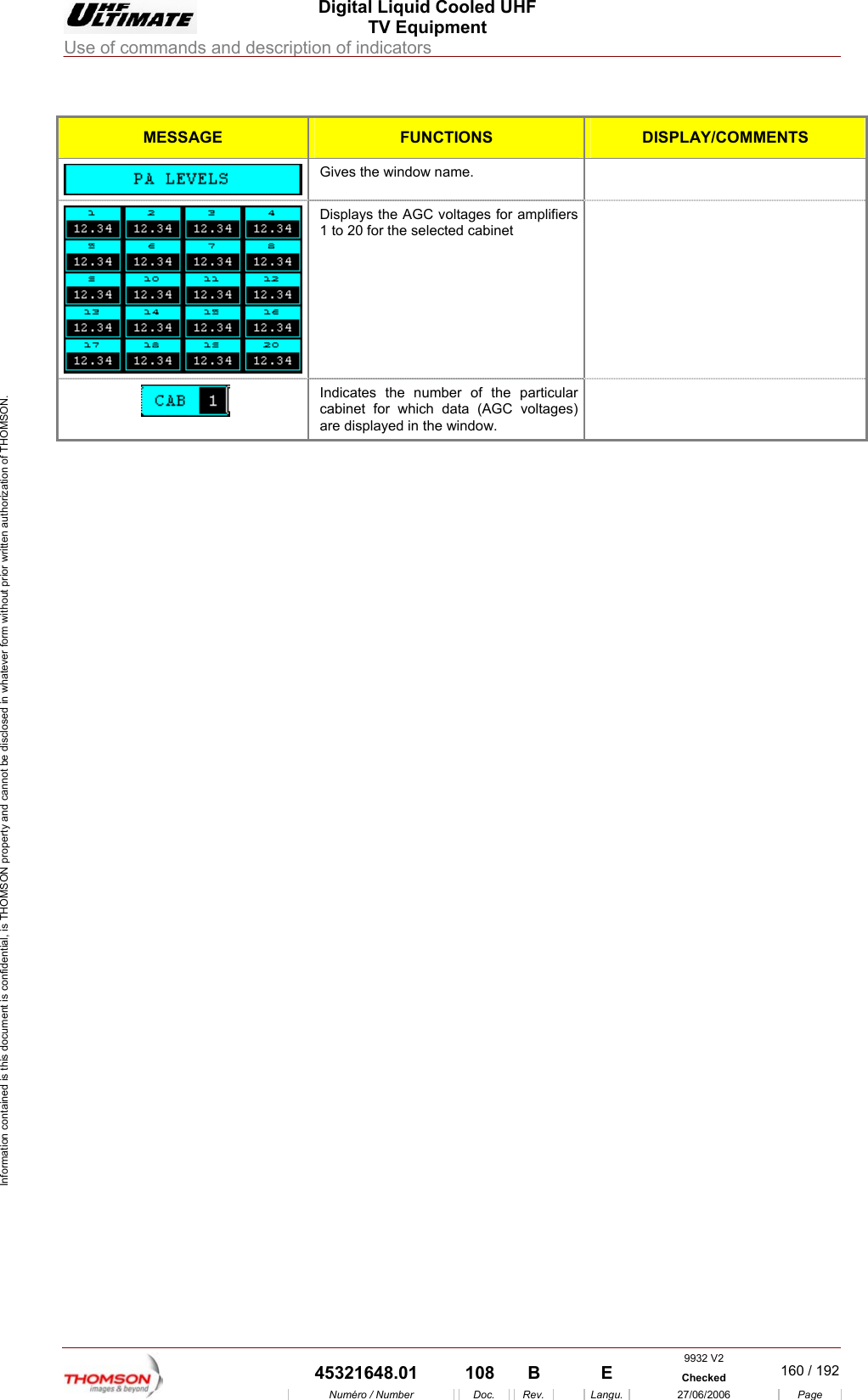
 Digital Liquid Cooled UHF TV Equipment Use of commands and description of indicators  Information contained is this document is confidential, is THOMSON property and cannot be disclosed in whatever form without prior written authorization of THOMSON.                        2.1.49.  "PA LEVELS" window (OPTIMUM AND ULTIMATE FAMILIES ONLY) It is called up by pressing t PThis window displays the AGC voltage values for power amplifiers in selected cabinet.  he "PA LEVELS" control key in the "AM LIFIER" window.   CONTROL KEYS FUNCTIONS DISPLAY/COMMENTS  (*) Increments the cabinet number.  The number resulting from the incrementation is displayed in the message window between the "+ CAB" and "- CAB" control keys. Command is disabled while the PCL is locked (disabled).  (*) Decrements the cabinet number.  The number resulting from the decrementation is displayed in the message window between the "+ CAB" and "- CAB" control keys. Command is disabled while the PCL is locked (disabled).  Calls up the "TRANSMITTER STATUS" window.   Calls up the "CONTROL MAINT Level 2" window.   Calls up the "EXCITER Level 1" window.    Calls up the "AMPLIFIERS" window.    Calls up the «INTERLOCK» window     Calls up the "POWER SUPPLY" window.  (*) : Operating only when there is more than one cabinet. 9932 V2  45321648.01  108  B    E  Checked  159 / 192Numéro / Number Doc. Rev. Langu. 27/06/2006 Page
 Digital Liquid Cooled UHF TV Equipment Use of commands and description of indicators  Information contained is this document is confidential, is THOMSON property and cannot be disclosed in whatever form without prior written authorization of THOMSON.  MESSAGE FUNCTIONS DISPLAY/COMMENTS  Gives the window name.    Displays the AGC voltages for amplifiers 1 to 20 for the selected cabinet   Indicates the number of the particular cabinet for which data (AGC voltages) are displayed in the window.      9932 V2  45321648.01  108  B    E  Checked  160 / 192Numéro / Number Doc. Rev. Langu. 27/06/2006 Page
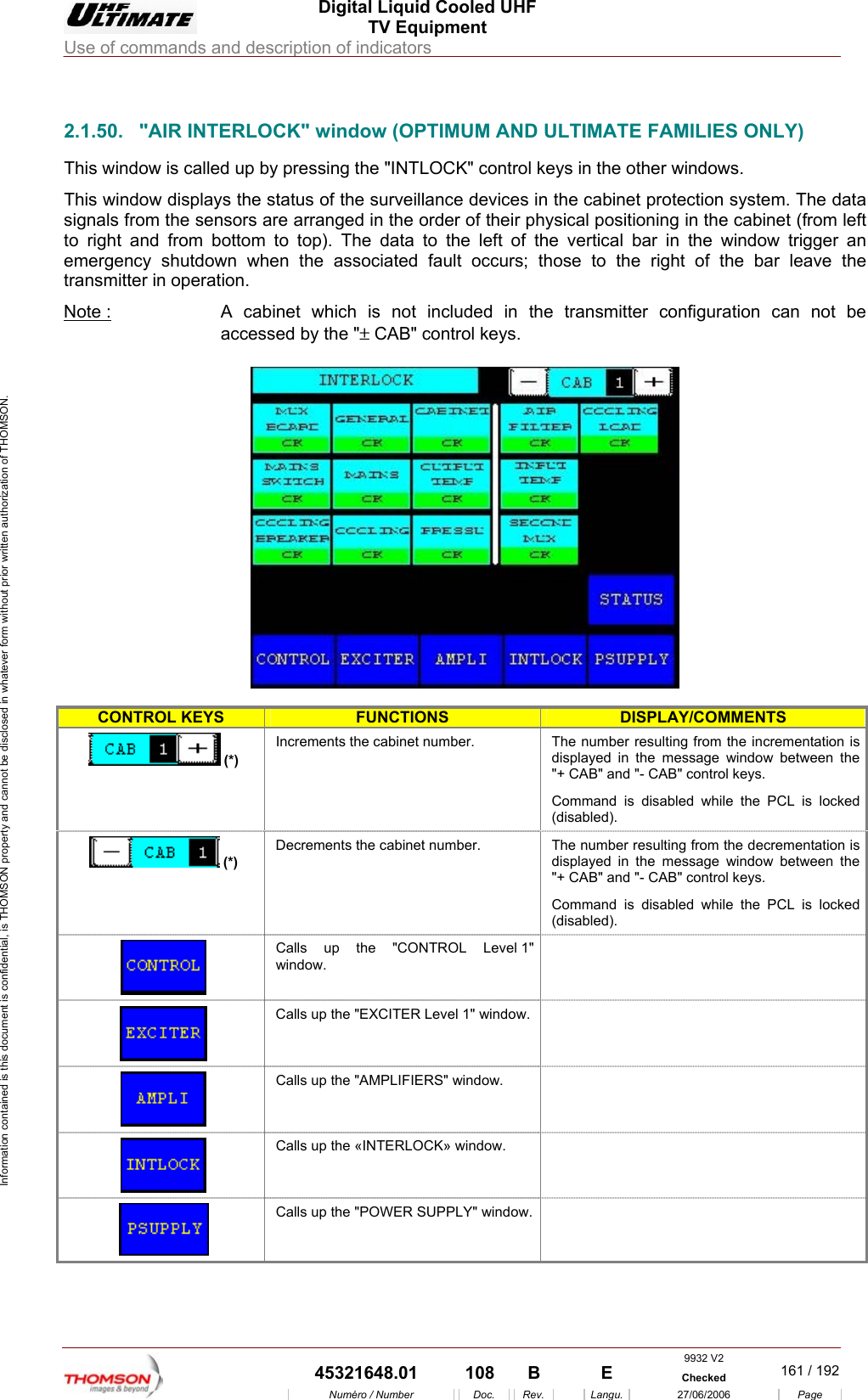
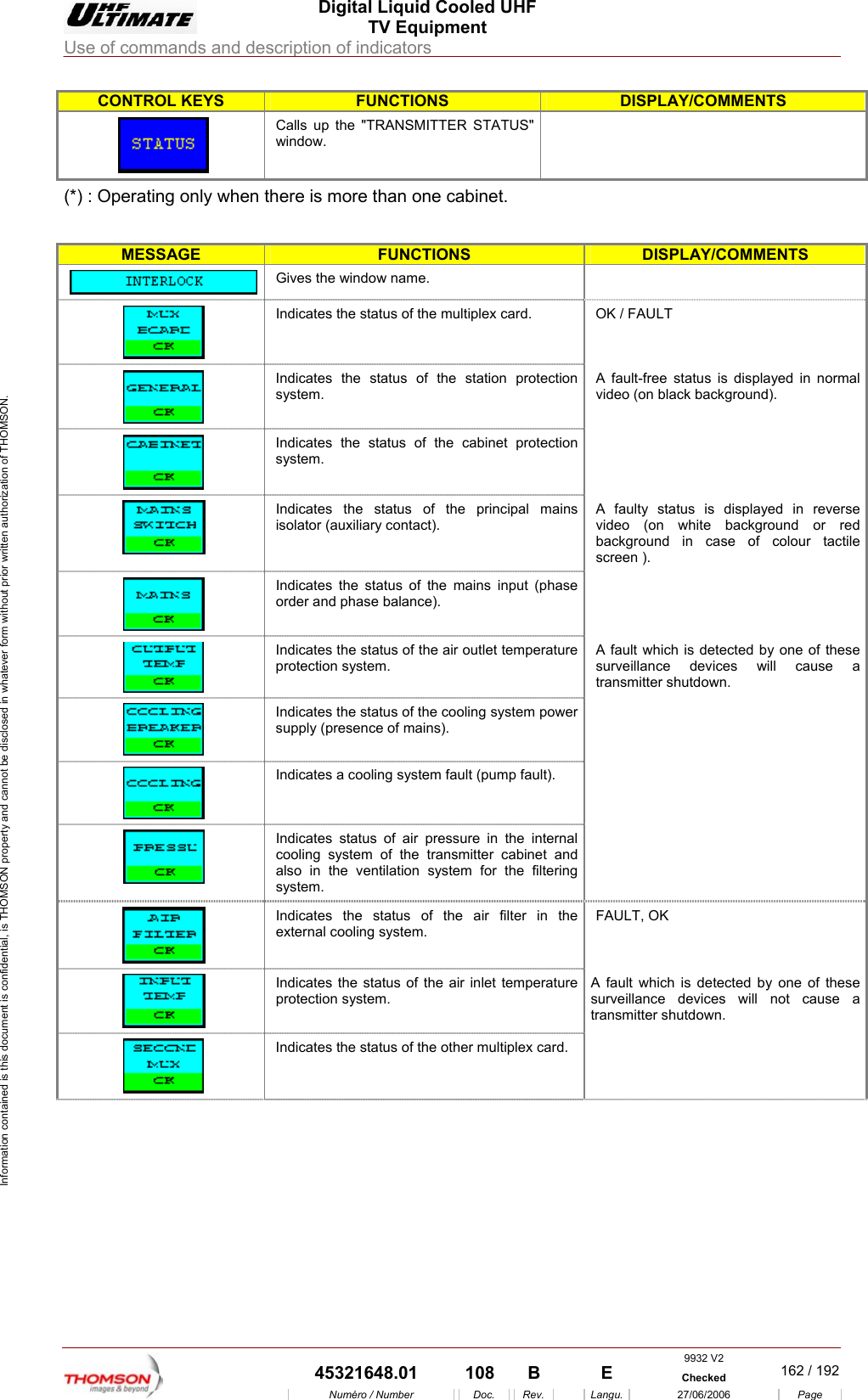
 Digital Liquid Cooled UHF TV Equipment Use of commands and description of indicators  Information contained is this document is confidential, is THOMSON property and cannot be disclosed in whatever form without prior written authorization of THOMSON.                        2.1.50.  "AIR INTERLOCK" window (OPTIMUM AND ULTIMATE FAMILIES ONLY) This window is called up by pressing the "INTLOCK" control keys in the other windows. This window displays the status of the surveillance devices in the cabinet protection system. The data signals from the sensors are arranged in the order of their physical positioning in the cabinet (from left to right and from bottom to top). The data to the left of the vertical bar in the window trigger an emergency shutdown when the associated fault occurs; those to the right of the bar leave the transmitter in operation. Note :  A cabinet which is not included in the transmitter configuration can not be accessed by the "± CAB" control keys.    CONTROL KEYS FUNCTIONS DISPLAY/COMMENTS  (*) Inc mber resulting from the incrementation is displayed in the message window between the "+ CAB" and "- CAB" control keys. Command is disabled while the PCL is locked (disabled). rements the cabinet number.  The nu(*) Decrements the cabinet number.  The number resulting from the decrementation is display d in the message window between the "+ CAB" and "- CAB" control keys. Command is disabled while the PCL is locked (disabled).  e Calls up the "CONTROL Level 1" window.  Calls up the "EXCITER Level 1" window.    Calls up the "AMPLIFIERS"  window.    Calls up the «INTERLOCK» window.    Calls up the "POWER SUPPLY" window.  9932 V2  45321648.01  108  B    E  Checked  161 / 192Numéro / Number Doc. Rev. Langu. 27/06/2006 Page
 Digital Liquid Cooled UHF TV Equipment Use of commands and description of indicators  Information contained is this document is confidential, is THOMSON property and cannot be disclosed in whatever form without prior written authorization of THOMSON. CONTROL KEYS FUNCTIONS DISPLAY/COMMENTS  Calls up the "TRANSMITTER STATUS" window.  (*) : Operating only when there is more than one cabinet.  MESSAGE FUNCTIONS DISPLAY/COMMENTS  Gives the window name.    Indicates the status of the multiplex card.  OK / FAULT  Indicates the status of the station protection system. A fault-free status is displayed in normal video (on black background).  Indicates the status of the cabinet protection system.   isolator (auxiliaryIndicates the status of the principal mains  contact). A faulty status is displayed in reverse video (on white background or red background in case of colour tactile screen ). Indicates the status of the mains input (phase order and phase   balance). Indicates the status of the air outlet temperature protection system. which is detected by one of these surveillance devices will cause a nsmitter shutdown. A fault tra Indicates the status of the cooling system po wer supply (presence of mains).   Indicates a cooling system fault (pump fault).   Indicates status of air pressure in the internal cooling system of the transmitter cabinet and also in the venti lation system for the filtering system.   Indicates the status of the air filter in the external cooling system. FAULT, OK Indicates the status of the air inlet temperature protection system. d by one of these ill not cause a A fault which is detectesurveillance devices wtransmitter shutdown.   Indicates the status of the other multiplex card.   9932 V2  45321648.01  108  B    E  Checked  162 / 192Numéro / Number Doc. Rev. Langu. 27/06/2006 Page
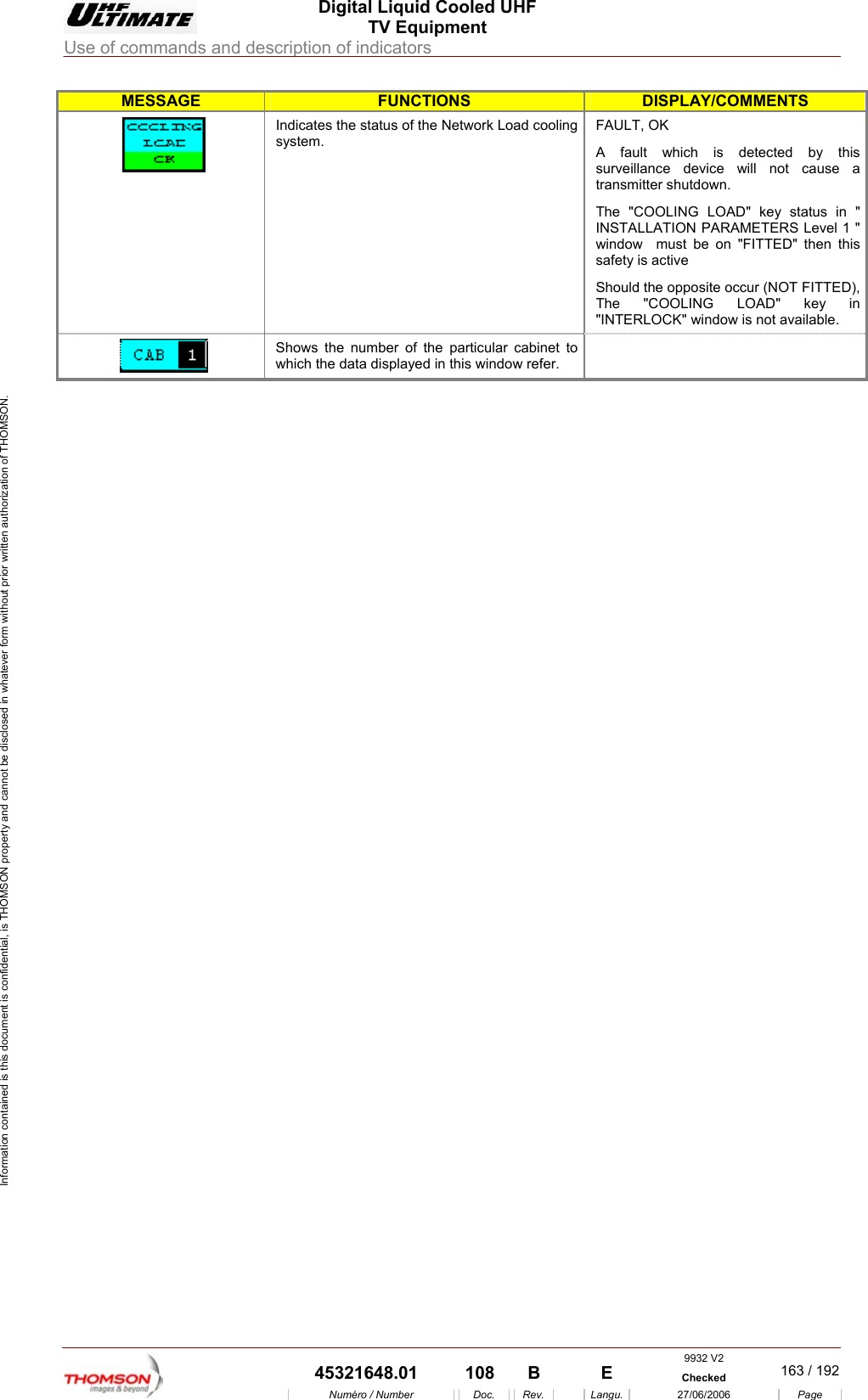
 Digital Liquid Cooled UHF TV Equipment Use of commands and description of indicators  Information contained is this document is confidential, is THOMSON property and cannot be disclosed in whatever form without prior written authorization of THOMSON. MESSAGE FUNCTIONS DISPLAY/COMMENTS Indicates the status of the Net k Load cooling system. FAULT, OK y this se a transmitter shutdown. in " ON PARAMETERS Level 1 " indow  must be on "FITTED" then this safety is active pposite occur (NOT FITTED), The "COOLING LOAD" key in worA fault which is detected bsurveillance device will not cauThe "COOLING LOAD" key status INSTALLATIwShould the o"INTERLOCK" window is not available.  Shows the number of t he particular cabinet to which the data displayed in this window refer.      9932 V2  45321648.01  108  B    E  Checked  163 / 192Numéro / Number Doc. Rev. Langu. 27/06/2006 Page
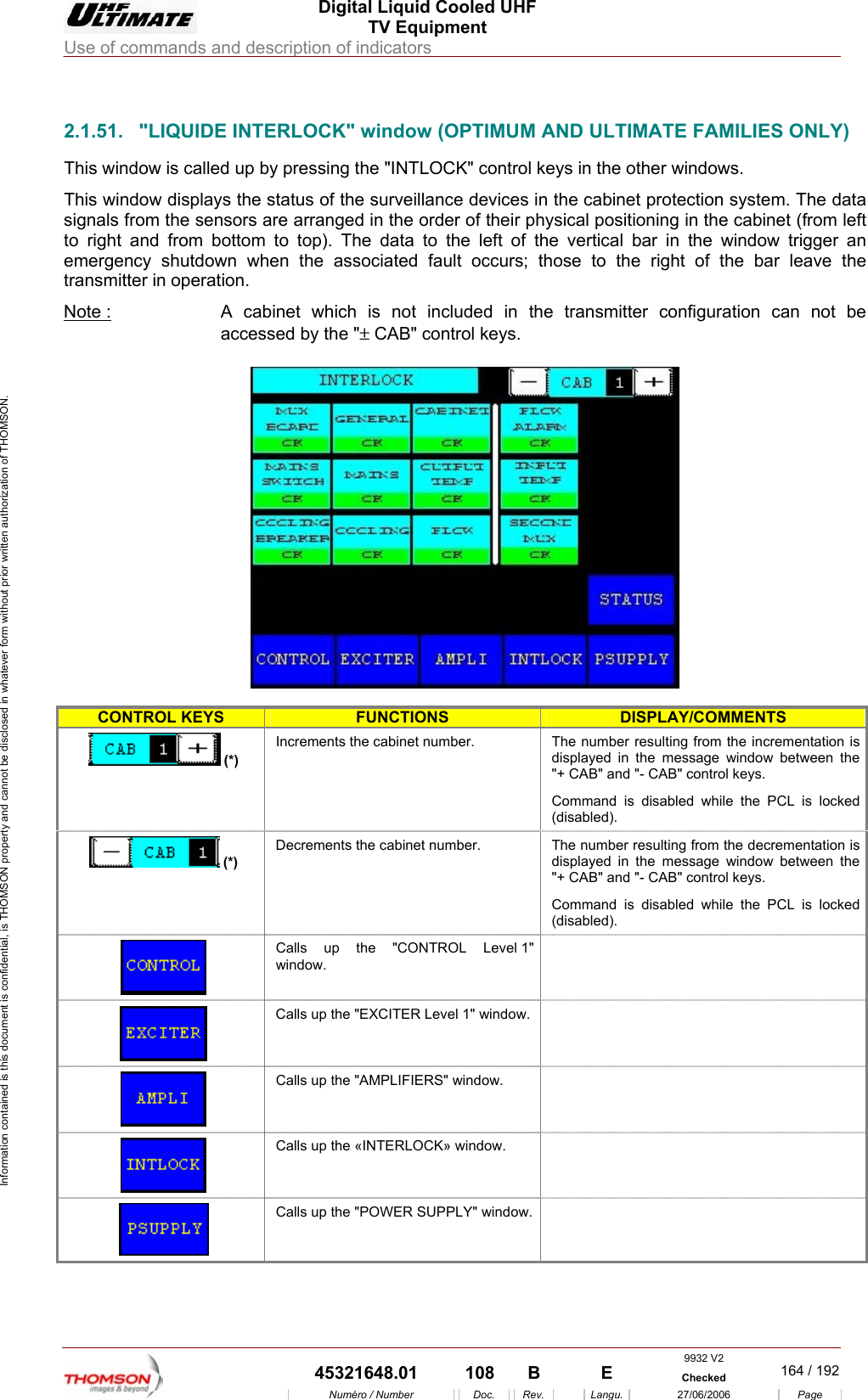
 Digital Liquid Cooled UHF TV Equipment Use of commands and description of indicators  Information contained is this document is confidential, is THOMSON property and cannot be disclosed in whatever form without prior written authorization of THOMSON.                        2.1.51.  "LIQUIDE INTERLOCK" window (OPTIMUM AND ULTIMATE FAMILIES ONLY) up by pressing the "INTLOCK" control keys in the other windows. Thsigto right and  ft of the vertical bar in the window trigger an en the associated fault occurs; those to the right of the bar leave the transmitter in NoThis window is called is window displays the status of the surveillance devices in the cabinet protection system. The data nals from the sensors are arranged in the order of their physical positioning in the cabinet (from left from bottom to top). The data to the leemergency shutdown whoperation. te :  A cabinet which is not included in the transmitter configuration can not be accessed by the "± CAB" control keys.    CONTROL KEYS FUNCTIONS DISPLAY/COMMENTS  (*) The numdisplaye"+ CAB l keys. Command is disabled while the PCL is locked (disabled). Increments the cabinet number.  ber resulting from the incrementation is d in the message window between the " and "- CAB" contro(*) Decrements the cabinet number.  The number resulting from the decrementation is displaye"+ CABCommand is disabled while the PCL is locked (disabled).  d in the message window between the " and "- CAB" control keys.  Calls up the "CONTROL Level 1" window.  Calls up the "EXCITER Level 1" window.   Calls up the "AMPLIFIERS" window.     Calls up the «INTERLOCK» window.    Calls up the "POWER SUPPLY" window.  9932 V2  45321648.01  108  B    E  Checked  164 / 192Numéro / Number Doc. Rev. Langu. 27/06/2006 Page
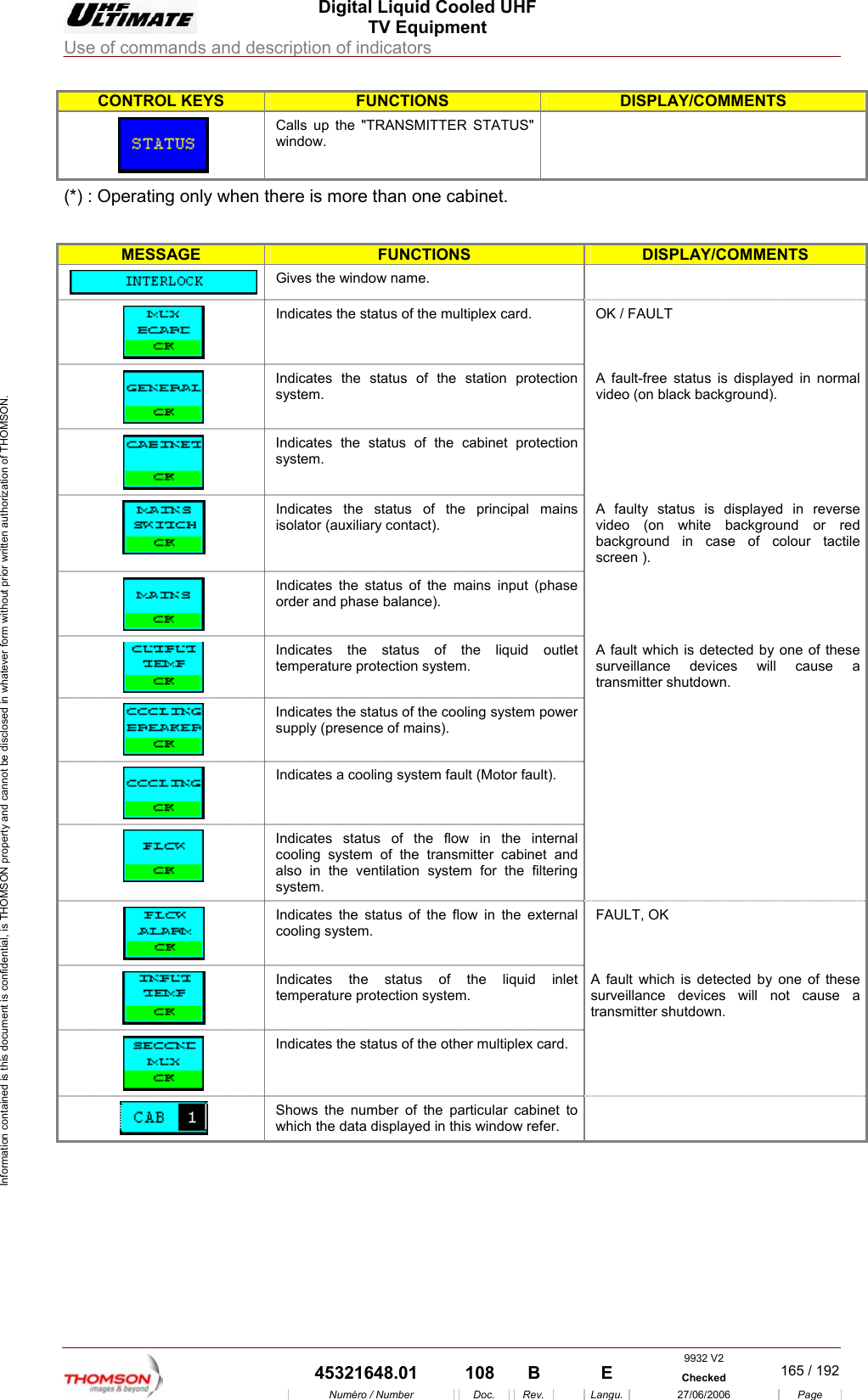
 Digital Liquid Cooled UHF TV Equipment Use of commands and description of indicators  Information contained is this document is confidential, is THOMSON property and cannot be disclosed in whatever form without prior written authorization of THOMSON. CONTROL KEYS FUNCTIONS DISPLAY/COMMENTS Calls up the "TRANSwindow.  MITTER STATUS"   (*) : Operating only wh  is en there  more than one cabinet. MESSAGE FUNCTIONS DISPLAY/COMMENTS  Gives the window name.    Indicates the status of the multiplex card.  OK / FAULT  Indicates the status of the station protection system. A fault-free status is displayed in normal video (on black background).  Indicates the status of the cabinet protection system.   Indicates the status of the principal mains isolator (auxiliary contact). A faulty status is displayed in reverse video (on white background or red background in case of colour tactile screen ).  Indicates the status of the mains input (phase order and phase balance).   Indicates the status of the liquid outlet temperature protection system. A fault which is detected by one of these surveillance devices will cause a transmitter shutdown.  Indicates the status of the cooling system power supply (presence of mains).   Indicates a cooling system fault (Motor fault).    Indicates status of the flow in the internal cooling system of the transmitter cabinet and also in the ventilation system for the filtering system.   Indicates the status of the flow in the external cooling system. FAULT, OK  Indicates the status of the liquid inlet temperature protection system. A fault which is detected by one of these surveillance devices will not cause a transmitter shutdown.  Indicates the status of the other multiplex card.    Shows the number of the particular cabinet to which the data displayed in this window refer.      9932 V2  45321648.01  108  B    E  Checked  165 / 192Numéro / Number Doc. Rev. Langu. 27/06/2006 Page
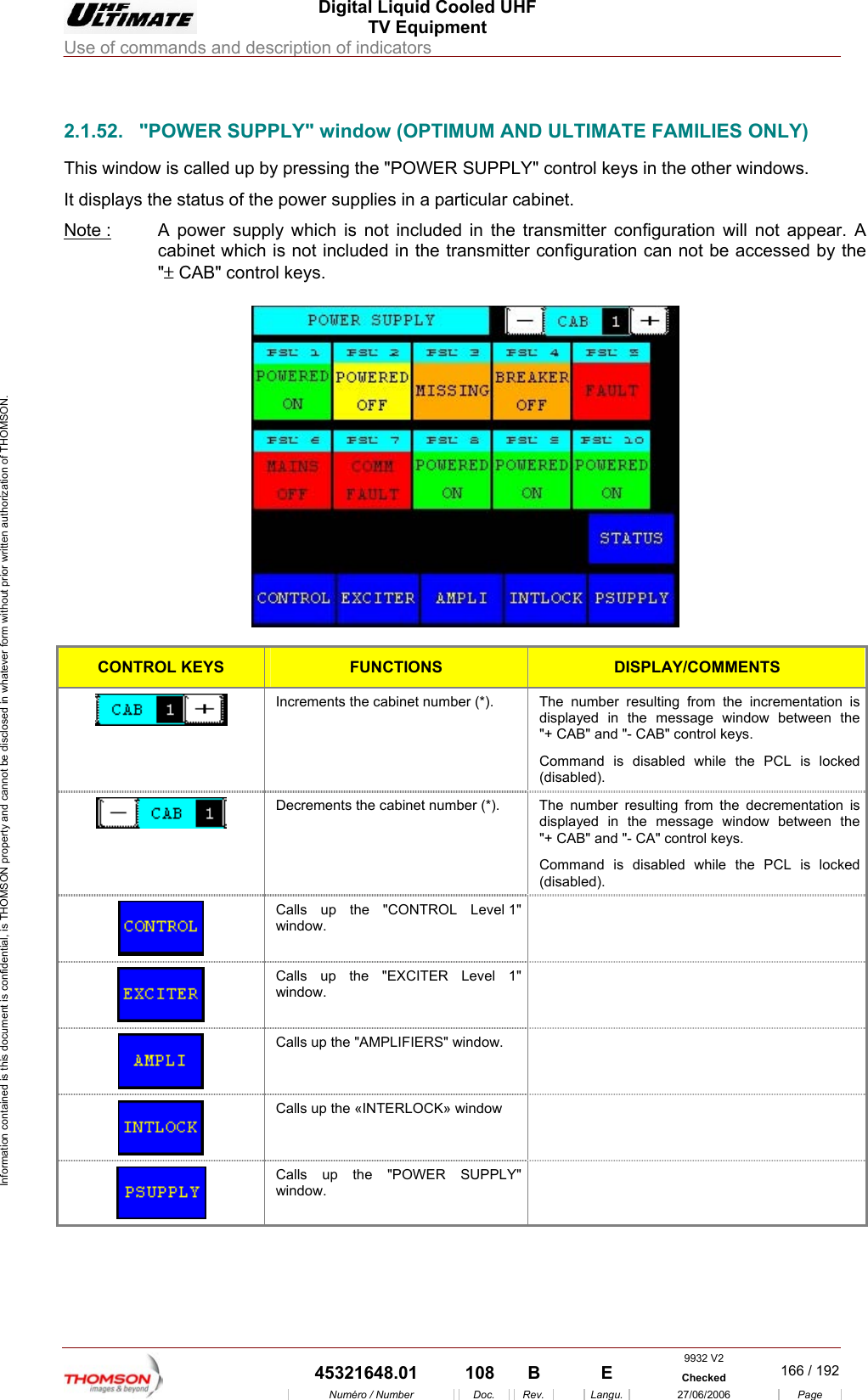
 Digital Liquid Cooled UHF TV Equipment Use of commands and description of indicators  Information contained is this document is confidential, is THOMSON property and cannot be disclosed in whatever form without prior written authorization of THOMSON.                        2.1.52.  "POWER SUPPLY" window (OPTIMUM AND ULTIMATE FAMILIES ONLY) This window is called up by pressing the "POWER SUPPLY" control keys in the other windows. It displays the status of the power supplies in a particular cabinet. Note :  A power supply which is not included in the transmitter configuration will not appear. A cabinet which is not included in the transmitter configuration can not be accessed by the "± CAB" control keys.    CONTROL KEYS FUNCTIONS DISPLAY/COMMENTS  Increments the cabinet number (*).  The number resulting from the incrementation is displayed in the message window between the "+ CAB" and "- CAB" control keys. Command is disabled while the PCL is locked (disabled).  Decrements the cabinet number (*).  The  number resulting from the decrementation is displayed in the message window between the "+ CAB" and "- CA" control keys. Command is disabled while the PCL is locked (disabled).  Calls up the "CONTROL Level 1" window.   Calls up the "EXCITER Level 1" window.   Calls up the "AMPLIFIERS" window.    Calls up the «INTERLOCK» window    Calls up the "POWER SUPPLY" window.  9932 V2  45321648.01  108  B    E  Checked  166 / 192Numéro / Number Doc. Rev. Langu. 27/06/2006 Page
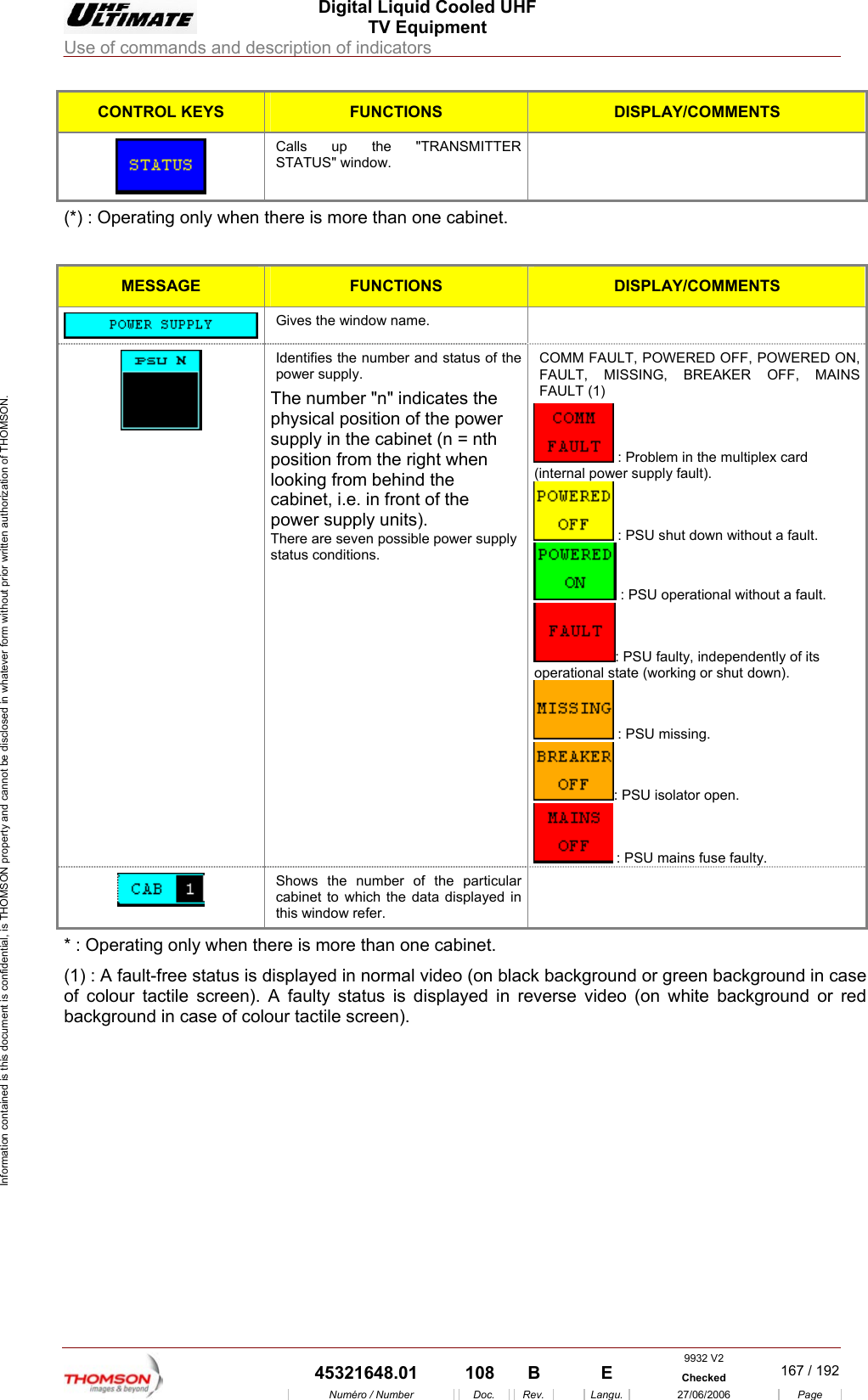
 Digital Liquid Cooled UHF TV Equipment Use of commands and description of indicators  Information contained is this document is confidential, is THOMSON property and cannot be disclosed in whatever form without prior written authorization of THOMSON. CONTROL KEYS FUNCTIONS DISPLAY/COMMENTS  Calls up the "TRANSMITTER STATUS" window.  (*) : Operating only when there is more than one cabinet.  MESSAGE FUNCTIONS DISPLAY/COMMENTS  Gives the window name.   Identifies the number and status of the power supply. The number "n" indicates the physical position of the power supply in the cabinet (n = nth position from the right when looking from behind the cabinet, i.e. in front of the power supply units). There are seven possible power supply status conditions. COMM FAULT, POWERED OFF, POWERED ON, FAULT, MISSING, BREAKER OFF, MAINS FAULT (1)   : Problem in the multiplex card (internal power supply fault).  : PSU shut down without a fault.  : PSU operational without a fault. : PSU faulty, independently of its operational state (working or shut down).  : PSU missing. : PSU isolator open.  : PSU mains fuse faulty.  Shows the number of the particular cabinet to which the data displayed in this window refer.  * : Operating only when there is more than one cabinet. (1) : A fault-free status is displayed in normal video (on black background or green background in case of colour tactile screen). A faulty status is displayed in reverse video (on white background or red background in case of colour tactile screen).    9932 V2  45321648.01  108  B    E  Checked  167 / 192Numéro / Number Doc. Rev. Langu. 27/06/2006 Page
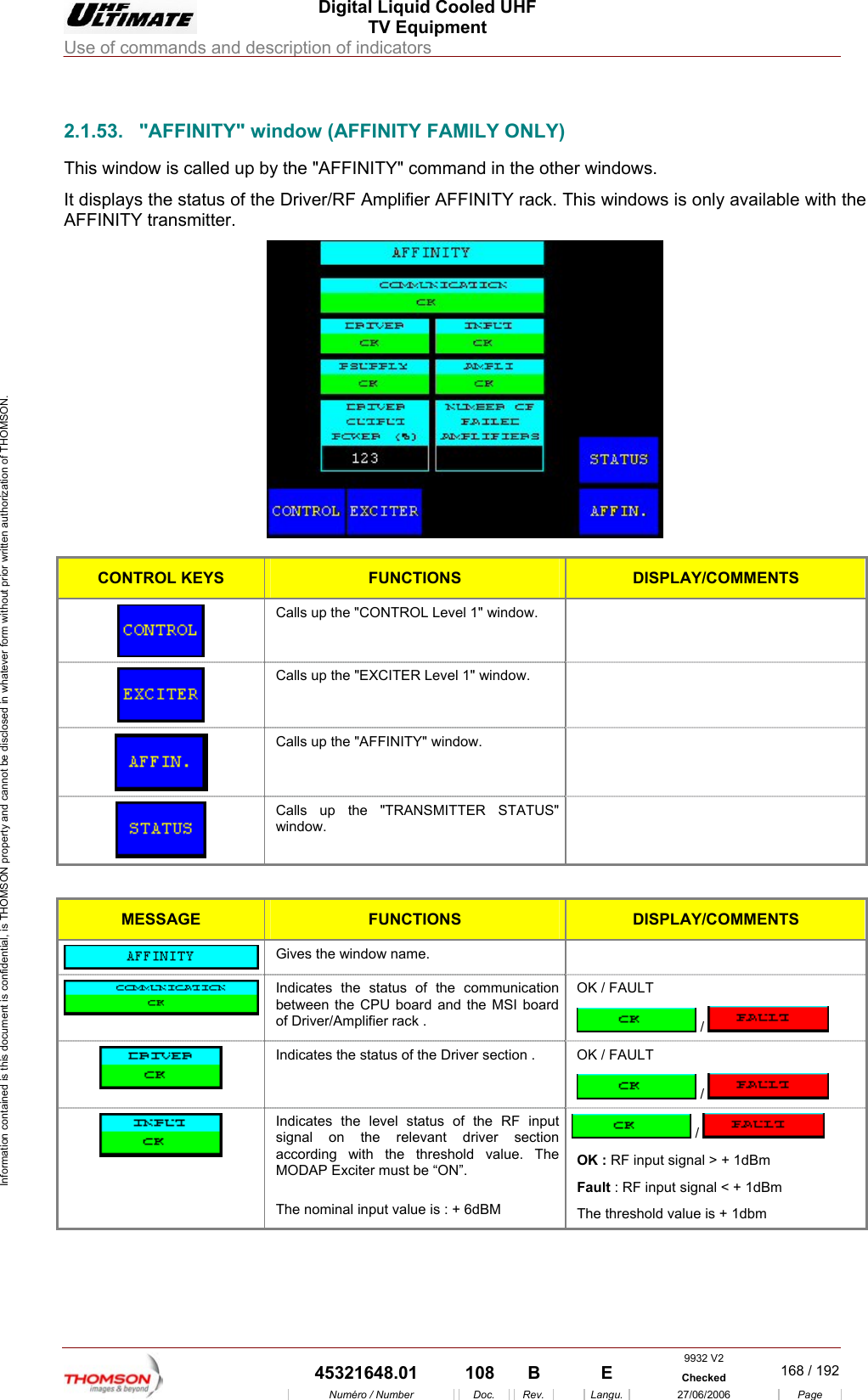
 Digital Liquid Cooled UHF TV Equipment Use of commands and description of indicators  Information contained is this document is confidential, is THOMSON property and cannot be disclosed in whatever form without prior written authorization of THOMSON.                        2.1.53.  "AFFINITY" window (AFFINITY FAMILY ONLY) This window is called up by the "AFFINITY" command in the other windows. It displays the status of the Driver/RF Amplifier AFFINITY rack. This windows is only available with the AFFINITY transmitter.   CONTROL KEYS FUNCTIONS DISPLAY/COMMENTS  Calls up the "CONTROL Level 1" window.    Calls up the "EXCITER Level 1" window.    Calls up the "AFFINITY" window.    Calls up the "TRANSMITTER STATUS" window.   MESSAGE FUNCTIONS DISPLAY/COMMENTS  Gives the window name.    Indicates the status of the communication between the CPU board and the MSI board of Driver/Amplifier rack . OK / FAULT  /    Indicates the status of the Driver section .  OK / FAULT  /    Indicates the level status of the RF input signal on the relevant driver section according with the threshold value. The MODAP Exciter must be “ON”.  The nominal input value is : + 6dBM  /   OK : RF input signal > + 1dBm Fault : RF input signal < + 1dBm  The threshold value is + 1dbm 9932 V2  45321648.01  108  B    E  Checked  168 / 192Numéro / Number Doc. Rev. Langu. 27/06/2006 Page
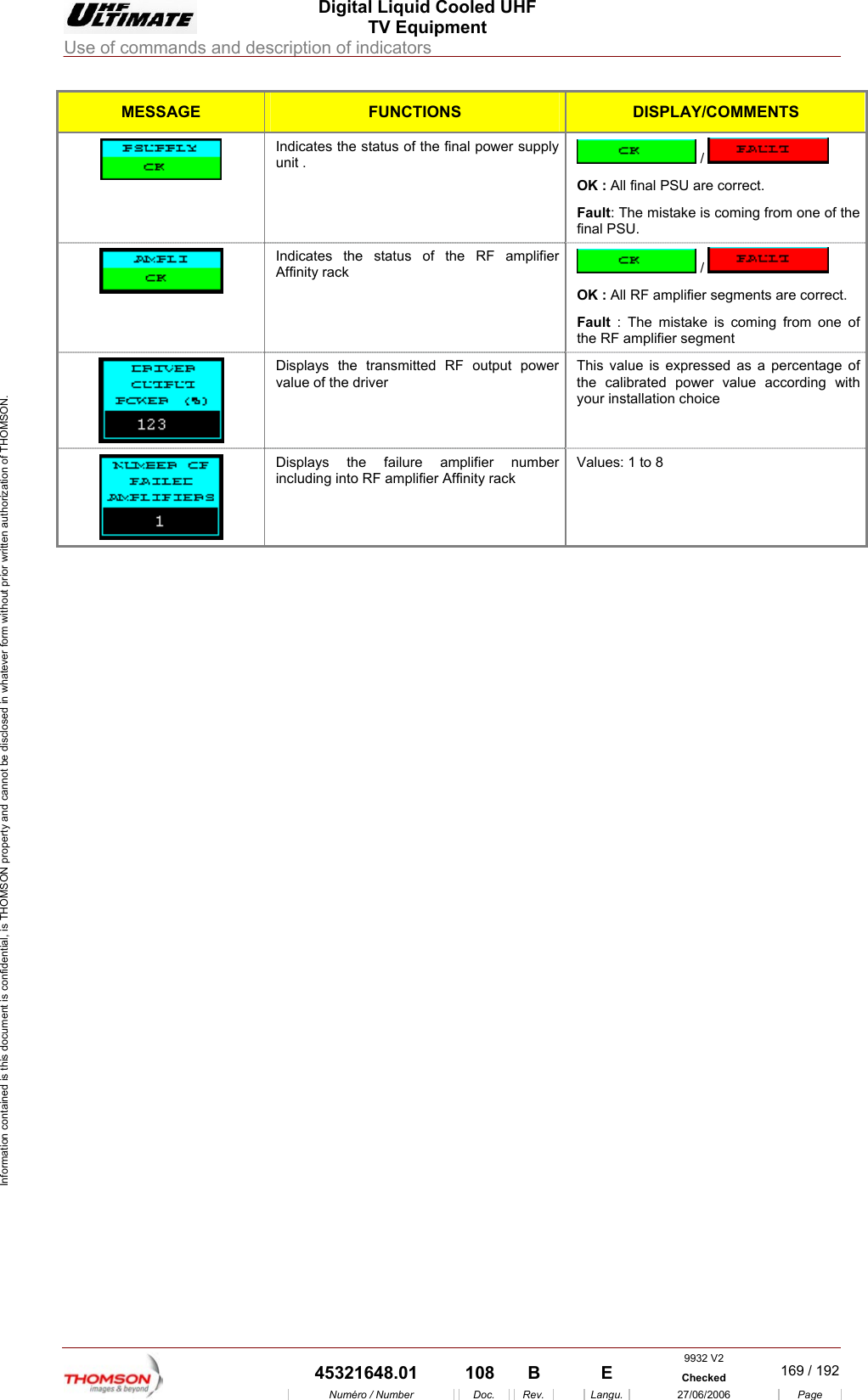
 Digital Liquid Cooled UHF TV Equipment Use of commands and description of indicators  Information contained is this document is confidential, is THOMSON property and cannot be disclosed in whatever form without prior written authorization of THOMSON. MESSAGE FUNCTIONS DISPLAY/COMMENTS Indicates the status of the final power supply  unit .   /   OK : All final PSU are correct. Fault: The mistake is coming from one of the final PSU.  Indicates the status of the RF amplifier Affinity rack   /   OK : All RF amplifier segments are correct. Fault : The mistake is coming from one of  the RF amplifier segment  Displays the transmitted RF output power value of the driver  This value is expressed as a percentage of the calibrated power value according with your installation choice  Displays the failure amplifier number including into RF amplifier Affinity rack Values: 1 to 8     9932 V2  45321648.01  108  B    E  Checked  169 / 192Numéro / Number Doc. Rev. Langu. 27/06/2006 Page
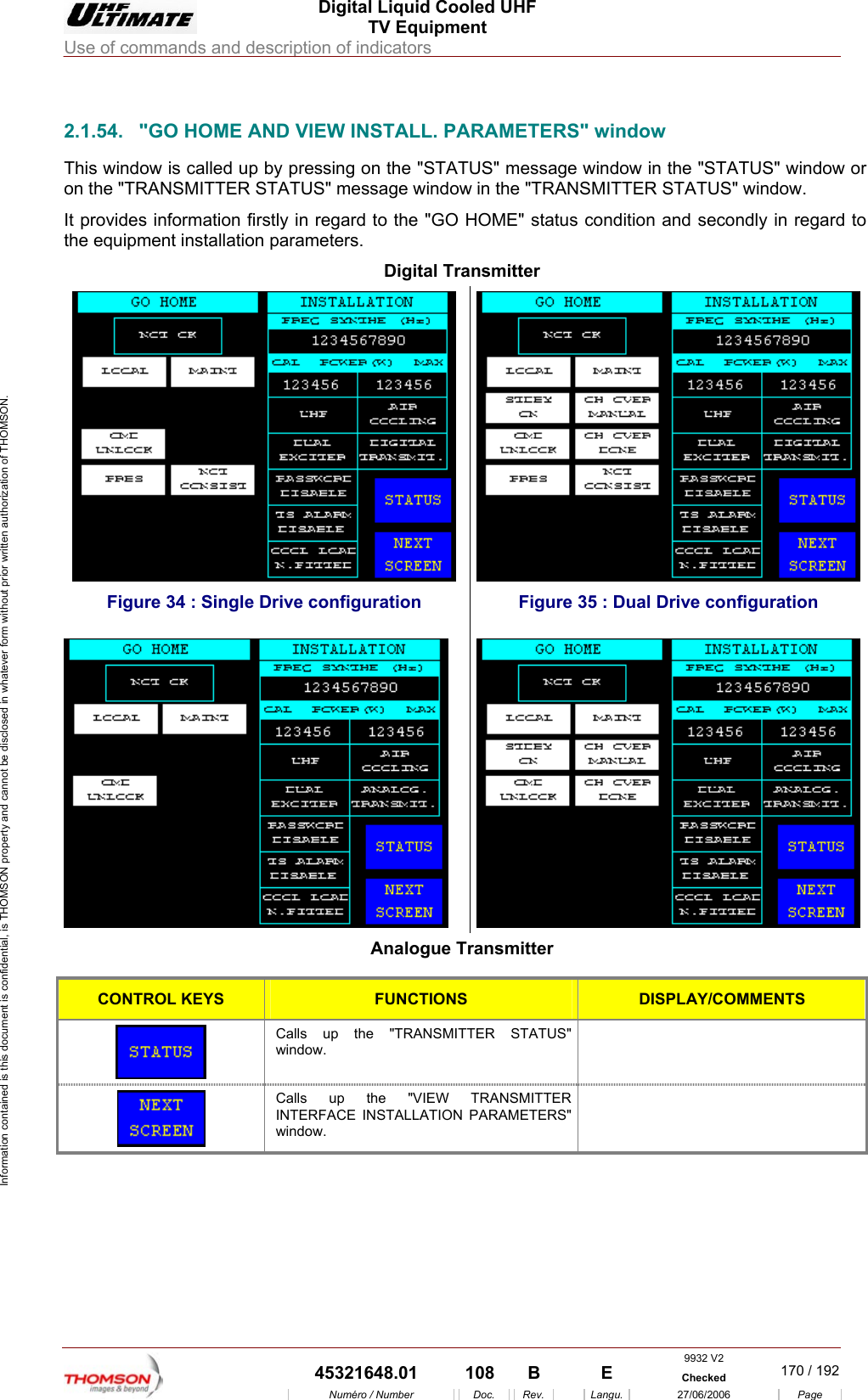
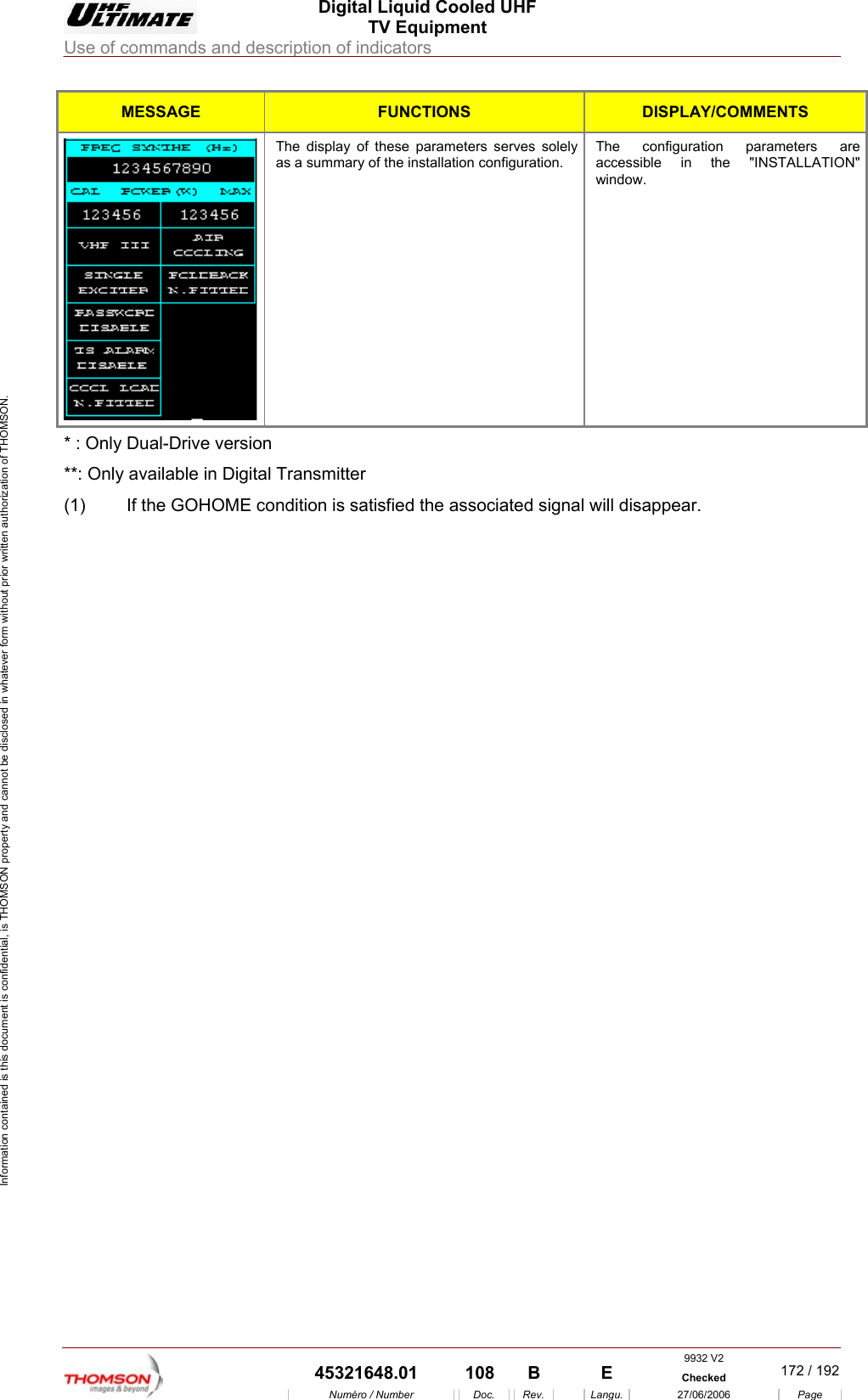
 Digital Liquid Cooled UHF TV Equipment Use of commands and description of indicators  Information contained is this document is confidential, is THOMSON property and cannot be disclosed in whatever form without prior written authorization of THOMSON.                        2.1.54.  "GO HOME AND VIEW INSTALL. PARAMETERS" window This window is called up by pressing on the "STATUS" message window in the "STATUS" window or ATUS" message window in the "TRANSMITTER STATUS" window. It provides information firstly in regard to the "GO HOME" status condition and secondly in regard to the equipment installation parameters. Digital Transmitter on the "TRANSMITTER ST Figure 34 : Single Drive configuration  Figure 35 : Dual Drive configuration  Analogue Transmitter  CONTROL KEYS FUNCTIONS DISPLAY/COMMENTS Calls up the "TRANSMIwindow. TTER STATUS"    Calls up the "VIEW TRANSMITTER INTERFA ON PARAMETERS" window.   CE INSTALLATI 9932 V2  45321648.01  108  B    E  Checked  170 / 192Numéro / Number Doc. Rev. Langu. 27/06/2006 Page
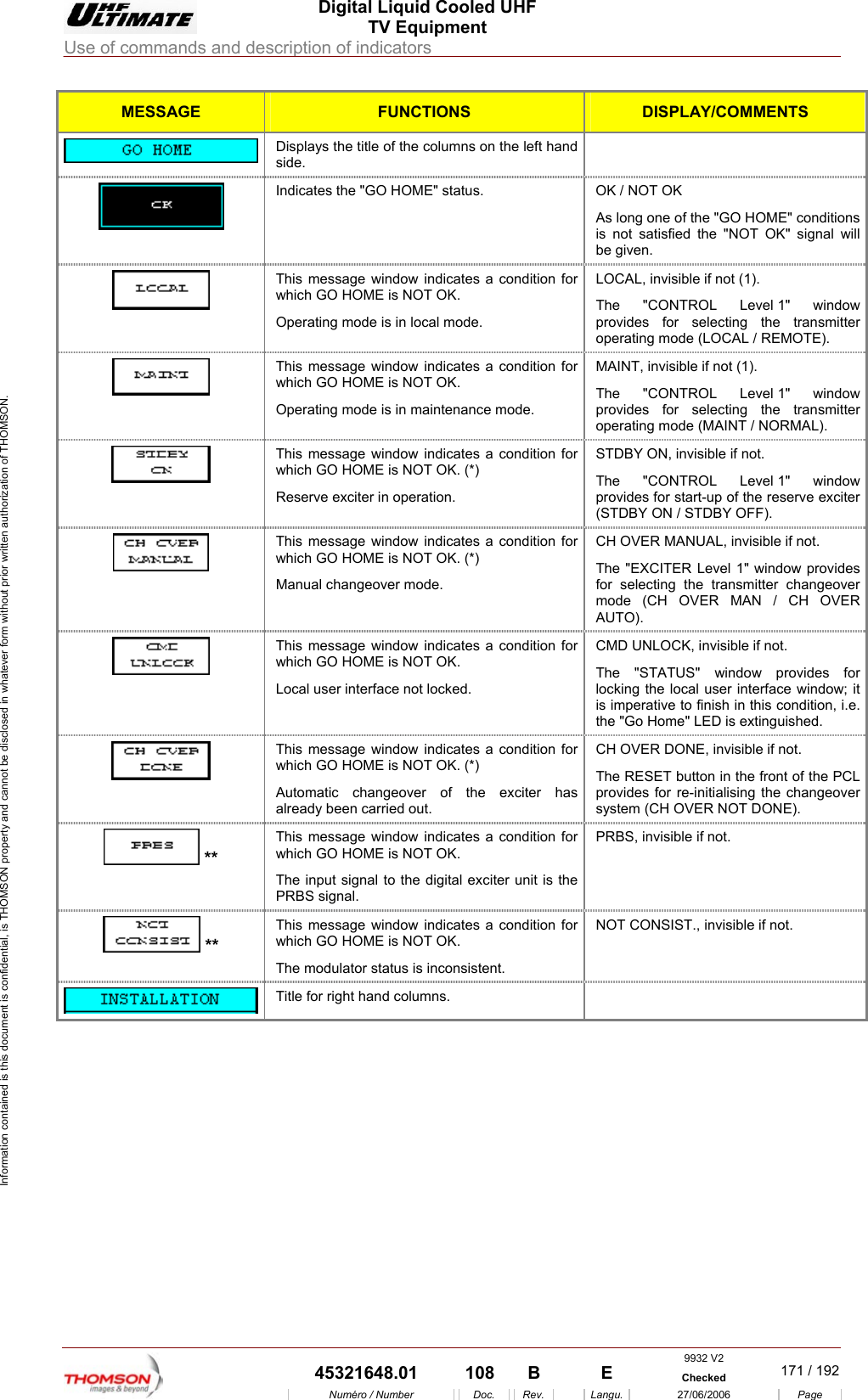
 Digital Liquid Cooled UHF TV Equipment Use of commands and description of indicators  Information contained is this document is confidential, is THOMSON property and cannot be disclosed in whatever form without prior written authorization of THOMSON. MESSAGE FUNCTIONS DISPLAY/COMMENTS  Displays the title of the columns on the left hand side.  Indicates OK / NOT OK itions is not satisfied the "NOT OK" signal will  the "GO HOME" status.  As long one of the "GO HOME" condbe given. This meswhich GOOperating mode is in local mode.  Level 1" window provides for selecting the transmitter operating mode (LOCAL / REMOTE). sage window indicates a condition for  HOME is NOT OK. LOCAL, invisible if not (1). The "CONTROL  This message window indicates a condition for which GO HOME is NOT OK. Operating mode is in maintenance mode. MAINT, invisible if not (1). The "CONTROL Level 1" window provides for selecting the transmitter operating mode (MAINT / NORMAL).  This message window indicates a condition for which GO HOME is NOT OK. (*) Reserve exciter in operation. STDBY ON, invisible if not. The "CONTROL Level 1" window provides for start-up of the reserve exciter (STDBY ON / STDBY OFF).  This message window indicates a condition for which GO HOME is NOT OK. (*) Manual changeover mode. CH OVER MANUAL, invisible if not. The "EXCITER Level 1" window provides for selecting the transmitter changeover mode (CH OVER MAN / CH OVER AUTO). This message window indicates a condition for which GO HOME is NOT OK.  CMD UNLOCK, invisible if not.  Local user interface not locked.  locking the local user interface window; it is imperative to finish in this condition, i.e. The "STATUS" window provides for the "Go Home" LED is extinguished.  which GO HOME is NOT OKAutomatic changeoThis message window indicates a condition for . (*) ver of the exciter has CH OVER DONE, invisible if not. The RESET button in the front of the PCL provides for re-initialising the changeover system (CH OVER NOT DONE). already been carried out.  ** whThis message window indicates a condition for ich GO HOME is NOT OK. The input signal to the digital exciter unit is the RBS sigPRBS, invisible if not. P nal.  ** This meswhich GOThe modusage window indicates a condition for  HOME is NOT OK. NOT CONSIST., invisible if not. lator status is inconsistent.  Title for right hand columns.   9932 V2  45321648.01  108  B    E  Checked  171 / 192Numéro / Number Doc. Rev. Langu. 27/06/2006 Page
 Digital Liquid Cooled UHF TV Equipment Use of commands and description of indicators  Information contained is this document is confidential, is THOMSON property and cannot be disclosed in whatever form without prior written authorization of THOMSON. MESSAGE FUNCTIONS DISPLAY/COMMENTS  The display of these parameters serves solely as a summary of the installation configuration. The configuration parameters are accessible in the "INSTALLATION" window. * : Only Dual-Drive version **: Only available in Digital Transmitter  (1)  If the GOHOME condition is satisfied the associated signal will disappear.    9932 V2  45321648.01  108  B    E  Checked  172 / 192Numéro / Number Doc. Rev. Langu. 27/06/2006 Page
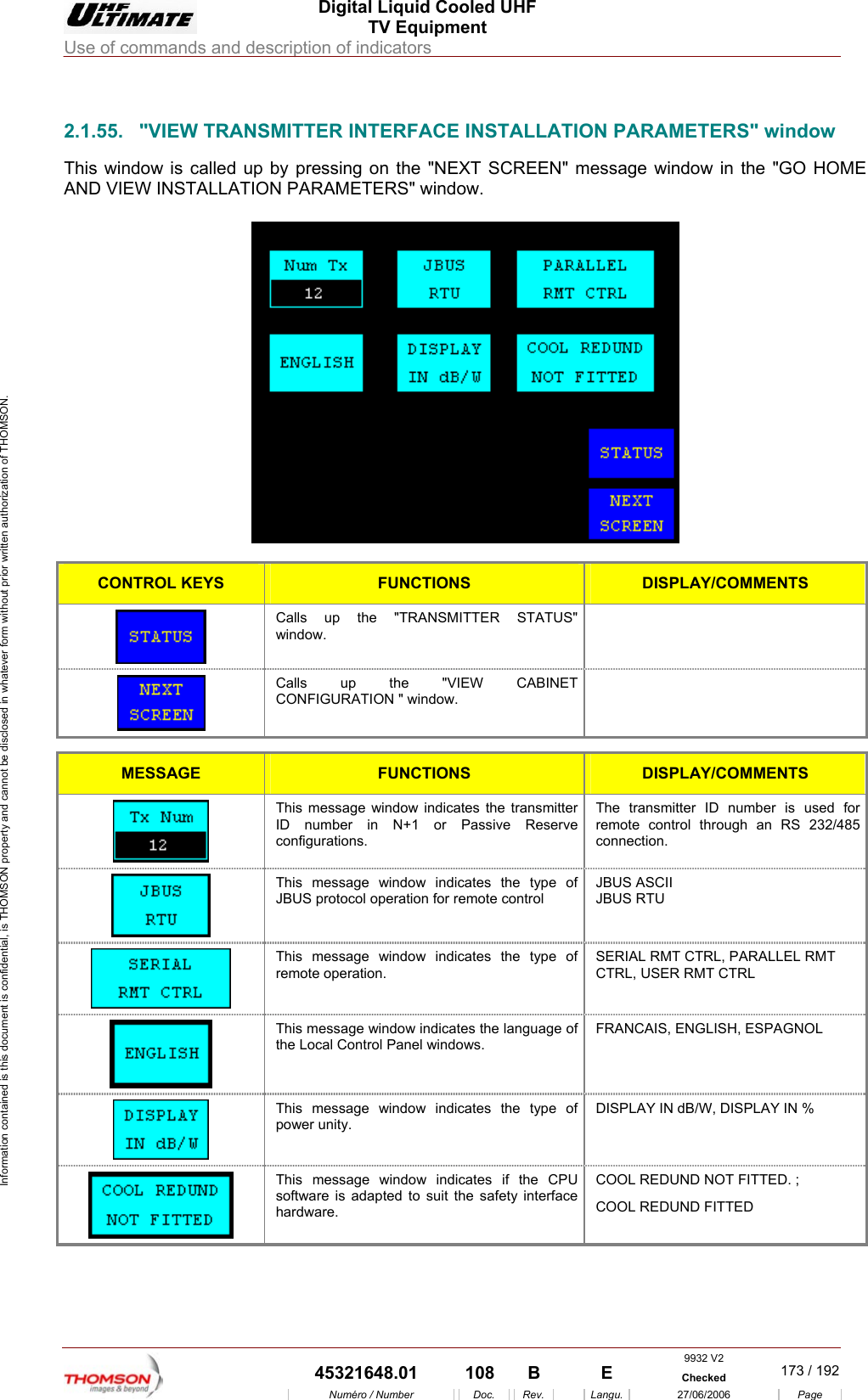
 Digital Liquid Cooled UHF TV Equipment Use of commands and description of indicators  Information contained is this document is confidential, is THOMSON property and cannot be disclosed in whatever form without prior written authorization of THOMSON.                        2.1.55.  "VIEW TRANSMITTER INTERFACE INSTALLATION PARAMETERS" window This window is called up by pressing on the "NEXT SCREEN" message window in the "GO HOME AND VIEW INSTALLATION PARAMETERS" window.    CONTROL KEYS FUNCTIONS DISPLAY/COMMENTS  Calls up the "TRANSMITTER STATUS" window.  Calls up the  "VIEW CABINET CONFIGURATION " window.   MESSAGE FUNCTIONS DISPLAY/COMMENTS  This message window indicates the transmitter ID number in N+1 or Passive Reserve configurations. The transmitter ID number is used for remote control through an RS 232/485 connection.  This message window indicates the type of JBUS protocol operation for remote control JBUS ASCII JBUS RTU  This message window indicates the type of remote operation. SERIAL RMT CTRL, PARALLEL RMT CTRL, USER RMT CTRL   This message window indicates the language of the Local Control Panel windows. FRANCAIS, ENGLISH, ESPAGNOL  This message window indicates the type of power unity. DISPLAY IN dB/W, DISPLAY IN %  This message window indicates if the CPU software is adapted to suit the safety interface hardware. COOL REDUND NOT FITTED. ; COOL REDUND FITTED     9932 V2  45321648.01  108  B    E  Checked  173 / 192Numéro / Number Doc. Rev. Langu. 27/06/2006 Page
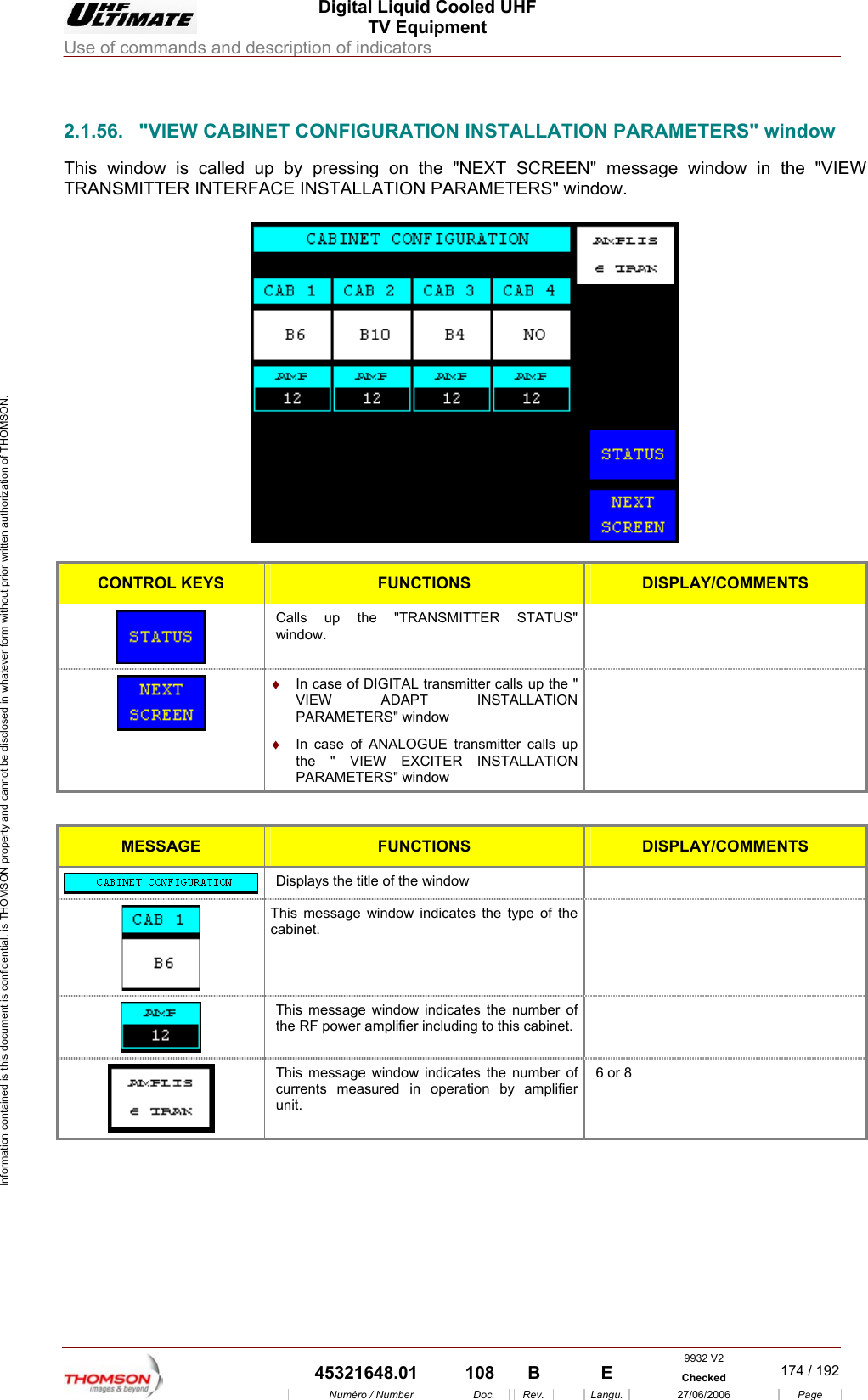
 Digital Liquid Cooled UHF TV Equipment Use of commands and description of indicators  Information contained is this document is confidential, is THOMSON property and cannot be disclosed in whatever form without prior written authorization of THOMSON.                        2.1.56.  "VIEW CABINET CONFIGURATION INSTALLATION PARAMETERS" window This window is called up by pressing on the "NEXT SCREEN" message window in the "VIEW TRANSMITTER INTERFACE INSTALLATION PARAMETERS" window.    CONTROL KEYS FUNCTIONS DISPLAY/COMMENTS Calls up the "TRANSMITTER STATUS" window.   ♦  In case of DIGITAL transmitter calls up the " VIEW ADAPT INSTALLATION PARAMETERS" window ♦  In case of ANALOGUE transmitter calls up NSTALLATION   the " VIEW EXCITER IPARAMETERS" window  MESSA  GE FUNCTIONS DISPLAY/COMMENTS  Displays the title of the window    This message window indicates the type of the cabinet.  This message window indicates the number of F power amplifier including to this cabinet.  the R This message window  indicates the number of currents measured in operation by amplifier unit.  6 or 8      9932 V2  45321648.01  108  B    E  Checked  174 / 192Numéro / Number Doc. Rev. Langu. 27/06/2006 Page
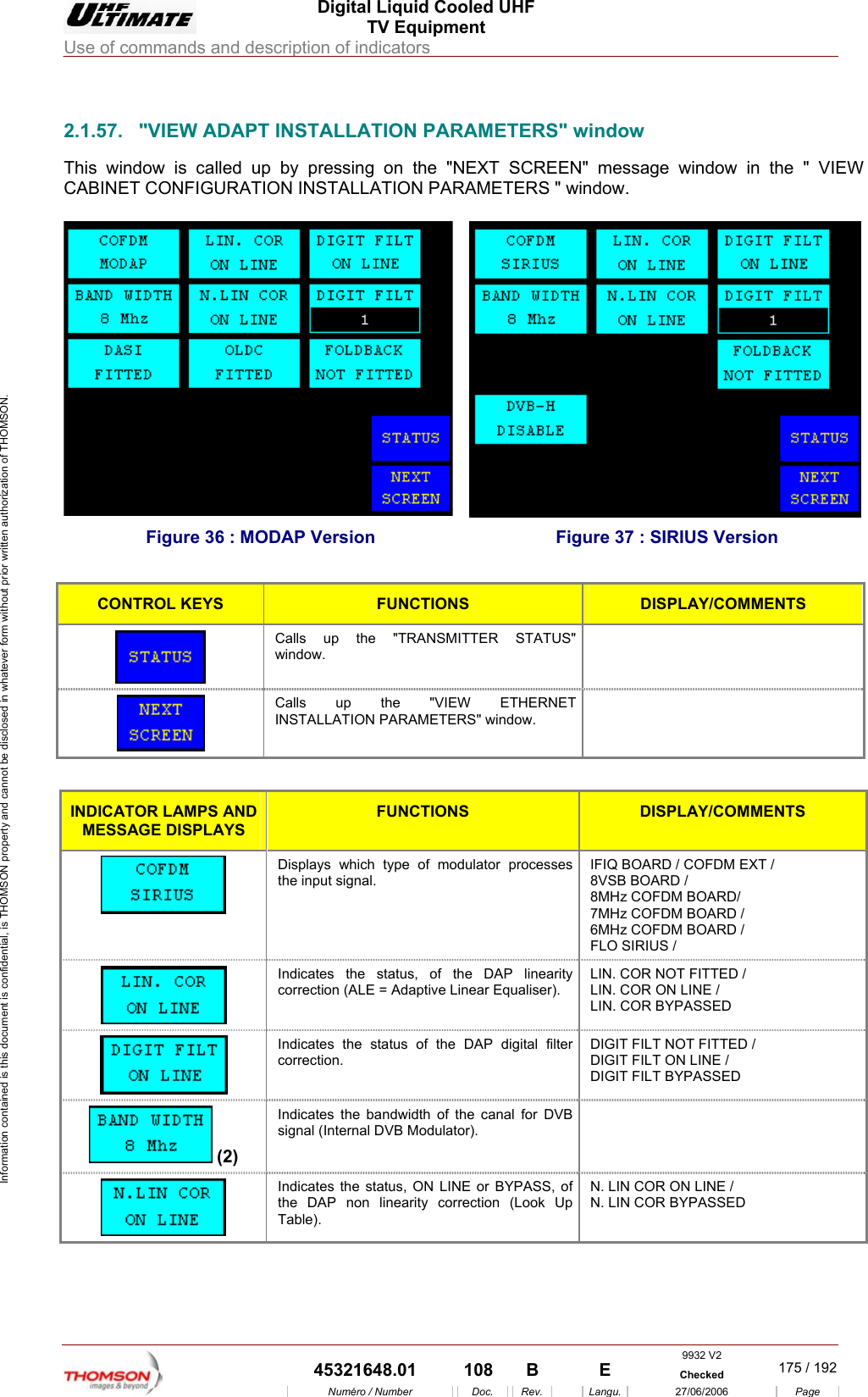
 Digital Liquid Cooled UHF TV Equipment Use of commands and description of indicators  Information contained is this document is confidential, is THOMSON property and cannot be disclosed in whatever form without prior written authorization of THOMSON.                        INSTALLATION PARAMETERS" window message window in the " VIEW ATION PARAMETERS " window.  2.1.57.  "VIEW ADAPT This window is called up by pressing on the "NEXT SCREEN" CABINET CONFIGURATION INSTALL Figure 36 : MODAP Version  Figure 37 : SIRIUS Version  CONTROL KEYS FUNCTIONS DISPLAY/COMMENTS  Calls up the "TRANSMITTER STATUS" window.   Calls up the "VIEW ETHERNET INSTALLATION PARAMETERS" window.   INDICATOR LAMPS AND MESSAGE DISPLAYS FUNCTIONS DISPLAY/COMMENTS  Displays which type of modulator processes the input signal. IFIQ BOARD / COFDM EXT /  8VSB BOARD / 8MHz COFDM BOARD/  7MHz COFDM BOARD /  6MHz COFDM BOARD /  FLO SIRIUS /   Indicates the status, of the DAP linearity correction (ALE = Adaptive Linear Equaliser). LIN. COR NOT FITTED / LIN. COR ON LINE / LIN. COR BYPASSED  Indicates the status of the DAP digital filter correction. DIGIT FILT NOT FITTED / DIGIT FILT ON LINE / DIGIT FILT BYPASSED  (2) Indicates the bandwidth of the canal for DVB signal (Internal DVB Modulator).   Indicates the status, ON LINE or BYPASS, of the DAP non linearity correction (Look Up Table). N. LIN COR ON LINE / N. LIN COR BYPASSED 9932 V2  45321648.01  108  B    E  Checked  175 / 192Numéro / Number Doc. Rev. Langu. 27/06/2006 Page
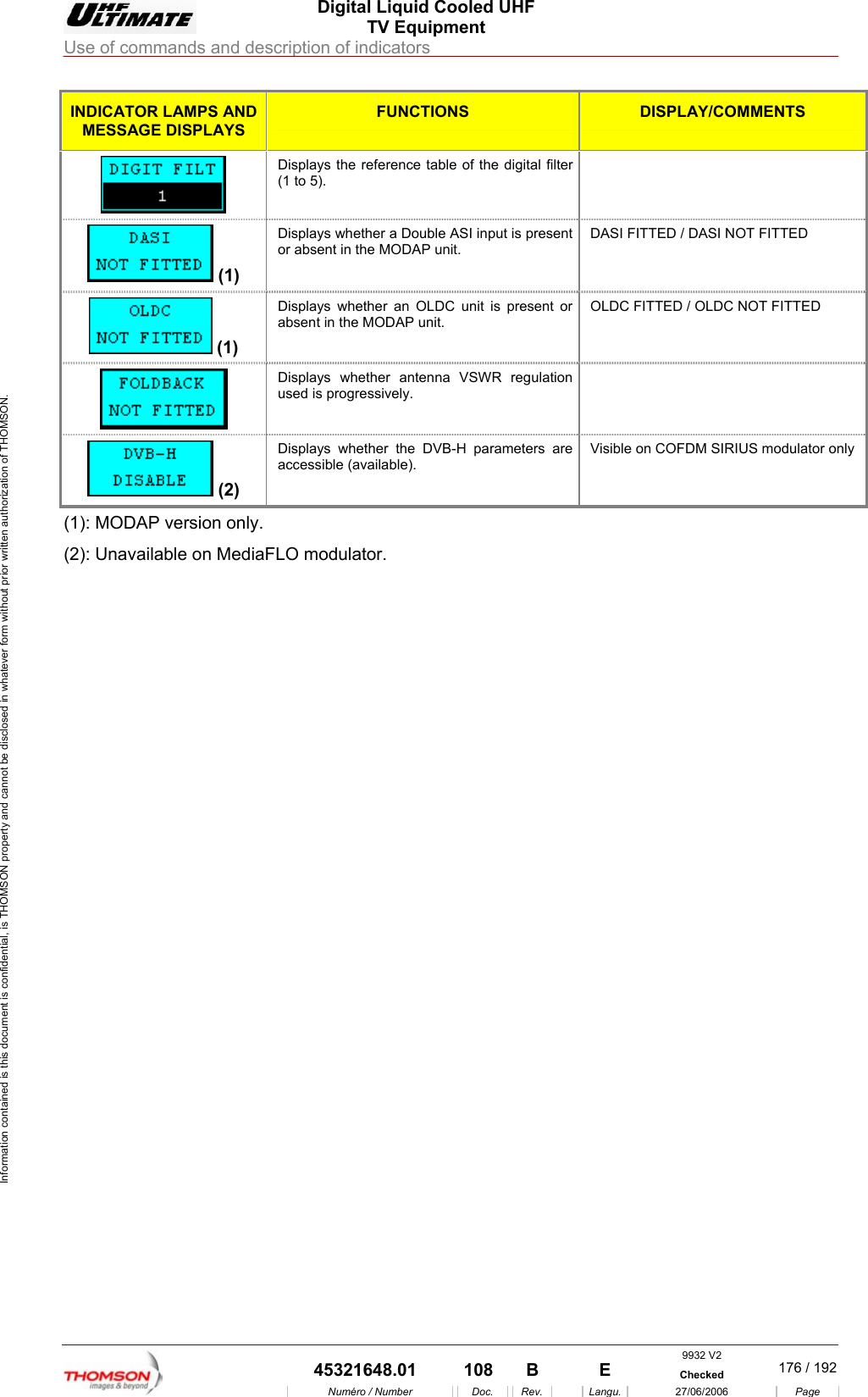
 Digital Liquid Cooled UHF TV Equipment Use of commands and description of indicators  Information contained is this document is confidential, is THOMSON property and cannot be disclosed in whatever form without prior written authorization of THOMSON. INDICATOR LAMPS AND MESSAGE DISPLAYS FUNCTIONS DISPLAY/COMMENTS Displays th(1 to 5).  e reference table of the digital filter    (1) I input is present P unit. DASI FITTED / DASI NOT FITTED Displays whether a Double ASor absent in the MODADisplays whether an O (1) LDC unit is present or absent in the MODAP unit. OLDC FITTED / OLDC NOT FITTED    used is progressively. Displays whether antenna VSWR regulation    (2) accessible (available). Displays whether the DVB-H parameters are  Visible on COFDM SIRIUS modulator only (1): MODAP version only. vailable on MediaFLO modulator.  (2): Una 9932 V2  45321648.01  108  B    E  Checked  176 / 192Numéro / Number Doc. Rev. Langu. 27/06/2006 Page
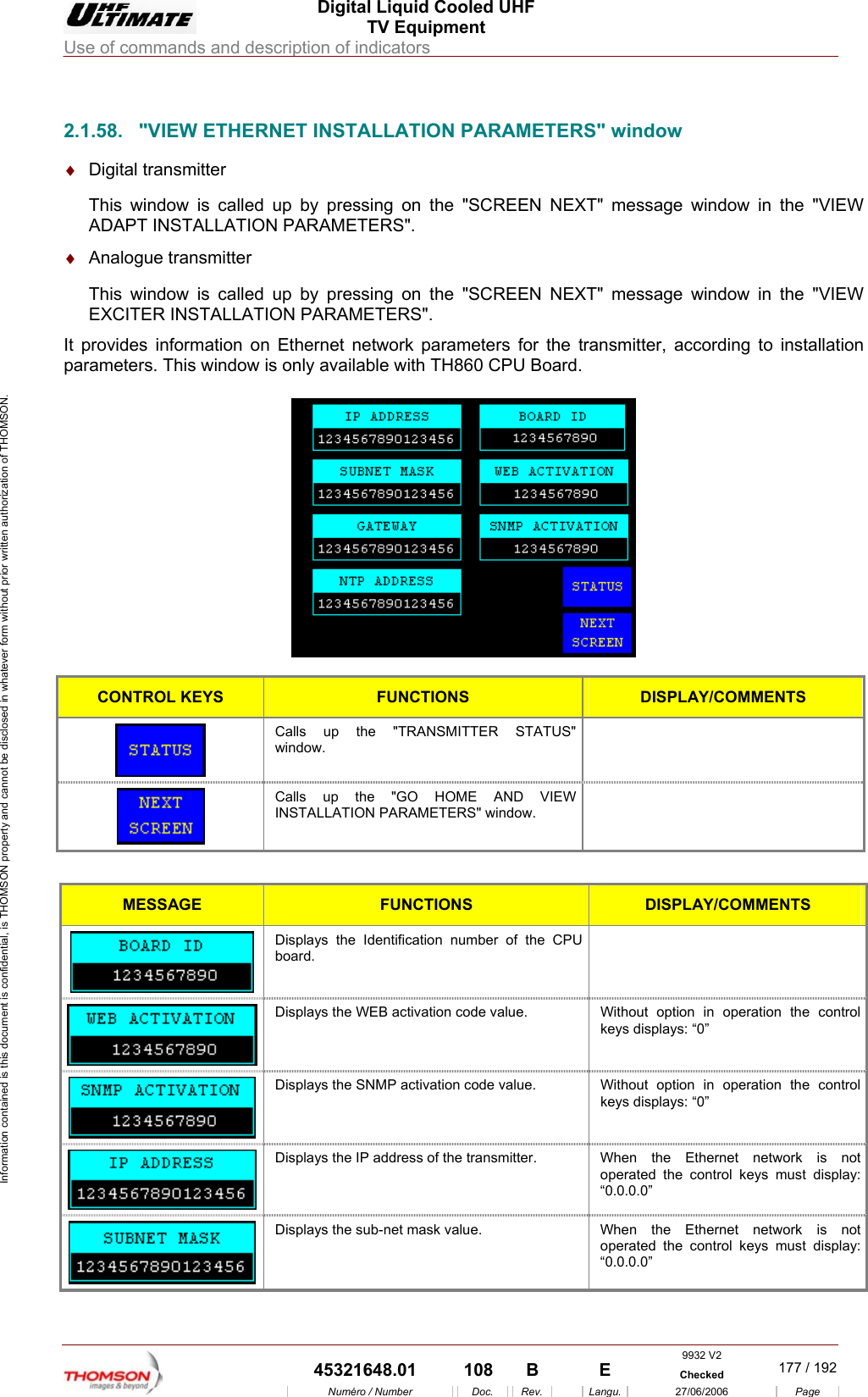
 Digital Liquid Cooled UHF TV Equipment Use of commands and description of indicators  Information contained is this document is confidential, is THOMSON property and cannot be disclosed in whatever form without prior written authorization of THOMSON.                        ADAPT INSTALLATION P♦  It provparam 2.1.58.  "VIEW ETHERNET INSTALLATION PARAMETERS" window ♦  Digital transmitter This window is called up by pressing on the "SCREEN NEXT" message window in the "VIEW ARAMETERS". Analogue transmitter This window is called up by pressing on the "SCREEN NEXT" message window in the "VIEWEXCITER INSTALLATION PARAMETERS". ides information on Ethernet network parameters for the transmitter, according to installation eters. This window is only available with TH860 CPU Board.   CONTROL KEYS FUNCTIONS DISPLAY/COMMENTS Calls up the "TRANSMITTER STATUS" window.   Calls up the "GO HOME AND VIEW INSTALLATION PARAMETERS"  window.   MESSAGE FUNCTIONS DISPLAY/COMMENTS  Displays the Identification number of the CPU board.   Displays the WEB activation code value.  Without option in operation the control keys displays: “0”  Displays the SNMP activation code value.  Without option in operation the control keys displays: “0”  Displays the IP address of the transmitter.  When  the  Ethernet  network  is  not operated the control keys must display: “0.0.0.0”  Displays the sub-net mask value.  When the Ethernet network is not operated the control keys must display: “0.0.0.0” 9932 V2  45321648.01  108  B    E  Checked  177 / 192Numéro / Number Doc. Rev. Langu. 27/06/2006 Page
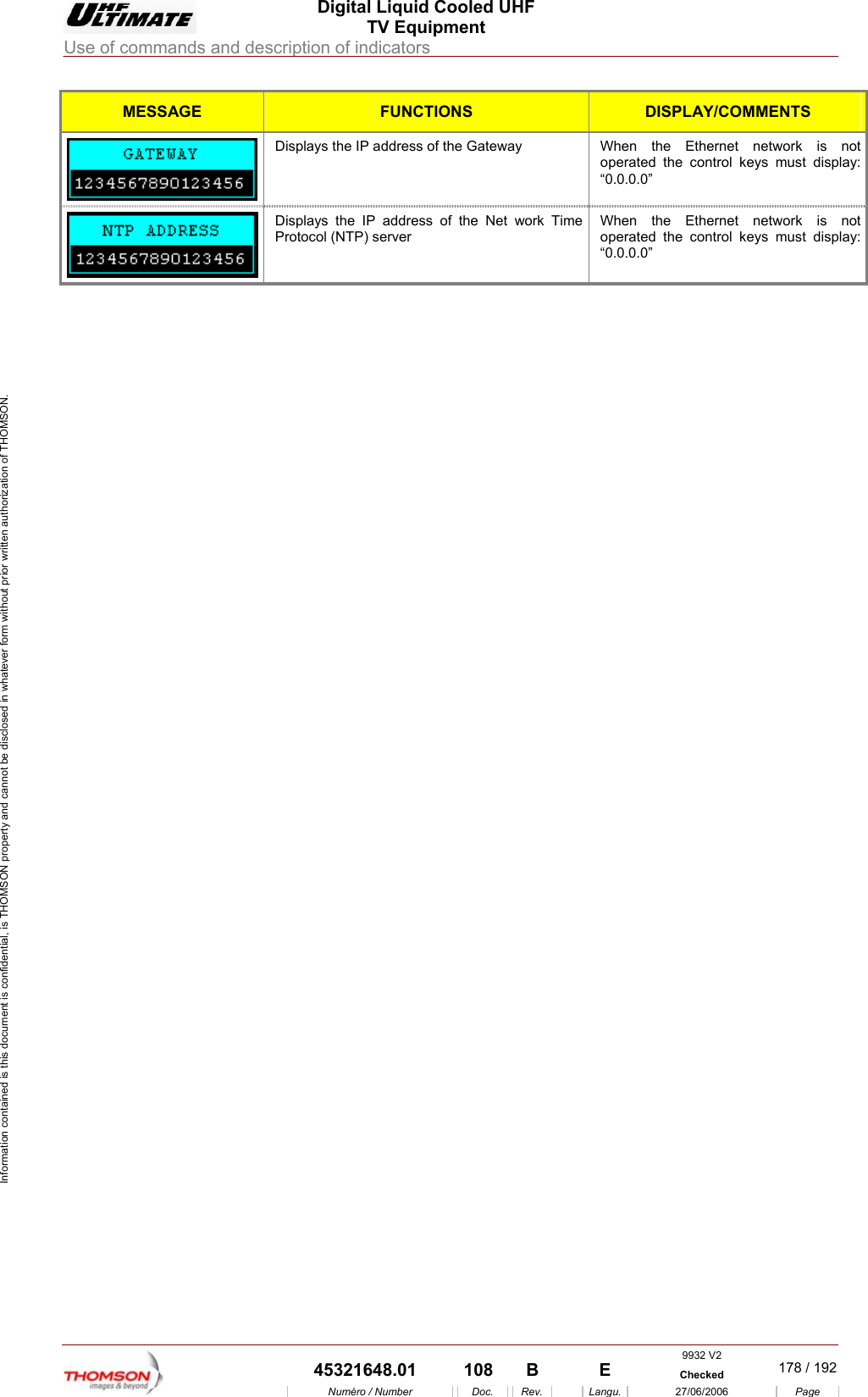
 Digital Liquid Cooled UHF TV Equipment Use of commands and description of indicators  Information contained is this document is confidential, is THOMSON property and cannot be disclosed in whatever form without prior written authorization of THOMSON. MESSAGE FUNCTIONS DISPLAY/COMMENTS  Displays the IP address of the Gateway  When  the  Ethernet  network  is  not operated the control keys must display: “0.0.0.0”  Displays the IP address of the Net work Time Protocol (NTP) server When the Ethernet network is not operated the control keys must display: “0.0.0.0”     9932 V2  45321648.01  108  B    E  Checked  178 / 192Numéro / Number Doc. Rev. Langu. 27/06/2006 Page
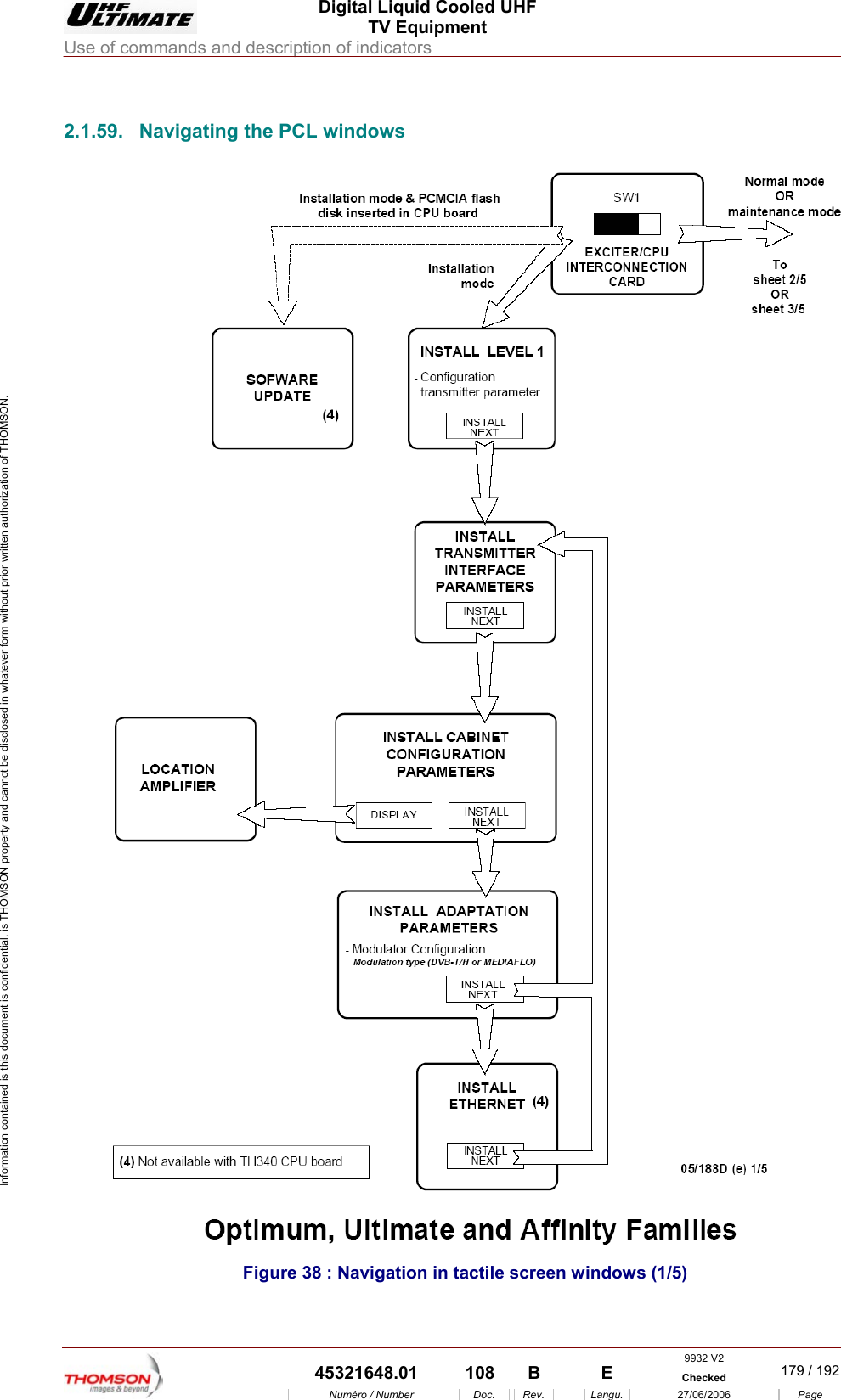
 Digital Liquid Cooled UHF TV Equipment Use of commands and description of indicators  9932 V2  45321648.01  108  B    E  Checked  179 / 192Numéro / Number Doc. Rev. Langu. 27/06/2006 Page Information contained is this document is confidential, is THOMSON property and cannot be disclosed in whatever form without prior written authorization of THOMSON.             2.1.59.  Navigating the PCL windows  Figure 38 : Navigation in tactile screen windows (1/5)
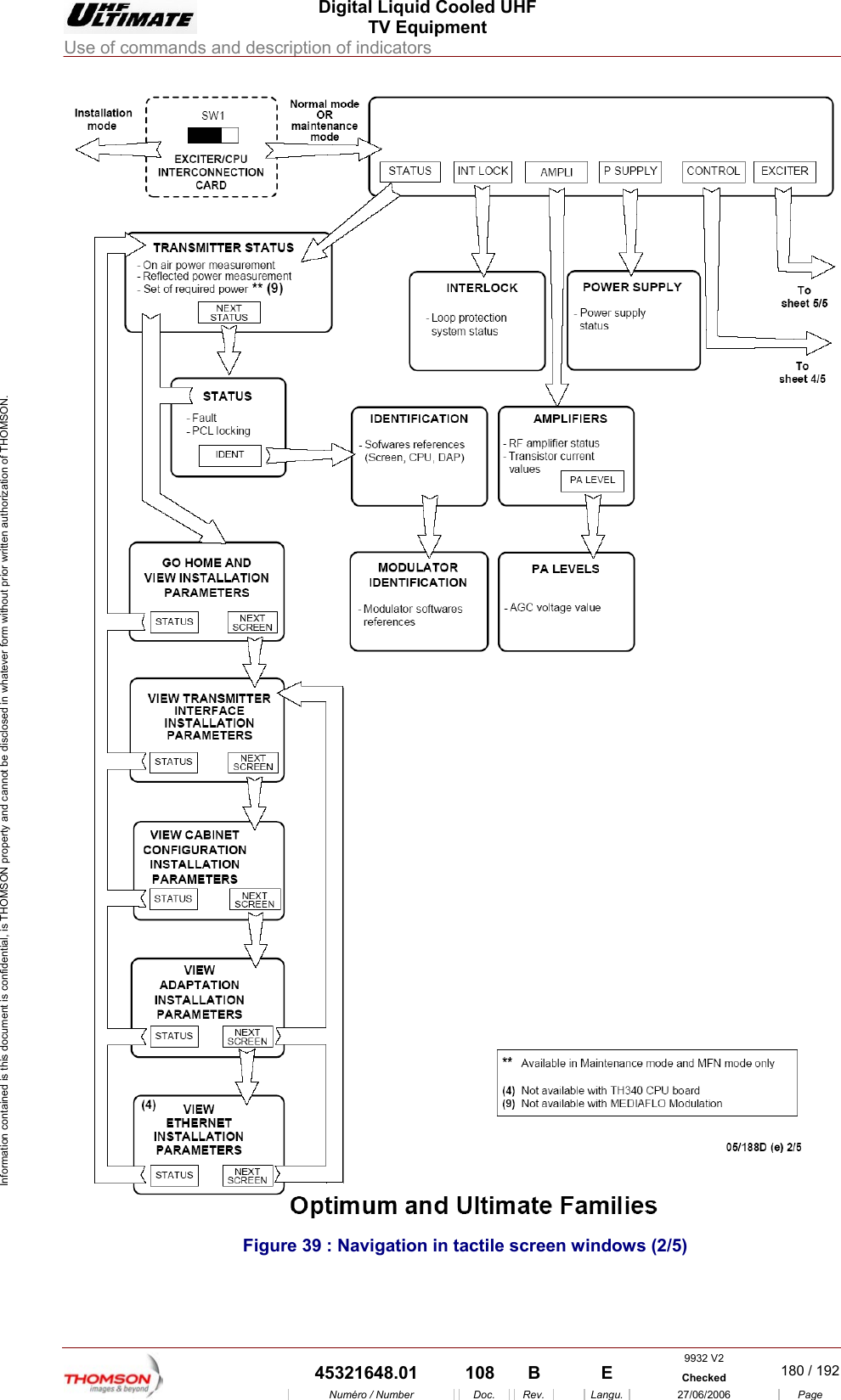
 Digital Liquid Cooled UHF TV Equipment Use of commands and description of indicators  9932 V2  45321648.01  108  B    E  Checked  180 / 192Numéro / Number Doc. Rev. Langu. 27/06/2006 Page Information contained is this document is confidential, is THOMSON property and cannot be disclosed in whatever form without prior written authorization of THOMSON.  Figure 39 : Navigation in tactile screen windows (2/5)
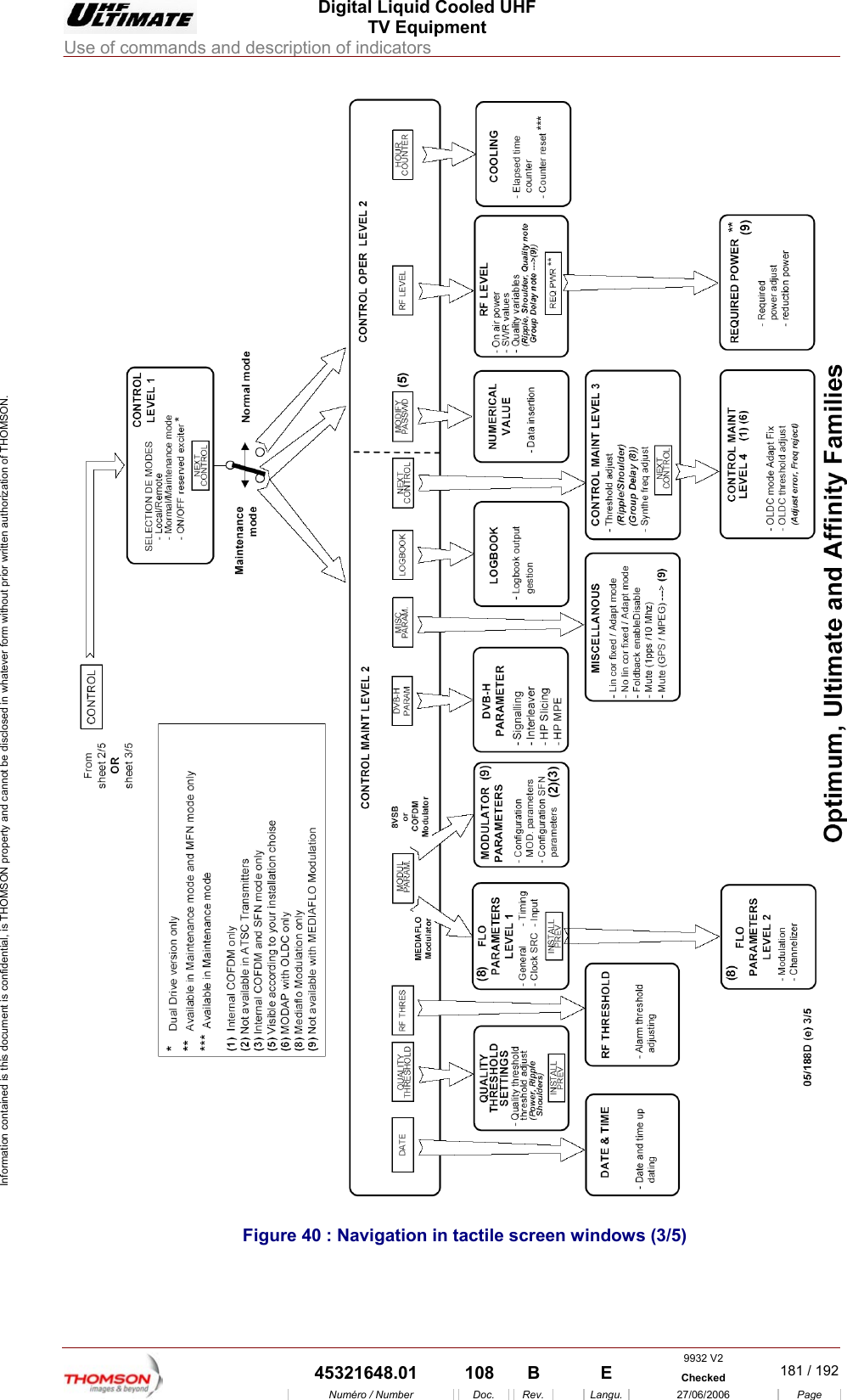
 Digital Liquid Cooled UHF TV Equipment Use of commands and description of indicators  9932 V2  45321648.01  108  B    E  Checked  181 / 192Numéro / Number Doc. Rev. Langu. 27/06/2006 Page Information contained is this document is confidential, is THOMSON property and cannot be disclosed in whatever form without prior written authorization of THOMSON.  Figure 40 : Navigation in tactile screen windows (3/5)
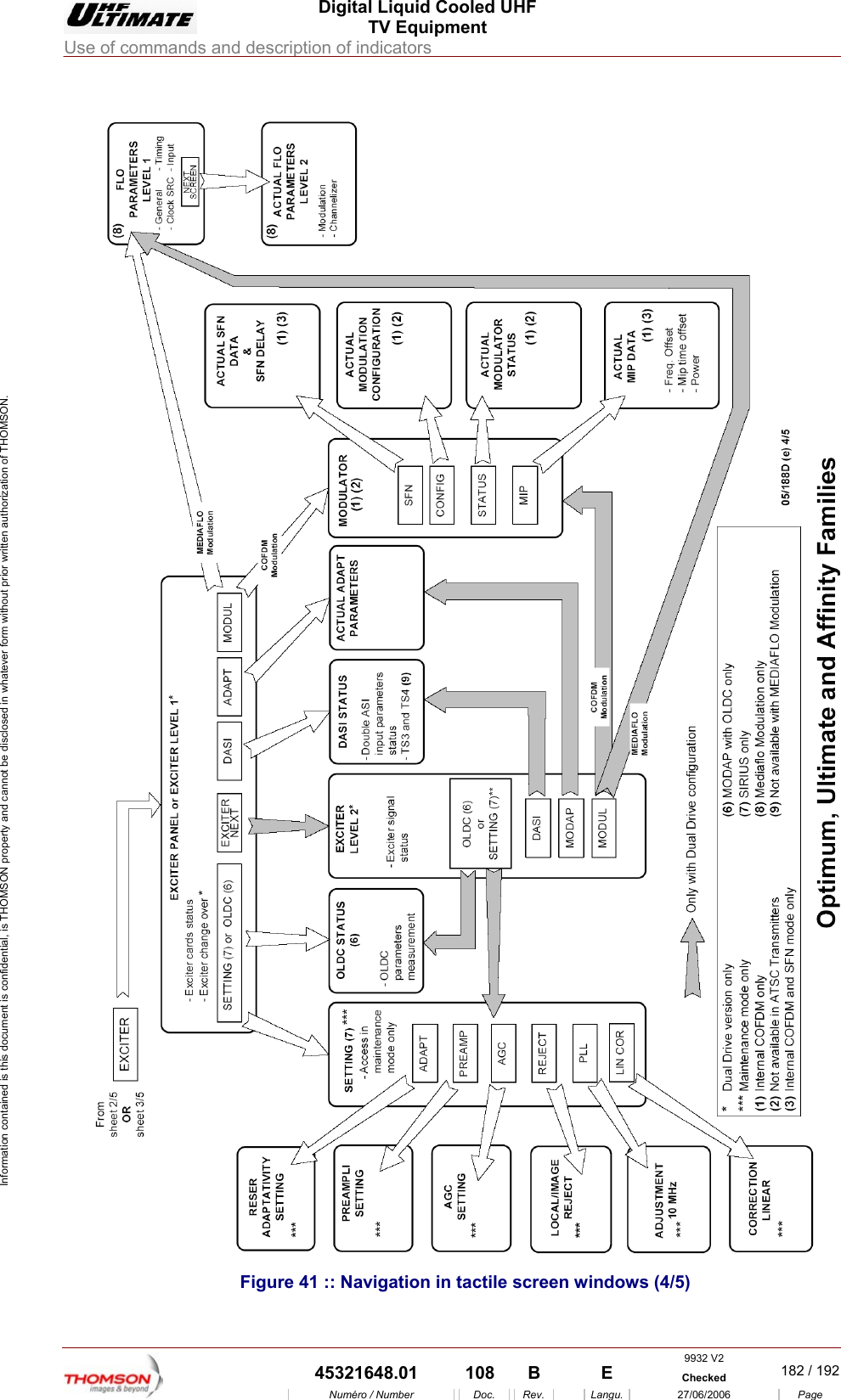
 Digital Liquid Cooled UHF TV Equipment Use of commands and description of indicators  9932 V2  45321648.01  108  B    E  Checked  182 / 192Numéro / Number Doc. Rev. Langu. 27/06/2006 Page Information contained is this document is confidential, is THOMSON property and cannot be disclosed in whatever form without prior written authorization of THOMSON.  Figure 41 :: Navigation in tactile screen windows (4/5)
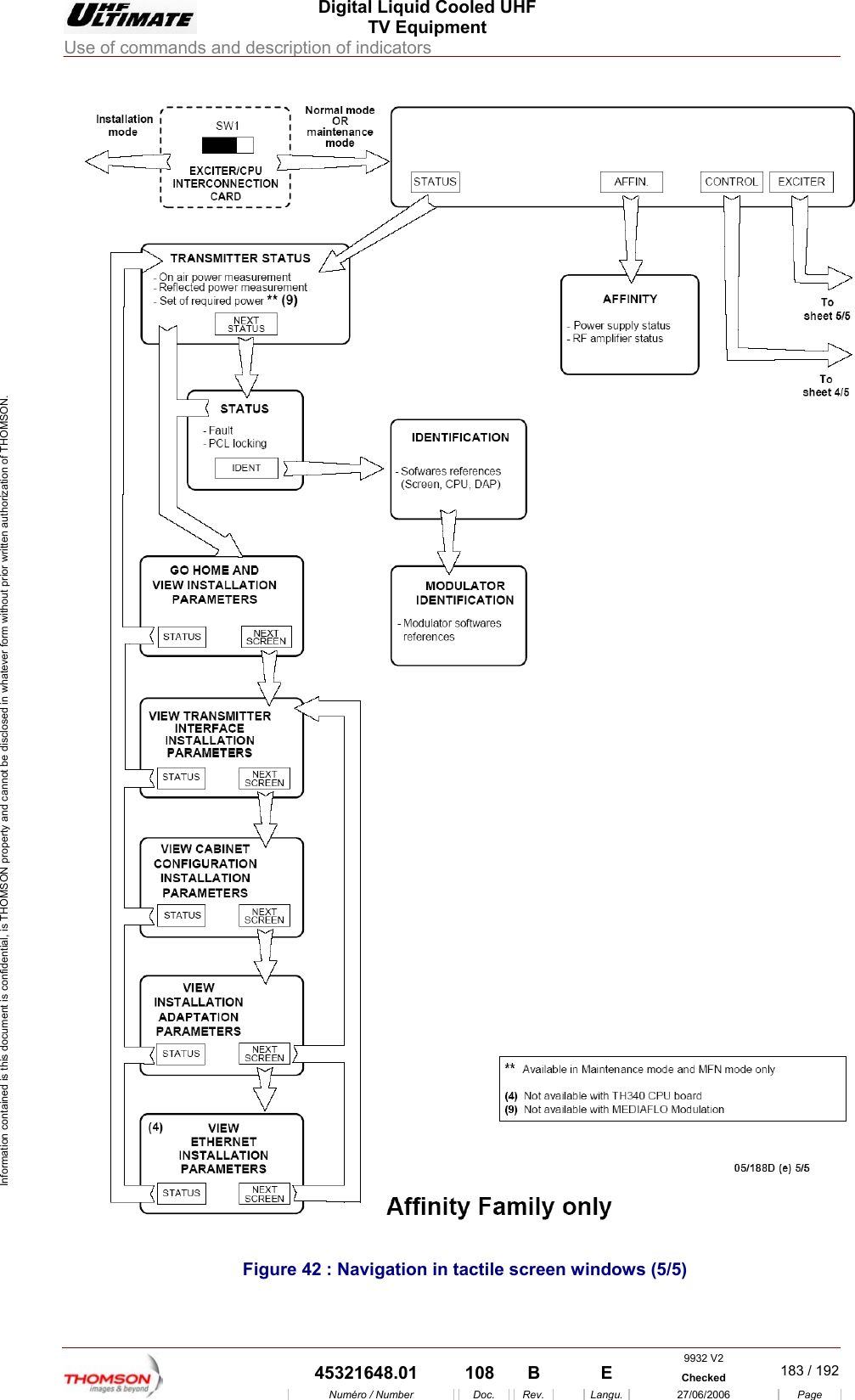
 Digital Liquid Cooled UHF TV Equipment Use of commands and description of indicators  9932 V2  45321648.01  108  B    E  Checked  183 / 192Numéro / Number Doc. Rev. Langu. 27/06/2006 Page Information contained is this document is confidential, is THOMSON property and cannot be disclosed in whatever form without prior written authorization of THOMSON.  Figure 42 : Navigation in tactile screen windows (5/5)
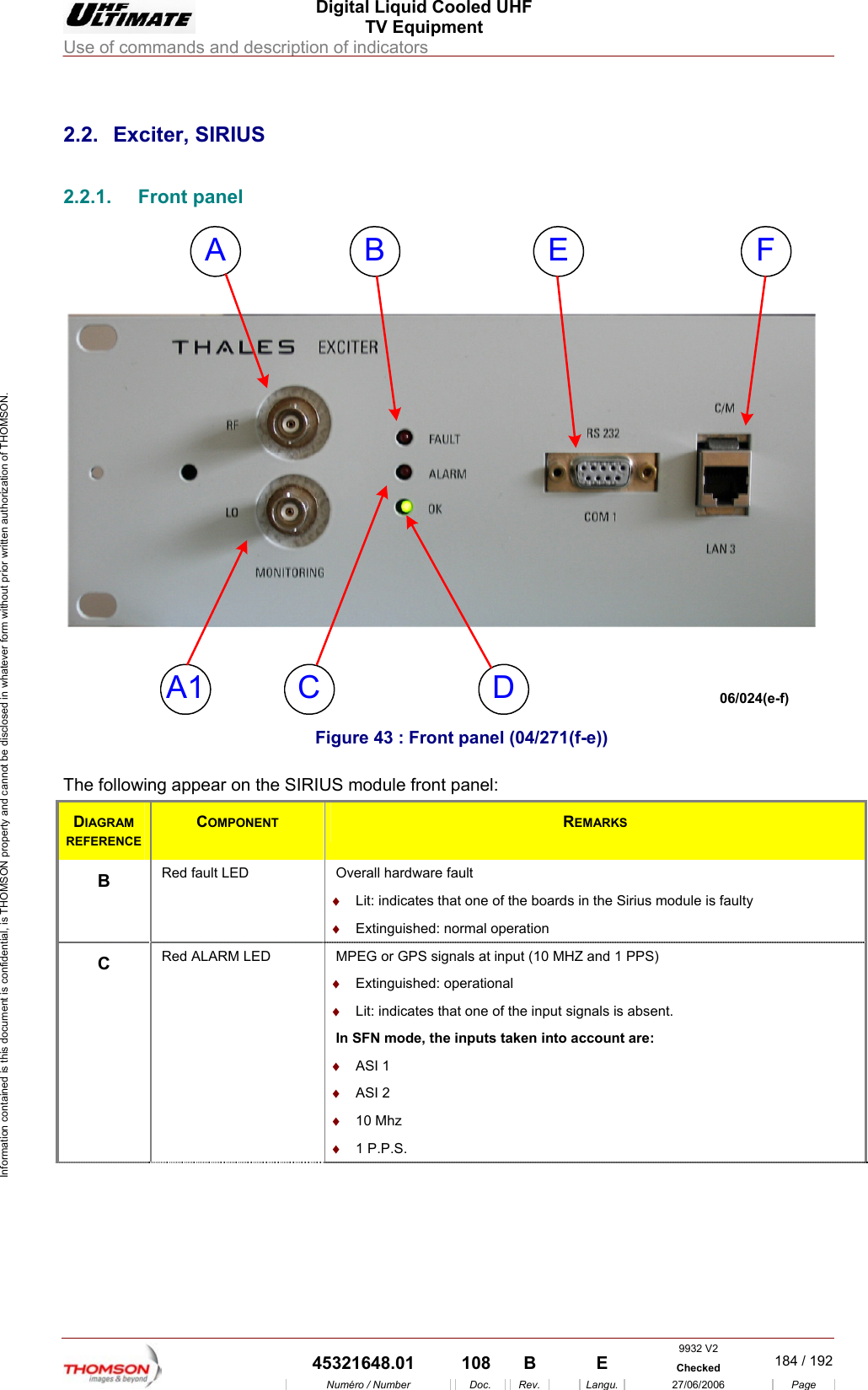
 Digital Liquid Cooled UHF TV Equipment Use of commands and description of indicators  9932 V2  45321648.01  108  B    E  Checked  184 / 192Numéro / Number Doc. Rev. Langu. 27/06/2006 Page Information contained is this document is confidential, is THOMSON property and cannot be disclosed in whatever form without prior written authorization of THOMSON.             2.2. Exciter, SIRIUS 2.2.1. Front panel A B FCA1ED06/024(e-f)  Figure 43 : Front panel (04/271(f-e)) The following appear on the SIRIUS module front panel: DIAGRAM REFERENCE COMPONENT  REMARKS B  Red fault LED  Overall hardware fault ♦  Lit: indicates that one of the boards in the Sirius module is faulty ♦  Extinguished: normal operation C  Red ALARM LED   MPEG or GPS signals at input (10 MHZ and 1 PPS) ♦  Extinguished: operational ♦  Lit: indicates that one of the input signals is absent. In SFN mode, the inputs taken into account are: ♦  ASI 1 ♦  ASI 2 ♦  10 Mhz ♦  1 P.P.S.
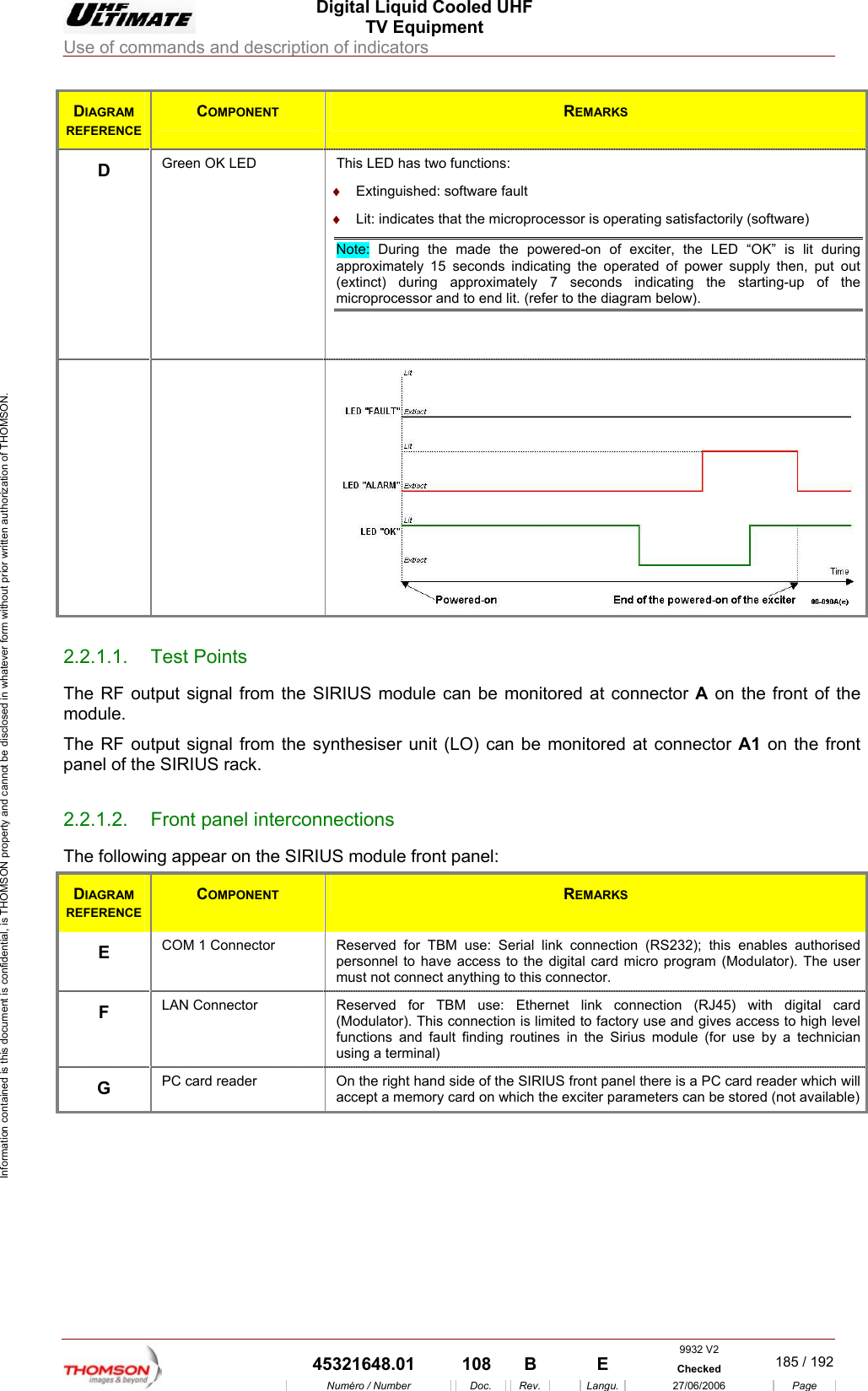
 Digital Liquid Cooled UHF TV Equipment Use of commands and description of indicators  9932 V2  45321648.01  108  B    E  Checked  185 / 192Numéro / Number Doc. Rev. Langu. 27/06/2006 Page Information contained is this document is confidential, is THOMSON property and cannot be disclosed in whatever form without prior written authorization of THOMSON. DIAGRAM REFERENCE COMPONENT  REMARKS D  Green OK LED  This LED has two functions:  ♦  Extinguished: software fault ♦  Lit: indicates that the microprocessor is operating satisfactorily (software) Note: During the made the powered-on of exciter, the LED “OK” is lit during approximately 15 seconds indicating the operated of power supply then, put out (extinct) during approximately 7 seconds indicating the starting-up of the microprocessor and to end lit. (refer to the diagram below).   2.2.1.1. Test Points The RF output signal from the SIRIUS module can be monitored at connector A on the front of the module. The RF output signal from the synthesiser unit (LO) can be monitored at connector A1 on the front panel of the SIRIUS rack. 2.2.1.2.  Front panel interconnections The following appear on the SIRIUS module front panel: DIAGRAM REFERENCE COMPONENT  REMARKS E  COM 1 Connector  Reserved for TBM use: Serial link connection (RS232); this enables authorised personnel to have access to the digital card micro program (Modulator). The user must not connect anything to this connector. F  LAN Connector  Reserved for TBM use: Ethernet link connection (RJ45) with digital card (Modulator). This connection is limited to factory use and gives access to high level functions and fault finding routines in the Sirius module (for use by a technician using a terminal) G  PC card reader  On the right hand side of the SIRIUS front panel there is a PC card reader which will accept a memory card on which the exciter parameters can be stored (not available)
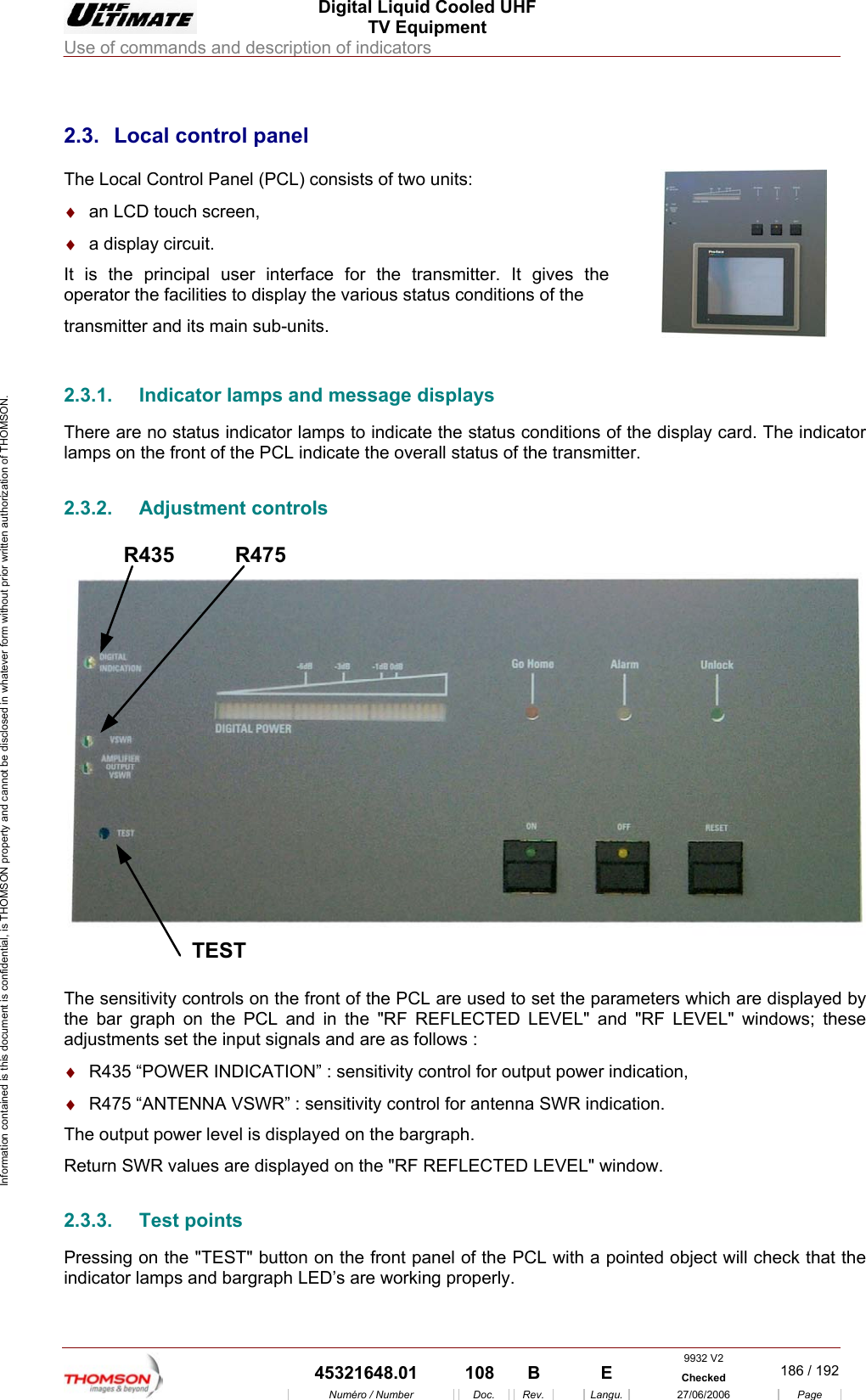
 Digital Liquid Cooled UHF TV Equipment Use of commands and description of indicators  9932 V2  45321648.01  108  B    E  Checked  186 / 192Numéro / Number Doc. Rev. Langu. 27/06/2006 Page Information contained is this document is confidential, is THOMSON property and cannot be disclosed in whatever form without prior written authorization of THOMSON.             2.3.  Local control panel The Local Control Panel (PCL) consists of two units: ♦  an LCD touch screen, ♦  a display circuit. It is the principal user interface for the transmitter. It gives the operator the facilities to display the various status conditions of the  transmitter and its main sub-units.    2.3.1.  Indicator lamps and message displays There are no status indicator lamps to indicate the status conditions of the display card. The indicator lamps on the front of the PCL indicate the overall status of the transmitter. 2.3.2. Adjustment controls R435TESTR475 The sensitivity controls on the front of the PCL are used to set the parameters which are displayed by the bar graph on the PCL and in the "RF REFLECTED LEVEL" and "RF LEVEL" windows; these adjustments set the input signals and are as follows : ♦  R435 “POWER INDICATION” : sensitivity control for output power indication, ♦  R475 “ANTENNA VSWR” : sensitivity control for antenna SWR indication. The output power level is displayed on the bargraph. Return SWR values are displayed on the "RF REFLECTED LEVEL" window. 2.3.3. Test points Pressing on the "TEST" button on the front panel of the PCL with a pointed object will check that the indicator lamps and bargraph LED’s are working properly.
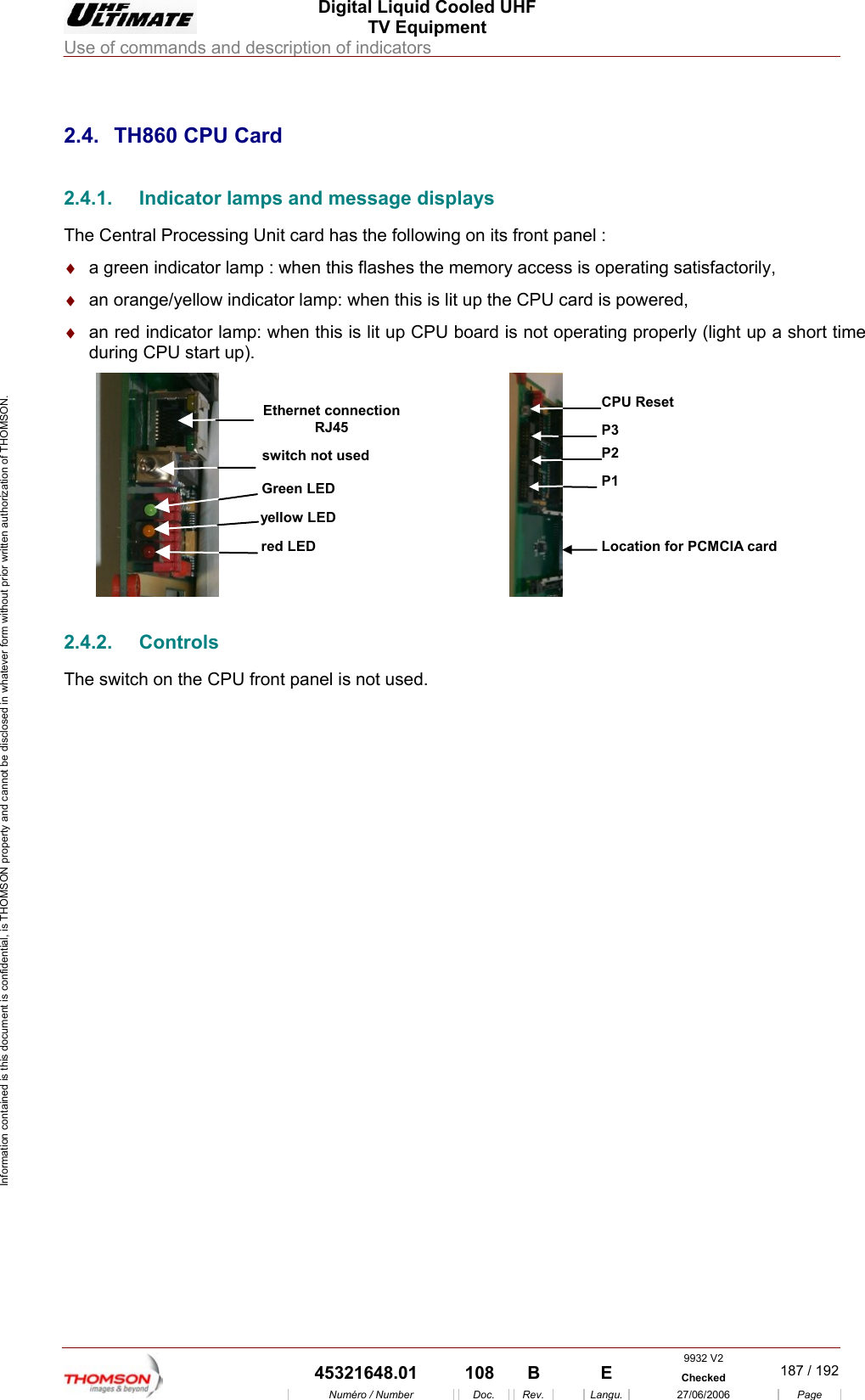
 Digital Liquid Cooled UHF TV Equipment Use of commands and description of indicators  9932 V2  45321648.01  108  B    E  Checked  187 / 192Numéro / Number Doc. Rev. Langu. 27/06/2006 Page Information contained is this document is confidential, is THOMSON property and cannot be disclosed in whatever form without prior written authorization of THOMSON.             2.4.  TH860 CPU Card 2.4.1.  Indicator lamps and message displays The Central Processing Unit card has the following on its front panel : ♦  a green indicator lamp : when this flashes the memory access is operating satisfactorily, ♦  an orange/yellow indicator lamp: when this is lit up the CPU card is powered, ♦  an red indicator lamp: when this is lit up CPU board is not operating properly (light up a short time during CPU start up). yellow LEDred LEDGreen LEDswitch not usedEthernet connectionRJ45 P1Location for PCMCIA cardP2P3CPU Reset 2.4.2. Controls The switch on the CPU front panel is not used.
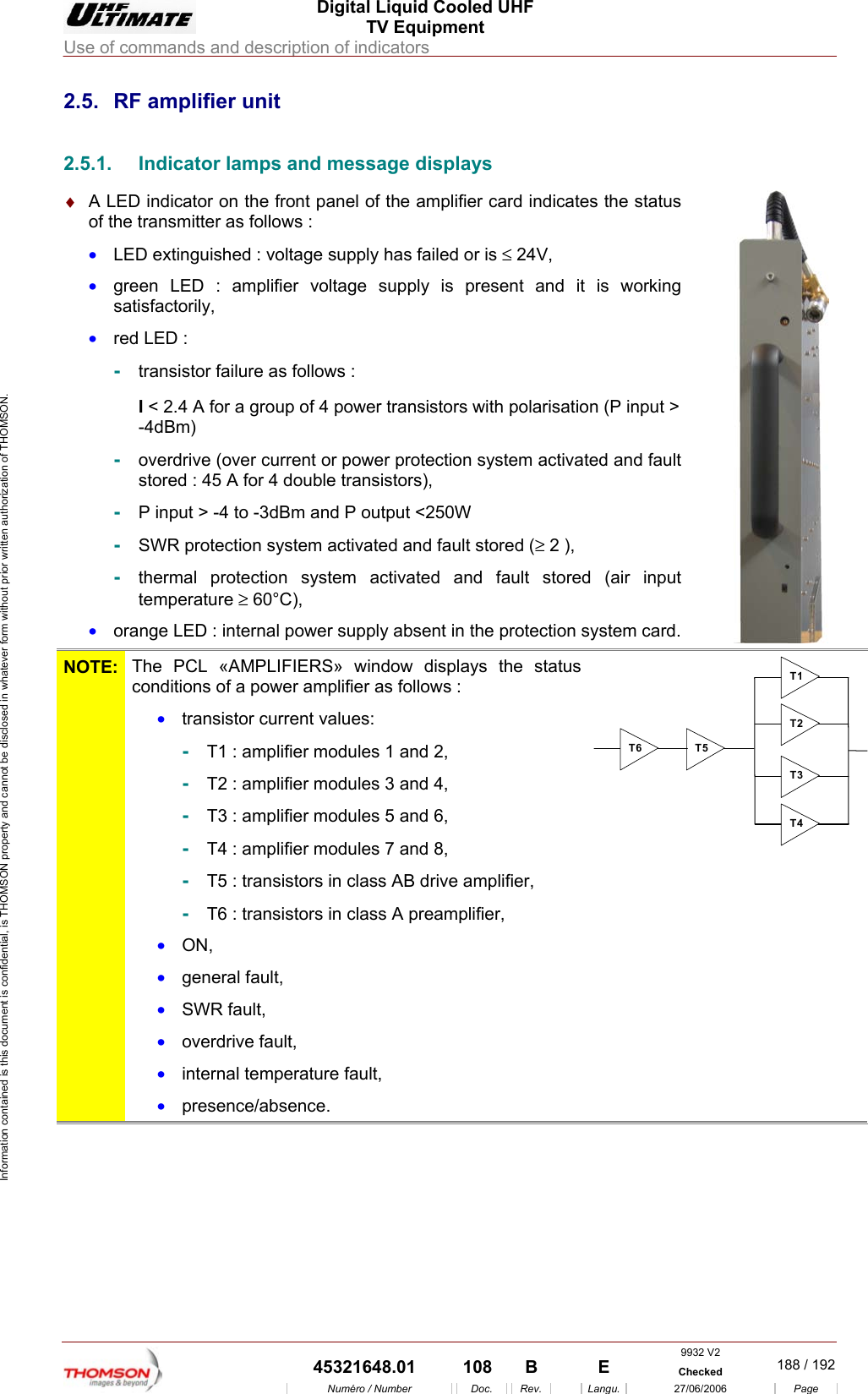
 Digital Liquid Cooled UHF TV Equipment Use of commands and description of indicators  9932 V2  45321648.01  108  B    E  Checked  188 / 192Numéro / Number Doc. Rev. Langu. 27/06/2006 Page Information contained is this document is confidential, is THOMSON property and cannot be disclosed in whatever form without prior written authorization of THOMSON. 2.5.  RF amplifier unit 2.5.1.  Indicator lamps and message displays ♦  A LED indicator on the front panel of the amplifier card indicates the status of the transmitter as follows : •  LED extinguished : voltage supply has failed or is ≤ 24V, •  green LED : amplifier voltage supply is present and it is working satisfactorily, •  red LED : -  transistor failure as follows : I < 2.4 A for a group of 4 power transistors with polarisation (P input > -4dBm)  -  overdrive (over current or power protection system activated and fault stored : 45 A for 4 double transistors), -  P input > -4 to -3dBm and P output <250W -  SWR protection system activated and fault stored (≥ 2 ), -  thermal protection system activated and fault stored (air input temperature ≥ 60°C), •  orange LED : internal power supply absent in the protection system card.   NOTE:  The PCL «AMPLIFIERS» window displays the status conditions of a power amplifier as follows :  •  transistor current values: -  T1 : amplifier modules 1 and 2, -  T2 : amplifier modules 3 and 4, -  T3 : amplifier modules 5 and 6, -  T4 : amplifier modules 7 and 8, -  T5 : transistors in class AB drive amplifier, -  T6 : transistors in class A preamplifier, •  ON, •  general fault, •  SWR fault, •  overdrive fault, •  internal temperature fault, •  presence/absence. T1T2T3T4T5T6
 Digital Liquid Cooled UHF TV Equipment Use of commands and description of indicators  9932 V2  45321648.01  108  B    E  Checked  189 / 192Numéro / Number Doc. Rev. Langu. 27/06/2006 Page Information contained is this document is confidential, is THOMSON property and cannot be disclosed in whatever form without prior written authorization of THOMSON. 2.5.2. Test points Connector J1 on the front of the panel provides a test monitoring feed of the amplifier RF output signal. 2.5.3.  Adjustment controls  There is a potentiometer control (R164) on the front panel of each RF amplifier module which is used to set the AGC voltage of each power amplifier to the same value.
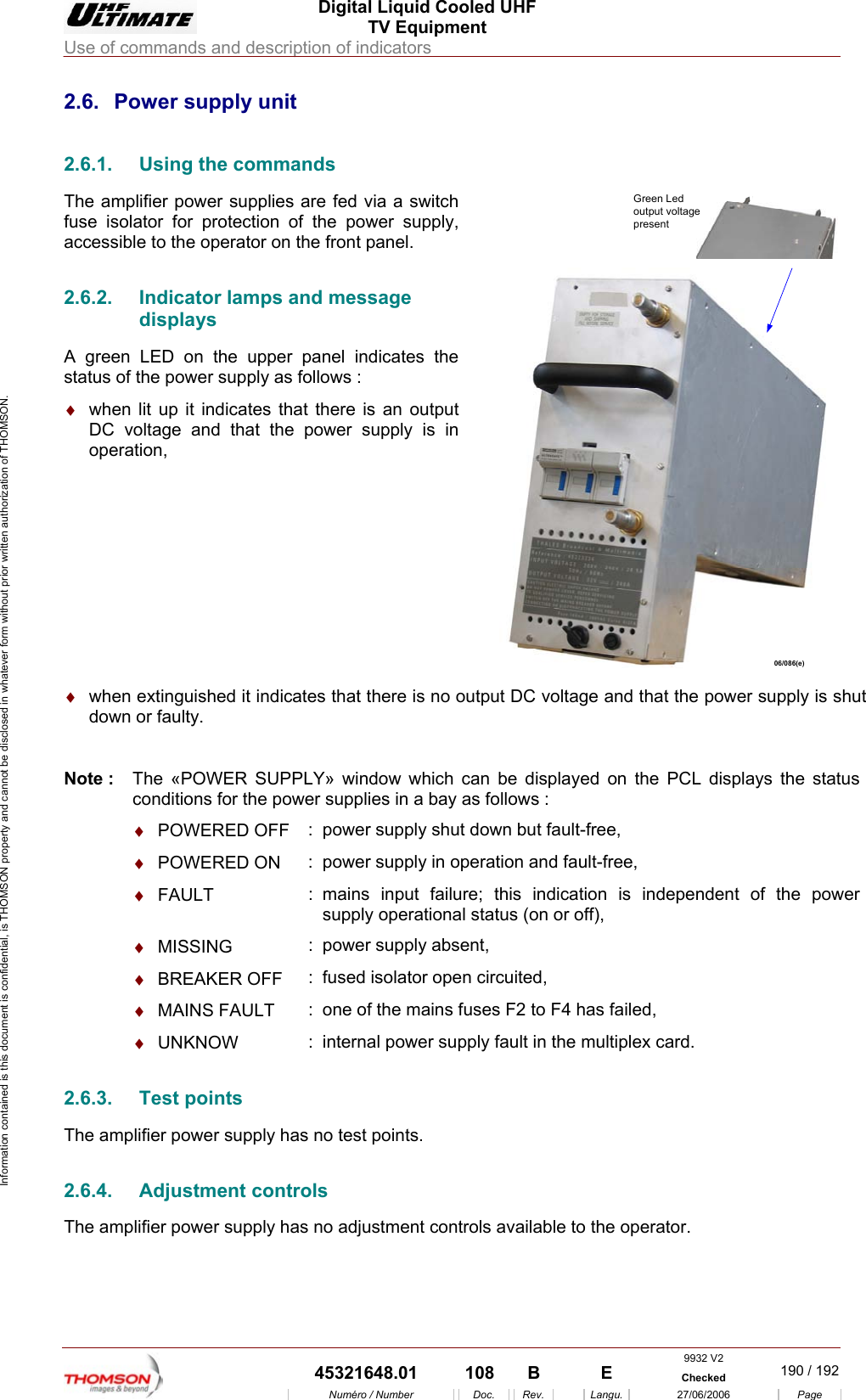
 Digital Liquid Cooled UHF TV Equipment Use of commands and description of indicators  9932 V2  45321648.01  108  B    E  Checked  190 / 192Numéro / Number Doc. Rev. Langu. 27/06/2006 Page Information contained is this document is confidential, is THOMSON property and cannot be disclosed in whatever form without prior written authorization of THOMSON. 2.6.  Power supply unit 2.6.1.  Using the commands The amplifier power supplies are fed via a switch fuse isolator for protection of the power supply, accessible to the operator on the front panel. 2.6.2.  Indicator lamps and message displays A green LED on the upper panel indicates the status of the power supply as follows : ♦  when lit up it indicates that there is an output DC voltage and that the power supply is in operation, Green Ledoutput voltagepresent06/086(e)  ♦  when extinguished it indicates that there is no output DC voltage and that the power supply is shut down or faulty.  Note :  The «POWER SUPPLY» window which can be displayed on the PCL displays the status conditions for the power supplies in a bay as follows :  ♦  POWERED OFF  :  power supply shut down but fault-free,  ♦  POWERED ON  :  power supply in operation and fault-free,  ♦  FAULT  : mains input failure; this indication is independent of the power supply operational status (on or off),  ♦  MISSING  :  power supply absent,  ♦  BREAKER OFF  :  fused isolator open circuited,  ♦  MAINS FAULT  :  one of the mains fuses F2 to F4 has failed,  ♦  UNKNOW  :  internal power supply fault in the multiplex card. 2.6.3. Test points The amplifier power supply has no test points. 2.6.4. Adjustment controls The amplifier power supply has no adjustment controls available to the operator.
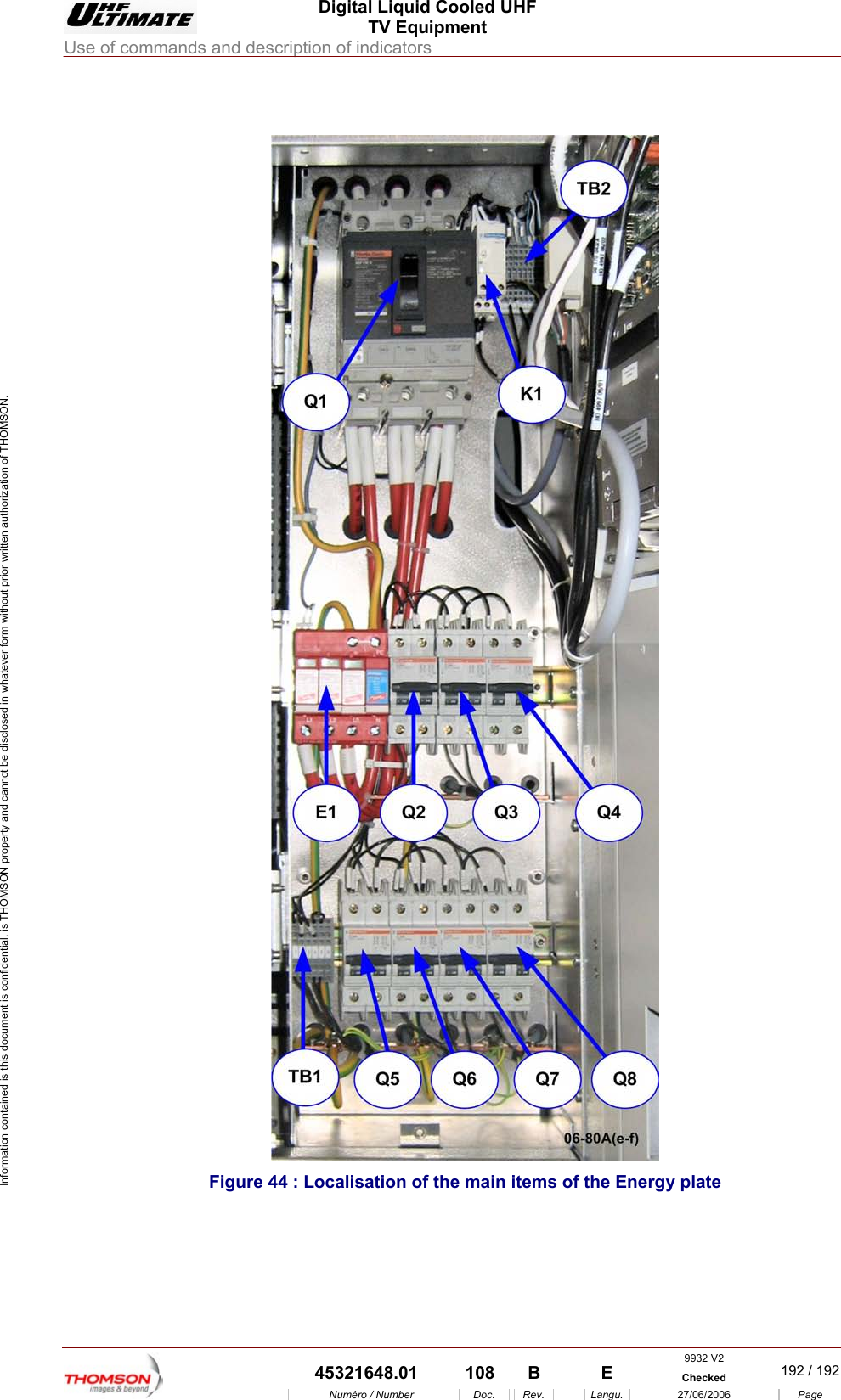
 Digital Liquid Cooled UHF TV Equipment Use of commands and description of indicators  9932 V2  45321648.01  108  B    E  Checked  191 / 192Numéro / Number Doc. Rev. Langu. 27/06/2006 Page Information contained is this document is confidential, is THOMSON property and cannot be disclosed in whatever form without prior written authorization of THOMSON. 2.7.  860 Cabinet Mains distribution The Mains Distribution Panel provide selective protection for the installation so that only the protective device immediately ahead of the fault will be activated : •  Circuit breaker Q6 : protects the mains feeds of the very low voltage power supply for the Control Processor Unit via the management rack, •  Circuit breaker Q7 : not used, •  Circuit breaker Q8 : protects the mains feeds of external exhaust fan EV3. •  Circuit breaker Q5 : protects the mains feeds of an uninterruptible power supply (UPS) - option, This configuration, with an uninterruptible power supply (UPS) is an option. Without this element, Q5 is not used and the mains come from “emergency mains input” (see “LV distribution” drawing for TB1 terminal block configuration ) •  Circuit breaker Q2 : protects the mains feeds of Sirius 1, •  Circuit breaker Q3 : protects the mains feeds of Sirius 2, •  Circuit breaker Q4 : protects the mains feeds of the very low voltage power supply for the screen of  the control panel via the management rack 2.7.1.  Indicator lamps and message displays ♦  An orange indicator lamp on the mains monitoring relay K1 gives further information on the incoming main supply as follows: •  Lit up : OK, •  Extinguished: absence or inversion of phases. ♦  E1 includes 4 surge arrestors “over voltage protection” ( 3 between Phases and Ground , the 4 th. one between Neutral and Ground .When one surge arrestor is damaged, the light on the corresponding arrestor is on : the plug-in module has to be replaced . 2.7.2.  Test points and adjustment controls The front panel of the Mains Distribution Panel does not have any test points or adjustment controls, which can be used by the operator.
 Digital Liquid Cooled UHF TV Equipment Use of commands and description of indicators  9932 V2  45321648.01  108  B    E  Checked  192 / 192Numéro / Number Doc. Rev. Langu. 27/06/2006 Page Information contained is this document is confidential, is THOMSON property and cannot be disclosed in whatever form without prior written authorization of THOMSON.    Figure 44 : Localisation of the main items of the Energy plate

Navigation menu