HAICOM Electronics HI-601VT GPS/GSM Tracking Device - Decoder Unit User Manual Manual 6

HAICOM Electronics Corp. GPS/GSM Tracking Device - Decoder Unit Manual 6

Manual 6

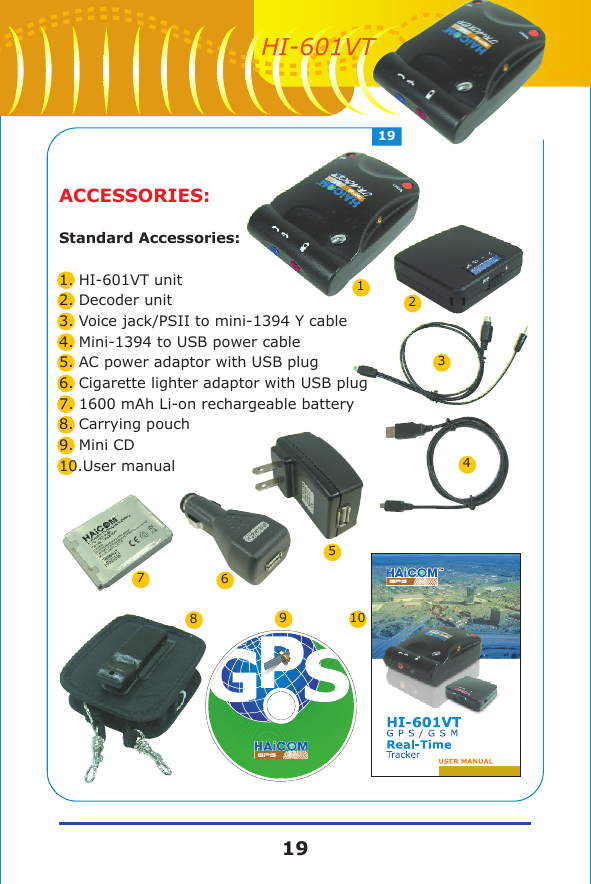
ACCESSORIES:Standard Accessories:1. HI-601VT unit2. Decoder unit3. Voice jack/PSII to mini-1394 Y cable4. Mini-1394 to USB power cable5. AC power adaptor with USB plug6. Cigarette lighter adaptor with USB plug7. 1600 mAh Li-on rechargeable battery8. Carrying pouch9. Mini CD10.User manual168107234591919HI-601VT
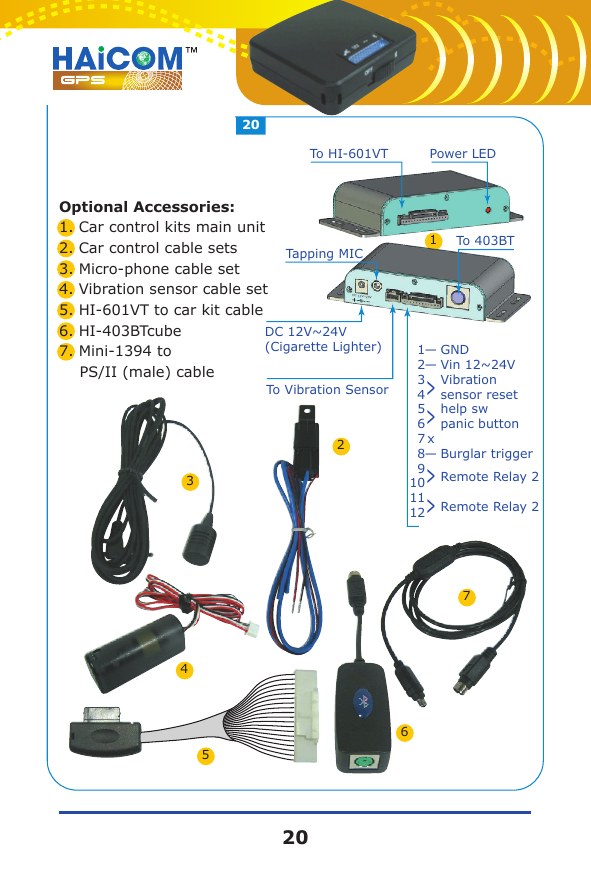
Optional Accessories:1. Car control kits main unit2. Car control cable sets3. Micro-phone cable set4. Vibration sensor cable set5. HI-601VT to car kit cable6. HI-403BTcube7. Mini-1394 to     PS/II (male) cableDC 12V~24VDC 12V~24V(Cigarette Lighter)To Vibration Sensor123456789101112GNDVin 12~24VBurglar triggerRemote Relay 2Remote Relay 21234657Vibration sensor resethelp sw panic button——>>x—>>Power LEDTo HI-601VTTapping MICTo 403BT2020
Operation Easy ManualNo pass code required modePress “5” to enter the emergency statusPress “8” to activate the bugging under none encryption mode saving mode activated)Press “ * ” to stop sending voice message back and hear “du du” respondingPress “ 0 0 0 0 ” (per-setted) and hear a long “du” verifying the pass code confirmed.Change the pass code by pressing “ 0 1234 1234 ” (example) pass code correct: a long “du”  and pass code incorrect: du 4 times “du du du du”Set the first set dial-back telephone number: “ 1 0912 345678*” Setup correct: a long “du” and incorrect: du 4 times “du du du du” (anti-thief alarm)Set the second set dial-back telephone number: “ 2 0912 345678* “ Setup correct: a long “du” and incorrect: du 4 times “du du du du” (anti-thief alarm)Set the third set dial-back telephone number: “ 3 0912 345678* ” Setup correct: a long “du” and incorrect: du 4 times “du du du du” (anti-thief alarm)Remove first set dial-back telephone number: “ 1 * ” Remove correct: a long “du” and incorrect: du 4 times “du du du du” Remove second set dial-back telephone number: “ 2 * ” Remove correct: a long “du” and incorrect: du 4 times “du du du du” Remove third set dial-back telephone number: “ 3 * ” Remove correct: a long “du” and incorrect: du 4 times “du du du du” SOS dial-back: 4, 5, 6 three setsPress “ # ” to stop sending voice message back and hear “du du” respondingPress “ 0 0 0 0 ” (per-setted) and hear a long “ du” verifying the pass code confirmed.Change the PIN code by pressing “ 0 5678 5678 ” (example)PIN code correct: a long “du”  and Cancel PIN code by pressing “ 0 # ” and a long “du” confirm it is correctPress “ 1 ” for temporary disable tracking encryption mode under tracking encryption mode. 2121HI-601VT
Send back data 50 times (around 3 minites ) when the set up correct.Short message send back to the preset dial-back number by pressing “ 21 ” “ 22 ” “ 23 ”  Connection hanged up when set up correctly.Press “ 2# ” to disable short message function Press “ 2* ” to enable short message function (pre-setted)Set up correct: a long “du” and incorrect: du 4 times “du du du du”Press “ 40 ” to immediately cut off oil and electricity Set up correct: a long “du” and incorrect: du 4 times “du du du du”Press “ 51 ” to disable moving sensor function (pre-setted)Press “ 52 ” to enable moving sensor functionSet up correct: a long “du” and incorrect: du 4 times “du du du du”(Anti-thief mode can also works normally)Press “ 54 ” to bugging without the pass code mode (pre-setted)Press “ 55 ” to bugging with pass code required modeSet up correct: a long “du” and incorrect: du 4 times “ du du du du”Press “ 57 ” to tracking with no encryption required (pre-setted)Press “ 58 ” to tracking with encryption mode(under encryption mode, the voice message is steady tune and unable to decode it)Set up correct: a long “du” and incorrect: du 4 times “du du du du”Press “ 53 ” for moving sensor trigger and instant dial back (pre-setted)Press “ 56 ” for moving sensor trigger and delay dial backSet up correct: a long “du” and incorrect: du 4 times “du du du du”Press “ 6* ” for GPS location dial back on certain timesConnection hanged up when set up correctly.Press “ 6# ” for GPS location speed mode than 20 km  Connection hanged up when set up correctly.2222

Navigation menu