Acrodyne NW8201E DIGITAL TELEVISION BROADCAST TRANSMITTER User Manual 32 NV8202 26 04 06 01 00

Acrodyne Industries, Inc. DIGITAL TELEVISION BROADCAST TRANSMITTER 32 NV8202 26 04 06 01 00

Users Manual Part 11

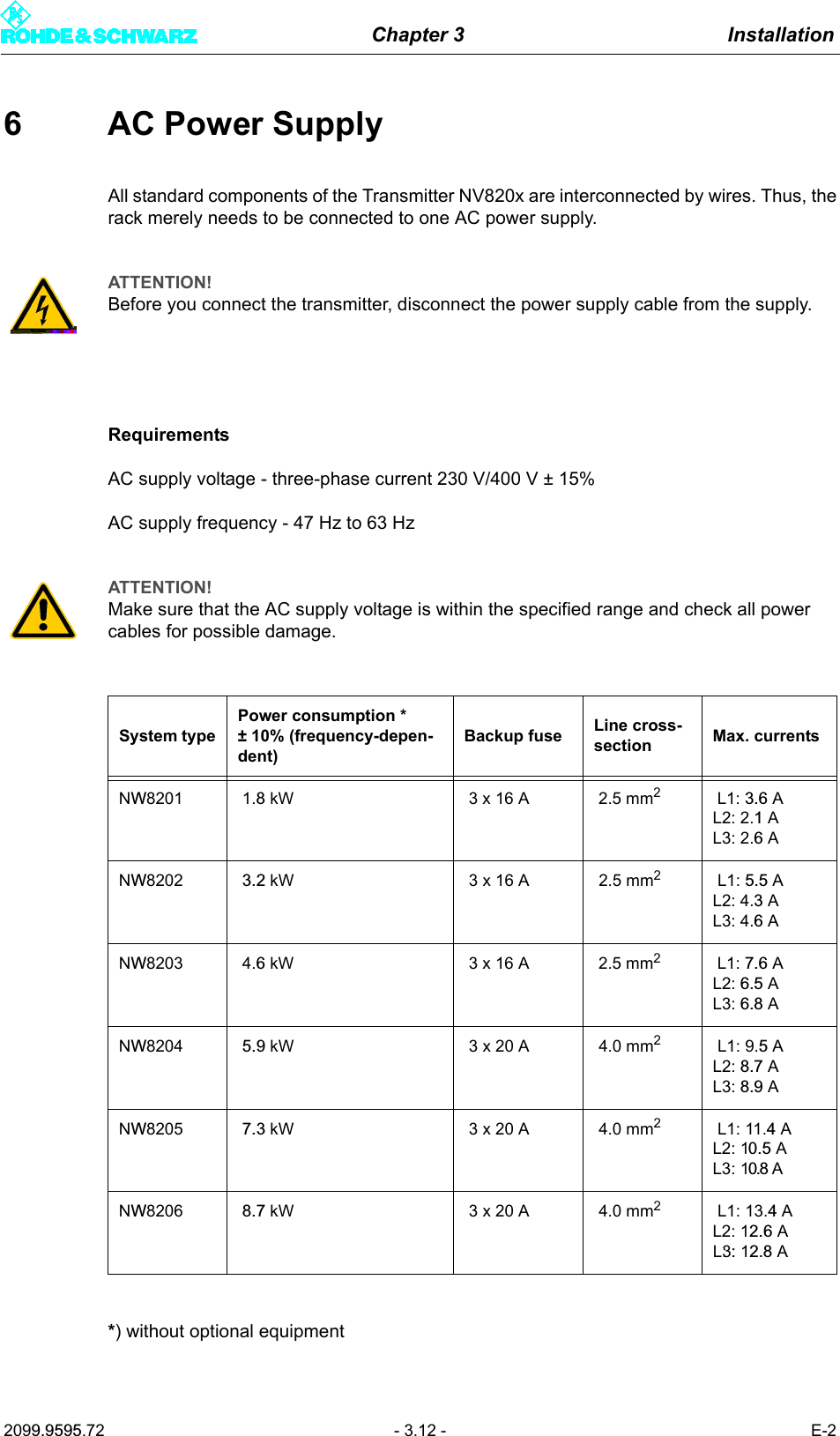
Chapter 3 Installation2099.9595.72 - 3.12 - E-26 AC Power SupplyAll standard components of the Transmitter NV820x are interconnected by wires. Thus, therack merely needs to be connected to one AC power supply.RequirementsAC supply voltage - three-phase current 230 V/400 V ± 15%AC supply frequency - 47 Hz to 63 Hz*) without optional equipmentATTENTION!Before you connect the transmitter, disconnect the power supply cable from the supply.ATTENTION!Make sure that the AC supply voltage is within the specified range and check all power cables for possible damage.System typePower consumption *± 10% (frequency-depen-dent)Backup fuse Line cross-section Max. currentsNW8201 1.8 kW 3 x 16 A 2.5 mm2 L1: 3.6 AL2: 2.1 AL3: 2.6 ANW8202 3.2 kW 3 x 16 A 2.5 mm2 L1: 5.5 AL2: 4.3 AL3: 4.6 ANW8203 4.6 kW 3 x 16 A 2.5 mm2 L1: 7.6 AL2: 6.5 AL3: 6.8 ANW8204 5.9 kW 3 x 20 A 4.0 mm2 L1: 9.5 AL2: 8.7 AL3: 8.9 ANW8205 7.3 kW 3 x 20 A 4.0 mm2 L1: 11.4 AL2: 10.5 AL3: 10.8 ANW8206 8.7 kW 3 x 20 A 4.0 mm2 L1: 13.4 AL2: 12.6 AL3: : 12.8  A
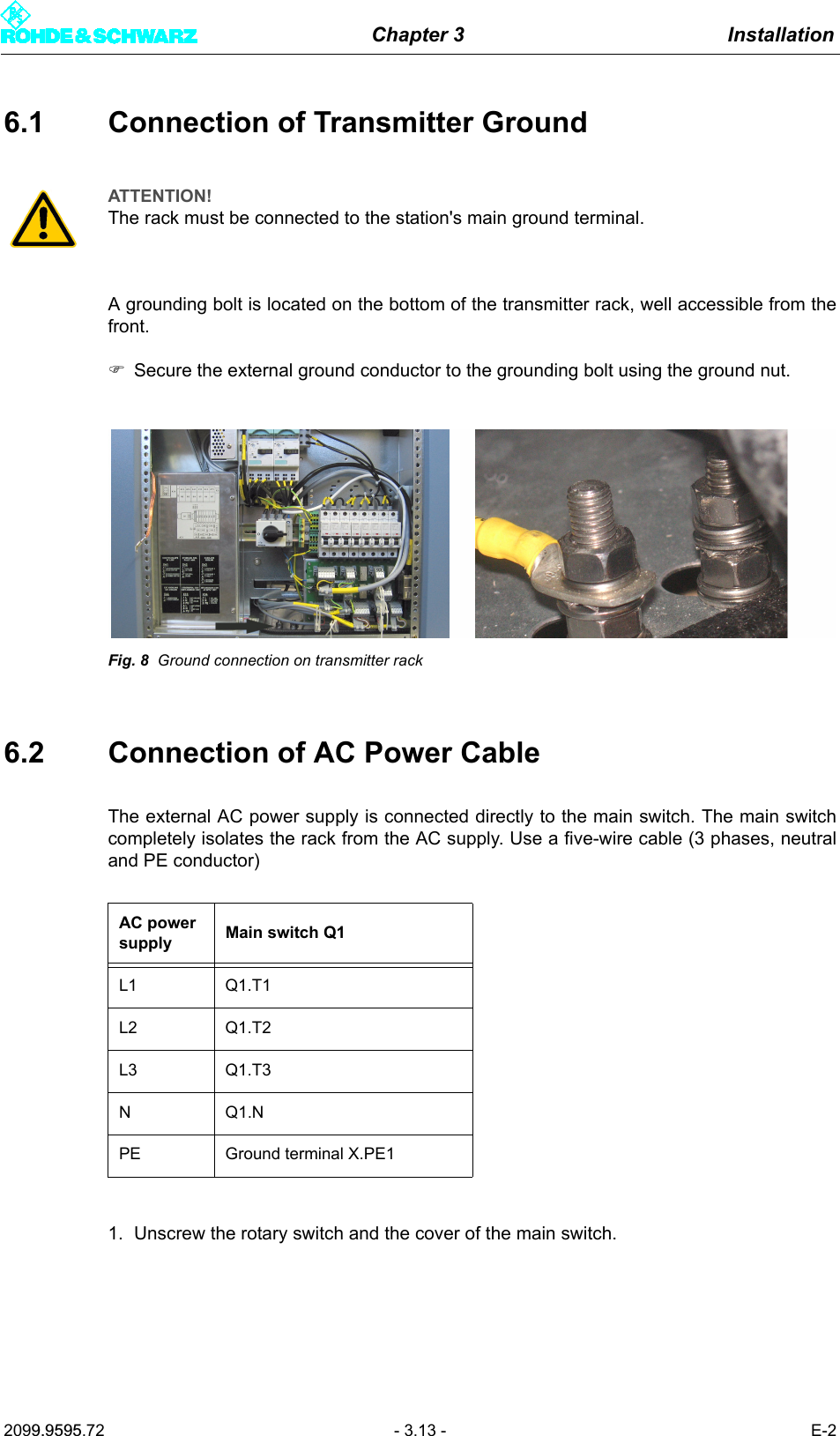
Chapter 3 Installation2099.9595.72 - 3.13 - E-26.1 Connection of Transmitter GroundA grounding bolt is located on the bottom of the transmitter rack, well accessible from thefront.)Secure the external ground conductor to the grounding bolt using the ground nut.Fig. 8 Ground connection on transmitter rack6.2 Connection of AC Power CableThe external AC power supply is connected directly to the main switch. The main switchcompletely isolates the rack from the AC supply. Use a five-wire cable (3 phases, neutraland PE conductor) 1. Unscrew the rotary switch and the cover of the main switch.ATTENTION!The rack must be connected to the station's main ground terminal.AC power supply Main switch Q1L1 Q1.T1L2 Q1.T2L3 Q1.T3NQ1.NPE Ground terminal X.PE1
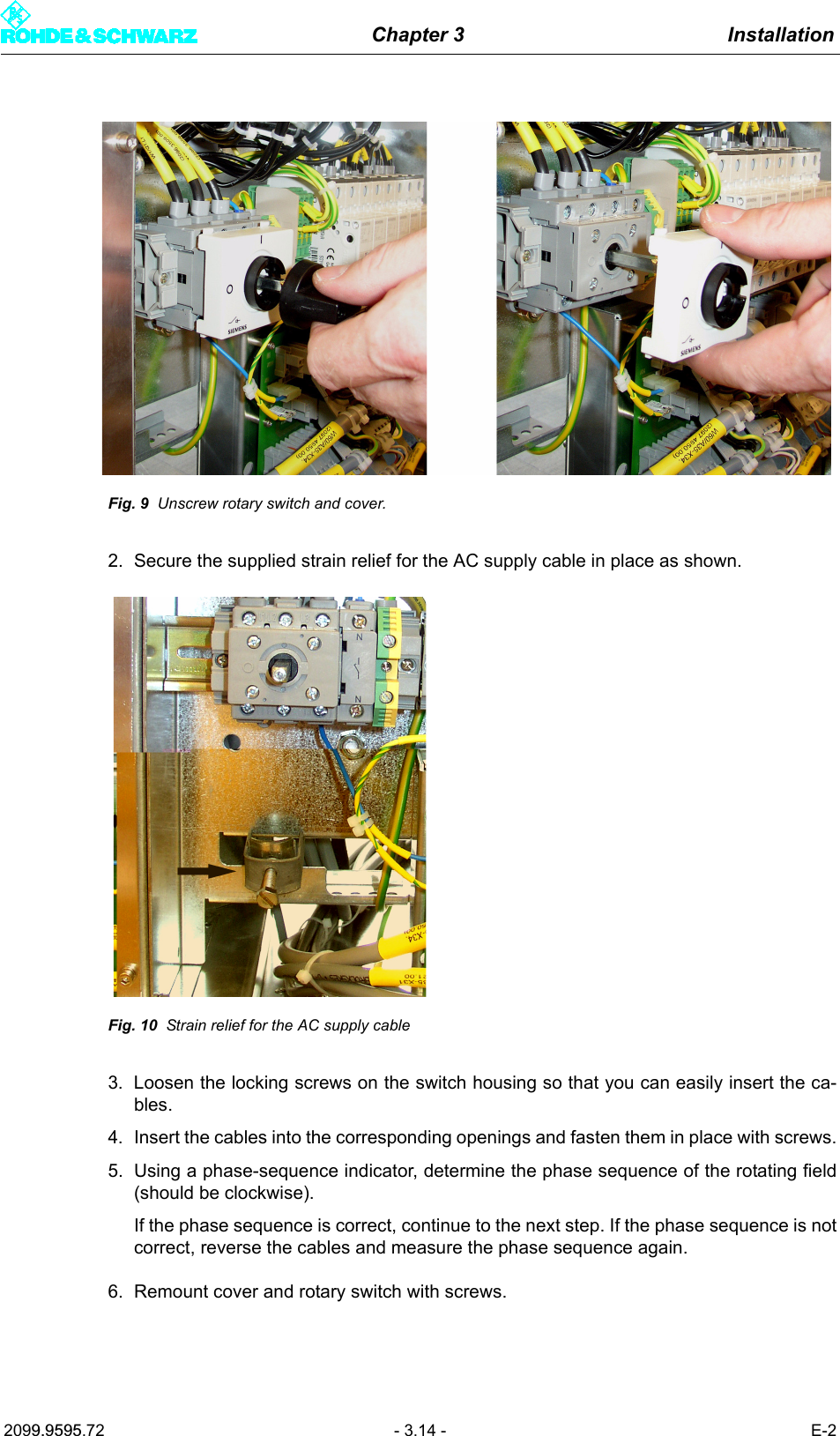
Chapter 3 Installation2099.9595.72 - 3.14 - E-2Fig. 9 Unscrew rotary switch and cover.2. Secure the supplied strain relief for the AC supply cable in place as shown.Fig. 10 Strain relief for the AC supply cable3. Loosen the locking screws on the switch housing so that you can easily insert the ca-bles.4. Insert the cables into the corresponding openings and fasten them in place with screws.5. Using a phase-sequence indicator, determine the phase sequence of the rotating field(should be clockwise).If the phase sequence is correct, continue to the next step. If the phase sequence is notcorrect, reverse the cables and measure the phase sequence again.6. Remount cover and rotary switch with screws.
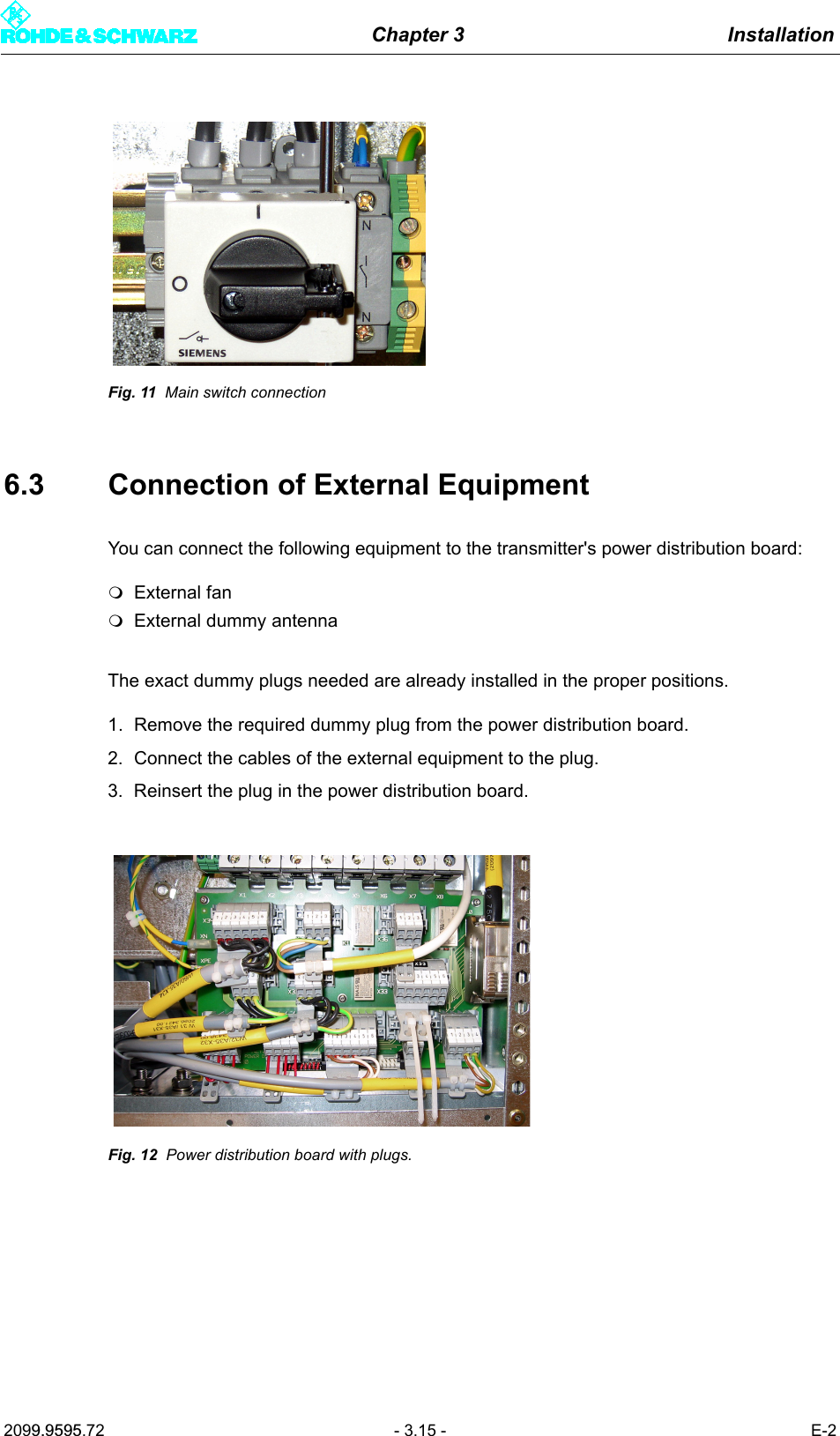
Chapter 3 Installation2099.9595.72 - 3.15 - E-2Fig. 11 Main switch connection6.3 Connection of External EquipmentYou can connect the following equipment to the transmitter's power distribution board:External fanExternal dummy antennaThe exact dummy plugs needed are already installed in the proper positions.1. Remove the required dummy plug from the power distribution board.2. Connect the cables of the external equipment to the plug.3. Reinsert the plug in the power distribution board.Fig. 12 Power distribution board with plugs.
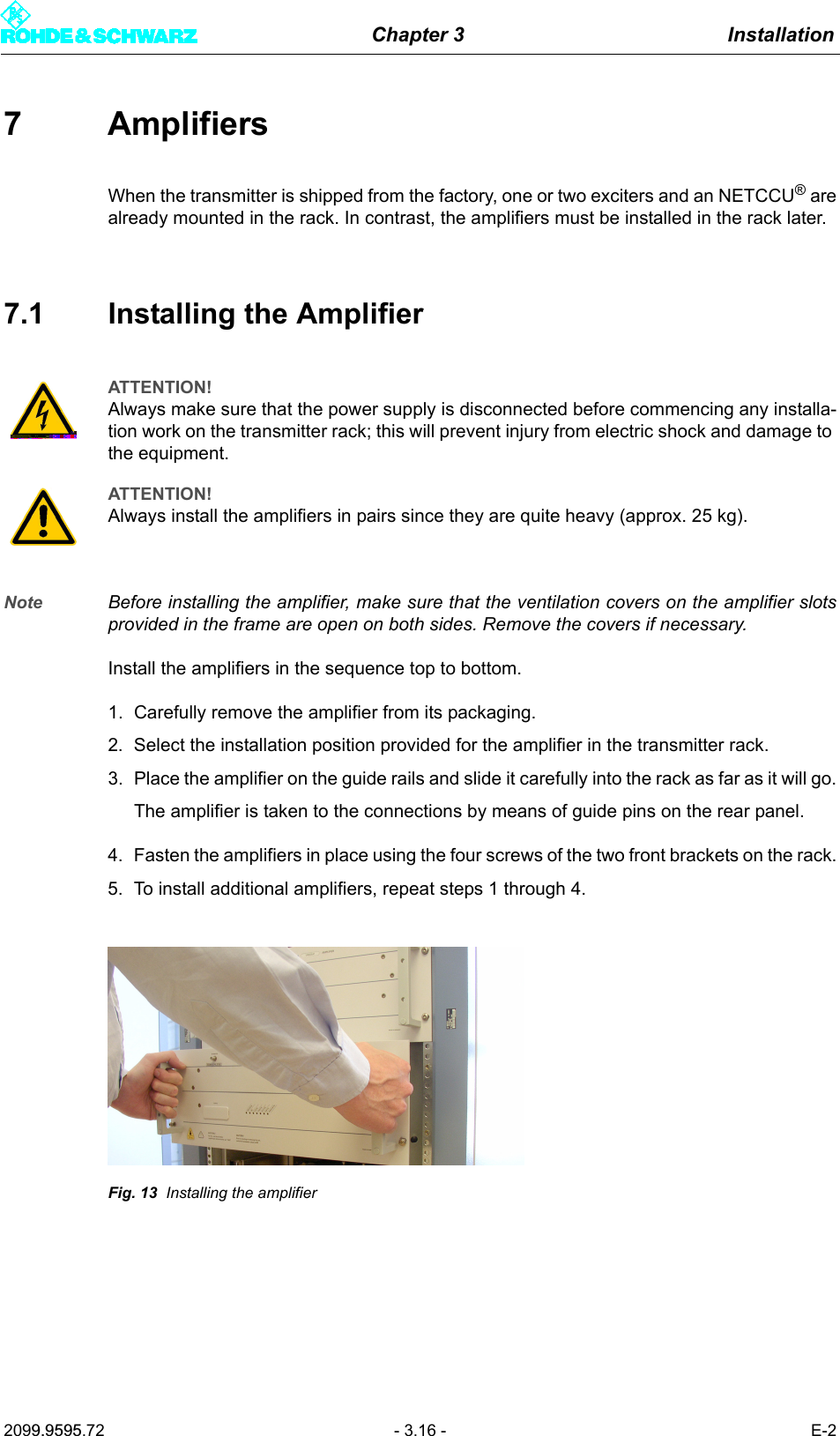
Chapter 3 Installation2099.9595.72 - 3.16 - E-27AmplifiersWhen the transmitter is shipped from the factory, one or two exciters and an NETCCU® arealready mounted in the rack. In contrast, the amplifiers must be installed in the rack later.7.1 Installing the AmplifierNote Before installing the amplifier, make sure that the ventilation covers on the amplifier slotsprovided in the frame are open on both sides. Remove the covers if necessary.Install the amplifiers in the sequence top to bottom.1. Carefully remove the amplifier from its packaging.2. Select the installation position provided for the amplifier in the transmitter rack.3. Place the amplifier on the guide rails and slide it carefully into the rack as far as it will go.The amplifier is taken to the connections by means of guide pins on the rear panel. 4. Fasten the amplifiers in place using the four screws of the two front brackets on the rack.5. To install additional amplifiers, repeat steps 1 through 4.Fig. 13 Installing the amplifierATTENTION!Always make sure that the power supply is disconnected before commencing any installa-tion work on the transmitter rack; this will prevent injury from electric shock and damage to the equipment.ATTENTION!Always install the amplifiers in pairs since they are quite heavy (approx. 25 kg).
Chapter 3 Installation2099.9595.72 - 3.17 - E-28 Connection of Antenna/Dummy Antenna to RF ConnectorThe connection flanges for the antenna cables are uniformly 1 5/8" EIA for 325 W to 1.95 kWTV transmitters; they are located on the roof of the transmitter. Depending on the transmit-ter station (one or more transmitters), either the antenna (RF cable or RF transmission line)or an RF connection is connected directly to a multi-transmitter combining filter.8.1 Connection of AntennaConnect the antenna as follows:)Using the four screws (M8, 35 mm), fasten the ready-made coaxial cable located on thestation in place. To prevent the screw connection from locking in place, insert a plainwasher and spring-lock washer.Note In regions with high humidity, the supplied rubber ring can be inserted in the groove be-tween the two EIA flanges.ATTENTION!Do not connect the antenna until you have completed all measurements, because the link to the antenna produces emissions.
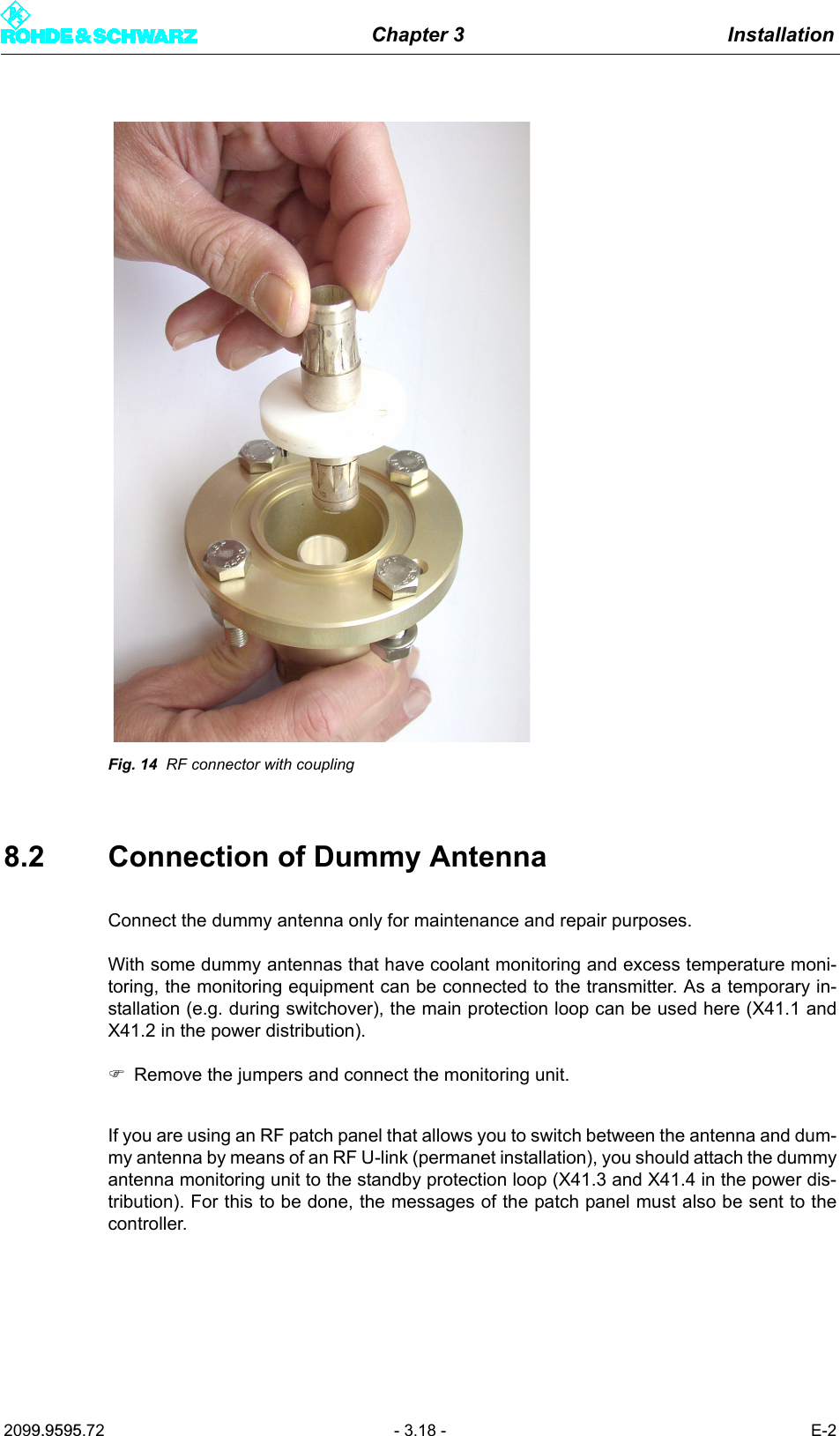
Chapter 3 Installation2099.9595.72 - 3.18 - E-2Fig. 14 RF connector with coupling8.2 Connection of Dummy AntennaConnect the dummy antenna only for maintenance and repair purposes.With some dummy antennas that have coolant monitoring and excess temperature moni-toring, the monitoring equipment can be connected to the transmitter. As a temporary in-stallation (e.g. during switchover), the main protection loop can be used here (X41.1 andX41.2 in the power distribution). )Remove the jumpers and connect the monitoring unit.If you are using an RF patch panel that allows you to switch between the antenna and dum-my antenna by means of an RF U-link (permanet installation), you should attach the dummyantenna monitoring unit to the standby protection loop (X41.3 and X41.4 in the power dis-tribution). For this to be done, the messages of the patch panel must also be sent to thecontroller.
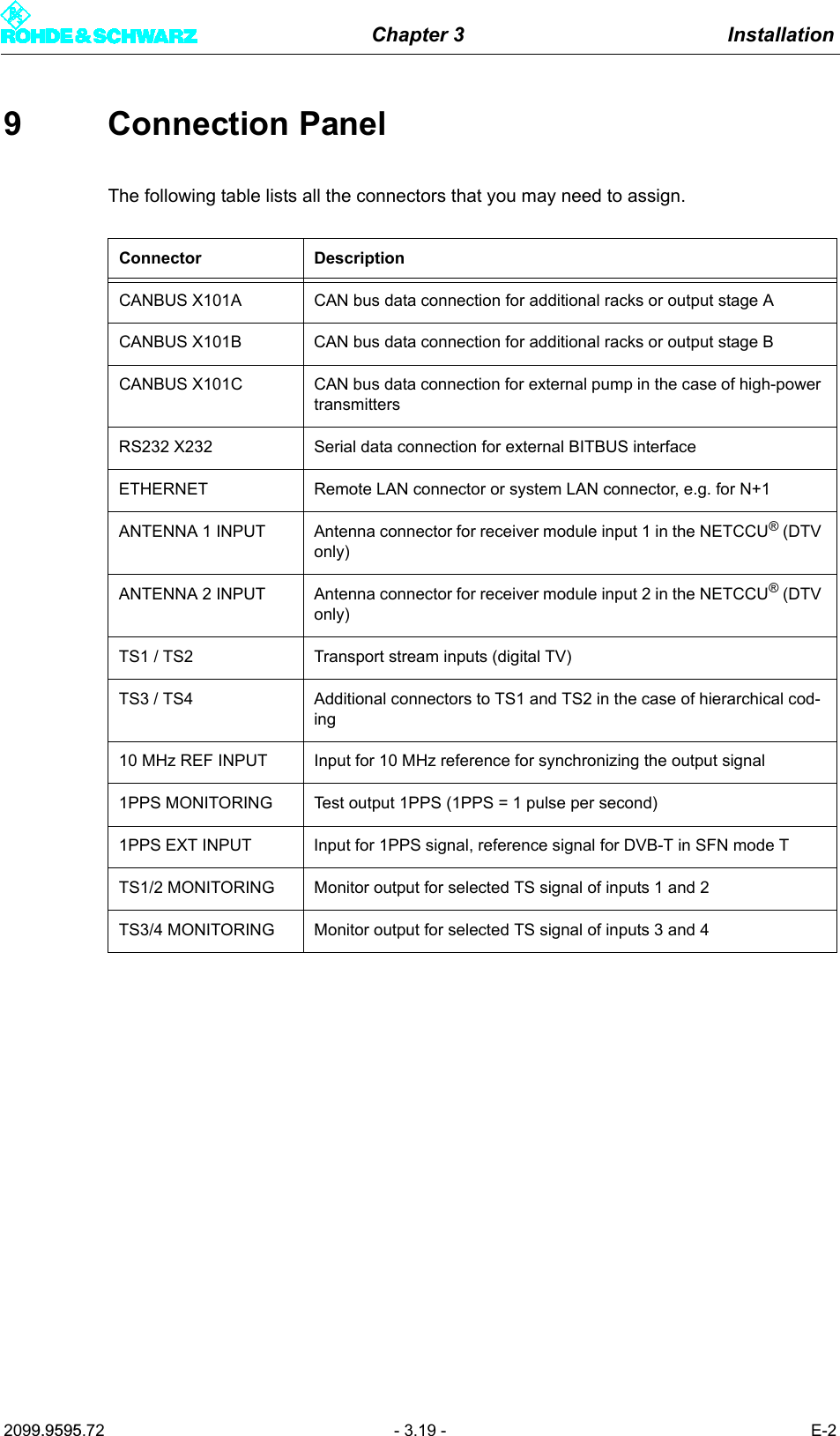
Chapter 3 Installation2099.9595.72 - 3.19 - E-29 Connection PanelThe following table lists all the connectors that you may need to assign.Connector DescriptionCANBUS X101A CAN bus data connection for additional racks or output stage ACANBUS X101B  CAN bus data connection for additional racks or output stage BCANBUS X101C  CAN bus data connection for external pump in the case of high-power transmittersRS232 X232 Serial data connection for external BITBUS interfaceETHERNET Remote LAN connector or system LAN connector, e.g. for N+1ANTENNA 1 INPUT Antenna connector for receiver module input 1 in the NETCCU® (DTV only)ANTENNA 2 INPUT Antenna connector for receiver module input 2 in the NETCCU® (DTV only)TS1 / TS2 Transport stream inputs (digital TV)TS3 / TS4 Additional connectors to TS1 and TS2 in the case of hierarchical cod-ing10 MHz REF INPUT Input for 10 MHz reference for synchronizing the output signal1PPS MONITORING Test output 1PPS (1PPS = 1 pulse per second)1PPS EXT INPUT Input for 1PPS signal, reference signal for DVB-T in SFN mode TTS1/2 MONITORING Monitor output for selected TS signal of inputs 1 and 2TS3/4 MONITORING Monitor output for selected TS signal of inputs 3 and 4

Navigation menu